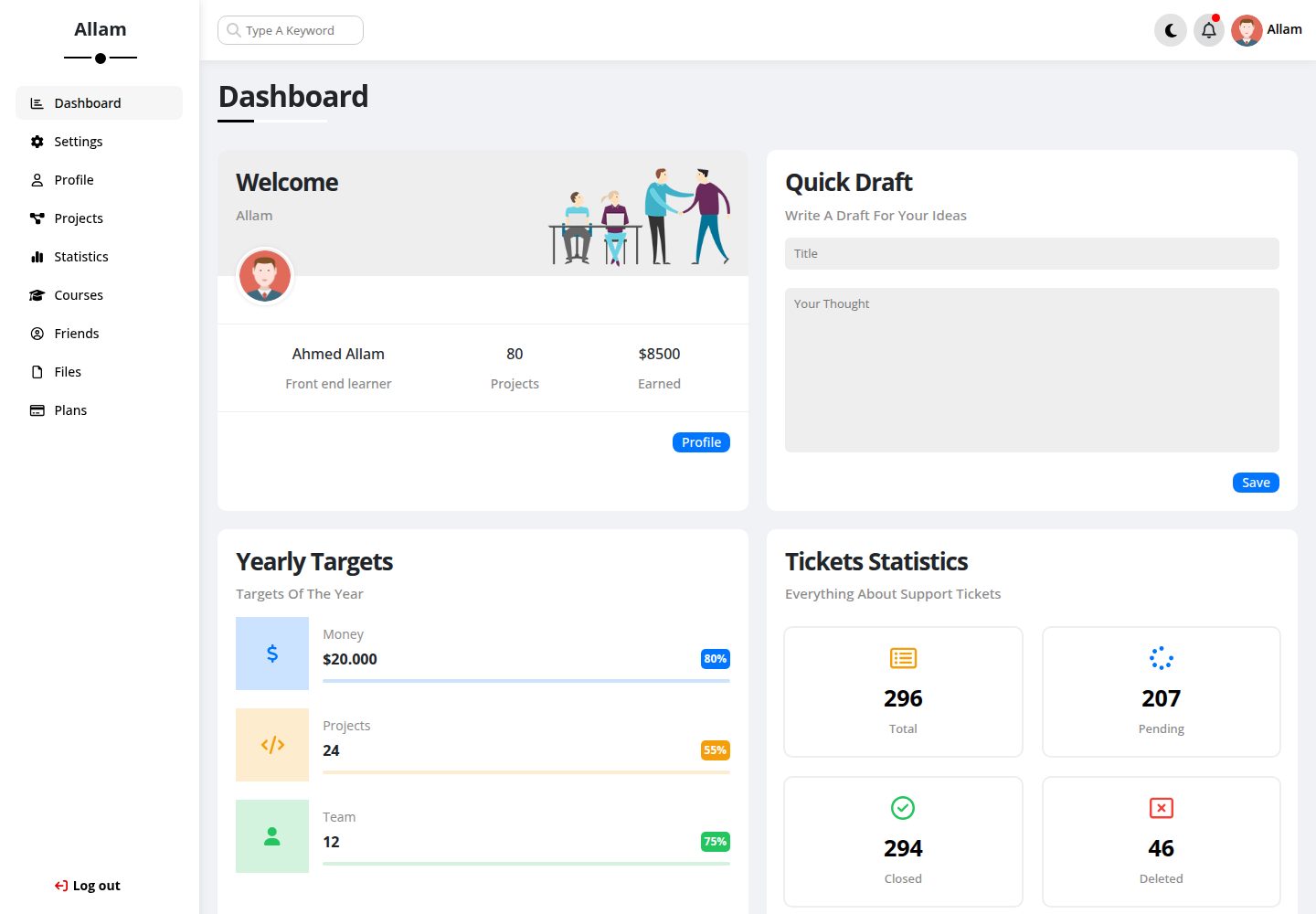
Multi-page admin layout, including a home page and inner pages such as projects.html
HTMLAdmin dashboard
Dashboard — HTML Admin dashboard Template
By GziXnine
A multi-page admin dashboard template built with HTML, SCSS, Bootstrap, and JavaScript, featuring light/dark theme switching and AOS scroll animations.
Explore the design
Compare the page layouts and mobile experience. Open any screenshot for a closer look.
Desktop homepage1 / 3
Desktop captureTop of page
Actual screenshot captured by the server browser.
All pages & views 3
Screenshots show visual appearance; interactive behavior may differ.
Recorded 2026-10-03View source
What stands out
A quick read of the recorded project description.
Provides light/dark theme switching controlled by JavaScript
Styles are written in SCSS and can be adjusted via _variables.scss for colors and fonts
Responsive grid and UI components based on Bootstrap
Scroll-triggered transition animations using AOS
Integrates FontAwesome icons
Template Details
This template is the fourth practice template from Elzero Web School, published by GziXnine on GitHub under the MIT license. It is a multi-page admin dashboard interface that uses HTML5 for page structure, SCSS for styling, Bootstrap for responsive grid and UI components, JavaScript for interactions and light/dark theme switching, FontAwesome for icons, and AOS for scroll-triggered animations.
The template includes a home page and inner pages such as projects.html. The repository provides actual screenshots for desktop and mobile, which can be used to assess the layout. The README states that it targets admin panels or data-driven applications and lists completed items such as multi-page layout, responsiveness, light/dark mode, animations, and icon integration.
Regarding usage limitations, the repository does not provide build tools or package management configuration; the installation step is simply to clone the repository and open index.html directly in a browser. To modify SCSS, you need to set up your own compilation environment. The licenses for third-party assets such as demo images, fonts, and icons must be checked separately and cannot be determined solely from the code's MIT license.
HTMLAdmin panel
Is it right for your project?
Use Cases
- Building front-end interface prototypes for admin panels or data dashboards
- As a practice project for learning to combine HTML, SCSS, Bootstrap, and JavaScript
- Reusing its theme-switching approach in admin interfaces that require light/dark theme switching
- Providing layout and component references for multi-page front-end projects
Suitable For
- Developers who need to quickly build admin interface prototypes
- Beginners learning front-end multi-page layout and SCSS organization
- Front-end developers looking for reference implementations of light/dark mode and scroll animations
Getting started & customization
Use these recorded setup notes alongside the repository instructions for your chosen version.
- 1
After cloning the repository, enter the Dashboard directory and open index.html directly in a browser to view it
- 2
Before modifying SCSS, you need to set up your own SCSS compilation environment; the repository does not provide build scripts
- 3
The repository does not include package management configuration; to see how dependencies such as Bootstrap, FontAwesome, and AOS are included, check the page source
- 4
Third-party assets such as demo images, fonts, and icons must be checked separately under their respective licenses
License & source material
Usage conditions & limitations
Free to use · keep license noticeThis entry covers the free version under the MIT license in a public repository; the free scope applies to that version's code and does not mean external services or third-party assets are free.
Must comply with when using
- You are allowed to freely use, modify, commercially use, and distribute the code of this version.
- When distributing copies or substantial portions of the code, retain the original author's copyright notice and the full MIT license notice.
- The code is provided as is; warranties and limitations of liability are governed by the original license and applicable law.
Additional costs & items to verify
- The project is inspired by Elzero Web School tutorials and is a learning exercise, which may affect its positioning as an independent original template.
- Icons are provided by Font Awesome, whose license is independent of the code's MIT license; check Font Awesome's licensing terms separately before commercial use.
- Fonts are from Google Fonts and must be checked separately under each font's own license; do not judge based solely on the code's MIT license.
- Demo images, fonts, icons, and other third-party assets must be checked under their respective licenses; do not judge based solely on the code's MIT license.
- External services such as domains, hosting, databases, payments, or AI may incur additional charges.
View Original Text Basis
Permission is hereby granted, free of charge
Original License Text
Inspired by tutorials from [Elzero Web School](https://elzero.org/).
Original README
Icons provided by [Font Awesome](https://fontawesome.com/).
Original README
https://github.com/GziXnine/Dashboard/blob/main/LICENSEhttps://github.com/GziXnine/Dashboard/blob/main/README.mdFonts from [Google Fonts](https://fonts.google.com/).
Original README
Compiled by DeepSeek based on repository license and README ·2026-10-03. Results only cover the materials read; dependencies, images, fonts, and subsequent term changes are subject to their respective original texts.
Project checks & description sources
Template Information
- Source platforms
- GitHub
- Documentation and maintenance reference score
- Partly documented · 68 / 100
- Technologies
- HTML
- Website type
- Admin dashboard
How this score is calculated
Our heuristic uses license records (up to 30), a demo link (12), a preview (10), stars (15), recorded maintenance (15), description completeness (8), feature records (5) and classification data (5). It is not a code, security or performance test, or a Google score. A link does not establish tested functionality.
What to verify for this project
- Repository update recorded
- 2024-09-20
- Screenshot last checked
- 2026-10-03
A demo link is listed. Check it with your own content and viewport sizes; its presence does not confirm that forms, authentication or payments work.
The catalog identifies HTML as the primary stack. Check the actual dependency manifest and lockfile for versions and hosting requirements. These notes use recorded metadata, not a code audit or a deployment test.
Use a selection guide →How this description was prepared
AI-assisted description based on catalog records and repository material. Repository authors are not automatically the reviewers of this description.
Review declaration: [email protected] · 2026-10-04
Inspect the recorded source material
SHA-256: 3a3d1d3afe4d1844c014d59f1836443f0b8266b2fbe38ab94a06b1ae31e3370b
2026-10-03T23:14:37.557Z
Source file / repository# 🌐 Dashboard - Multi-Page Application
Welcome to **Dashboard**, a dynamic, multi-page application created with modern web development best practices. This project features a responsive layout, interactive elements, light/dark mode, and smooth animations, offering an immersive user experience.
## 🔥 What’s Special About the Dashboard?
### Key Features:
- ⚡️ **Dynamic Multi-Page Layout**: Seamless navigation across multiple pages, providing a smooth and intuitive user experience.
- 💻 **Fully Responsive Design**: Ensures excellent performance across all devices, from large desktops to small mobile screens.
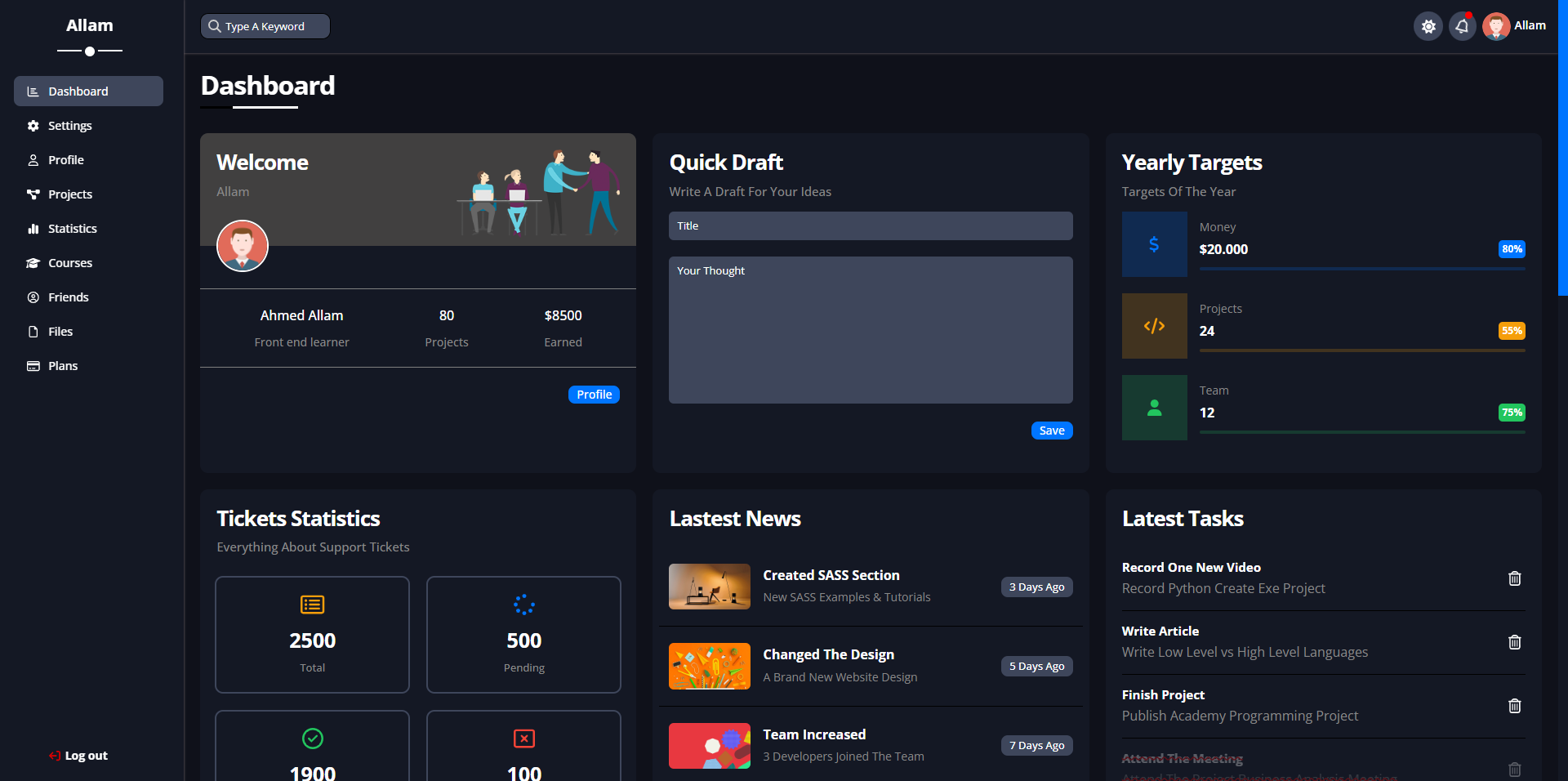
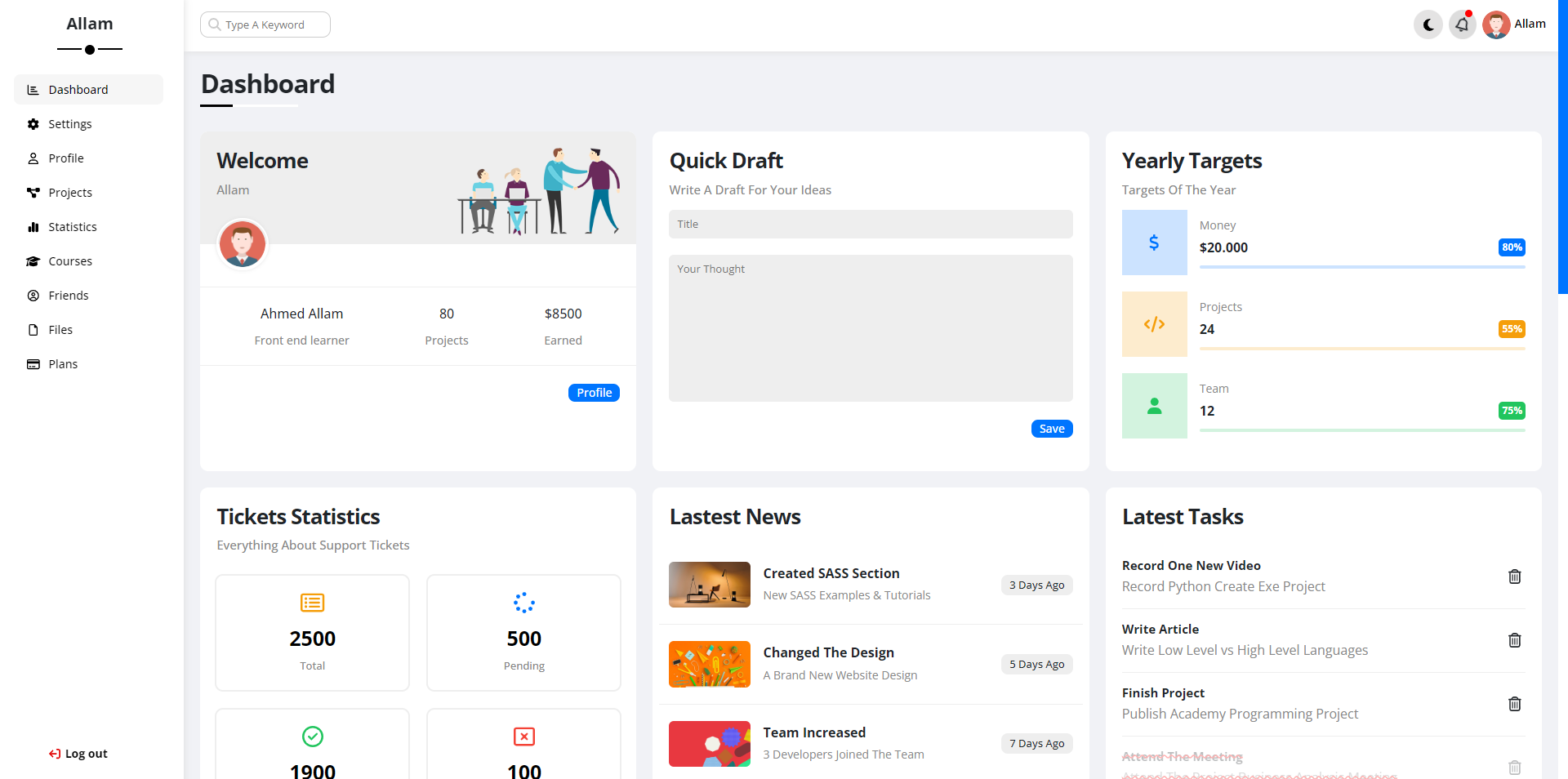
- 🌗 **Light/Dark Mode Toggle**: Switch easily between light and dark themes, enhancing accessibility and personalization.
- 🎞️ **Smooth Animations**: Powered by **AOS (Animate On Scroll)** for dynamic, visually engaging transitions.
- 🛠️ **FontAwesome Icons**: Sleek, modern icons to enhance UI/UX.
- 🎨 **Custom Styling**: Using **SCSS** for reusable, scalable styles, and **Bootstrap** for responsive layout.
## 📸 Preview
<p align="center">
<img src="https://img.shields.io/badge/Completion-100%25-brightgreen" alt="Completion Status">
<img src="https://visitor-badge.laobi.icu/badge?page_id=GziXnine/Dashboard" alt="Visitors">
<img src="https://img.shields.io/github/repo-size/GziXnine/Dashboard" alt="Repository Size">
</p>
<img src="https://github.com/AllamF5J/AllamF5J/blob/main/images/neon.gif">
<h3 align="center">Dark Mode</h3>
<h3 align="center">Light Mode</h3>
## 🛠️ Technologies Used
- **HTML5**: Semantic and structured content.
- **SCSS**: Modular and reusable styles.
- **Bootstrap**: Responsive grid and UI components.
- **JavaScript**: Interactivity and light/dark mode handling.
- **FontAwesome**: Vector icons for enhanced design.
- **AOS**: Smooth scroll-based animations.
## 🚀 How to Get Started
### Prerequisites:
- Basic understanding of HTML, CSS, JavaScript, and SCSS.
- Familiarity with Git for version control.
### Installation:
1. **Clone the repository**:
```bash
git clone https://github.com/GziXnine/Dashboard.git
```
2. **Navigate to the project directory**:
```bash
cd Dashboard
```
3. **Open `index.html` in your browser** to view the dashboard.
## 🎨 Customization
This dashboard is highly customizable. You can easily modify:
- **SCSS Variables**: Customize the primary and secondary colors, fonts, and more via the `_variables.scss` file.
- **Icons**: Powered by [Font Awesome](https://fontawesome.com/), you can include custom icons throughout the dashboard.
## 📈 Roadmap
- [x] Multi-page layout implementation.
- [x] Responsive design for all screen sizes.
- [x] JavaScript interactivity.
- [x] Light/Dark mode toggle.
- [x] Smooth animations using AOS.
- [x] FontAwesome icons integration.
## 🙌 Contributions
Contributions are welcome! Feel free to check the [issues page](https://github.com/GziXnine/Dashboard/issues) or submit a pull request.
## 📝 License
This project is open-source and available under the [MIT License](LICENSE).
## 🙏 Acknowledgments
- Inspired by tutorials from [Elzero Web School](https://elzero.org/).
- Icons provided by [Font Awesome](https://fontawesome.com/).
- Fonts from [Google Fonts](https://fonts.google.com/).
- BrandColor [Brand Color](https://brandcolors.net/).
## 📬 Contact
Feel free to reach out with any questions or feedback:
- **GitHub**: [GziXnine](https://github.com/GziXnine)
- **LinkedIn**: [Ahmed Allam](https://www.linkedin.com/in/1ahmed-allam)
- **Telegram**: [Telegram](http://t.me/GziXnine).
---
_A project by Ahmed Allam, showcasing advanced front-end development skills._
Explore similar templates
Compare previews and descriptions within the same stack and category.

gentelella
Gentelella v4 is a free, open-source admin dashboard template maintained by Colorlib, built with vanilla JavaScript, SCSS, and Vite 8 without Bootstrap or jQuery.
HTML · Admin dashboard

coreui-free-bootstrap-admin-template
A free Bootstrap admin template maintained by CoreUI, built on CoreUI's own UI component library. It provides compiled HTML pages and Pug template source code, covering dashboards, authentication, forms, components, icons, and error pages.
HTML · Admin dashboard

dashboards
A collection of responsive dashboard HTML templates open-sourced by Keen IO, built on CSS Grid, offering multiple prebuilt admin data interface layouts.
HTML · Admin dashboard

SB Admin 2
SB Admin 2 is a classic Bootstrap admin template from Start Bootstrap, offering dashboards, charts, tables, and common management pages.
HTML · Admin dashboard

Adminator-admin-dashboard
Adminator 4 is a vanilla HTML, CSS and JavaScript admin dashboard template with a CSS-variable token design system, built-in light and dark themes, no jQuery or Bootstrap dependency, and 18 pages covering dashboards, mail, calendar, charts, forms, tables and error pages.
HTML · Admin dashboard

SB Admin
SB Admin is a lightweight, open-source Bootstrap admin template from Start Bootstrap. It offers a sidebar-and-top-bar layout with data tables, forms, and stat cards, plus responsive design.
HTML · Admin dashboard