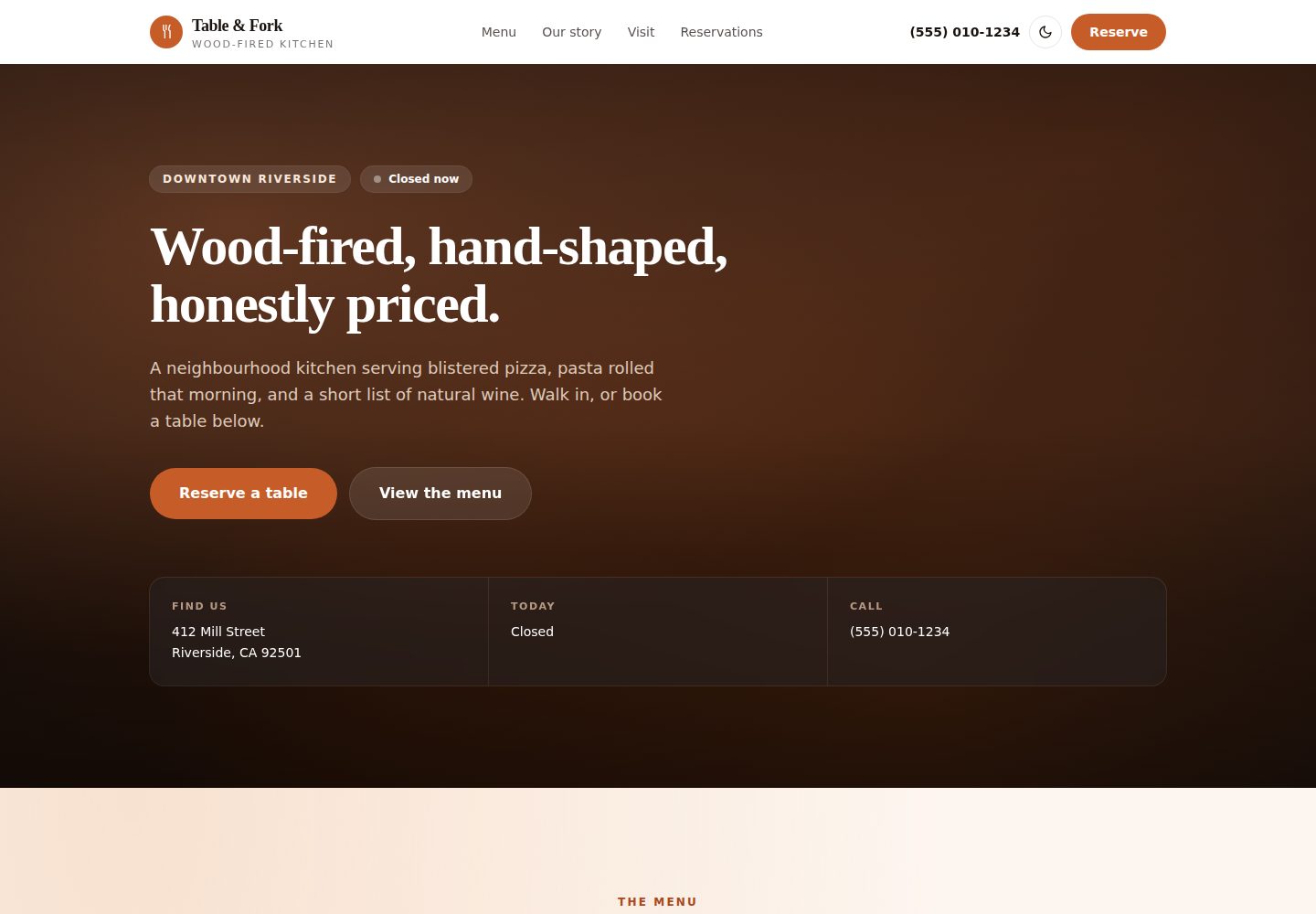
Menus are output as semantic HTML, including sections, descriptions, prices, dietary tags, and dotted price leaders, with data from config/site.ts
Next.jsReactHTMLCorporate Website
tablefork-nextjs-restaurant-template — Next.js Business Template
By haider484991
A free Next.js restaurant website template that renders menus as semantic HTML and includes opening hours, a reservation form, and local SEO structured data, with all content centralized in a single configuration file.
Explore the design
Compare the page layouts and mobile experience. Open any screenshot for a closer look.
Desktop homepage1 / 2
Desktop captureTop of page
Actual screenshot captured by the server browser.
All pages & views 2
Screenshots show visual appearance; interactive behavior may differ.
Recorded 2026-10-12View source
What stands out
A quick read of the recorded project description.
Opening hours are configured as 24-hour strings; the on-page display and JSON-LD structured data are generated from the same configuration, and closing times past midnight are handled
The reservation form provides party-size selection and blocks past dates. By default it does not submit to a backend; a one-line configuration can point it to OpenTable, Resy, SevenRooms, or Formspree
Automatically generates JSON-LD for Restaurant, Menu, MenuSection, MenuItem, and per-day OpeningHoursSpecification
Supports static export; the build output is plain HTML/CSS/JS and can be deployed to any static hosting platform
Dark mode uses the class strategy, with localStorage persistence, system preference detection, and an anti-flicker inline script
Template Details
Table & Fork is a static website template for restaurants, built with Next.js and supporting static export. The build output is plain HTML/CSS/JS and can be deployed to static hosting platforms such as Cloudflare Pages, Netlify, Vercel, or GitHub Pages. The template centralizes the restaurant name, contact details, opening hours, menu, and copy in config/site.ts; after editing that file, page content and structured data update together.
Menus use semantic HTML rather than PDFs, including sections, descriptions, prices, and dietary tags. Opening hours are configured as 24-hour strings; the on-page display format and the JSON-LD data are generated from the same configuration, and closing times past midnight are handled. The reservation form provides party-size selection and blocks past dates. By default it does not submit to any backend; to receive real reservations, reservations.action must point to an endpoint such as OpenTable, Resy, SevenRooms, or Formspree. The template also outputs JSON-LD for Restaurant, Menu, MenuSection, MenuItem, and per-day opening hours, and supports dark mode and responsive layout.
The visual design does not rely on image or video files; the homepage, gallery, and textures are drawn with CSS gradients, so there are no licensable image assets at launch, and they can later be replaced with real photos. Third-party assets in the demo, such as images, fonts, and icons, must be checked separately under their own licenses and cannot be judged solely by the code's MIT license. Statements in the README about production readiness, performance, and deployment convenience are the author's descriptions; this introduction only organizes its features and configuration approach.
Next.jsReactHTMLBusiness website
Is it right for your project?
Use Cases
- Building a website focused on menu display and reservation guidance for an independent restaurant, cafe, or bistro
- Restaurant sites that need menu content to be readable by search engines rather than published as a PDF
- Scenarios where opening hours, address, and phone number should appear above the fold, with local SEO structured data generated automatically
- Restaurant websites with no backend service that plan to deploy for free on static hosting
- Food and beverage display pages that need dark mode and mobile adaptation
Suitable For
- Restaurant, cafe, bar, and other food service operators
- Front-end developers or design studios building websites for food service clients
- Learners who want to build on Next.js and TypeScript
- Users who need static export and want to choose their own hosting platform
Getting started & customization
Use these recorded setup notes alongside the repository instructions for your chosen version.
- 1
After cloning the repository, run npm install and npm run dev; local preview defaults to port 3000
- 2
Site name, contact details, opening hours, menu, and copy are all edited in config/site.ts
- 3
To receive real reservations, set reservations.action to a reservation provider endpoint; when left as "#", the form only shows the built-in demo confirmation
- 4
Menu tags v, vg, gf, popular, and new can be extended in TAG_STYLES in components/sections/Menu.tsx
- 5
Run npm run build to generate the /out static directory, then deploy to Cloudflare Pages, Netlify, Vercel, or GitHub Pages; the licensing and costs of external services such as Formspree and demo assets must be checked separately
License & source material
Usage conditions & limitations
Free to use · keep license noticeThis listing covers the free version in the public repository under the MIT license; the free scope is the code of that version and does not mean external services or third-party assets are free.
Must comply with when using
- The code of this version may be used, modified, used commercially, and distributed free of charge.
- When distributing copies or substantial portions of the code, retain the original author's copyright notice and the full MIT license notice.
- The code is provided as is; warranties and limitations of liability are governed by the original license and applicable law.
Additional costs & items to verify
- The README mentions the Formspree form service; real submissions require configuring a service endpoint, and its usage limits and fees must be checked separately.
- Demo images, fonts, icons, and other third-party assets must be checked under their own licenses and cannot be judged solely by the code's MIT license.
- External services such as domains, hosting, databases, payments, or AI may incur additional charges.
- The reservation form does not submit to any backend by default: when reservations.action remains "#", the form only shows the built-in demo confirmation and cannot receive real reservations. You must point it to an external service endpoint such as OpenTable, Resy, SevenRooms, or Formspree to actually take bookings.
- Receiving real reservations depends on external third-party services (OpenTable, Resy, SevenRooms, or Formspree), which may require account registration, API keys, or service fees; these are outside the scope of the template code license.
- If the restaurant also needs online ordering and point-of-sale features, the README points to the author's own paid POS product (Pixel & Oak POS, Windows platform), which is an independent commercial service outside the template and not part of this free template.
- That POS product currently runs in only one restaurant in Karachi; restaurants in other regions can only join early access, so it is not a generally available mature service.
- The template itself contains no image or video assets; all visuals are drawn with CSS gradients. If replaced with real photos, you must obtain and verify the appropriate asset licenses yourself.
View Original Text Basis
Permission is hereby granted, free of charge
Original License Text
While it is `"#"`, the form shows a built-in demo confirmation instead of posting anywhere.
Original README
point it at OpenTable, Resy, SevenRooms, or Formspree with one line
Original README
[Pixel & Oak POS](https://pixelandoak.com/pos/online-ordering-system/) is our restaurant POS for Windows
Original README
It runs today at a restaurant in Karachi; restaurants elsewhere can join early access.
Original README
https://github.com/haider484991/tablefork-nextjs-restaurant-template/blob/main/LICENSEhttps://github.com/haider484991/tablefork-nextjs-restaurant-template/blob/main/README.mdSwap in real photography whenever you have it
Original README
Compiled by DeepSeek based on repository license and README ·2026-10-12. Results only cover the materials read; dependencies, images, fonts, and subsequent term changes are subject to their respective original texts.
Project checks & description sources
Template Information
- Source platforms
- GitHub
- Documentation and maintenance reference score
- More documented · 85 / 100
- Technologies
- Next.js · React · HTML
- Website type
- Corporate Website
How this score is calculated
Our heuristic uses license records (up to 30), a demo link (12), a preview (10), stars (15), recorded maintenance (15), description completeness (8), feature records (5) and classification data (5). It is not a code, security or performance test, or a Google score. A link does not establish tested functionality.
What to verify for this project
- Repository update recorded
- 2026-10-12
- Screenshot last checked
- 2026-10-12
A demo link is listed. Check it with your own content and viewport sizes; its presence does not confirm that forms, authentication or payments work.
The catalog identifies Next.js as the primary stack. Check the actual dependency manifest and lockfile for versions and hosting requirements. These notes use recorded metadata, not a code audit or a deployment test.
Use a selection guide →How this description was prepared
AI-assisted description based on catalog records and repository material. Repository authors are not automatically the reviewers of this description.
Review declaration: [email protected] · 2026-10-13
Inspect the recorded source material
SHA-256: 20f285d4415333c89209d1f33041923c356785020a9fde12d578ab6ba650ba91
2026-10-12T22:55:11.214Z
Source file / repository# 🍕 Table & Fork — Free Restaurant Website Template
**A production-ready restaurant website template built with Next.js 15, TypeScript, and Tailwind CSS v4.** Real HTML menus, reservations, opening hours, and local-SEO structured data. Clone it, edit one config file, deploy for free.
**[Live demo →](https://pixelandoak-tablefork.pages.dev)**
**[Template page →](https://pixelandoak.com/templates/restaurant-website-template/)**

## Why this template exists
Most restaurant websites fail in the same four ways. This template is built specifically to avoid them:
| The common mistake | What Table & Fork does |
| --- | --- |
| Menu as a **PDF** (or a photo of a printed menu) | Real, semantic HTML — Google can read it, phones can zoom it, screen readers can speak it |
| Hours and address buried on a *Contact* page | Address, today's hours, and phone sit in the hero |
| Autoplay video that delays the menu | **Zero image or video files.** Every visual is drawn in CSS |
| No structured data | `Restaurant` + `Menu` + `OpeningHoursSpecification` JSON-LD out of the box |
That first row matters more than anything else on this list. A PDF menu is invisible to search engines, which means you rank for none of the dishes you actually serve.
## Features
- 🍽️ **A real HTML menu** — sections, descriptions, prices, dietary badges, and dotted price leaders. Driven entirely by `config/site.ts`
- 🕐 **Live open/closed badge** — computed in the browser, so it is never stale (a static site that renders "Open now" at build time will be wrong within hours)
- 📅 **Reservation form** — party-size picker, past dates blocked, works with no backend out of the box; point it at OpenTable, Resy, SevenRooms, or Formspree with one line
- 🔍 **Local-SEO structured data** — `Restaurant`, `Menu`, `MenuSection`, `MenuItem`, and per-day opening hours, generated from your config automatically
- 🌙 **Real dark mode** — class strategy, localStorage persistence, OS-preference detection, and a no-flash inline script
- 🖼️ **Zero image dependencies** — hero, gallery, and textures are all CSS gradients. Nothing to license, nothing to optimise, nothing slow. Swap in real photography whenever you have it
- ⚙️ **One-file customization** — name, hours, address, menu, prices, and copy all live in `config/site.ts`
- 📦 **Fully static export** — `npm run build` emits plain HTML/CSS/JS to `/out`. Host it free on Cloudflare Pages, Netlify, Vercel, or GitHub Pages
- ♿ **Accessible** — semantic landmarks, labelled form controls, visible focus rings, `prefers-reduced-motion` respected
- 📱 **Responsive** — tested from 375px up, with a mobile nav panel and no horizontal scroll
## Quick start
```bash
git clone https://github.com/haider484991/tablefork-nextjs-restaurant-template.git my-restaurant
```
```bash
cd my-restaurant && npm install && npm run dev
```
Open [http://localhost:3000](http://localhost:3000).
## Make it yours
Everything lives in **`config/site.ts`**. Change these and the whole site follows — including the structured data:
```ts
export const siteConfig = {
name: "Table & Fork",
title: "Table & Fork — Wood-Fired Kitchen in Riverside",
cuisine: "Italian",
priceRange: "$$",
contact: {
phone: "(555) 010-1234",
address: { street: "412 Mill Street", city: "Riverside", /* … */ },
},
hours: [
{ day: "Monday", closed: true, open: "", close: "" },
{ day: "Tuesday", closed: false, open: "17:00", close: "22:00" },
// …
],
menu: [
{
section: "Wood-fired pizza",
note: "48-hour dough, 90 seconds at 450°C.",
items: [
{
name: "Margherita",
price: "15",
description: "San Marzano, fior di latte, basil, olive oil.",
tags: ["v", "popular"],
},
],
},
],
};
```
**Menu badges:** `v` (vegetarian), `vg` (vegan), `gf` (gluten-free), `popular`, `new`. Add your own in `TAG_STYLES` inside `components/sections/Menu.tsx`.
**Hours** use 24-hour `"HH:MM"` strings. Display formatting (`5pm – 10pm`) and the JSON-LD are both generated from them, so you only write them once. Closing times past midnight are handled correctly.
**Taking real bookings:** set `reservations.action` to your provider's endpoint. While it is `"#"`, the form shows a built-in demo confirmation instead of posting anywhere.
## Deploy
Build a static site:
```bash
npm run build
```
That emits `/out`. Deploy it anywhere — no Node server required:
```bash
npx wrangler pages deploy out
```
Netlify, Vercel, GitHub Pages, and any static host work the same way. Preview the production build locally with `npm run preview`.
## Taking orders as well?
This template shows the menu and takes reservations. If the restaurant also needs online ordering and a till, [Pixel & Oak POS](https://pixelandoak.com/pos/online-ordering-system/) is our restaurant POS for Windows: a commission-free ordering website whose menu comes from the till, with every order printed in the kitchen. It runs today at a restaurant in Karachi; restaurants elsewhere can join early access.
## Tech
Next.js 15 (App Router, static export) · React 19 · TypeScript · Tailwind CSS v4 · zero runtime dependencies beyond React.
## License
MIT — free for personal and commercial use. Attribution appreciated but not required.
---
Built by [Pixel & Oak](https://pixelandoak.com/templates/restaurant-website-template/) — web design and AI development studio.
More free templates: [Nova (blog)](https://github.com/haider484991/nova-nextjs-blog-template) · [LaunchPad (SaaS)](https://github.com/haider484991/launchpad-nextjs-saas-template)
Explore similar templates
Compare previews and descriptions within the same stack and category.

SaaS-Boilerplate
SaaS-Boilerplate is an open-source SaaS starter template built with Next.js App Router, React 19, TypeScript, Tailwind CSS, and Shadcn UI.
Next.js · SaaS

Next-JS-Landing-Page-Starter-Template
A free Next.js landing page starter template written in Tailwind CSS and TypeScript, featuring built-in navbar, hero, features, CTA banner, and footer sections.
Next.js · Corporate Website

next-saas-starter
A free Next.js SaaS marketing landing page template from Blazity, using static generation and styled-components with no extra UI library.
Next.js · SaaS

startup-nextjs
Startup is a free, MIT-licensed Next.js template from NextJSTemplates for SaaS startups and corporate landing pages.
Next.js · SaaS

shadcn-landing-page
A Next.js landing page template built with Shadcn, TypeScript, and Tailwind, converted from a Shadcn-Vue version. It includes sections such as Navbar, mobile Sidebar, Hero, Pricing, FAQ, and Footer, and highlights responsive design, navigation, and dark mode.
Next.js · Corporate Website

shadcn-dashboard-landing-template
An open-source admin dashboard and marketing landing page template built on shadcn/ui and Tailwind CSS, with both Vite + React and Next.js versions in one repository.
Next.js · Admin dashboard