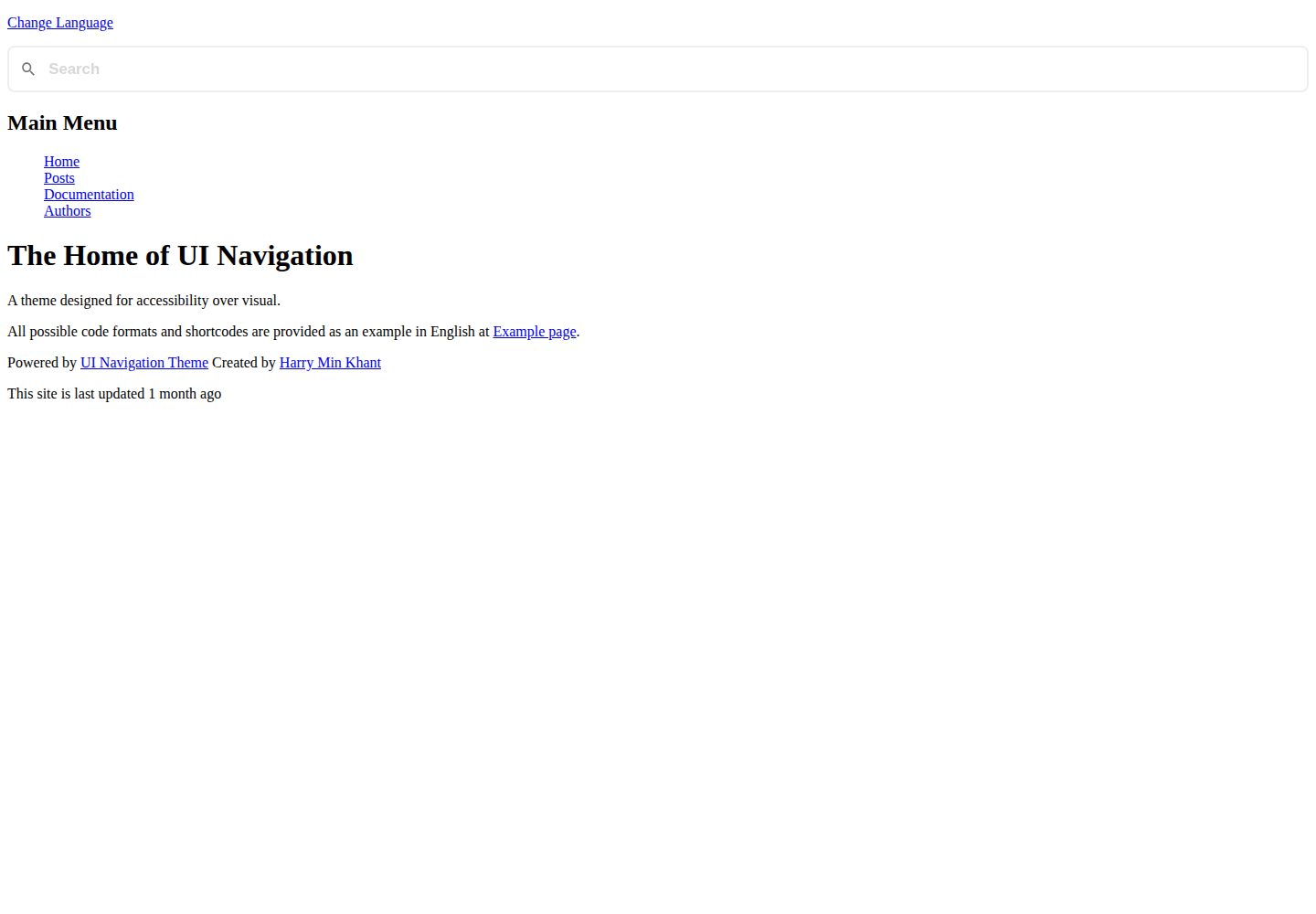
Accessibility-focused design using ARIA and other accessibility labels, aimed at blind and visually impaired users
HugoBlogDocumentation
hguinav — Hugo Blog Template
By harrymkt
hguinav is a multilingual Hugo theme focused on accessibility, offering both blog and documentation site templates under the MIT license.
Explore the design
Compare the page layouts and mobile experience. Open any screenshot for a closer look.
Desktop homepage1 / 3
Desktop captureTop of page
Actual screenshot captured by the server browser.
All pages & views 3
Screenshots show visual appearance; interactive behavior may differ.
Recorded 2026-10-02View source
What stands out
A quick read of the recorded project description.
Supports Hugo's built-in multilingual and i18n features, with multilingual menu checks
Provides both blog post templates and dedicated documentation site templates
Customize head, header, footer, extrahead, and extrafooter via blocks and partials without copying files into layouts
Built-in search support with multiple search formats, plus taxonomies and taxonomy-based author management
JavaScript-assisted features such as code block copy buttons and displaying dates in the user's local time zone, with configurable toggles
Template Details
hguinav (UI Navigation) is a Hugo theme created by a blind developer, with accessibility as its core design focus. It uses ARIA and other accessibility labels to improve usability for screen readers and visually impaired users. The theme supports Hugo's built-in multilingual and i18n mechanisms, and provides blog post templates as well as templates specifically for building documentation sites.
In terms of features, the theme offers customizable extrahead, extrafooter, head, header, and footer (implemented via partials and blocks), supports content variables (such as %title%), per-section page sorting, per-section pagination counts, multilingual menu checks for menu pages, taxonomies, and taxonomy-based author/user management. The theme also includes built-in search support with multiple search formats, along with JavaScript-assisted features such as code block copy buttons and displaying dates in the user's local time zone. JavaScript usage can be toggled separately in configuration and page frontmatter.
The theme uses a blocks mechanism to reduce the need to copy files into the layouts directory, and provides numerous partials and shortcodes to streamline content and templates. Installation options include Git submodule, git clone, or manual download into the themes directory, followed by setting theme = "hguinav" in the configuration. The theme comes with complete documentation covering layouts, partials, shortcodes, blocks, and configurable parameters.
Note that third-party assets such as demo images, fonts, and icons require separate license verification and cannot be judged solely by the code's MIT license; external services such as domains and hosting may incur additional charges.
HugoBlogDocumentation
Is it right for your project?
Use Cases
- Building a multilingual blog with Hugo
- Creating a documentation site for visually impaired users with an emphasis on accessibility
- Projects that need to customize areas such as head, header, and footer at the theme level without copying template files
- Sites that want to manage author information via taxonomies and include built-in search
Suitable For
- Developers using Hugo who value accessibility
- Individuals or teams needing a multilingual blog or documentation site
- Users who want to customize the theme using blocks and partials while reducing template duplication
- Static site projects that need built-in search and taxonomy support
Getting started & customization
Use these recorded setup notes alongside the repository instructions for your chosen version.
- 1
Recommended installation via Git submodule: git submodule add --name hguinav https://github.com/harrymkt/hguinav.git themes/hguinav, then run git submodule update --remote
- 2
Alternatively, use git clone in the themes directory, or download the ZIP and place it manually into the themes directory
- 3
After installation, set theme = "hguinav" in the Hugo configuration
- 4
Refer to the theme documentation site for configuration options and usage
- 5
Third-party assets such as demo images, fonts, and icons require separate license verification; external services such as domains and hosting may incur additional charges
License & source material
Usage conditions & limitations
Free to use · keep license noticeThis entry covers the free version under the MIT license in the public repository; the free scope applies to that version's code and does not imply that external services or third-party assets are free.
Must comply with when using
- Free use, modification, commercial use, and distribution of this version's code are permitted.
- When distributing copies or substantial portions of the code, retain the original author's copyright notice and the full MIT license notice.
- The code is provided as-is; warranties and limitations of liability are governed by the original license and applicable law.
Additional costs & items to verify
- Demo images, fonts, icons, and other third-party assets require separate license verification and cannot be judged solely by the code's MIT license.
- External services such as domains, hosting, databases, payments, or AI may incur additional charges.
View Original Text Basis
https://github.com/harrymkt/hguinav/blob/main/LICENSE.mdhttps://github.com/harrymkt/hguinav/blob/main/README.mdPermission is hereby granted, free of charge
Original License Text
Compiled by DeepSeek based on repository license and README ·2026-10-02. Results only cover the materials read; dependencies, images, fonts, and subsequent term changes are subject to their respective original texts.
Project checks & description sources
Template Information
- Source platforms
- GitHub
- Documentation and maintenance reference score
- More documented · 88 / 100
- Technologies
- Hugo
- Website type
- Blog · Documentation
How this score is calculated
Our heuristic uses license records (up to 30), a demo link (12), a preview (10), stars (15), recorded maintenance (15), description completeness (8), feature records (5) and classification data (5). It is not a code, security or performance test, or a Google score. A link does not establish tested functionality.
What to verify for this project
- Repository update recorded
- 2026-08-05
- Screenshot last checked
- 2026-10-02
A demo link is listed. Check it with your own content and viewport sizes; its presence does not confirm that forms, authentication or payments work.
The catalog identifies Hugo as the primary stack. Check the actual dependency manifest and lockfile for versions and hosting requirements. These notes use recorded metadata, not a code audit or a deployment test.
Use a selection guide →How this description was prepared
AI-assisted description based on catalog records and repository material. Repository authors are not automatically the reviewers of this description.
Automatically checked against source and license rules; no manual editorial review.
Inspect the recorded source material
SHA-256: dc90cbb483f82a028bc1dbc4556f9891029a7c9db8f0e51e2bb845dac362a875
2026-10-02T17:08:32.921Z
Source file / repository# UI Navigation UI Navigation, or known as hguinav, is a modern multilingual [Hugo](https://gohugo.io) theme designed for accessibility over visual and made as easy as possible. As I am a blind developer, I would like to develop tools with accessibility so visually impaired users can use them. This theme is also available for Zola at [Zluinav](https://github.com/harrymkt/zluinav). This theme uses blocks as possible, as Hugo does not allow extend and super functions like other static site generators. [Theme demo Site](https://harrymkt.github.io/hguinav) ## License This theme is distributed under the terms of the [MIT License](https://github.com/harrymkt/hguinav/blob/main/LICENSE.md). ## Features - Accessibility: HGUINav is designed to be accessible as possible, especially for blind and visually impaired. This is done by using accessibility tags, such as ARIA, and other possible accessibility features. - SEO friendly. - Multilingual support with i18n: Hugo supports built-in advance multilingual feature, this theme only implements templates for it. - Customizable extrahead, extrafooter, head, header, footer, with partials, and extrahead, with blocks. - Customizable Documentation Site: build accessible [documentation sites](https://harrymkt.github.io/hguinav/docs/documentation) by using built-in template specifically designed for documentation. You set the layout of the section you want to document as well as in each page of that related document, or cascade just once in the main documentation page. - [Content variables](https://harrymkt.github.io/hguinav/docs/writing), such as `%title%`. - Sort pages by the way you like and for specific sections, which is by default not supported. This uses the [sort](https://harrymkt.github.io/hguinav/docs/partials/sort) partial. - Define per-section pagination size. - Define menu pages that check for multilingual with the special [menu](https://harrymkt.github.io/hguinav/docs/partials/menu) partial. - Built-in blog post templates. - Copy Code Blocks: Add code blocks which can then be copied using buttons and display the code language if available, helped by JavaScript. - Local Date Display: display dates in user's local timezone, no matter what timezone the date is set. - Taxonomies support. - Taxonomy based [author/user management](https://harrymkt.github.io/hguinav/docs/author-taxonomy), provided in demo. - Built-in [search](https://harrymkt.github.io/hguinav/docs/search) support, with a variety of search formats. - Use [blocks](https://harrymkt.github.io/hguinav/docs/blocks) to easily modify without having to copy some files to your layouts. - Use extensive partials and shortcodes to make your content and/or templates shorten. - Ability to toggle the use of JavaScript for both config and per-page frontmadder. - Comprehensive Documentation: HGUINav provides a full Comprehensive documentation including possible layouts, partials, shortcodes, blocks, configurable parameters, and more, everything as it updates. ## Installation Add as a Git submodule (recommended): ```bash git submodule add --name hguinav https://github.com/harrymkt/hguinav.git themes/hguinav git submodule update --remote ``` Or using git clone: ```bash cd themes git clone https://github.com/harrymkt/hguinav.git git fetch git pull ``` Or [download manually](https://github.com/harrymkt/hguinav/archive/refs/heads/main.zip) and paste in the themes directory. Next, set the theme in your config. `theme = "hguinav"` ## Configuration Please read the [documentation](https://harrymkt.github.io/hguinav) for more information and configuration options. ## Contribution Contributions to this theme are welcome, provided that the following requirements are met: - Use 2 level space indentation for HTML. Use 1 tab level indentation for CSS, TOML and JavaScript. If Markdown files need indentation, use 1 tab. - Be the templates accessible for visually impaired and/or blind and prefer readability. Don't worry, I will process in case accessibility issues before pull requests are merged. - Photos are not required in this theme. You may design with CSS for visual if you so wish. - When creating a pull request it is advised that you: - Use different branch other than main; this avoids issues with updating in case your pull request gets rejected. Thank you!
Explore similar templates
Compare previews and descriptions within the same stack and category.

hugo-PaperMod
A fast, clean, responsive Hugo theme for blogs and lightweight portfolios, with three layout modes (Regular, Home-Info, Profile), automatic and manual light/dark themes, Fuse.js client-side search, multilingual support, and built-in Open Graph, Twitter Cards, and Schema.org data.
Hugo · Portfolio

hugo-book
Hugo Book is a Hugo documentation theme that aims to make documentation sites as simple as a plain book. It emphasizes clean, lightweight, mobile-friendly, and zero initial configuration, and comes with an example site that doubles as documentation.
Hugo · Documentation

LoveIt
LoveIt is a clean, elegant, and feature-rich Hugo blog theme derived from LeaveIt and KeepIt, MIT-licensed. It offers light/dark modes, responsive layout, multilingual support, and search via Lunr.js or Algolia.
Hugo · Blog

hugo-coder
hugo-coder is a minimalist Hugo blog theme maintained by luizdepra under the MIT license. It provides a clean, text-focused blog appearance, configuration documentation in the docs directory, and a complete exampleSite with hugo.toml.
Hugo · Blog

docsy
Docsy is a Hugo theme for technical documentation sites, governed by the Linux Foundation and licensed under Apache-2.0. It provides simple navigation and site structure for open source project and product documentation.
Hugo · Documentation

blowfish
Blowfish is a Hugo personal website and blog theme built with Tailwind CSS 4, focused on lightness, simplicity, and content-first presentation.
Hugo · Blog