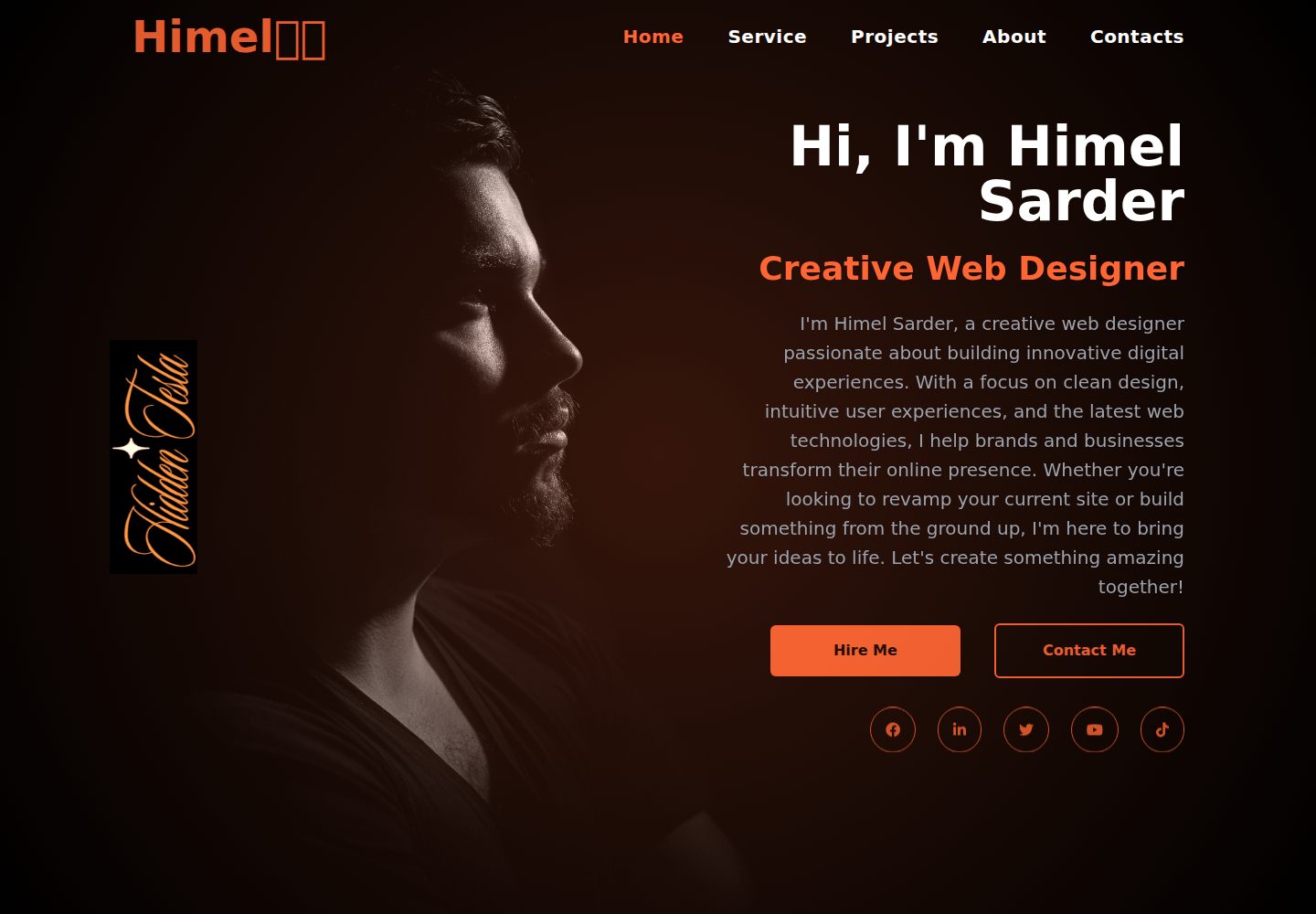
Single-page portfolio layout with a dark background and orange accent colors
HTMLPortfolio
Personal-Portfolio-using-Tailwind-CSS — HTML Portfolio Template
By Himel-Sarder
A dark-themed single-page personal portfolio built with HTML and Tailwind CSS, used to showcase a personal introduction, services, projects, and social links.
Explore the design
Compare the page layouts and mobile experience. Open any screenshot for a closer look.
Desktop homepage1 / 2
Desktop captureTop of page
Actual screenshot captured by the server browser.
All pages & views 2
Screenshots show visual appearance; interactive behavior may differ.
Recorded 2026-10-13View source
What stands out
A quick read of the recorded project description.
Header navigation links with underline animation, plus gradient and bubble background effects
Hero section includes a greeting, self-introduction, and two buttons: Hire Me and Contact Me
Social icons cover Facebook, LinkedIn, Twitter, YouTube, and TikTok, with hover scaling and color changes
Responsive layout and animations such as fade-in and scaling implemented with Tailwind CSS
All content is contained in index.html, so text, images, and links can be edited directly
Template Details
This template is a static personal portfolio website aimed at web designers or developers to present their background, services, projects, and contact information. The page uses a dark background with orange accent colors and includes a header with navigation, a hero introduction, floating images, social icons, and sections for services, projects, about, and contact.
Technically, the page organizes content with HTML, uses Tailwind CSS for styling, layout, and animations, and incorporates FontAwesome icons and Google Fonts. The README mentions that JavaScript can be added as needed to enhance interactivity.
To use it, clone the repository and open index.html directly in a browser; all text, images, and links are edited in that file. The template does not include a backend, and dynamic features such as a contact form are listed as possible future extensions.
HTMLPortfolio
Is it right for your project?
Use Cases
- Web designers or developers building a personal online portfolio
- As a static page reference for learning Tailwind CSS layout and animations
- Quickly replace personal information on the existing HTML and publish to static hosting such as GitHub Pages
Suitable For
- Designers or developers who need a lightweight static personal homepage
- Those who prefer to maintain portfolio content in a single file
- Front-end learners who want to reference a dark theme with orange accent colors
Getting started & customization
Use these recorded setup notes alongside the repository instructions for your chosen version.
- 1
Clone the repository: git clone https://github.com/Himel-Sarder/Personal-Portfolio-using-Tailwind-CSS.git
- 2
Open index.html directly in a browser to view it locally
- 3
Modify text, images, and links in index.html to replace them with personal information
- 4
Third-party assets such as demo images, fonts, and icons must be checked against their respective licenses; do not judge solely by the code's MIT license
License & source material
Usage conditions & limitations
Free to use · keep license noticeThis entry covers the free version under the MIT license in a public repository; the free scope is the code of this version and does not mean external services or third-party assets are free.
Must comply with when using
- You are allowed to use, modify, commercially use, and distribute the code of this version for free.
- When distributing copies or substantial portions of the code, retain the original author's copyright notice and the full MIT license notice.
- The code is provided as is; warranties and limitations of liability are governed by the original license and applicable law.
Additional costs & items to verify
- Demo images, fonts, icons, and other third-party assets must be checked against their respective licenses; do not judge solely by the code's MIT license.
- External services such as domains, hosting, databases, payments, or AI may incur additional charges.
View Original Text Basis
Compiled by DeepSeek based on repository license and README ·2026-10-13. Results only cover the materials read; dependencies, images, fonts, and subsequent term changes are subject to their respective original texts.
Project checks & description sources
Template Information
- Source platforms
- GitHub
- Documentation and maintenance reference score
- More documented · 77 / 100
- Technologies
- HTML
- Website type
- Portfolio
How this score is calculated
Our heuristic uses license records (up to 30), a demo link (12), a preview (10), stars (15), recorded maintenance (15), description completeness (8), feature records (5) and classification data (5). It is not a code, security or performance test, or a Google score. A link does not establish tested functionality.
What to verify for this project
- Repository update recorded
- 2024-11-03
- Screenshot last checked
- 2026-10-13
A demo link is listed. Check it with your own content and viewport sizes; its presence does not confirm that forms, authentication or payments work.
The catalog identifies HTML as the primary stack. Check the actual dependency manifest and lockfile for versions and hosting requirements. These notes use recorded metadata, not a code audit or a deployment test.
Use a selection guide →How this description was prepared
AI-assisted description based on catalog records and repository material. Repository authors are not automatically the reviewers of this description.
Review declaration: codex-user-requested-batch-review-20261015 · 2026-10-15
Inspect the recorded source material
SHA-256: e74de7354bfca32065123a81c69b82d6ba64da15cff85ddda6450a0eb98a4f61
2026-10-13T01:13:30.554Z
Source file / repository# Portfolio Website This project represents a modern, responsive personal portfolio website that showcases my work as a creative web designer and developer. It serves as an online presence for anyone interested in learning about my background, exploring my projects, and reaching out for collaboration or inquiries. The website combines a visually engaging design with ease of navigation, providing an interactive experience for visitors.  --- ## ✅Live Demo : [Click here](https://himel-sarder.github.io/Personal-Portfolio-using-Tailwind-CSS/) ## ✅Project Vision The portfolio website aims to create a dynamic digital platform where my skills and work are presented professionally. Using a sleek, dark-themed interface accented by a vibrant orange hue, the site highlights essential information about my background, services, and projects. Each element is thoughtfully animated to enhance the user experience, and a consistent visual style reinforces my brand identity. --- ## Featured LinkedIn Post Check out my LinkedIn post for more video > [**View the LinkedIn post**](https://www.linkedin.com/feed/update/urn:li:ugcPost:7258862099106254848) ## ✅Key Features ### 1. **Interactive Header with Navigation** - **Logo and Navigation:** At the top, the header includes my logo, “Himel🐦🔥,” and navigation links. Each link has an animated underline effect, enhancing the interaction and making it easy for visitors to explore various sections such as Home, Services, Projects, About, and Contacts. - **Dynamic Background:** The dark background is paired with a subtle gradient and bubble animation, adding a modern touch without overwhelming the content. ### 2. **Hero Section** - **Introduction Text:** This section features a warm greeting and a brief introduction about me, “Hi, I'm Himel Sarder - Creative Web Designer,” that sets the tone for the rest of the site. - **Animated Elements:** Text elements in this section fade in with a slight delay, adding elegance and professionalism to the first impression. - **Call-to-Action Buttons:** There are two primary buttons—“Hire Me” and “Contact Me.” These guide visitors to specific actions, emphasizing my availability for projects or inquiries. ### 3. **Floating Image Section** - On the left side, there’s a rotated image (side.png) that acts as an eye-catching visual anchor. Positioned to float as visitors scroll, it reflects my creative personality and adds an unconventional design element. ### 4. **Social Media Integration** - **Icons with Hover Effects:** The website features icons for platforms like Facebook, LinkedIn, Twitter, YouTube, and TikTok. Each icon is designed to transform slightly on hover, displaying a subtle color change and scale effect, encouraging visitors to connect on multiple channels. --- ## ✅Technologies Used 1. **HTML** for structuring content. 2. **CSS with Tailwind** for styling, animations, and layout, allowing rapid prototyping with a clean and organized design. 3. **FontAwesome** icons for social media links, providing accessible icons with simple implementation. 4. **Google Fonts** for typography to enhance readability and add a professional, modern look to the text. 5. **JavaScript (optional)** can be added for further interactive effects if needed. --- ## ✅Design Highlights The design is focused on creating a streamlined yet visually striking interface: - **Dark Background with Accents:** The background combines a deep color (#06070c) with bright orange accents (#ff6633), creating a modern contrast. - **Responsive Layout:** Each section is designed to adapt to different screen sizes, ensuring a consistent and intuitive experience across devices. - **Animations:** Subtle animations (fade-in, scale effects, and bubble animations) make the website feel dynamic and engaging, without overwhelming the content. --- ## ✅Getting Started 1. **Clone the Repository** ```bash git clone https://github.com/Himel-Sarder/Personal-Portfolio-using-Tailwind-CSS.git ``` 2. **Open the `index.html` file** in your preferred browser to view the site locally. 3. **Customize Content:** Edit the text, images, and links directly within the `index.html` file if you wish to personalize it further. --- ## ✅Future Enhancements - **Backend Integration:** Adding a contact form with a backend to handle messages. - **Project Section**: Dynamically update with new projects using a CMS or static JSON files. - **SEO Optimization**: Enhance metadata and accessibility to improve search visibility. # Thank You 😻🤍
Explore similar templates
Compare previews and descriptions within the same stack and category.

simplefolio
Simplefolio is a minimal single-page portfolio template for developers, built with HTML, Bootstrap, SCSS, and Parcel under the MIT license. It includes Hero, About, Projects, Contact, and Footer sections, with content edited in /src/index.html and theme colors controlled by two SCSS variables.
HTML · Portfolio

Freelancer
A bright, single-page Bootstrap portfolio template for freelancers, designers, and small studios. It includes a responsive portfolio grid with modal detail windows and an SB Forms contact form that requires an API token.
HTML · Portfolio

Resume
A single-page resume and CV template from Start Bootstrap, built on Bootstrap with a fixed sidebar and content sections.
HTML · Portfolio

Creative
A single-page marketing template by Start Bootstrap for creative agencies and product services, built on Bootstrap with SCSS, featuring a portfolio grid and call-to-action sections. It includes pre-set SB Forms markers for form integration and npm build scripts for source customization.
HTML · Corporate Website

Grayscale
A dark single-page Bootstrap template from Start Bootstrap for photography, events and brand storytelling, with a large hero and clearly separated sections.
HTML · Corporate Website

startbootstrap-stylish-portfolio
A one-page Bootstrap portfolio theme from Start Bootstrap with multiple content sections and an off-canvas navigation menu. Basic use means editing HTML/CSS under dist and opening index.html; advanced use relies on npm with Pug and SCSS build scripts.
HTML · Portfolio