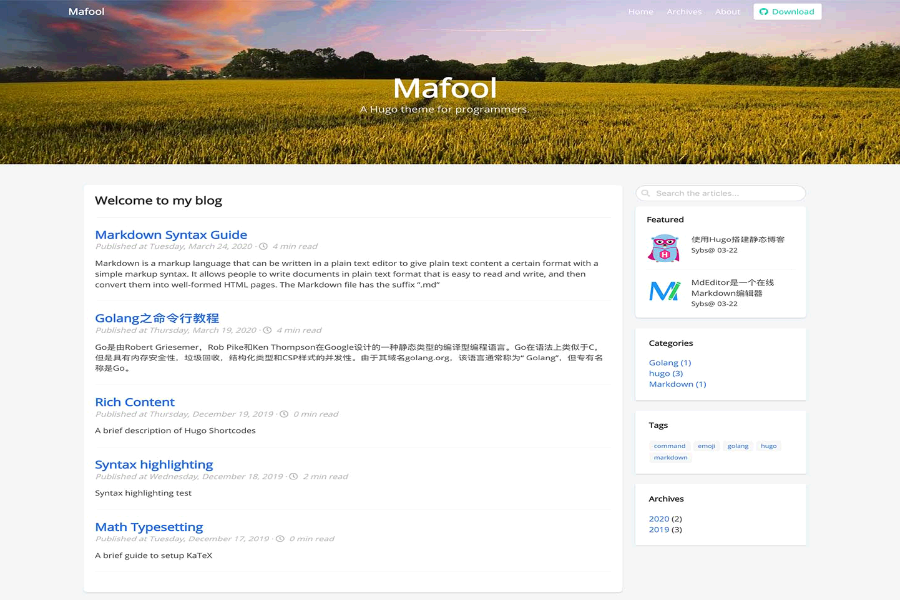
A Hugo blog theme for programmers and columnists, with a link to Chinese documentation in the repository
HugoBlog
hugo-theme-dooz — Hugo Blog Template
By hollson
hugo-theme-dooz is a Hugo blog theme for programmers and columnists, with the repository under the MIT license and providing a demo site and Chinese documentation.
Explore the design
Compare the page layouts and mobile experience. Open any screenshot for a closer look.
Author preview
Author-provided previewTop of page
Preview provided in the project README.
One original preview is available. Open the full image to inspect the design.
Screenshots show visual appearance; interactive behavior may differ.
Recorded 2026-10-02View source
What stands out
A quick read of the recorded project description.
Provides an exampleSite that can be copied to the site root for direct local preview
Post templates are in archetypes, and front matter covers categories, tags, archives, SEO keywords, and description fields
Configuration items include multilingual support, menus, permalinks, taxonomies, and goldmark rendering and code highlighting settings
Within params, you can set author information, social links, rewards, announcements, hero image, and 404 page content
Template Details
hugo-theme-dooz is a Hugo blog theme published on GitHub, positioned by its author as a clean theme for programmers or columnists. The repository README provides English instructions and a link to Chinese documentation, along with a demo site at http://www.mafool.com for reference.
For usage, the theme is placed into a Hugo site's themes/dooz directory via git clone or git submodule; the repository includes an exampleSite, whose contents can be copied to the site root and then previewed locally by running hugo server -w. Posts are created with hugo new post/category-title.md, and templates in the archetypes directory determine the front matter fields; the README example includes fields such as title, url, keywords, description, image, date, categories, tags, archives, author, height, and draft.
For configuration, the README lists settings including baseURL, title, theme, languageCode, hasCJKLanguage, enableEmoji, googleAnalytics, paginate, metaDataFormat, a languages multilingual block, outputs, params, permalinks, taxonomies, menu.friendly, and markup. Within params, you can configure author, city, avatar, motto, GitHub/CSDN/Blog Garden links, a reward toggle and prompt text, announcements, date format, hero image, slogan, 404 image and text, a share toggle, and SEO-related homeTitle, keywords, and description. The markup section is based on goldmark and can enable extensions such as footnotes, definition lists, tables, and task lists, and configure code highlighting style, line numbers, and table of contents levels.
Limitations and notes: the repository materials do not state the theme's browser compatibility range, accessibility support, or long-term maintenance status; third-party links, images, fonts, and other assets in the demo site and README must be checked separately under their respective licenses, and usability cannot be judged solely by the code's MIT license.
HugoBlog
Is it right for your project?
Use Cases
- Building a personal blog focused on technical articles with Hugo
- Sites that need to organize posts by category, tag, and archive and configure SEO metadata
- Local preview where you want to quickly see the theme's effect by copying exampleSite directly
- Blog sites that need multilingual configuration such as Chinese and English
Suitable For
- Developers who use Hugo and are familiar with TOML configuration
- Individual bloggers focused on technical articles or column writing
- Sites that need to configure author information, social links, and reward entry points in the theme
Getting started & customization
Use these recorded setup notes alongside the repository instructions for your chosen version.
- 1
First install Hugo, then run hugo new site myblog to create a site
- 2
In the site directory, place the theme into themes/dooz via git clone or git submodule
- 3
Copy ./themes/dooz/exampleSite/* to the site root and run hugo server -w to preview
- 4
Set theme = "hugo-theme-dooz" in the site configuration and adjust params, menu, and markup according to the README example
- 5
Create posts with hugo new post/category-title.md and modify the templates in archetypes as needed
License & source material
Usage conditions & limitations
Free to use · keep license noticeThis entry covers the free version under the MIT license in the public repository; the free scope is the code of this version and does not mean external services or third-party assets are free.
Must comply with when using
- You are allowed to use, modify, commercialize, and distribute the code of this version for free.
- When distributing copies or substantial portions of the code, retain the original author's copyright notice and the complete MIT license notice.
- The code is provided as is; warranties and limitations of liability are governed by the original license and applicable law.
Additional costs & items to verify
- Demo images, fonts, icons, and other third-party assets must be checked under their respective licenses and cannot be judged solely by the code's MIT license.
- External services such as domains, hosting, databases, payments, or AI may incur separate charges.
View Original Text Basis
https://github.com/hollson/hugo-theme-dooz/blob/master/LICENSEhttps://github.com/hollson/hugo-theme-dooz/blob/master/README.mdPermission is hereby granted, free of charge
Original License Text
Compiled by DeepSeek based on repository license and README ·2026-10-02. Results only cover the materials read; dependencies, images, fonts, and subsequent term changes are subject to their respective original texts.
Project checks & description sources
Template Information
- Source platforms
- GitHub
- Documentation and maintenance reference score
- More documented · 75 / 100
- Technologies
- Hugo
- Website type
- Blog
How this score is calculated
Our heuristic uses license records (up to 30), a demo link (12), a preview (10), stars (15), recorded maintenance (15), description completeness (8), feature records (5) and classification data (5). It is not a code, security or performance test, or a Google score. A link does not establish tested functionality.
What to verify for this project
- Repository update recorded
- 2026-04-12
- Screenshot last checked
- 2026-10-02
A demo link is listed. Check it with your own content and viewport sizes; its presence does not confirm that forms, authentication or payments work.
The catalog identifies Hugo as the primary stack. Check the actual dependency manifest and lockfile for versions and hosting requirements. These notes use recorded metadata, not a code audit or a deployment test.
Use a selection guide →How this description was prepared
AI-assisted description based on catalog records and repository material. Repository authors are not automatically the reviewers of this description.
Automatically checked against source and license rules; no manual editorial review.
Inspect the recorded source material
SHA-256: 68630c201bb30a1398612679e2018ad8b5cba01bbf6c038d929067e81da90ba0
2026-10-02T17:14:29.464Z
Source file / repository> #### [**Hugo Dooz主题中文文档**](./README-ZH.md) - 码农的专属博客 <br/> ## Dooz Theme for Hugo Dooz is a simple and elegant hugo theme specially designed for programmers or columnists.  <br/> ## Sample Site http://www.mafool.com <br/> ## Installation When you finish installing the [Hugo](https://gohugo.io/getting-started/installing/),You can create your own blog site: ```shell $ hugo new site myblog $ cd myblog $ git clone [email protected]:hollson/hugo-theme-dooz.git themes/dooz # If already in a git project,you can execute the following command $ git submodule add [email protected]:hollson/hugo-theme-dooz.git themes/dooz ``` <br/> ## Quick Start You can use the example given for a quick experience: ```shell $ cp -rp ./themes/dooz/exampleSite/* ./ $ hugo server -w ``` Enter [`http://localhost:1313`](http://localhost:1313) in the browser's address bar,then see an example of the picture above. For more information check out the official [Hugo documentation](http://gohugo.io/overview/usage/). <br/> ## Create Posts ```shell hugo new post/mycategory-my-blog-title.md ``` You can customize your template in the “archetypes” directory ,As follows: ```toml +++ title= "{{with slicestr .Name (len (index (split .Name "-") 0))}}{{replace . "-" " "|strings.TrimLeft " "|title}}{{end}}" url= "/post/{{now.Unix}}/" #aliases = ["/posts/{{md5 now}}/"] keywords= "keyword1,keyword2" #SEO keywords description= "Content description for SEO" image= "/img/res/blog.jpg" date= {{ slicestr .Date 0 10 }} categories= ["{{index (split .Name "-") 0|title}}"] tags= ["tag1", "tag2"] archives= "{{ now.Format "2006" }}" author= "{{.Site.Params.Author}}" height= {{now.Unix}} draft= false +++ ``` <br/> ## Configuration ```toml baseURL = "http://www.mafool.com" title = "Mafool" theme = "hugo-theme-dooz" languageCode = "en" defaultContentLanguage = "en" hasCJKLanguage = true enableEmoji= true copyright="Copyright Reservation" googleAnalytics = "G-DKXXXXXX2J" canonifyurls = true paginate = 10 metaDataFormat = "toml" [languages] [languages.en] # baseURL = "https://hollson.github.io" # contentDir = "content/english" title = "Mafool" languageName = "English" copyright="All Rights Reserved" weight = 1 [languages.en.params] #author= "shongsheng" #replace the dedault param homeTitle="Programmer's Exclusive Blog" slogan="A Hugo theme for programmers." title_404="Sorry, page was not found." [outputs] home = ["HTML", "RSS", "JSON"] [params] #Author author = "Sybs" city = "Beijing" avatar = "img/my/avatar.png" aphorism="Here is my motto" github="https://github.com/hollson" csdn="https://blog.csdn.net/gusand" cnblog="https://www.cnblogs.com/hollson/" #Rewords reward= true rewardTitle="hint" rewardPrompt="Words of thanks~" #Notice notice="**[Dooz theme](https://github.com/hollson/hugo-theme-dooz)** updated, hurry up and experience it! `2020.03.22`" #Default Site Config of timeOfMonth="2006.01" timeOfDay="2006-01-02" hero = "img/res/hero.jpg" slogan = "A Hugo theme for programmers." image_404 = "img/res/404.jpg" title_404 = "Sorry, page was not found. :(" openShare= true #SEO Info(meta info) homeTitle = "Programmer's Exclusive Blog" keywords = "keyword1,keyword2,keyword3" description = "Here is description for seo" [permalinks] post = "/:year/:month/:title" # Classification basis:e.g.:tags、categories、archives... [taxonomies] tag = "tags" category = "categories" archive = "archives" # series = "series" # nav menu [[menu.friendly]] name="Mafool" url="http://www.mafool.com" weight="1" [[menu.friendly]] name="Mafool" url="http://www.mafool.com" weight="2" [[menu.friendly]] name="Mafool" url="http://www.mafool.com" weight="3" [[menu.friendly]] name="Mafool" url="http://www.mafool.com" weight="4" [[menu.friendly]] name="Mafool" url="http://www.mafool.com" weight="5" [markup] defaultMarkdownHandler = "goldmark" [markup.goldmark] [markup.goldmark.extensions] definitionList = true footnote = true linkify = true strikethrough = true table = true taskList = true typographer = true [markup.goldmark.parser] attribute = true autoHeadingID = true autoHeadingIDType = "github" [markup.goldmark.renderer] hardWraps = true unsafe = false xHTML = false [markup.highlight] codeFences = true guessSyntax = true lineNoStart = 1 lineNos = true #line number lineNumbersInTable = true style = "monokai" #code style tabWidth = 8 [markup.tableOfContents] startLevel = 2 #start from:H2 endLevel = 3 #end from:H3 ordered = false ``` **Some important references:** > https://gohugo.io/getting-started/configuration-markup#highlight # Markdown Config > https://gohugo.io/content-management/syntax-highlighting/ # High lighting > https://xyproto.github.io/splash/docs/longer/all.html # Code Style <br/> ## Contributing Did you found a bug or got an idea for a new feature? Feel free to use the [issue tracker](https://github.com/hollson/hugo-theme-dooz/issues) to let us know. Or make directly a [pull request](https://github.com/hollson/hugo-theme-dooz/pulls).
Explore similar templates
Compare previews and descriptions within the same stack and category.

hugo-PaperMod
A fast, clean, responsive Hugo theme for blogs and lightweight portfolios, with three layout modes (Regular, Home-Info, Profile), automatic and manual light/dark themes, Fuse.js client-side search, multilingual support, and built-in Open Graph, Twitter Cards, and Schema.org data.
Hugo · Portfolio

LoveIt
LoveIt is a clean, elegant, and feature-rich Hugo blog theme derived from LeaveIt and KeepIt, MIT-licensed. It offers light/dark modes, responsive layout, multilingual support, and search via Lunr.js or Algolia.
Hugo · Blog

hugo-coder
hugo-coder is a minimalist Hugo blog theme maintained by luizdepra under the MIT license. It provides a clean, text-focused blog appearance, configuration documentation in the docs directory, and a complete exampleSite with hugo.toml.
Hugo · Blog

blowfish
Blowfish is a Hugo personal website and blog theme built with Tailwind CSS 4, focused on lightness, simplicity, and content-first presentation.
Hugo · Blog

hugo-paper
hugo-paper is a simple, clean, and customizable Hugo blog theme configured through config.toml or hugo.toml.
Hugo · Blog

hextra
Hextra is a Hugo theme for documentation and blog sites, built on Hugo and Tailwind CSS with design referencing Nextra.
Hugo · Documentation