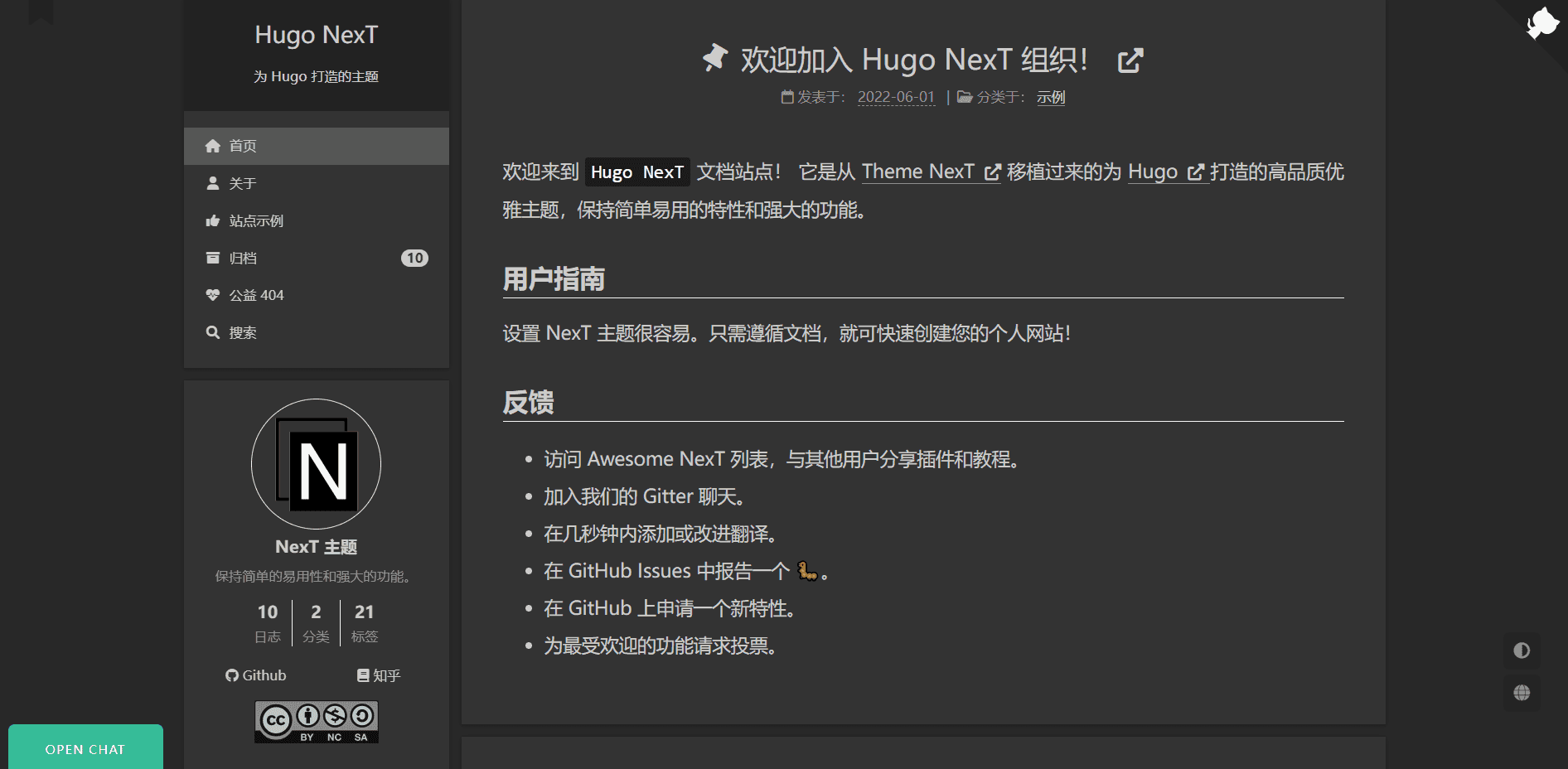
Serves as a starter site skeleton for hugo-theme-next, including sample content and configuration directories
HugoBlogStarter
hugo-theme-next-starter — Hugo Blog Template
By hugo-next
A starter template for the Hugo NexT theme that helps users new to Hugo quickly set up a personal blog site.
Explore the design
Compare the page layouts and mobile experience. Open any screenshot for a closer look.
Author preview
Author-provided preview
Preview provided in the project README.
One original preview is available. Open the full image to inspect the design.
Screenshots show visual appearance; interactive behavior may differ.
Recorded 2026-10-02View source
What stands out
A quick read of the recorded project description.
The theme is pulled in via Git submodule, requiring submodule initialization and update commands
Provides a one-click Vercel deploy button; deployment requires setting HUGO_VERSION and manually switching the framework to Hugo
Includes a startup.sh script; local preview address is http://localhost:1414/
Can generate static files with the hugo command, deploy to Nginx, or enable GitHub Pages
README notes to replace parameters such as comments, analytics, and sharing in params.yaml before deployment
Template Details
This is a starter template for the Hugo NexT theme, aimed at users who are new to Hugo and want to build a personal blog. The repository itself is not theme code; it is a site skeleton that pulls in hugo-theme-next as a Git submodule, including sample content, configuration directories, and startup scripts.
In terms of workflow, the template offers two paths: one is to clone and deploy via the Vercel deploy button, where you need to fill in the HUGO_VERSION environment variable and manually change the framework to Hugo in Vercel before redeploying; the other is to click GitHub's Use this template to generate your own repository, clone it locally, and then use the git submodule command to fetch the theme. For local preview, run startup.sh in the site root directory and visit http://localhost:1414/ in your browser.
For building, use the hugo command to generate static files, which can be deployed to web servers such as Nginx, or you can enable automatic builds with GitHub Pages. The README notes that before deployment you need to replace actual parameter values for comments, analytics, sharing, etc. in config/_default/params.yaml.
Limitations and notes: the first time you fetch the theme, you must run the submodule initialization command; in mainland China, it is recommended to replace the submodule URL in .gitmodules with a Gitee URL to improve speed. The template depends on Git and Hugo being installed locally. The repository uses the MIT license, but third-party assets such as demo images, fonts, and icons must be checked separately under their respective licenses.
HugoBlogStarter
Is it right for your project?
Use Cases
- First time using Hugo and wanting to build a personal blog from an existing template
- Wanting to quickly deploy a Hugo site online with Vercel
- Needing a Hugo site starting point that includes sample content and configuration structure
- Planning to deploy a static site to Nginx or GitHub Pages
Suitable For
- Personal blog authors new to Hugo
- Users who want to manage site code as a template repository
- Those who need to deploy a Hugo static site to Vercel, Nginx, or GitHub Pages
Getting started & customization
Use these recorded setup notes alongside the repository instructions for your chosen version.
- 1
Git and Hugo must be installed locally in advance
- 2
After the first clone, run git submodule update --init --recursive to fetch the theme, then use git submodule update --remote --merge to update
- 3
In mainland China, you can replace the submodule URL in .gitmodules with a Gitee URL to improve fetch speed
- 4
For local preview, run sh startup.sh in the site root directory and visit http://localhost:1414/
- 5
Before deployment, replace parameter values for comments, analytics, sharing, etc. in config/_default/params.yaml
License & source material
Usage conditions & limitations
Free to use · keep license noticeThis entry covers the free version under the MIT license in the public repository; the free scope is the code of this version and does not mean external services or third-party assets are free.
Must comply with when using
- You are allowed to freely use, modify, commercialize, and distribute the code of this version.
- When distributing copies or substantial portions of the code, retain the original author's copyright notice and the full MIT license notice.
- The code is provided as is; warranties and limitations of liability are governed by the original license and applicable law.
Additional costs & items to verify
- You need to install Git and Hugo locally before use; the template itself does not include a runtime environment.
- On first use, you must run the git submodule command to fetch the hugo-theme-next theme, otherwise the site cannot build properly.
- In mainland China, it is recommended to replace the submodule URL in .gitmodules with a Gitee URL to improve fetch speed.
- Before deployment, replace parameter values for comments, analytics, sharing, etc. in params.yaml, otherwise related features will not work.
- When deploying via Vercel, you need to fill in the HUGO_VERSION environment variable and manually change the framework to Hugo before redeploying.
- Demo images, fonts, icons, and other third-party assets must be checked under their respective licenses; do not judge solely by the code's MIT license.
- External services such as domains, hosting, databases, payments, or AI may incur additional charges.
View Original Text Basis
Permission is hereby granted, free of charge
Original License Text
Before that make sure your PC were installed [Git](https://git-scm.com/downloads) and [Hugo](https://github.com/gohugoio/hugo/releases/) software.
Original README
Remember that need use `git submodule` command to pull all things from `hugo-theme-next` at first time.
Original README
When you are in China, recommend to use `Gitee` repository url replace the submodule url in `.gitmodules` file content
Original README
Please replace actual parameter's value in `config/_default/params.yaml` config file before deploy, such as comment, analytics, share and so on.
Original README
https://github.com/hugo-next/hugo-theme-next-starter/blob/main/LICENSEhttps://github.com/hugo-next/hugo-theme-next-starter/blob/main/README.mdalso need enter latest Hugo version at `HUGO_VERSION` parameter
Original README
Compiled by DeepSeek based on repository license and README ·2026-10-02. Results only cover the materials read; dependencies, images, fonts, and subsequent term changes are subject to their respective original texts.
Project checks & description sources
Template Information
- Source platforms
- GitHub
- Documentation and maintenance reference score
- Partly documented · 66 / 100
- Technologies
- Hugo
- Website type
- Blog · Starter
How this score is calculated
Our heuristic uses license records (up to 30), a demo link (12), a preview (10), stars (15), recorded maintenance (15), description completeness (8), feature records (5) and classification data (5). It is not a code, security or performance test, or a Google score. A link does not establish tested functionality.
What to verify for this project
- Repository update recorded
- 2025-06-08
- Screenshot last checked
- 2026-10-02
No demo link is recorded. Use the repository instructions to evaluate the project locally; the screenshot alone cannot establish interactive behavior.
The catalog identifies Hugo as the primary stack. Check the actual dependency manifest and lockfile for versions and hosting requirements. These notes use recorded metadata, not a code audit or a deployment test.
Use a selection guide →How this description was prepared
AI-assisted description based on catalog records and repository material. Repository authors are not automatically the reviewers of this description.
Automatically checked against source and license rules; no manual editorial review.
Inspect the recorded source material
SHA-256: c4822aad128f19ef02905cc6b12e2b94b212a1141f6f04354002bfb4c5a64246
2026-10-02T10:16:01.281Z
Source file / repository[中文](https://github.com/hugo-next/hugo-theme-next-starter/blob/main/README.zh.md) | [English](#)
# Hugo NexT theme starter
It's usefully for people who are first time notice Hugo framework and want to create himself blog site. Following steps as below and good luck for you! :tada::tada::tada:
> **Note**
> Before that make sure your PC were installed [Git](https://git-scm.com/downloads) and [Hugo](https://github.com/gohugoio/hugo/releases/) software.
## Deploy on Vercel
Now you can deployment your site on Vercel platform by this button: [](https://vercel.com/new/clone?repository-url=https%3A%2F%2Fgithub.com%2Fhugo-next%2Fhugo-theme-next-starter&env=HUGO_VERSION&envDescription=Enter%20latest%20version%20of%20Hugo%20engine.&envLink=https%3A%2F%2Fgithub.com%2Fgohugoio%2Fhugo%2Freleases%2F&project-name=my-blog&repo-name=my-blog&demo-title=Hugo%20NexT%20Theme&demo-description=Easily%20%26%20powerful%20theme%20of%20Hugo%20engine.&demo-url=https%3A%2F%2Fhugo-next.eu.org%2F&demo-image=https%3A%2F%2Fimgs.lisenhui.cn%2Fhugo-next%2Fhugo-next-demo.png&install-command=git%20submodule%20add%20https%3A%2F%2Fgithub.com%2Fhugo-next%2Fhugo-theme-next.git%20themes%2Fhugo-theme-next)
### ➕ Create Github repository
Please login Vercel with your Github account, then enter your repository name and click `Create`, also need enter latest Hugo version at `HUGO_VERSION` parameter, after those action then deploy it.

### 🏗 Change Framework
Because Vercel doesn't defined the framework the site not work at first time, you need change it to `Hugo` and save change.

### 🚧 Redeployment
Switch to `Deployment` tag page, refer to the following snapshot for operation, after a while the site will visit success.

## ⏬ Clone Theme
Click the green button which name call `Use this template` and upper right corner on the page. Full information such as below image:

After do that click the green button which name call `Create repository from template`, then will create your site code automatic, and clone it on your PC environment.
Remember that need use `git submodule` command to pull all things from `hugo-theme-next` at first time.
```
# First time
git submodule update --init --recursive
# Next time
git submodule update --remote --merge
```
> **Note**
> When you are in China, recommend to use `Gitee` repository url replace the submodule url in `.gitmodules` file content and then execute the above `Git` command line to improve the speed.
## 💻 Local Preview
Execute the `startup.sh` boot start script file which is under site root directory, when see some words like `stop` that mean success, and open browser visit
[http://localhost:1414/](http://localhost:1414/) will enjoy yourself.
```shell
$ sh startup.sh
========================================
███╗ ██╗███████╗██╗ ██╗████████╗
████╗ ██║██╔════╝╚██╗██╔╝╚══██╔══╝
██╔██╗ ██║█████╗ ╚███╔╝ ██║
██║╚██╗██║██╔══╝ ██╔██╗ ██║
██║ ╚████║███████╗██╔╝ ██╗ ██║
╚═╝ ╚═══╝╚══════╝╚═╝ ╚═╝ ╚═╝
========================================
Hugo NexT version 4.3.1
Documentation: https://hugo-next.eu.org
========================================
Start building sites …
hugo v0.102.3-b76146b129d7caa52417f8e914fc5b9271bf56fc+extended windows/amd64 BuildDate=2022-09-01T10:16:19Z VendorInfo=gohugoio
| ZH-CN
-------------------+--------
Pages | 71
Paginator pages | 0
Non-page files | 0
Static files | 43
Processed images | 0
Aliases | 26
Sitemaps | 1
Cleaned | 0
Built in 233 ms
Watching for changes in C:\xxx\hugo-theme-next-starter\{content,data,themes}
Watching for config changes in C:\xxx\hugo-theme-next-starter\config\_default
Environment: "development"
Serving pages from memory
Running in Fast Render Mode. For full rebuilds on change: hugo server --disableFastRender
Web Server is available at //localhost:1414/ (bind address 127.0.0.1)
Press Ctrl+C to stop
```
## 🎨 Snapshot

## 🎉 Deployment
Use `hugo` command to build site's static files, and deploy them into Web server just like `Nginx` and so on. Or you can enable `Github Page` function when you commit your local things there will build static files by automatic, more info:[Github Pages](https://pages.github.com/).
> **Note**
> Please replace actual parameter's value in `config/_default/params.yaml` config file before deploy, such as comment, analytics, share and so on.
## 📜 License
[MIT License](LICENSE)
Copyright (c) 2022, hugo-next teams.
Explore similar templates
Compare previews and descriptions within the same stack and category.

hugo-PaperMod
A fast, clean, responsive Hugo theme for blogs and lightweight portfolios, with three layout modes (Regular, Home-Info, Profile), automatic and manual light/dark themes, Fuse.js client-side search, multilingual support, and built-in Open Graph, Twitter Cards, and Schema.org data.
Hugo · Portfolio

LoveIt
LoveIt is a clean, elegant, and feature-rich Hugo blog theme derived from LeaveIt and KeepIt, MIT-licensed. It offers light/dark modes, responsive layout, multilingual support, and search via Lunr.js or Algolia.
Hugo · Blog

hugo-coder
hugo-coder is a minimalist Hugo blog theme maintained by luizdepra under the MIT license. It provides a clean, text-focused blog appearance, configuration documentation in the docs directory, and a complete exampleSite with hugo.toml.
Hugo · Blog

blowfish
Blowfish is a Hugo personal website and blog theme built with Tailwind CSS 4, focused on lightness, simplicity, and content-first presentation.
Hugo · Blog

hugo-paper
hugo-paper is a simple, clean, and customizable Hugo blog theme configured through config.toml or hugo.toml.
Hugo · Blog

hextra
Hextra is a Hugo theme for documentation and blog sites, built on Hugo and Tailwind CSS with design referencing Nextra.
Hugo · Documentation