A clean Jekyll blog theme with Chinese support, providing an online demo
JekyllBlog
fluid-jekyll-theme — Jekyll Blog Template
By iamwilliamli
A clean Jekyll blog theme with Chinese support, including responsive layout, tag categories, full-text search, and RSS subscription.
Explore the design
Compare the page layouts and mobile experience. Open any screenshot for a closer look.
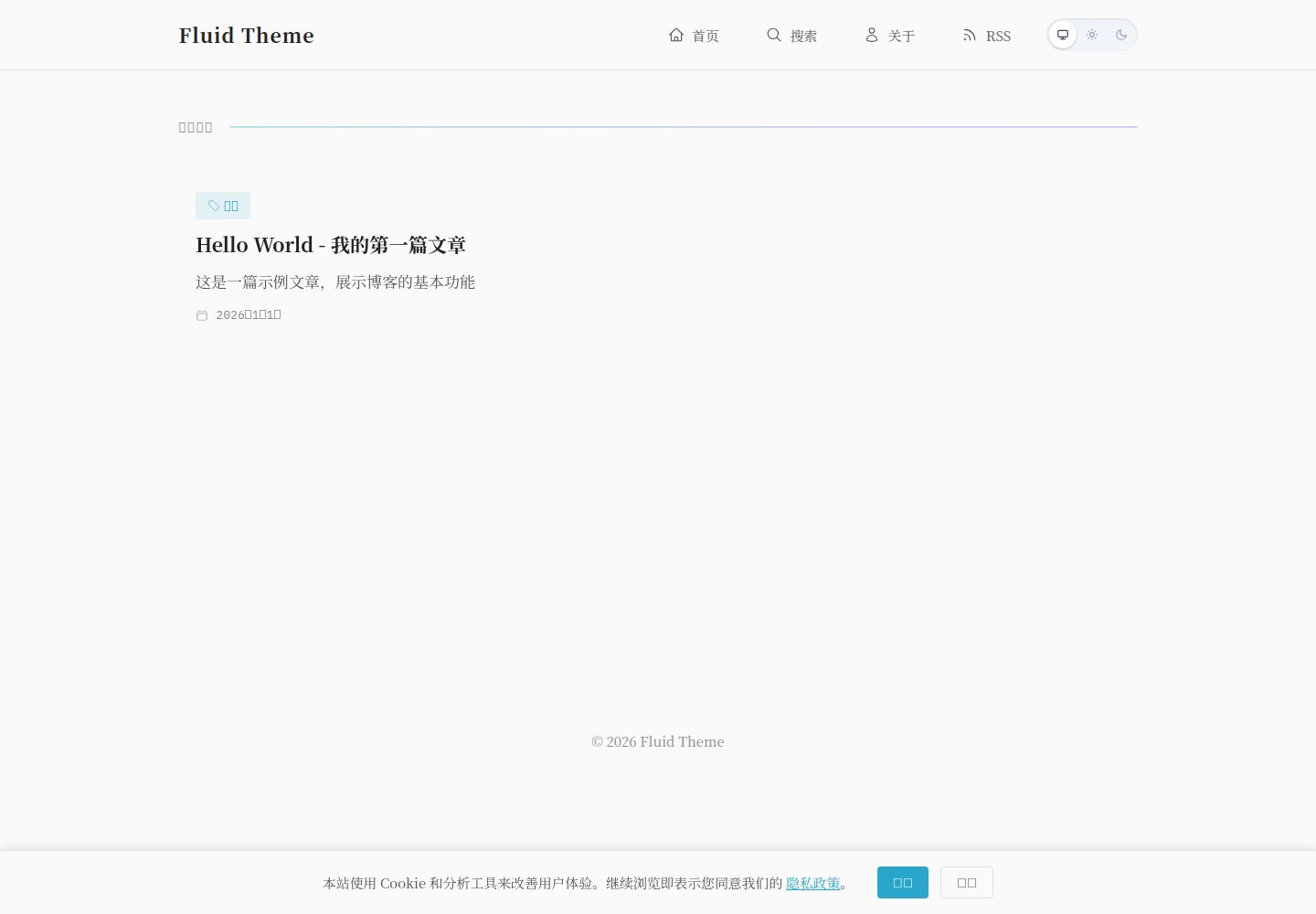
Desktop homepage1 / 3
Desktop captureTop of page
Actual screenshot captured by the server browser.
All pages & views 3
Screenshots show visual appearance; interactive behavior may differ.
Recorded 2026-10-02View source
What stands out
A quick read of the recorded project description.
Responsive design, mobile-friendly
Built-in code syntax highlighting and MathJax mathematical formula support
Integrates jekyll-seo-tag, sitemap, and jekyll-feed, with SEO and RSS capabilities
Provides a tag category system and a full-text search page
Optionally generates cover images for posts automatically via a Google Gemini API script
Template Details
Fluid Theme is a Jekyll-based blog theme positioned as clean, elegant, and supportive of Chinese writing. The repository provides an online demo, and the README explains the complete process from cloning the repository and installing dependencies to local preview.
The theme includes responsive design, so it displays properly on mobile devices; it supports code syntax highlighting and MathJax mathematical formula rendering. At the site level, it integrates jekyll-seo-tag and sitemap for SEO output, provides RSS subscription via jekyll-feed, and includes a tag category system and a full-text search page.
For content organization, posts are placed in the _posts directory, with filenames in the YYYY-MM-DD-title.md format. Front matter supports fields such as title, subtitle, date, tags, and description. Each tag requires a separate corresponding .md file created in the tags directory. Cover images can be manually specified via the image field in front matter, or optionally generated for posts lacking covers by a script that calls the Google Gemini API. This feature requires a GEMINI_API_KEY locally and is disabled by default in CI, requiring manual enabling.
For deployment, the README provides a GitHub Pages method, and the repository already includes the .github/workflows/jekyll.yml workflow file. The project uses the MIT license and can be freely used, modified, and distributed, but third-party assets such as demo images, fonts, and icons require separate license verification. Domains, hosting, and external services such as Gemini may incur additional costs.
JekyllBlog
Is it right for your project?
Use Cases
- Building a personal Chinese blog with Jekyll
- Content sites requiring tag categories and full-text search
- Writing technical articles containing mathematical formulas or code snippets
- Static blogs deployed to GitHub Pages
Suitable For
- Bloggers familiar with Jekyll and Markdown writing
- Site authors needing Chinese interface and Chinese content support
- Users who want to deploy static blogs via GitHub Actions
Getting started & customization
Use these recorded setup notes alongside the repository instructions for your chosen version.
- 1
After cloning the repository, run bundle install to install dependencies, then use bundle exec jekyll serve for local preview
- 2
Edit _config.yml to set site information such as title, description, author, and url
- 3
Posts are placed in the _posts directory, with filenames in the YYYY-MM-DD-title.md format
- 4
Each tag requires a corresponding .md file created in the tags directory with layout: tag set
- 5
AI cover generation requires a GEMINI_API_KEY; it is disabled by default in CI and must be enabled by setting ENABLE_AI_COVERS to true
License & source material
Usage conditions & limitations
Free to use · keep license noticeThis entry covers the free version under the MIT license in the public repository; the free scope is the code of this version and does not mean external services or third-party assets are free.
Must comply with when using
- Free use, modification, commercial use, and distribution of this version's code are permitted.
- When distributing copies or substantial portions of the code, retain the original author's copyright notice and the full MIT license notice.
- The code is provided as is; warranties and limitations of liability are governed by the original license and applicable law.
Additional costs & items to verify
- The optional AI cover generation feature requires your own Google Gemini API key (GEMINI_API_KEY) and may incur external service fees; this feature is not required, and not using it does not affect basic use of the theme.
- Automatic cover generation in CI is disabled by default and must be enabled by manually adding the ENABLE_AI_COVERS variable in the GitHub repository settings and setting it to true.
- The MIT license requires retaining the original copyright notice and license notice in all copies or substantial portions, and author information must not be removed.
- Demo images, fonts, icons, and other third-party assets must be checked against their respective licenses and cannot be judged solely by the code's MIT license.
- External services such as domains, hosting, databases, payments, or AI may incur additional charges.
View Original Text Basis
Permission is hereby granted, free of charge
Original License Text
GEMINI_API_KEY=your_key node scripts/generate-covers.js
Original README
在仓库 Settings → Variables 添加 `ENABLE_AI_COVERS` 值为 `true`
Original README
https://github.com/iamwilliamli/fluid-jekyll-theme/blob/main/LICENSEhttps://github.com/iamwilliamli/fluid-jekyll-theme/blob/main/README.md但请保留原作者信息和许可证声明。
Original README
Compiled by DeepSeek based on repository license and README ·2026-10-02. Results only cover the materials read; dependencies, images, fonts, and subsequent term changes are subject to their respective original texts.
Project checks & description sources
Template Information
- Source platforms
- GitHub
- Documentation and maintenance reference score
- More documented · 83 / 100
- Technologies
- Jekyll
- Website type
- Blog
How this score is calculated
Our heuristic uses license records (up to 30), a demo link (12), a preview (10), stars (15), recorded maintenance (15), description completeness (8), feature records (5) and classification data (5). It is not a code, security or performance test, or a Google score. A link does not establish tested functionality.
What to verify for this project
- Repository update recorded
- 2026-02-10
- Screenshot last checked
- 2026-10-02
A demo link is listed. Check it with your own content and viewport sizes; its presence does not confirm that forms, authentication or payments work.
The catalog identifies Jekyll as the primary stack. Check the actual dependency manifest and lockfile for versions and hosting requirements. These notes use recorded metadata, not a code audit or a deployment test.
Use a selection guide →How this description was prepared
AI-assisted description based on catalog records and repository material. Repository authors are not automatically the reviewers of this description.
Automatically checked against source and license rules; no manual editorial review.
Inspect the recorded source material
SHA-256: 29634dbbd9efd2706c7d85d75e68b8fa56e72e7b8359eea5d173a9e0c0bab0e1
2026-10-02T21:42:15.105Z
Source file / repository# Fluid Theme 一个简洁优雅的 Jekyll 博客主题,支持中文。 **[在线演示 Demo](https://iamwilliamli.github.io/fluid-jekyll-theme)** ## 特性 - 响应式设计,移动端友好 - 代码语法高亮 - MathJax 数学公式支持 - SEO 优化(jekyll-seo-tag, sitemap) - RSS 订阅(jekyll-feed) - 标签分类系统 - 全文搜索 ## 快速开始 ### 1. 使用模板 ```bash # 克隆仓库 git clone https://github.com/yourusername/fluid-theme.git my-blog cd my-blog # 安装依赖 bundle install # 本地预览 bundle exec jekyll serve ``` ### 2. 配置站点 编辑 `_config.yml`: ```yaml title: Your Blog Title description: Your blog description author: Your Name url: "https://yourusername.github.io" ``` ### 3. 创建文章 在 `_posts` 目录下创建 Markdown 文件,文件名格式:`YYYY-MM-DD-title.md` ```yaml --- layout: post title: "文章标题" subtitle: "副标题(可选)" date: 2026-01-01 tags: [标签1, 标签2] description: "文章描述,用于 SEO" --- 文章内容... ``` ### 4. 添加标签页 每个标签需要在 `tags` 目录下创建对应的 `.md` 文件: ```yaml --- layout: tag tag: 标签名 title: "标签名" --- ``` ## 目录结构 ```text ├── _config.yml # 站点配置 ├── _layouts/ # 布局模板 ├── _posts/ # 文章目录 ├── _includes/ # 可复用组件 ├── assets/ # 静态资源 │ ├── css/ # 样式文件 │ └── images/ # 图片资源 ├── tags/ # 标签页面 ├── about.md # 关于页面 ├── privacy.md # 隐私政策 └── search.html # 搜索页面 ``` ## 封面图片 ### 手动添加封面 在文章 front matter 中添加 `image` 字段: ```yaml --- title: "文章标题" image: /assets/images/posts/your-cover.png --- ``` ### AI 自动生成封面(可选) 模板支持使用 Google Gemini API 自动为没有封面的文章生成图片。 **生成流程:** 1. 扫描 `_posts/` 目录下的所有文章 2. 检查 front matter 中是否已有 `image` 字段 3. 如果没有,调用 Gemini API 根据标题和描述生成封面 4. 保存图片到 `assets/images/posts/` 5. 自动更新文章 front matter 添加 `image` 字段 **本地使用:** ```bash GEMINI_API_KEY=your_key node scripts/generate-covers.js ``` **CI 自动生成(默认关闭):** 如需在 GitHub Actions 中自动生成封面: 1. 在仓库 Settings → Secrets 添加 `GEMINI_API_KEY` 2. 在仓库 Settings → Variables 添加 `ENABLE_AI_COVERS` 值为 `true` ## 部署 ### GitHub Pages 1. 将仓库推送到 GitHub 2. 在 Settings → Pages 中选择 GitHub Actions 部署 3. 工作流文件已在 `.github/workflows/jekyll.yml` 中配置好 ## License 本项目采用 [MIT License](LICENSE) 开源。 你可以自由地: - 使用、复制、修改、合并、发布、分发本主题 - 用于个人或商业项目 但请保留原作者信息和许可证声明。
Explore similar templates
Compare previews and descriptions within the same stack and category.

al-folio
A Jekyll academic homepage theme for scholars and researchers, with a clean responsive design and out-of-the-box support for publication lists, project showcases, CVs, and blogs.
Jekyll · Portfolio

minimal-mistakes
Minimal Mistakes is a two-column Jekyll theme for personal sites, blogs, project documentation, or portfolios.
Jekyll · Portfolio

Beautiful Jekyll
Beautiful Jekyll is a mature, easy-to-use Jekyll blog theme maintained by Dean Attali since 2015, with over 50,000 users.
Jekyll · Blog

jekyll-TeXt-theme
A customizable Jekyll theme for personal sites, team sites, blogs, projects, and documentation.
Jekyll · Blog

startbootstrap-clean-blog-jekyll
The official Jekyll version of Start Bootstrap's Clean Blog theme, offering a blog home page, about page, contact page, and sample post pages, with a Formspree-powered contact form.
Jekyll · Blog

So Simple
A minimal reading-oriented Jekyll theme by Michael Rose for personal blogs, portfolios, and long-form reading. It offers multiple layouts, microformat markup, Disqus comments, Google Analytics, Jekyll SEO Tag, three skins, and aggregation by year, category, and tag with a grid view.
Jekyll · Blog