Built with Astro and does not output a JavaScript runtime by default
AstroStarter
airy-personal-page — Astro Starter Template
By ifeevel
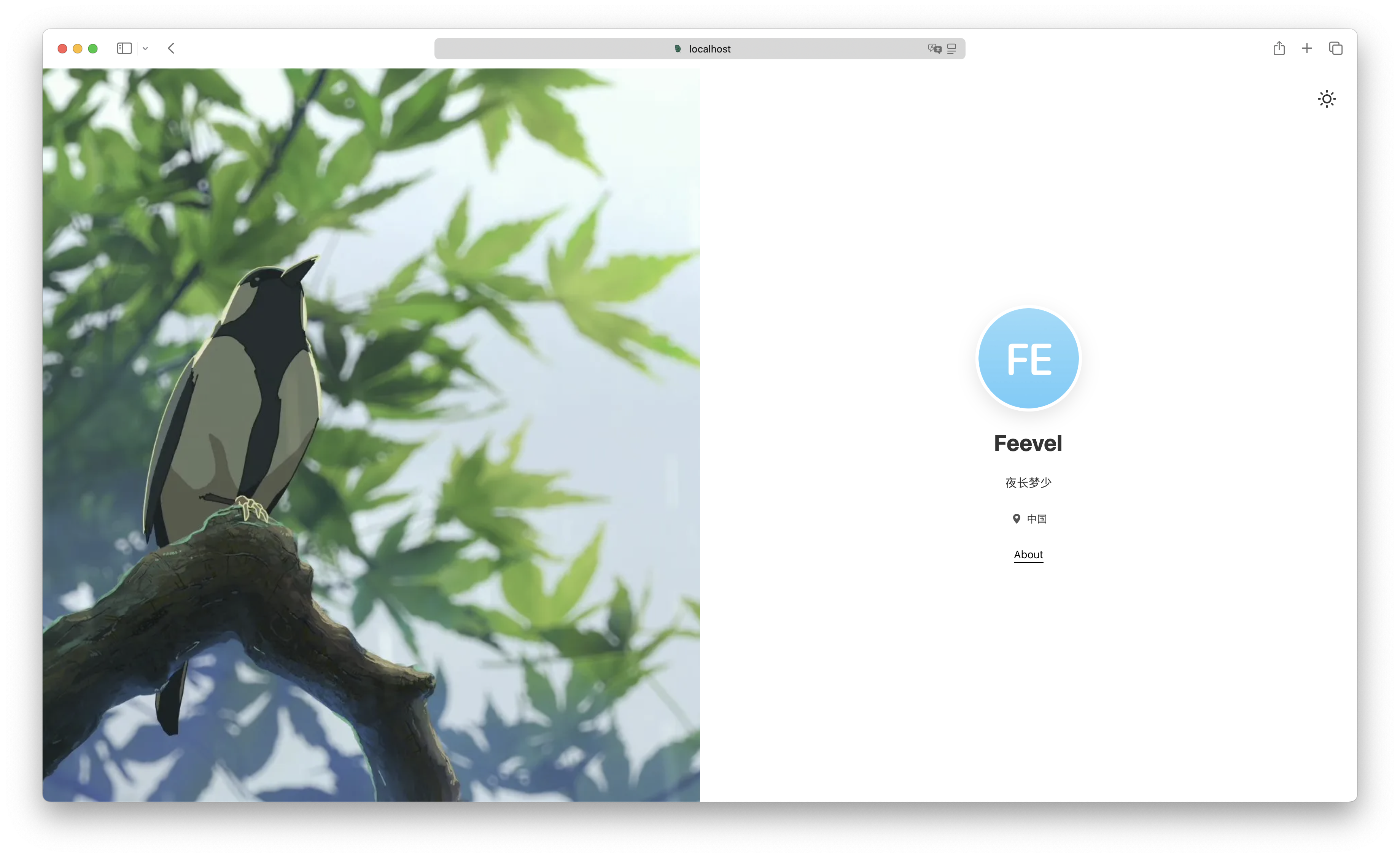
A minimal Astro-based personal landing page starter that uses config/site.yaml to configure site information, with dark mode and responsive layout support.
Explore the design
Compare the page layouts and mobile experience. Open any screenshot for a closer look.
Author preview
Author-provided preview
Preview provided in the project README.
One original preview is available. Open the full image to inspect the design.
Screenshots show visual appearance; interactive behavior may differ.
Recorded 2026-10-04View source
What stands out
A quick read of the recorded project description.
Uses config/site.yaml to centrally manage site configuration and navigation links
Local complex interactions are implemented through Preact island components
Built-in dark mode supports following the system or manual switching and persists the preference
Content pages use a Bento Grid layout and support configurable content modules
TypeScript is used throughout the site, with type definitions and path mapping
Template Details
Airy Personal Page is an Astro-based personal landing page template, and the project type is a starter. The page core is composed of Astro components, with Preact island components used for local complex interactions, and TypeScript used throughout the site. Navigation links, site configuration, and content data are centralized in config/site.yaml, and changes take effect after modification.
The template includes built-in dark mode, which can follow the system or be switched manually, and records the preference through local persistence; the layout is responsively adapted for mobile, tablet, and PC; content pages use a Bento Grid style and support configurable content modules. The project structure follows Astro's standard directory conventions, including directories for layouts, components, styles, types, and utility functions.
The build output is static files and can be deployed to static hosting services. The README states that Node.js v18.20.8 or higher is required, dependencies are installed with npm, and the development server runs on port 4321 by default. Astro's View transitions are not enabled by default and need to be configured manually according to the documentation.
AstroStarter
Is it right for your project?
Use Cases
- Building a personal homepage or navigation landing page
- Using it as a starting template for an Astro static site project
- Personal sites that need dark mode and responsive layout
- Deploying a purely static personal page on a static hosting service
Suitable For
- Developers who want to quickly customize a personal page with a configuration file
- Front-end developers familiar with Astro or willing to learn Astro
- Users who need static output and deployment to GitHub Pages, Vercel, Netlify, or Nginx
- Projects that prefer a TypeScript development experience
Getting started & customization
Use these recorded setup notes alongside the repository instructions for your chosen version.
- 1
Requires Node.js v18.20.8 or higher, and dependencies are installed with npm
- 2
Run npm run dev to start the local development server, accessible by default at http://localhost:4321
- 3
Run npm run build to generate static output in the dist/ directory
- 4
Site title, description, announcements, and other information are modified in config/site.yaml
- 5
View transitions are not enabled by default; refer to the Astro documentation to uncomment and configure the relevant settings
License & source material
Usage conditions & limitations
Free to use · keep license noticeThis entry covers the free version under the MIT license in the public repository; the free scope is the code of that version and does not mean that external services or third-party assets are free.
Must comply with when using
- The code of this version may be used, modified, used commercially, and distributed for free.
- When distributing copies or substantial portions of the code, retain the original author's copyright notice and the complete MIT license notice.
- The code is provided as is; warranties and limitations of liability are governed by the original license and applicable law.
Additional costs & items to verify
- Demo images, fonts, icons, and other third-party assets must be checked against their respective licenses and cannot be judged solely by the code's MIT license.
- External services such as domains, hosting, databases, payments, or AI may incur separate charges.
View Original Text Basis
https://github.com/ifeevel/airy-personal-page/blob/main/LICENSEhttps://github.com/ifeevel/airy-personal-page/blob/main/README.mdPermission is hereby granted, free of charge
Original License Text
Compiled by DeepSeek based on repository license and README ·2026-10-04. Results only cover the materials read; dependencies, images, fonts, and subsequent term changes are subject to their respective original texts.
Project checks & description sources
Template Information
- Source platforms
- Astro Themes
- Documentation and maintenance reference score
- More documented · 83 / 100
- Technologies
- Astro
- Website type
- Starter
How this score is calculated
Our heuristic uses license records (up to 30), a demo link (12), a preview (10), stars (15), recorded maintenance (15), description completeness (8), feature records (5) and classification data (5). It is not a code, security or performance test, or a Google score. A link does not establish tested functionality.
What to verify for this project
- Repository update recorded
- 2026-07-17
- Screenshot last checked
- 2026-10-04
A demo link is listed. Check it with your own content and viewport sizes; its presence does not confirm that forms, authentication or payments work.
The catalog identifies Astro as the primary stack. Check the actual dependency manifest and lockfile for versions and hosting requirements. These notes use recorded metadata, not a code audit or a deployment test.
Use a selection guide →How this description was prepared
AI-assisted description based on catalog records and repository material. Repository authors are not automatically the reviewers of this description.
Review declaration: [email protected] · 2026-10-05
Inspect the recorded source material
SHA-256: 073842c4b6660ec6cc1165d03fbdbd429f271ddea50fbabd2fa1236efac4b8e5
2026-10-04T23:10:01.123Z
Source file / repository# Airy Personal Page 一个极简、优美且高性能的个人引导页,专为现代 Web 打造。 <p align="center"> <span>简体中文</span> | <a href="README.en.md">English</a> </p> <p align="center"> <img alt="Astro" src="https://img.shields.io/badge/Astro-5.x-BC52EE?style=flat-square&logo=astro&logoColor=white"> <img alt="Preact" src="https://img.shields.io/badge/Preact-10.x-673AB8?style=flat-square&logo=preact&logoColor=white"> <img alt="TypeScript" src="https://img.shields.io/badge/TypeScript-5.x-3178C6?style=flat-square&logo=typescript&logoColor=white"> <img alt="Zero JS" src="https://img.shields.io/badge/Zero--JS-runtime-2EA44F?style=flat-square"> <img alt="License" src="https://img.shields.io/badge/license-MIT-blue?style=flat-square"> </p> <p align="center"><img src="show/SCR-20260209-meeq.png" width="50%"><img src="show/SCR-20260209-mjwj.png" width="50%"></p> <p align="center"><img src="show/SCR-20260209-mmyw.png" width="50%"><img src="show/SCR-20260209-mzdq.png" width="50%"></p> ## 🛠️ 技术栈 - **Astro 5.0+**: 现代高性能 Web 框架,默认零 JS 运行。 - **Preact**: 轻量级 React 替代方案,用于处理复杂的客户端交互岛屿。 - **TypeScript**: 全站使用 TypeScript 提供更可靠的开发体验和类型安全。 ## ✨ 项目特性 - **现代架构**: 基于 Astro 5.0+ 构建,零 JavaScript 运行时(Zero-JS),首屏加载极快。 - **混合组件化开发**: 核心页面采用 Astro 极致性能,局部复杂交互通过 **Preact (TSX) 岛屿** 实现,兼顾开发效率与运行性能。 - **配置化驱动**: 导航链接、站点配置、内容数据均由 `config/site.yaml` 承载,修改即生效。 - **暗色模式支持**: 内置深色主题,支持跟随系统或一键切换,并本地持久化记录偏好。 - **响应式设计**: 针对移动端、平板、PC 进行响应式优化,确保跨端体验一致。 - **Bento 布局**: 内容页面采用现代 Bento Grid 风格设计,支持可配置化的内容模块,兼具秩序感与美感。 ## 📂 项目结构 项目遵循 Astro 的标准目录规范,核心逻辑位于 `src/` 目录下: ```text ├── src/ │ ├── assets/ # 静态资源 (图片、字体) │ ├── components/ # 组件 │ │ ├── common/ # 通用 Preact 岛屿组件 │ │ ├── layout/ # 布局组件 │ │ └── theme/ # 主题切换组件 │ ├── constants/ # 常量定义 (运行时枚举、映射) │ ├── layouts/ # 布局组件 (页面骨架) │ ├── pages/ # 页面路由 (文件名即路径) │ ├── styles/ # 全局样式 (CSS) │ ├── types/ # 类型定义 (全局 TypeScript 定义) │ ├── utils/ # 工具函数 │ └── content.config.ts # 内容配置 (Astro) ├── public/ # 静态资源 (图片、favicon) ├── config/ # 配置文件 │ └── site.yaml # 站点信息配置 ├── astro.config.mjs # Astro 配置文件 ├── tsconfig.json # TypeScript 配置 (支持 JSX 路径映射) ├── package-lock.json # 项目依赖管理锁定文件 └── package.json # 项目依赖管理 ``` ## 🏗️ 架构说明 ### 1. 组件系统 (Components) 本项目采用了 Astro 的标准组件模式: - **BaseLayout**: 这是所有页面的“外壳”。它统一管理了 `<body>` 结构,包含主题切换组件以及 `BaseFooter`组件。 - **SplitLayout**: 分栏布局组件,可配置左右分栏比例,支持 Banner 和自定义内容插槽注入。 - **BaseHead**: 独立的头部组件。封装了 SEO Meta、Favicon、viewport 设置等通用逻辑,包含极小的 Inline JS 以防止页面闪烁,并支持插槽注入。 - **BaseFooter**: 独立的页脚组件,并针对分栏布局进行了适配。 - **ThemeToggle**: 独立的主题切换逻辑。 - **Preact Islands**: 对于涉及复杂状态管理的交互,使用 Preact 驱动的岛屿组件(`.tsx`),通过 `client:*` 指令实现局部水合。 - **Announcement**: 全局公告组件(Preact 岛屿)。基于 `site.yaml` 配置,支持多条公告轮播、语义化颜色(Info/Success/Warning/Error)以及基于 `localStorage` 的用户消除状态持久化。 ### 2. 样式管理 (Styling) | 文件 | 职责 | |------|------| | `src/styles/global.css` | 全局样式入口,导入基础样式 | | `src/styles/base/*.css` | CSS Reset、全局字体、主题颜色等基础组件样式 | | `src/components/*.css` | 组件样式 | ## 🚀 构建指南 ### 前置要求 - Node.js (v18.20.8 或更高版本) - npm ### 1. 安装依赖 ```bash npm install ``` ### 2. 启动本地开发服务器 ```bash npm run dev ``` 访问 `http://localhost:4321` 即可预览。 ### 3. 构建生产版本 ```bash npm run build ``` 构建产物将生成在 `dist/` 目录下,可直接部署到任何静态托管服务(Vercel, Netlify, GitHub Pages, Nginx 等)。 ## 🎨 定制指南 想要把这个主页改成你自己的?非常简单: 1. **修改站点配置**: 编辑 `config/site.yaml`,更新站点标题、描述、公告等信息。 2. **调整样式**: 如果需要个性化样式,可以修改 `src/styles/` 与 `src/components/` 目录下的 CSS 文件。 3. **添加/修改页面**: 在 `src/pages/` 目录下添加或修改页面文件。 4. **SEO 与 Sitemap**: 根据需要调整 `src/components/BaseHead.astro` 中的 SEO 设置以及 `astro.config.mjs` 中的 `site` 配置。 Astro 5.0+ 高级特性 `View transitions` 适配(默认未启用): 1. 参考 [Astro 文档](https://docs.astro.build/en/guides/client-side-routing/) 进行配置。 2. 取消注释 `ClientRouter` 相关适配代码。 3. 在全局组件或页面共用组件中,请根据需要添加 `transition:persist`、`transition:name` 等属性。 ## 📦 部署建议 由于是纯静态网站,推荐使用以下零成本方案: - **GitHub Pages**: 将代码推送到 GitHub,开启 Pages 服务即可(需配合 GitHub Actions 自动构建)。 - **Vercel / Netlify**: 关联 GitHub 仓库,自动识别 Astro 框架并一键发布。 - **自建 Nginx**: 将 `dist/` 目录上传至服务器,配置 Nginx 指向该目录的 `index.html`。 ## 📜 许可证 [MIT License](LICENSE)
Explore similar templates
Compare previews and descriptions within the same stack and category.

astrowind
AstroWind is a free, open-source Astro starter theme using Astro and Tailwind CSS, released under the MIT license.
Astro · Blog
accessible-astro-starter
An accessibility-focused Astro 6 starter template with WCAG 2.2 AA practices, Tailwind CSS 4, TypeScript, Prettier, ESLint, form validation, blog and portfolio examples, and preference toggles for dark mode, high contrast, and reduced motion.
Astro · Blog

astro-erudite
astro-erudite is an opinionated, unstyled static blog template built with Astro and native CSS, with no UI or CSS framework and minimal dependencies.
Astro · Portfolio

astro-shopify
A lightweight Shopify headless ecommerce starter template built with Astro and Svelte, integrating the Shopify Storefront API for product and inventory data, with built-in cart state management and basic add-to-cart and checkout flow.
Astro · E-commerce

brutal
Brutal is a neobrutalism Astro starter theme from ElianCodes, derived from the author's personal site and generalized. It includes a Markdown blog collection, build-time RSS and sitemap, image optimization, Tailwind CSS styling, and Biome checks, with no JavaScript by default.
Astro · Starter

qwind
Qwind is a free and open-source website template built on Qwik and Tailwind CSS, featuring directory-based routing via QwikCity, a Markdown blog, dark mode, and static deployment configuration.
Astro · Tool Site