Multi-site monorepo: each site has its own directory, build, and deployment while sharing the same components and design tokens
AstroStarter
astro-fleet — Astro Starter Template
By Indivar
Astro Fleet is a multi-site Astro monorepo starter that lets a single codebase serve multiple brand websites through shared components, per-site design tokens, and independent builds.
Explore the design
Compare the page layouts and mobile experience. Open any screenshot for a closer look.
Desktop homepage1 / 3
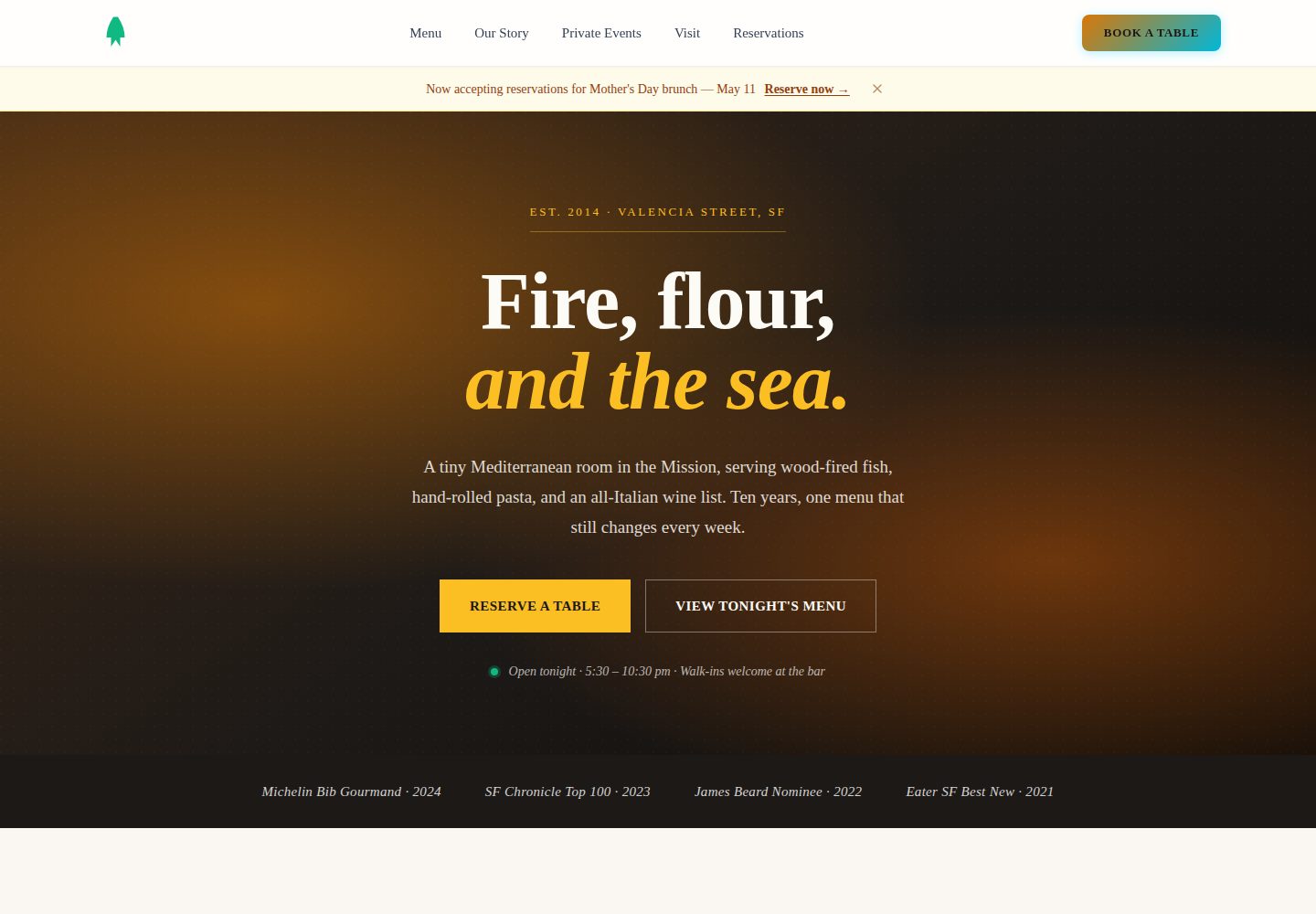
Desktop captureTop of page
Actual screenshot captured by the server browser.
All pages & views 3
Screenshots show visual appearance; interactive behavior may differ.
Recorded 2026-10-03View source
What stands out
A quick read of the recorded project description.
24 shared components and 3 layouts, using typed props and CSS variable theming, with no unnecessary JavaScript by default
Three design presets (Corporate, SaaS, Warm) switch colors and fonts per site without modifying component code
Site search, consent-gated analytics, and SEO are all opt-in; the search index is generated from the actual build output HTML
Responsive images are enabled by default: a script pre-generates AVIF and WebP at four widths, and the build rewrites <img> to <picture>
Provides site scaffolding, a self-hosting infrastructure template, and a CLAUDE.md playbook for AI assistants
Template Details
Astro Fleet is aimed at agencies and multi-brand companies, keeping multiple sites in a single monorepo. Each site lives in a sites/<domain> directory, shares components and layouts from packages/shared-ui, but has its own configuration, design tokens, and build output. The repository provides 24 shared components and 3 layouts, covering headers, footers, SEO head, CTAs, cards, forms, testimonials, breadcrumbs, pricing tables, FAQ accordions, team grids, timelines, hero carousels, section dividers, comparison tables, search, and analytics. The design token system includes three presets—Corporate, SaaS, and Warm—defined through TypeScript interfaces, so changing colors and fonts does not require touching component code. Site scaffolding can add new sites via bunx create-astro-fleet or scripts/new-site.sh, wiring them into configuration, styles, and the build process.
Features are opt-in. Site search is indexed by a post-build script from the actual generated HTML, requested only on first use, and opens with / or Cmd-K. Analytics loads no Google scripts by default; it requests them only after a visitor accepts, and global privacy control signals are treated as a refusal. SEO works automatically once site is set in astro.config.mjs, including per-page title and description, canonical, Open Graph, Twitter cards, JSON-LD, and sitemap. Responsive images are enabled by default: after placing photos in public/images/, run a Python script once to generate AVIF and WebP copies at four widths and commit them; during build, <img> tags with srcset are rewritten to <picture>.
The repository also includes a _headers template with security headers and enforced CSP, a contact form with a honeypot and success/error states, an optional Keystatic CMS example, self-hosted fonts, and an optional Docker Compose + Traefik + Caddy self-hosting infrastructure template. CLAUDE.md documents the full workflow from environment setup to DNS, so AI assistants can work within the repository's established structure.
Usage constraints: Bun 1.1+ and Node 20+ are required; deploying to Cloudflare Pages requires a free account; the machine adding photos needs Python 3 and Pillow, while the build itself does not require Python. Third-party assets such as demo images, fonts, and icons must be checked against their respective licenses and cannot be judged solely by the code's MIT license. External services such as domains and hosting may incur additional costs.
AstroStarter
Is it right for your project?
Use Cases
- Agencies maintaining a unified component library and build process for multiple client sites
- Multi-brand companies operating websites on separate domains under the same codebase
- Projects that need per-site design tokens while reusing page sections and form components
- Astro sites that want optional site search, privacy-first analytics, and SEO metadata
- Static sites that need pre-generated responsive images committed as artifacts, avoiding dynamic processing at build or request time
Suitable For
- Development teams using Astro and comfortable with a monorepo workflow
- Agencies that need to maintain components and builds uniformly for multiple brand or client sites
- Multi-site projects that want to switch design presets per site within the same repository
- Developers willing to use Bun as the package manager and optionally Python scripts for image processing
Getting started & customization
Use these recorded setup notes alongside the repository instructions for your chosen version.
- 1
Requires Bun 1.1+ and Node 20+; the build itself does not depend on Python.
- 2
After cloning the repository, run bun install, then bun run dev to view the starter site at localhost:4321.
- 3
After adding a site with bunx create-astro-fleet or ./scripts/new-site.sh, you must run bun install again.
- 4
Deploying to Cloudflare Pages requires a free account, using the npx wrangler pages deploy command.
- 5
The machine adding photos needs Python 3 and Pillow; run scripts/responsive-images.py to generate and commit image copies.
License & source material
Usage conditions & limitations
Free to use · keep license noticeThis entry covers the free version of the public repository under the MIT license; the free scope is the code of that version and does not imply that external services or third-party assets are free.
Must comply with when using
- You may use, modify, commercialize, and distribute the code of this version for free.
- When distributing copies or substantial portions of the code, retain the original author's copyright notice and the full MIT license notice.
- The code is provided as is; warranties and limitations of liability are governed by the original license and applicable law.
Additional costs & items to verify
- Requires Bun 1.1+ and Node 20+; deploying to Cloudflare Pages requires registering a free Cloudflare account.
- The machine adding photos needs Python 3 and Pillow installed separately; the build itself does not require Python.
- Scripts download hotlinked images from Unsplash and Pexels; using these assets must comply with the respective stock library's license terms.
- The Meridian demo site uses Keystatic CMS, which provides a /keystatic admin entry only in the development environment.
- The self-hosting infrastructure template is optional, uses Docker Compose, Traefik, and Caddy, and you bear the server and operational costs yourself.
- Deploying to Cloudflare Pages requires a Cloudflare account; external services such as domains and hosting may incur separate charges.
- Demo images, fonts, icons, and other third-party assets must be checked against their respective licenses and cannot be judged solely by the code's MIT license.
- External services such as domains, hosting, databases, payments, or AI may incur additional costs.
View Original Text Basis
Permission is hereby granted, free of charge
Original License Text
**Requires** Bun 1.1+ and Node 20+. A Cloudflare account is needed only to deploy, and it is free.
Original README
Python 3 with Pillow is the one extra, and only on the machine that adds photos
Original README
Downloads hotlinked Unsplash and Pexels photos, writes WebP, rewrites the URLs
Original README
the Meridian demo ships with [Keystatic](https://keystatic.com); admin at `/keystatic` in dev
Original README
optional Docker Compose + Traefik + Caddy for self-hosting
Original README
https://github.com/Indivar/astro-fleet/blob/main/LICENSEhttps://github.com/Indivar/astro-fleet/blob/main/README.mdA Cloudflare account is needed only to deploy
Original README
Compiled by DeepSeek based on repository license and README ·2026-10-03. Results only cover the materials read; dependencies, images, fonts, and subsequent term changes are subject to their respective original texts.
Project checks & description sources
Template Information
- Source platforms
- Astro Themes
- Documentation and maintenance reference score
- More documented · 87 / 100
- Technologies
- Astro
- Website type
- Starter
How this score is calculated
Our heuristic uses license records (up to 30), a demo link (12), a preview (10), stars (15), recorded maintenance (15), description completeness (8), feature records (5) and classification data (5). It is not a code, security or performance test, or a Google score. A link does not establish tested functionality.
What to verify for this project
- Repository update recorded
- 2026-09-26
- Screenshot last checked
- 2026-10-03
A demo link is listed. Check it with your own content and viewport sizes; its presence does not confirm that forms, authentication or payments work.
The catalog identifies Astro as the primary stack. Check the actual dependency manifest and lockfile for versions and hosting requirements. These notes use recorded metadata, not a code audit or a deployment test.
Use a selection guide →How this description was prepared
AI-assisted description based on catalog records and repository material. Repository authors are not automatically the reviewers of this description.
Review declaration: [email protected] · 2026-10-04
Inspect the recorded source material
SHA-256: 6a3d09abf4a36fcda33c0682f76b04995e3374e4ff6cfad2467fd5c3feeb3312
2026-10-03T15:05:08.750Z
Source file / repository# Astro Fleet
[](https://github.com/Indivar/astro-fleet/actions/workflows/ci.yml) [](https://github.com/Indivar/astro-fleet/releases) [](https://www.npmjs.com/package/create-astro-fleet) [](LICENSE)
**One codebase, many sites.** A multi-site Astro monorepo for agencies and
multi-brand companies.
Shared components, per-site design tokens, Turborepo builds, and independent
deployment to Cloudflare Pages, Vercel or your own VPS. Create a site in one
command, brand it with a preset, ship it on its own domain.
Site-wide search, consent-gated analytics and full SEO are built in and **off by
default** — each is one instruction away. Responsive images are on: write a
plain `<img>`, ship `<picture>` with AVIF and WebP.
**Built for AI-driven development.** The structure, typed props and single-file
site config exist so an AI assistant can work in this repo without guessing.
Tested extensively with [Claude Code](https://claude.ai/claude-code); works with
Gemini CLI and others.
---
## Get started
### With Claude Code
The fastest path from nothing to a live site:
```bash
git clone https://github.com/Indivar/astro-fleet.git
cd astro-fleet
bun install
claude
```
Then say what you want:
> Build me a site for acme.com. We fabricate structural steel for commercial
> builders in Auckland. The buyer is a project manager comparing fabricators on
> lead time and certification. I want them to request a quote.
Claude reads [`CLAUDE.md`](CLAUDE.md) automatically and follows the whole
process: scaffold, design, content, SEO, deploy.
**[Build a site with Claude →](docs/build-a-site-with-claude.md)** is the
human-readable walkthrough, with the exact sentences to type at each step.
### With the CLI
```bash
bunx create-astro-fleet # or: npm create astro-fleet
cd my-astro-fleet
bun install
bun run dev
```
Prompts for a target directory, first-site domain and design preset. Use
`--domain` and `--preset` to skip them.
### By hand
```bash
git clone https://github.com/Indivar/astro-fleet.git
cd astro-fleet
bun install
bun run dev # starter site at localhost:4321
```
**Requires** Bun 1.1+ and Node 20+. A Cloudflare account is needed only to
deploy, and it is free. Python 3 with Pillow is the one extra, and only on the
machine that adds photos: it writes the image renditions that get committed.
The build needs nothing beyond Bun.
---
## Everyday commands
```bash
# Develop
bun run dev # every site (4321)
bun run dev --filter=acme.com # one site
bun run dev --filter=acme.com -- --port 4322 # a second alongside
# Build
bun run build # all, in parallel
bun run build --filter=acme.com # one
# Typecheck and lint
bun run lint
# Add a site
bunx create-astro-fleet add acme.com saas # or:
./scripts/new-site.sh acme.com saas
bun install # always, after adding
# Deploy
npx wrangler pages deploy sites/acme.com/dist \
--project-name=acme-com --branch=main
# Images (Python 3 + Pillow, once per new photo; renditions are committed)
python3 scripts/responsive-images.py acme.com # AVIF + WebP at 4 widths
python3 scripts/localize-stock-images.py acme.com # bring Unsplash/Pexels hotlinks in-house
python3 scripts/responsive-images.py --check # no large image without srcset
python3 scripts/image-weight.py # bytes per page, before vs after
# One canonical host per zone (apex -> www or the reverse)
python3 scripts/cf-canonical-redirects.py --check
# Self-hosted infrastructure
./scripts/setup-infra.sh acme.com,other.com
```
| Script | Does |
|---|---|
| `scripts/new-site.sh` | Copies the starter into `sites/<domain>` and applies a preset |
| `scripts/setup-infra.sh` | Generates the Caddyfile and `.env` for the self-hosted stack |
| `scripts/responsive-images.py` | Writes AVIF and WebP renditions plus a manifest into `public/images/_r/`; `--check` fails the build on a large image without `srcset` |
| `scripts/localize-stock-images.py` | Downloads hotlinked Unsplash and Pexels photos, writes WebP, rewrites the URLs; `--check` fails on any remaining hotlink |
| `scripts/image-weight.py` | Per-page image bytes at 375 and 1440 px, from the built HTML |
| `scripts/cf-canonical-redirects.py` | One 301 rule per Cloudflare zone from `infrastructure/zones.json`; `--check` verifies with HEAD requests |
| `packages/shared-ui/scripts/search-index.mjs` | Builds the search index from the HTML that shipped |
---
## Turning features on
Everything is opt-in. Full detail in
[`CLAUDE.md`](CLAUDE.md) §6 and the [component docs](docs/components/README.md).
### Site search
Add the index generator to the site's build, then switch it on:
```jsonc
// package.json
"build": "astro build && node ../../packages/shared-ui/scripts/search-index.mjs"
```
```astro
<BaseLayout search searchPlaceholder="Pricing, integrations, security" ...>
```
Built from the HTML that actually shipped, fetched on first use and never on
load, about 1.8 KB gzipped per page. `/` or Cmd-K opens it. No search service,
no server, no subscription.
### Analytics, behind consent
```astro
<BaseLayout gaId="G-XXXXXXXXXX" privacyHref="/privacy/" ...>
```
That is the whole integration. **Nothing is requested from Google until the
visitor accepts** — stricter than the usual Consent Mode v2 pattern, which
loads the script immediately with tracking denied. Global Privacy Control is
read as a decline. `requireConsent={false}` restores standard behaviour.
Your numbers will be lower than a site that tags everyone. They will also match
what your privacy page says.
### SEO
Automatic once `site` is set in `astro.config.mjs`: per-page titles and
descriptions, canonicals, Open Graph, Twitter cards, JSON-LD, sitemap.
[SEO Recipes](docs/seo-recipes.md) covers the rest — per-page OG images,
git-based `lastmod`, `llms.txt` for answer engines, IndexNow, fuzzy 404
redirects, one canonical host, a CSP that does not break the form, and
build-time validation.
### Responsive images
On by default. Drop a photo in `public/images/`, run
`python3 scripts/responsive-images.py <site>` once, commit the renditions.
Every `<img>` in the built HTML that has them becomes `<picture>` with AVIF
and WebP `srcset`, `width`/`height` and lazy loading. Nothing is generated at
build time and nothing is resized on request. [Images](docs/images.md) has the
per-image controls and the two checks.
---
## What's included
- **24 shared components + 3 layouts** — header, footer, SEO head, CTA blocks,
cards, forms, testimonials, breadcrumbs, pricing tables, FAQ accordions, team
grids, timelines, hero sliders, section dividers, comparison tables, search
and analytics. Typed props, CSS-variable theming, zero JS unless a component
needs it.
- **Design token system** — three presets (Corporate, SaaS, Warm) behind a
TypeScript interface. Change colours and fonts per site without touching
component code.
- **Site scaffolder** — `bunx create-astro-fleet` or `./scripts/new-site.sh`,
wiring config, styles and the build pipeline.
- **Search and analytics**, as above.
- **Responsive images, pre-generated** — AVIF and WebP at four widths, written
once by a script and committed; the build rewrites `<img>` to `<picture>`.
Two checks fail on a large image without `srcset` or a stock-photo hotlink.
- **Security headers with an enforced CSP** in the starter's `_headers`, with
the placeholders for the form endpoint and analytics marked, and a script
that gives each zone one canonical host.
- **Hardened contact form** — honeypot, success and error states, and a
documented submit handler that counts the lead only after the endpoint said
yes.
- **CMS-ready** — the Meridian demo ships with [Keystatic](https://keystatic.com);
admin at `/keystatic` in dev, content committed as markdown.
[Adding a CMS](docs/adding-a-cms.md) covers the pattern and the alternatives.
- **Self-hosted fonts** — the Astro Fonts API downloads at build time and serves
from your domain. No runtime third-party requests.
- **Framework-agnostic** — native `.astro` files throughout. Add React, Vue,
Svelte, Solid or Preact to any site via Astro's
[Islands Architecture](https://docs.astro.build/en/concepts/islands/).
- **Infrastructure templates** — optional Docker Compose + Traefik + Caddy for
self-hosting.
- **An AI operating manual** — [`CLAUDE.md`](CLAUDE.md) carries the whole path
from prerequisites to DNS, including nine failure modes that ship silently in
real projects.
---
## Live demos
Three fully-built sites. Same monorepo, same shared components, three
genuinely different looks — the presets are complete site personalities, not
colour swaps.
| Preset | Demo | Use case | Live |
|---|---|---|---|
| **Corporate** | [Meridian Advisory](sites/meridian-advisory.com) | Management consulting firm | [astro-fleet-meridian.pages.dev](https://astro-fleet-meridian.pages.dev) |
| **SaaS** | [Flux Analytics](sites/flux-analytics.com) | Developer-tool product site | [astro-fleet-flux.pages.dev](https://astro-fleet-flux.pages.dev) |
| **Warm** | [Olive & Vine](sites/olive-and-vine.com) | Neighbourhood restaurant | [astro-fleet-olive.pages.dev](https://astro-fleet-olive.pages.dev) |
<table>
<tr>
<td align="center"><strong>Corporate → Meridian Advisory</strong></td>
<td align="center"><strong>SaaS → Flux Analytics</strong></td>
<td align="center"><strong>Warm → Olive & Vine</strong></td>
</tr>
<tr>
<td><img src="docs/screenshots/meridian-home.png" alt="Meridian Advisory home page — corporate consulting firm with editorial hero, dark stat strip, and navy/blue palette" /></td>
<td><img src="docs/screenshots/flux-home.png" alt="Flux Analytics home page — SaaS product with dark hero, code mockup, and emerald accents" /></td>
<td><img src="docs/screenshots/olive-home.png" alt="Olive & Vine home page — restaurant with warm editorial hero, serif display type, and amber accents" /></td>
</tr>
<tr>
<td><img src="docs/screenshots/meridian-services.png" alt="Meridian Advisory expertise page — numbered practice areas in editorial layout" /></td>
<td><img src="docs/screenshots/flux-services.png" alt="Flux Analytics product page — dark six-card feature grid with icons and tags" /></td>
<td><img src="docs/screenshots/olive-services.png" alt="Olive & Vine menu page — dotted-line typography grouped by course" /></td>
</tr>
<tr>
<td><img src="docs/screenshots/meridian-contact.png" alt="Meridian Advisory contact page — briefing request form with global office grid" /></td>
<td><img src="docs/screenshots/flux-contact.png" alt="Flux Analytics book-a-demo page — split layout with benefits list and form" /></td>
<td><img src="docs/screenshots/olive-contact.png" alt="Olive & Vine reservations page — address, hours, and reservation form" /></td>
</tr>
</table>
Each composes the **same shared components**. The navigation, section structure,
hero layouts and typography are unique to each brand.
---
## Built with Astro Fleet
Eight sites in production on this codebase, across eight industries, plus one
landing page that shares a domain with the site above it and looks nothing like
it. Same components, same tokens, same build.
<table>
<tr valign="top">
<td width="45%"><a href="https://www.edubold.com"><img src="docs/screenshots/production/edubold.jpg" alt="EduBold home page — an editorial serif headline on pale green, with a hairline-ruled register of the day's figures below it" /></a></td>
<td>
### [edubold.com](https://www.edubold.com)
**School management ERP for Indian schools and trusts.** Admissions, fees,
attendance, payroll and double-entry accounts on one set of records.
Set as a ledger, because that is what every Indian school already runs on:
hairline rules, a section index down the left margin, and red reserved for
totals and corrections. The homepage opens with the questions a principal asks
at 8am, each facing its answer.
Site search, consent-gated GA4, and a blog with pagination and archives. 46
pages.
</td>
</tr>
<tr valign="top">
<td><a href="https://edubold.com/a-school-day/"><img src="docs/screenshots/production/aschoolday.jpg" alt="A School Day landing page — dark navy starfield, a live clock and timeline down the left margin, sans-serif display headline" /></a></td>
<td>
### [edubold.com/a-school-day/](https://edubold.com/a-school-day/)
**The same site, and nothing like it.** A long-form landing page that walks
through one school day from first bell to last, on the same domain as the page
above.
Dark navy against pale green. A live clock and timeline down the margin instead
of a section index. Sans-serif display type instead of the serif. Scroll-driven
scenes — a timetable that solves itself, a receipt posting to its journal
entry — instead of a static register.
Here because it makes the point better than any argument: **the codebase does
not impose a look.** Nothing in the shared layer had to be fought to build it.
</td>
</tr>
<tr valign="top">
<td><a href="https://www.moiengineering.com"><img src="docs/screenshots/production/moi.jpg" alt="MOI Engineering home page — condensed uppercase headline on navy, with an orange technical drawing of meshing involute gears" /></a></td>
<td>
### [moiengineering.com](https://www.moiengineering.com)
**Packaging and wrapping machinery, built since 1960.** Cigarette making and
packing lines, capsule machines for pharma, and high-speed wrapping, bundling
and cartoning systems, shipped to manufacturers in 20+ countries.
Drawn as an engineering document: drawing numbers, revision marks, a technical
grid, and a hero of true involute gears meshing in WebGL. The catalogue runs to
28 machines, each with a real specification sheet behind it.
The largest site here at 77 pages.
</td>
</tr>
<tr valign="top">
<td><a href="https://www.hybridagrobots.com"><img src="docs/screenshots/production/hybrid.jpg" alt="Hybrid Agrobots home page — dark hero with a live egg-sorting conveyor scene in lime and black" /></a></td>
<td>
### [hybridagrobots.com](https://www.hybridagrobots.com)
**Computer-vision grading and sorting machines** for eggs, apples, fruit and
vegetables, sorting by size, weight, colour and grade.
The hero is the product: a live sorting line rendered in WebGL, eggs moving
under a vision head that grades and rejects them as you watch. Eleven machines,
each with its own bespoke scene, lazily loaded and replaced by a still on
mobile so the phone budget survives.
</td>
</tr>
<tr valign="top">
<td><a href="https://boldreach.io"><img src="docs/screenshots/production/boldreach.jpg" alt="BoldReach home page — large centred headline in black on white, above a product screenshot of the CRM risk dashboard" /></a></td>
<td>
### [boldreach.io](https://boldreach.io)
**A field-sales CRM that fills itself in.** Voice notes become contacts and
deals, the pipeline nudges reps on WhatsApp, and deals about to slip get flagged
before anyone has to ask.
The biggest build here: **512 pages**, generated across five regional variants
so pricing, currency and compliance copy match the reader's market without five
separate sites.
</td>
</tr>
<tr valign="top">
<td><a href="https://www.indivar.com"><img src="docs/screenshots/production/indivar.jpg" alt="Indivar home page — independent technology consulting" /></a></td>
<td>
### [indivar.com](https://www.indivar.com)
**Independent technology consulting**: architecture, cloud and delivery, for
organisations that have already been sold a platform and now need someone
without a stake in it.
95 pages including a migrated blog, service and product catalogues, and case
studies. Built to read as a consultancy rather than a vendor, which is the whole
positioning.
</td>
</tr>
<tr valign="top">
<td><a href="https://www.stakteck.com"><img src="docs/screenshots/production/stakteck.jpg" alt="StakTeck home page — IT staffing and recruitment across India" /></a></td>
<td>
### [stakteck.com](https://www.stakteck.com)
**IT staffing, contract hiring and staff augmentation across India.** Job
listings, a talent-pipeline view, and industry expertise grids.
58 pages. The clearest example of the design-token system doing its job: a
recruitment brand sharing every component with an industrial machinery site and
looking nothing like it.
</td>
</tr>
<tr valign="top">
<td><a href="https://www.vairi.com"><img src="docs/screenshots/production/vairi.jpg" alt="Vairi Technologies home page — AI-enhanced software and automation, Auckland" /></a></td>
<td>
### [vairi.com](https://www.vairi.com)
**AI-enhanced software development, business automation, and AI-driven SEO and
marketing.** Auckland, New Zealand.
The only site here outside India, and the one that most exercises the
token system's typography settings. Service pillars, a pricing table, process
steps and an assessment form.
</td>
</tr>
<tr valign="top">
<td><a href="https://www.claspt.app"><img src="docs/screenshots/production/claspt.jpg" alt="Claspt home page — encrypted markdown notes and password vault" /></a></td>
<td>
### [claspt.app](https://www.claspt.app)
**Encrypted markdown notes and a password vault**, on the Microsoft Store, macOS
and Linux.
A product site rather than a company one: download paths per platform, a
documentation tree, and a blog. The only entry here that was already running
GA4 before this repo grew an analytics component.
</td>
</tr>
</table>
Every URL was requested and returned 200 on 23 August 2026. The consent bar
along the bottom of each shot is the [analytics component](#analytics-behind-consent)
behaving correctly on a first visit — at that moment nothing has been requested
from Google.
If you ship a site with Astro Fleet, open a PR adding it here.
---
## Documentation
**Start here**
- [Build a site with Claude](docs/build-a-site-with-claude.md) — clone to live domain, step by step
- [Getting Started](docs/getting-started.md) — clone to first deploy in 15 minutes
- [`CLAUDE.md`](CLAUDE.md) — the operating manual Claude reads. Worth reading yourself
**Building**
- [Adding a Site](docs/adding-a-site.md) — create and configure additional sites
- [Components](docs/components/README.md) — one page per component: what it is, when to use it,
every setting in plain words, a copy-paste example, and the mistakes people make
- [Design Tokens](docs/design-tokens.md) — presets and custom palettes
- [Framework Integrations](docs/framework-integrations.md) — React, Vue, Svelte, islands, view transitions
- [Adding a CMS](docs/adding-a-cms.md) — the Keystatic pattern, and when to pick something else
- [Translating a Site](docs/i18n.md) — **optional.** A second language under its own URL prefix,
with translated pages held back from Google until a person has read them
**Shipping**
- [SEO Recipes](docs/seo-recipes.md) — OG images, `llms.txt`, IndexNow, canonical host, CSP, validation
- [Images](docs/images.md) — pre-generated renditions, stock-photo localisation, the checks
- [Deployment](docs/deployment.md) — Cloudflare Pages, Vercel, Netlify, self-hosted, security headers
- [AI Workflow](docs/ai-workflow.md) — prompts, tool setup, AI-driven patterns
- [Changelog](CHANGELOG.md) — what changed, and when
---
## Stack
Astro 6 · Bun · Turborepo 2 · Tailwind CSS 4 · TypeScript · static-first, zero JS
by default · works with React, Vue, Svelte, Solid and Preact
## License
MIT. Use it for anything. See [LICENSE](LICENSE).
## Credits
Built by [Indivar Software Solutions](https://indivar.com), a software company
in India and New Zealand. We use Astro Fleet to run our own portfolio of company
websites — the seven listed above.
Explore similar templates
Compare previews and descriptions within the same stack and category.

astrowind
AstroWind is a free, open-source Astro starter theme using Astro and Tailwind CSS, released under the MIT license.
Astro · Blog
accessible-astro-starter
An accessibility-focused Astro 6 starter template with WCAG 2.2 AA practices, Tailwind CSS 4, TypeScript, Prettier, ESLint, form validation, blog and portfolio examples, and preference toggles for dark mode, high contrast, and reduced motion.
Astro · Blog

astro-erudite
astro-erudite is an opinionated, unstyled static blog template built with Astro and native CSS, with no UI or CSS framework and minimal dependencies.
Astro · Portfolio

astro-shopify
A lightweight Shopify headless ecommerce starter template built with Astro and Svelte, integrating the Shopify Storefront API for product and inventory data, with built-in cart state management and basic add-to-cart and checkout flow.
Astro · E-commerce

brutal
Brutal is a neobrutalism Astro starter theme from ElianCodes, derived from the author's personal site and generalized. It includes a Markdown blog collection, build-time RSS and sitemap, image optimization, Tailwind CSS styling, and Biome checks, with no JavaScript by default.
Astro · Starter

qwind
Qwind is a free and open-source website template built on Qwik and Tailwind CSS, featuring directory-based routing via QwikCity, a Markdown blog, dark mode, and static deployment configuration.
Astro · Tool Site