API authentication based on Laravel Sanctum, supporting multi-device token management and logout
LaravelStarter
ims-laravel-api-starter — Laravel Starter Template
By Innovix-Matrix-Systems
A Laravel-based backend API starter with built-in Sanctum authentication, RBAC, OTP login, API documentation and observability tools, plus Docker and Pest test configuration.
Explore the design
Compare the page layouts and mobile experience. Open any screenshot for a closer look.
Author preview
Author-provided preview
Preview provided in the project README.
One original preview is available. Open the full image to inspect the design.
Screenshots show visual appearance; interactive behavior may differ.
Recorded 2026-10-02View source
What stands out
A quick read of the recorded project description.
Configurable mobile OTP login flow with rate limiting
RBAC access control composed of roles and permissions
Provides Scalar, Swagger UI and OpenAPI specification simultaneously, compatible with Postman
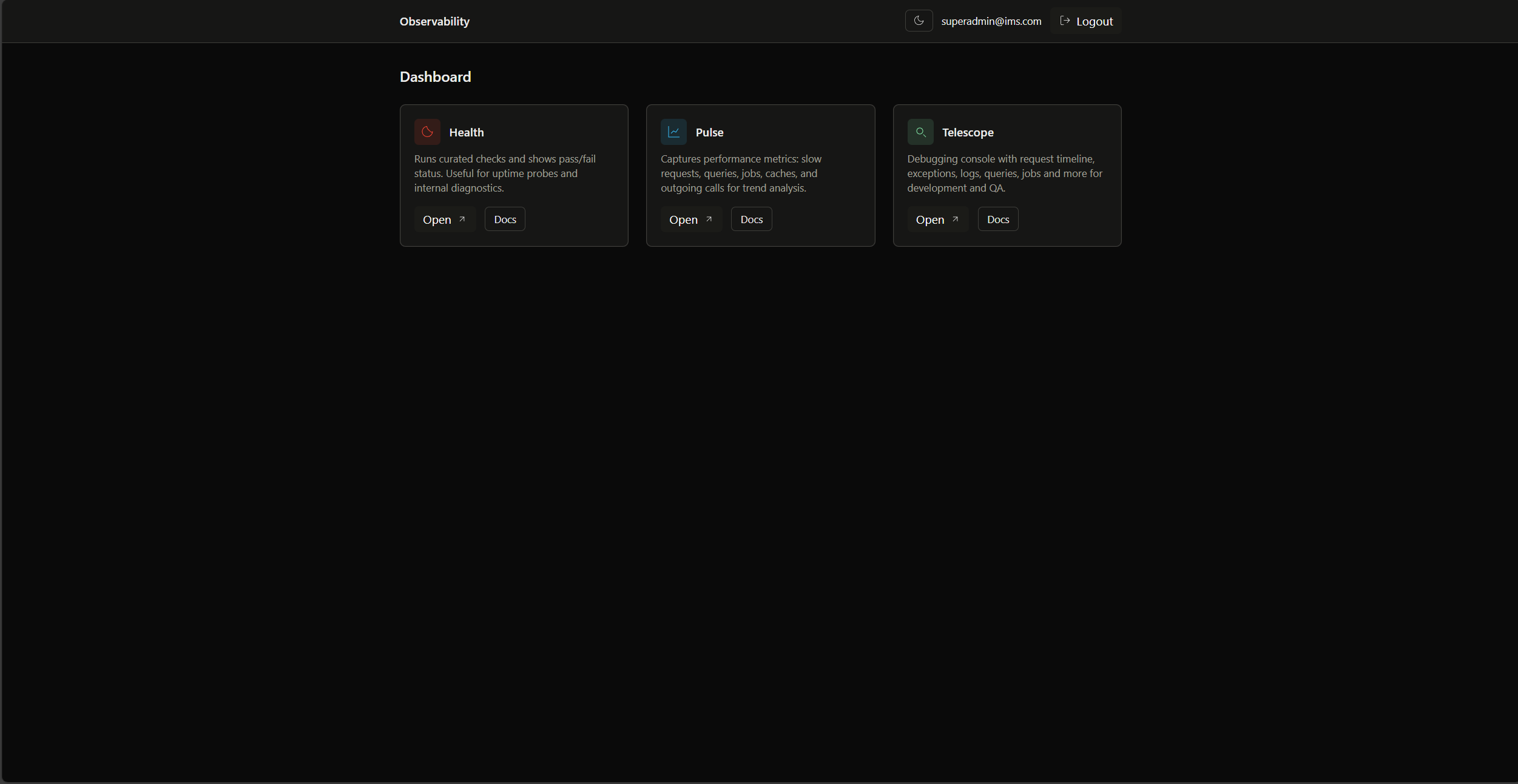
Unified observability dashboard integrating Telescope, Pulse and Health (requires authentication)
Queue-driven user data import/export, supporting Excel/CSV and task progress tracking
Template Details
ims-laravel-api-starter is a Laravel-based backend API starter aimed at quickly building backend services with authentication and permission systems. The project organizes code using the repository pattern, DTOs and a service layer, and provides code generation commands (such as make:crud, make:dto, make:service, make:repo) to generate skeleton files.
Functionally, authentication is based on Laravel Sanctum personal access tokens, supporting multi-device login and logout, as well as a configurable mobile OTP login flow (with rate limiting). For permissions, it provides an RBAC system composed of roles and permissions. API documentation is available via Scalar UI, Swagger UI and an OpenAPI specification, and is compatible with Postman. Observability integrates Telescope, Pulse and Health into a unified dashboard, and these tools require authentication to access.
For data and tasks, it includes user management, data import/export, a media library and backups. Bulk user import/export is processed through queues and supports Excel/CSV, with task progress tracking and scheduled cleanup of completed tasks and temporary files. Internationalization currently provides English and Bengali, and can be extended as needed. The project includes a Docker containerized development environment, Git hooks and IDE helper tools, and tests use Pest PHP and Mockery.
Usage limitations: the runtime requires PHP 8.2+, MySQL 8.0+, Node.js 16+ and Composer; the default seeded account is [email protected] / 123456, which is only suitable for the development environment and must be changed before deployment. The code is MIT licensed, but third-party assets such as demo images, fonts and icons require separate license verification, and external services such as domains, hosting and databases may incur additional charges.
LaravelStarter
Is it right for your project?
Use Cases
- Need to quickly build a backend API service with authentication and permission systems
- Provide token authentication and OTP login interfaces for mobile or multi-device clients
- Projects that need a unified view of API documentation and runtime observability data
- Process bulk user data import/export through queues and track task progress
Suitable For
- Backend projects using Laravel that need ready-made authentication, RBAC and API documentation skeletons
- Teams that want to organize code with the repository pattern, DTOs and a service layer
- Developers who need a Docker development environment and Pest testing infrastructure
- API projects that need multiple languages (English, Bengali) and can be extended as needed
Getting started & customization
Use these recorded setup notes alongside the repository instructions for your chosen version.
- 1
Environment requirements: PHP 8.2+, MySQL 8.0+, Node.js 16+ and Composer.
- 2
Run composer install, npm install, npx husky install in sequence, copy .env.example to .env, then run php artisan migrate --seed.
- 3
The default seeded account [email protected] / 123456 is for development only and must be changed before deployment.
- 4
Observability tools (Telescope, Pulse, Health) require authentication to access.
- 5
The code is MIT licensed, but third-party assets such as demo images, fonts and icons require separate license verification.
License & source material
Usage conditions & limitations
Free to use · keep license noticeThis entry covers the free version under the MIT license in the public repository; the free scope is the code of this version and does not mean external services or third-party assets are free.
Must comply with when using
- Free use, modification, commercial use and distribution of this version's code are permitted.
- When distributing copies or substantial portions of the code, retain the original author's copyright notice and the full MIT license notice.
- The code is provided as is; warranties and liability limitations are governed by the original license and applicable law.
Additional costs & items to verify
- The default seeded account [email protected] / 123456 is for the development environment only and must be changed before deploying to production.
- The dashboards and health check pages of the observability tools (Telescope, Pulse, Health) require login authentication to access.
- The runtime requires PHP 8.2+, MySQL 8.0+, Node.js 16+ and Composer; installation and operation are not possible if these are not met.
- Demo images, fonts, icons and other third-party assets must be checked against their respective licenses and cannot be judged solely by the code's MIT license.
- External services such as domains, hosting, databases, payments or AI may incur additional charges.
View Original Text Basis
Permission is hereby granted, free of charge
Original License Text
**Super Admin**: [email protected] / 123456
Original README
Observability tools require authentication
Original README
https://github.com/Innovix-Matrix-Systems/ims-laravel-api-starter/blob/main/LICENSE.mdhttps://github.com/Innovix-Matrix-Systems/ims-laravel-api-starter/blob/main/README.md- PHP 8.2+ - MySQL 8.0+ - Node.js 16+ - Composer
Original README
Compiled by DeepSeek based on repository license and README ·2026-10-02. Results only cover the materials read; dependencies, images, fonts, and subsequent term changes are subject to their respective original texts.
Project checks & description sources
Template Information
- Source platforms
- GitHub
- Documentation and maintenance reference score
- More documented · 87 / 100
- Technologies
- Laravel
- Website type
- Starter
How this score is calculated
Our heuristic uses license records (up to 30), a demo link (12), a preview (10), stars (15), recorded maintenance (15), description completeness (8), feature records (5) and classification data (5). It is not a code, security or performance test, or a Google score. A link does not establish tested functionality.
What to verify for this project
- Repository update recorded
- 2026-01-17
- Screenshot last checked
- 2026-10-02
A demo link is listed. Check it with your own content and viewport sizes; its presence does not confirm that forms, authentication or payments work.
The catalog identifies Laravel as the primary stack. Check the actual dependency manifest and lockfile for versions and hosting requirements. These notes use recorded metadata, not a code audit or a deployment test.
Use a selection guide →How this description was prepared
AI-assisted description based on catalog records and repository material. Repository authors are not automatically the reviewers of this description.
Automatically checked against source and license rules; no manual editorial review.
Inspect the recorded source material
SHA-256: bf6f95329de424d8174870a475bab1333aec0b136006462d0b31cdb09c3191c9
2026-10-02T22:40:41.392Z
Source file / repository# IMS Laravel API Starter A production-ready Laravel API starter kit with enterprise-grade features. Built-in authentication, RBAC, comprehensive API documentation, advanced observability tools, and production-ready testing infrastructure. Designed for rapid development with clean architecture patterns. <p align="center"> <img src="image1.png" alt="Observability Dashboard" width="100%" /> <br> <em>Observability Dashboard</em> </p> <p align="center"> <img src="image2.png" alt="Scalar API Dashboard" width="100%" /> <br> <em>Scalar API Documentation</em> </p> ## Features - 🔐 **Laravel Sanctum** - Secure API authentication with personal access tokens - 📱 **Multi-Device Login** - Device-specific token management with logout capabilities - 🔢 **OTP Authentication** - Configurable phone-based OTP login flow with rate limiting - 🔑 **RBAC System** - Role-based access control with permissions and roles - 📚 **API Documentation** - Scalar, Swagger UI, OpenAPI with Postman compatibility - 📊 **Observability** - Telescope, Pulse, Health with unified dashboard - 🛠️ **Clean Architecture** - Repository pattern, DTOs, service layer - 💾 **Data Management** - User management, data export/import, media library, backups - 📤 **Background Import/Export** - Queue-based bulk user data processing with Excel/CSV support - 📊 **Job Tracking** - Real-time monitoring of background jobs with progress tracking - 🧹 **Automated Cleanup** - Scheduled cleanup of completed jobs and temporary files - 🌍 **Internationalization** - Multi-language support (English, Bengali), ability to add more as needed - 🐳 **Docker Support** - Complete containerized development environment - ⚡ **Development Tools** - Code generators, IDE helpers, Git hooks - 🧪 **Production-Ready Testing** - Pest PHP with Mockery, comprehensive feature/unit tests, queue testing, DTO validation ## Quick Start ### Prerequisites - PHP 8.2+ - MySQL 8.0+ - Node.js 16+ - Composer ### Development Setup 1. **Clone and setup** ```bash git clone [email protected]:Innovix-Matrix-Systems/ims-laravel-api-starter.git cd ims-laravel-api-starter cp .env.example .env ``` 2. **Install dependencies** ```bash composer install npm install npx husky install ``` 3. **Database setup** ```bash php artisan migrate --seed ``` 4. **Start development** ```bash php artisan serve ``` ### Default Credentials - **Super Admin**: [email protected] / 123456 **Development Environment Compatibility:** Works seamlessly with modern development tools including [Laravel Herd](https://herd.laravel.com/) (blazing fast native Laravel environment), [FlyEnv](https://www.flyenv.com/) (all-in-one full-stack environment), and [Laragon](https://laragon.org/) (lightweight Windows development environment) ## 📖 Documentation Our comprehensive documentation covers everything from setup to advanced features. Learn about background job processing, OTP authentication configuration, API endpoints, monitoring tools, and deployment strategies. Whether you're setting up for the first time or scaling for production, our detailed guides provide step-by-step instructions and best practices. 🌐 **[GitHub Wiki](https://github.com/Innovix-Matrix-Systems/ims-laravel-api-starter/wiki)** *The [`docs/`](docs/) folder contains a local mirror of the wiki for offline access.* ### API Documentation - **Scalar UI**: http://localhost:8000/docs - **Swagger UI**: http://localhost:8000/docs/swagger - **OpenAPI Spec**: http://localhost:8000/docs/openapi.yaml ### Observability - **Dashboard**: http://localhost:8000/observability - **Health Check**: http://localhost:8000/health > **Note**: Observability tools require authentication ## Commands ```bash # Code generation php artisan make:crud Product // All necessary skeleton files php artisan make:dto ProductDTO php artisan make:service Product/ProductService php artisan make:repo Product/ProductRepository // and many more, check wiki! # Code quality php artisan pint php artisan optimize:clear php artisan ide-helper:generate php artisan ide-helper:models -N // and many more, check wiki! ``` ## License This project is licensed under the `MIT License` - see the [LICENSE.md](LICENSE.md) file for details.
Explore similar templates
Compare previews and descriptions within the same stack and category.

sage
Sage is a WordPress starter theme maintained by Roots, using Laravel Blade components and templates, Vite builds, Tailwind CSS, and built-in block editor support.
Laravel · Starter

wave
Wave is an open-source SaaS starter kit built on Laravel and released under the MIT license.
Laravel · SaaS

filament-starter
A Laravel TALL stack starter template maintained by Log1x, with a preconfigured Filament admin panel and plugins including Curator, Gravatar, Exceptions, Jobs Monitor, Breezy, Peek, and Logger.
Laravel · Starter

electrik
Electrik is a Laravel SaaS starter kit installed as a Composer package, with authentication, teams, Stripe subscription billing, and the Slate 3 interface under the Electrik\ namespace rather than copied into App\.
Laravel · SaaS

php-saas
php-saas is a Laravel-based SaaS starter positioned as an everything-included kit. It generates new projects via a global Composer command and includes authentication with two-factor, API tokens, Stripe and Paddle billing, and project, team, and organization management.
Laravel · SaaS

filament-jetstream
A Laravel starter kit that implements Jetstream-like authentication and account features using Filament's native panels and components. It includes login, registration, two-factor authentication, session management, user profiles, and optional teams and API tokens.
Laravel · Starter