Flask backend paired with an HTML/CSS/JavaScript frontend, with a clear structure
HTMLStarter
Byte.com_course-website — HTML Starter Template
By Jack5237
A Flask-based website template for educational institutions and course showcases, where course content is maintained through .mdx files in the templates/data directory, allowing courses to be added or removed without changing code.
Explore the design
Compare the page layouts and mobile experience. Open any screenshot for a closer look.
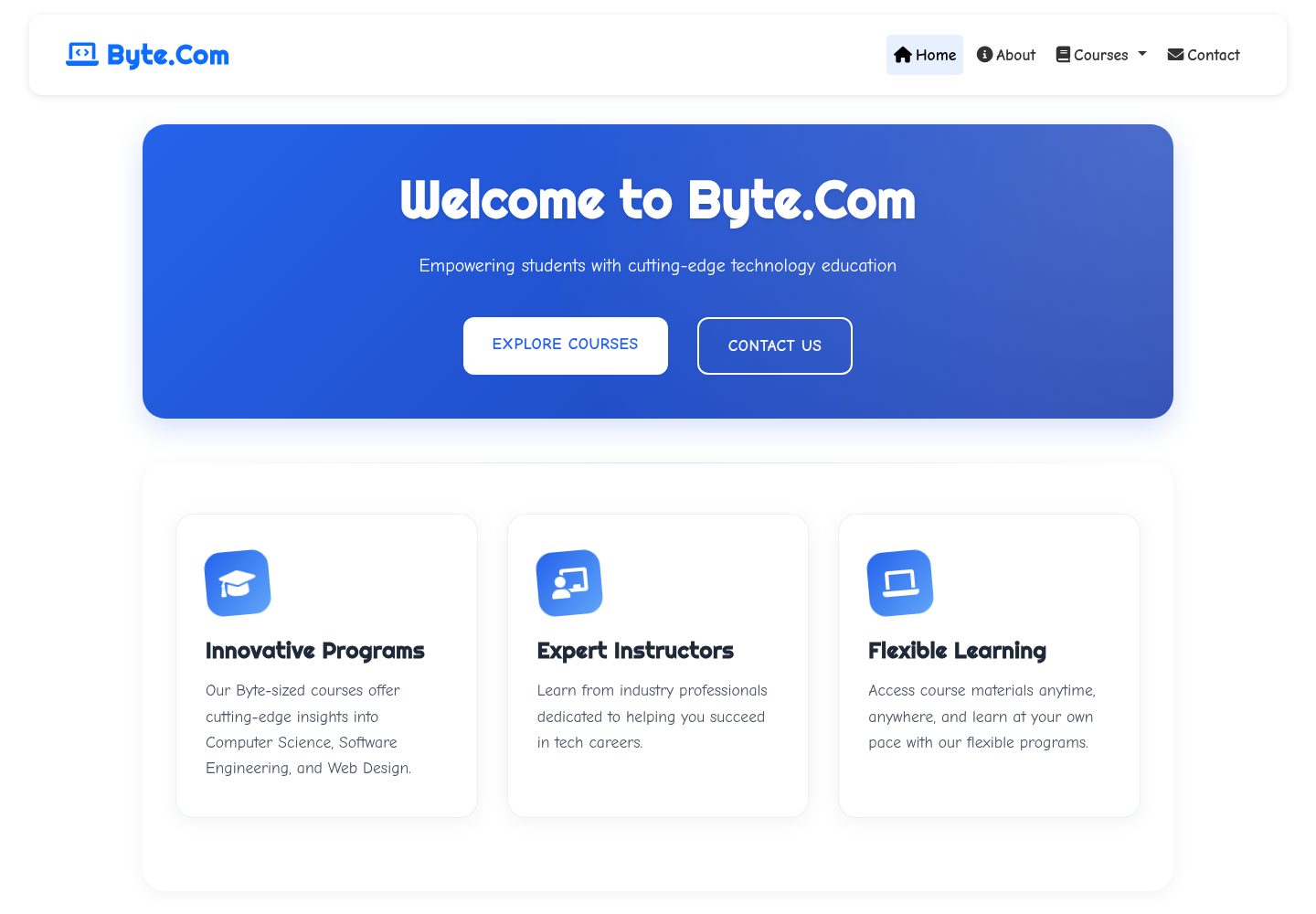
Desktop homepage1 / 3
Desktop captureTop of page
Actual screenshot captured by the server browser.
All pages & views 3
Screenshots show visual appearance; interactive behavior may differ.
Recorded 2026-10-04View source
What stands out
A quick read of the recorded project description.
Course data is stored in .mdx files in templates/data; editing the files allows courses to be added or removed
Includes common educational institution information modules such as departmental features, institutional statistics, and contact information
Provides an interactive course browsing interface
Uses Bootstrap and AOS scroll animations, with pages adapted for desktop and mobile
Template Details
Byte.Com_course-website is a website template for educational institutions and course showcase scenarios. The backend uses Flask, while the frontend uses HTML5, CSS3, and JavaScript, and incorporates Bootstrap, Font Awesome, and AOS scroll animations. The pages cover common educational institution information modules such as departmental features, institutional statistics, and contact information, and also provide an interactive course browsing interface.
Course content is separated from page data: courses are stored as .mdx files in the templates/data directory, and editing these files allows courses to be created or updated without writing code. The template uses responsive design, with corresponding layouts for desktop and mobile.
Before use, Python 3.8 or higher, pip, and a virtual environment are required locally. After installing dependencies via requirements.txt, start it with flask run. The repository uses the MIT license, allowing free use, modification, commercial use, and distribution of this version of the code; however, third-party assets such as demo images, fonts, and icons, as well as external services such as domains and hosting, require separate verification of licensing and costs.
HTMLLauncher
Is it right for your project?
Use Cases
- Build course showcase and introduction pages for departments or training institutions
- Showcase departmental features, teaching facilities, and key institutional data
- Publish course lists and allow visitors to browse course information online
- Serve as a starting point for the frontend and content structure of an education-related website for secondary development
Suitable For
- Educational institutions or departments that need to quickly build course showcase pages
- Operations staff who want to maintain course content with Markdown-like files without writing code
- Developers familiar with Flask and frontend basics who need an editable template
Getting started & customization
Use these recorded setup notes alongside the repository instructions for your chosen version.
- 1
Requires Python 3.8 or higher and pip; using a virtual environment is recommended
- 2
After cloning the repository, run pip install -r requirements.txt to install dependencies
- 3
Run flask run to start; the default access address is http://localhost:5000
- 4
Course content is maintained by editing .mdx files in the templates/data directory
- 5
Third-party assets and external hosting services require separate verification of licensing and costs; the MIT license covers only the code
License & source material
Usage conditions & limitations
Free to use · keep license noticeThis entry covers the free version in a public repository under the MIT license; the free scope is the code of this version and does not mean external services or third-party assets are free.
Must comply with when using
- Free use, modification, commercial use, and distribution of this version of the code are permitted.
- When distributing copies or substantial portions of the code, retain the original author's copyright notice and the complete MIT license notice.
- The code is provided as is; warranties and limitations of liability are governed by the original license and applicable law.
Additional costs & items to verify
- The README provides only a Discord username and server link as contact/support channels, and does not require account registration or API keys; using the template itself does not require an external account.
- Icons use Font Awesome, and Bootstrap and AOS are frontend dependencies; these third-party resources may carry their own license terms and must be verified independently. The MIT license covers only this project's code.
- Local operation requires Python 3.8+, pip, and a virtual environment, and after installing dependencies via requirements.txt it is started with flask run; these are runtime environment requirements rather than usage restrictions.
- Demo images, fonts, icons, and other third-party assets must be verified under their respective licenses and cannot be judged solely by the code's MIT license.
- External services such as domains, hosting, databases, payments, or AI may incur additional charges.
View Original Text Basis
Permission is hereby granted, free of charge
Original License Text
Discord Username: ttv*jack*
Original README
Font Awesome for the icons
Original README
https://github.com/Jack5237/Byte.com_course-website/blob/main/LICENSEhttps://github.com/Jack5237/Byte.com_course-website/blob/main/README.mdThe application will be available at `http://localhost:5000`
Original README
Compiled by DeepSeek based on repository license and README ·2026-10-04. Results only cover the materials read; dependencies, images, fonts, and subsequent term changes are subject to their respective original texts.
Project checks & description sources
Template Information
- Source platforms
- GitHub
- Documentation and maintenance reference score
- More documented · 77 / 100
- Technologies
- HTML
- Website type
- Starter
How this score is calculated
Our heuristic uses license records (up to 30), a demo link (12), a preview (10), stars (15), recorded maintenance (15), description completeness (8), feature records (5) and classification data (5). It is not a code, security or performance test, or a Google score. A link does not establish tested functionality.
What to verify for this project
- Repository update recorded
- 2025-05-04
- Screenshot last checked
- 2026-10-04
A demo link is listed. Check it with your own content and viewport sizes; its presence does not confirm that forms, authentication or payments work.
The catalog identifies HTML as the primary stack. Check the actual dependency manifest and lockfile for versions and hosting requirements. These notes use recorded metadata, not a code audit or a deployment test.
Use a selection guide →How this description was prepared
AI-assisted description based on catalog records and repository material. Repository authors are not automatically the reviewers of this description.
Review declaration: [email protected] · 2026-10-04
Inspect the recorded source material
SHA-256: 40c8ae0cfb365694a81db8e4fe2a95eb28a8b57c596dc5bbc9d63d7207ab93f4
2026-10-04T00:08:48.717Z
Source file / repository# Byte.Com - Educational Institution Website     [](https://byte-com-course-website.onrender.com) > **Byte.Com** is a modern, responsive web application designed for educational institutions, built with Flask. It offers a comprehensive platform for showcasing academic programs, faculty information, and institutional highlights. The entire website is easily customizable—allowing you to modify content, design, and structure to fully match your institution's unique needs. > > Made with care by **Jack** — consider giving it a ⭐ if you appreciate the effort! 😋 ## 🌟 Features - **Modern UI/UX**: Clean and responsive design with smooth animations - **Department Highlights**: Showcase key features and facilities - **Interactive Statistics**: Dynamic display of institutional facts and figures - **Contact Information**: Easy access to department contact details - **Responsive Design**: Works seamlessly across all devices - **AOS Animations**: Smooth scroll animations for better user experience * **Interactive Course Viewer**: Browse and explore courses dynamically with a user-friendly interface * **Easily Editable Course Maker**: Anyone can create or update courses by editing the `.mdx` files located in the `templates/data` directory – no coding knowledge required ## 🚀 Getting Started > > 🟢 **[Live Preview](https://byte-com-course-website.onrender.com)** > ### Prerequisites - Python 3.8 or higher - pip (Python package installer) - Virtual environment (recommended) ### Installation 1. Clone the repository: ```bash git clone https://github.com/yourusername/byte-com.git cd byte-com ``` 2. Create and activate a virtual environment: ```bash python -m venv venv source venv/bin/activate # On Windows: venv\Scripts\activate ``` 3. Install dependencies: ```bash pip install -r requirements.txt ``` 4. Run the application: ```bash flask run ``` The application will be available at `http://localhost:5000` ## 🛠️ Tech Stack - **Backend**: Flask - **Frontend**: HTML5, CSS3, JavaScript - **CSS Framework**: Bootstrap - **Icons**: Font Awesome - **Animations**: AOS (Animate On Scroll) - **Styling**: Custom CSS with modern design principles ## 🤝 Contributing We welcome contributions from the community! Here's how you can help: 1. Fork the repository 2. Create a new branch (`git checkout -b feature/AmazingFeature`) 3. Make your changes 4. Commit your changes (`git commit -m 'Add some AmazingFeature'`) 5. Push to the branch (`git push origin feature/AmazingFeature`) 6. Open a Pull Request ### Contribution Guidelines - Follow PEP 8 style guide for Python code - Write clear, descriptive commit messages - Update documentation for any new features ## 📄 License This project is licensed under the MIT License - see the [LICENSE](LICENSE) file for details. ## 🙏 Acknowledgments - Font Awesome for the icons - Bootstrap for the responsive framework - AOS library for scroll animations ## 📞 Contact For any queries or support, please reach out to: - Discord Username: ttv*jack* - Discord Server: https://discord.gg/AZTam3ttu4 --- Made with ❤️ by the Byte.Com Team (Jack)
Explore similar templates
Compare previews and descriptions within the same stack and category.

startbootstrap-simple-sidebar
A Bootstrap off-canvas sidebar navigation HTML starter template from Start Bootstrap. It provides directly editable HTML and CSS in the dist directory, while the source uses Pug, SCSS, and JavaScript with npm build scripts for live preview and compilation.
HTML · Starter

adminkit
AdminKit is a free, MIT-licensed HTML admin and dashboard template built on Bootstrap 5. The free version includes 15 demo pages, 1 plugin, and 1 color scheme, with hundreds of UI components, forms, tables, charts, and icons.
HTML · Admin dashboard

Landing-Page
A general-purpose landing page HTML template maintained by Tailwind Toolbox, written in pure HTML and loading the complete Tailwind CSS via CDN.
HTML · Corporate Website

light-bootstrap-dashboard
Light Bootstrap Dashboard is a free, MIT-licensed admin dashboard template from Creative Tim, built on Bootstrap with a responsive static HTML structure.
HTML · Admin dashboard

sing-app
Sing App Lite is a free, open-source admin dashboard template from Flatlogic, built with Bootstrap 4.5 and SCSS. It provides a responsive layout, dashboard examples, typography, tables, notifications, basic charts, icons, maps, and a hover sidebar, along with styled Bootstrap components.
HTML · Admin dashboard

startbootstrap-modern-business
Modern Business is a multipurpose Bootstrap full-site HTML template from Start Bootstrap with 17 standalone pages covering home, about, services, portfolio, pricing, blog, FAQ, and contact.
HTML · Starter