Pure HTML/CSS/JavaScript structure with no build step; clone and open index.html directly to preview
HTMLPortfolio
portfolio-template (jahanweb-co) — HTML Portfolio Template
By jahanweb-co
A responsive portfolio HTML template for web designers, developers, and creative professionals, released under the MIT license, with RTL and Persian typography support.
Explore the design
Compare the page layouts and mobile experience. Open any screenshot for a closer look.
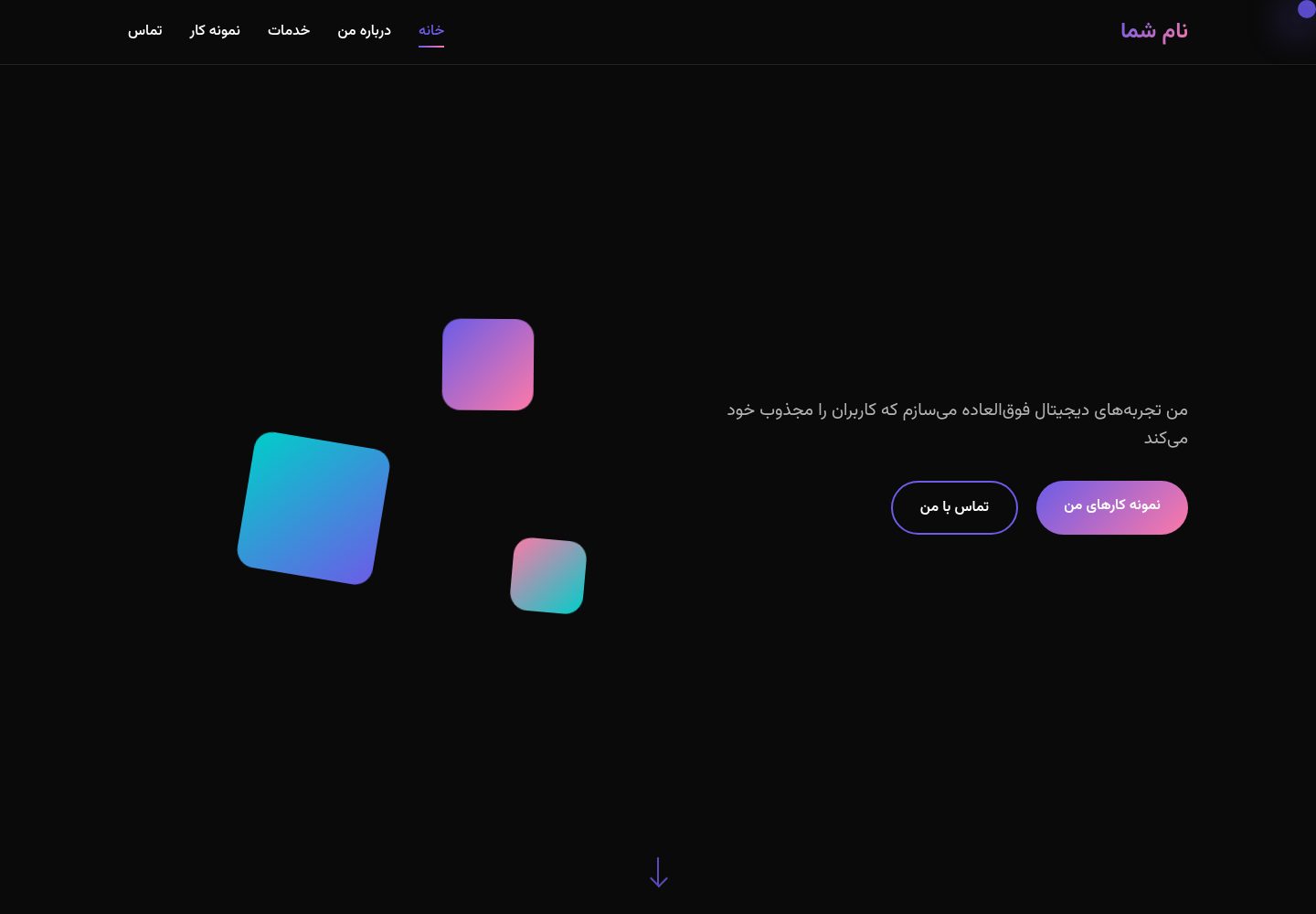
Desktop homepage1 / 2
Desktop captureTop of page
Actual screenshot captured by the server browser.
All pages & views 2
Screenshots show visual appearance; interactive behavior may differ.
Recorded 2026-10-12View source
What stands out
A quick read of the recorded project description.
Native RTL support, paired with the Vazirmatn font for Persian and other right-to-left typography
Portfolio section supports filtering projects by data-category
Built-in interactions include loading animation, smooth scrolling, parallax, skill bar animation, and a custom cursor trail
Primary, secondary, accent, background, and text colors are managed centrally via CSS variables
Template Details
This is a pure HTML portfolio template built from three core files: index.html, style.css, and script.js. It requires no build tools; after cloning, you can open it directly in a browser to view it. The page includes a hero introduction, an about section with skill bars, a portfolio grid filterable by category, and a contact form with validation, along with loading animations, smooth scrolling, parallax, card hover effects, skill bar animations, and a custom cursor trail. The template defines breakpoints for desktop, laptop, tablet, and mobile, and natively supports RTL layout, making it suitable for right-to-left languages such as Persian.
Customization is concentrated in two places: replace the name, title, contact details, project entries, and skill names in index.html, and adjust the primary, secondary, accent, background, and text color variables in the :root block of style.css. For images, you need to create an images directory yourself, add the avatar and project images, and then replace the placeholder paths in the HTML. The contact form is not bound to a backend by default; the README provides three integration options—Formspree, Netlify Forms, or a custom endpoint—and you must configure an endpoint before use.
The template uses Font Awesome icons, the Vazirmatn font from Google Fonts, and Unsplash sample images. These third-party assets must be checked separately under their own licenses; the MIT license in the repository covers only the template code itself. The README's to-do list outlines unimplemented directions such as a blog section, multilingual support, light/dark mode toggle, accessibility improvements, PWA, and CMS integration.
HTMLPortfolio
Is it right for your project?
Use Cases
- Web designers or front-end developers building a personal portfolio showcase page
- Users of RTL languages such as Persian creating a personal homepage
- Creative professionals who need to filter project cases by category for a portfolio display
Suitable For
- Developers who want to launch a personal portfolio quickly with static HTML
- Creators targeting Persian-speaking audiences who need RTL layout
- Users willing to customize by manually editing HTML and CSS variables
Getting started & customization
Use these recorded setup notes alongside the repository instructions for your chosen version.
- 1
After cloning the repository, open index.html directly, or preview it with a local server such as Live Server
- 2
Replace the name, title, contact details, project entries, and skill names in index.html
- 3
Create an images directory and add the avatar and project images, then replace the placeholder paths in the HTML
- 4
The contact form requires you to integrate Formspree, Netlify Forms, or a custom backend endpoint
- 5
Third-party assets such as Font Awesome, Google Fonts, and Unsplash must be checked under their respective licenses
License & source material
Usage conditions & limitations
Free to use · keep license noticeThis entry covers the free version in the public repository under the MIT license; the free scope applies to that version's code and does not mean external services or third-party assets are free.
Must comply with when using
- You may use, modify, commercialize, and distribute this version's code for free.
- When distributing copies or substantial portions of the code, retain the original author's copyright notice and the full MIT license notice.
- The code is provided as is; warranties and limitations of liability are governed by the original license and applicable law.
Additional costs & items to verify
- The README mentions the Formspree form service; real submissions require configuring a service endpoint, and its usage quotas and fees must be checked separately.
- Demo images, fonts, icons, and other third-party assets must be checked under their own licenses; they cannot be judged solely by the code's MIT license.
- External services such as domains, hosting, databases, payments, or AI may incur additional charges.
- The contact form is not bound to a backend by default; you must integrate a third-party service such as Formspree and configure a form ID to receive messages properly.
- Alternatively, you can use Netlify Forms, which requires deploying on the Netlify platform and enabling form functionality, representing an external service dependency.
- Or you can write your own backend endpoint, which requires modifying script.js and adding an API endpoint; the template itself does not provide a backend.
- Sample images come from Unsplash and must be checked separately under Unsplash's own license; the MIT license does not cover these assets.
- Icons use Font Awesome and must comply with its own license terms, which are independent of the template code's MIT license.
- The font is Vazirmatn from Google Fonts and must be used under the font's own license; it is not licensed together with the template's MIT license.
View Original Text Basis
Permission is hereby granted, free of charge
Original License Text
### گزینه 1: استفاده از Formspree
Original README
### گزینه 2: استفاده از Netlify Forms
Original README
### گزینه 3: Backend سفارشی
Original README
- [Unsplash](https://unsplash.com/) برای تصاویر نمونه
Original README
- [Font Awesome](https://fontawesome.com/) برای آیکونها
Original README
https://github.com/jahanweb-co/portfolio-template/blob/main/LICENSEhttps://github.com/jahanweb-co/portfolio-template/blob/main/README.md- [Google Fonts](https://fonts.google.com/) برای فونت Vazirmatn
Original README
Compiled by DeepSeek based on repository license and README ·2026-10-12. Results only cover the materials read; dependencies, images, fonts, and subsequent term changes are subject to their respective original texts.
Project checks & description sources
Template Information
- Source platforms
- GitHub
- Documentation and maintenance reference score
- More documented · 77 / 100
- Technologies
- HTML
- Website type
- Portfolio
How this score is calculated
Our heuristic uses license records (up to 30), a demo link (12), a preview (10), stars (15), recorded maintenance (15), description completeness (8), feature records (5) and classification data (5). It is not a code, security or performance test, or a Google score. A link does not establish tested functionality.
What to verify for this project
- Repository update recorded
- 2025-07-31
- Screenshot last checked
- 2026-10-12
A demo link is listed. Check it with your own content and viewport sizes; its presence does not confirm that forms, authentication or payments work.
The catalog identifies HTML as the primary stack. Check the actual dependency manifest and lockfile for versions and hosting requirements. These notes use recorded metadata, not a code audit or a deployment test.
Use a selection guide →How this description was prepared
AI-assisted description based on catalog records and repository material. Repository authors are not automatically the reviewers of this description.
Review declaration: [email protected] · 2026-10-13
Inspect the recorded source material
SHA-256: e8027e3d122a8fb5197fe4b0e56caefa7af8801f835ac9e41162dad568320548
2026-10-12T14:08:11.034Z
Source file / repository# 🎨 Portfolio Template - قالب پورتفولیو
یک قالب پورتفولیو مدرن و کاملاً ریسپانسیو برای طراحان وب، توسعهدهندگان و افراد خلاق.
## ✨ ویژگیها
- 🎯 **طراحی مدرن**: استفاده از جدیدترین تکنیکهای طراحی UI/UX
- 📱 **کاملاً ریسپانسیو**: بهینه برای تمام دستگاهها (دسکتاپ، تبلت، موبایل)
- 🌟 **انیمیشنهای روان**: انیمیشنهای زیبا و تعاملی
- 🎨 **کرسور سفارشی**: تجربه کاربری منحصر به فرد
- 🔥 **افکتهای بصری**: گرادیانتهای زیبا و عناصر شناور
- 📧 **فرم تماس**: فرم کاربردی با اعتبارسنجی
- 🎯 **فیلتر پورتفولیو**: نمایش پروژهها بر اساس دستهبندی
- ⚡ **بهینهسازی شده**: کد تمیز و بهینه برای سرعت بالا
- 🌍 **پشتیبانی RTL**: بهینه برای زبان فارسی
## ✨ تصویر نمونه

## 🎯 نمونه سایت
[مشاهده Demo زنده](https://jahanweb-co.github.io/portfolio-template)
## 🚀 شروع سریع
### 1. دانلود و راهاندازی
```bash
# کلون کردن مخزن
git clone https://github.com/jahanweb-co/portfolio-template.git
# ورود به پوشه پروژه
cd portfolio-template
# باز کردن در مرورگر
open index.html
```
### 2. ساختار فایلها
```
portfolio-template/
│
├── index.html # فایل اصلی HTML
├── style.css # استایلهای CSS
│ script.js # کدهای JavaScript
├── images/ # پوشه تصاویر (شما باید ایجاد کنید)
│ ├── profile.jpg # تصویر پروفایل
│ ├── project1.jpg # تصاویر پروژهها
│ └── ...
├── README.md # مستندات پروژه
└── LICENSE # مجوز استفاده
```
## 🛠️ سفارشیسازی
### تغییر اطلاعات شخصی
فایل `index.html` را باز کرده و موارد زیر را ویرایش کنید:
```html
<!-- تغییر نام و عنوان -->
<h1 class="hero-title">
<span class="text-gradient">طراح وب</span>
<br>خلاق و نوآور
</h1>
<!-- تغییر اطلاعات تماس -->
<div class="contact-details">
<h4>ایمیل</h4>
<p>[email protected]</p>
</div>
```
### تغییر رنگها
فایل `style.css` را باز کرده و متغیرهای رنگ را ویرایش کنید:
```css
:root {
--primary-color: #6c5ce7; /* رنگ اصلی */
--secondary-color: #fd79a8; /* رنگ ثانویه */
--accent-color: #00cec9; /* رنگ تاکیدی */
--bg-primary: #0a0a0a; /* پسزمینه اصلی */
--bg-secondary: #1a1a1a; /* پسزمینه ثانویه */
--text-primary: #ffffff; /* متن اصلی */
--text-secondary: #b3b3b3; /* متن ثانویه */
}
```
### افزودن تصاویر
1. پوشه `images` ایجاد کنید
2. تصاویر خود را در این پوشه قرار دهید
3. در فایل HTML، placeholder ها را با تصاویر واقعی جایگزین کنید:
```html
<!-- جایگزینی placeholder تصویر پروفایل -->
<div class="about-image">
<img src="images/profile.jpg" alt="تصویر پروفایل" class="profile-img">
</div>
<!-- جایگزینی placeholder تصاویر پروژه -->
<div class="portfolio-image">
<img src="images/project1.jpg" alt="پروژه 1">
</div>
```
### افزودن پروژه جدید
برای افزودن پروژه جدید در بخش portfolio:
```html
<div class="portfolio-item" data-category="web">
<div class="portfolio-image">
<img src="images/your-project.jpg" alt="نام پروژه">
<div class="portfolio-overlay">
<h3>نام پروژه</h3>
<p>توضیح کوتاه پروژه</p>
<div class="portfolio-links">
<a href="#" class="portfolio-link" title="مشاهده"><i class="fas fa-eye"></i></a>
<a href="#" class="portfolio-link" title="لینک پروژه"><i class="fas fa-external-link-alt"></i></a>
</div>
</div>
</div>
</div>
```
### تغییر مهارتها
مهارتها را در بخش about ویرایش کنید:
```html
<div class="skill-item">
<span class="skill-name">نام مهارت</span>
<div class="skill-bar">
<div class="skill-progress" data-width="90%"></div>
</div>
</div>
```
## 🎨 انیمیشنها و افکتها
### انیمیشنهای موجود:
- ✨ Loading screen با انیمیشن
- 🎯 Smooth scroll بین بخشها
- 💫 Parallax effect برای عناصر شناور
- 🎨 Hover effects روی کارتها
- 📊 انیمیشن skill bars
- 🖱️ Custom cursor با trail effect
- 🔄 Fade in animations برای بخشها
### غیرفعال کردن انیمیشنها
برای غیرفعال کردن انیمیشنها، این کد را به CSS اضافه کنید:
```css
@media (prefers-reduced-motion: reduce) {
*, *::before, *::after {
animation-duration: 0.01ms !important;
animation-iteration-count: 1 !important;
transition-duration: 0.01ms !important;
}
}
```
## 📱 ریسپانسیو طراحی
قالب برای breakpoint های زیر بهینه شده:
- 🖥️ **Desktop**: 1200px+
- 💻 **Laptop**: 992px - 1199px
- 📱 **Tablet**: 768px - 991px
- 📱 **Mobile**: 320px - 767px
## 🔧 بهینهسازی عملکرد
### تکنیکهای استفاده شده:
- ⚡ Lazy loading برای تصاویر
- 🎯 Throttled scroll events
- 💾 Efficient DOM manipulation
- 🔄 CSS transforms به جای position changes
- 📦 Minified و optimized کد
### بهبود سرعت:
```html
<!-- Preload critical resources -->
<link rel="preload" href="style.css" as="style">
<link rel="preload" href="script.js" as="script">
<!-- Optimize images -->
<img src="image.jpg" alt="..." loading="lazy" decoding="async">
```
## 🌐 سئو (SEO)
### Meta tags مهم:
```html
<meta name="description" content="توضیح درباره شما و کارتان">
<meta name="keywords" content="طراحی وب، UI/UX، فرانتاند">
<meta name="author" content="نام شما">
<!-- Open Graph -->
<meta property="og:title" content="نام شما - طراح وب">
<meta property="og:description" content="توضیح درباره شما">
<meta property="og:image" content="images/og-image.jpg">
<meta property="og:url" content="https://yourwebsite.com">
<!-- Twitter Card -->
<meta name="twitter:card" content="summary_large_image">
<meta name="twitter:title" content="نام شما - طراح وب">
<meta name="twitter:description" content="توضیح درباره شما">
<meta name="twitter:image" content="images/twitter-image.jpg">
```
## 📧 راهاندازی فرم تماس
### گزینه 1: استفاده از Formspree
```html
<form action="https://formspree.io/f/YOUR_FORM_ID" method="POST">
<!-- فیلدهای فرم -->
</form>
```
### گزینه 2: استفاده از Netlify Forms
```html
<form name="contact" method="POST" data-netlify="true">
<!-- فیلدهای فرم -->
</form>
```
### گزینه 3: Backend سفارشی
فایل `script.js` را ویرایش کرده و endpoint API خود را اضافه کنید.
## 🚀 Deploy کردن
### GitHub Pages:
1. پروژه را در GitHub آپلود کنید
2. به Settings → Pages بروید
3. Source را "Deploy from a branch" انتخاب کنید
4. Branch را "main" و folder را "/ (root)" انتخاب کنید
### Netlify:
1. پروژه را در GitHub آپلود کنید
2. در Netlify "New site from Git" را انتخاب کنید
3. مخزن GitHub خود را متصل کنید
4. Deploy settings پیشفرض را تایید کنید
### Vercel:
```bash
npm i -g vercel
vercel --prod
```
## 🔧 ابزارهای توسعه
### VS Code Extensions پیشنهادی:
- Live Server
- Prettier
- Auto Rename Tag
- CSS Peek
- HTML Snippets
### ابزارهای آنلاین:
- [CSS Gradient Generator](https://cssgradient.io/)
- [Google Fonts](https://fonts.google.com/)
- [Font Awesome Icons](https://fontawesome.com/)
- [Unsplash Images](https://unsplash.com/)
## 🐛 رفع مشکلات
### مشکلات رایج:
**انیمیشنها کار نمیکنند:**
- بررسی کنید JavaScript لود شده باشد
- Console browser را چک کنید
**رنگها درست نمایش داده نمیشوند:**
- CSS variables را بررسی کنید
- مرورگر cache را پاک کنید
**فرم تماس کار نمیکند:**
- Action فرم را تنظیم کنید
- Server-side handling اضافه کنید
## 📋 To-Do List
برای بهبود قالب:
- [ ] اضافه کردن blog section
- [ ] پشتیبانی از چند زبان
- [ ] اضافه کردن dark/light mode toggle
- [ ] بهبود accessibility
- [ ] اضافه کردن PWA features
- [ ] Integration با CMS
## 🤝 مشارکت
برای مشارکت در بهبود این قالب:
1. Fork کنید
2. Branch جدید ایجاد کنید (`git checkout -b feature/AmazingFeature`)
3. تغییرات را commit کنید (`git commit -m 'Add some AmazingFeature'`)
4. Push کنید (`git push origin feature/AmazingFeature`)
5. Pull Request ایجاد کنید
## 📄 مجوز
این پروژه تحت مجوز MIT منتشر شده - [LICENSE](LICENSE) را برای جزئیات بیشتر مطالعه کنید.
## 🙏 تشکر
- [Font Awesome](https://fontawesome.com/) برای آیکونها
- [Google Fonts](https://fonts.google.com/) برای فونت Vazirmatn
- [Unsplash](https://unsplash.com/) برای تصاویر نمونه
## 📞 پشتیبانی
اگر سوال یا مشکلی دارید:
- ⭐ بهترین راه: Issue جدید در GitHub ایجاد کنید
---
**ساخته شده با ❤️ برای جامعه توسعهدهندگان ایران**
> نکته: این قالب به صورت کاملاً رایگان در اختیار شما قرار میگیرد. اگر مفید بود، ⭐ یادتون نره!
## 📊 آمار پروژه



Explore similar templates
Compare previews and descriptions within the same stack and category.

simplefolio
Simplefolio is a minimal single-page portfolio template for developers, built with HTML, Bootstrap, SCSS, and Parcel under the MIT license. It includes Hero, About, Projects, Contact, and Footer sections, with content edited in /src/index.html and theme colors controlled by two SCSS variables.
HTML · Portfolio

Freelancer
A bright, single-page Bootstrap portfolio template for freelancers, designers, and small studios. It includes a responsive portfolio grid with modal detail windows and an SB Forms contact form that requires an API token.
HTML · Portfolio

Resume
A single-page resume and CV template from Start Bootstrap, built on Bootstrap with a fixed sidebar and content sections.
HTML · Portfolio

Creative
A single-page marketing template by Start Bootstrap for creative agencies and product services, built on Bootstrap with SCSS, featuring a portfolio grid and call-to-action sections. It includes pre-set SB Forms markers for form integration and npm build scripts for source customization.
HTML · Corporate Website

Grayscale
A dark single-page Bootstrap template from Start Bootstrap for photography, events and brand storytelling, with a large hero and clearly separated sections.
HTML · Corporate Website

startbootstrap-stylish-portfolio
A one-page Bootstrap portfolio theme from Start Bootstrap with multiple content sections and an off-canvas navigation menu. Basic use means editing HTML/CSS under dist and opening index.html; advanced use relies on npm with Pug and SCSS build scripts.
HTML · Portfolio