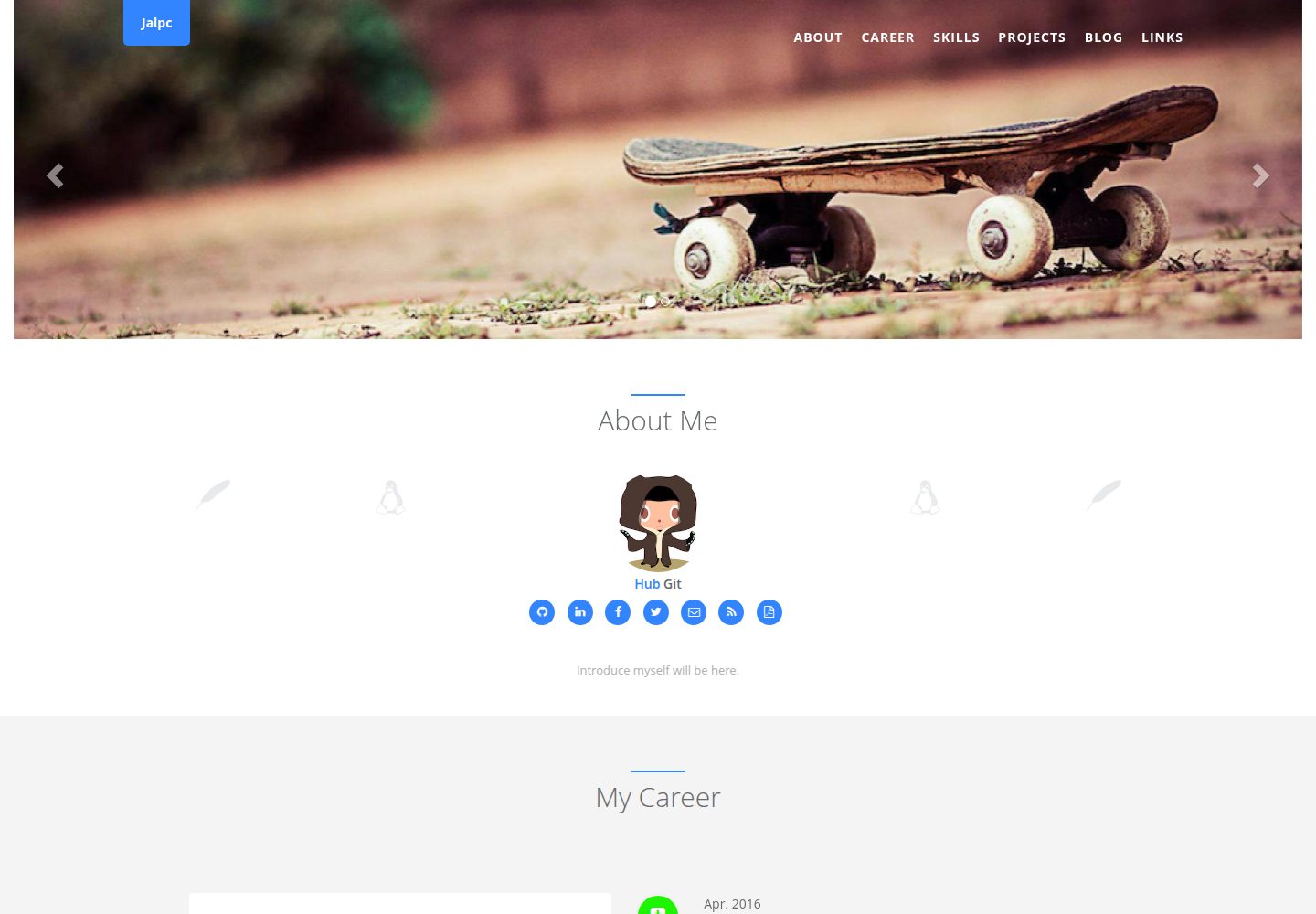
The homepage is split into multiple sections, with content driven by YAML files under _data, so content changes do not require touching HTML
JekyllPortfolioBlog
Jalpc — Jekyll Portfolio Template
By jarrekk
Jalpc is a Jekyll-based personal homepage and blog theme. The homepage consists of multiple configurable sections, with content driven by YAML files in the _data directory.
Explore the design
Compare the page layouts and mobile experience. Open any screenshot for a closer look.
Desktop homepage1 / 3
Desktop captureTop of page
Actual screenshot captured by the server browser.
All pages & views 3
Screenshots show visual appearance; interactive behavior may differ.
Recorded 2026-09-30View source
What stands out
A quick read of the recorded project description.
The blog organizes categories by URL, with all category pages sharing the same category.html template
Skills are displayed using a Chart.js radar chart, with data configured in _data/index/skills.yml
The landing page supports multiple languages via i18next and can be removed by clearing the configuration file and locales directory
Integrates Disqus comments, AddToAny sharing, JavaScript site search, and Google Analytics / GrowingIO analytics
CSS and JS minification scripts are based on NPM, UglifyJS2, and clean-css, with style source files in the _sass directory
Template Details
Jalpc is a theme for Jekyll that serves both as a personal homepage (portfolio) and a blog. The homepage is split into several sections stored in _includes/sections, with overall configuration in _data/landing.yml and per-section details spread across YAML files under _data/index, such as careers.yml, skills.yml, projects.yml, and links.yml. Because pages are rendered dynamically from these data files, modifying content usually does not require editing HTML directly.
The blog organizes categories by URL, with all category pages sharing the _includes/category.html template; category names are defined in _data/blog.yml. Pagination does not use Jekyll's built-in solution but is implemented on the front end with jPages. The theme also provides a Chart.js radar chart for skills, an i18next multilingual landing page, Disqus comments, AddToAny sharing, JavaScript-based site search, and two analytics integrations: Google Analytics and GrowingIO. Page view counting is handled by the author's self-built Flask backend API together with a front-end script, which is an external dependency.
Before use, note the following: the multilingual feature can be removed by clearing _data/language.yml and the static/locales/ directory; comments, analytics, sharing, and view counting all rely on third-party services, requiring you to register and replace the IDs or keys in the configuration. CSS and JS minification depends on NPM along with UglifyJS2 and clean-css; custom styles can be modified in the _sass directory. Several items listed in the README's Todo (such as using raw CSS/JS in --watch mode, custom homepage section titles, and more color themes) are not yet complete. Running locally requires Ruby and the github-pages gem, then execute bundle exec jekyll serve to start.
JekyllPortfolioBlog
Is it right for your project?
Use Cases
- Building a personal homepage with a skills radar chart, project list, and social links
- Maintaining a categorized technical blog within the same site
- A personal website that needs a multilingual landing page, such as Chinese and English
- Maintaining site content through YAML data files rather than editing HTML directly
Suitable For
- Developers familiar with Jekyll and YAML configuration who are willing to integrate third-party services themselves
- Independent site authors who need a combined personal homepage and blog
- Users who can set up a Ruby environment and accept a command-line build process
Getting started & customization
Use these recorded setup notes alongside the repository instructions for your chosen version.
- 1
Local setup requires Ruby and the github-pages gem; run bundle install, then bundle exec jekyll serve
- 2
Homepage content is configured in _data/landing.yml and _data/index/*.yml; blog navigation is configured in _data/blog.yml
- 3
Comments, analytics, sharing, and view counting depend on Disqus, Google Analytics, GrowingIO, AddToAny, and the author's self-built backend; you must register and replace the IDs or keys in the configuration
- 4
Minifying CSS/JS requires installing NPM along with UglifyJS2 and clean-css; the script is build/build.js, run npm run build
- 5
Licenses for third-party assets such as demo images, fonts, and icons must be checked separately; the MIT license covers only this version's code
License & source material
Usage conditions & limitations
Free to use · keep license noticeThis entry covers the free version under the MIT license in the public repository; the free scope is the code of this version and does not imply that external services or third-party assets are free.
Must comply with when using
- You may use, modify, commercialize, and distribute the code of this version for free.
- When distributing copies or substantial portions of the code, retain the original author's copyright notice and the full MIT license notice.
- The code is provided as is; warranties and limitations of liability are governed by the original license and applicable law.
Additional costs & items to verify
- Web analytics depends on third-party services Google Analytics or GrowingIO; you must register an account and replace the corresponding ID in _config.yml to enable it.
- Comments depend on the third-party service Disqus; you must register to obtain a shortname and public key and configure them in _config.yml before use.
- Share buttons depend on the third-party service AddToAny; you must customize the button code on its website and paste it into _includes/share.html.
- Page view counting depends on the author's self-built Flask backend API (deployed on a Vultr VPS); you must deploy that backend service separately to use it.
- Minifying CSS/JS requires installing NPM and external tools such as UglifyJS2 and clean-css, and running npm install and npm run build.
- Local building and running require installing Ruby and the github-pages gem yourself, which are external environment dependencies.
- Demo images, fonts, icons, and other third-party assets must be checked against their respective licenses and cannot be judged solely by the code's MIT license.
- External services such as domains, hosting, databases, payments, or AI may incur additional charges.
View Original Text Basis
Permission is hereby granted, free of charge
Original License Text
I use [Google analytics](https://www.google.com/analytics/) and [GrowingIO](https://www.growingio.com/) to do web analytics, you can choose either to realize it,just register a account and replace id in `_config.yml`.
Original README
I use [Disqus](https://disqus.com/) to realize comment. You should set disqus_shortname and get public key and then, in `_config.yml`, edit the disqus value to enable Disqus.
Original README
I use [AddToAny](https://www.addtoany.com/) to share my blog on other social network platform. You can go to this website to custom your share buttons and paste code at `_includes/share.html`.
Original README
the backend API is written with flask on [Vultr VPS](https://www.vultr.com/), detail code please see [ztool-backhend-mongo](https://github.com/Z-Tool/ztool-backhend-mongo).
Original README
Install [NPM](https://github.com/npm/npm) then install **UglifyJS2** and **clean-css**: `npm install -g uglifyjs; npm install -g clean-css`, then run `npm install` at root dir of project.
Original README
https://github.com/jarrekk/Jalpc/blob/master/LICENSEhttps://github.com/jarrekk/Jalpc/blob/master/README.md- [ruby](https://www.ruby-lang.org/en/) - the [github-pages](https://github.com/github/pages-gem) gem
Original README
Compiled by DeepSeek based on repository license and README ·2026-10-01. Results only cover the materials read; dependencies, images, fonts, and subsequent term changes are subject to their respective original texts.
Project checks & description sources
Template Information
- Source platforms
- GitHub
- Documentation and maintenance reference score
- More documented · 85 / 100
- Technologies
- Jekyll
- Website type
- Portfolio · Blog
How this score is calculated
Our heuristic uses license records (up to 30), a demo link (12), a preview (10), stars (15), recorded maintenance (15), description completeness (8), feature records (5) and classification data (5). It is not a code, security or performance test, or a Google score. A link does not establish tested functionality.
What to verify for this project
- Repository update recorded
- 2024-07-07
- Screenshot last checked
- 2026-10-01
A demo link is listed. Check it with your own content and viewport sizes; its presence does not confirm that forms, authentication or payments work.
The catalog identifies Jekyll as the primary stack. Check the actual dependency manifest and lockfile for versions and hosting requirements. These notes use recorded metadata, not a code audit or a deployment test.
Use a selection guide →How this description was prepared
AI-assisted description based on catalog records and repository material. Repository authors are not automatically the reviewers of this description.
Automatically checked against source and license rules; no manual editorial review.
Inspect the recorded source material
SHA-256: 761dd5516105f9ca43d9decabf1125422b0e62ca89bd47adfc408861c4e0683d
2026-10-01T14:06:02.765Z
Source file / repository# Jalpc. [](https://github.com/jarrekk/Jalpc)
[](https://opensource.org/licenses/mit-license.php)
[](http://github.com/badges/stability-badges)
[](https://github.com/ellerbrock/open-source-badge/)
<https://jarrekk.github.io/Jalpc/>
<http://www.jarrekk.com> -- Personal website

- [3 steps to setup this theme at your website!](#3-steps-to-setup-this-theme-at-your-website)
- [Features](#features)
- [Index page](#index-page)
- [`_data/*.yml`](#_datayml)
- [Chart Skills](#chart-skills)
- [Categories in blog page](#categories-in-blog-page)
- [Pagination](#pagination)
- [Page views counter](#page-views-counter)
- [Multilingual Page](#multilingual-page)
- [Web analytics](#web-analytics)
- [Comment](#comment)
- [Share](#share)
- [Search engines](#search-engines)
- [Compress CSS and JS files](#compress-css-and-js-files)
- [Put in a Jalpc Plug](#put-in-a-jalpc-plug)
- [Upgrading Jalpc](#upgrading-jalpc)
- [Ensure there's an upstream remote](#ensure-theres-an-upstream-remote)
- [Pull in the latest changes](#pull-in-the-latest-changes)
- [Todo](#todo)
- [Donate Jalpc](#donate-jalpc)
- [Wiki](#wiki)
- [Ad](#ad)
This is a simple, beautiful and swift theme for Jekyll. It's mobile first, fluidly responsive, and delightfully lightweight.
If you're completely new to Jekyll, I recommend checking out the documentation at <http://jekyllrb.com> or there's a tutorial by Smashing Magazine.
# 3 steps to setup this theme at your website!
Here is a [document](https://jarrekk.github.io/Jalpc/html/2017/01/31/3-steps-to-setup-website-with-Jalpc.html) of how to setup this theme with 3 steps and a [wiki](https://github.com/jarrekk/Jalpc/wiki/How-to-add-posts) of how to add posts. If you have any **questions** please ask me at [GitHub Issues](https://github.com/jarrekk/Jalpc/issues).
# Features
## Index page
The index page is seprated into several sections and they are located in `_includes/sections`,the configuration is in `_data/landing.yml` and section's detail configuration is in `_data/*.yml`.
### `_data/*.yml`
These files are used to dynamically render pages, so you almost don't have to edit *html files* to change your own theme, besides you can use `jekyll serve --watch` to reload changes.
The following is mapping between *yml files* to *sections*.
* landing.yml ==> index.html
* index/language.yml ==> index.html
* index/careers.yml ==> _includes/sections/career.html
* index/skills.yml ==> _includes/sections/skills.html
* index/projects.yml ==> _includes/sections/projects.html
* index/links.yml ==> _includes/sections/links.html
This *yml file* is about blog page navbar
* blog.yml ==> _includes/header.html
The following is mapping between *yml files* to *donation*
* donation/donationlist.yml ==> blog/donate.html
* donation/alipay.yml ==> blog/donate.html
* donation/wechat_pay.yml ==> blog/donate.yml
## Chart Skills
I use [Chart.js](http://www.chartjs.org/) to show skills, the type of skills' chart is radar, if you want to custom, please read document of Chart.js and edit **_includes/sections/skills.html** and **_data/index/skills.yml**.
## Categories in blog page
In blog page, we categorize posts into several categories by url, all category pages use same template html file - `_includes/category.html`.
For example: URL is `http://127.0.0.1:4000/python/`. In `_data/blog.yml`, we define this category named `Python`, so in `_includes/category.html` we get this URL(/python/) and change it to my category(Python), then this page are posts about **Python**. The following code is about how to get url and display corresponding posts in `_includes/category.html`.
```html
<div class="row">
<div class="col-lg-12 text-center">
<div class="navy-line"></div>
{% assign category = page.url | remove:'/' | capitalize %}
{% if category == 'Html' %}
{% assign category = category | upcase %}
{% endif %}
<h1>{{ category }}</h1>
</div>
</div>
<div class="wrapper wrapper-content animated fadeInRight blog">
<div class="row">
<ul id="pag-itemContainer" style="list-style:none;">
{% assign counter = 0 %}
{% for post in site.categories[category] %}
{% assign counter = counter | plus: 1 %}
<li>
```
## Pagination
The pagination in jekyll is not very perfect,so I use front-end web method,there is a [blog](http://www.jarrekk.com/html/2016/06/04/jekyll-pagination-with-jpages.html) about the method and you can refer to [jPages](http://luis-almeida.github.io/jPages).
## Page views counter
Many third party page counter platforms are too slow,so I count my website page view myself,the javascript file is [static/js/count.min.js](https://github.com/jarrekk/jalpc_jekyll_theme/blob/gh-pages/static/js/count.min.js) ([static/js/count.js](https://github.com/jarrekk/jalpc_jekyll_theme/blob/gh-pages/static/js/count.js)),the backend API is written with flask on [Vultr VPS](https://www.vultr.com/), detail code please see [ztool-backhend-mongo](https://github.com/Z-Tool/ztool-backhend-mongo).
## Multilingual Page
The landing page has multilingual support with the [i18next](http://i18next.com) plugin.
Languages are configured in the `_data/index/language.yml` file.
> Not everyone needs this feature, so I make it very easy to remove it, just clear content in file `_data/language.yml` and folder `static/locales/`.
About how to custom multilingual page, please see [wiki](https://github.com/jarrekk/Jalpc/wiki/Multilingual-Page).
## Web analytics
I use [Google analytics](https://www.google.com/analytics/) and [GrowingIO](https://www.growingio.com/) to do web analytics, you can choose either to realize it,just register a account and replace id in `_config.yml`.
## Comment
I use [Disqus](https://disqus.com/) to realize comment. You should set disqus_shortname and get public key and then, in `_config.yml`, edit the disqus value to enable Disqus.
## Share
I use [AddToAny](https://www.addtoany.com/) to share my blog on other social network platform. You can go to this website to custom your share buttons and paste code at `_includes/share.html`.

## Search engines
I use javascript to realize blog search,you can double click `Ctrl` or click the icon at lower right corner of the page,the detail you can got to this [repository](https://github.com/androiddevelop/jekyll-search). Just use it.

## Compress CSS and JS files
All CSS and JS files are compressed at `/static/assets`.
I use [UglifyJS2](https://github.com/mishoo/UglifyJS2), [clean-css](https://github.com/jakubpawlowicz/clean-css) to compress CSS and JS files, customised CSS files are at `_sass` folder which is feature of [Jekyll](https://jekyllrb.com/docs/assets/). If you want to custom CSS and JS files, you need to do the following:
1. Install [NPM](https://github.com/npm/npm) then install **UglifyJS2** and **clean-css**: `npm install -g uglifyjs; npm install -g clean-css`, then run `npm install` at root dir of project.
2. Compress script is **build.js**
3. If you want to add or remove CSS/JS files, just edit **build/build.js** and **build/files.conf.js**, then run `npm run build` at root dir of project, link/src files will use new files.
OR
Edit CSS files at `_sass` folder.
# Local tests/development
First, install Jekyll on terminal:
```shell
bundle install
```
Then, execute:
```shell
bundle exec jekyll serve
```
# Put in a Jalpc Plug
If you want to give credit to the Jalpc theme with a link to my personal website <http://www.jarrekk.com>, that'd be awesome. No worries if you don't.
# Upgrading Jalpc
Jalpc is always being improved by its users, so sometimes one may need to upgrade.
## Ensure there's an upstream remote
If `git remote -v` doesn't have an upstream listed, you can do the following to add it:
```
git remote add upstream https://github.com/jarrekk/Jalpc.git
```
## Pull in the latest changes
```
git pull upstream gh-pages
```
There may be merge conflicts, so be sure to fix the files that git lists if they occur. That's it!
# Testing Locally
To test your site locally, you’ll need
- [ruby](https://www.ruby-lang.org/en/)
- the [github-pages](https://github.com/github/pages-gem) gem
## Installing ruby
There are [lots of different ways to install ruby](https://www.ruby-lang.org/en/documentation/installation/).
In Mac OS X, older versions of ruby will already be installed. But I use the [Ruby Version Manager (RVM)](https://rvm.io/) to have a more recent version. You could also use [Homebrew](https://brew.sh/).
In Windows, use [RubyInstaller](https://rubyinstaller.org/). (In most of this tutorial, I’ve assumed you’re using a Mac or some flavor of Unix. It’s possible that none of this was usable for Windows folks. Sorry!)
## Installing the github-pages gem
Run the following command:
```
gem install github-pages
```
This will install the github-pages gem and all dependencies (including [jekyll](https://jekyllrb.com/)).
## Later, to update the gem, type:
```
gem update github-pages
```
Testing your site locally
To construct and test your site locally, go into the directory and type
```
jekyll build
```
This will create (or modify) a `_site/ directory`, containing everything from `assets/`, and then the `index.md` and all `pages/*.md` files, converted to html. (So there’ll be `_site/index.html` and the various `_site/pages/*.html.`)
Type the following in order to “serve” the site. This will first run build, and so it does not need to be preceded by `jekyll build`.
```
jekyll serve
```
Now open your browser and go to `http://localhost:4000/site-name/`
# Todo
- [ ] `jekyll server --watch` mode need to use original CSS/JS files
- [ ] User can customise index page's section title.
- [x] Non-github projects also have links.
- [ ] Add some custom color themes for selection(Nav bar, background, words, dominant hue).
# Donate Jalpc
If this project let you enjoy your blog time, you can give me a cup of coffee :)
[](https://paypal.me/jarrekk)
# Wiki
* [Multilingual Page](https://github.com/jarrekk/Jalpc/wiki/Multilingual-Page)
* [How to add posts](https://github.com/jarrekk/Jalpc/wiki/How-to-add-posts)
* [Change Log](https://github.com/jarrekk/Jalpc/wiki/Change-Log)
* [Contributors](https://github.com/jarrekk/Jalpc/wiki/Contributors)
* [Thanks to the following](https://github.com/jarrekk/Jalpc/wiki/Thanks-to-the-following)
# Ad
[Jalpc-A](https://github.com/Jack614/Jalpc-A): another Jekyll theme written by [AngularJS](https://angularjs.org/).
Explore similar templates
Compare previews and descriptions within the same stack and category.

al-folio
A Jekyll academic homepage theme for scholars and researchers, with a clean responsive design and out-of-the-box support for publication lists, project showcases, CVs, and blogs.
Jekyll · Portfolio

minimal-mistakes
Minimal Mistakes is a two-column Jekyll theme for personal sites, blogs, project documentation, or portfolios.
Jekyll · Portfolio

Beautiful Jekyll
Beautiful Jekyll is a mature, easy-to-use Jekyll blog theme maintained by Dean Attali since 2015, with over 50,000 users.
Jekyll · Blog

jekyll-TeXt-theme
A customizable Jekyll theme for personal sites, team sites, blogs, projects, and documentation.
Jekyll · Blog

startbootstrap-clean-blog-jekyll
The official Jekyll version of Start Bootstrap's Clean Blog theme, offering a blog home page, about page, contact page, and sample post pages, with a Formspree-powered contact form.
Jekyll · Blog

So Simple
A minimal reading-oriented Jekyll theme by Michael Rose for personal blogs, portfolios, and long-form reading. It offers multiple layouts, microformat markup, Disqus comments, Google Analytics, Jekyll SEO Tag, three skins, and aggregation by year, category, and tag with a grid view.
Jekyll · Blog