Loads the Hugo Theme Stack theme using Hugo Modules
HugoBlog
iamjeremie.me-with-hugo-theme-stack — Hugo Blog Template
By JeremieLitzler
An English blog site template based on Hugo Theme Stack, loading the theme via Hugo Modules, with GitHub Actions for automatic deployment and a scheduled daily theme update.
Explore the design
Compare the page layouts and mobile experience. Open any screenshot for a closer look.
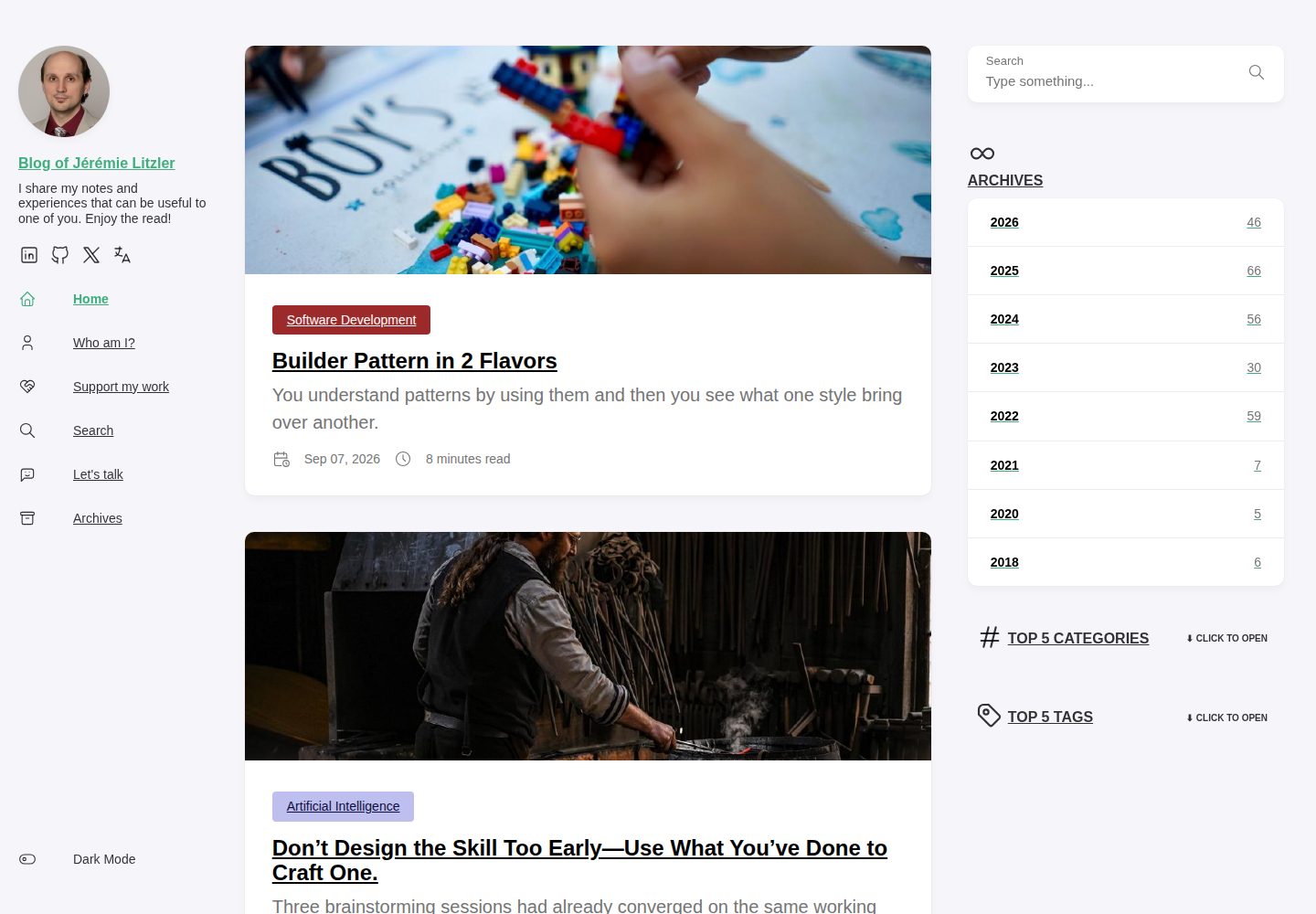
Desktop homepage1 / 3
Desktop captureTop of page
Actual screenshot captured by the server browser.
All pages & views 3
Screenshots show visual appearance; interactive behavior may differ.
Recorded 2026-10-11View source
What stands out
A quick read of the recorded project description.
Includes a GitHub Action to automatically deploy to public GitHub Pages
Configures a cron job to automatically update the theme daily
Provides the validate-xml-output.mjs script to validate the XML declaration position, tag structure, and absolute sitemap URLs of sitemap.xml and index.xml after build
Includes a Prettier configuration script for Go template formatting and a .prettierrc example
The README explains Go installation and HUGO_VERSION environment variable setup when deploying outside Netlify
Template Details
This is the site source template for Jeremie Litzler's English blog (iamjeremie.me), built with Hugo and loading the Hugo Theme Stack theme via Hugo Modules. The repository provides the basic theme structure and configuration, and includes a GitHub Action to automatically deploy the site to public GitHub Pages; a cron job updates the theme daily.
The repository also includes a script to validate the built XML output. The README explains that when the Hugo version did not match, a blank line was once produced before the <?xml declaration in sitemap.xml, causing browsers to refuse to render it. Therefore, scripts/validate-xml-output.mjs checks public/sitemap.xml and public/index.xml after each build: it confirms that the <?xml declaration is at the very beginning of the file (no BOM, whitespace, or blank lines), that the tag structure is well-formed, and that the <loc> URLs in the sitemap are absolute addresses under the site base URL. This script runs after the Hugo build via npm run build:ci (the Netlify build command); file format errors will cause the deployment to fail.
The README also documents the manual theme update process: Prettier must be configured for .html files that mix in Golang code, the repository provides the init-prettier-golang-html-formatter.sh script, and a .prettierrc configuration containing prettier-plugin-go-template must be added; hugo build must be run before pushing. If deploying to a static hosting platform other than Netlify, ensure Go is installed on the machine, override the build command to manually install Go, and specify the Hugo version in the HUGO_VERSION environment variable.
HugoBlog
Is it right for your project?
Use Cases
- Building a personal English blog and publishing it to GitHub Pages
- Customizing your own blog site based on Hugo Theme Stack
- Sites that need to automatically validate sitemap.xml and RSS output format on every build
- Hugo projects that want the theme to update automatically every day to reduce manual maintenance
Suitable For
- Developers building blogs with Hugo
- Users who want to automatically deploy static sites with GitHub Actions
- Projects that need a reference for loading themes via Hugo Modules and validating XML output
Getting started & customization
Use these recorded setup notes alongside the repository instructions for your chosen version.
- 1
Run hugo build before pushing, and confirm Prettier is configured per the README to support .html files with Go templates
- 2
After building, run the XML output validation script via npm run build:ci
- 3
When deploying to platforms other than Netlify, ensure Go is installed on the host, override the build command, and set the HUGO_VERSION environment variable
- 4
When distributing or modifying this version of the code, retain the original author's copyright notice and the full MIT license notice
License & source material
Usage conditions & limitations
Free to use · keep license noticeThis listing covers the free version under the MIT license in the public repository; the free scope is the code of this version and does not mean external services or third-party assets are free.
Must comply with when using
- You may freely use, modify, commercially use, and distribute the code of this version.
- When distributing copies or substantial portions of the code, retain the original author's copyright notice and the full MIT license notice.
- The code is provided as is; warranties and limitations of liability are governed by the original license and applicable law.
Additional costs & items to verify
- Demo images, fonts, icons, and other third-party assets must be checked under their respective licenses and cannot be judged solely by the code's MIT license.
- External services such as domains, hosting, databases, payments, or AI may incur additional charges.
- When deploying to a static hosting platform other than Netlify, the hosting machine must have Go installed; otherwise the site cannot be built.
- When deploying on non-Netlify platforms, you need to override the default build command and manually install Go before running the Hugo build.
- When deploying, you must specify the Hugo version via the HUGO_VERSION environment variable, and you must use the Hugo extended version.
- You must run hugo build before pushing code; otherwise the build output may be incomplete or outdated.
- Before manually updating the theme, configure Prettier and its extensions to correctly handle .html files that mix in Golang code.
View Original Text Basis
Permission is hereby granted, free of charge
Original License Text
If you want to build this site using another static page hosting, you need to make sure they have Go installed in the machine.
Original README
You need to overwrite build command to install manually Go:
Original README
Make sure also to specify Hugo version in the environment variable `HUGO_VERSION` (Use the latest version of Hugo extended):
Original README
**MAKE SURE TO run `hugo build` before pushing !**
Original README
https://github.com/JeremieLitzler/iamjeremie.me-with-hugo-theme-stack/blob/master/LICENSEhttps://github.com/JeremieLitzler/iamjeremie.me-with-hugo-theme-stack/blob/master/README.mdMake sure Prettier is setup with the extension to setup `.html` files mixing Golang code with HTML.
Original README
Compiled by DeepSeek based on repository license and README ·2026-10-11. Results only cover the materials read; dependencies, images, fonts, and subsequent term changes are subject to their respective original texts.
Project checks & description sources
Template Information
- Source platforms
- GitHub
- Documentation and maintenance reference score
- More documented · 80 / 100
- Technologies
- Hugo
- Website type
- Blog
How this score is calculated
Our heuristic uses license records (up to 30), a demo link (12), a preview (10), stars (15), recorded maintenance (15), description completeness (8), feature records (5) and classification data (5). It is not a code, security or performance test, or a Google score. A link does not establish tested functionality.
What to verify for this project
- Repository update recorded
- 2026-09-08
- Screenshot last checked
- 2026-10-11
A demo link is listed. Check it with your own content and viewport sizes; its presence does not confirm that forms, authentication or payments work.
The catalog identifies Hugo as the primary stack. Check the actual dependency manifest and lockfile for versions and hosting requirements. These notes use recorded metadata, not a code audit or a deployment test.
Use a selection guide →How this description was prepared
AI-assisted description based on catalog records and repository material. Repository authors are not automatically the reviewers of this description.
Review declaration: [email protected] · 2026-10-13
Inspect the recorded source material
SHA-256: 661bd0fc9535c482e044f5b61c83469301e862be47cf25a465e4de3bb7408489
2026-10-11T21:04:15.676Z
Source file / repository# Hugo Theme Stack Starter Template
This is a quick start template for [Hugo theme Stack](https://github.com/CaiJimmy/hugo-theme-stack). It uses [Hugo modules](https://gohugo.io/hugo-modules/) feature to load the theme.
It comes with a basic theme structure and configuration. GitHub action has been set up to deploy the theme to a public GitHub page automatically. Also, there's a cron job to update the theme automatically everyday.
## Updating theme manually
Make sure Prettier is setup with the extension to setup `.html` files mixing Golang code with HTML.
In this repo, it is included:
```bash
bash init-prettier-golang-html-formatter.sh
```
Then, add a `.prettierrc` file with:
```json
{
"plugins": ["prettier-plugin-go-template"],
"overrides": [
{
"files": ["*.html"],
"options": {
"parser": "go-template",
"goTemplateBracketSpacing": true,
"bracketSameLine": true
}
},
{
"files": ["*.js", "*.ts"],
"options": {
"useTabs": true,
"printWidth": 120,
"singleQuote": true
}
}
]
}
```
**MAKE SURE TO run `hugo build` before pushing !**
Source: [gohugo Forum](https://discourse.gohugo.io/t/formatter-for-go-templates/38403)
### Deploy somewhere else than Netilf?
If you want to build this site using another static page hosting, you need to make sure they have Go installed in the machine.
You need to overwrite build command to install manually Go:
```sh
amazon-linux-extras install golang1.11 && hugo --gc --minify
```

Make sure also to specify Hugo version in the environment variable `HUGO_VERSION` (Use the latest version of Hugo extended):

## Validating generated XML outputs
A mismatched Hugo version once emitted a blank line before the `<?xml` declaration in `sitemap.xml`, which made browsers refuse to render it (the HTTP status and `Content-Type` were fine, hiding the problem).
To catch this on every build, `scripts/validate-xml-output.mjs` is a zero-dependency Node script that checks `public/sitemap.xml` and `public/index.xml` for:
- the `<?xml` declaration being the first bytes (no BOM, whitespace, or blank line),
- well-formedness (balanced tags), and
- sitemap `<loc>` URLs being absolute under the site base URL.
It runs after the Hugo build via `npm run build:ci` (the Netlify build command), so a malformed file fails the deploy. Run it locally with:
```sh
npm run build:ci
```
Explore similar templates
Compare previews and descriptions within the same stack and category.

hugo-PaperMod
A fast, clean, responsive Hugo theme for blogs and lightweight portfolios, with three layout modes (Regular, Home-Info, Profile), automatic and manual light/dark themes, Fuse.js client-side search, multilingual support, and built-in Open Graph, Twitter Cards, and Schema.org data.
Hugo · Portfolio

LoveIt
LoveIt is a clean, elegant, and feature-rich Hugo blog theme derived from LeaveIt and KeepIt, MIT-licensed. It offers light/dark modes, responsive layout, multilingual support, and search via Lunr.js or Algolia.
Hugo · Blog

hugo-coder
hugo-coder is a minimalist Hugo blog theme maintained by luizdepra under the MIT license. It provides a clean, text-focused blog appearance, configuration documentation in the docs directory, and a complete exampleSite with hugo.toml.
Hugo · Blog

blowfish
Blowfish is a Hugo personal website and blog theme built with Tailwind CSS 4, focused on lightness, simplicity, and content-first presentation.
Hugo · Blog

hugo-paper
hugo-paper is a simple, clean, and customizable Hugo blog theme configured through config.toml or hugo.toml.
Hugo · Blog

hextra
Hextra is a Hugo theme for documentation and blog sites, built on Hugo and Tailwind CSS with design referencing Nextra.
Hugo · Documentation