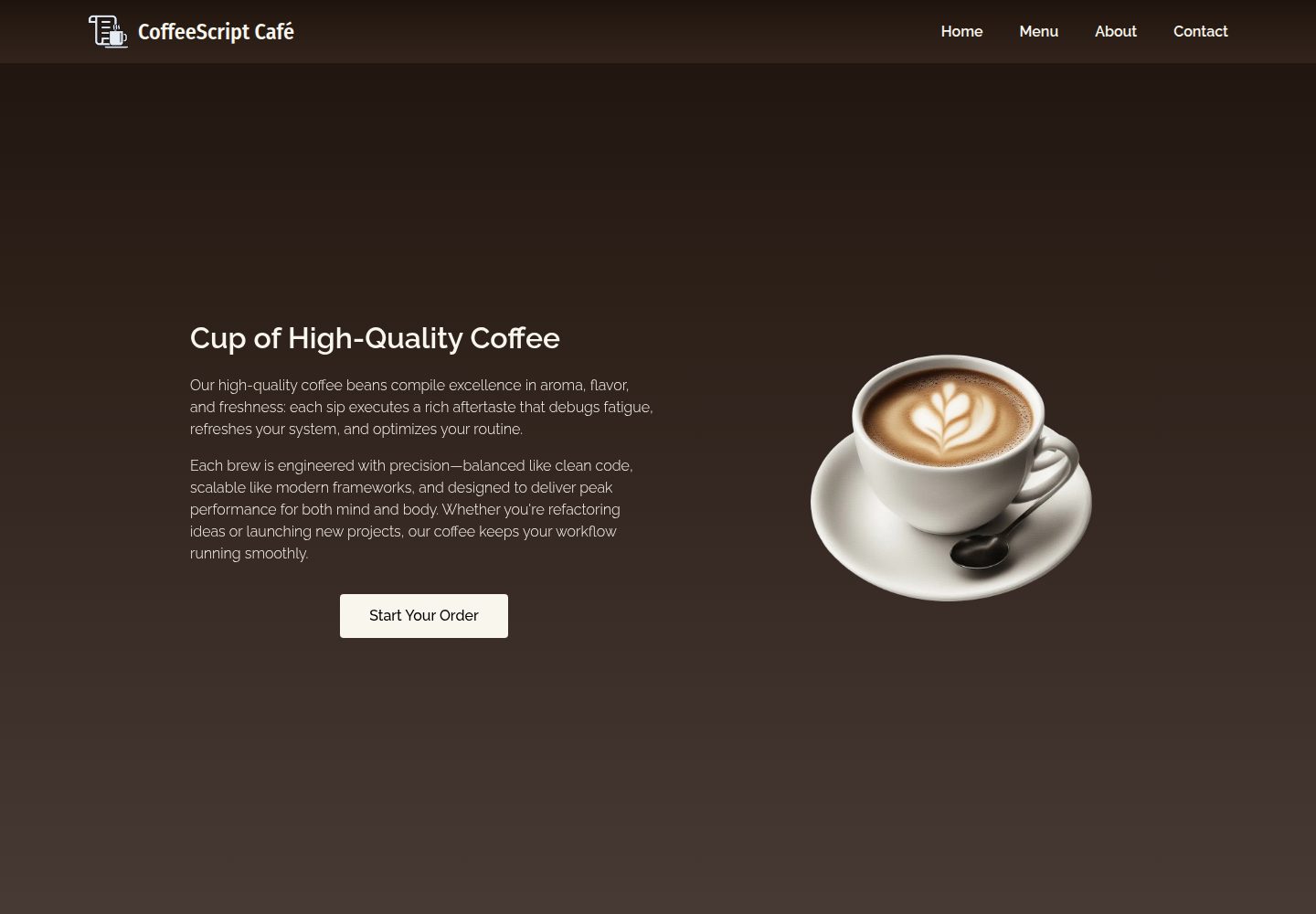
Four static pages: home, menu, about, and contact, covering a complete multi-page site structure
HTMLPortfolio
coffeescript-cafe-website — HTML Portfolio Template
By jjmginon
A responsive multi-page static website themed around developer culture and coffee, built with semantic HTML, CSS, and vanilla JavaScript, comprising four pages: home, menu, about, and contact.
Explore the design
Compare the page layouts and mobile experience. Open any screenshot for a closer look.
Desktop homepage1 / 3
Desktop captureTop of page
Actual screenshot captured by the server browser.
All pages & views 3
Screenshots show visual appearance; interactive behavior may differ.
Recorded 2026-10-13View source
What stands out
A quick read of the recorded project description.
Navigation is dynamically injected by JavaScript into .nav-mount for consistent cross-page management
Mobile slide-in menu with focus trapping, Escape key to close, and synchronized ARIA states
Back-to-top button appears after scrolling more than 200px, with smooth scrolling and focus styles
CSS uses custom properties, Flexbox/Grid, responsive media queries, and supports reduced motion
Images use srcset and fetchpriority, JavaScript is deferred, and fonts are preloaded
Template Details
CoffeeScript Café is a fictional developer-themed café website that weaves programming puns into drink names, such as Java Coffee, Tea++, and BubbleSort Milk Tea. The project consists of four static pages: index.html (home), menu.html (menu), about.html (about us), and contact.html (contact). No build tools or dependencies are required; after cloning, simply open index.html in a browser to run it.
Technically, the pages use semantic HTML5 tags (article, figure, address, time) and SEO metadata. Styling relies on CSS custom properties, Flexbox and Grid, responsive media queries, and supports reduced motion. The JavaScript is implemented in vanilla form, including dynamic navigation injection, an accessible mobile slide-in menu, focus trapping, a back-to-top button, and a combined throttle and debounce utility for resize handling.
For accessibility, the project uses ARIA attributes, focus management, and keyboard navigation, and provides screen-reader-only text utility classes. Performance aspects include image srcset, fetchpriority, deferred JavaScript loading, and font preloading.
Note that this is a sample project demonstrating front-end fundamentals and accessibility practices. The content is a fictional café and does not include a backend, database, or payment functionality; third-party assets such as demo images and fonts must be checked separately against their respective licenses.
HTMLPortfolio
Is it right for your project?
Use Cases
- A static multi-page site example for learning semantic HTML, CSS variables, and responsive layout
- Reference for implementing dynamic navigation injection, focus trapping, and a back-to-top button in vanilla JavaScript
- Understanding accessibility practices such as ARIA attributes, keyboard navigation, and screen-reader-only text
- A starting point for page structure for a developer culture or café-themed portfolio
Suitable For
- Front-end learners who want to study how a pure static multi-page website is organized without build tools
- Developers who need reference implementation details for accessible navigation and focus management
- Those looking for a page structure template with a developer or café theme
Getting started & customization
Use these recorded setup notes alongside the repository instructions for your chosen version.
- 1
After cloning the repository, open index.html directly in a browser; no build tools or dependency installation are required
- 2
The project is a pure static site and does not include external services such as a backend, database, or payment
- 3
Third-party assets such as demo images, fonts, and icons must be checked separately against their respective licenses; the MIT license covers only the code
License & source material
Usage conditions & limitations
Free to use · keep license noticeThis listing covers the free version under the MIT license in the public repository; the free scope applies to that version's code and does not imply that external services or third-party assets are free.
Must comply with when using
- You are allowed to use, modify, commercially use, and distribute this version's code for free.
- When distributing copies or substantial portions of the code, retain the original author's copyright notice and the full MIT license notice.
- The code is provided as is; warranties and limitations of liability are governed by the original license and applicable law.
Additional costs & items to verify
- Demo images, fonts, icons, and other third-party assets must be checked against their respective licenses; they cannot be judged solely by the code's MIT license.
- External services such as domains, hosting, databases, payments, or AI may incur separate charges.
View Original Text Basis
https://github.com/jjmginon/coffeescript-cafe-website/blob/main/LICENSEhttps://github.com/jjmginon/coffeescript-cafe-website/blob/main/README.mdPermission is hereby granted, free of charge
Original License Text
Compiled by DeepSeek based on repository license and README ·2026-10-13. Results only cover the materials read; dependencies, images, fonts, and subsequent term changes are subject to their respective original texts.
Project checks & description sources
Template Information
- Source platforms
- GitHub
- Documentation and maintenance reference score
- More documented · 80 / 100
- Technologies
- HTML
- Website type
- Portfolio
How this score is calculated
Our heuristic uses license records (up to 30), a demo link (12), a preview (10), stars (15), recorded maintenance (15), description completeness (8), feature records (5) and classification data (5). It is not a code, security or performance test, or a Google score. A link does not establish tested functionality.
What to verify for this project
- Repository update recorded
- 2026-03-30
- Screenshot last checked
- 2026-10-13
A demo link is listed. Check it with your own content and viewport sizes; its presence does not confirm that forms, authentication or payments work.
The catalog identifies HTML as the primary stack. Check the actual dependency manifest and lockfile for versions and hosting requirements. These notes use recorded metadata, not a code audit or a deployment test.
Use a selection guide →How this description was prepared
AI-assisted description based on catalog records and repository material. Repository authors are not automatically the reviewers of this description.
Review declaration: [email protected] · 2026-10-13
Inspect the recorded source material
SHA-256: 6ffb2c4a23fac1784d24ef1d7273738a5cee62e0a62ac76804f253d2462ebad6
2026-10-13T06:26:34.705Z
Source file / repository# CoffeeScript Café [](https://app.netlify.com/projects/coffeescript-cafe-website/deploys) CoffeeScript Café is a multi-page responsive café website inspired by the fusion of **code and coffee culture**. It showcases a fictional developer-themed café offering beverages like **Java Coffee**, **Tea++**, and **BubbleSort Milk Tea**. The project demonstrates modern HTML, CSS, and vanilla JavaScript practices with a strong focus on: - Accessibility (ARIA, focus management, semantic HTML) - Responsive design - Performance optimization - Clean UI/UX structure - Reusable JavaScript utilities --- ## Live Pages - `index.html` — Home - `menu.html` — Menu - `about.html` — About Us - `contact.html` — Contact --- ## Tech Stack - **HTML5** (Semantic structure & SEO meta tags) - **CSS3** - CSS Variables - Flexbox & Grid - Responsive Media Queries - Reduced Motion Support - Animations - **Vanilla JavaScript** - Dynamic navigation injection - Accessible mobile menu - Focus trap implementation - Back-to-top button - Hybrid throttle + debounce utility - **Google Fonts** - Fira Sans Condensed - Raleway --- ## Project Structure ``` CoffeeScript-Cafe/ │ ├── css/ │ └── styles.css ├── img/ │ ├── about/ │ ├── bubble-tea/ │ ├── coffee/ │ ├── contact/ │ ├── favicon/ │ ├── frappe/ │ ├── home/ │ ├── logo/ │ └── tea/ ├── js/ │ ├── nav.js │ └── script.js ├── favicon.ico ├── about.html ├── contact.html ├── index.html ├── menu.html └── README.md ``` --- ## Features ### Responsive Navigation (Injected via JavaScript) - Navigation is dynamically injected (`nav.js`) - Mobile slide-in menu - Accessible ARIA attributes - Escape key support - Focus trapping within mobile nav - Resize state synchronization --- ### Back-to-Top Button - Appears after scrolling past 200px - Smooth scroll behavior - Optimized visibility toggling - Accessible focus states --- ### Modern CSS Architecture - CSS custom properties (variables) - Component-style class naming - Hover, focus-visible, and active states - Reduced motion media query support - Smooth entry animations --- ### Accessibility Enhancements - Semantic HTML (`article`, `figure`, `address`, `time`) - Screen reader-only text utilities - ARIA-expanded / ARIA-hidden synchronization - Keyboard navigation support - Focus-visible styling --- ### Performance Considerations - Image `srcset` for responsive images - `fetchpriority` for important images - Deferred JavaScript loading - Hybrid throttle + debounce utility for resize handling - Preloaded fonts --- ## JavaScript Highlights ### 1. Navigation Injection The navigation is dynamically mounted into `.nav-mount`, allowing centralized nav management across pages. ### 2. Focus Trap Utility Reusable focus trap ensures keyboard users remain inside the mobile navigation while it is open. ### 3. Hybrid Throttle + Debounce A performance-optimized utility that combines: - Throttling for immediate responsiveness - Debouncing for final stable execution --- ## How to Run 1. Clone the repository: ```bash git clone https://github.com/jjmginon/coffeescript-cafe-website.git ``` 2. Open `index.html` in your browser. No build tools or dependencies required — this is a fully static project. --- ## Purpose of the Project This project demonstrates: - Frontend fundamentals mastery - Accessibility best practices - Clean component structure - Practical JavaScript DOM manipulation - Real-world responsive design implementation --- ## Author **JJ Ginon**
Explore similar templates
Compare previews and descriptions within the same stack and category.

simplefolio
Simplefolio is a minimal single-page portfolio template for developers, built with HTML, Bootstrap, SCSS, and Parcel under the MIT license. It includes Hero, About, Projects, Contact, and Footer sections, with content edited in /src/index.html and theme colors controlled by two SCSS variables.
HTML · Portfolio

Freelancer
A bright, single-page Bootstrap portfolio template for freelancers, designers, and small studios. It includes a responsive portfolio grid with modal detail windows and an SB Forms contact form that requires an API token.
HTML · Portfolio

Resume
A single-page resume and CV template from Start Bootstrap, built on Bootstrap with a fixed sidebar and content sections.
HTML · Portfolio

Creative
A single-page marketing template by Start Bootstrap for creative agencies and product services, built on Bootstrap with SCSS, featuring a portfolio grid and call-to-action sections. It includes pre-set SB Forms markers for form integration and npm build scripts for source customization.
HTML · Corporate Website

Grayscale
A dark single-page Bootstrap template from Start Bootstrap for photography, events and brand storytelling, with a large hero and clearly separated sections.
HTML · Corporate Website

startbootstrap-stylish-portfolio
A one-page Bootstrap portfolio theme from Start Bootstrap with multiple content sections and an off-canvas navigation menu. Basic use means editing HTML/CSS under dist and opening index.html; advanced use relies on npm with Pug and SCSS build scripts.
HTML · Portfolio