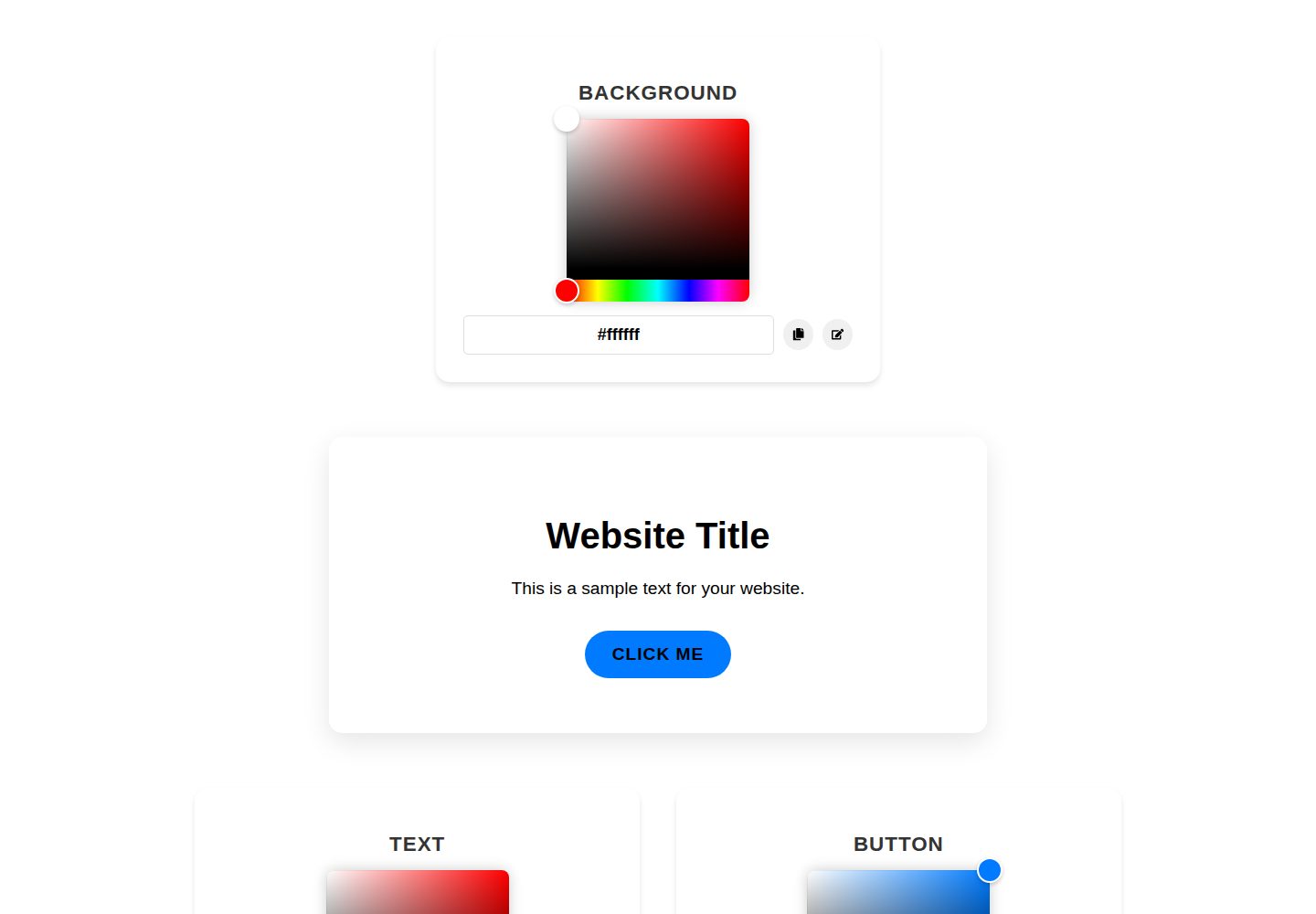
Provides three color pickers for background color, text color, and button color
ReactStarter
Aesthetic-color-picker — React Starter Template
By Josekariz
A React-based color preview tool that lets you adjust background, text, and button colors, view the template effect in real time, and copy color values.
Explore the design
Compare the page layouts and mobile experience. Open any screenshot for a closer look.
Desktop homepage1 / 2
Desktop captureTop of page
Actual screenshot captured by the server browser.
All pages & views 2
Screenshots show visual appearance; interactive behavior may differ.
Recorded 2026-10-20View source
What stands out
A quick read of the recorded project description.
Live preview of the selected colors in the template
Displays the color value for each color and supports clicking to copy to the clipboard
Built with React and react-colorful
The README states that the interface adapts to different screen sizes
Template Details
This template is a React application for creating aesthetic color schemes for website templates. Users can set the background color, text color, and button color separately via color pickers, and the page displays a live preview of the template with the selected colors applied. Next to each color option, the corresponding color value is displayed; clicking it copies the value to the clipboard for use in CSS or other parts of a project. The project depends on React and react-colorful. Installation steps are to clone the repository, enter the directory, and run npm install, then start the development server with npm start, which opens at http://localhost:3000 by default. The README does not provide information about production builds, deployment processes, or performance.
ReactLauncher
Is it right for your project?
Use Cases
- Quickly experimenting with and comparing different color combinations for a website template
- Previewing how background, text, and button colors work together before development
- Copying selected color values for use in CSS or other project files
Suitable For
- Designers or developers who need to quickly decide on a website color scheme
- Front-end learners who want to adjust template colors visually
- Personal projects that need reference color effects in the early stages
Getting started & customization
Use these recorded setup notes alongside the repository instructions for your chosen version.
- 1
After cloning the repository, enter the project directory
- 2
Run npm install to install dependencies
- 3
Run npm start to start the development server, which opens at http://localhost:3000 by default
- 4
The README does not provide production build or deployment steps
License & source material
Usage conditions & limitations
Free to use · keep license noticeThis listing covers the free version under the MIT license in the public repository; the free scope is the code of this version and does not mean that external services or third-party assets are free.
Must comply with when using
- Free use, modification, commercial use, and distribution of this version's code are permitted.
- When distributing copies or substantial portions of the code, the original author's copyright notice and the full MIT license notice must be retained.
- The code is provided as is; warranties and limitations of liability are governed by the original license and applicable law.
Additional costs & items to verify
- Demo images, fonts, icons, and other third-party assets must be checked against their respective licenses; the code's MIT license alone is not sufficient to determine this.
- External services such as domains, hosting, databases, payments, or AI may incur separate charges.
View Original Text Basis
https://github.com/Josekariz/Aesthetic-color-picker/blob/main/LICENSEhttps://github.com/Josekariz/Aesthetic-color-picker/blob/main/README.mdPermission is hereby granted, free of charge
Original License Text
Compiled by DeepSeek based on repository license and README ·2026-10-20. Results only cover the materials read; dependencies, images, fonts, and subsequent term changes are subject to their respective original texts.
Project checks & description sources
Template Information
- Source platforms
- GitHub
- Documentation and maintenance reference score
- Partly documented · 68 / 100
- Technologies
- React
- Website type
- Starter
How this score is calculated
Our heuristic uses license records (up to 30), a demo link (12), a preview (10), stars (15), recorded maintenance (15), description completeness (8), feature records (5) and classification data (5). It is not a code, security or performance test, or a Google score. A link does not establish tested functionality.
What to verify for this project
- Repository update recorded
- 2024-09-23
- Screenshot last checked
- 2026-10-20
A demo link is listed. Check it with your own content and viewport sizes; its presence does not confirm that forms, authentication or payments work.
The catalog identifies React as the primary stack. Check the actual dependency manifest and lockfile for versions and hosting requirements. These notes use recorded metadata, not a code audit or a deployment test.
Use a selection guide →How this description was prepared
AI-assisted description based on catalog records and repository material. Repository authors are not automatically the reviewers of this description.
Review declaration: codex-user-requested-batch-review-20261021 · 2026-10-21
Inspect the recorded source material
SHA-256: 241ef77bbedf016b9b6b1b09d84b3b8294ecd37ff9ea876966ec2e857285d2e4
2026-10-20T22:27:41.130Z
Source file / repository# Aesthetic Website Template Previewer This is a React application that allows you to create an aesthetic website template by customizing the background color, text color, and button color. It provides a live preview of the template, along with color pickers and color code displays for each color option.  ## Features - **Color Pickers**: Use the intuitive color pickers to select the desired background color, text color, and button color for your website template. - **Live Preview**: The application displays a live preview of your website template, reflecting the selected colors in real-time. - **Color Code Display**: The color code for each selected color is displayed, allowing you to easily copy and use the codes in your CSS or other parts of your project. - **Copy to Clipboard**: With a simple click, you can copy the color code to your clipboard, making it easy to use in your project. - **Responsive Design**: The application is designed to be responsive and adapt to different screen sizes, ensuring a great user experience on desktops, tablets, and mobile devices. ## Installation 1. Clone the repository: ```bash git clone https://github.com/your-username/aesthetic-website-template-previewer.git ``` 2. Navigate to the project directory: ```bash cd aesthetic-website-template-previewer ``` 3. Install the dependencies: ```bash npm install ``` ## Usage 1. Start the development server: ```bash npm start ``` The application will open in your default browser at `http://localhost:3000`. 2. Use the color pickers to select your desired background color, text color, and button color. 3. The live preview section will update in real-time, showing you how your website template will look with the selected colors. 4. To copy a color code, simply click on the respective color code display. 5. Customize the styles and layout of the preview section according to your preferences by modifying the CSS files. ## Dependencies This project relies on the following dependencies: - [React](https://reactjs.org/) - [react-colorful](https://github.com/omgovich/react-colorful) ## Contributing Contributions are welcome! If you find any bugs or have suggestions for improvements, please open an issue or submit a pull request. ## License This project is licensed under the [MIT License](LICENSE).
Explore similar templates
Compare previews and descriptions within the same stack and category.
ant-design-pro
Ant Design Pro is an enterprise-grade React admin scaffold built on React 19, Umi Max 4, and antd 6 with TypeScript.
React · Admin dashboard

react-boilerplate
A production-grade React + Redux starter for experienced developers, integrating Redux, redux-saga, styled-components, and react-router, with offline-first and PWA support, CLI code generation, and built-in testing and CI configuration. Requires Node.js v8.15.1 and npm v5 or higher; not suitable for beginners.
React · Starter

react-starter-kit
A full-stack React SaaS starter monorepo with a React application, an Astro marketing site, tRPC and Cloudflare Workers. Bun and Vite are part of its toolchain.
React · SaaS

fastapi-react
A Cookiecutter template for FastAPI + React (TypeScript) full-stack projects, integrating PostgreSQL, SQLAlchemy, Alembic, Celery, Redis, JWT authentication, a react-admin admin panel, and a Docker Compose development environment with Nginx reverse proxy.
React · Admin dashboard

shadcn-landing-page
A free React landing page template built with TypeScript, Tailwind and Shadcn/UI, offering 16 ready-to-use sections such as Navbar, Hero, Pricing, FAQ and Footer, with responsive layout, dark mode and meta tags.
React · Corporate Website

start-ui-web
Start UI [web] is an opinionated full-stack starter from the BearStudio team, built on Node.js, TypeScript, React, and TanStack Start, with Tailwind CSS, shadcn/ui, React Hook Form, oRPC, Prisma, and Better Auth.
React · Starter