Use Google Docs as the writing interface and a Google Drive folder as the content source
EleventyDocumentationStarter
eleventy-google-docs-starter — Eleventy Documentation Template
By jpoehnelt
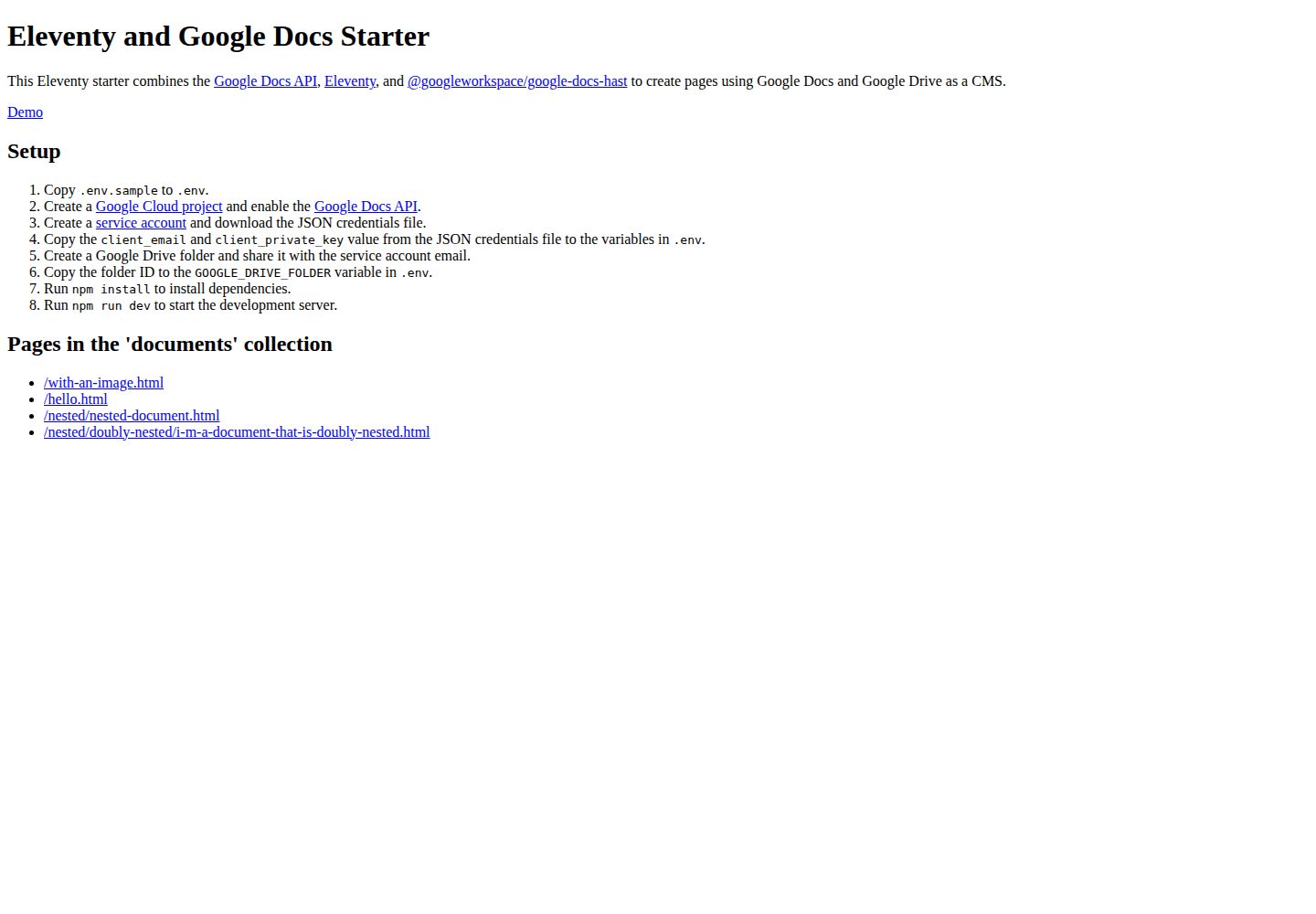
An Eleventy starter that uses Google Docs and Google Drive as content sources, converting documents into pages via the Google Docs API and google-docs-hast.
Explore the design
Compare the page layouts and mobile experience. Open any screenshot for a closer look.
Desktop homepage1 / 2
Desktop captureTop of page
Actual screenshot captured by the server browser.
All pages & views 2
Screenshots show visual appearance; interactive behavior may differ.
Recorded 2026-09-30View source
What stands out
A quick read of the recorded project description.
Convert documents using the Google Docs API and @googleworkspace/google-docs-hast
Generate static pages with Eleventy
Configure the service account email, private key, and Drive folder ID via .env
Provides an online demo site and is licensed under Apache-2.0
Template Details
This starter combines the Google Docs API, Eleventy, and @googleworkspace/google-docs-hast, using Google Docs and Google Drive as a CMS: document content is converted and then Eleventy generates pages. The repository provides an online demo and is licensed under Apache-2.0.
Before use, you need to set up your own Google Cloud project: enable the Google Docs API, create a service account and download the JSON credentials, write client_email and client_private_key into .env; also create a Google Drive folder and share it with the service account email, and put the folder ID into GOOGLE_DRIVE_FOLDER. Then run npm install to install dependencies and npm run dev to start the development server.
The materials do not describe the content model, routing rules, styling approach, or deployment method, nor do they provide conclusions about performance or production readiness; these need to be confirmed against the actual repository code.
EleventyDocumentsStarter
Is it right for your project?
Use Cases
- Individuals or teams who want to write and maintain website content in Google Docs
- Scenarios where existing Google Drive documents need to be published as static pages
- Developers who want to understand how the Google Docs API integrates with Eleventy
Suitable For
- Users familiar with Node.js and the npm command line
- Developers who can create a Google Cloud project and service account on their own
- Projects that accept Google Docs as the content editing interface
Getting started & customization
Use these recorded setup notes alongside the repository instructions for your chosen version.
- 1
Copy .env.sample to .env
- 2
Create a project in Google Cloud and enable the Google Docs API
- 3
Create a service account and download the JSON credentials, then fill client_email and client_private_key into .env
- 4
Create a Google Drive folder and share it with the service account email, then write the folder ID into GOOGLE_DRIVE_FOLDER
- 5
Run npm install to install dependencies and npm run dev to start the development server
License & source material
Usage conditions & limitations
Free to use · keep license noticeThis entry covers the free version under the Apache-2.0 license in the public repository; the free scope applies to that version's code and does not mean external services or third-party assets are free.
Must comply with when using
- Free use, modification, commercial use, and distribution are permitted; when distributing, include the Apache-2.0 license.
- Modified files must prominently indicate changes and retain relevant copyright, patent, trademark, and attribution notices.
- If the original project includes a NOTICE file, retain applicable attribution notices when distributing derivative works.
- The license includes an applicable contributor patent grant; initiating patent litigation as described in the license terminates that patent grant, and no trademark rights are granted.
- The code is provided as is; warranties and limitations of liability are governed by the original license and applicable law.
Additional costs & items to verify
- Using this template requires creating your own Google Cloud project and enabling the Google Docs API; this is an external service dependency, and you are responsible for the associated account and costs.
- You must create a Google service account and download the JSON credentials file to obtain the client_email and client_private_key needed to access the Google Docs API.
- The content source depends on a Google Drive folder, and that folder must be shared with the service account email; otherwise documents cannot be read.
- The Google Drive folder ID must be configured in the .env GOOGLE_DRIVE_FOLDER variable for the template to locate the content source.
- Demo images, fonts, icons, and other third-party assets must be checked against their respective licenses; do not judge solely by the code's Apache-2.0 license.
- External services such as domains, hosting, databases, payments, or AI may incur additional charges.
View Original Text Basis
no-charge, royalty-free, irrevocable copyright license
Original License Text
Create a [Google Cloud project](https://console.cloud.google.com) and enable the [Google Docs API](https://developers.google.com/docs/api).
Original README
Create a [service account](https://console.cloud.google.com/iam-admin/serviceaccounts) and download the JSON credentials file.
Original README
Create a Google Drive folder and share it with the service account email.
Original README
https://github.com/jpoehnelt/eleventy-google-docs-starter/blob/main/LICENSEhttps://github.com/jpoehnelt/eleventy-google-docs-starter/blob/main/README.mdCopy the folder ID to the `GOOGLE_DRIVE_FOLDER` variable in `.env`.
Original README
Compiled by DeepSeek based on repository license and README ·2026-10-01. Results only cover the materials read; dependencies, images, fonts, and subsequent term changes are subject to their respective original texts.
Project checks & description sources
Template Information
- Source platforms
- GitHub
- Documentation and maintenance reference score
- More documented · 77 / 100
- Technologies
- Eleventy
- Website type
- Documentation · Starter
How this score is calculated
Our heuristic uses license records (up to 30), a demo link (12), a preview (10), stars (15), recorded maintenance (15), description completeness (8), feature records (5) and classification data (5). It is not a code, security or performance test, or a Google score. A link does not establish tested functionality.
What to verify for this project
- Repository update recorded
- 2023-04-20
- Screenshot last checked
- 2026-10-01
A demo link is listed. Check it with your own content and viewport sizes; its presence does not confirm that forms, authentication or payments work.
The catalog identifies Eleventy as the primary stack. Check the actual dependency manifest and lockfile for versions and hosting requirements. These notes use recorded metadata, not a code audit or a deployment test.
Use a selection guide →How this description was prepared
AI-assisted description based on catalog records and repository material. Repository authors are not automatically the reviewers of this description.
Automatically checked against source and license rules; no manual editorial review.
Inspect the recorded source material
SHA-256: d951d15374f046bb1e33ba6560d46382c8a41c2ee20d2e2cd94ed36273659bf7
2026-10-01T13:30:49.752Z
Source file / repository# Eleventy and Google Docs Starter This Eleventy starter combines the [Google Docs API](https://developers.google.com/docs/api), [Eleventy](https://11ty.dev), and [@googleworkspace/google-docs-hast](https://www.npmjs.com/package/@googleworkspace/google-docs-hast) to create pages using Google Docs and Google Drive as a CMS. [Demo](https://eleventy-google-docs-starter.netlify.app) ## Setup 1. Copy `.env.sample` to `.env`. 2. Create a [Google Cloud project](https://console.cloud.google.com) and enable the [Google Docs API](https://developers.google.com/docs/api). 3. Create a [service account](https://console.cloud.google.com/iam-admin/serviceaccounts) and download the JSON credentials file. 4. Copy the `client_email` and `client_private_key` value from the JSON credentials file to the variables in `.env`. 5. Create a Google Drive folder and share it with the service account email. 6. Copy the folder ID to the `GOOGLE_DRIVE_FOLDER` variable in `.env`. 7. Run `npm install` to install dependencies. 8. Run `npm run dev` to start the development server.
Explore similar templates
Compare previews and descriptions within the same stack and category.

eleventy-base-blog
The officially maintained Eleventy blog starter template, MIT licensed, includes posts, tag pages, archives, an about page, a 404 page, an Atom feed, and sitemap.xml, with per-page CSS bundling, syntax highlighting, and image optimization.
Eleventy · Blog

eleventy-garden
An Eleventy-based digital garden starter template for building a personal knowledge site organized through hyperlinks. It supports Roam-style double-bracket links, backlink display, and hover cards for backlinks.
Eleventy · Starter

eleventastic
Eleventastic is an Eleventy starter kit by Max Böck, used as the base for new 11ty projects. It integrates Sass, Webpack, SVG icon sprites, critical CSS, and HTML minification into the 11ty build without external steps.
Eleventy · Starter

neat-starter
An Eleventy-based static site starter template integrating Netlify CMS, Alpine.js, and Tailwind CSS. It provides a ready-to-run example site, a one-click Netlify deploy button, and an MIT-licensed codebase.
Eleventy · Starter

Eleventy-Starter-Boilerplate
An Eleventy-based blog starter template with Tailwind CSS, Webpack, PostCSS, ESLint, and Prettier, optional Netlify CMS, and built-in SEO metadata, sitemap, and 404 page.
Eleventy · Blog

eleventy-plus-vite
A static site starter combining Eleventy and Vite, with a live-reloading development server, Vite-based production post-processing, a PostCSS pipeline with Autoprefixer and cssnano, critical CSS inlining and asynchronous CSS loading, a web font loading strategy example, fluid typography, basic dark mode, an…
Eleventy · Starter