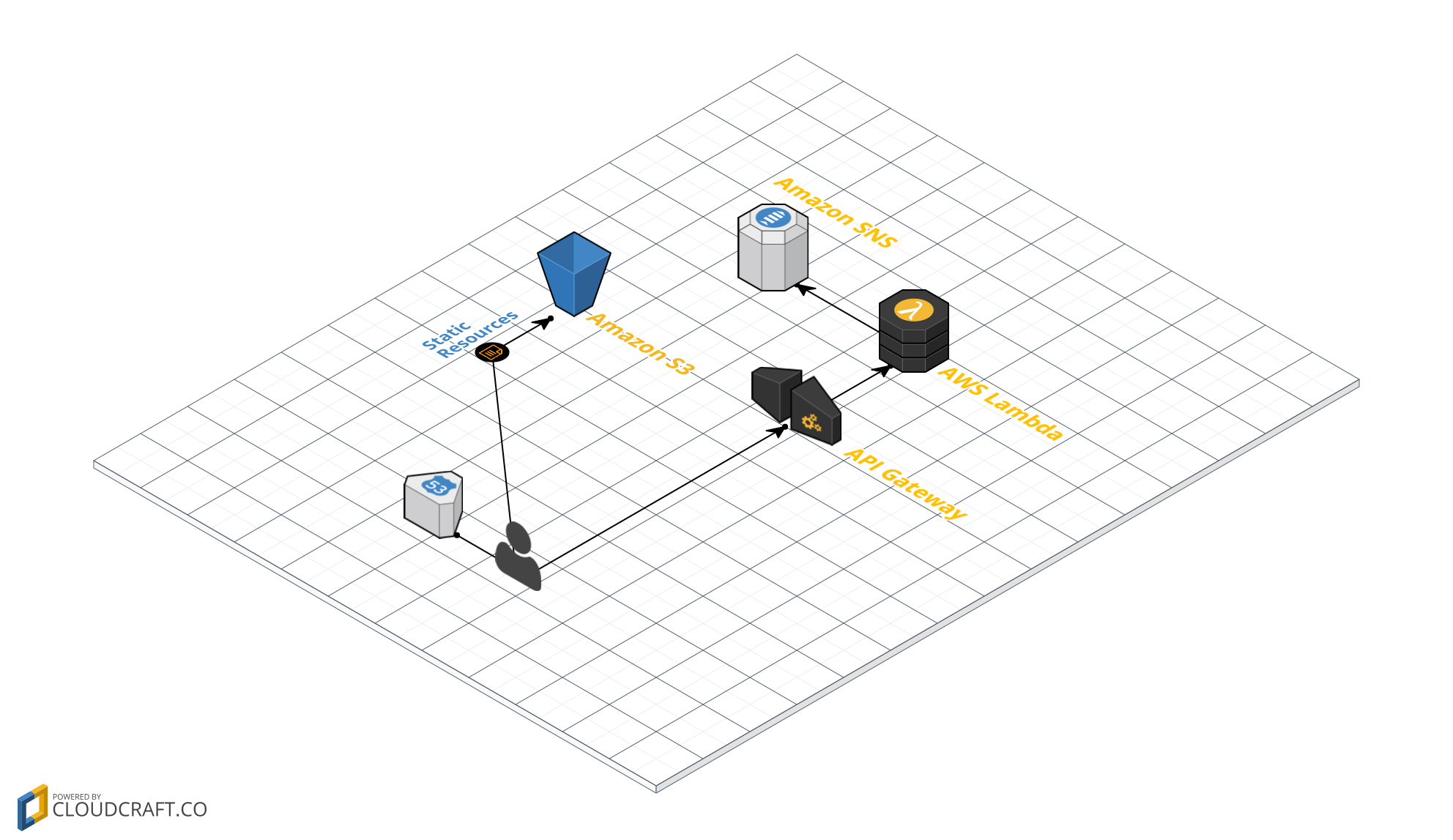
CloudFormation template creates S3, API Gateway, Lambda, SNS, and required IAM roles in one go
HTMLCorporate Website
serverless-landing-page — HTML Business Template
By justabuzz
An AWS CloudFormation template for quickly building a serverless landing page with a contact form, including S3 static hosting, API Gateway, Lambda, and SNS email notifications.
Explore the design
Compare the page layouts and mobile experience. Open any screenshot for a closer look.
Author preview
Author-provided preview
Preview provided in the project README.
One original preview is available. Open the full image to inspect the design.
Screenshots show visual appearance; interactive behavior may differ.
Recorded 2026-10-03View source
What stands out
A quick read of the recorded project description.
S3 bucket hosts static landing page content
API Gateway receives contact form submissions and forwards them to Lambda
Lambda sends form data to a specified email address via SNS
Repository includes two initial pages: index.html and error.html
Template Details
This project targets scenarios where landing pages and contact forms need to be created repeatedly, delegating server provisioning to AWS serverless resources. The repository provides a CloudFormation template that, once deployed, creates an S3 bucket for storing static content, an API Gateway to receive form submissions, a Lambda to process submissions, and an SNS topic that sends form data to a specified email address, along with the required IAM roles. The repository also includes initial HTML for the landing page: index.html provides a basic landing page and contact form with code that submits to API Gateway; error.html is displayed when users access an incorrect URL.
Before use, confirm that the AWS region where you deploy supports Lambda and API Gateway. The deployment process is: run the CloudFormation template and provide the stack name, the hosted zone name (or subdomain) for S3 hosting, and the email address to receive form data; obtain the endpoint URL from the prod stage in the API Gateway console and replace the placeholder address in index.html; upload index.html and error.html to the S3 bucket and make them public; finally, confirm the subscription confirmation email sent by SNS. The site URL can be found on the Outputs tab of CloudFormation.
Customizing the form requires changes in two places: add fields in index.html and update the JavaScript, and in the POST method of API Gateway, add the corresponding fields under Body Mapping Templates in Method Integration. The README also mentions that you can configure a custom domain via Route53 yourself, or configure CloudFront as a CDN for the landing page; the latter is not included in the template to avoid extra costs for some users.
HTMLCorporate Website
Is it right for your project?
Use Cases
- Quickly set up a serverless backend for promotional landing pages that need a contact form
- Host a purely static landing page on AWS and receive form submission emails
- Serve as a reference example combining CloudFormation and serverless architecture
- Reuse the template when similar landing pages need to be created repeatedly per project
Suitable For
- Developers familiar with the AWS console and CloudFormation
- Teams needing a static landing page with email form notifications
- Projects that want to avoid provisioning servers for landing pages
Getting started & customization
Use these recorded setup notes alongside the repository instructions for your chosen version.
- 1
Confirm the deployment region supports AWS Lambda and AWS API Gateway
- 2
When running the CloudFormation template, provide the stack name, hosted zone name, and email address to receive form submissions
- 3
Obtain the endpoint URL from the prod stage in the API Gateway console and replace the placeholder address in index.html
- 4
Upload index.html and error.html to the S3 bucket and make them public
- 5
After deployment, confirm the subscription confirmation email sent by SNS; otherwise, form data will not be received
License & source material
Usage conditions & limitations
Free to use · keep license noticeThis entry covers the free version under the MIT license from a public repository; the free scope is the code of this version and does not imply that external services or third-party assets are free.
Must comply with when using
- Free use, modification, commercial use, and distribution of this version's code are permitted.
- When distributing copies or substantial portions of the code, retain the original author's copyright notice and the full MIT license notice.
- The code is provided as is; warranties and limitations of liability are governed by the original license and applicable law.
Additional costs & items to verify
- The deployment region must support AWS Lambda and AWS API Gateway; otherwise, the template cannot be used.
- Before use, you must have an AWS account and run the CloudFormation template to create S3, API Gateway, Lambda, SNS, and other resources, which will incur corresponding AWS charges.
- After deployment, you must manually obtain the prod stage endpoint URL from the API Gateway console and replace the placeholder address in index.html.
- You must manually upload index.html and error.html to the S3 bucket and make them public; otherwise, the pages will not be accessible.
- You must confirm the subscription confirmation email sent by SNS; otherwise, form data cannot reach the specified email address.
- CloudFront CDN is not included in the template; you must configure it yourself and it may incur additional AWS charges.
- Demo images, fonts, icons, and other third-party assets must be checked against their respective licenses; the code's MIT license alone is not sufficient to determine this.
- External services such as domains, hosting, databases, payments, or AI may incur separate charges.
View Original Text Basis
Permission is hereby granted, free of charge
Original License Text
Make sure the AWS region you deploy this on supports the following AWS resources:
Original README
Run the CloudFormation template to provision all necessary AWS resources.
Original README
Grab the API Gateway 'prod' endpoint URL
Original README
Upload to the S3 bucket the two files index.html and error.html and make them public
Original README
Remember to confirm the receiving of emails from the site - a confirmation email is sent as part of the creation of the site
Original README
https://github.com/justabuzz/serverless-landing-page/blob/master/LICENSEhttps://github.com/justabuzz/serverless-landing-page/blob/master/README.mdYou may also configure AWS CloudFront to CDN your landing page. I didn't include that as part of the CloudFormation as it may incur unecessary costs to some users.
Original README
Compiled by DeepSeek based on repository license and README ·2026-10-03. Results only cover the materials read; dependencies, images, fonts, and subsequent term changes are subject to their respective original texts.
Project checks & description sources
Template Information
- Source platforms
- GitHub
- Documentation and maintenance reference score
- Partly documented · 60 / 100
- Technologies
- HTML
- Website type
- Corporate Website
How this score is calculated
Our heuristic uses license records (up to 30), a demo link (12), a preview (10), stars (15), recorded maintenance (15), description completeness (8), feature records (5) and classification data (5). It is not a code, security or performance test, or a Google score. A link does not establish tested functionality.
What to verify for this project
- Repository update recorded
- 2016-07-10
- Screenshot last checked
- 2026-10-03
No demo link is recorded. Use the repository instructions to evaluate the project locally; the screenshot alone cannot establish interactive behavior.
The catalog identifies HTML as the primary stack. Check the actual dependency manifest and lockfile for versions and hosting requirements. These notes use recorded metadata, not a code audit or a deployment test.
Use a selection guide →How this description was prepared
AI-assisted description based on catalog records and repository material. Repository authors are not automatically the reviewers of this description.
Automatically checked against source and license rules; no manual editorial review.
Inspect the recorded source material
SHA-256: db62844994f60d341ed0a59172201e3b079aca9f180e27c082ed602d93e9b829
2026-10-03T00:07:56.007Z
Source file / repository# Serverless Landing Page
An AWS CloudFormation template for creating a serverless landing page website.
Author: [@justabuzz] | http://www.onclouds.com.au/
## Overview
Create a landing page in a snap! How many times did you have to create a landing page with a Contact Us form? It's one of those tasks that tend to repeat themselves. And how can you guage what sort of server to provision for this page? If your client plans promoting it at some point then you need to ensure you provision the right server for the time job.
Enter Serverless Landing Page! By utilising serverless infrastructure you avoid the provisioning part and focus solely on your business problem. And by using this AWS CloudFormation template you also avoid the initial setup of your serverless landing page. Leaving yourself with the most important task - design the actual landing page. That's it! The rest is ready! :)
## Features
The CloudFormation template provisions the following AWS resources:
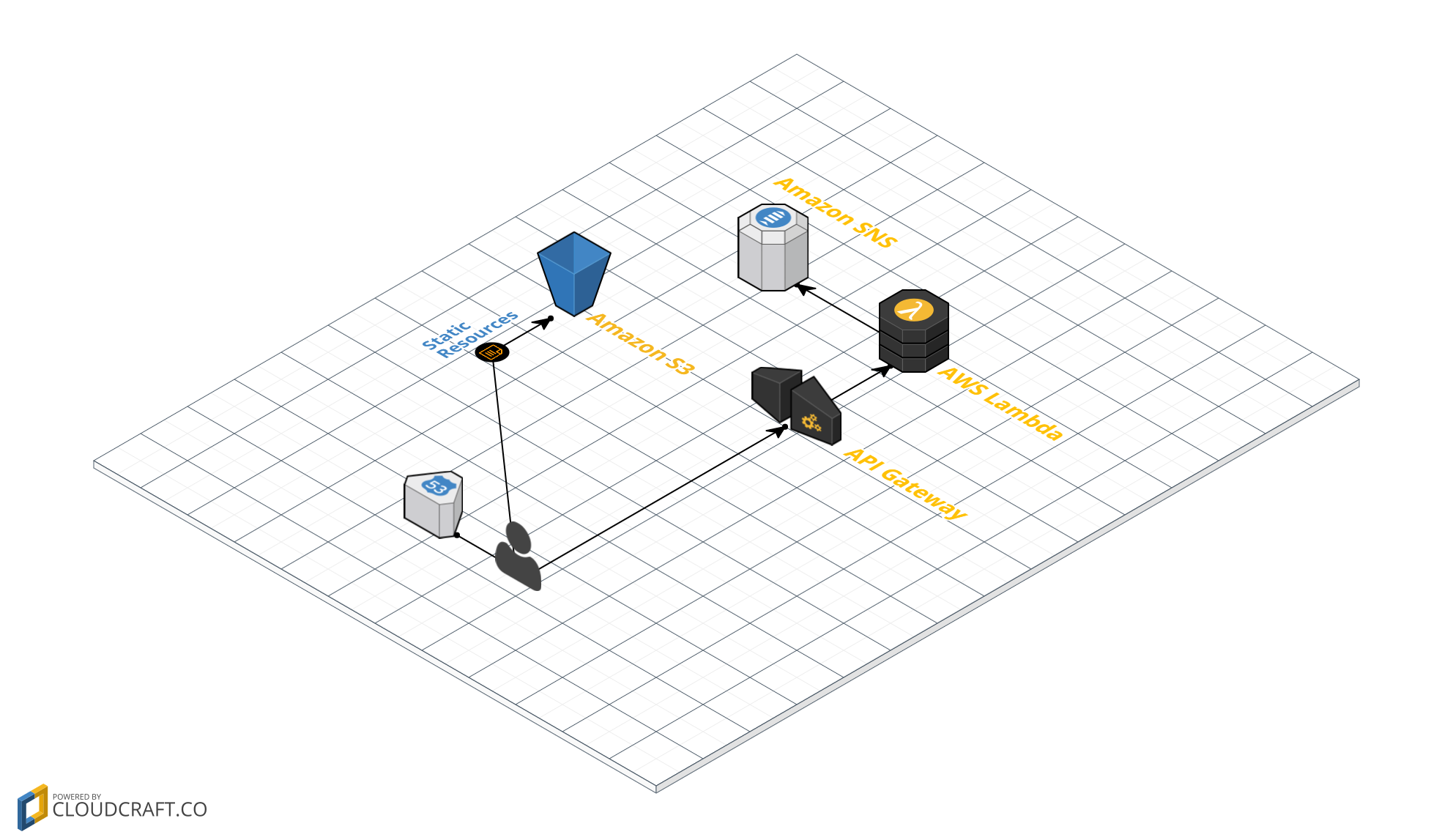
* S3 Bucket to store static content
* AWS API Gateway to receive submitted Contact Us form data and pass it to AWS Lambda
* AWS Lambda to publish the submitted data via AWS SNS
* AWS SNS to send the form data to the designated email address
* Various AMI roles for the necessary permissions the resources require
The repository includes an initial version for the landing page HTML, which includes:
* index.html: a basic landing page with a Contact form and all the code to submit it to the API Gateway
* error.html: an error page if users accidentally reach the wrong URL on the site
## Infrastructure design
## Requirements
Make sure the AWS region you deploy this on supports the following AWS resources:
* AWS Lambda
* AWS API Gateway
You can check that in the [AWS Region Table].
## How To Setup
* Run the CloudFormation template to provision all necessary AWS resources. In the process the system will ask you for:
* Stack Name
* Hosted Zone - domain (or sub-domain) for the landing page - this is important in order to enable S3-based hosting
* Email Receipient - recipient of the submitted form data
* Grab the API Gateway 'prod' endpoint URL - you can do this by accessing the prod stage in API Gateway console
* Replace the URL place holder in index.html with the endpoint URL
* Upload to the S3 bucket the two files index.html and error.html and make them public
* Remember to confirm the receiving of emails from the site - a confirmation email is sent as part of the creation of the site
You will find your new serverless landing page site URL under the CloudFormation template's Outputs tab.
That's it! You have a fully functional serverless landing page!
## What To Do Next
You probably want to customise the site's URL. Here's how you can do that using [Route53]. Remember that you have to use the HostedZone value you have entered.
You may also configure AWS CloudFront to CDN your landing page. I didn't include that as part of the CloudFormation as it may incur unecessary costs to some users. Here's how to [configure CloudFront with S3].
## FAQ
### How to customise the Contact Us form?
Customising the form requires an update in two places:
* Add the required fields and update the JS in index.html.
* Update API Gateway's POST method - add the new fields under Method Integration (under Body Mapping Templates)
That's it! Enjoy!
[@justabuzz]: <https://github.com/justabuzz/>
[AWS Region Table]: <https://aws.amazon.com/about-aws/global-infrastructure/regional-product-services/>
[Route53]: <http://docs.aws.amazon.com/gettingstarted/latest/swh/getting-started-configure-route53.html>
[configure CloudFront with S3]: <http://docs.aws.amazon.com/gettingstarted/latest/swh/getting-started-create-cfdist.html>
Explore similar templates
Compare previews and descriptions within the same stack and category.

mazer
Mazer is a free and open-source Bootstrap 5 admin dashboard and landing page template that does not depend on jQuery. It provides prebuilt releases, source builds, and CDN inclusion, and includes dark mode, perfect-scrollbar, and ApexCharts examples.
HTML · Admin dashboard

Freelancer
A bright, single-page Bootstrap portfolio template for freelancers, designers, and small studios. It includes a responsive portfolio grid with modal detail windows and an SB Forms contact form that requires an API token.
HTML · Portfolio

Creative
A single-page marketing template by Start Bootstrap for creative agencies and product services, built on Bootstrap with SCSS, featuring a portfolio grid and call-to-action sections. It includes pre-set SB Forms markers for form integration and npm build scripts for source customization.
HTML · Corporate Website

startbootstrap-agency
Agency is a one-page Bootstrap portfolio theme from Start Bootstrap, MIT licensed. It includes a responsive portfolio grid with modal details and a preconfigured SB Forms contact form that requires an API token.
HTML · Corporate Website

startbootstrap-landing-page
A general-purpose Bootstrap landing page template from Start Bootstrap, MIT licensed, with a Pug/SCSS/npm build pipeline.
HTML · Corporate Website

Landing-Page
A general-purpose landing page HTML template maintained by Tailwind Toolbox, written in pure HTML and loading the complete Tailwind CSS via CDN.
HTML · Corporate Website