All HTML, CSS, and JavaScript are contained in a single index.html file, with no build step or dependencies
HTMLPortfolio
portfolio-website — HTML Portfolio Template
By kajalbaraiya
A single-page personal portfolio website built with vanilla HTML, CSS, and JavaScript, featuring light/dark themes, a mobile navigation menu, and project showcase cards, deployable to GitHub Pages.
Explore the design
Compare the page layouts and mobile experience. Open any screenshot for a closer look.
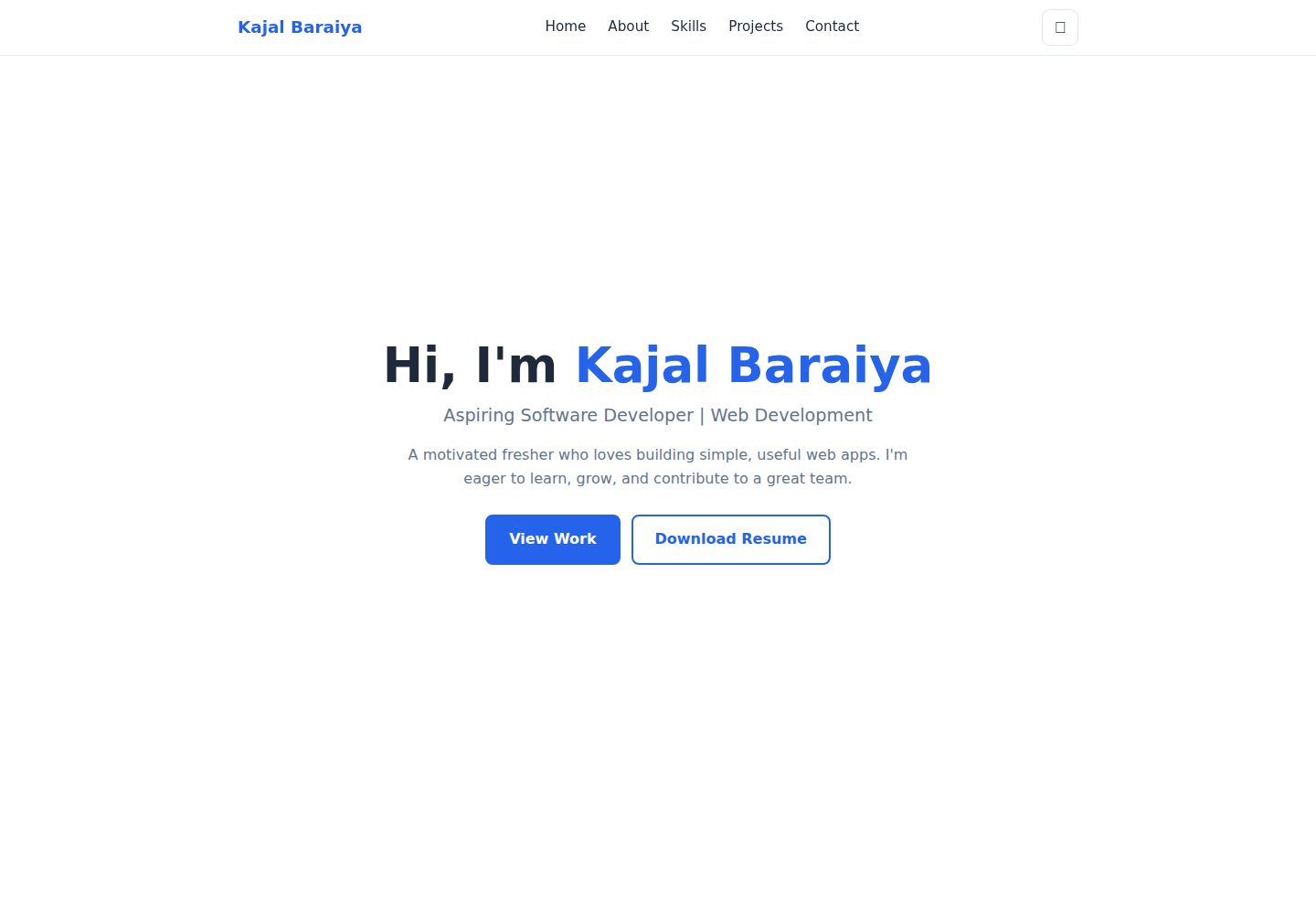
Desktop homepage1 / 2
Desktop captureTop of page
Actual screenshot captured by the server browser.
All pages & views 2
Screenshots show visual appearance; interactive behavior may differ.
Recorded 2026-10-15View source
What stands out
A quick read of the recorded project description.
Light/dark theme toggle with the choice saved in localStorage and defaulting to following the device setting
Responsive navigation that collapses into a hamburger menu on small screens
Sticky navigation bar with section links and smooth scrolling
Project cards include technology tags, demo links, and hover effects
Provides a resume download button and an automatically updating footer year
Template Details
This is a single-page personal portfolio template with all site code contained in a single index.html file, relying on no build tools or third-party libraries. The README states the page includes five sections: Home, About, Skills, Projects, and Contact, and provides a light/dark theme toggle (the choice is saved in localStorage and defaults to following the device setting), a hamburger menu on small screens, a sticky navigation bar with section links and smooth scrolling, project cards with technology tags and demo links, a resume download button, and an automatically updating footer year.
Regarding the tech stack, the README lists HTML5 for structure, CSS3 for styling (Grid, Flexbox, CSS variables, media queries), vanilla JavaScript for behavior, and GitHub Pages for hosting. The project structure consists of only three files: index.html, resume.pdf, and README.md.
The README provides customization instructions: modify the name, bio, and about text in index.html; adjust colors via the CSS variables at the top of the style block (such as --accent, --bg), with dark mode colors located in :root[data-theme="dark"]; add or remove <span class="tag"> items in the Skills section; copy the .card block and update the title, description, tags, and links to add projects; replace resume.pdf with a file of the same name; update the email, LinkedIn, and GitHub links in the Contact section.
The README does not specify browser compatibility, accessibility support, performance, or deployment methods other than GitHub Pages.
HTMLPortfolio
Is it right for your project?
Use Cases
- Individual developers building a single-page portfolio to showcase skills and projects
- As a reference project for learning vanilla HTML/CSS/JavaScript
- Publishing a free static personal homepage via GitHub Pages
Suitable For
- Developers who want to maintain a personal homepage with pure HTML/CSS/JavaScript
- Those with customization needs who want to quickly replace text, colors, and project content
- Users hosting static sites with GitHub Pages
Getting started & customization
Use these recorded setup notes alongside the repository instructions for your chosen version.
- 1
Clone the repository: git clone https://github.com/kajalbaraiya/portfolio-website.git
- 2
After entering the directory, open index.html directly in a browser; no build step or dependency installation is required
- 3
To deploy to GitHub Pages: after pushing the repository, go to Settings → Pages, select the main branch and the / (root) folder, and save
- 4
When replacing resume.pdf, keep the filename unchanged, otherwise the download button will not work
License & source material
Usage conditions & limitations
Free to use · keep license noticeThis entry covers the free version under the MIT license in the public repository; the free scope is the code of this version and does not imply that external services or third-party assets are free.
Must comply with when using
- Free use, modification, commercial use, and distribution of this version's code are permitted.
- When distributing copies or substantial portions of the code, retain the original author's copyright notice and the full MIT license notice.
- The code is provided as is; warranties and limitations of liability are governed by the original license and applicable law.
Additional costs & items to verify
- Demo images, fonts, icons, and other third-party assets must be checked against their respective licenses and cannot be judged solely by the code's MIT license.
- External services such as domains, hosting, databases, payments, or AI may incur additional charges.
View Original Text Basis
https://github.com/kajalbaraiya/portfolio-website/blob/main/LICENSEhttps://github.com/kajalbaraiya/portfolio-website/blob/main/README.mdPermission is hereby granted, free of charge
Original License Text
Compiled by DeepSeek based on repository license and README ·2026-10-15. Results only cover the materials read; dependencies, images, fonts, and subsequent term changes are subject to their respective original texts.
Project checks & description sources
Template Information
- Source platforms
- GitHub
- Documentation and maintenance reference score
- More documented · 80 / 100
- Technologies
- HTML
- Website type
- Portfolio
How this score is calculated
Our heuristic uses license records (up to 30), a demo link (12), a preview (10), stars (15), recorded maintenance (15), description completeness (8), feature records (5) and classification data (5). It is not a code, security or performance test, or a Google score. A link does not establish tested functionality.
What to verify for this project
- Repository update recorded
- 2026-10-14
- Screenshot last checked
- 2026-10-15
A demo link is listed. Check it with your own content and viewport sizes; its presence does not confirm that forms, authentication or payments work.
The catalog identifies HTML as the primary stack. Check the actual dependency manifest and lockfile for versions and hosting requirements. These notes use recorded metadata, not a code audit or a deployment test.
Use a selection guide →How this description was prepared
AI-assisted description based on catalog records and repository material. Repository authors are not automatically the reviewers of this description.
Review declaration: codex-user-requested-batch-review-20261017 · 2026-10-16
Inspect the recorded source material
SHA-256: e075fde00ec488684ea9952e2468a6a42d1a2048eeea23d44f78035c63f94deb
2026-10-15T09:19:36.158Z
Source file / repository# Portfolio Website A responsive, single-page personal portfolio built with plain HTML, CSS, and JavaScript. It introduces me, lists my skills, and showcases my projects, with a light/dark theme and a mobile-friendly navigation menu. **Live Demo:** --- ## Features - **Responsive layout** – works on mobile, tablet, and desktop - **Light / Dark theme** – toggle button that remembers your choice (saved in `localStorage`) and defaults to your device setting - **Mobile hamburger menu** – collapses the navigation on small screens - **Smooth scrolling** – sticky navbar with section links - **Sections** – Home, About, Skills, Projects, Contact - **Project cards** – tech tags and live demo links with hover effects - **Downloadable resume** – one-click resume download button - **Auto-updating footer year** ## Tech Stack | Area | Technology | | --- | --- | | Structure | HTML5 | | Styling | CSS3 (Grid, Flexbox, CSS variables, media queries) | | Behavior | Vanilla JavaScript | | Hosting | GitHub Pages | ## Project Structure ``` portfolio-website/ ├── index.html # Entire site (HTML, CSS, JS in one file) ├── resume.pdf # Resume used by the "Download Resume" button └── README.md ``` ## Getting Started 1. **Clone the repository** ```bash git clone https://github.com/kajalbaraiya/portfolio-website.git ``` 2. **Open the folder** ```bash cd portfolio-website ``` 3. **Run it** – open `index.html` in your browser (no build step or dependencies needed). ## Customization - **Name, intro, and about text** – edit the content inside `index.html`. - **Colors** – change the CSS variables at the top of the `<style>` block (`--accent`, `--bg`, etc.). Dark mode colors are under `:root[data-theme="dark"]`. - **Skills** – add or remove `<span class="tag">` items in the Skills section. - **Projects** – duplicate a `.card` block and update the title, description, tags, and link. - **Resume** – replace `resume.pdf` with your own file (keep the same name). - **Social links** – update the email, LinkedIn, and GitHub links in the Contact section. ## Deployment (GitHub Pages) 1. Push the project to a GitHub repository. 2. Go to **Settings → Pages**. 3. Under **Source**, select the `main` branch and the `/ (root)` folder, then save. 4. Your site will be live at `https://<your-username>.github.io/<repository-name>/`. ## Projects Featured - **Portfolio Website** – this site - **Pet-Heaven** – pet adoption website - **Cognitive Twin** – AI assistant for solving simple coding problems (in progress) ## Contact - Email: [email protected] - LinkedIn: https://www.linkedin.com/in/kajal-baraiya-761862419 - GitHub: https://github.com/kajalbaraiya --- © Kajal Baraiya. All rights reserved.
Explore similar templates
Compare previews and descriptions within the same stack and category.

simplefolio
Simplefolio is a minimal single-page portfolio template for developers, built with HTML, Bootstrap, SCSS, and Parcel under the MIT license. It includes Hero, About, Projects, Contact, and Footer sections, with content edited in /src/index.html and theme colors controlled by two SCSS variables.
HTML · Portfolio

Freelancer
A bright, single-page Bootstrap portfolio template for freelancers, designers, and small studios. It includes a responsive portfolio grid with modal detail windows and an SB Forms contact form that requires an API token.
HTML · Portfolio

Resume
A single-page resume and CV template from Start Bootstrap, built on Bootstrap with a fixed sidebar and content sections.
HTML · Portfolio

Creative
A single-page marketing template by Start Bootstrap for creative agencies and product services, built on Bootstrap with SCSS, featuring a portfolio grid and call-to-action sections. It includes pre-set SB Forms markers for form integration and npm build scripts for source customization.
HTML · Corporate Website

Grayscale
A dark single-page Bootstrap template from Start Bootstrap for photography, events and brand storytelling, with a large hero and clearly separated sections.
HTML · Corporate Website

startbootstrap-stylish-portfolio
A one-page Bootstrap portfolio theme from Start Bootstrap with multiple content sections and an off-canvas navigation menu. Basic use means editing HTML/CSS under dist and opening index.html; advanced use relies on npm with Pug and SCSS build scripts.
HTML · Portfolio