Newspaper-layout blog structure: masthead, lead story, tag-based "sections," and list pages
AstroBlog
astro-theme-shinbun — Astro Blog Template
By kamimen
An Astro blog theme that uses the visual language of Japanese newspaper pages, with horizontal writing by default, per-article vertical writing, and switchable day/night page modes.
Explore the design
Compare the page layouts and mobile experience. Open any screenshot for a closer look.
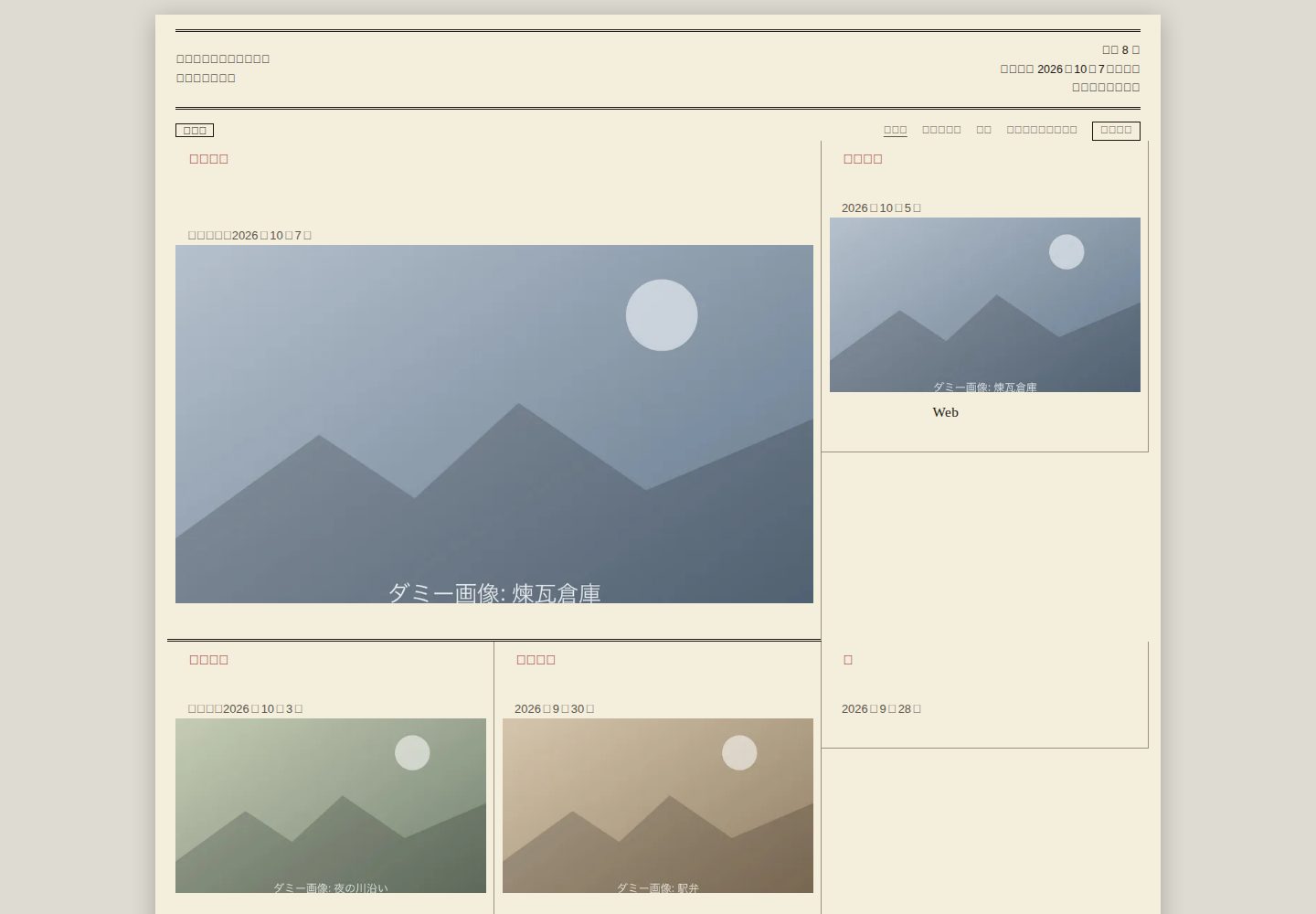
Desktop homepage1 / 3
Desktop captureTop of page
Actual screenshot captured by the server browser.
All pages & views 3
Screenshots show visual appearance; interactive behavior may differ.
Recorded 2026-10-08View source
What stands out
A quick read of the recorded project description.
Horizontal writing by default, with per-article vertical writing and reader switching between horizontal and vertical writing on the article page
Switchable day and night page modes that remember the last choice
Markdown and MDX writing, with frontmatter type-checked by Astro content collections, supporting drafts and scheduled publishing
Outputs RSS, sitemap, robots.txt, canonical, Open Graph, and JSON-LD, and supports the site.base base path
Images use Astro image optimization and can be used for lead photos, list thumbnails, captioned body images, and OG images
Template Details
astro-theme-shinbun is an Astro theme for Japanese-language blogs, with a layout inspired by newspaper pages: the blog name serves as the masthead, the latest article becomes the lead story, and tags correspond to newspaper "sections," each with its own page and list. Horizontal writing is the default, and individual articles can be set to vertical writing; readers can also switch between horizontal and vertical writing on the article page. The day and night page modes are likewise switchable, and the choice is retained the next time the site is opened.
For writing, articles use Markdown and MDX, and frontmatter is type-checked through Astro content collections; articles with draft: true or a future publication date are not made public, long articles automatically generate a table of contents, code blocks switch color schemes between the day and night page modes (Shiki), and article templates can be generated with npm run new-post. Images go through Astro image optimization (WebP, srcset, lazy loading) and can be used for lead photos, list thumbnails, captioned body images, and OG images.
For output, it includes RSS, sitemap, robots.txt, canonical, Open Graph, and JSON-LD structured data, along with page transitions (ClientRouter) and link prefetching; it supports the site.base base path, so it can be used for GitHub Pages project pages. Configuration is centralized in a single file, shinbun.config.ts.
Note: the README states that testing was done only in Chrome, and Firefox and Safari were not tested; the people, groups, events, and photos in the examples are fictional; running it requires Node.js 22.12 or later.
AstroBlog
Is it right for your project?
Use Cases
- Writing a blog or column in Japanese with a newspaper-page style
- A site where some articles are vertical and some are horizontal, and readers can switch between them
- A static blog that needs basic output capabilities such as RSS, sitemap, structured data, and OG images
- Deployment in environments with a base path, such as GitHub Pages project pages
Suitable For
- Individual bloggers who use Astro and are comfortable writing in Markdown or MDX
- Japanese-language content sites that want newspaper-style typography rather than a generic card-based blog appearance
- Authors who need writing features such as drafts, scheduled publishing, a table of contents, and code highlighting
Getting started & customization
Use these recorded setup notes alongside the repository instructions for your chosen version.
- 1
Requires Node.js 22.12 or later
- 2
Can be created via a GitHub template, fork, or npm create astro@latest -- --template kamimen/astro-theme-shinbun
- 3
After installation, run npm install and npm run dev, then edit the masthead, description, author, URL, and menu in shinbun.config.ts
- 4
Use npm run new-post <filename> to generate an article template; it includes draft: true by default, and this must be removed when finished
- 5
The README states that testing was done only in Chrome, and Firefox and Safari were not tested; third-party assets such as example images and fonts must be checked against their respective licenses
License & source material
Usage conditions & limitations
Free to use · keep license noticeThis entry covers the free version under the MIT license in the public repository; the free scope is the code of that version and does not mean that external services or third-party assets are free.
Must comply with when using
- The code of this version may be used, modified, used commercially, and distributed free of charge.
- When distributing copies or substantial portions of the code, retain the original author's copyright notice and the full MIT license notice.
- The code is provided as is; warranties and limitations of liability are governed by the original license and applicable law.
Additional costs & items to verify
- Demo images, fonts, icons, and other third-party assets must be checked against their respective licenses and cannot be judged solely by the code's MIT license.
- External services such as domains, hosting, databases, payments, or AI may incur separate charges.
- Runtime requirement: Node.js 22.12 or later must be used; lower versions cannot build or run it.
- Browser compatibility limitation: the README states that testing was done only in Chrome, and Firefox and Safari were not tested, so you must verify them yourself before use.
- Example content limitation: the people, groups, events, and photos in the repository examples are fictional and cannot be used directly as real content.
- External dependency limitation: the layout components depend on the external project shinbun.css, and its license and maintenance status must be confirmed separately.
- External image limitation: when using external images, the domain must be explicitly allowed in images.domains, otherwise they will not be optimized.
View Original Text Basis
Permission is hereby granted, free of charge
Original License Text
Node.js 22.12 以上が必要です。
Original README

Original README
見本の内容(人物・団体・出来事・写真)は、すべて架空です。
Original README
紙面の部品は [shinbun.css](https://github.com/kamimen/shinbun-css) を使っています。
Original README
https://github.com/kamimen/astro-theme-shinbun/blob/main/LICENSEhttps://github.com/kamimen/astro-theme-shinbun/blob/main/README.md`images.domains` | 最適化を許可する外部の画像のドメイン
Original README
Compiled by DeepSeek based on repository license and README ·2026-10-08. Results only cover the materials read; dependencies, images, fonts, and subsequent term changes are subject to their respective original texts.
Project checks & description sources
Template Information
- Source platforms
- GitHub
- Documentation and maintenance reference score
- More documented · 80 / 100
- Technologies
- Astro
- Website type
- Blog
How this score is calculated
Our heuristic uses license records (up to 30), a demo link (12), a preview (10), stars (15), recorded maintenance (15), description completeness (8), feature records (5) and classification data (5). It is not a code, security or performance test, or a Google score. A link does not establish tested functionality.
What to verify for this project
- Repository update recorded
- 2026-10-08
- Screenshot last checked
- 2026-10-08
A demo link is listed. Check it with your own content and viewport sizes; its presence does not confirm that forms, authentication or payments work.
The catalog identifies Astro as the primary stack. Check the actual dependency manifest and lockfile for versions and hosting requirements. These notes use recorded metadata, not a code audit or a deployment test.
Use a selection guide →How this description was prepared
AI-assisted description based on catalog records and repository material. Repository authors are not automatically the reviewers of this description.
Review declaration: [email protected] · 2026-10-09
Inspect the recorded source material
SHA-256: f327816d0db26c32a3eec9c534ec6c20f7dc6c06c4596dbb5005f3b3a243b3bc
2026-10-08T22:10:15.371Z
Source file / repository
# astro-theme-shinbun
新聞の紙面のように書ける、日本語のブログの Astro テーマです。紙面の部品は [shinbun.css](https://github.com/kamimen/shinbun-css) を使っています。
    
日本語 | [English](README_en.md)


見本の内容(人物・団体・出来事・写真)は、すべて架空です。
## 特徴
### 紙面
ブログの名前が題字になり、最新の記事がトップ記事になります。タグは新聞の「面」にあたり、面ごとのページと一覧があります。既定は横組みで、記事ごとに縦組みを選べます。読む人は、記事ページで横組みと縦組みを切り替えられます。昼と夜の紙面も切り替えられ、選んだ紙面は次に開いたときも保たれます。
### 書く
記事は Markdown と MDX で書きます。frontmatter は、Astro のコンテンツコレクションで型を検査します。下書き(`draft: true`)と、公開日時が先の記事は公開しません。長い記事には、見出しの一覧(目次)が自動で付きます。コードのブロックは、昼と夜の紙面で色が切り替わります(Shiki)。記事の雛形は `npm run new-post` で作れます。
### 画像
Astro の画像最適化(WebP、`srcset`、遅延読み込み)に対応しています。トップ記事の写真、一覧のサムネイル、本文の画像(キャプションつき)、OG 画像に使えます。
### 公開
RSS、サイトマップ、robots.txt、canonical、Open Graph、構造化データ(JSON-LD)を出力します。ページ遷移(`ClientRouter`)とリンクの先読みもあります。公開する場所の基準パス(`site.base`)に対応するので、GitHub Pages のプロジェクトページでも使えます。設定は `shinbun.config.ts` の 1 ファイルです。
## プロジェクトの構成
```
/
├── public/
│ └── favicon.svg
├── scripts/
│ ├── new-post.ts 記事の雛形を作る
│ ├── update-theme.ts このテーマの更新を取り込む
│ └── make-sample-images.ts 見本のダミー画像を作る
├── src/
│ ├── assets/photos/ 見本の写真
│ ├── components/ 題字、欄外、記事、ページ送りなど
│ ├── content/
│ │ ├── pages/about.md
│ │ └── posts/ 記事(.md と .mdx)
│ ├── i18n/ja.ts 画面の文字列
│ ├── layouts/ Layout.astro
│ ├── pages/ トップ、記事、タグ、アーカイブ、about、404、RSS
│ ├── plugins/rehype-figure.ts 本文の画像を写真(figure)にする
│ ├── scripts/ 昼夜の切り替え、縦組み・横組みの切り替え
│ ├── styles/blog.css shinbun.css の上に重ねるブログ向けの調整
│ ├── utils/ 記事の絞り込み、並べ替え、日付など
│ ├── config.ts 既定値を補った設定
│ └── content.config.ts 記事の frontmatter の型
├── test/ 単体テスト
├── vendor/ shinbun.css(CSS と JavaScript)
├── astro.config.ts
└── shinbun.config.ts 利用者が直す設定
```
記事は、`src/content/posts/` に置きます。
## はじめ方
1. このリポジトリを、GitHub のテンプレートとして使うか、fork します。次のコマンドでも作れます
```sh
npm create astro@latest -- --template kamimen/astro-theme-shinbun
```
2. 次を実行します
```sh
npm install
npm run dev
```
3. `shinbun.config.ts` を直します(題字、説明、著者、URL、メニュー)
4. `npm run new-post <ファイル名>` で、記事の雛形を作ります(`src/content/posts/` に作られます。`draft: true` が付いているので、書き終えたら外します)
5. `npm run build` で、`dist/` に静的なサイトを作ります
Node.js 22.12 以上が必要です。
## 設定(`shinbun.config.ts`)
| 項目 | 内容 |
|---|---|
| `site.url`、`site.title`、`site.subtitle`、`site.description`、`site.author` | サイトの情報。`url` は、公開する URL |
| `site.base` | 公開する場所の基準パス。GitHub Pages のプロジェクトページなら、`"/リポジトリ名/"` |
| `site.timezone` | 日付を表示するタイムゾーン(既定は `Asia/Tokyo`) |
| `writing` | サイトの組方向。`"horizontal"`(横組み)または `"vertical"`(縦組み) |
| `paper.dan`、`paper.verticalDan`、`paper.fontSize` | 横組み・縦組みの段数と、文字の大きさ |
| `masthead.left`、`masthead.right` | 題字の左右に出す文 |
| `images.domains` | 最適化を許可する外部の画像のドメイン |
| `nav`、`socials` | メニューと、フッターのリンク |
| `posts.perPage`、`posts.columns`、`posts.scheduledMargin` | 1 ページの記事数、記事の段数(既定は 1)、予約投稿を早く出す余裕(ミリ秒) |
| `features.darkMode`、`features.archives`、`features.transitions` | 夜の紙面の切り替え、アーカイブ、ページ遷移 |
## 記事の frontmatter
```yaml
---
title: 見出し
description: 記事の要点を、一文で。リードとして表示されます
pubDatetime: 2026-10-07T09:00:00+09:00
tags: [まちの話, 建築]
kicker: みどり市 # 見出しの上の肩見出し。省略するとタグの先頭
dateline: みどり市 # 発信地
byline: 架空太郎 # 署名。省略するとサイトの著者
writing: vertical # この記事だけ縦組みにする
image: ../../assets/photos/library.jpg # 記事の写真
imageAlt: 写真の説明
draft: false
---
```
## 画像
- 記事の写真: frontmatter の `image` に、記事の Markdown から見た相対パスで書きます。トップ記事と記事ページに大きく、一覧にはサムネイルで出ます。OG 画像にも使います
- 本文の画像: Markdown の `` で書きます。`src/` の画像は、自動で最適化されます。`"キャプション"` を付けると、写真の説明(`figcaption`)になります
- MDX: `.mdx` の記事では、`Image` の部品も使えます(見本: `src/content/posts/code-sample.mdx`)
- 外部の画像: `images.domains` に、許可するドメインを書きます。許可しない画像は、最適化されません
- `public/` に置いた画像は、最適化されません
## 縦組みの記事の書き方
- 日付は、縦組みでは漢数字(二〇二六年十月五日)で表示されます
- 本文の数字は、書いたとおりに表示されます。縦組みの記事では、二桁の数字は縦中横になります。三桁以上や年は、漢数字で書くと読みやすくなります
- 写真は、縦組みでは高さを抑えて表示します
## 色を変える
紙面の色は、shinbun.css のトークンで決まっています。`src/styles/blog.css` で上書きします。
```css
.sb-paper {
--sb-paper: light-dark(#f4eedd, #17140f); /* 紙の色(昼、夜) */
--sb-ink: light-dark(#1b1812, #eee6d2); /* 文字の色 */
--sb-accent: light-dark(#a02a1f, #e5786b); /* 肩見出しなどの差し色 */
}
```
トークンの一覧は、[shinbun.css の API](https://github.com/kamimen/shinbun-css/blob/main/docs/API.md) にあります。
## ライセンス
[MIT License](LICENSE)
Explore similar templates
Compare previews and descriptions within the same stack and category.

astrowind
AstroWind is a free, open-source Astro starter theme using Astro and Tailwind CSS, released under the MIT license.
Astro · Blog

astro-paper
AstroPaper is a minimal, responsive, accessible, and SEO-friendly Astro blog theme. Articles are stored as Markdown/MDX in src/content/posts/, with subdirectories affecting URLs.
Astro · Blog

fuwari
Fuwari is a static blog template built with Astro and Tailwind CSS for personal blogs. It manages posts as Markdown files in src/content/posts/, with frontmatter for title, date, description, cover, tags, categories, draft status, and language.
Astro · Blog

Firefly
Firefly is a clean personal blog theme forked from Astro and Fuwari, offering four background modes, single/double sidebar and list/grid layouts, Pagefind client-side full-text search, and a six-language UI.
Astro · Blog

astro-theme-cactus
Astro Cactus is an Astro-based blog and portfolio theme that uses Markdown/MDX content collections to manage posts, notes, and tags, with frontmatter type-checked by a schema.
Astro · Portfolio

astrofy
Astrofy is a free and open-source personal portfolio website template built with Astro and TailwindCSS, with built-in blog, CV timeline, project showcase, store, and RSS feed modules.
Astro · Portfolio