Based on Bootstrap 5, with added NeoBrutalism-style component styles
HTMLAdmin dashboard
neostrap-core — HTML Admin dashboard Template
By kodinusgroup
neostrap-core is a Bootstrap 5 admin interface template with a NeoBrutalism visual style, built on Vite and TypeScript, including SCSS theme variables, component styles, and multi-page examples.
Explore the design
Compare the page layouts and mobile experience. Open any screenshot for a closer look.
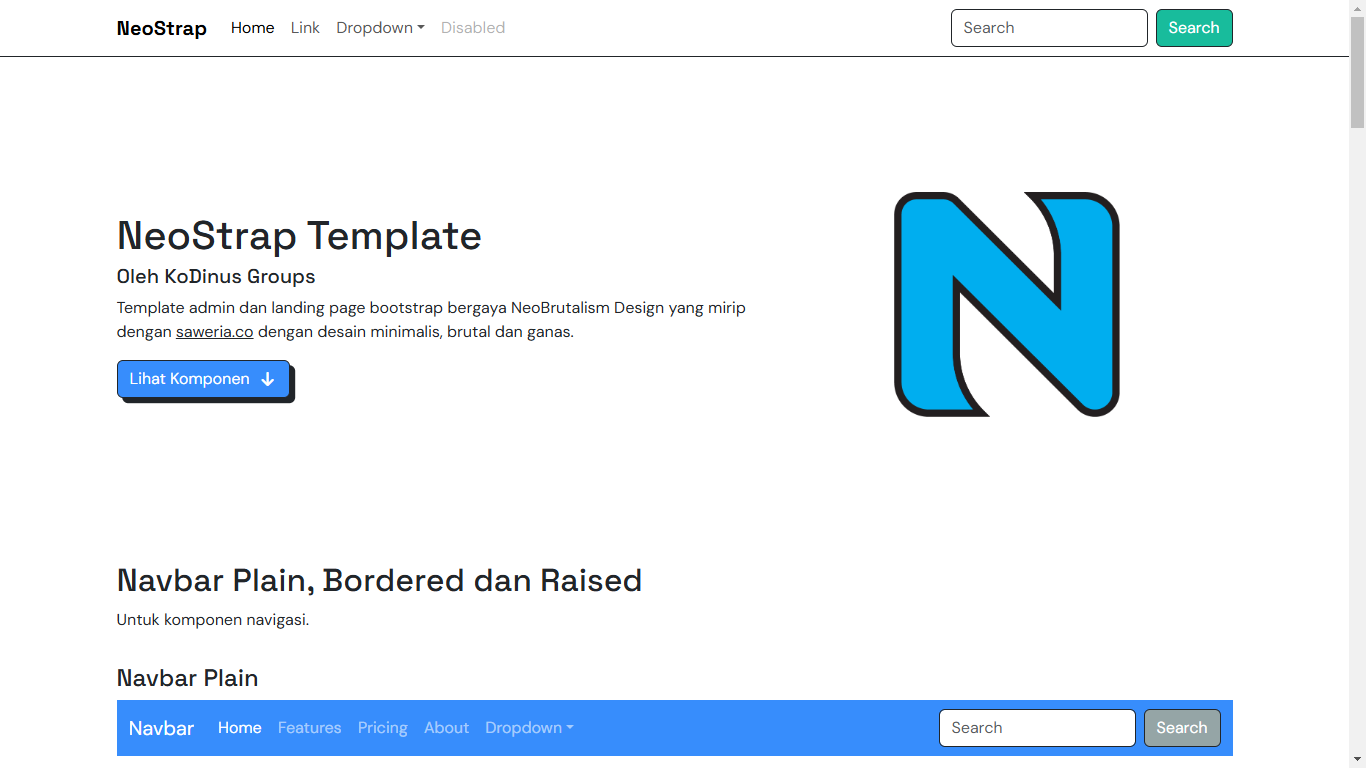
Author preview
Author-provided preview
Preview provided in the project README.
One original preview is available. Open the full image to inspect the design.
Screenshots show visual appearance; interactive behavior may differ.
Recorded 2026-10-02View source
What stands out
A quick read of the recorded project description.
SCSS split by component, including light and dark variable files for easy theme customization
Uses Vite and TypeScript, providing hot reload and production build scripts
Includes multiple HTML pages: index, 404, 500, 503, and component documentation
Includes initialization scripts for i18n and theme switching
Comes with multiple sizes of favicon, apple-touch-icon, and mstile icons
Template Details
neostrap-core is an open-source HTML admin template by kodinusgroup on GitHub, positioned as a data interface/backend type, with a NeoBrutalism visual style (thick outlines, high contrast, hard shadows). The template is based on Bootstrap 5, with style files split by component under the src/assets/scss/neobrutalism directory, covering alert, button, card, dropdown, input, navbar, and more, and provides _variables.scss and _variables-dark.scss for theme customization.
The engineering side uses Vite and TypeScript. Entry scripts include init-i18n.ts, init-theme.ts, and neostrap.ts, handling internationalization initialization, theme switching, and main logic respectively; the page layer includes index.html, 404.html, 500.html, 503-cs.html, and docs-component-index.html, with layouts composed of layouts/single.html and partials for favicon, font, footer, and navbar. The static assets directory provides multiple sizes of favicon, apple-touch-icon, and mstile icons.
The README lists features such as Vite + TypeScript, Bootstrap 5 integration, SCSS/SASS support, NeoBrutalism component styles, hot reload, and production builds, and provides installation and dev, build commands for npm/yarn/pnpm/bun. The repository uses the MIT license, allowing free use, modification, commercial use, and distribution of this version of the code, but third-party assets such as demo images, fonts, and icons need separate license verification.
HTMLBackend
Is it right for your project?
Use Cases
- Building a backend management interface with a thick-outline, high-contrast visual style
- Introducing NeoBrutalism component styles into a Bootstrap 5 project for secondary development
- As a starting point for a multi-page HTML backend prototype, reusing its layout and navigation partials
- Interface projects that need light/dark theme switching and internationalization initialization
Suitable For
- Frontend developers familiar with Bootstrap and SCSS
- HTML projects that need a backend/data interface template
- Teams that want to freely modify and distribute under the MIT license
Getting started & customization
Use these recorded setup notes alongside the repository instructions for your chosen version.
- 1
After cloning the repository, install dependencies using npm, yarn, pnpm, or bun
- 2
Start the development server with the corresponding command such as npm run dev
- 3
Use npm run build to generate a production build
- 4
Mainly edit files under the src/ directory; Bootstrap components can be used directly
- 5
Third-party images, fonts, and icon assets need separate license verification
License & source material
Usage conditions & limitations
Free to use · keep license noticeThis listing covers the free version under the MIT license in the public repository; the free scope is the code of this version and does not mean external services or third-party assets are free.
Must comply with when using
- Free use, modification, commercial use, and distribution of this version of the code are allowed.
- When distributing copies or substantial portions of the code, retain the original author's copyright notice and the full MIT license notice.
- The code is provided as is; warranties and limitations of liability are governed by the original license and applicable law.
Additional costs & items to verify
- Demo images, fonts, icons, and other third-party assets need separate license verification and cannot be judged solely by the code's MIT license.
- External services such as domains, hosting, databases, payments, or AI may incur additional charges.
View Original Text Basis
https://github.com/kodinusgroup/neostrap-core/blob/main/LICENSEhttps://github.com/kodinusgroup/neostrap-core/blob/main/README.mdPermission is hereby granted, free of charge
Original License Text
Compiled by DeepSeek based on repository license and README ·2026-10-02. Results only cover the materials read; dependencies, images, fonts, and subsequent term changes are subject to their respective original texts.
Project checks & description sources
Template Information
- Source platforms
- GitHub
- Documentation and maintenance reference score
- More documented · 81 / 100
- Technologies
- HTML
- Website type
- Admin dashboard
How this score is calculated
Our heuristic uses license records (up to 30), a demo link (12), a preview (10), stars (15), recorded maintenance (15), description completeness (8), feature records (5) and classification data (5). It is not a code, security or performance test, or a Google score. A link does not establish tested functionality.
What to verify for this project
- Repository update recorded
- 2025-05-26
- Screenshot last checked
- 2026-10-02
A demo link is listed. Check it with your own content and viewport sizes; its presence does not confirm that forms, authentication or payments work.
The catalog identifies HTML as the primary stack. Check the actual dependency manifest and lockfile for versions and hosting requirements. These notes use recorded metadata, not a code audit or a deployment test.
Use a selection guide →How this description was prepared
AI-assisted description based on catalog records and repository material. Repository authors are not automatically the reviewers of this description.
Automatically checked against source and license rules; no manual editorial review.
Inspect the recorded source material
SHA-256: 1c08f5da5b45b1869ae485695e51de0d351ad1a298ce5a3ccbeb352eb77285f5
2026-10-02T18:35:28.294Z
Source file / repository[](https://github.com/Safouene1/support-palestine-banner/Markdown-pages/Support.md)
<div align="center" style="margin-bottom: 1rem">
<a href="./README.md"><strong>English</strong></a>
<span style="margin-left: .5rem;margin-right: .5rem">•</span>
<a href="./README-id.md">Indonesian</a>
</div>
<h1 align="center">NeoStrap Template</h1>

<p align="center">The latest Bootstrap 5 template with a NeoBRUTALISM style that is simple, bold, and fierce!</p>
<div align="center">
[](https://github.com/kokodingin/neostrap-core/graphs/contributors)


[](LICENSE)
<hr />
<p>This project is supported and sponsored by:</p>
<div style="text-align: center">
<a href="https://www.facebook.com/groups/programmerhandal/">
<img src="./logo-sponsor-imphnen-xxxhdpi.png" height="100px" />
</a>
</div>
<p align="center">
<a href="http://neostrap.kokodingin.id">Demo Page</a>
<span style="margin-left: .5rem;margin-right: .5rem">•</span>
<a href="./CONTRIBUTE.md">READ THE CONTRIBUTION GUIDE!</a>
<span style="margin-left: .5rem;margin-right: .5rem">•</span>
<a href="./LICENSE">LICENSE</a>
</p>
</div>
## ⚡ Quick Start
1. Download or clone the repository
```bash
git clone https://github.com/kokodingin/neostrap-core.git
```
2. Install dependencies
```bash
npm install
yarn install
pnpm install
bun install
```
3. Run the development server
```bash
npm run dev
yarn dev
pnpm run dev
bun run dev
```
### 📁 Folder Structure
```
neostrap/
| .editorconfig
| .env
| .gitignore
| .prettierignore
| .prettierrc
| .tsconfig.json
| LICENSE
| logo-sponsor-imphnen-xxxhdpi.png
| package.json
| README.md
| screenshot.png
| vite.config.ts
|
+---.vscode
| launch.json
|
+---src
| | 404.html
| | 500.html
| | 503-cs.html
| | docs-component-index.html
| | index.html
| |
| +---assets
| | +---js
| | | init-i18n.ts
| | | init-theme.ts
| | | neostrap.ts
| | |
| | +---scss
| | | | bootstrap.scss
| | | | neostrap.scss
| | | | _variables-dark.scss
| | | | _variables.scss
| | | |
| | | \---neobrutalism
| | | core.scss
| | | _alert.scss
| | | _brutal-design.scss
| | | _button.scss
| | | _card.scss
| | | _dropdown.scss
| | | _input.scss
| | | _navbar.scss
| | | _root.scss
| | |
| | \---static
| | | apple-touch-icon-114x114.png
| | | apple-touch-icon-120x120.png
| | | apple-touch-icon-144x144.png
| | | apple-touch-icon-152x152.png
| | | apple-touch-icon-57x57.png
| | | apple-touch-icon-60x60.png
| | | apple-touch-icon-72x72.png
| | | apple-touch-icon-76x76.png
| | | favicon-128.png
| | | favicon-16x16.png
| | | favicon-196x196.png
| | | favicon-32x32.png
| | | favicon-96x96.png
| | | favicon.ico
| | | mstile-144x144.png
| | | mstile-150x150.png
| | | mstile-310x150.png
| | | mstile-310x310.png
| | | mstile-70x70.png
| | |
| | +---images
| | |
| | \---js
| | all.js
| |
| \---layouts
| | single.html
| |
| \---partials
| | favicon.html
| | font.html
| |
| +---footer
| | single.html
| |
| \---navbars
| primary.html
|
\---types
\---vite-env.d.ts
```
## 📁 Included Features
- ✅ Vite + TypeScript setup
- ✅ Integrated Bootstrap 5
- ✅ SCSS/SASS support
- ✅ NeoBrutalism components & styles
- ✅ Hot reload
- ✅ Production-ready builds
## 📦 Production Build
```bash
npm run build
```
## 💻 Development
Start editing files in the `src/` folder according to your needs. All Bootstrap components are available and ready for use.
Explore similar templates
Compare previews and descriptions within the same stack and category.

gentelella
Gentelella v4 is a free, open-source admin dashboard template maintained by Colorlib, built with vanilla JavaScript, SCSS, and Vite 8 without Bootstrap or jQuery.
HTML · Admin dashboard

coreui-free-bootstrap-admin-template
A free Bootstrap admin template maintained by CoreUI, built on CoreUI's own UI component library. It provides compiled HTML pages and Pug template source code, covering dashboards, authentication, forms, components, icons, and error pages.
HTML · Admin dashboard

dashboards
A collection of responsive dashboard HTML templates open-sourced by Keen IO, built on CSS Grid, offering multiple prebuilt admin data interface layouts.
HTML · Admin dashboard

SB Admin 2
SB Admin 2 is a classic Bootstrap admin template from Start Bootstrap, offering dashboards, charts, tables, and common management pages.
HTML · Admin dashboard

Adminator-admin-dashboard
Adminator 4 is a vanilla HTML, CSS and JavaScript admin dashboard template with a CSS-variable token design system, built-in light and dark themes, no jQuery or Bootstrap dependency, and 18 pages covering dashboards, mail, calendar, charts, forms, tables and error pages.
HTML · Admin dashboard

SB Admin
SB Admin is a lightweight, open-source Bootstrap admin template from Start Bootstrap. It offers a sidebar-and-top-bar layout with data tables, forms, and stat cards, plus responsive design.
HTML · Admin dashboard