Built on Next.js, with styling using Emotion
Next.jsReactBlog
blog-template-kooku — Next.js Blog Template
By kooku0
A blog template based on Next.js and Emotion, integrated with Netlify CMS for writing articles; site information can be configured via meta-config.ts and deployed to Netlify.
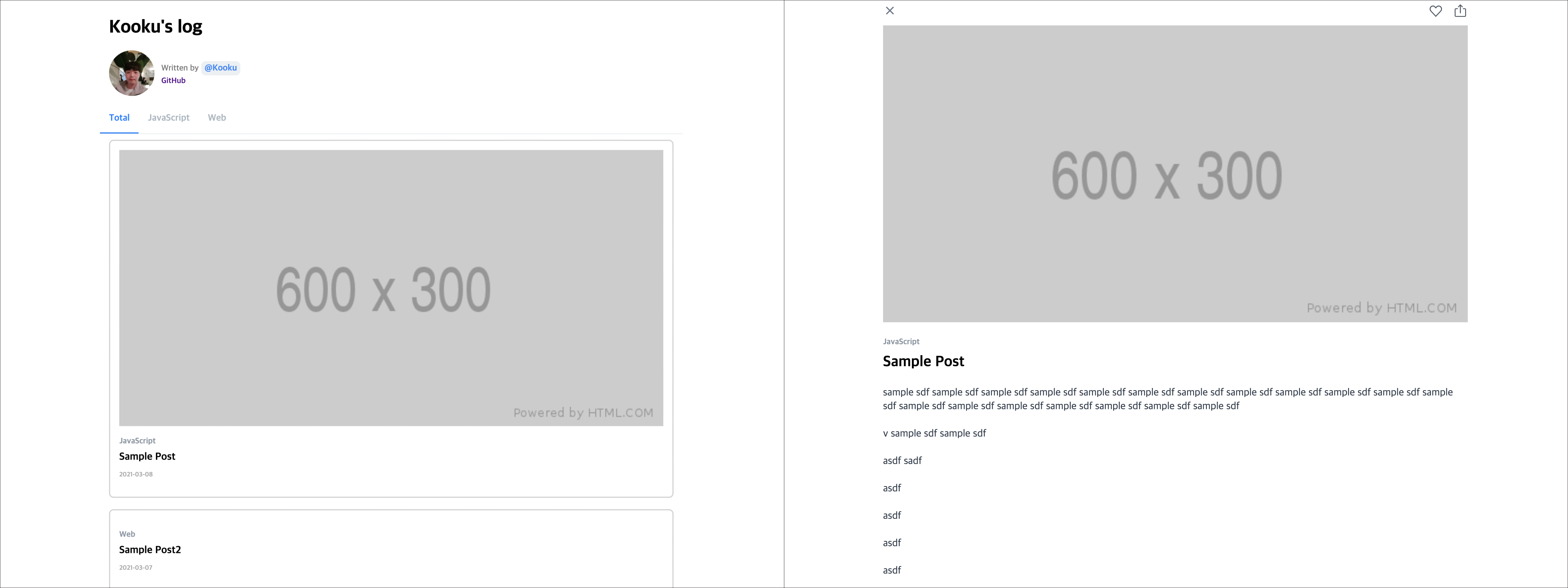
Explore the design
Compare the page layouts and mobile experience. Open any screenshot for a closer look.
Author preview
Author-provided preview
Preview provided in the project README.
One original preview is available. Open the full image to inspect the design.
Screenshots show visual appearance; interactive behavior may differ.
Recorded 2026-10-13View source
What stands out
A quick read of the recorded project description.
Integrated with Netlify CMS, allowing articles to be written and published from the admin
Site title, author, introduction, avatar, and social accounts are configured centrally in /meta-config.ts
CMS fields and collections can be customized via /public/admin/config.yml
The README provides a one-click Netlify deploy button and a deploy status badge
Template Details
This is a blog template built on Next.js with styling handled by Emotion; in the README the author positions it as a "Blog Template based on Next.js". The template includes Netlify CMS as the content management entry point; articles are added through the CMS admin, and the CMS fields and collections can be adjusted in /public/admin/config.yml. The site title, author, introduction, site URL, avatar, and social accounts (GitHub, Medium, Facebook) are configured centrally in /meta-config.ts, which are configurable options provided by the template.
For the usage flow, the README gives these steps: fork the repository, run yarn and yarn dev to preview locally on port 3000, modify meta-config.ts, then publish via the Netlify deploy button, and finally write articles in Netlify CMS. The repository also provides a Netlify deploy status badge, PC and mobile screenshots, and a demo GIF, and lists the site kooku-log that uses this template as an example.
Regarding licensing, the repository uses the MIT license, allowing use, modification, commercial use, and distribution of this version of the code; when distributing, the copyright notice and license notice must be retained. Note that the authorization for third-party assets such as demo images, fonts, and icons must be checked separately; external services such as domains and hosting may incur costs. The README does not specify metrics for testing, accessibility, internationalization, or performance, nor does it provide deployment methods other than Netlify.
Next.jsBlog
Is it right for your project?
Use Cases
- A starting project for a personal development log or technical blog
- Authors who want to write through the Netlify CMS graphical interface rather than hand-writing Markdown files
- Static blogs that need to be forked, quickly reconfigured, and deployed to Netlify
Suitable For
- Developers familiar with or willing to use Next.js and yarn
- Individual authors planning to host the blog on Netlify and use Netlify CMS
- Blog projects that need an MIT license and code that can be freely modified and distributed
Getting started & customization
Use these recorded setup notes alongside the repository instructions for your chosen version.
- 1
After forking the repository, run yarn to install dependencies, then run yarn dev to preview at localhost:3000
- 2
Modify fields such as title, author, introduction, siteUri, profile, and social in /meta-config.ts
- 3
Publish the site via the Netlify deploy button and add articles in the Netlify CMS admin
- 4
To adjust CMS fields or collections, edit /public/admin/config.yml
- 5
The authorization for third-party assets such as demo images, fonts, and icons must be checked separately; external services such as domains and hosting may be charged separately
License & source material
Usage conditions & limitations
Free to use · keep license noticeThis entry covers the free version under the MIT license in a public repository; the free scope is the code of this version and does not mean that external services or third-party assets are free.
Must comply with when using
- Allows free use, modification, commercial use, and distribution of this version of the code.
- When distributing copies or substantial portions of the code, retain the original author's copyright notice and the complete MIT license notice.
- The code is provided as is; warranties and limitations of liability are governed by the original license and applicable law.
Additional costs & items to verify
- Demo images, fonts, icons, and other third-party assets must be checked against their respective licenses and cannot be judged solely by the code's MIT license.
- External services such as domains, hosting, databases, payments, or AI may incur additional charges.
- Publishing the site depends on the external hosting service Netlify; a Netlify account is required and its deployment features must be used, which may involve that service's fees and terms.
- Writing and publishing articles depends on the external content management service Netlify CMS and must be operated through its admin rather than purely local editing.
- The README recommends forking the repository and then modifying it, rather than installing and using it directly as a standalone package.
View Original Text Basis
Permission is hereby granted, free of charge
Original License Text
### 4. Publish with [netlify](https://netlify.com)
Original README
### 5. Add post with [Netlify CMS](https://www.netlifycms.org/)
Original README
https://github.com/kooku0/blog-template-kooku/blob/main/LICENSEhttps://github.com/kooku0/blog-template-kooku/blob/main/README.mdfork this repository
Original README
Compiled by DeepSeek based on repository license and README ·2026-10-13. Results only cover the materials read; dependencies, images, fonts, and subsequent term changes are subject to their respective original texts.
Project checks & description sources
Template Information
- Source platforms
- GitHub
- Documentation and maintenance reference score
- Partly documented · 56 / 100
- Technologies
- Next.js · React
- Website type
- Blog
How this score is calculated
Our heuristic uses license records (up to 30), a demo link (12), a preview (10), stars (15), recorded maintenance (15), description completeness (8), feature records (5) and classification data (5). It is not a code, security or performance test, or a Google score. A link does not establish tested functionality.
What to verify for this project
- Repository update recorded
- 2022-06-19
- Screenshot last checked
- 2026-10-13
No demo link is recorded. Use the repository instructions to evaluate the project locally; the screenshot alone cannot establish interactive behavior.
The catalog identifies Next.js as the primary stack. Check the actual dependency manifest and lockfile for versions and hosting requirements. These notes use recorded metadata, not a code audit or a deployment test.
Use a selection guide →How this description was prepared
AI-assisted description based on catalog records and repository material. Repository authors are not automatically the reviewers of this description.
Review declaration: [email protected] · 2026-10-13
Inspect the recorded source material
SHA-256: 5f457ccfe4617468f8dd2939678a7df9d13c67953fa5896145bc83700c880c79
2026-10-13T04:57:14.438Z
Source file / repository# Blog-Template
[](https://app.netlify.com/sites/blog-template-kooku/deploys)
Blog Template with next.js & emotion & netlify-cms
> Blog Template based on Next.js
In this template
- netlify-cms
- Configurable
- Enhance UX
- Shared Link
## Usecase
- [kooku-log](http://kooku-log.netlify.app)
## Demo
- [Demo Site](http://blog-template-kooku.netlify.app/)
### PC

### Mobile


## Quick Start
### 1. create Blog
fork this repository
### 2. Start developing.
```shell
$ yarn
$ yarn dev
# open localhost:3000
```
### 3. Update config
You can write...
- update config at `/meta-config.ts`
```ts
export default {
title: "Kooku's log",
author: 'Kooku',
introduction: 'Development Blog',
siteUri: '',
profile: '/profile.png',
social: {
github: 'kooku94', // Your GitHub account
medium: '', // Your Medium account
facebook: '' // Your Facebook account
}
};
```
### 4. Publish with [netlify](https://netlify.com)
[](https://app.netlify.com/start/deploy?repository=https://github.com/kooku94/blog-template-kooku)
### 5. Add post with [Netlify CMS](https://www.netlifycms.org/)
you can posting with netlify cms..

if you want customize cms tool, edit `/public/admin/config.yml`
## LICENSE
[MIT](./LICENSE)
<div align="center">
<sub><sup>Project by <a href="https://github.com/kooku94">@Kooku</a></sup></sub>
</div>
Explore similar templates
Compare previews and descriptions within the same stack and category.

tailwind-nextjs-starter-blog
A Next.js and Tailwind CSS blog starter template using Contentlayer for Markdown/MDX, with built-in SEO, code highlighting, and tags. It targets personal technical blogs and migration from Jekyll/Hugo to React, and supports one-click Vercel deployment.
Next.js · Blog

Nextjs-tailwindcss-blog-template
A personal blog template built with Next.js and Tailwind CSS, using Velite to process Markdown content. It includes home, about, contact and article pages, with a demo site and a companion YouTube tutorial.
Next.js · Blog

Next-js-Blog-Boilerplate
A blog starter built on Next.js 12 and Tailwind CSS 3, integrating TypeScript, ESLint, Prettier, and PostCSS.
Next.js · Blog

nextjs-blog-theme
A Next.js 15 and Tailwind CSS 4.x blog starter by Netlify, designed by Bejamas, with MDX support, dark/light theme switching, and environment-variable configuration. It includes a visual setup wizard for deploying to Netlify and manages content via local .mdx files.
Next.js · Blog

blog
A personal blog forked from Timlrx's tailwind-nextjs-starter-blog, built with Next.js, React, and Tailwind CSS. Content is stored as Markdown/MDX under data/, with site, author, navigation, and project data in separate files.
Next.js · Blog

tailnext
Tailnext is a free, open-source template built on the Next.js 14 App Router and Tailwind CSS, created by the onWidget team.
Next.js · Blog