A Jekyll-based static blog theme released under the MIT license
JekyllBlog
kpper_clean — Jekyll Blog Template
By kpper
kpper_clean is a Jekyll-based blog theme with a simple black-and-white color scheme and a flat, iOS-leaning style. It offers good image presentation and suits personal blogs and project showcases.
Explore the design
Compare the page layouts and mobile experience. Open any screenshot for a closer look.
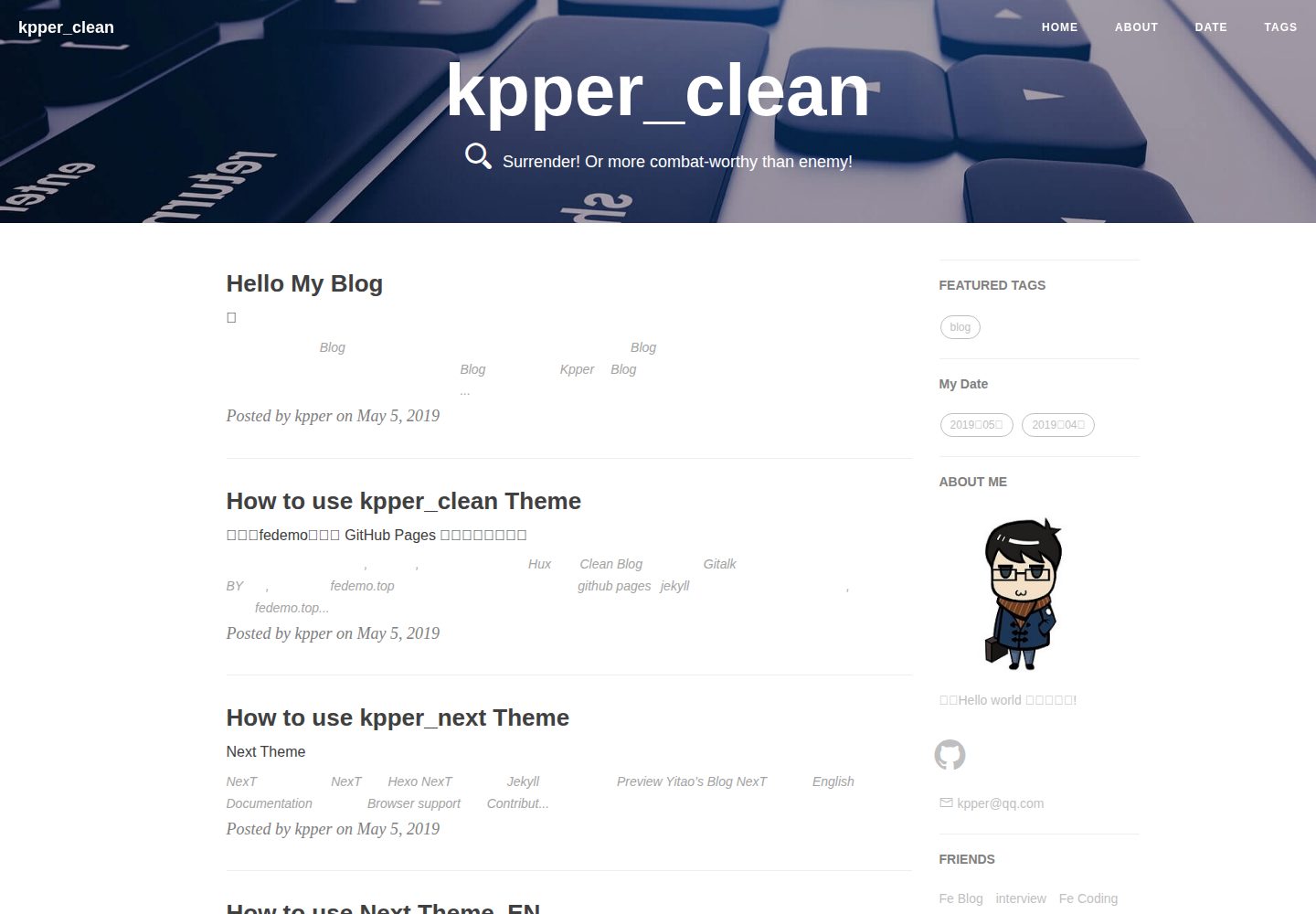
Desktop homepage1 / 3
Desktop captureTop of page
Actual screenshot captured by the server browser.
All pages & views 3
Screenshots show visual appearance; interactive behavior may differ.
Recorded 2026-10-03View source
What stands out
A quick read of the recorded project description.
Simple black-and-white color scheme with a flat, iOS-leaning style
The README states it has good image presentation, suitable for blogs and project showcases
Modified from FeDemo's site, with the author thanking the original author in the README
Provides an online preview address; the repository has not been updated since 2019
Template Details
kpper_clean is one of the Jekyll themes in the kpper series. It is modified from FeDemo's site and released under the MIT license. Positioned as a minimalist theme, its README describes it as having good image presentation with a slight iOS flat style, suitable for blogs and project showcases.
The theme is one of several Jekyll themes maintained personally by the author, and the repository has not been updated since 2019. The README provides an online preview address and deployment instructions, noting that if deploying under a secondary URL, both url and baseurl must be set in the configuration. It also states that after adding baseurl, some pages in kpper_simple still cannot navigate, because some links in the template do not include baseurl; it recommends using it under a first-level directory.
Built with Jekyll, the theme can be deployed to GitHub Pages. The deployment notes in the README emphasize that the project name must be username.github.io, and if the account name contains uppercase letters, it should be changed to lowercase. The author welcomes forks and pull requests for fixes to issues and requirements, and provides the corresponding repository's issue entry point.
JekyllBlog
Is it right for your project?
Use Cases
- Building a personal blog and publishing text-and-image content
- Using it as a project showcase page
- Deploying to GitHub Pages under the first-level username.github.io directory
- Configuring url and baseurl as described in the README when deploying under a secondary URL
Suitable For
- Personal blog authors who prefer a simple black-and-white color scheme and flat style
- Users who need a Jekyll theme with good image presentation
- Developers who want to freely modify and distribute theme code under the MIT license
- Users deploying static blogs with GitHub Pages
Getting started & customization
Use these recorded setup notes alongside the repository instructions for your chosen version.
- 1
When deploying to GitHub Pages, the project name must be username.github.io; if the account name contains uppercase letters, change it to lowercase
- 2
When deploying under a secondary URL, set url and baseurl in the configuration, for example baseurl: "/blog"
- 3
The README notes that after adding baseurl, some pages in kpper_simple still cannot navigate because some links in the template do not include baseurl; it recommends using it under a first-level directory
- 4
The theme is under the MIT license; when distributing copies or substantial portions of the code, retain the original author's copyright notice and the full MIT license notice
- 5
Third-party assets such as demo images, fonts, and icons must be checked against their respective licenses; do not judge solely by the code's MIT license
License & source material
Usage conditions & limitations
Free to use · keep license noticeThis entry covers the free version under the MIT license in the public repository; the free scope is the code of this version and does not mean external services or third-party assets are free.
Must comply with when using
- You may freely use, modify, commercialize, and distribute the code of this version.
- When distributing copies or substantial portions of the code, retain the original author's copyright notice and the full MIT license notice.
- The code is provided as is; warranties and limitations of liability are governed by the original license and applicable law.
Additional costs & items to verify
- When deploying to GitHub Pages, the repository/project name must be username.github.io; if the account name contains uppercase letters, change it to lowercase.
- If deploying under a secondary URL, set both url and baseurl in the configuration (e.g., baseurl: "/blog").
- The README states that after adding baseurl, some pages in kpper_simple still cannot navigate because some links in the template do not include baseurl; it recommends using it under a first-level directory.
- Demo images, fonts, icons, and other third-party assets must be checked against their respective licenses; do not judge solely by the code's MIT license.
- External services such as domains, hosting, databases, payments, or AI may incur additional charges.
View Original Text Basis
Permission is hereby granted, free of charge
Original License Text
项目名称必须是: ** username.github.io** ,如果你账号名有大写的话,统一改成小写.
Original README
由于Github Pages 默认部署为一级url**your username.github.io**如果你使用二级url部署做如下修改
Original README
https://github.com/kpper/kpper_clean/blob/master/LICENSEhttps://github.com/kpper/kpper_clean/blob/master/README.md发现`kpper_simple`加了baseurl部分页面reng无法跳转,是主题模板中部分link没有加入baseurl导致,暂时先这样了,如果想正常使用请放在一级目录下
Original README
Compiled by DeepSeek based on repository license and README ·2026-10-03. Results only cover the materials read; dependencies, images, fonts, and subsequent term changes are subject to their respective original texts.
Project checks & description sources
Template Information
- Source platforms
- GitHub
- Documentation and maintenance reference score
- Partly documented · 65 / 100
- Technologies
- Jekyll
- Website type
- Blog
How this score is calculated
Our heuristic uses license records (up to 30), a demo link (12), a preview (10), stars (15), recorded maintenance (15), description completeness (8), feature records (5) and classification data (5). It is not a code, security or performance test, or a Google score. A link does not establish tested functionality.
What to verify for this project
- Repository update recorded
- 2019-05-20
- Screenshot last checked
- 2026-10-03
A demo link is listed. Check it with your own content and viewport sizes; its presence does not confirm that forms, authentication or payments work.
The catalog identifies Jekyll as the primary stack. Check the actual dependency manifest and lockfile for versions and hosting requirements. These notes use recorded metadata, not a code audit or a deployment test.
Use a selection guide →How this description was prepared
AI-assisted description based on catalog records and repository material. Repository authors are not automatically the reviewers of this description.
Review declaration: [email protected] · 2026-10-04
Inspect the recorded source material
SHA-256: fcda8bbe50a8f13b51359d80e4d596a4bb3c5e5e0c56220b2fdee9a98fd785be
2026-10-03T21:37:43.898Z
Source file / repository# My Theme > 精于心,简于形 ,从简随心 ## 我的Jekyll主题 * `kpper_next` | <a href="https://kpper.github.io/kpper_next/ " target="_blank">在线预览 Preview</a> | [仓库源码欢迎star](https://github.com/kpper/kpper_next) >挺喜欢的简洁风,黑白色调,无冗余功能,能让人专心阅读,适合做笔记。 * `kpper_simple` | <a href="https://kpper.github.io/kpper_simple/ " target="_blank">在线预览 Preview</a> | [仓库源码欢迎star](https://kpper.github.io/kpper_simple/) >简单却易用的主题,没有使用bootstrap和jQuery框架,加载速度会提升些。 * `kpper_clean` | <a href="https://kpper.github.io/kpper_clean/ " target="_blank">在线预览 Preview</a> | [仓库源码欢迎star](https://github.com/kpper/kpper_clean) >图片展示比较好,有点ios扁平化风格,适合做博客和项目展示用。 * `kpper_jacman` | <a href="https://kpper.github.io/kpper_jacman/ " target="_blank">在线预览 Preview</a> | [仓库源码欢迎star](https://github.com/kpper/kpper_jacman) >中规中矩,功能性比较好。 ## 我的Hexo主题 >仅仅是fork过来以后有时间折腾,`kpper_next` 就是以 [iissnan Hexo NexT](https://github.com/iissnan/hexo-theme-next) 为原型移植而来的 Jekyll 主题。暂时还不会切到Hexo,还要花时间折腾,毕竟我只是一个后端开发者,web只会现学现卖。(:逃) * `hexo-theme-next` | <a href="https://kpper.github.io/hexo-theme-next/ " target="_blank">在线预览 Preview</a> | [仓库源码欢迎star](https://github.com/kpper/hexo-theme-next) * 现在原作者已经不维护了,最新版由社区维护[社区维护版本](https://github.com/theme-next/hexo-theme-next) ## 支持 >你可以选择一款适合自己的,当然我只是一个搬运工,只是加入了自己想要的功能。 * 你可以自由的fork这些主题,每个主题都有帮助文档,对着改就行了。或者可以直接下载zip到本地自己去修改。 * 你也可以直接去fork原作者的仓库。 ## 贡献 Contributing 欢迎fork后提交你发现的问题与需求的修复代码,共同管理。 ## 问题 issue 欢迎到对应仓库下的issue下提问。 比如在这里提问[kpper_next:issues](https://github.com/kpper/kpper_next/issues) ## 开发 Development 主旨在于简洁优雅且易于使用,所以首先要尽量确保主题的简洁易用性。 First things first, always keep things simple. ## 部署 Deploy **划重点** 项目名称必须是: ** username.github.io** ,如果你账号名有大写的话,统一改成小写. >由于Github Pages 默认部署为一级url**your username.github.io**如果你使用二级url部署做如下修改 ``` url: "username.github.io" # your host, for absolute URL baseurl: "/blog" # for example, '/blog' if your blog hosted on 'host/blog' ``` >发现`kpper_simple`加了baseurl部分页面reng无法跳转,是主题模板中部分link没有加入baseurl导致,暂时先这样了,如果想正常使用请放在一级目录下,或者如果你知道怎么修改错误,也欢迎你贡献你的代码。 ## 特别致谢 1. `kpper_next`基于[Simpleyyt](https://github.com/Simpleyyt/jekyll-theme-next) 修改的,感谢这个作者。 2. `kpper_simple`基于[Gaohaoyang](https://github.com/Gaohaoyang/gaohaoyang.github.io) 修改的,感谢这个作者。 3. `kpper_clean`基于[FeDemo](https://github.com/FeDemo/fedemo.github.io) 修改的,感谢这个作者。 4. `kpper_jacman`基于[Simpleyyt](https://github.com/simpleyyt/jekyll-jacman) 修改的,感谢这个作者。 5. 感谢 Jekyll、Github Pages 和 Bootstrap! ## 浏览器支持 Browser support  ## 捐赠 支付宝捐赠链接还是要有的,万一真的有人捐呢。  ## License [MIT License](https://github.com/kpper/kpper.github.io/blob/master/LICENSE) ## 最后 >update 2019-05-19 本来只是想有个在线记笔记的地方,方便查阅,做知识储备或者项目展示用,没想到花费了这么多时间在选主题上,倒有点本末倒置了。 * `kpper_note`这个主题我将一直使用,Hexo平台式最新版本已经到7.x了,[Simpleyyt](https://github.com/Simpleyyt/jekyll-theme-next)也没有移植的打算,我目前加了一些,以后有时间在加吧,如果你也喜欢这个,欢迎加入一起维护,毕竟我只是现学现卖。 * 其他的主题,暂时就这样了。 * 如果你恰好逛到了这里,希望你也能喜欢我的博客主题。 * 回顾这几个博客主题的诞生,纯粹是出于个人兴趣,如果你喜欢我的这个博客模板,请在Repository里点个赞—右上角**star**一下。
Explore similar templates
Compare previews and descriptions within the same stack and category.

al-folio
A Jekyll academic homepage theme for scholars and researchers, with a clean responsive design and out-of-the-box support for publication lists, project showcases, CVs, and blogs.
Jekyll · Portfolio

minimal-mistakes
Minimal Mistakes is a two-column Jekyll theme for personal sites, blogs, project documentation, or portfolios.
Jekyll · Portfolio

Beautiful Jekyll
Beautiful Jekyll is a mature, easy-to-use Jekyll blog theme maintained by Dean Attali since 2015, with over 50,000 users.
Jekyll · Blog

jekyll-TeXt-theme
A customizable Jekyll theme for personal sites, team sites, blogs, projects, and documentation.
Jekyll · Blog

startbootstrap-clean-blog-jekyll
The official Jekyll version of Start Bootstrap's Clean Blog theme, offering a blog home page, about page, contact page, and sample post pages, with a Formspree-powered contact form.
Jekyll · Blog

So Simple
A minimal reading-oriented Jekyll theme by Michael Rose for personal blogs, portfolios, and long-form reading. It offers multiple layouts, microformat markup, Disqus comments, Google Analytics, Jekyll SEO Tag, three skins, and aggregation by year, category, and tag with a grid view.
Jekyll · Blog