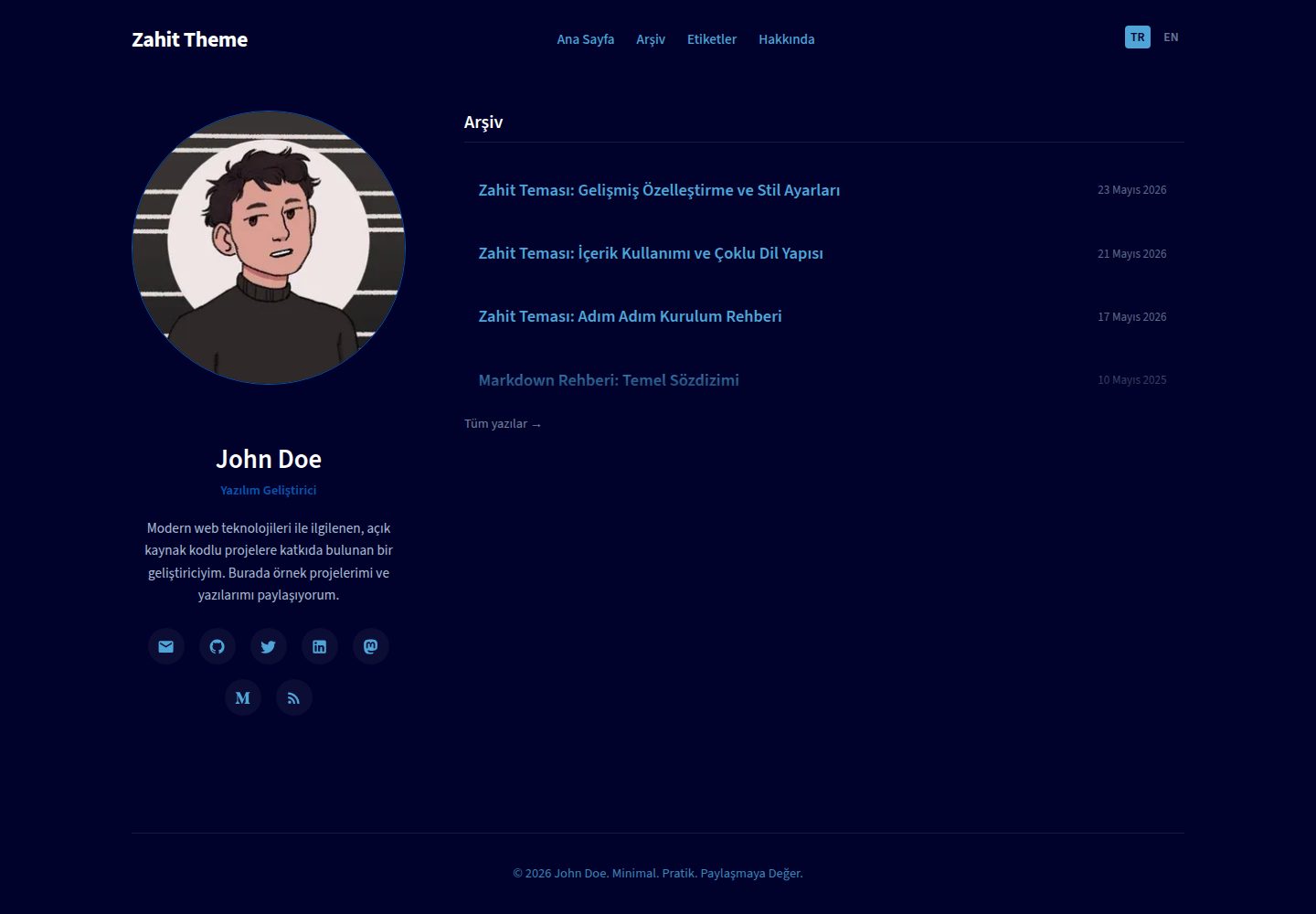
Built-in Turkish and English bilingual routing, with the default language at the root path and English at the /en/ path
AstroBlog
Zahit — Astro Blog Template
By kuscadev
Zahit is a minimalist blog and portfolio theme built on Astro, featuring a flat dark design, built-in Turkish and English bilingual routing, year-grouped archive pages, a table of contents with ScrollSpy, and code copy buttons.
Explore the design
Compare the page layouts and mobile experience. Open any screenshot for a closer look.
Desktop homepage1 / 3
Desktop captureTop of page
Actual screenshot captured by the server browser.
All pages & views 3
Screenshots show visual appearance; interactive behavior may differ.
Recorded 2026-10-02View source
What stands out
A quick read of the recorded project description.
The language switcher matches translated articles via translationKey, falling back to the target language archive page when no translation exists
The archive page dynamically groups articles by publication year, with a slight displacement animation on link hover
The blog post layout automatically parses h2 and h3 to generate a table of contents and highlights the current section via scroll monitoring
Code blocks show a copy button on hover; clicking it changes the icon to a confirmation mark and reverts after 2 seconds
The profile sidebar is fixed on desktop and hides the avatar at screen widths below 860px
Template Details
Zahit is an Astro blog and portfolio theme built on the philosophy that simplicity is depth. The interface uses a deep space blue background with ice blue accent colors, presenting a flat, minimalist style without unnecessary components. The theme targets developers, system administrators, and writers, emphasizing a content-first reading experience.
In terms of features, Zahit includes built-in Turkish (default, at the root path) and English (at the /en/ path) bilingual routing. The language switcher navigates between translated articles via the translationKey in frontmatter, falling back to the archive page for that language if no corresponding translation exists. The archive page dynamically groups articles by publication year, with links shifting slightly to the right on hover. The blog post layout parses h2 and h3 headings in MDX to generate a table of contents and highlights the current reading position via scroll monitoring. Code blocks show a copy button on hover; clicking it changes the icon to a confirmation mark and reverts after 2 seconds. The profile sidebar is fixed on desktop and hides the avatar via CSS media queries at screen widths below 860px. The 404 page determines the language based on the URL path and displays the corresponding error message and return button.
On the technical stack, the theme uses Astro and MDX integration, icons are implemented via Astro-Icon with the Iconify icon set, and styles are based on CSS variables in global.css without using a utility-class framework. Site configuration is centralized in src/config.ts, including site metadata, author information, and social links; translation dictionaries are in src/i18n/ui.ts; design tokens such as colors, fonts, and widths are defined in src/styles/global.css.
Regarding usage limitations, the theme requires Node.js version 22.12.0 or higher, and the build output is static files that can be deployed to Netlify, Vercel, or GitHub Pages. The code is MIT licensed, allowing free use, modification, commercial use, and distribution, but third-party assets such as demo images, fonts, and icons require separate license verification, and external services such as domains and hosting may incur costs.
AstroBlog
Is it right for your project?
Use Cases
- Building a bilingual technical blog for developers or system administrators
- Creating a text-focused personal portfolio site with a clean interface
- A writing site that needs year-based article archiving and table of contents navigation
- Projects that want to customize a dark theme with pure CSS variables without relying on a utility-class framework
Suitable For
- Developers familiar with Astro and MDX who want to quickly launch a bilingual blog
- Writers who prefer a minimalist dark design and focus on reading experience
- Personal sites that need to display bilingual Turkish and English content
- Users who accept static site generation and handle hosting and deployment themselves
Getting started & customization
Use these recorded setup notes alongside the repository instructions for your chosen version.
- 1
Requires Node.js version 22.12.0 or higher
- 2
After cloning the repository, run npm install to install dependencies, and npm run dev to start the development server, with the default address at http://localhost:4321
- 3
Run npm run build to generate static files into the dist directory, and npm run preview to preview the build result locally
- 4
Site title, description, author information, and social links are configured in src/config.ts
- 5
Design tokens such as colors, fonts, and layout widths are adjusted via CSS variables in src/styles/global.css
License & source material
Usage conditions & limitations
Free to use · keep license noticeThis entry covers the free version under the MIT license in the public repository; the free scope is the code of this version and does not mean that external services or third-party assets are free.
Must comply with when using
- Free use, modification, commercial use, and distribution of this version's code are permitted.
- When distributing copies or substantial portions of the code, retain the original author's copyright notice and the full MIT license notice.
- The code is provided as is; warranties and limitations of liability are governed by the original license and applicable law.
Additional costs & items to verify
- Using this theme requires Node.js 22.12.0 or higher installed locally; lower versions cannot run development and build commands.
- The build output is static files and must be deployed to a hosting platform such as Netlify, Vercel, or GitHub Pages; domains and hosting services may incur additional costs.
- Icons depend on the Iconify Material Design Icons icon set; users should verify the license terms of that icon set before use.
- Demo assets such as the sample avatar need to be replaced with your own images, and you must confirm the authorization status of the assets you use.
- Demo images, fonts, icons, and other third-party assets must be checked against their respective licenses and cannot be judged solely by the code's MIT license.
- External services such as domains, hosting, databases, payments, or AI may incur separate charges.
View Original Text Basis
Permission is hereby granted, free of charge
Original License Text
Make sure you have **Node.js >= 22.12.0** installed on your system.
Original README
The optimized static build outputs to the `./dist/` directory, ready to be deployed to Netlify, Vercel, or GitHub Pages.
Original README
*Note: Icons are imported via the [Iconify Material Design Icons (MDI)](https://icon-sets.iconify.design/mdi/) set.*
Original README
https://github.com/kuscadev/Zahit/blob/main/LICENSEhttps://github.com/kuscadev/Zahit/blob/main/README.mdavatar: '/profile.jpg', // Place your avatar in the /src/assets folder
Original README
Compiled by DeepSeek based on repository license and README ·2026-10-02. Results only cover the materials read; dependencies, images, fonts, and subsequent term changes are subject to their respective original texts.
Project checks & description sources
Template Information
- Source platforms
- GitHub
- Documentation and maintenance reference score
- More documented · 83 / 100
- Technologies
- Astro
- Website type
- Blog
How this score is calculated
Our heuristic uses license records (up to 30), a demo link (12), a preview (10), stars (15), recorded maintenance (15), description completeness (8), feature records (5) and classification data (5). It is not a code, security or performance test, or a Google score. A link does not establish tested functionality.
What to verify for this project
- Repository update recorded
- 2026-06-03
- Screenshot last checked
- 2026-10-02
A demo link is listed. Check it with your own content and viewport sizes; its presence does not confirm that forms, authentication or payments work.
The catalog identifies Astro as the primary stack. Check the actual dependency manifest and lockfile for versions and hosting requirements. These notes use recorded metadata, not a code audit or a deployment test.
Use a selection guide →How this description was prepared
AI-assisted description based on catalog records and repository material. Repository authors are not automatically the reviewers of this description.
Automatically checked against source and license rules; no manual editorial review.
Inspect the recorded source material
SHA-256: 125135bbe6f0ab36b8d532153e7f31b265489badbb882ec2810bdc186230ce10
2026-10-02T20:55:56.554Z
Source file / repository# 🪐 Zahit — Minimalist & Raw Astro v6 Portfolio Blog Theme
<div align="center">
<img src="public/zahit.png" alt="Zahit Theme Logo" width="100" style="margin-bottom: 15px;" />
<p><em>"Simplicity is depth, not lack."</em></p>
[](https://astro.build)
[](https://mdxjs.com)
[](https://github.com/kuscadev/Zahit)
[](https://astro-zahit.netlify.app)
[](https://nodejs.org)
[](LICENSE)
</div>
---
**Zahit** is a raw, flat minimalist **Astro v6** portfolio & blog theme built on the philosophy that simplicity is depth. Stripping away unnecessary widgets, heavy frameworks, and digital clutter, Zahit closes the gap between the writer and the reader, presenting a clean, content-first canvas optimized for developers, system administrators, and thinkers.
The theme features a cohesive, premium dark design system using a deep space blue background (`#00022b`), highlighted by vibrant ice-blue accents (`#4fa5d8`) and optimized ice-blue tinted text (`#daeaff`) for exceptional high-contrast reading comfort.
🔗 **Live Demo:** [https://astro-zahit.netlify.app](https://astro-zahit.netlify.app)
---
## 🚀 Core Features
Despite its ultra-minimalist appearance, Zahit is packed with highly refined, modern engineering features:
### 🌐 1. Advanced i18n & Smart Translation Mapping
* **Bilingual Routing:** Built-in internationalization (i18n) support for Turkish (`tr` as default) and English (`en` as secondary). Using Astro's localized routing rules with `prefixDefaultLocale: false` means Turkish resides at the root `/` path, and English pages are served under `/en/`.
* **Smart Post Redirects:** The language switcher in [`Header.astro`](src/components/Header.astro) is dynamically mapped. If you are reading a localized blog post and click the language switcher, it looks up the corresponding translated post in the other language using a shared `translationKey` frontmatter value (e.g., `/tr/blog/kodun-estetigi/` redirects straight to `/en/blog/aesthetics-of-code/`). If no translation exists, it gracefully redirects to the target language's `/archive/` page.
### 📅 2. Dynamic Year-Grouped Archive
* **Year-Based Grouping:** Posts on the [`archive.astro`](src/pages/%5Blang%5D/archive.astro) page are dynamically grouped by their publication year (`2026`, `2025`, etc.) on compile time.
* **Fluid Hover Interactions:** Features smooth minimalist transitions where links slide slightly to the right (`translateX`) on hover for an interactive, modern look.
### 📑 3. ScrollSpy-Enabled Dynamic Table of Contents (ToC)
* **Heading Scanner:** The [`BlogPost.astro`](src/layouts/BlogPost.astro) layout dynamically parses `h2` and `h3` heading elements inside your MDX file.
* **Active State Tracker:** A native, lightweight scroll-event listener tracks the reader's viewport scrolling location, dynamically applying an `.active` class to the current section inside the sticky Table of Contents sidebar.
### 📋 4. One-Click Code Clipboard Copier
* **Hover Copy Button:** A copy button seamlessly overlays code blocks (`pre`) on hover.
* **Visual Confirmation:** Tapping the copy button instantly copies the code block to the user's clipboard and switches icons to an animated confirmation checkmark with a transient highlight, resetting back after 2 seconds.
### 📱 5. Responsive Profile Sidebar
* **Sticky Layout:** The profile panel floats as a sticky sidebar on large desktop monitors, keeping author details and social links readily available.
* **Mobile-Optimized Layout:** Under `860px` screen widths, the author's avatar is automatically hidden via CSS media queries (`@media (max-width: 859px) { .avatar { display: none; } }`) to conserve vertical space and eliminate mobile distractions.
### ⚡ 6. Locale-Aware 404 Page
* **Path Detection:** The universal [`404.astro`](src/pages/404.astro) page extracts the current language context from the URL path. It then renders localized error messages and provides contextual Turkish or English buttons directing users back to `/home` or `/archive`.
---
## 🛠️ Tech Stack
* **Astro v6.3+** — Modern, component-based static site generator with zero client-side JS by default.
* **MDX Integration** — Markdown extension that allows importing interactive components and structures inside posts.
* **Astro-Icon** — Highly optimized SVG icon wrapper supporting Iconify icon packs.
* **Pure CSS Design System** — Built purely on top of local CSS variables (`global.css`) without bloated utility frameworks.
---
## 📁 Repository Structure
```text
Zahit/
├── public/ # Static assets (favicons, profile graphics)
│ ├── favicon.svg # The vector logo used across the site
│ └── profile.jpeg # Desktop sidebar avatar picture
├── src/
│ ├── components/ # Reusable Astro UI components
│ │ ├── BaseHead.astro # Site meta tags, SEO setup, and font loaders
│ │ ├── Footer.astro # Minimal footer links
│ │ ├── Header.astro # Header layout, logo, and smart i18n switcher
│ │ └── Profile.astro # Author info and social link matrix
│ ├── layouts/ # Page shell layouts
│ │ ├── BaseLayout.astro # Core HTML viewport shell
│ │ └── BlogPost.astro # Blog layout with ToC, ScrollSpy, and Clipboard Copy
│ ├── i18n/ # Translation configuration
│ │ ├── ui.ts # Localized translation dictionary keys
│ │ └── utils.ts # Translation route parsers and slug resolvers
│ ├── pages/ # Page routes (File-based Routing)
│ │ ├── [lang]/ # Localized routes (Home, Archive)
│ │ │ ├── blog/
│ │ │ │ └── [...slug].astro # Dynamic blog posts resolver
│ │ │ ├── archive.astro
│ │ │ └── index.astro
│ │ ├── en/
│ │ │ └── about.astro # English "About Me" page
│ │ ├── tr/
│ │ │ └── about.astro # Turkish "Hakkımda" page
│ │ ├── 404.astro # Universal i18n-aware 404 page
│ │ └── index.astro # Root entry route (Redirects to /tr/)
│ ├── styles/ # Styling architecture
│ │ └── global.css # Color scheme tokens, resets, & typography
│ ├── content/ # Content directories
│ │ └── blog/
│ │ ├── en/ # English posts (.mdx / .md)
│ │ └── tr/ # Turkish posts (.mdx / .md)
│ ├── content.config.ts # Astro collections schema schema definitions
│ └── config.ts # Core site variables, bio, and social listings
├── astro.config.mjs # Astro configuration with MDX and i18n routing
├── package.json # Project dependencies and operational scripts
└── tsconfig.json # TypeScript definitions
```
---
## ⚡ Getting Started
Run Zahit locally in just a few steps. Make sure you have **Node.js >= 22.12.0** installed on your system.
**1. Clone the repository:**
```bash
git clone https://github.com/kuscadev/Zahit.git
cd Zahit
```
**2. Install dependencies:**
```bash
npm install
```
**3. Run the local development server:**
```bash
npm run dev
```
Open [http://localhost:4321](http://localhost:4321) in your browser to preview your site.
**4. Build for production:**
```bash
npm run build
```
The optimized static build outputs to the `./dist/` directory, ready to be deployed to Netlify, Vercel, or GitHub Pages.
**5. Preview your build locally:**
```bash
npm run preview
```
---
## ⚙️ Configuration & Customization Guide
Make Zahit your own by customizing these key configuration scopes:
### 👤 1. Set Your Bio & Socials: `src/config.ts`
Personalize the site metadata, biography, avatar, and social links in [`src/config.ts`](src/config.ts):
```typescript
export const SITE_CONFIG = {
title: 'Zahit',
description: 'A raw, flat minimalist theme built on the philosophy that simplicity is depth.',
url: 'https://zahit.dev',
};
export const AUTHOR = {
name: 'John Doe',
role: {
tr: 'Yazar | Geliştirici | Düşünür',
en: 'Writer | Developer | Thinker',
},
bio: {
tr: 'Teknik konuları sade bir dille anlatan bağımsız bir yazarım. Projelerimi ve düşüncelerimi burada paylaşıyorum.',
en: 'An independent writer who explains technical topics in plain language. I share my projects and thoughts here.',
},
avatar: '/profile.jpg', // Place your avatar in the /src/assets folder
};
export const SOCIALS = [
{ label: 'Mail', href: 'mailto:[email protected]', icon: 'mdi:email' },
{ label: 'GitHub', href: 'https://github.com/johndoe', icon: 'mdi:github' },
// Add additional channels by mimicking this schema
];
```
*Note: Icons are imported via the [Iconify Material Design Icons (MDI)](https://icon-sets.iconify.design/mdi/) set.*
---
### ✍️ 2. Writing Linked Bilingual Blog Posts
To leverage Zahit's bilingual matching feature, place the post files in the respective locale directories and bind them together with a matching `translationKey`:
1. **Add your files under the content directory:**
* Turkish draft: `src/content/blog/tr/sadelik.mdx`
* English draft: `src/content/blog/en/simplicity.mdx`
2. **Specify matching `translationKey` parameters in both frontmatters:**
Provide the exact same key in both files so the smart language switcher in the header knows they are translated versions of each other.
#### Turkish Post Frontmatter Example (`src/content/blog/tr/sadelik.mdx`):
```markdown
---
title: 'Sadelik, Eksiklik Değil Derinliktir'
description: 'Minimalizmin anlamı ve Zahit temasının temel felsefesi.'
pubDate: '2026-05-16'
tags: ['minimalizm', 'tasarim', 'felsefe']
translationKey: 'simplicity-post' # MUST match the English post key exactly
---
Türkçe içeriğinizi buraya yazın...
```
#### English Post Frontmatter Example (`src/content/blog/en/simplicity.mdx`):
```markdown
---
title: 'Simplicity is Depth, Not Lack'
description: 'Discover the meaning of minimalism, the core philosophy of the Zahit theme.'
pubDate: '2026-05-16'
tags: ['minimalism', 'design', 'philosophy']
translationKey: 'simplicity-post' # MUST match the Turkish post key exactly
---
Write your English content here...
```
---
### 🎨 3. Customize Colors & Themes: `src/styles/global.css`
Zahit is entirely customized using CSS variables. Change the theme colors, typography, or grid width in [`src/styles/global.css`](src/styles/global.css):
```css
:root {
/* Color Palette Variables */
--bg-color: #00022b; /* Deep Space Blue Background */
--dark: #010e54; /* Section dark accenting blocks */
--accent: #0855b1; /* Primary accent color (Links, borders) */
--light: #4fa5d8; /* Brighter accent blue for hovering states */
--text-color: #daeaff; /* Soft ice-blue text tint for superior reading readability */
/* Typography Variables */
--font-family-body: 'Source Sans 3', sans-serif;
--font-family-heading: 'Source Sans 3', sans-serif;
/* Global Widths */
--site-width: 80%; /* Global responsive container width */
--content-padding: 2rem;
/* Transition timings */
--transition-speed: 0.2s;
}
```
---
### 🗣️ 4. Edit Menu Labels: `src/i18n/ui.ts`
Customize translation dictionary labels or add extra languages in [`src/i18n/ui.ts`](src/i18n/ui.ts):
```typescript
export const languages = {
tr: 'Türkçe',
en: 'English',
};
export const defaultLang = 'tr';
export const ui = {
tr: {
'nav.home': 'Ana Sayfa',
'nav.about': 'Hakkında',
'nav.archive': 'Arşiv',
'toc.title': 'İçindekiler',
// ...other TR definitions
},
en: {
'nav.home': 'Home',
'nav.about': 'About',
'nav.archive': 'Archive',
'toc.title': 'Contents',
// ...other EN definitions
},
} as const;
```
---
## 📜 License
This project is open-source and licensed under the [MIT License](LICENSE).
---
<div align="center">
<p><em>Minimal. Practical. Worth Sharing.</em></p>
<p>Developed with passion by <strong><a href="https://github.com/kuscadev">kuscadev</a></strong></p>
</div>
Explore similar templates
Compare previews and descriptions within the same stack and category.

astrowind
AstroWind is a free, open-source Astro starter theme using Astro and Tailwind CSS, released under the MIT license.
Astro · Blog

astro-paper
AstroPaper is a minimal, responsive, accessible, and SEO-friendly Astro blog theme. Articles are stored as Markdown/MDX in src/content/posts/, with subdirectories affecting URLs.
Astro · Blog

fuwari
Fuwari is a static blog template built with Astro and Tailwind CSS for personal blogs. It manages posts as Markdown files in src/content/posts/, with frontmatter for title, date, description, cover, tags, categories, draft status, and language.
Astro · Blog

Firefly
Firefly is a clean personal blog theme forked from Astro and Fuwari, offering four background modes, single/double sidebar and list/grid layouts, Pagefind client-side full-text search, and a six-language UI.
Astro · Blog

astro-theme-cactus
Astro Cactus is an Astro-based blog and portfolio theme that uses Markdown/MDX content collections to manage posts, notes, and tags, with frontmatter type-checked by a schema.
Astro · Portfolio

astrofy
Astrofy is a free and open-source personal portfolio website template built with Astro and TailwindCSS, with built-in blog, CV timeline, project showcase, store, and RSS feed modules.
Astro · Portfolio