Integrates Livewire and the Mary UI component library, paired with Tailwind CSS and DaisyUI for the interface
LaravelStarter
mary-ui-starter-kit — Laravel Starter Template
By lauroguedes
A Laravel-based Mary UI starter kit integrating Livewire, Mary UI components, full authentication, user management, role permissions, and demo mode.
Explore the design
Compare the page layouts and mobile experience. Open any screenshot for a closer look.
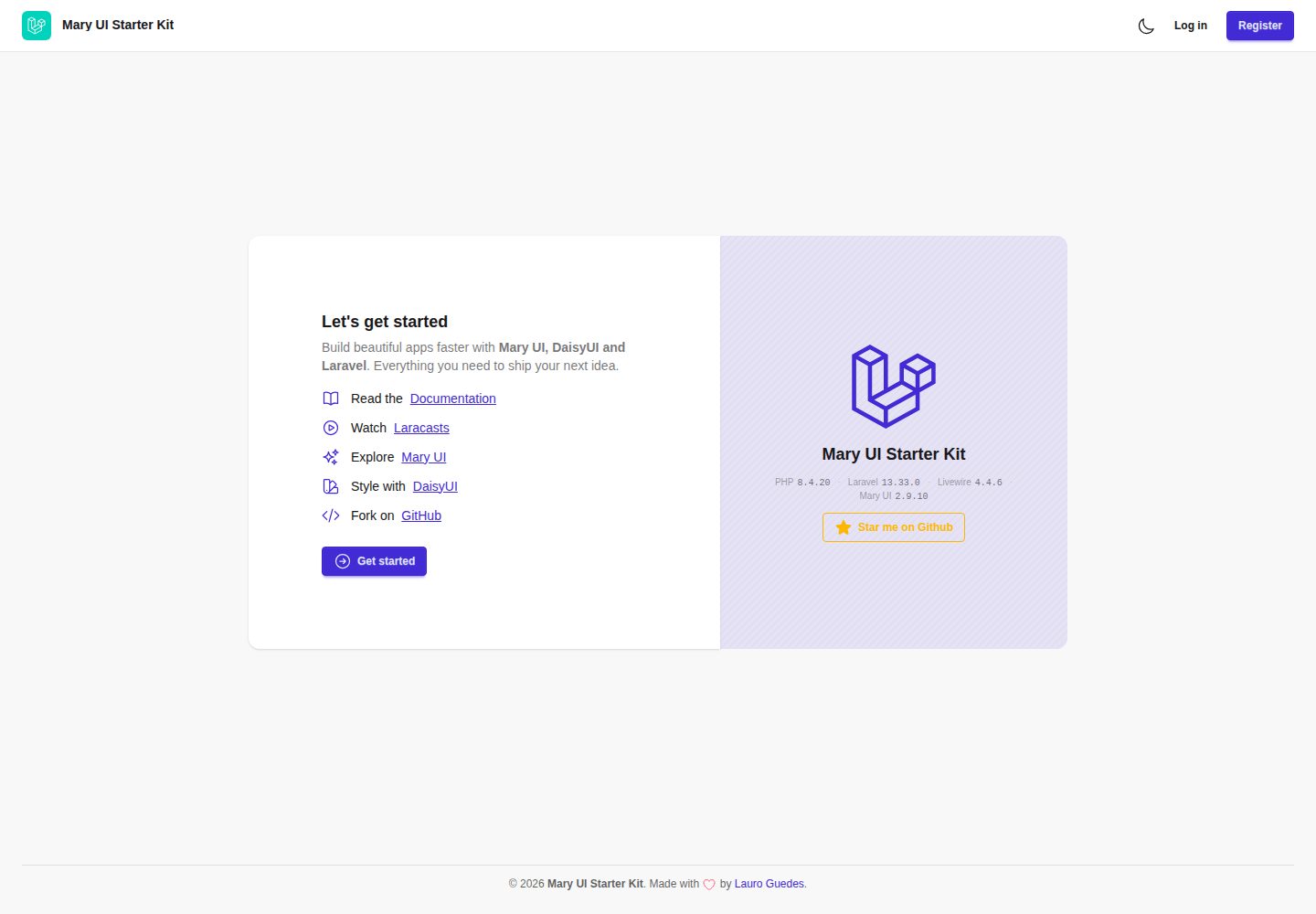
Desktop homepage1 / 2
Desktop captureTop of page
Actual screenshot captured by the server browser.
All pages & views 2
Screenshots show visual appearance; interactive behavior may differ.
Recorded 2026-10-02View source
What stands out
A quick read of the recorded project description.
Built-in complete authentication flow: login, registration, password reset, email verification, and password confirmation
Provides a user management dashboard with CRUD, status management, search and filtering, and avatar upload and cropping
Implements a role and permission system with middleware checks via Spatie Laravel Permission
Integrates Google OAuth login via Laravel Socialite, supporting account linking and automatic user creation
Built-in demo mode supporting scheduled data resets, public password rotation, and visitor-level sandbox isolation
Template Details
This is a Laravel starter project with a frontend using Livewire and the Mary UI component library, styled with Tailwind CSS and DaisyUI, and icons from Blade Heroicons and Font Awesome. The project includes a complete authentication system, covering login, registration, password reset, email verification, and password confirmation, along with user profile management and avatar upload (with Cropper.js cropping).
The user management section provides an admin dashboard supporting CRUD operations for users, status management (Active, Inactive, Suspended), search and filtering, and automatic avatar cleanup. For permissions, it integrates Spatie Laravel Permission to implement role and permission assignment and middleware checks. Social login is integrated via Laravel Socialite with Google OAuth, supporting account linking and automatic user creation, and reserves a structure for extending to other OAuth providers.
The project also includes a demo mode provided by lauroguedes/laravel-demo-mode, which supports resetting data on a cron expression or preset schedule, rotating public admin passwords, restricting public accounts from being edited, preventing super admin login, and providing a demo:doctor command to check configuration. In scoped sandbox mode, the user table implements visitor isolation through the BelongsToSandbox trait and a demo_sandbox_id column, so each visitor can only see seed accounts and accounts they create.
The development environment defaults to SQLite, and testing is based on Pest, including parallel execution, Test Impact Analysis, and sharding configuration. Code quality tools include Pint and Rector, debugging tools include LaraDumps and Laravel Pail, and the development server starts multiple processes simultaneously via Concurrently. The project is MIT licensed, and a demo site is provided in the repository.
LaravelStarter Kit
Is it right for your project?
Use Cases
- Quickly building a Laravel project with authentication and a user management backend
- Scenarios where you want to build interactive interfaces using Livewire and the Mary UI component library
- Web applications requiring role-based permission control and Google social login
- Projects that need to provide a publicly accessible demo environment and want automatic data resets
Suitable For
- Developers familiar with Laravel and Livewire
- Backend projects that need ready-made authentication and user management foundations
- Teams that want to freely modify and use commercially under the MIT license
- Projects that need a demo mode to showcase product features
Getting started & customization
Use these recorded setup notes alongside the repository instructions for your chosen version.
- 1
Environment requirements: PHP 8.4+, Node.js 22+, Composer, and SQLite
- 2
Can be installed via laravel new or composer create-project, or by cloning the repository and running composer install
- 3
Copy .env.example to .env and generate the application key, then run migrations and seed data
- 4
Install frontend dependencies with npm or yarn; during development, run php artisan serve and npm run dev
- 5
Before enabling demo mode, run php artisan demo:doctor to check configuration, and note that DEMO_MODE will allow database resets
License & source material
Usage conditions & limitations
Free to use · keep license noticeThis entry covers the free version under the MIT license in the public repository; the free scope is the code of this version and does not mean external services or third-party assets are free.
Must comply with when using
- You are allowed to freely use, modify, use commercially, and distribute the code of this version.
- When distributing copies or substantial portions of the code, retain the original author's copyright notice and the full MIT license notice.
- The code is provided as is; warranties and limitations of liability are governed by the original license and applicable law.
Additional costs & items to verify
- Using Google social login requires creating an OAuth application on the Google Developer Platform and configuring the client ID and secret; this is an external service dependency and subject to Google's terms.
- Demo mode depends on the third-party package lauroguedes/laravel-demo-mode, which is an independent project; its license and maintenance status must be confirmed separately.
- After enabling DEMO_MODE, demo:reset will clear the database; it should only be used in a demo environment with disposable data, and must never be enabled on an installation storing important data.
- In demo mode, the super admin cannot log in and there is no permission bypass; demo mode must be disabled before production use.
- In demo mode, public accounts cannot be edited, so their profile or password cannot be changed.
- Demo mode rotates and publicly exposes the admin account password; those credentials are visible to visitors.
- Using Pest's Test Impact Analysis requires installing the pcov or Xdebug coverage driver; otherwise it degrades to running the full test suite.
- Demo images, fonts, icons, and other third-party assets must be checked against their respective licenses and cannot be judged solely by the code's MIT license.
- External services such as domains, hosting, databases, payments, or AI may incur additional charges.
View Original Text Basis
Permission is hereby granted, free of charge
Original License Text
**Google OAuth integration** for social login
Original README
**Demo Mode** Powered by [lauroguedes/laravel-demo-mode](https://github.com/lauroguedes/laravel-demo-mode).
Original README
`DEMO_MODE=true` allows `demo:reset` to drop the database.
Original README
**Super-admin cannot sign in** and gets no gate bypass
Original README
**The published account cannot be edited**, so one visitor cannot lock out the next
Original README
**Rotating published password** for the admin account, filled into the login form
Original README
https://github.com/lauroguedes/mary-ui-starter-kit/blob/main/LICENSEhttps://github.com/lauroguedes/mary-ui-starter-kit/blob/main/README.md**Tia** (`--tia`) needs a coverage driver (`pcov` or Xdebug). Without one Pest prints a notice and runs the full suite instead.
Original README
Compiled by DeepSeek based on repository license and README ·2026-10-02. Results only cover the materials read; dependencies, images, fonts, and subsequent term changes are subject to their respective original texts.
Project checks & description sources
Template Information
- Source platforms
- GitHub
- Documentation and maintenance reference score
- More documented · 79 / 100
- Technologies
- Laravel
- Website type
- Starter
How this score is calculated
Our heuristic uses license records (up to 30), a demo link (12), a preview (10), stars (15), recorded maintenance (15), description completeness (8), feature records (5) and classification data (5). It is not a code, security or performance test, or a Google score. A link does not establish tested functionality.
What to verify for this project
- Repository update recorded
- 2026-09-26
- Screenshot last checked
- 2026-10-02
A demo link is listed. Check it with your own content and viewport sizes; its presence does not confirm that forms, authentication or payments work.
The catalog identifies Laravel as the primary stack. Check the actual dependency manifest and lockfile for versions and hosting requirements. These notes use recorded metadata, not a code audit or a deployment test.
Use a selection guide →How this description was prepared
AI-assisted description based on catalog records and repository material. Repository authors are not automatically the reviewers of this description.
Automatically checked against source and license rules; no manual editorial review.
Inspect the recorded source material
SHA-256: 6e67c5fe98d1cad3639489a1d4671c3f9d6a2711c88730f2be4f0a493c69b2da
2026-10-02T14:53:09.417Z
Source file / repository# Mary UI Starter Kit 🚀 <div align="center"> A **modern, production-ready Laravel starter kit** featuring **Livewire 4** and **Mary UI**. Build beautiful web applications with a complete authentication system, user management, and developer-friendly tooling. [](https://laravel.com) [](https://php.net) [](https://livewire.laravel.com) [](https://mary-ui.com) [](https://pestphp.com) [](LICENSE) --- [](https://packagist.org/packages/lauroguedes/mary-ui-starter-kit) [](https://packagist.org/packages/lauroguedes/mary-ui-starter-kit) [](https://forge.laravel.com/lauro-guedes-q58/graceful-silence-fzg/3022898) </br>  </div> ## ✨ Features ### 🎨 **Frontend Stack** - **Livewire 4.x** for reactive components with improved performance - **Mary UI 2.x** - Beautiful, accessible UI components - **Tailwind CSS 4.x** + **DaisyUI v5** for styling - **Blade Heroicons and Font Awesome 7** icons integration - **Vite 8** for lightning-fast asset bundling - **Live version badges** on the welcome page, read from the running app and `composer.lock` ### 🔐 **Authentication & User Management** - Complete authentication system (login, registration, password reset) - Email verification with resend functionality - Password confirmation for sensitive operations - User profile management with avatar uploads - **User management dashboard** with full CRUD operations - **User status management** (Active, Inactive, Suspended) - **Advanced filtering and search** capabilities - **Avatar management** with automatic cleanup - **Google OAuth integration** for social login - **Roles & Permissions system** powered by Spatie Laravel Permission - **Role-based access control** with granular permission management - **User role assignment** and permission checking middleware ### 🔗 **OAuth Socialite Integration** - **Laravel Socialite** integration with extensible provider system - **Google OAuth** authentication out of the box - **Social account linking** to existing user accounts - **Automatic user creation** for new social logins - **Extensible architecture** for adding new OAuth providers - **Secure token handling** and user data synchronization ### 🎭 **Demo Mode** Powered by [lauroguedes/laravel-demo-mode](https://github.com/lauroguedes/laravel-demo-mode). - **Scheduled data reset** on any cron expression, or `hourly`/`daily`/`weekly`/`monthly` - **Rotating published password** for the admin account, filled into the login form - **The published account cannot be edited**, so one visitor cannot lock out the next - **Super-admin cannot sign in** and gets no gate bypass - **`demo:doctor`** audits the configuration and exits non-zero on anything that would destroy data or publish a secret - **Visual indicator** that counts down from the schedule the scheduler actually runs - **Per-visitor isolation** on the Users screen — each visitor sees the seeded accounts plus the ones they made, and a button that clears only their own ### 🏗️ **Architecture & Developer Experience** - **Laravel 13.x** with PHP 8.4+ support - **SQLite** database by default (easy local setup) - **Pest 5 testing framework** with 230+ comprehensive tests, running in parallel - **Code quality tools**: Pint (formatting), Rector (refactoring) - **Debugging tools**: LaraDumps, Laravel Pail - **Development workflow** with Concurrently for multi-process dev server - **OAuth Socialite Integration** with extensible architecture for new oauth providers ### 🧪 **Testing Coverage** - Complete test coverage for authentication flows - User management CRUD operations testing - Roles and Permissions management CRUD operations testing - Demo mode functionality testing - File upload and avatar management testing - Form validation and error handling - Database cleanup and file storage testing ### 📁 **File Management** - Avatar upload with cropping support (Cropper.js) - Automatic file cleanup on user deletion - File validation (type, size) - Storage testing with fake disks ## 🚀 Quick Start ### Prerequisites - **PHP 8.4+** (Laravel 13 needs 8.3+, Pest 5 raises the floor to 8.4) - **Node.js 22+** - **Composer** - **SQLite** (included with PHP) ### Installation ```bash # Install via Laravel Installer laravel new my-app --using=lauroguedes/mary-ui-starter-kit # or Composer composer create-project lauroguedes/mary-ui-starter-kit my-app # (Optional) Generate fake data for testing php artisan db:seed # Default user user: [email protected] pw: secret ``` Clone the repository manually: ```bash # Clone the repository git clone https://github.com/lauroguedes/mary-ui-starter-kit cd mary-ui-starter-kit # Install PHP dependencies composer install # Copy environment file and generate app key cp .env.example .env php artisan key:generate # Set up the database php artisan migrate --seed # Install frontend dependencies npm install # or if you use Yarn yarn # Run the development server php artisan serve # In a separate terminal npm run dev # or yarn dev ``` ### Development Workflow For an enhanced development experience with hot reloading: ```bash # Start all development services (server, queue, logs, vite) composer dev ``` Visit [http://localhost:8000](http://localhost:8000) to view your application. This runs: - Laravel development server - Queue worker - Log monitoring (Pail) - Vite dev server with hot reload ## 🧪 Testing The suite runs on **Pest 5** and is parallel-safe, which takes a full run from ~40s down to ~9s. ```bash # Run the whole suite in parallel (the default) composer test # Rerun only what recent changes touched (Test Impact Analysis) composer test:tia # Enforce the 80% coverage gate composer test:coverage # Refresh the time-balanced shard timings after adding or removing tests composer test:shards ``` Or call Pest directly: ```bash ./vendor/bin/pest --parallel ./vendor/bin/pest --shard=1/2 --parallel ``` ### Notes on the Pest 5 features - **Parallel** is the default. Anything that writes to shared state outside the database must stay process-local — that is why `phpunit.xml` sets `APP_MAINTENANCE_DRIVER=array`, so `demo:reset` calling `artisan down` cannot put *other* test processes into maintenance mode. - **Tia** (`--tia`) needs a coverage driver (`pcov` or Xdebug). Without one Pest prints a notice and runs the full suite instead. - **Time-balanced sharding** reads `tests/.pest/shards.json`, which is committed so CI shards stay stable. CI runs two shards per PHP version. ## 🔧 Customization Key environment variables for customization: ```env # Appearance settings APP_LAYOUT=sidebar # Options: sidebar, header LOGIN_LAYOUT=card # Options: card, simple, split # Demo mode settings — see config/demo.php for every key, documented inline DEMO_MODE=false # Turn this installation into a public demonstration DEMO_RESET_SCHEDULE=hourly # A cron expression, or hourly/daily/weekly/monthly [email protected] # The account whose password is published and rotated DEMO_CREDENTIALS_STORE=file # Where that password is kept: file, cache or null DEMO_SANDBOX=scoped # shared | scoped — see "Per-visitor isolation" below ``` > [!WARNING] > `DEMO_MODE=true` allows `demo:reset` to drop the database. Run > `php artisan demo:doctor` before the first scheduled reset, and never turn it on > for an installation holding anything you want to keep. #### Per-visitor isolation With `DEMO_SANDBOX=scoped`, each visitor gets the fifty-three seeded accounts plus whatever they create. The Users screen is a list everybody adds to, which is the one case where a shared demo falls apart — the first visitor's test accounts are the second visitor's clutter — so `App\Models\User` carries the package's `BelongsToSandbox` trait and a nullable `demo_sandbox_id` column. The identifier lives in the session. Rows the seeder made carry none, so they belong to everybody, which is what keeps the demo populated. The bar's reset button then reads **Clear what you created** and deletes only that visitor's rows; the scheduled reset still rebuilds the whole thing. Roles and permissions stay shared on purpose: they are part of what the kit demonstrates, not something a visitor should fork. Two other things follow from sandboxing the authentication model — `unique:users,email` is query-builder validation and sees every sandbox, so two visitors cannot register the same address, and logging out does not end a sandbox (the reset button is how a visitor gets a clean slate). Set `DEMO_SANDBOX=shared` to turn all of it off; the trait and the column then do nothing at all. `demo:doctor` warns if the models stay marked while the driver does not agree. ## 🤝 Contributing We welcome contributions! Please see our [Contributing Guide](CONTRIBUTING.md) for details. ### Development Setup 1. Fork the repository 2. Create a feature branch: `git checkout -b feature/amazing-feature` 3. Make your changes and add tests 4. Run the test suite: `composer test` 5. Commit your changes: `git commit -m 'Add amazing feature'` 6. Push to the branch: `git push origin feature/amazing-feature` 7. Open a Pull Request ### Code Quality We maintain high code quality standards: ```bash # Format code ./vendor/bin/pint # Refactor code ./vendor/bin/rector # Run tests composer test ``` ## 📋 Roadmap - [x] **Role-based permissions system** ✅ - [x] **Demo mode for showcasing** ✅ - [ ] **Advanced Log and Audit** - [ ] **Multi-tenant support** - [ ] **Advanced notification system** - [ ] **Dashboard analytics** - [ ] **API integration with Laravel Sanctum** ## 🆘 Support - **Documentation**: [Mary UI Docs](https://mary-ui.com) - **Issues**: [GitHub Issues](https://github.com/lauroguedes/mary-ui-starter-kit/issues) ## 📝 License This project is open-sourced software licensed under the [MIT license](LICENSE). --- <div align="center"> **Built with ❤️ by [Lauro Guedes](https://lauroguedes.dev)** **⭐ Star this repository if it helped you!** </div>
Explore similar templates
Compare previews and descriptions within the same stack and category.

sage
Sage is a WordPress starter theme maintained by Roots, using Laravel Blade components and templates, Vite builds, Tailwind CSS, and built-in block editor support.
Laravel · Starter

wave
Wave is an open-source SaaS starter kit built on Laravel and released under the MIT license.
Laravel · SaaS

filament-starter
A Laravel TALL stack starter template maintained by Log1x, with a preconfigured Filament admin panel and plugins including Curator, Gravatar, Exceptions, Jobs Monitor, Breezy, Peek, and Logger.
Laravel · Starter

electrik
Electrik is a Laravel SaaS starter kit installed as a Composer package, with authentication, teams, Stripe subscription billing, and the Slate 3 interface under the Electrik\ namespace rather than copied into App\.
Laravel · SaaS

php-saas
php-saas is a Laravel-based SaaS starter positioned as an everything-included kit. It generates new projects via a global Composer command and includes authentication with two-factor, API tokens, Stripe and Paddle billing, and project, team, and organization management.
Laravel · SaaS

filament-jetstream
A Laravel starter kit that implements Jetstream-like authentication and account features using Filament's native panels and components. It includes login, registration, two-factor authentication, session management, user profiles, and optional teams and API tokens.
Laravel · Starter