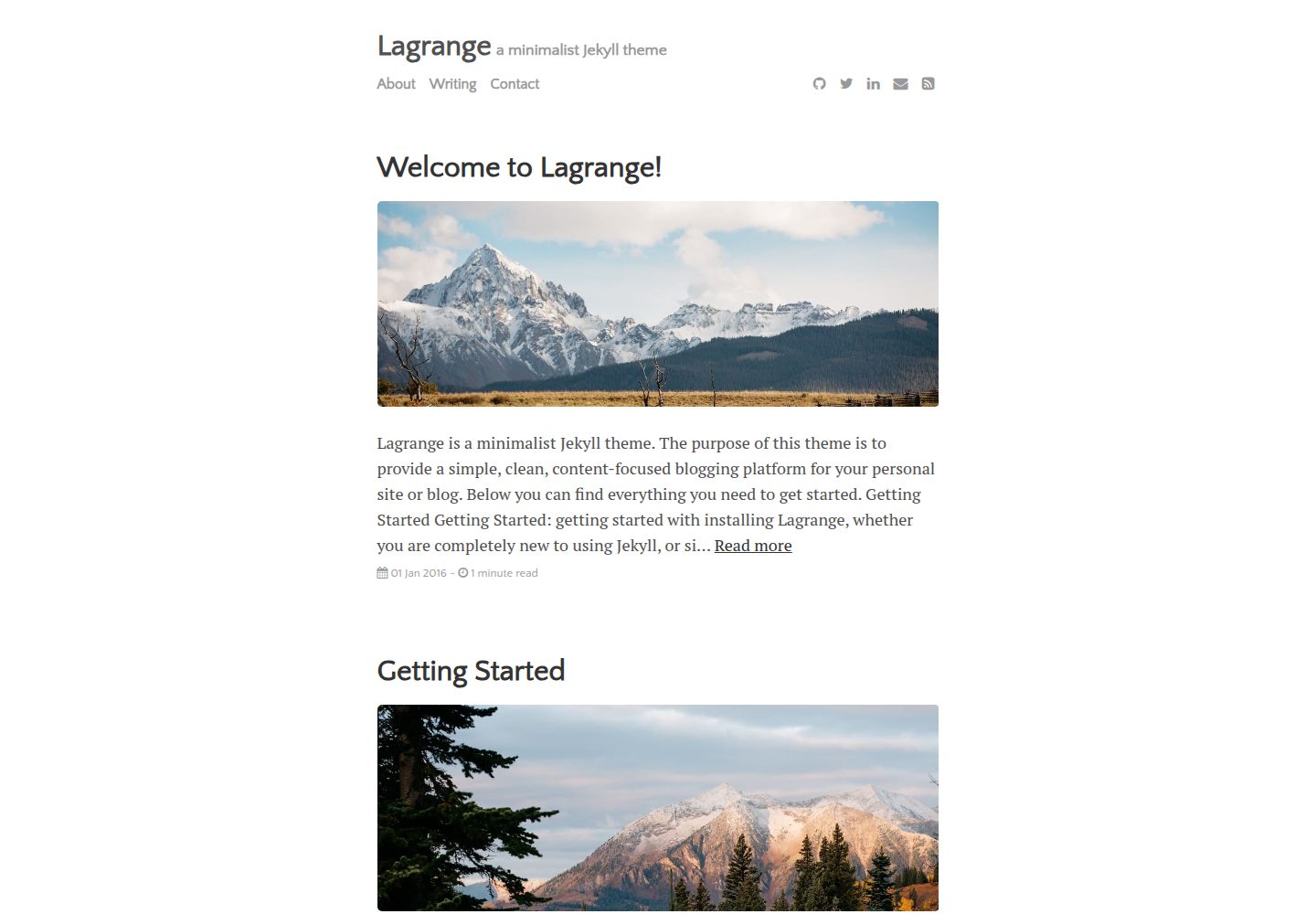
Compatible with GitHub Pages; you can publish a site directly by forking the repository and renaming it
JekyllBlog
Lagrange — Jekyll Blog Template
By LeNPaul
Lagrange is a Jekyll theme for personal blogs, deployable on GitHub Pages or your own server, with minimalist typography that keeps content in focus.
Explore the design
Compare the page layouts and mobile experience. Open any screenshot for a closer look.
Desktop homepage1 / 3
Desktop captureTop of page
Actual screenshot captured by the server browser.
All pages & views 3
Screenshots show visual appearance; interactive behavior may differ.
Recorded 2026-09-30View source
What stands out
A quick read of the recorded project description.
Supports Jekyll's built-in Sass/SCSS preprocessor and _data data files for easy customization
Built-in support for Disqus comments and Google Analytics tracking, requiring your own account configuration
Supports LaTeX math formulas via MathJax and provides code syntax highlighting
Provides two main layouts, post and page, plus custom layouts for the homepage and archive page
Generates an RSS 2.0 subscription file and includes social media icons and related posts
Template Details
Lagrange is a Jekyll theme for building a personal blog or site, which can be hosted for free on GitHub Pages or deployed to your own server. The theme starts from a minimalist design: links are mainly indicated with underlines, reducing visual distraction and keeping reading focused on the body text.
In terms of features, the theme is compatible with GitHub Pages and supports Jekyll's built-in Sass/SCSS preprocessor and data files, making it easy to adjust styles and site settings; it provides Google Analytics tracking, Disqus comments, MathJax formula rendering, code syntax highlighting, and RSS subscription. Site configuration is centralized in _config.yml and _data/settings.yml, menu pages go in the menu directory, and posts go in the _posts directory named as YYYY-MM-DD-name-of-post.md.
Usage limitations: the theme itself does not provide a backend management interface; content maintenance relies on the GitHub web editor or a local Jekyll environment. Comments, analytics, and formula rendering depend on external services such as Disqus, Google Analytics, and MathJax, respectively, and you need to register and fill in the corresponding identifiers yourself. The licenses for third-party assets such as demo images, fonts, and icons must be checked separately and cannot be determined solely from the code's MIT license.
JekyllBlog
Is it right for your project?
Use Cases
- Building a text-focused personal blog and wanting to host it on GitHub Pages
- Writing technical notes or tutorials that require inserting math formulas and code blocks in articles
- Maintaining a personal site with fixed pages such as About and Contact
- Having an existing Jekyll site and wanting to migrate posts to a more minimalist theme
Suitable For
- Individual bloggers familiar with or willing to learn Jekyll and Markdown
- Users who want to manage content directly with a GitHub repository and do not rely on a database
- Writers who prefer minimalist typography and prioritize reading experience
- Technical content authors who need formula rendering and code highlighting
Getting started & customization
Use these recorded setup notes alongside the repository instructions for your chosen version.
- 1
GitHub Pages method: fork the repository and rename it to USERNAME.github.io, ensure a gh-pages branch exists, then edit _data/settings.yml
- 2
Local method: after downloading the repository, run bundle install, then run jekyll serve; the site is available at localhost:4000 by default
- 3
Modify site title, description, author, and other settings in the root _config.yml; menu, social information, Disqus, and Google Analytics switches are in _data/settings.yml
- 4
Place posts in the _posts directory, name files as YYYY-MM-DD-name-of-post.md, and fill in front matter such as layout, title, author, categories, tags, and image
- 5
To enable Disqus comments, turn on disqus.comments in _data/settings.yml and fill in the corresponding shortname; for Google Analytics, fill in your own tracking ID
License & source material
Usage conditions & limitations
Free to use · keep license noticeThis entry covers the free version under the MIT license in the public repository; the free scope is the code of this version and does not mean external services or third-party assets are free.
Must comply with when using
- Permits free use, modification, commercial use, and distribution of this version's code.
- When distributing copies or substantial portions of the code, retain the original author's copyright notice and the full MIT license notice.
- The code is provided as is; warranties and limitations of liability are governed by the original license and applicable law.
Additional costs & items to verify
- Enabling Disqus comments requires registering a Disqus account and creating a profile for the site, obtaining a disqus_shortname, and entering it in the configuration; this is an external service dependency.
- Using Google Analytics requires registering a Google Analytics account and entering a tracking ID; this is an external service dependency.
- Social icons come from Font Awesome, whose license must be checked separately and is not granted along with the theme's MIT code license.
- Demo images come from Death to Stock and icons come from Font Awesome; the licenses for these third-party assets must be checked separately and cannot be determined solely from the code's MIT license.
- Demo images, fonts, icons, and other third-party assets must be checked under their respective licenses and cannot be determined solely from the code's MIT license.
- External services such as domains, hosting, databases, payments, or AI may incur additional charges.
View Original Text Basis
Permission is hereby granted, free of charge
Original License Text
If you do not have a Disqus account already, you will have to set one up, and create a profile for your website.
Original README
you will have to create an account for Google Analytics, and enter the correct Google ID for your site
Original README
All social media icons are courtesy of [Font Awesome](http://fontawesome.io/).
Original README
https://github.com/LeNPaul/Lagrange/blob/gh-pages/LICENSE.mdhttps://github.com/LeNPaul/Lagrange/blob/gh-pages/README.md### Icons + Demo Images * [Death to Stock](https://deathtothestockphoto.com/) * [Font Awesome](http://fontawesome.io/)
Original README
Compiled by DeepSeek based on repository license and README ·2026-10-01. Results only cover the materials read; dependencies, images, fonts, and subsequent term changes are subject to their respective original texts.
Project checks & description sources
Template Information
- Source platforms
- GitHub
- Documentation and maintenance reference score
- More documented · 76 / 100
- Technologies
- Jekyll
- Website type
- Blog
How this score is calculated
Our heuristic uses license records (up to 30), a demo link (12), a preview (10), stars (15), recorded maintenance (15), description completeness (8), feature records (5) and classification data (5). It is not a code, security or performance test, or a Google score. A link does not establish tested functionality.
What to verify for this project
- Repository update recorded
- 2024-08-06
- Screenshot last checked
- 2026-10-01
A demo link is listed. Check it with your own content and viewport sizes; its presence does not confirm that forms, authentication or payments work.
The catalog identifies Jekyll as the primary stack. Check the actual dependency manifest and lockfile for versions and hosting requirements. These notes use recorded metadata, not a code audit or a deployment test.
Use a selection guide →How this description was prepared
AI-assisted description based on catalog records and repository material. Repository authors are not automatically the reviewers of this description.
Automatically checked against source and license rules; no manual editorial review.
Inspect the recorded source material
SHA-256: 21f1a229db62b671d32d9d4fb18264ec39c1cf101da2a6df2cab76e30f620282
2026-10-01T14:41:38.428Z
Source file / repository# Lagrange
Lagrange is a minimalist Jekyll theme for running a personal blog or site for free through [Github Pages](https://pages.github.com/), or on your own server. Everything that you will ever need to know about this Jekyll theme is included in the README below, which you can also find in [the demo site](https://lenpaul.github.io/Lagrange/). For a guide on how to deploy a Jekyll site using GitHub Pages, please check out [this article](https://paulle.ca/jekyll-tutorials/deploy-jekyll-site-github-pages).
If you like my work then please consider supporting me with [Ko-fi](https://ko-fi.com/paulle).
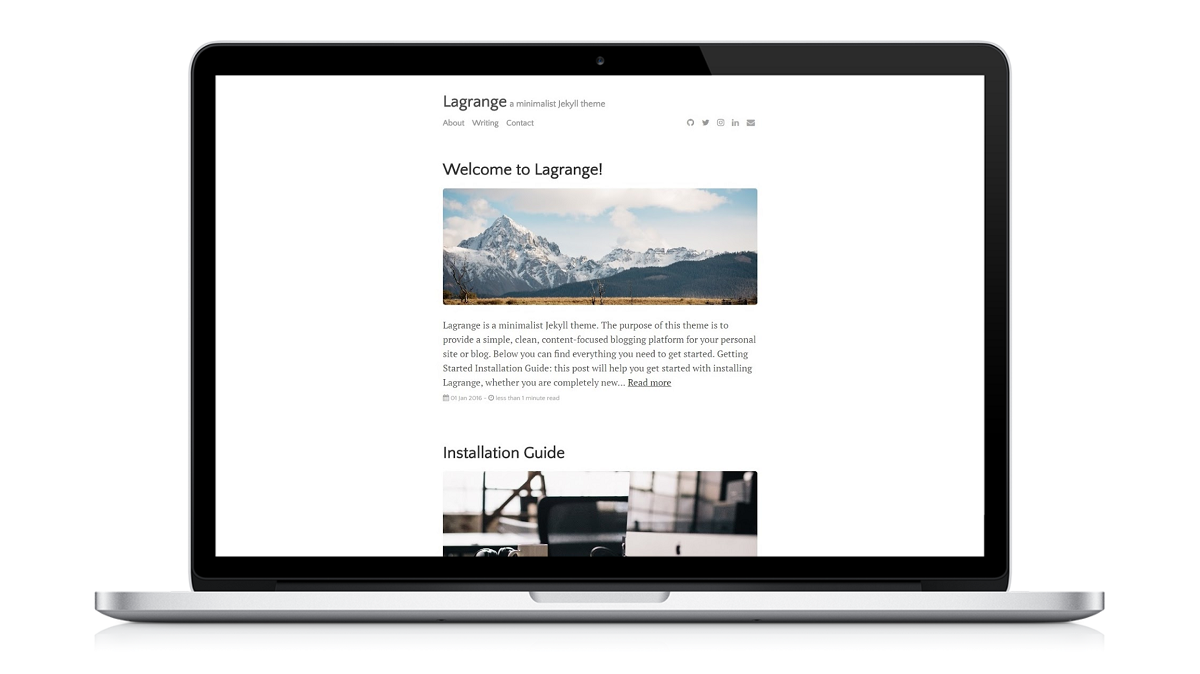
## Notable features
* Compatible with GitHub Pages.
* Support for Jekyll's built-in Sass/SCSS preprocessor and data files for making customizing easier.
* [Google Analytics](https://www.google.com/analytics/) support.
* Commenting support powered by [Disqus](https://disqus.com/).
* Optimized for search engines.
* LaTeX support through [MathJax](https://www.mathjax.org/).
## Table of Contents
1. [Introduction](#introduction)
1. [What is Jekyll](#what-is-jekyll)
2. [Never Used Jeykll Before?](#never-used-jekyll-before)
2. [Installation](#installation)
1. [GitHub Pages Installation](#github-pages-installation)
2. [Local Installation](#local-installation)
3. [Directory Structure](#directory-structure)
4. [Starting From Scratch](#starting-from-scratch)
3. [Configuration](#configuration)
1. [Sample Posts](#sample-posts)
2. [Site Variables](#site-variables)
3. [Adding Menu Pages](#adding-menu-pages)
4. [Posts](#posts)
5. [Layouts](#layouts)
6. [YAML Front Block Matter](#yaml-front-block-matter)
4. [Features](#features)
1. [Design Considerations](#design-considerations)
2. [Disqus](#disqus)
3. [Google Analytics](#google-analytics)
4. [RSS Feeds](#rss-feeds)
5. [Social Media Icons](#social-media-icons)
6. [MathJax](#mathjax)
7. [Syntax Highlighting](#syntax-highlighting)
8. [Markdown](#markdown)
5. [Everything Else](#everything-else)
6. [Contributing](#Contributing)
7. [Questions?](#questions)
8. [Credits](#credits)
9. [License](#license)
## Introduction
Lagrange is a Jekyll theme that was built to be 100% compatible with [GitHub Pages](https://pages.github.com/). If you are unfamiliar with GitHub Pages, you can check out [their documentation](https://help.github.com/categories/github-pages-basics/) for more information. [Jonathan McGlone's guide](http://jmcglone.com/guides/github-pages/) on creating and hosting a personal site on GitHub is also a good resource.
### What is Jekyll?
Jekyll is a simple, blog-aware, static site generator for personal, project, or organization sites. Basically, Jekyll takes your page content along with template files and produces a complete website. For more information, visit the [official Jekyll site](https://jekyllrb.com/docs/home/) for their documentation. Codecademy also offers a great course on [how to deploy a Jekyll site](https://www.codecademy.com/learn/deploy-a-website) for complete beginners.
### Never Used Jekyll Before?
The beauty of hosting your website on GitHub is that you don't have to actually have Jekyll installed on your computer. Everything can be done through the GitHub code editor, with minimal knowledge of how to use Jekyll or the command line. All you have to do is add your posts to the `_posts` directory and edit the `_config.yml` file to change the site settings. With some rudimentary knowledge of HTML and CSS, you can even modify the site to your liking. This can all be done through the GitHub code editor, which acts like a content management system (CMS).
## Installation
### GitHub Pages Installation
To start using Jekyll right away with GitHub Pages, [fork the Lagrange repository on GitHub](https://github.com/LeNPaul/Lagrange/fork). From there, you can rename your repository to `USERNAME.github.io`, where `USERNAME` is your GitHub username, and edit the `settings.yml` file in the `_data` folder to your liking. Ensure that you have a branch named `gh-pages`. Your website should be ready immediately at 'http://USERNAME.github.io'. Note: if you are hosting several sites under the same GitHub username, then you will have to use [Project Pages instead of User Pages](https://help.github.com/articles/user-organization-and-project-pages/) - just change the repository name to something other than 'http://USERNAME.github.io'.
Head over to the `_posts` directory to view all the posts that are currently on the website, and to see examples of what post files generally look like. You can simply just duplicate the template post and start adding your own content.
### Local Installation
For a full local installation of Lagrange, [download your own copy of Lagrange](https://github.com/LeNPaul/Lagrange/archive/gh-pages.zip) and unzip it into it's own directory. From there, open up your favorite command line tool, enter `bundle install`, and then enter `jekyll serve`. Your site should be up and running locally at [http://localhost:4000](http://localhost:4000).
### Directory Structure
If you are familiar with Jekyll, then the Lagrange directory structure shouldn't be too difficult to navigate. The following some highlights of the differences you might notice between the default directory structure. More information on what these folders and files do can be found in the [Jekyll documentation site](https://jekyllrb.com/docs/structure/).
```bash
Lagrange/
├── _data # Data files
| └── settings.yml # Theme settings and custom text
├── _includes # Theme includes
├── _layouts # Theme layouts (see below for details)
├── _posts # Where all your posts will go
├── assets # Style sheets and images are found here
| ├── css # Style sheets go here
| | └── main.css # Main CSS file
| | └── syntax.css # Style sheet for code syntax highlighting
| └── img # Images go here
├── menu # Menu pages
├── _config.yml # Site build settings
├── Gemfile # Ruby Gemfile for managing Jekyll plugins
├── index.md # Home page
├── LICENSE.md # License for this theme
├── README.md # Includes all of the documentation for this theme
└── rss-feed.xml # Generates RSS 2.0 file which Jekyll points to
```
### Starting From Scratch
To completely start from scratch, simply delete all the files in the `_posts`, `assets/img`, and `menu` folder, and add your own content. You may also replace the `README.md` file with your own README. Everything in the `_data` folder and `_config.yml` file can be edited to suit your needs. You may also change the `favicon.ico` file to your own favicon.
## Configuration
### Sample Posts
Visit the [the demo site](https://lenpaul.github.io/Lagrange/) to find sample posts that show what different types of text formatting look like. You can find these posts in the `_posts` folder, which show what the best practices for setting up your own site are.
### Site Variables
To change site build settings, edit the `_config.yml` file found in the root of your repository, which you can tweak however you like. More information on configuration settings and plugins can be found on [the Jekyll documentation site](https://jekyllrb.com/docs/configuration/). This is also where you will be able to customize the title, description, and the author/owner of your site.
If you are hosting your site on GitHub Pages, then committing a change to the `_config.yml` file will force a rebuild of your site with Jekyll. Any changes made should be viewable soon after. If you are hosting your site locally, then you must run `jekyll serve` again for the changes to take place.
In the `settings.yml` file found in the `_data` folder, you will be able to customize your site settings, such as setting Disqus comments, Google Analytics, what shows up in your menu, and social media information.
### Adding Menu Pages
The menu pages are found in the `menu` folder in the root directory, and can be added to your menu in the `settings.yml` file.
### Posts
You will find example posts in your `_posts` directory. Go ahead and edit any post and re-build the site to see your changes. You can rebuild the site in many different ways, but the most common way is to run `jekyll serve`, which launches a web server and auto-regenerates your site when a file is updated.
To add new posts, simply add a file in the `_posts` directory that follows the convention of `YYYY-MM-DD-name-of-post.md` and includes the necessary front matter. Take a look at any sample post to get an idea about how it works. If you already have a website built with Jekyll, simply copy over your posts to migrate to Lagrange.
### Layouts
There are two main layout options that are included with Lagrange: post and page. Layouts are specified through the [YAML front block matter](https://jekyllrb.com/docs/frontmatter/). Any file that contains a YAML front block matter will be processed by Jekyll. For example:
```
---
layout: post
title: "Example Post"
---
```
Examples of what posts looks like can be found in the `_posts` directory, which includes this post you are reading right now. Posts are the basic blog post layout, which includes a header image, post content, author name, date published, social media sharing links, and related posts.
Pages are essentially the post layout without any of the extra features of the posts layout. An example of what pages look like can be found at the [About](https://lenpaul.github.io/Lagrange/menu/about.html) and [Contacts](https://lenpaul.github.io/Lagrange/menu/contact.html).
In addition to the two main layout options above, there are also custom layouts that have been created for the [home page](https://lenpaul.github.io/Lagrange/) and the [archives page](https://lenpaul.github.io/Lagrange/menu/writing.html). These are simply just page layouts with some [Liquid template code](https://shopify.github.io/liquid/). Check out the `index.html` file in the root directory for what the code looks like.
### YAML Front Block Matter
The recommended YAML front block is:
```
---
layout:
title:
author:
categories:
tags: []
image:
---
```
`layout` specifies which layout to use, `title` is the page or post title, `categories` can be used to better organize your posts, `tags` are used when generating related posts based on the topic of the post, and `image` specifies which images to use. Have a look at some posts in the `_posts` directory to see how these variables are set.
## Features
### Design Considerations
Lagrange was designed to be a minimalist theme in order for the focus to remain on your content. For example, links are signified mainly through an underline text-decoration, in order to maximize the perceived affordance of clickability (I originally just wanted to make the links a darker shade of grey).
### Disqus
Lagrange supports comments at the end of posts through [Disqus](https://disqus.com/). In order to activate Disqus commenting, set `disqus.comments` to true in the `_data/settings.yml` file. If you do not have a Disqus account already, you will have to set one up, and create a profile for your website. You will be given a `disqus_shortname` that will be used to generate the appropriate comments sections for your site. More information on [how to set up Disqus](http://www.perfectlyrandom.org/2014/06/29/adding-disqus-to-your-jekyll-powered-github-pages/).
### Google Analytics
It is possible to track your site statistics through [Google Analytics](https://www.google.com/analytics/). Similar to Disqus, you will have to create an account for Google Analytics, and enter the correct Google ID for your site under `google-ID` in the `settings.yml` file. More information on [how to set up Google Analytics](https://michaelsoolee.com/google-analytics-jekyll/). Note: If you are not using Google Analytics, please change `google-ID` to an empty string.
### RSS Feeds
Atom is supported by default through [jekyll-feed](https://github.com/jekyll/jekyll-feed). With jekyll-feed, you can set configuration variables such as 'title', 'description', and 'author', in the `_config.yml` file.
RSS 2.0 is also supported through [RSS auto-discovery](http://www.rssboard.org/rss-autodiscovery). The `rss-feed.xml` file (based on the template found at [jekyll-rss-feeds](https://github.com/snaptortoise/jekyll-rss-feeds)) that the feed path points to when using RSS 2.0 is automatically generated based on the appropriate configuration variables found in `_data/settings.yml`.
To use RSS 2.0, ensure the following is done:
* Uncomment the last two lines in the `_config.yml` file.
* In `_data/settings.yml`, under 'social', comment out the rss-square that points to `feed.xml`, and uncomment the rss-square that points to `rss-feed.xml`.
* In `_includes/head.html`, comment out `{% feed_meta %}` and uncomment the line under the RSS 2.0 comment.
### Social Media Icons
All social media icons are courtesy of [Font Awesome](http://fontawesome.io/). You can change which icons appear, as well as the account that they link to, in the `settings.yml` file in the `_data` folder.
### MathJax
Lagrange comes out of the box with [MathJax](https://www.mathjax.org/), which allows you to display mathematical equations in your posts through the use of [LaTeX](http://www.andy-roberts.net/writing/latex/mathematics_1).
### Syntax Highlighting
Lagrange provides syntax highlighting through [fenced code blocks](https://help.github.com/articles/creating-and-highlighting-code-blocks/). Syntax highlighting allows you to display source code in different colors and fonts depending on what programming language is being displayed. You can find the full list of supported programming languages [here](https://github.com/jneen/rouge/wiki/List-of-supported-languages-and-lexers). Another option is to embed your code through [Gist](https://en.support.wordpress.com/gist/).
### Markdown
As always, Jekyll offers support for GitHub Flavored Markdown, which allows you to format your posts using the [Markdown syntax](https://guides.github.com/features/mastering-markdown/). Examples of these text formatting features can be seen below. You can find this post in the `_posts` directory as well as the `README.md` file.
## Everything Else
Check out the [Jekyll docs][jekyll-docs] for more info on how to get the most out of Jekyll. File all bugs/feature requests at [Jekyll's GitHub repo][jekyll-gh]. If you have questions, you can ask them on [Jekyll Talk][jekyll-talk].
[jekyll-docs]: http://jekyllrb.com/docs/home
[jekyll-gh]: https://github.com/jekyll/jekyll
[jekyll-talk]: https://talk.jekyllrb.com/
## Contributing
If you would like to make a feature request, or report a bug or typo in the documentation, then please [submit a GitHub issue](https://github.com/LeNPaul/Lagrange/issues/new). If you would like to make a contribution, then feel free to [submit a pull request](https://help.github.com/articles/about-pull-requests/) - as a bonus, I will credit all contributors below! If this is your first pull request, it may be helpful to read up on the [GitHub Flow](https://guides.github.com/introduction/flow/) first.
Lagrange has been designed as a base for users to customize and fit to their own unique needs. Please keep this in mind when requesting features and/or submitting pull requests. Some examples of changes that I would love to see are things that would make the site easier to use, or better ways of doing things. Please avoid changes that do not benefit the majority of users.
## Questions?
This theme is completely free and open source software. You may use it however you want, as it is distributed under the [MIT License](http://choosealicense.com/licenses/mit/). If you are having any problems, any questions or suggestions, feel free to [tweet at me](https://twitter.com/intent/tweet?text=My%question%about%Lagrange%is:%&via=paululele), or [file a GitHub issue](https://github.com/lenpaul/lagrange/issues/new).
## Credits
### Creator
#### Paul Le
* [www.lenpaul.com](http://lenpaul.com)
* [Twitter](https://twitter.com/paululele)
* [GitHub](https://github.com/LeNPaul)
### Contributors
* [nikolalukovic](https://github.com/nikolalukovic)
* [gmemstr](https://github.com/gmemstr)
* [lynn9388](https://github.com/lynn9388)
* [robqiao](https://github.com/robqiao)
* [Mauladen](https://github.com/Mauladen)
* [dhanus](https://github.com/dhanus)
* [mlewand](https://github.com/mlewand)
* [Hguimaraes](https://github.com/Hguimaraes)
* [ilhamadun](https://github.com/ilhamadun)
* [brianclemens](https://github.com/brianclemens)
* [leyhline](https://github.com/leyhline)
* [aritra24](https://github.com/aritra24)
* [DuckSoft](https://github.com/DuckSoft)
* [larrylawl](https://github.com/larrylawl)
* [borting](https://github.com/borting)
### Icons + Demo Images
* [Death to Stock](https://deathtothestockphoto.com/)
* [Font Awesome](http://fontawesome.io/)
### Other
* [Jekyll](https://jekyllrb.com/)
* [Free Code Camp](https://www.freecodecamp.org)
* [Khan Academy](https://www.khanacademy.org/)
## License
Open sourced under the [MIT license](https://github.com/LeNPaul/Lagrange/blob/gh-pages/LICENSE.md).
Explore similar templates
Compare previews and descriptions within the same stack and category.

al-folio
A Jekyll academic homepage theme for scholars and researchers, with a clean responsive design and out-of-the-box support for publication lists, project showcases, CVs, and blogs.
Jekyll · Portfolio

minimal-mistakes
Minimal Mistakes is a two-column Jekyll theme for personal sites, blogs, project documentation, or portfolios.
Jekyll · Portfolio

Beautiful Jekyll
Beautiful Jekyll is a mature, easy-to-use Jekyll blog theme maintained by Dean Attali since 2015, with over 50,000 users.
Jekyll · Blog

jekyll-TeXt-theme
A customizable Jekyll theme for personal sites, team sites, blogs, projects, and documentation.
Jekyll · Blog

startbootstrap-clean-blog-jekyll
The official Jekyll version of Start Bootstrap's Clean Blog theme, offering a blog home page, about page, contact page, and sample post pages, with a Formspree-powered contact form.
Jekyll · Blog

So Simple
A minimal reading-oriented Jekyll theme by Michael Rose for personal blogs, portfolios, and long-form reading. It offers multiple layouts, microformat markup, Disqus comments, Google Analytics, Jekyll SEO Tag, three skins, and aggregation by year, category, and tag with a grid view.
Jekyll · Blog