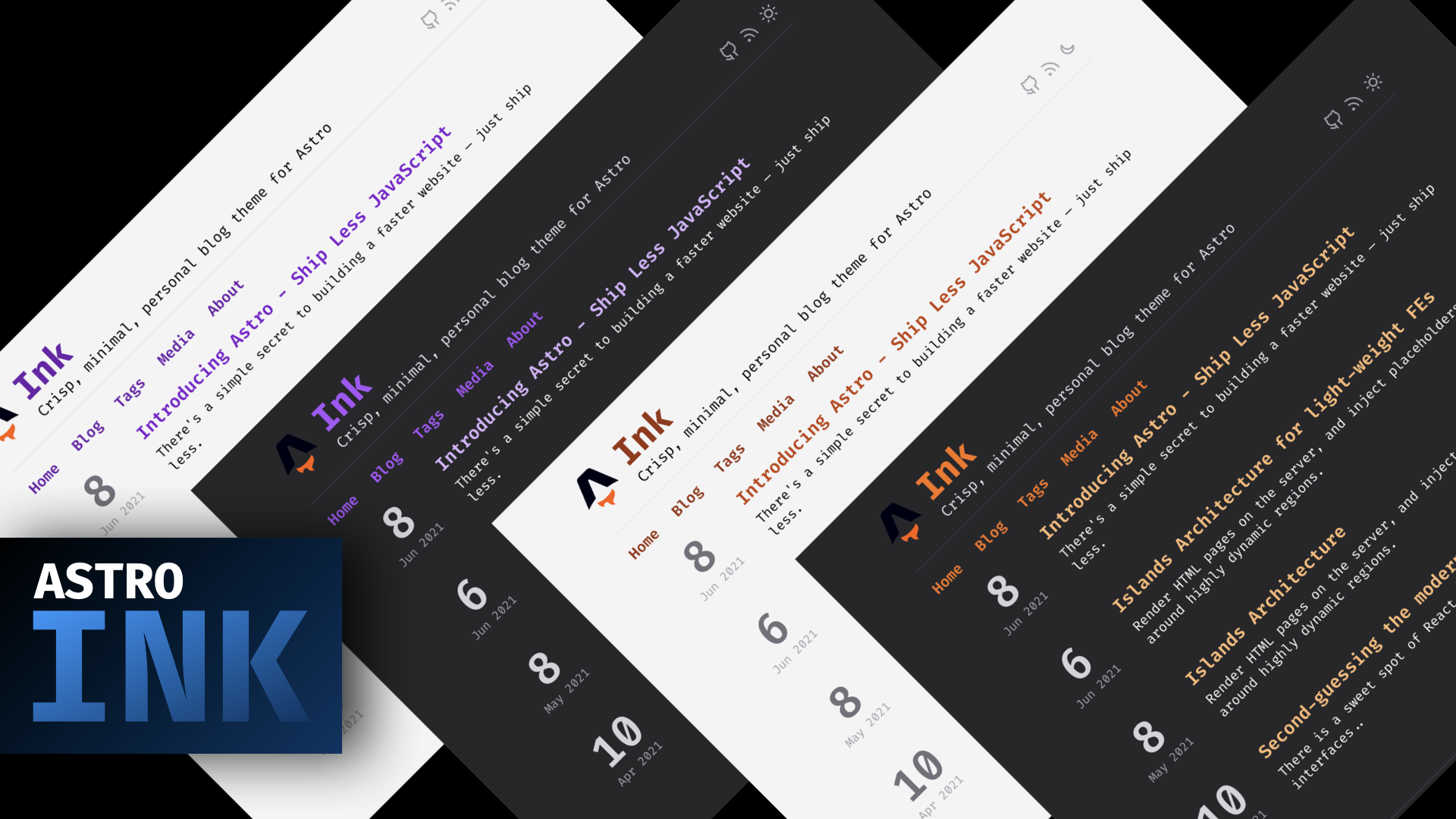
Minimal Markdown blog theme that outputs as little JavaScript as possible by default
AstroHugoBlog
TEMPLATE_ASTRO_INK_JSAY_HUGO — Astro Blog Template
By lgtm-migrator
Astro Ink is a minimal Astro theme for Markdown-based personal blogs, inspired by Hugo's Ink theme, with optional capabilities such as Netlify CMS, scheduled draft publishing, and client-side search.
Explore the design
Compare the page layouts and mobile experience. Open any screenshot for a closer look.
Author preview
Author-provided preview
Preview provided in the project README.
One original preview is available. Open the full image to inspect the design.
Screenshots show visual appearance; interactive behavior may differ.
Recorded 2026-10-11View source
What stands out
A quick read of the recorded project description.
Highly modular structure, with each component handling a single concern
Dynamic pages supporting tag categorization and pagination, with configurable behavior
Supports dark mode and more than 6 configurable color modes (marked as beta in the README)
Integrates Netlify CMS for managing posts under the /blog directory from the backend
Provides scheduled draft publishing (GitHub Action) and client-side search based on Lunr.js
Template Details
Astro Ink is a minimal personal blog theme centered on Markdown content, built with Astro and designed to output as little JavaScript as possible by default. It references Hugo's Ink theme, and its overall structure is highly modular, with each component responsible for a single concern.
The theme includes the basic Astro components commonly used by blogs, supports dynamic pages similar to Next.js, can categorize by tags and output paginated results, and the related behavior is configurable. Interactive components (such as the theme switcher) are implemented with Svelte. It supports dark mode and provides more than 6 color modes configurable via tailwind.config.js; this feature is marked as beta in the README, which notes that development requires a restart and that only one color set can be enabled at a time. Blog body styles can be customized via Tailwind Typography's prose-{color} classes.
For content management, the theme integrates Netlify CMS, allowing articles under the /blog directory to be added, edited, and updated from the Netlify site backend, but Netlify Identity and Git Gateway must be enabled. It also provides a future-post feature: create posts in the /src/drafts directory with future dates, and a companion GitHub Action automatically publishes them on the specified date, with the check interval configurable in the workflow. In addition, it offers client-side search based on Lunr.js.
The README states that the theme uses astro@next and mentions that Svelte is used for interactive components, but it does not give specific dependency version numbers. Third-party assets such as demo images, fonts, and icons in the repository must have their licenses checked separately; the code's MIT license alone cannot be used to judge them.
AstroHugoBlog
Is it right for your project?
Use Cases
- Building a personal technical blog written in Markdown
- Needing a clearly structured Astro blog starting point that is easy to modify component by component
- Wanting to manage post content in the browser via Netlify CMS
- Wanting posts to publish automatically on preset dates, or adding client-side search to a blog
Suitable For
- Personal blog authors who use Astro and prefer writing in Markdown
- Developers who want a blog that outputs less JavaScript by default
- Blog sites that need tag categorization and paginated browsing
- Users willing to configure Netlify Identity, Git Gateway, or GitHub Actions
Getting started & customization
Use these recorded setup notes alongside the repository instructions for your chosen version.
- 1
The README states that the theme uses astro@next; specific dependency versions should be based on the repository's dependency manifest
- 2
Netlify CMS requires Identity and Git Gateway to be enabled on the Netlify site before it can be used
- 3
The future-post feature depends on a companion GitHub Action, and the check interval can be configured in .github/workflows/main.yml
- 4
Color modes must be configured in tailwind.config.js; the README notes that development requires a restart and that only one color set can be enabled at a time
- 5
Third-party assets such as demo images, fonts, and icons must be checked separately under their respective licenses
License & source material
Usage conditions & limitations
Free to use · keep license noticeThis entry covers the free version under the MIT license in the public repository; the free scope is the code of that version and does not mean that external services or third-party assets are free.
Must comply with when using
- The code of this version may be used, modified, used commercially, and distributed free of charge.
- When distributing copies or substantial portions of the code, retain the original author's copyright notice and the complete MIT license notice.
- The code is provided as is; warranties and limitations of liability are governed by the original license and applicable law.
Additional costs & items to verify
- Demo images, fonts, icons, and other third-party assets must be checked under their respective licenses; the code's MIT license alone cannot be used to judge them.
- External services such as domains, hosting, databases, payments, or AI may incur separate charges.
- Using the Netlify CMS backend to manage posts requires enabling Netlify Identity and Git Gateway services on the Netlify site and depends on a Netlify account and site configuration, which is an external service dependency.
- The scheduled future-post publishing feature depends on an external GitHub Action (ssg-publish-drafts) and the GitHub Actions runtime environment, and must be configured in the repository workflow before it can automatically publish on the specified date.
- Color mode configuration has usage restrictions: development requires a restart, and only one color set can be enabled at a time; multiple color configurations cannot be enabled simultaneously.
View Original Text Basis
Permission is hereby granted, free of charge
Original License Text
It needs Netlify Identity(https://app.netlify.com/sites/your-site/settings/identity#registration ) and Git Gateway(https://app.netlify.com/sites/your-site/settings/identity#services) enabled.
Original README
Create posts in the `/src/drafts` directory with a future `date` in the `YYYY-MM-DD` format, and let a specially crafted [Github Action](https://github.com/marketplace/actions/ssg-publish-drafts) take care of auto-publishing it on your specified date.
Original README
https://github.com/lgtm-migrator/TEMPLATE_ASTRO_INK_JSAY_HUGO/blob/main/LICENSEhttps://github.com/lgtm-migrator/TEMPLATE_ASTRO_INK_JSAY_HUGO/blob/main/README.mdRemember to restart when developing, and enable just one group of colors at a time.
Original README
Compiled by DeepSeek based on repository license and README ·2026-10-11. Results only cover the materials read; dependencies, images, fonts, and subsequent term changes are subject to their respective original texts.
Project checks & description sources
Template Information
- Source platforms
- GitHub
- Documentation and maintenance reference score
- Partly documented · 58 / 100
- Technologies
- Astro · Hugo
- Website type
- Blog
How this score is calculated
Our heuristic uses license records (up to 30), a demo link (12), a preview (10), stars (15), recorded maintenance (15), description completeness (8), feature records (5) and classification data (5). It is not a code, security or performance test, or a Google score. A link does not establish tested functionality.
What to verify for this project
- Repository update recorded
- 2022-11-09
- Screenshot last checked
- 2026-10-11
No demo link is recorded. Use the repository instructions to evaluate the project locally; the screenshot alone cannot establish interactive behavior.
The catalog identifies Astro as the primary stack. Check the actual dependency manifest and lockfile for versions and hosting requirements. These notes use recorded metadata, not a code audit or a deployment test.
Use a selection guide →How this description was prepared
AI-assisted description based on catalog records and repository material. Repository authors are not automatically the reviewers of this description.
Review declaration: [email protected] · 2026-10-13
Inspect the recorded source material
SHA-256: 5d3c91d1800c90fce382d883e799dc769052fb85be9f752d56414ab33935b6c9
2026-10-11T21:34:30.837Z
Source file / repository# Astro - Ink
Crisp, minimal, personal blog theme for Astro
<img src="./public/astro-banner.png" alt="Astro Banner" />
Astro Ink is a minimal theme created to serve minimalistic markdown-based blog needs. It ships with almost all the basic Astro components that you might need while creating light-weight, performant, personal blogs, that focus on shipping less Javascript by default.
It's hugely inspired by [Hugo](https://github.com/knadh/hugo-ink)'s Ink theme and strives to remain light, while providing the basis for a beautiful, minimal blog.
## Features
- __Minimal, Crisp, Markdown-Blog Ready__
- __Uses `astro@next`__ - It uses Astro's [next](https://next.docs.astro.build/getting-started) APIs under the hood
- __Svelte Ready__ - In its effort to remain light-weight, performant, and more approachable from Astro's POV, Svelte is used for interactive components like the theme switcher
- __Modular__ - The structure is highly modular, with components doing just one job, and one job well.
- __Collection + Dynamic Pages__ - It's ready with Next.js like dynamic pages, to support a tag-based classification system with paginated results, all configurable
- __Dark Mode & Color Codes (beta)__ - It supports dark mode, and 6+ color modes that could be configured using `tailwind.config.js`. Remember to restart when developing, and enable just one group of colors at a time. To customize the blog section, add any of the Tailwind Typography's `prose-{color}` classes as referred [here](./src/components/Prose.astro)
- __Netlify CMS<sup>*NEW</sup>__ - Add/Edit/Update all the posts in the `/blog` directory by visiting `your-site.netlify.com/admin` ex: [astro-ink.netlify.app/admin](https://astro-ink.netlify.app/admin) with your Netlify credentials. It needs Netlify Identity(https://app.netlify.com/sites/your-site/settings/identity#registration
) and Git Gateway(https://app.netlify.com/sites/your-site/settings/identity#services) enabled. (_Write-up coming soon!_)
- __Future Posts<sup>*NEW</sup>__(with Github Actions) - Create posts in the `/src/drafts` directory with a future `date` in the `YYYY-MM-DD` format, and let a specially crafted [Github Action](https://github.com/marketplace/actions/ssg-publish-drafts) take care of auto-publishing it on your specified date. You can configure the check interval in [Github Action](https://github.com/one-aalam/astro-ink/blob/main/.github/workflows/main.yml).(_Write-up coming soon!_)
- __Client-Side Search<sup>*NEW</sup>__ - Allow your users get to your blog posts quickly with client-side search feat. Lunr.js
## Built with Astro Ink
- [jamesperkins.dev](https://www.jamesperkins.dev/) - Personal site of developer, YouTube instructor [James R Perkins](https://twitter.com/james_r_perkins)
> know a site built with Astro Ink? Let me know on [Twitter](https://twitter.com/aftabbuddy)
## Wanna learn Astro while building Ink?
Head over to `aalam.in/blog` and learn
- [How to set Astro up and get it running with essential defaults for styling, prototyping, and incremental deployments](https://aalam.in/blog/astro-get-up-and-running)
- [Managing presentational components and creating Astro pages](https://aalam.in/blog/astro-and-site-strcuture)
- [Feeding local as well as remote data to the Astro pages](https://aalam.in/blog/astro-and-data)
- [Putting interactivity where you absolutely cannot do without it in Astro](https://aalam.in/blog/astro-and-interactivity)
- [Creating data-driven, dynamic pages and paginated results in Astro](https://aalam.in/blog/astro-and-dynamic-pages)
Explore similar templates
Compare previews and descriptions within the same stack and category.

astrowind
AstroWind is a free, open-source Astro starter theme using Astro and Tailwind CSS, released under the MIT license.
Astro · Blog

astro-paper
An Astro blog theme with Markdown/MDX content, Tailwind styling and Pagefind search. Search is a feature of the blog, rather than a separate tool-site product.
Astro · Blog

fuwari
Fuwari is a static blog template built with Astro and Tailwind CSS for personal blogs. It manages posts as Markdown files in src/content/posts/, with frontmatter for title, date, description, cover, tags, categories, draft status, and language.
Astro · Blog

Firefly
Firefly is a clean personal blog theme forked from Astro and Fuwari, offering four background modes, single/double sidebar and list/grid layouts, Pagefind client-side full-text search, and a six-language UI.
Astro · Blog

astro-theme-cactus
An Astro blog and notes starter with Markdown/MDX content, Tailwind styling and Pagefind search. Its main purpose is publishing posts and notes.
Astro · Blog

astrofy
Astrofy is a free and open-source personal portfolio website template built with Astro and TailwindCSS, with built-in blog, CV timeline, project showcase, store, and RSS feed modules.
Astro · Portfolio