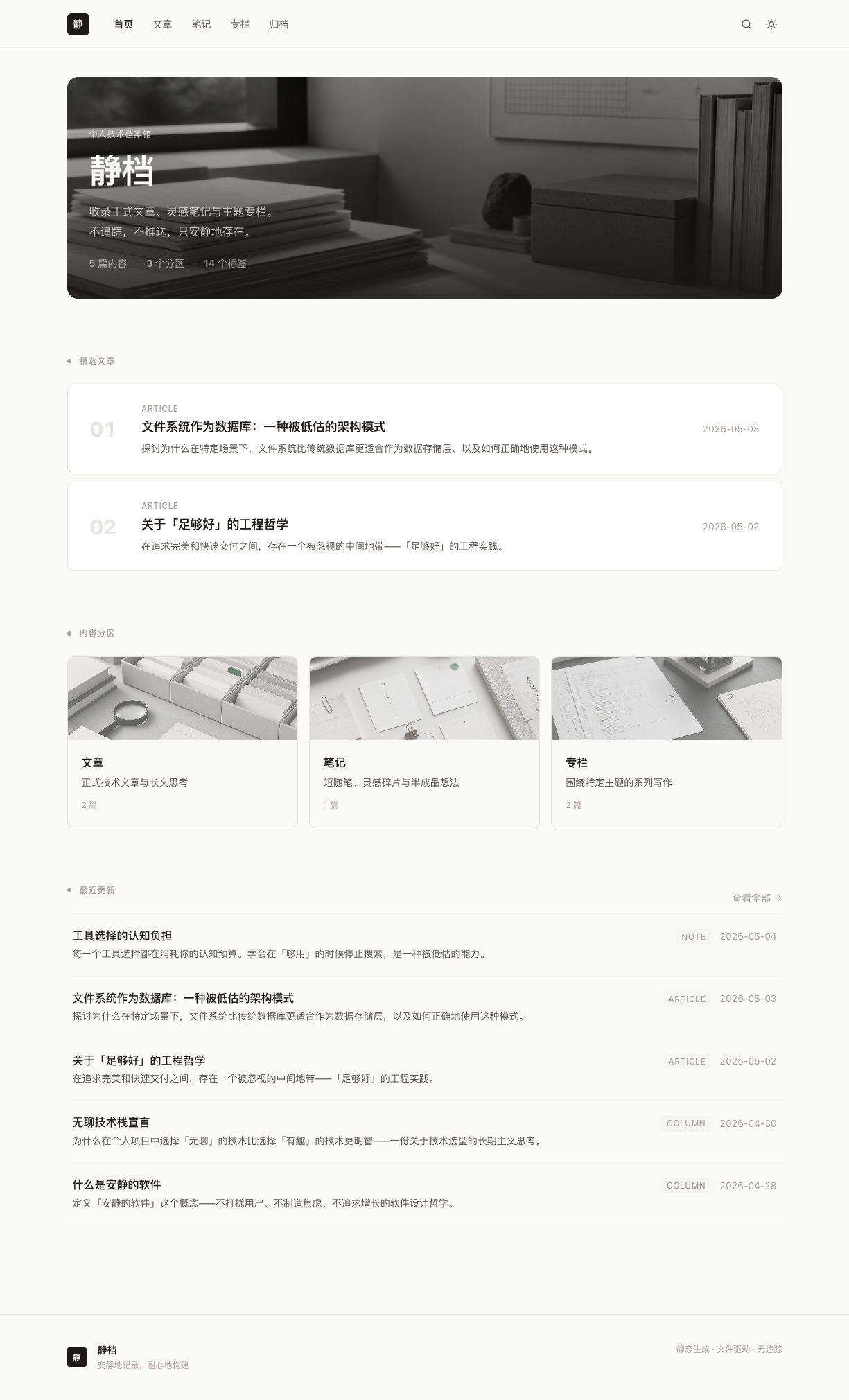
File-system driven: folders are content types, README.md is a directory page, no extra configuration needed
AstroBlogTool Site
quiet-archive — Astro Blog Template
By lin037
Quiet Archive is a personal archive base that uses the file system as the source of truth. Built with Astro, it outputs both a static site and JSON APIs, making it easy for agents or MCP to consume.
Explore the design
Compare the page layouts and mobile experience. Open any screenshot for a closer look.
Author preview
Author-provided previewTop of page
Preview provided in the project README.
One original preview is available. Open the full image to inspect the design.
Screenshots show visual appearance; interactive behavior may differ.
Recorded 2026-10-12View source
What stands out
A quick read of the recorded project description.
Build-time static JSON APIs, including types, entries, tree, tags, stats, and search index
Built-in jieba Chinese word segmentation and client-side field-weighted full-text search, no external search service required
Content with stable URIs and structured frontmatter, directly usable as a knowledge base for agents / MCP / skills
Provides a blog-frontend-bootstrap skill to generate custom frontends with Claude Code
Optional runtime: core archive remains accessible when dynamic capabilities are disabled
Template Details
Quiet Archive is positioned as a personal archive base, not an ordinary blog theme. Content is stored as Markdown in a private Git repository. The directory structure directly determines content types and URLs, with each level's README.md serving as a directory page. The build process is handled by Python scripts for content indexing, search indexing (including jieba Chinese word segmentation), and validation. Astro generates static pages and also outputs zero-runtime JSON interfaces such as /api/types.json, /api/entries.json, /api/entry/<uri>.json, /api/tree.json, /api/stats.json, /api/tags.json, and /search-index.json. The default frontend pages are only a reference implementation; the project recommends using the built-in blog-frontend-bootstrap skill with Claude Code to generate a custom visual solution.
Before use, note: Node >= 22.12 and Python >= 3.10 are required, and dependencies in scripts/requirements.txt must be installed. Deployment involves pulling and building on your own server and hosting via Nginx. The repository is MIT licensed, but third-party assets such as demo images, fonts, and icons require separate license verification. External services like domain, hosting, or AI may incur additional costs. Features listed in the Roadmap, such as incremental builds, a standalone MCP server package, share image generation, SQLite view counting, AI summaries and embedding caching, and automatic sitemap.xml and RSS generation, are not yet completed.
AstroBlogTool site
Is it right for your project?
Use Cases
- Building a personal long-term knowledge archive with content stored as Markdown in your own Git repository
- Providing a queryable static knowledge base interface for agents or MCP
- Building and hosting a static site on your own server, served by Nginx
- Using Claude Code and the built-in skill to generate a custom frontend visual solution
Suitable For
- Individuals who want content and structure fully controlled by the file system, without relying on a database
- Developers who need personal content for both website display and agent consumption
- Users willing to deploy a static site on their own server and accept Python build scripts
- Those with long-term archiving needs who prefer Markdown writing, version control, and structured retrieval
Getting started & customization
Use these recorded setup notes alongside the repository instructions for your chosen version.
- 1
Requires Node >= 22.12 (with npm >= 10) and Python >= 3.10
- 2
After cloning the repository, run npm install and install the Python dependencies in scripts/requirements.txt
- 3
Run npm run index to generate the content index, and npm run dev to start the local development server (default http://localhost:4321)
- 4
For production builds, use npm run build, which outputs the static site and /api/*.json
- 5
Deployment involves pulling and building on your own server and hosting via Nginx; third-party assets and external services require separate license and cost verification
License & source material
Usage conditions & limitations
Free to use · keep license noticeThis entry covers the free version under the MIT license in the public repository; the free scope is the code of this version and does not imply that external services or third-party assets are free.
Must comply with when using
- Free use, modification, commercial use, and distribution of this version's code are permitted.
- When distributing copies or substantial portions of the code, retain the original author's copyright notice and the full MIT license notice.
- The code is provided as is; warranties and limitations of liability are governed by the original license and applicable law.
Additional costs & items to verify
- Demo images, fonts, icons, and other third-party assets must be checked under their respective licenses and cannot be judged solely by the code's MIT license.
- External services such as domain, hosting, database, payment, or AI may incur additional charges.
- The project recommends using Claude Code and the built-in skill to generate the frontend rather than directly applying the template; the default pages are only a reference implementation.
- The English documentation also states that the frontend must be generated by the user with Claude Code and the built-in skill, rather than directly adopting the template.
- The site must be built on your own server and hosted by Nginx; no hosting service is provided.
- Running requires Node >= 22.12 (including npm >= 10) and Python >= 3.10 environment.
- Python dependencies in scripts/requirements.txt must be installed separately.
- The standalone MCP server package is not yet completed and is an unimplemented Roadmap item.
- Incremental build support is not yet implemented; build performance may be limited with large amounts of content.
- SQLite view counting is an optional runtime feature and is not yet implemented.
- AI summaries and embedding caching are optional runtime features and are not yet implemented.
- Automatic sitemap.xml and RSS generation are not yet implemented.
View Original Text Basis
Permission is hereby granted, free of charge
Original License Text
**前端** 建议你用 Claude Code + 内置的 `blog-frontend-bootstrap` skill **生成属于自己的一套设计**,而不是套用一个模板
Original README
**Frontend** is expected to be generated by you with Claude Code + the bundled `blog-frontend-bootstrap` skill, not adopted from a template
Original README
**Site** is built on your own server, served by Nginx
Original README
# Requires Node >= 22.12 (with npm >= 10) & Python >= 3.10
Original README
pip3 install -r scripts/requirements.txt
Original README
- [ ] **Standalone MCP server package** (consuming `/api/*.json`)
Original README
- [ ] Incremental build support (performance for large archives)
Original README
- [ ] Optional runtime: SQLite view counter
Original README
- [ ] Optional runtime: AI summary / embedding cache
Original README
https://github.com/lin037/quiet-archive/blob/main/LICENSEhttps://github.com/lin037/quiet-archive/blob/main/README.md- [ ] sitemap.xml + RSS auto-generation
Original README
Compiled by DeepSeek based on repository license and README ·2026-10-12. Results only cover the materials read; dependencies, images, fonts, and subsequent term changes are subject to their respective original texts.
Project checks & description sources
Template Information
- Source platforms
- GitHub
- Documentation and maintenance reference score
- More documented · 76 / 100
- Technologies
- Astro
- Website type
- Blog · Tool Site
How this score is calculated
Our heuristic uses license records (up to 30), a demo link (12), a preview (10), stars (15), recorded maintenance (15), description completeness (8), feature records (5) and classification data (5). It is not a code, security or performance test, or a Google score. A link does not establish tested functionality.
What to verify for this project
- Repository update recorded
- 2026-05-09
- Screenshot last checked
- 2026-10-12
No demo link is recorded. Use the repository instructions to evaluate the project locally; the screenshot alone cannot establish interactive behavior.
The catalog identifies Astro as the primary stack. Check the actual dependency manifest and lockfile for versions and hosting requirements. These notes use recorded metadata, not a code audit or a deployment test.
Use a selection guide →How this description was prepared
AI-assisted description based on catalog records and repository material. Repository authors are not automatically the reviewers of this description.
Review declaration: [email protected] · 2026-10-13
Inspect the recorded source material
SHA-256: 42dd7bd79b1f6997c4e1605b527bd6b2c4f423a0021b4d70b72170f78f64ca48
2026-10-12T20:52:04.584Z
Source file / repository<div align="center">
# Quiet Archive · 静档
**文件系统驱动的个人档案馆基座**
构建一个安静、长期、可编程的个人知识档案。
既是可阅读的网站,也是可被 Agent 使用的知识库。
*A quiet, file-driven personal archive — readable as a website, queryable as a knowledge base, reusable by agents.*
[简体中文](#简体中文) · [English](#english)
<table align="center">
<tr>
<td align="center"><b>Theme 1: Quiet</b></td>
<td align="center"><b>Theme 2: Vibrant Forest</b></td>
</tr>
<tr>
<td><img src="./public/assets/material/theme-1.png" alt="Theme 1 Preview" width="360" /></td>
<td><img src="./public/assets/material/theme-2.png" alt="Theme 2 Preview" width="360" /></td>
</tr>
</table>
<p align="center">
<img src="./public/assets/material/claude-code-usage.png" alt="使用 Claude Code 生成前端展示页面的示例" width="720" />
</p>
</div>
---
## 简体中文
### 这是什么
这是一套**个人档案馆基座**,不是又一个博客主题:
- **内容** 放在你自己的私有 Git 仓库里,用 Markdown 写
- **结构** 由文件系统直接决定(文件夹即类型栏,`README.md` 即目录页)
- **网站** 由你自己的服务器拉取构建,Nginx 托管
- **API 层** 是一等公民 —— 同一份内容既喂页面,也能喂 Agent / MCP / Skill
- **前端** 建议你用 Claude Code + 内置的 `blog-frontend-bootstrap` skill **生成属于自己的一套设计**,而不是套用一个模板
### 与 GitHub Pages / VitePress 的取舍
GitHub Pages 和 VitePress 都是成熟方案,也可以通过 GitHub Actions、插件、自定义构建或额外服务扩展出很多能力。这里比较的不是"能不能做到",而是各自的**默认定位**和 Quiet Archive 想要优先解决的问题。
| 维度 | GitHub Pages | VitePress | Quiet Archive |
|---|---|---|---|
| 核心定位 | 静态站点托管 | 文档站点框架 | **个人档案馆基座** |
| 内容组织 | 适合发布静态页面 | 适合结构化文档站 | **以本地 Markdown 档案为事实来源** |
| 数据接口 | 通常需要自行生成 | 通常需要自行扩展 | **默认生成 JSON API 与搜索索引** |
| Agent 使用 | 可以额外适配 | 可以额外适配 | **把 API、索引和前端生成作为一等能力** |
| 视觉方向 | 取决于所选生成器或主题 | 默认文档主题,可深度定制 | **推荐用 AI 生成专属前台体验** |
### 核心设计
1. **文件即事实来源**:任何页面必须可以只用 Markdown + 索引 JSON 构建出来。
2. **结构从文件系统推导**:不写配置,文件夹怎么放,导航和 URL 就是什么样。
3. **API 优先**:`src/api/*` 是内部 SDK,并同时以静态 JSON 形式对外暴露。
4. **视觉层自由**:默认页面只是参考实现,推荐用 skill 让 Claude Code 为你生成专属版本。
5. **运行时是可选项**:关掉所有动态能力,核心档案仍然能访问。
### 快速开始
```bash
# 需要 Node >= 22.12(附带 npm >= 10)& Python >= 3.10
git clone [email protected]:<you>/quiet-archive.git # ← 替换 <you> 为你的 GitHub 用户名
cd quiet-archive
npm install
pip3 install -r scripts/requirements.txt
# 生成索引 + 启动开发服务器
npm run index
npm run dev
```
浏览器打开 `http://localhost:4321` 即可预览默认展示页面。
完整流程:fork → clone → 本地预览 → 用 `blog-frontend-bootstrap` 生成专属前端 → 写文章 → push → 服务器自动构建上线。详见 **[docs/getting-started.md](./docs/getting-started.md)**。
### 项目结构
```
quiet-archive/
├── posts/ 你的 Markdown 内容(事实来源)
├── scripts/ Python 构建脚本
│ ├── build_index.py 内容索引
│ ├── build_search_index.py 搜索索引(含中文分词)
│ └── check.py 内容校验
├── src/
│ ├── api/ 内容查询层(稳定核心,不要改)
│ ├── pages/ 路由 + 静态 JSON API 端点
│ ├── components/ 组件
│ ├── layouts/ 布局
│ └── styles/ 设计 tokens
├── public/ 静态资源:assets/ 图片 + 索引 JSON / 搜索索引
├── dist/ 构建产物:静态站点 + /api/*.json
├── docs/ 项目文档
└── .claude/skills/ Claude Code 使用的 skills
```
### 文档
- [Getting Started](./docs/getting-started.md) — 部署与使用指南
- [Architecture Overview](./docs/architecture-overview.md) — 代码架构讲解
- [API Reference](./docs/api-reference.md) — API 与 MCP 接入
- [Content Authoring](./docs/content-authoring.md) — 内容创作规范
- [CHANGELOG](./CHANGELOG.md) — 版本更新日志
### 内置能力
- 📄 灵活的内容类型:`article` / `note` / `column` 等,可随时新增
- 🗂️ 任意深度嵌套的目录结构,每层 `README.md` 即目录页
- 🔍 全文搜索:构建时中文分词(jieba)+ 客户端字段权重匹配,无需外部搜索服务
- 📡 零运行时的静态 JSON API:`/api/types.json`、`/api/entries.json`、`/api/entry/<uri>.json`、`/api/tree.json`、`/api/stats.json`、`/api/tags.json`、`/search-index.json`
- 🤖 Agent / MCP / Skill 开箱即用的知识库接入能力
- 🎨 内置 `blog-frontend-bootstrap` skill,让 AI 为你生成专属前端
### 作为 Agent 知识库
本项目的内容天然适合作为 Agent 的长期记忆:
- 每条内容都有稳定 URI
- 结构化的 frontmatter(tags, series, type)
- 静态 JSON API + 搜索索引可直接被 Agent / MCP / Skill 消费
你写一次,内容既喂读者,也喂你的 Agent,也可以通过 MCP 喂别人的 Agent。
### Roadmap
- [x] 文件系统驱动的内容模型
- [x] 内容索引 / 路由表 / 归档树生成
- [x] 内容校验脚本
- [x] 静态 JSON API 端点
- [x] 中文分词 + 全文搜索(构建时索引 + 客户端检索)
- [x] 内容查询 API 层(`src/api/*`)
- [x] 前端生成 Claude Code skill
- [x] 默认展示页面(参考实现)
- [ ] 增量构建支持(提升大量内容时的构建性能)
- [ ] **独立的 MCP server 包**(消费本仓 `/api/*.json`)
- [ ] 分享图生成(论文封面风格)
- [ ] 可选运行时:SQLite 浏览计数
- [ ] 可选运行时:AI 摘要 / embedding 缓存
- [ ] 发布工作流:一键 `publish` 脚本串联校验 / 索引 / 分享图 / push / 远端 hook
- [ ] 站点地图 (sitemap.xml) 与 RSS 自动生成
- [ ] 智能下架与重定向管理
### 技术栈
- [Astro](https://astro.build) — 静态站点生成
- [Preact](https://preactjs.com) — 交互组件(岛屿架构)
- [MDX](https://mdxjs.com) — 富文本内容
- TypeScript — 类型安全
- Python 3 + [jieba](https://github.com/fxsjy/jieba) — 构建脚本 + 中文分词
### 设计原则
- 安静、克制的视觉方向
- 文件系统驱动,不依赖数据库
- 一切纳入版本控制
- 结构化、可检索
- 为长期存续而构建
> Build quietly. Archive everything.
### License
MIT. See [LICENSE](./LICENSE).
---
## English
### What is this
A foundation for a **personal archive**, not another blog theme:
- **Content** lives in your own private Git repo, written in Markdown
- **Structure** is derived directly from the filesystem (folders are type columns, `README.md` is the directory page)
- **Site** is built on your own server, served by Nginx
- **API layer** is a first-class citizen — the same content serves pages, agents, MCP servers, and skills
- **Frontend** is expected to be generated by you with Claude Code + the bundled `blog-frontend-bootstrap` skill, not adopted from a template
### Core design principles
1. **Files are the source of truth** — any page can be built from just Markdown + generated JSON indexes
2. **Structure is derived from the filesystem** — no config, just folders
3. **API-first** — `src/api/*` is the internal SDK, also exposed as static JSON
4. **Visual layer is yours** — the default pages are reference implementations; use Claude Code + a skill to generate your own
5. **Runtime is optional** — turn off every dynamic feature and the core archive still works
### Quick start
```bash
# Requires Node >= 22.12 (with npm >= 10) & Python >= 3.10
git clone [email protected]:<you>/quiet-archive.git # ← replace <you> with your GitHub username
cd quiet-archive
npm install
pip3 install -r scripts/requirements.txt
npm run index # generate content indexes
npm run dev # development server at http://localhost:4321
npm run build # production build (content + search index + static API)
```
Full flow: fork → clone → preview default pages → generate your own frontend with `blog-frontend-bootstrap` → write → push → auto-deploy. See **[docs/getting-started.md](./docs/getting-started.md)**.
### Docs
- [Getting Started](./docs/getting-started.md)
- [Architecture Overview](./docs/architecture-overview.md)
- [API Reference](./docs/api-reference.md)
- [Content Authoring](./docs/content-authoring.md)
- [CHANGELOG](./CHANGELOG.md)
### Built-in Capabilities
- 📄 Flexible content types: `article` / `note` / `column` and more, easily extensible
- 🗂️ Arbitrary-depth nested directories; every `README.md` becomes a directory page
- 🔍 Full-text search: Chinese segmentation (jieba) at build time + client-side field-weighted matching
- 📡 Zero-runtime static JSON API endpoints
- 🤖 Ready for Agent / MCP / Skill integration as a knowledge base
- 🎨 Built-in `blog-frontend-bootstrap` skill for AI-generated custom frontends
### Roadmap
- [x] Filesystem-driven content model
- [x] Content / route / archive-tree index generation
- [x] Content validation script
- [x] Static JSON API endpoints
- [x] Chinese segmentation + full-text search
- [x] Content query API layer (`src/api/*`)
- [x] Claude Code skill for frontend generation
- [x] Default reference pages
- [ ] Incremental build support (performance for large archives)
- [ ] **Standalone MCP server package** (consuming `/api/*.json`)
- [ ] Share-image generation (academic-paper-cover style)
- [ ] Optional runtime: SQLite view counter
- [ ] Optional runtime: AI summary / embedding cache
- [ ] One-shot `publish` script (check / index / share / push / hook)
- [ ] sitemap.xml + RSS auto-generation
- [ ] Smart unpublish & redirect management
### Stack
- [Astro](https://astro.build), [Preact](https://preactjs.com), [MDX](https://mdxjs.com), TypeScript, Python 3 + [jieba](https://github.com/fxsjy/jieba)
### Principles
- Quiet and restrained visuals
- Filesystem-driven, no database dependency
- Everything version-controlled
- Structured and searchable
- Built to last
> Build quietly. Archive everything.
### License
MIT. See [LICENSE](./LICENSE).
Explore similar templates
Compare previews and descriptions within the same stack and category.

astrowind
AstroWind is a free, open-source Astro starter theme using Astro and Tailwind CSS, released under the MIT license.
Astro · Blog

astro-paper
AstroPaper is a minimal, responsive, accessible, and SEO-friendly Astro blog theme. Articles are stored as Markdown/MDX in src/content/posts/, with subdirectories affecting URLs.
Astro · Blog

fuwari
Fuwari is a static blog template built with Astro and Tailwind CSS for personal blogs. It manages posts as Markdown files in src/content/posts/, with frontmatter for title, date, description, cover, tags, categories, draft status, and language.
Astro · Blog

Firefly
Firefly is a clean personal blog theme forked from Astro and Fuwari, offering four background modes, single/double sidebar and list/grid layouts, Pagefind client-side full-text search, and a six-language UI.
Astro · Blog

astro-theme-cactus
Astro Cactus is an Astro-based blog and portfolio theme that uses Markdown/MDX content collections to manage posts, notes, and tags, with frontmatter type-checked by a schema.
Astro · Portfolio

astrofy
Astrofy is a free and open-source personal portfolio website template built with Astro and TailwindCSS, with built-in blog, CV timeline, project showcase, store, and RSS feed modules.
Astro · Portfolio