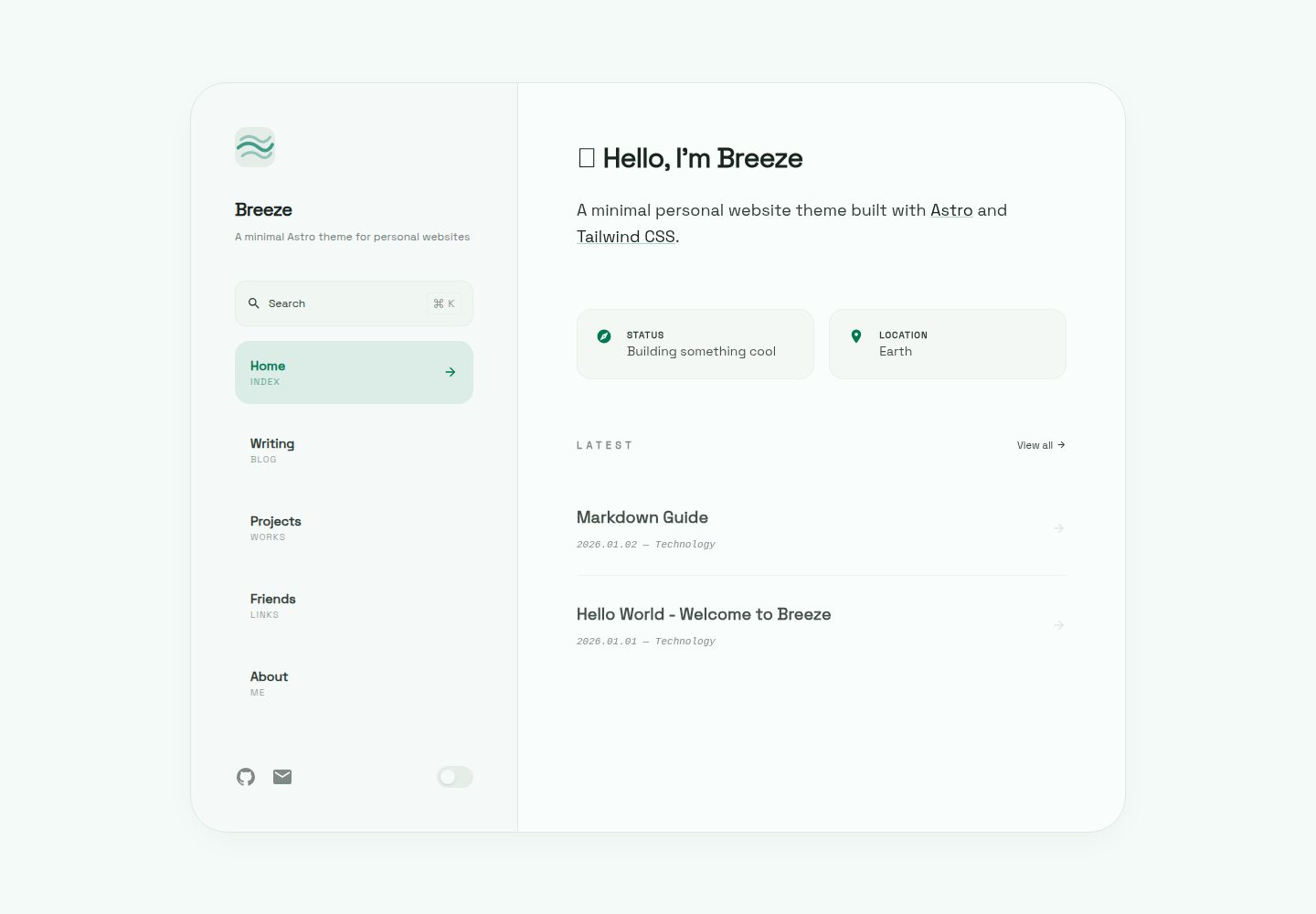
Light/dark mode switching with smooth interface transitions
AstroStarter
astro-theme-breeze — Astro Starter Template
By linftyz
Breeze is a minimalist personal website and blog theme built on Astro, with built-in light and dark modes, full-text search, RSS, content collections, and optional comment/analytics integrations, with configuration centralized in a single file.
Explore the design
Compare the page layouts and mobile experience. Open any screenshot for a closer look.
Desktop homepage1 / 3
Desktop captureTop of page
Actual screenshot captured by the server browser.
All pages & views 3
Screenshots show visual appearance; interactive behavior may differ.
Recorded 2026-10-03View source
What stands out
A quick read of the recorded project description.
Pagefind-based full-text search with Cmd+K shortcut support
Built-in RSS feed and sitemap
Uses content collections to manage posts, projects, categories, tags, and friend links
Optional Artalk comments and Umami analytics integrations, enabled via environment variables
OKLch color system; replace the unified hue value to change the overall color scheme
Template Details
Breeze is an Astro theme for personal websites and blogs, positioned as a minimalist, clean starter. It is built with Astro, together with Tailwind CSS and TypeScript, and provides light/dark mode switching, Pagefind-based full-text search (Cmd+K), RSS feeds and a sitemap, article table of contents, Expressive Code syntax highlighting, and View Transitions. Content is managed through Astro content collections, covering posts, projects, categories, tags, and friend links; the about page is a plain Markdown file that can be edited without component knowledge.
Site configuration is centralized in src/config/site.ts, including site metadata, navigation, social links, homepage greeting and info cards, footer, comments, feature toggles, tools page data, and UI text labels; the site URL also needs to be set in astro.config.mjs. Theme colors are defined in OKLch in src/styles/theme.css, and the color scheme can be changed by replacing the unified hue value, with the default hue being 165 (sage green).
Comments (Artalk) and analytics (Umami) are optional integrations enabled through environment variables, declared in env.schema in astro.config.mjs, with Astro providing typed access; on Cloudflare Pages, you only need to add the corresponding environment variables. The build output is static files and can be deployed to any static hosting platform.
In terms of usage limitations: third-party assets such as demo images, fonts, and icons must be checked separately under their respective licenses and cannot be judged solely by the code's MIT license; external services such as domains, hosting, comment servers, or analytics services may incur additional charges.
AstroStarter
Is it right for your project?
Use Cases
- Build a personal blog and publish Markdown or MDX posts
- Create a personal website showcasing a homepage greeting, info cards, and project list
- Provide full-text search, table of contents navigation, and RSS feeds for articles
- Integrate Artalk comments or Umami analytics when needed
- Deploy to static hosting platforms such as Vercel, Netlify, and Cloudflare Pages
Suitable For
- Developers who want to quickly start a personal blog with Astro
- Personal site authors who prefer a minimalist style and centralized configuration
- Blog projects that need light/dark mode, full-text search, and RSS
- Users who can accept configuring a comment server or analytics service themselves
Getting started & customization
Use these recorded setup notes alongside the repository instructions for your chosen version.
- 1
Use pnpm install to install dependencies, pnpm dev to start the development server, and pnpm build to generate static output to dist/
- 2
Edit src/config/site.ts to complete personalization such as site metadata, navigation, social links, homepage, and footer
- 3
Set the site URL in astro.config.mjs
- 4
Place posts in src/content/posts/, edit the about page at src/content/pages/about.md, and maintain categories and tags in JSON files under src/content/miscs/
- 5
When enabling Artalk comments or Umami analytics, copy .env.example to .env and fill in the corresponding environment variables; on Cloudflare Pages, add them in the project environment variables
License & source material
Usage conditions & limitations
Free to use · keep license noticeThis entry covers the free version under the MIT license in the public repository; the free scope is the code of that version and does not mean external services or third-party assets are free.
Must comply with when using
- The code of this version may be used, modified, used commercially, and distributed for free.
- When distributing copies or substantial portions of the code, retain the original author's copyright notice and the complete MIT license notice.
- The code is provided as is; warranties and limitations of liability are governed by the original license and applicable law.
Additional costs & items to verify
- The comment feature requires setting up and running an Artalk server yourself; it is an external service dependency, not a built-in capability of the theme.
- Enabling comments requires configuring the Artalk server address environment variable; comments cannot be used if it is not configured.
- Enabling analytics requires configuring the Umami script address environment variable and depends on an external analytics service.
- The analytics feature also requires a Umami website ID, which must be obtained by registering with the external service.
- Demo images, fonts, icons, and other third-party assets must be checked under their respective licenses and cannot be judged solely by the code's MIT license.
- External services such as domains, hosting, databases, payments, or AI may incur additional charges.
View Original Text Basis
Permission is hereby granted, free of charge
Original License Text
1. Set up an [Artalk](https://artalk.js.org) server
Original README
Set `PUBLIC_ARTALK_SERVER=https://your-artalk-server`
Original README
Set `UMAMI_URL=https://your-umami-script-url`
Original README
https://github.com/linftyz/astro-theme-breeze/blob/main/LICENSEhttps://github.com/linftyz/astro-theme-breeze/blob/main/README.mdSet `UMAMI_WEBSITE_ID=your-website-id`
Original README
Compiled by DeepSeek based on repository license and README ·2026-10-03. Results only cover the materials read; dependencies, images, fonts, and subsequent term changes are subject to their respective original texts.
Project checks & description sources
Template Information
- Source platforms
- Astro Themes
- Documentation and maintenance reference score
- More documented · 79 / 100
- Technologies
- Astro
- Website type
- Starter
How this score is calculated
Our heuristic uses license records (up to 30), a demo link (12), a preview (10), stars (15), recorded maintenance (15), description completeness (8), feature records (5) and classification data (5). It is not a code, security or performance test, or a Google score. A link does not establish tested functionality.
What to verify for this project
- Repository update recorded
- 2026-04-05
- Screenshot last checked
- 2026-10-03
A demo link is listed. Check it with your own content and viewport sizes; its presence does not confirm that forms, authentication or payments work.
The catalog identifies Astro as the primary stack. Check the actual dependency manifest and lockfile for versions and hosting requirements. These notes use recorded metadata, not a code audit or a deployment test.
Use a selection guide →How this description was prepared
AI-assisted description based on catalog records and repository material. Repository authors are not automatically the reviewers of this description.
Review declaration: [email protected] · 2026-10-04
Inspect the recorded source material
SHA-256: bb0dcc617fe46d6b4b1b1017deddb0e75dba934cb1c5b4660d14eab029b1549c
2026-10-03T21:41:51.430Z
Source file / repository# Breeze A minimal, clean Astro theme for personal websites and blogs. Built with [Astro 5](https://astro.build), [Tailwind CSS v4](https://tailwindcss.com), and TypeScript. [中文文档 / Chinese Documentation](./README.zh-CN.md) [Changelog](./CHANGELOG.md) ## Features - Dark / Light mode with smooth toggle - Full-text search (Pagefind, Cmd+K) - RSS feed and sitemap - Artalk comments (optional) - Umami analytics (optional) - Content collections (posts, projects, categories, tags, friends) - Table of contents for posts - Expressive Code syntax highlighting - View Transitions - Responsive design - OKLch color system with easy hue customization ## Quick Start ```bash # Clone the repository git clone https://github.com/your-username/astro-theme-breeze.git my-site cd my-site # Install dependencies pnpm install # Start development server pnpm dev # Build for production pnpm build ``` ## Configuration All site configuration is in `src/config/site.ts`. This is the only file you need to edit to personalize the theme. | Section | Description | | ------------ | ----------------------------------------------- | | `meta` | Site title, description, author, logo, language | | `navigation` | Navigation menu items with subtitle labels | | `social` | Social links (GitHub, Email, etc.) | | `hero` | Homepage greeting, description, info cards | | `footer` | Copyright and credit text | | `comments` | Artalk comments configuration | | `features` | Toggle search, RSS | | `tools` | Tools/Stack page data | | `labels` | All UI text labels (for i18n) | Also update `astro.config.mjs` to set your `site` URL. ## Content ### Blog Posts Add Markdown or MDX files to `src/content/posts/`: ```yaml --- title: My First Post createdAt: 2025-01-01 category: technology tags: [astro, tutorial] summary: A brief description of the post. --- ``` ### About Page Edit `src/content/pages/about.md` — pure Markdown, no component knowledge needed. ### Projects Add to `src/content/projects/` with frontmatter: `title`, `description`, `tech`, `link`, `status`. ### Categories & Tags Edit `src/content/miscs/categories.json` and `src/content/miscs/tags.json`. ### Friends Edit `src/content/miscs/friends.json` with `name`, `description`, `link`, `avatar`. ## Theme Colors Edit `src/styles/theme.css`. All colors use OKLch with a consistent hue value (default: 165). To change the color palette, find-and-replace the hue number: - `165` = Sage Green (default) - `250` = Ocean Blue - `280` = Lavender Purple - `330` = Rose Pink - `30` = Warm Orange ## Comments (Artalk) 1. Set up an [Artalk](https://artalk.js.org) server 2. Copy `.env.example` to `.env` 3. Set `PUBLIC_ARTALK_SERVER=https://your-artalk-server` 4. Optionally set `PUBLIC_ARTALK_ENABLED=true` or `false` to force enable/disable These variables are declared in `astro.config.mjs` via `env.schema`, so Astro provides typed access automatically. On Cloudflare Pages, just add `PUBLIC_ARTALK_SERVER` in your project environment variables. No code change is required in `src/config/site.ts`. ## Analytics (Umami) 1. Copy `.env.example` to `.env` 2. Set `UMAMI_URL=https://your-umami-script-url` 3. Set `UMAMI_WEBSITE_ID=your-website-id` These variables are also declared in `astro.config.mjs` via `env.schema`, so Astro provides typed access automatically. On Cloudflare Pages, just add `UMAMI_URL` and `UMAMI_WEBSITE_ID` in your project environment variables. ## Deploy Works with any static hosting: Vercel, Netlify, Cloudflare Pages, etc. ```bash pnpm build ``` The output is in `dist/`. ## License MIT
Explore similar templates
Compare previews and descriptions within the same stack and category.

astrowind
AstroWind is a free, open-source Astro starter theme using Astro and Tailwind CSS, released under the MIT license.
Astro · Blog
accessible-astro-starter
An accessibility-focused Astro 6 starter template with WCAG 2.2 AA practices, Tailwind CSS 4, TypeScript, Prettier, ESLint, form validation, blog and portfolio examples, and preference toggles for dark mode, high contrast, and reduced motion.
Astro · Blog

astro-erudite
astro-erudite is an opinionated, unstyled static blog template built with Astro and native CSS, with no UI or CSS framework and minimal dependencies.
Astro · Portfolio

astro-shopify
A lightweight Shopify headless ecommerce starter template built with Astro and Svelte, integrating the Shopify Storefront API for product and inventory data, with built-in cart state management and basic add-to-cart and checkout flow.
Astro · E-commerce

brutal
Brutal is a neobrutalism Astro starter theme from ElianCodes, derived from the author's personal site and generalized. It includes a Markdown blog collection, build-time RSS and sitemap, image optimization, Tailwind CSS styling, and Biome checks, with no JavaScript by default.
Astro · Starter

qwind
Qwind is a free and open-source website template built on Qwik and Tailwind CSS, featuring directory-based routing via QwikCity, a Markdown blog, dark mode, and static deployment configuration.
Astro · Tool Site