The writing archive supports year-month URLs, year archives, featured items, recently updated items, pagination, and previous/next links.
AstroPortfolioBlogTool SiteStarter
astro-fourfold — Astro Portfolio Template
By Liyuk
Fourfold is a static-first Astro theme for personal publications that organizes writing, columns, projects, research, and photo essays in one static site, with search, favorites, RSS, and light/dark themes that need no backend.
Explore the design
Compare the page layouts and mobile experience. Open any screenshot for a closer look.
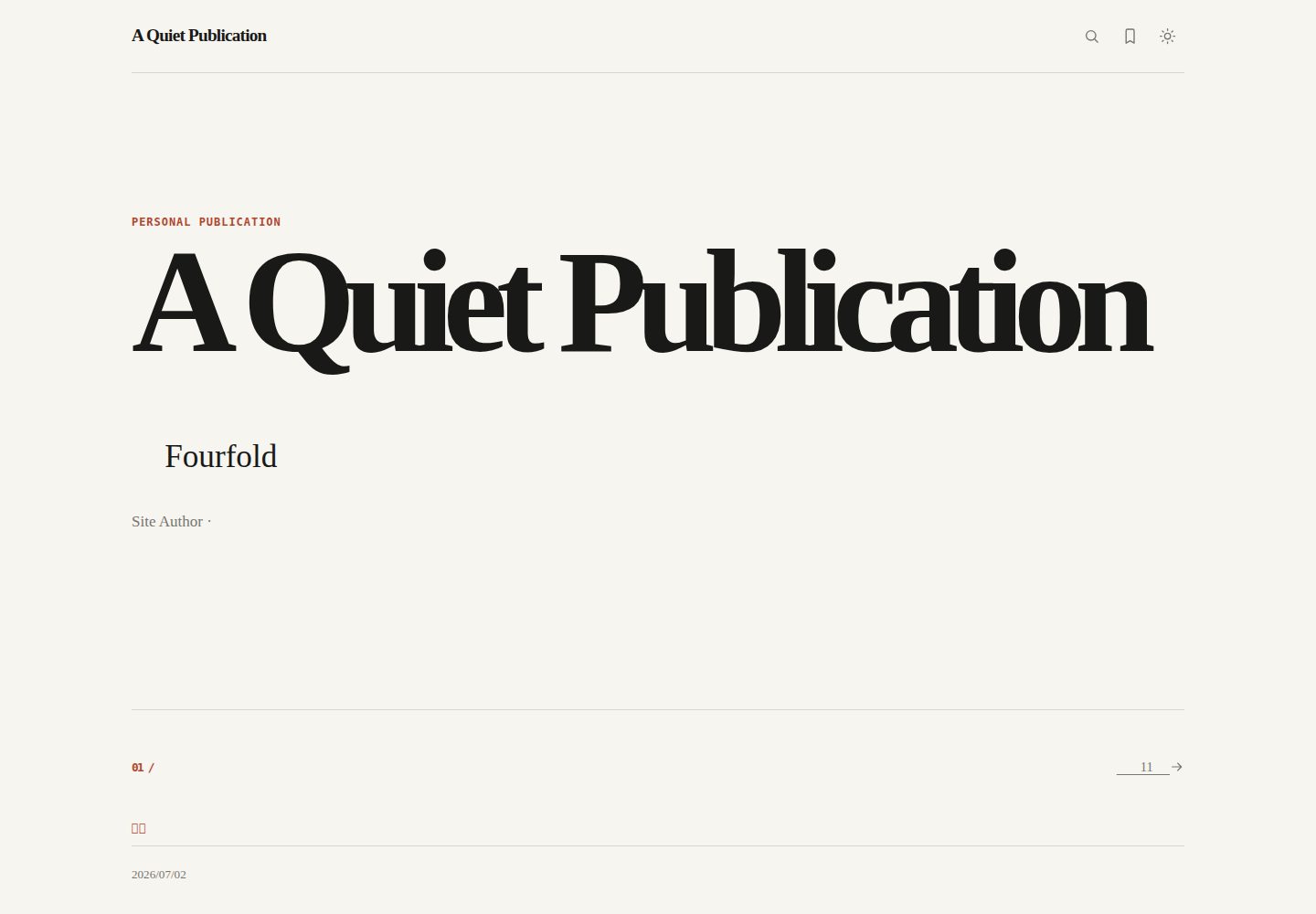
Desktop homepage1 / 3
Desktop captureTop of page
Actual screenshot captured by the server browser.
All pages & views 3
Screenshots show visual appearance; interactive behavior may differ.
Recorded 2026-10-17View source
What stands out
A quick read of the recorded project description.
Article pages provide an automatic table of contents, summary, reading time, tags, related articles, copy link, and local favorites.
Columns are organized in a recommended order for continuous reading, and tags derive indexes and aggregate pages from article frontmatter.
Projects, research, and photo essays are separate content types with fields such as status, version number, and gallery.
A /search-index.json is generated at build time; search matches titles, summaries, body text, and tags, and syncs the query to ?q=.
Publishing infrastructure includes RSS, sitemap, canonical, Open Graph, BlogPosting JSON-LD, and a 404 page.
Template Details
Fourfold is a static personal publication theme for Astro, and the README positions it as a content-first starting point for a site that can be maintained over the long term. It brings the writing archive, columns, tags, projects, research, and photo essays together in one static site and provides search, favorites, RSS, and light/dark themes without a backend.
Content is stored as Markdown under src/content/, organized into six types: writing, columns, projects, research, photos, and links. Frontmatter is validated by src/content.config.ts, and the build fails when it does not conform. Writing generates URLs by year and month plus year archives, and supports featured items, pagination, previous/next links, automatic tables of contents, reading time, related articles, and local favorites; columns are organized in a recommended order for continuous reading; tags derive indexes and aggregate pages from article frontmatter; projects have four statuses and optional external links; research has a type, version number, and optional paper/code links; photo essays are presented as galleries, and every image must provide alt text.
Site identity, navigation, UI copy, and feature toggles are configured in src/data/site.ts, src/data/navigation.ts, and src/data/i18n.ts respectively. The address is determined by the SITE_URL and BASE_PATH environment variables, and the README documents three deployment cases: GitHub Pages project sites, user/organization sites, and custom domains. The repository includes a GitHub Actions workflow that can publish dist/ after a push to main.
The README states explicitly that comments, email subscriptions, cloud favorites, analytics, and a CMS remain external integrations and are not tied to a vendor; MDX requires adding the @astrojs/mdx integration yourself. The current default language is zh-cn, and the schema reserves en and translationKey, but no separate English routes are provided yet. All sample content is fictional and should be replaced before publishing.
AstroPortfolioBlogTool siteLauncher
Is it right for your project?
Use Cases
- An individual author wants to maintain a writing archive over the long term with a static site, organized by year, tag, and column.
- A personal site needs to display projects, research notes, and photo essays alongside articles in the same site.
- Deployed under a GitHub Pages project subpath, canonical, sitemap, and RSS need to correctly join BASE_PATH.
- A static site wants search, favorites, and light/dark themes without relying on a backend or account system.
Suitable For
- Authors building static personal publications with Astro.
- Maintainers of personal sites who need writing, columns, projects, research, and photo essays archived together.
- Static site users who accept Markdown content management and build-time content validation.
Getting started & customization
Use these recorded setup notes alongside the repository instructions for your chosen version.
- 1
Run npm install and npm run dev to start local development; the default address is http://localhost:4321.
- 2
Before a production build, run npm run validate:content, npm run check, and npm run build; npm run build runs content validation and astro check first.
- 3
Copy .env.example to .env and set SITE_URL (without a subpath) and BASE_PATH (use / for the root path) according to the deployment method.
- 4
For a GitHub Pages project site, select GitHub Actions under Settings → Pages → Build and deployment in the repository; after a push to main, the workflow publishes dist/.
- 5
Before publishing, change the site identity and content license in src/data/site.ts, replace public/og-default.svg and all sample content, and check drafts, external links, and image alt text.
License & source material
Usage conditions & limitations
Free to use · keep license noticeThis listing covers the free version under the MIT license in the public repository; the free scope is the code of that version and does not mean external services or third-party assets are free.
Must comply with when using
- You may use, modify, use commercially, and distribute the code of this version for free.
- When distributing copies or substantial portions of the code, retain the original author's copyright notice and the complete MIT license notice.
- The code is provided as is; warranties and limitations of liability are governed by the original license and applicable law.
Additional costs & items to verify
- Demo images, fonts, icons, and other third-party assets must be checked against their respective licenses and cannot be judged solely by the code's MIT license.
- External services such as domains, hosting, databases, payments, or AI may incur separate charges.
- Comments, email subscriptions, cloud favorites, analytics, and a CMS are not built in and require integrating external services yourself; MDX requires adding the @astrojs/mdx integration yourself.
- The license field in src/data/site.ts is the content license shown in the footer (the example is a CC license); it describes only the sample articles and does not apply to the theme code, and should be changed to your own content license after switching to your own site.
- The footer's CC BY-NC-SA is only a content license placeholder, not the theme code license; the theme code is released under MIT (copyright holder Liyuk, 2026).
- The sample content (including drafts) is fictional, and all samples should be removed before publishing your own site.
- The paper links in the research samples point to public documents and only demonstrate the field; they must be replaced when publishing your own notes.
- Before deployment, replace public/og-default.svg and all sample content.
- The current default language is zh-cn, and the schema reserves en and translationKey, but there are no separate English routes yet.
- If tags are written for projects and research, the detail pages link to the writing tag pages, so those terms must appear in at least one public article; otherwise the links have no destination.
- Image src and cover values starting with / must be placed under public/, and every image must provide alt text.
- Before deploying a GitHub Pages project site, select GitHub Actions under Settings → Pages → Build and deployment in the repository.
- For user/organization sites, change the environment variables in the workflow and set BASE_PATH to /; otherwise the repository-name subpath will be used incorrectly.
- SITE_URL should not include a subpath, and BASE_PATH should not be a full URL; having the subpath in both causes canonical and sitemap to join it twice.
View Original Text Basis
Permission is hereby granted, free of charge
Original License Text
评论、邮件订阅、云端收藏、统计和 CMS 保持为外部接入,不绑定供应商。内容文件是 Markdown。若要 MDX,再自行加入官方的 `@astrojs/mdx` 集成。
Original README
- `license`:页脚里的**内容**许可。主题代码本身是 [MIT](LICENSE)(Copyright 2026 Liyuk);这里的 CC 协议只描述示例站点上的文章,换成你自己的站点后应改成你的内容协议
Original README
主题代码以 [MIT](LICENSE) 发布,版权人 Liyuk,年份 2026。页脚里的 CC BY-NC-SA 只是 `src/data/site.ts` 的内容许可占位,可以改成你自己的内容协议;它不是主题代码的许可证。
Original README
示例里各有一篇写作草稿、一个项目草稿和一条友链草稿,用来对照这个行为。发布自己的站点前删掉全部示例。
Original README
地址是 `/research/YYYY/MM/文件名/`。`version` 会显示在标题上方。`paperUrl` 和 `codeUrl` 可选,页面上分别标成“论文”和“代码”。示例里的论文链接指向公开文档,只为了让字段可见,发表自己的笔记时请替换。
Original README
2. 换掉 `public/og-default.svg` 和全部示例内容。
Original README
导航文案和顺序在 `src/data/navigation.ts`。界面字符串在 `src/data/i18n.ts`。当前默认语言是 `zh-cn`,schema 里预留了 `en` 和 `translationKey`,但还没有独立的英文路由。
Original README
项目和研究也可以写 `tags`。详情页会链到写作标签页,因此这些词需要至少在一篇公开文章里出现,否则链接没有目的地。两个标签如果去掉空格和大小写后相同,校验会失败。
Original README
地址是 `/photos/slug/`。Markdown 正文会显示在画廊上方,适合写成短文。`cover` 用于索引。以 `/` 开头的 `src` 和 `cover` 必须放在 `public/` 下,校验脚本会检查文件是否存在。每张图都要有 `alt`。
Original README
这适用于 **项目站点**。部署前在仓库 Settings → Pages → Build and deployment 中选择 **GitHub Actions**,推送到 `main` 后工作流会发布 `dist/`。
Original README
仓库名为 `用户名.github.io`,站点在域名根上,而不是在仓库名子路径上。上面的工作流会把 `BASE_PATH` 设成仓库名,因此需要改工作流里的环境变量:
Original README
https://github.com/Liyuk/astro-fourfold/blob/main/LICENSEhttps://github.com/Liyuk/astro-fourfold/blob/main/README.md`src/data/site.ts` 会把二者拼成对外地址。子路径如果同时出现在两个变量里,canonical 和 sitemap 会被拼两次。
Original README
Compiled by DeepSeek based on repository license and README ·2026-10-17. Results only cover the materials read; dependencies, images, fonts, and subsequent term changes are subject to their respective original texts.
Project checks & description sources
Template Information
- Source platforms
- GitHub
- Documentation and maintenance reference score
- More documented · 88 / 100
- Technologies
- Astro
- Website type
- Portfolio · Blog · Tool Site · Starter
How this score is calculated
Our heuristic uses license records (up to 30), a demo link (12), a preview (10), stars (15), recorded maintenance (15), description completeness (8), feature records (5) and classification data (5). It is not a code, security or performance test, or a Google score. A link does not establish tested functionality.
What to verify for this project
- Repository update recorded
- 2026-10-16
- Screenshot last checked
- 2026-10-17
A demo link is listed. Check it with your own content and viewport sizes; its presence does not confirm that forms, authentication or payments work.
The catalog identifies Astro as the primary stack. Check the actual dependency manifest and lockfile for versions and hosting requirements. These notes use recorded metadata, not a code audit or a deployment test.
Use a selection guide →How this description was prepared
AI-assisted description based on catalog records and repository material. Repository authors are not automatically the reviewers of this description.
Review declaration: codex-user-requested-batch-review-20261018 · 2026-10-18
Inspect the recorded source material
SHA-256: bcdf46467350c29c0aba0b18a01766f9539bc9520e87f4e0c82cc1473756e159
2026-10-17T01:13:45.649Z
Source file / repository# Fourfold
> 一个静态优先、内容优先的个人出版物主题。
>
> A static-first personal publication theme for Astro.
**在线演示 / Live demo:** <https://liyuk.github.io/astro-fourfold/>
Fourfold 把个人站点从“文章列表”收成一套可以长期维护的出版物:写作是档案,专栏和标签负责发现,项目、研究与影像放在同一套静态站点里。搜索、收藏、RSS 和明暗主题都不需要后端。仓库里的作者、文章和图片都是示例,替换后即可当作自己的起点。
Writing, columns, tags, projects, research notes, and photo essays share one static archive. Search, favorites, RSS, and the light/dark theme run without a backend. Sample content is fictional. The rest of this README is the adoption guide in Chinese.
## 核心能力
- **写作档案**:Markdown 文章、年月 URL、年份归档、精选、最近更新、分页、上一篇 / 下一篇。
- **长文体验**:自动目录、摘要、阅读时长、标签、相关文章、复制链接、本地收藏。
- **专栏**:按推荐顺序组织连续阅读,不把专栏当成普通分类。
- **标签**:由文章 frontmatter 派生索引和聚合页。
- **项目**:`active`、`maintained`、`paused`、`archived` 四种状态,以及可选的演示地址和仓库地址。
- **研究**:类型、版本号,以及可选的论文和代码链接。
- **影像**:封面、短文、带替代文本和图注的画廊。
- **友链**:按分组排列的外部站点。
- **开始页**:按读者的问题提供入口。
- **搜索**:构建期生成 `/search-index.json`,页面匹配标题、摘要、正文和标签,并把查询同步到 `?q=`。
- **收藏**:`localStorage` 保存文章 URL,不需要账号,不上传数据。
- **主题**:CSS 变量切换明暗,并尊重系统主题。
- **发布基础设施**:RSS、sitemap、动态 robots、canonical、Open Graph、文章 `BlogPosting` JSON-LD、404。
- **内容校验**:`npm run validate:content` 检查必填字段、重复 `translationKey`、重复文章 URL、无效专栏和本地图片引用。
- **GitHub Pages**:用 `SITE_URL` 和 `BASE_PATH` 支持项目子路径。仓库自带 Actions 工作流。
评论、邮件订阅、云端收藏、统计和 CMS 保持为外部接入,不绑定供应商。内容文件是 Markdown。若要 MDX,再自行加入官方的 `@astrojs/mdx` 集成。
## 你会看到什么
截图来自本地生产构建,使用与在线演示相同的 `SITE_URL=https://liyuk.github.io` 和 `BASE_PATH=/astro-fourfold`。
### 首页
首页同时放站名、精选、最近更新,以及项目和研究的入口。

### 文章
文章页包含摘要、日期、标签、收藏、复制链接和由标题生成的目录。

### 搜索
搜索页支持标题、摘要、标签和正文匹配,地址栏保留 `?q=`。

### 专栏、项目与影像


## 快速开始
```bash
npm install
npm run dev
```
打开 <http://localhost:4321>。本地开发默认走站点根路径,不需要先配置域名。
生产构建:
```bash
npm run validate:content
npm run check
npm run build
npm run preview
```
`npm run build` 会先做内容校验和 `astro check`。与在线演示一致的构建命令是:
```bash
SITE_URL=https://liyuk.github.io BASE_PATH=/astro-fourfold npm run build
```
## 配置
地址由两个环境变量决定,在 `astro.config.mjs` 和 `src/data/site.ts` 里读取。
| 变量 | 作用 | 不要写成 |
| --- | --- | --- |
| `SITE_URL` | 站点源站,用于 sitemap、canonical、RSS、Open Graph、JSON-LD | 不要带仓库子路径 |
| `BASE_PATH` | 站点挂在域名下的路径。根路径用 `/` | 不要写完整 URL |
`src/data/site.ts` 会把二者拼成对外地址。子路径如果同时出现在两个变量里,canonical 和 sitemap 会被拼两次。
复制 `.env.example` 为 `.env` 后按部署方式修改。三种常见情况:
### GitHub Pages 项目站点
在线演示就是这种。仓库名 `astro-fourfold`,页面在用户域名的子路径下:
```env
SITE_URL=https://liyuk.github.io
BASE_PATH=/astro-fourfold
```
结果是 <https://liyuk.github.io/astro-fourfold/>。换成自己的仓库时,只改用户名和仓库名,不要把用户名写进主题源码。
仓库里的 [`.github/workflows/deploy-pages.yml`](.github/workflows/deploy-pages.yml) 会按 GitHub 上下文自动写成:
```text
SITE_URL=https://实际用户名.github.io
BASE_PATH=/实际仓库名
```
这适用于 **项目站点**。部署前在仓库 Settings → Pages → Build and deployment 中选择 **GitHub Actions**,推送到 `main` 后工作流会发布 `dist/`。
### GitHub Pages 用户站点或组织站点
仓库名为 `用户名.github.io`,站点在域名根上,而不是在仓库名子路径上。上面的工作流会把 `BASE_PATH` 设成仓库名,因此需要改工作流里的环境变量:
```env
SITE_URL=https://用户名.github.io
BASE_PATH=/
```
### 自定义域名
自定义域名通常也从根路径提供站点。在 GitHub Pages 或托管商处绑定域名,并把构建环境改为:
```env
SITE_URL=https://你的域名
BASE_PATH=/
```
其他静态托管(Cloudflare Pages、Netlify、Vercel、对象存储)同样只需要在构建环境里提供这两个变量,然后发布 `dist/`。
### 站点身份
读者看到的名字不在环境变量里,而在 `src/data/site.ts`:
- `name`、`title`、`description`
- `author.name`、`author.bio`、`author.email`
- `social` 链接
- `license`:页脚里的**内容**许可。主题代码本身是 [MIT](LICENSE)(Copyright 2026 Liyuk);这里的 CC 协议只描述示例站点上的文章,换成你自己的站点后应改成你的内容协议
- `writingPageSize`、`tagIndexThreshold`
- `features`:搜索、收藏、主题、RSS、复制链接等开关
导航文案和顺序在 `src/data/navigation.ts`。界面字符串在 `src/data/i18n.ts`。当前默认语言是 `zh-cn`,schema 里预留了 `en` 和 `translationKey`,但还没有独立的英文路由。
## 内容作者指南
所有公开内容都在 `src/content/`。frontmatter 不符合 `src/content.config.ts` 时,构建会失败。`draft: true` 可以提交,但不会进入列表、分页、RSS、sitemap 或搜索。
示例里各有一篇写作草稿、一个项目草稿和一条友链草稿,用来对照这个行为。发布自己的站点前删掉全部示例。
```text
src/content/
├── writing/ 写作
├── columns/ 专栏
├── projects/ 项目
├── research/ 研究
├── photos/ 影像
└── links/ 友链
```
### 写作
```yaml
---
title: "文章标题"
description: "列表、SEO 和 RSS 使用的摘要"
locale: zh-cn
translationKey: optional-stable-id
publishedAt: 2026-08-20
updatedAt: 2026-08-22
author: "作者"
tags: [主题一, 主题二]
featured: true
minutes: 8
column: "专栏名称"
columnOrder: 1
draft: false
---
```
- `publishedAt` 决定地址:`/writing/YYYY/MM/文件名/`。
- 列表按 `updatedAt ?? publishedAt` 倒序。更新文章不会把旧地址搬走。
- `featured: true` 进入首页精选。精选和“最近更新”是两份名单。
- `minutes` 显示在文章页。目录来自二、三级标题。
- 相关文章来自共同标签。上一篇 / 下一篇按时间,不按专栏篇序。
- 同一 `locale` 下的 `translationKey` 不能重复。
- 写作索引按 `writingPageSize` 分页,年份页从文章日期自动生成。
正文用 Markdown。代码块会用浅色 / 深色两套 Shiki 主题。
### 专栏
专栏是一条阅读路径,不是分类。一篇文章最多通过 `column` 关联一个专栏,并用 `columnOrder` 表示篇序。`column` 必须等于专栏文件的 `title`。
```yaml
---
title: "专栏名称"
description: "这条路径解决什么问题,以及建议如何阅读。"
locale: zh-cn
slug: column-slug
order: 1
draft: false
---
```
地址是 `/columns/slug/`。专栏页按篇序列出文章。标签仍然负责横向查找。
### 标签
标签没有单独的内容文件。写作 frontmatter 里的 `tags` 会生成 `/tags/` 和 `/tags/某个标签/`。出现次数低于 `tagIndexThreshold` 的标签不会进入总索引。
项目和研究也可以写 `tags`。详情页会链到写作标签页,因此这些词需要至少在一篇公开文章里出现,否则链接没有目的地。两个标签如果去掉空格和大小写后相同,校验会失败。
### 项目
```yaml
---
title: "项目名称"
description: "一句话说明它是什么、现在处于什么阶段。"
locale: zh-cn
publishedAt: 2026-08-20
status: active # active | maintained | paused | archived
type: theme
tags: [Astro, 发布]
externalUrl: https://example.com/
repositoryUrl: https://github.com/example/project
featured: false
draft: false
---
```
地址是 `/projects/YYYY/MM/文件名/`。有 `externalUrl` 时显示“访问项目”,有 `repositoryUrl` 时显示“源代码”。两个都可以不写。示例覆盖了四种状态。
### 研究
```yaml
---
title: "笔记标题"
description: "这则笔记现在主张什么。"
locale: zh-cn
publishedAt: 2026-08-20
kind: note # 自由文本,例如 note、preprint
version: "0.3"
tags: [架构]
paperUrl: https://example.com/paper
codeUrl: https://github.com/example/project
draft: false
---
```
地址是 `/research/YYYY/MM/文件名/`。`version` 会显示在标题上方。`paperUrl` 和 `codeUrl` 可选,页面上分别标成“论文”和“代码”。示例里的论文链接指向公开文档,只为了让字段可见,发表自己的笔记时请替换。
### 影像
```yaml
---
title: "一组影像"
description: "这组图在说什么。"
locale: zh-cn
slug: essay-slug
order: 1
cover: /photos/cover.svg
photos:
- src: /photos/cover.svg
alt: "画面里实际有什么"
caption: "可选图注"
draft: false
---
```
地址是 `/photos/slug/`。Markdown 正文会显示在画廊上方,适合写成短文。`cover` 用于索引。以 `/` 开头的 `src` 和 `cover` 必须放在 `public/` 下,校验脚本会检查文件是否存在。每张图都要有 `alt`。
### 友链
```yaml
---
title: "站点名称"
description: "为什么把它留在这里。"
locale: zh-cn
url: https://example.com/
group: 文档
order: 1
draft: false
---
```
`url` 必须是 `http` 或 `https`。同一 `group` 会排在一起,分组顺序跟条目的 `order` 走。友链页只展示这些字段,不渲染正文。
## 架构速览
```mermaid
flowchart LR
Content[src/content\nMarkdown 内容] --> Schema[content.config.ts\nSchema 校验]
Schema --> Query[src/lib/content.ts\n查询与派生]
Config[src/data/site.ts\n站点配置] --> Layout[BaseLayout / SEO]
Query --> Pages[Astro 静态页面]
Layout --> Pages
Pages --> Output[HTML / RSS / sitemap / search-index]
Output --> Deploy[GitHub Pages / 静态 CDN]
```
目录、图标系统和运行时边界见 [`PROJECT.md`](PROJECT.md)。面向 Astro 主题站的英文介绍见 [`docs/BRANDING.md`](docs/BRANDING.md) 和 [`docs/ASTRO-THEME-SUBMISSION.md`](docs/ASTRO-THEME-SUBMISSION.md)。
```text
src/
├── components/ 壳层、文章、目录、收藏、复制链接、图标
├── content/ Markdown 内容集合
├── data/ 站点配置、导航、界面文案
├── layouts/ BaseLayout
├── lib/ 内容查询、URL、收藏、主题
├── pages/ 页面、RSS、搜索索引
└── styles/ token、全局样式、正文样式
```
界面图标集中在 `src/components/chrome/Icon.astro`:`24 × 24` viewBox、统一线宽、`currentColor`,只有 `sm / md / lg` 三种尺寸。
## 部署
1. 改 `src/data/site.ts`,以及构建环境里的 `SITE_URL` 和 `BASE_PATH`。
2. 换掉 `public/og-default.svg` 和全部示例内容。
3. 确认草稿、外链和图片 `alt`。
4. 运行 `npm run check && npm run build`。
5. 在真实域名上检查首页、一篇文章、RSS、sitemap、canonical 和 404。
GitHub Pages 项目站点推送到 `main` 即可,前提是 Pages 使用 GitHub Actions。用户站点和自定义域名要先改工作流中的两个环境变量,见上面的配置一节。
页面路径:
```text
/ 首页
/start/ 开始
/writing/ 写作
/writing/page/2/ 写作分页
/writing/2026/ 年份归档
/columns/ 专栏
/projects/ 项目
/research/ 研究
/photos/ 影像
/about/ 关于
/links/ 友链
/tags/ 标签
/search/ 搜索
/favorites/ 收藏
/rss.xml RSS
```
## 公开发布入口
- 在线演示:<https://liyuk.github.io/astro-fourfold/>
- GitHub 仓库:<https://github.com/Liyuk/astro-fourfold>
- GitHub Release:<https://github.com/Liyuk/astro-fourfold/releases/tag/v0.1.0>
- GitHub Discussions 介绍帖:<https://github.com/Liyuk/astro-fourfold/discussions/1>
- Astro Showcase 提交评论:<https://github.com/withastro/roadmap/discussions/521#discussioncomment-18099696>
- Astro Theme Portal:<https://portal.astro.build/>
主题代码以 [MIT](LICENSE) 发布,版权人 Liyuk,年份 2026。页脚里的 CC BY-NC-SA 只是 `src/data/site.ts` 的内容许可占位,可以改成你自己的内容协议;它不是主题代码的许可证。
## 设计取舍
- 编辑化而非营销化:用标题、摘要、日期和分隔线建立秩序。
- 单列优先:长文宽度受控,列表可扫描。
- 内容优先:图片是一种内容类型,不是首页装饰。
- 精选与最近分离:一个负责策展,一个表示还在更新。
- 专栏与标签分工:一个负责线性阅读,一个负责横向探索。
- 少量客户端 JS:静态 HTML 仍可读,交互只在搜索、主题、收藏和复制链接上。
Fourfold 指写作、项目、研究与个人表达这四个互相支撑的面。站名、颜色、字体、文案和导航都可以换成你自己的。
Explore similar templates
Compare previews and descriptions within the same stack and category.

astrowind
AstroWind is a free, open-source Astro starter theme using Astro and Tailwind CSS, released under the MIT license.
Astro · Blog

astro-paper
An Astro blog theme with Markdown/MDX content, Tailwind styling and Pagefind search. Search is a feature of the blog, rather than a separate tool-site product.
Astro · Blog

fuwari
Fuwari is a static blog template built with Astro and Tailwind CSS for personal blogs. It manages posts as Markdown files in src/content/posts/, with frontmatter for title, date, description, cover, tags, categories, draft status, and language.
Astro · Blog

Firefly
Firefly is a clean personal blog theme forked from Astro and Fuwari, offering four background modes, single/double sidebar and list/grid layouts, Pagefind client-side full-text search, and a six-language UI.
Astro · Blog

astro-theme-cactus
An Astro blog and notes starter with Markdown/MDX content, Tailwind styling and Pagefind search. Its main purpose is publishing posts and notes.
Astro · Blog

astrofy
Astrofy is a free and open-source personal portfolio website template built with Astro and TailwindCSS, with built-in blog, CV timeline, project showcase, store, and RSS feed modules.
Astro · Portfolio