Based on the Jekyll theme Dumbarton, aimed at academic personal homepage scenarios
JekyllPortfolioBlog
marcoliu-website — Jekyll Portfolio Template
By MarcoLIU27
Marco Liu's personal website, built on the Jekyll theme Dumbarton, includes an about page, blog, and academic highlights sections.
Explore the design
Compare the page layouts and mobile experience. Open any screenshot for a closer look.
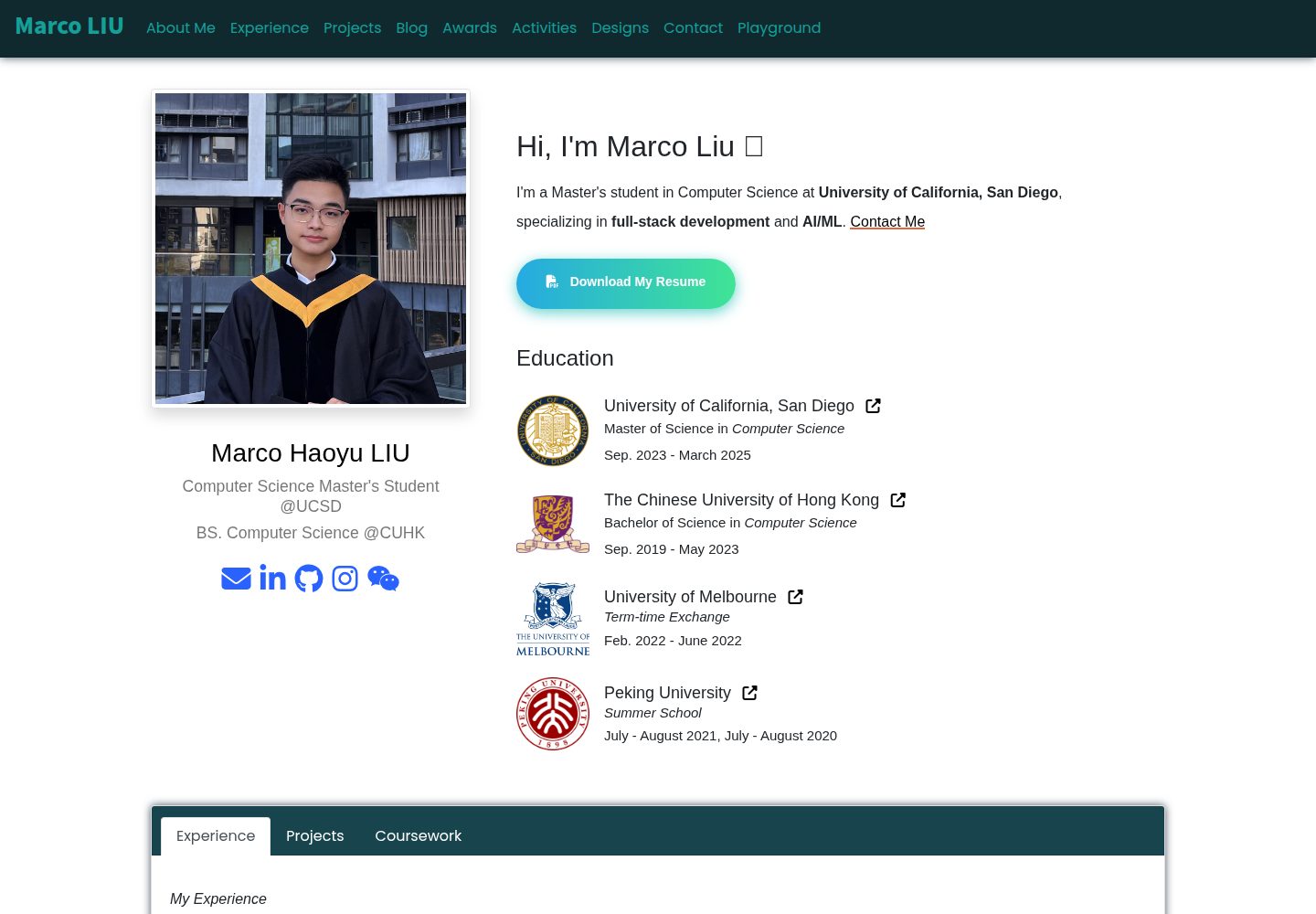
Desktop homepage1 / 2
Desktop captureTop of page
Actual screenshot captured by the server browser.
All pages & views 2
Screenshots show visual appearance; interactive behavior may differ.
Recorded 2026-10-04View source
What stands out
A quick read of the recorded project description.
Homepage includes an about me section and switchable display sections
Built-in blog page with tag component support
Displays literature on the publications page and homepage highlight area via jekyll-scholar
Supports defining color schemes in _data/themes.yml and switching them in _config.yml
Interface based on Bootstrap and Animate CSS, with configurable homepage loading animations
Template Details
This is a Jekyll-based personal website template, with the repository named marcoliu-website, authored by MarcoLIU27, and the site deployed at marcoliu.com. It was not written from scratch but customized from the Jekyll theme Dumbarton developed by Tyler Butler, and the README retains the theme's complete documentation.
According to the theme materials, the site structure revolves around a personal academic homepage: the homepage includes an about me section, with switchable sections such as education below; there is also a blog page and an interactive highlights area for describing papers, courses, teaching, and projects. The theme uses Bootstrap and Animate CSS for the interface and homepage animations, and supports configuration of social links, tags, color schemes, meta tags, and favicon via _config.yml.
Limitations to note: the README explicitly states that the theme is currently incompatible with GitHub Pages because GitHub does not support jekyll-scholar; the blog comment feature (gitalk) is marked as 'Not Currently Working'; among the section options below the about me on the homepage, only education is documented as available. The publications page and the homepage publications highlight area depend on the jekyll-scholar plugin.
JekyllPortfolioBlog
Is it right for your project?
Use Cases
- Building a personal academic homepage to centrally present bio, education, and research outputs
- Maintaining a Jekyll blog with tags
- Generating a publication list from BibTeX files using jekyll-scholar
- Adjusting site color schemes, social links, and meta tags through configuration files
Suitable For
- Developers familiar with Jekyll and Bundler workflows who want to quickly start a personal site
- Individuals needing to showcase academic content such as papers, courses, or projects
- Users who accept self-deployment (not GitHub Pages) and are willing to configure third-party plugins
Getting started & customization
Use these recorded setup notes alongside the repository instructions for your chosen version.
- 1
After cloning the repository, run bundle install to install dependencies, then use bundle exec jekyll serve to start the local development server
- 2
After modifying _config.yml, you need to stop and restart the development server to see the changes
- 3
The theme is incompatible with GitHub Pages because GitHub does not support jekyll-scholar, so an alternative hosting method is required
- 4
The publications feature depends on jekyll-scholar, with its configuration in the scholar section of _config.yml, and the bibliography source defaults to /_bibliography/
- 5
Blog comments (gitalk) are marked as currently unavailable in the README; the favicon is located at /assets/img/icons and can be replaced
License & source material
Usage conditions & limitations
Free to use · keep license noticeThis entry covers the free version under the MIT license in the public repository; the free scope applies to this version's code and does not imply that external services or third-party assets are free.
Must comply with when using
- Free use, modification, commercial use, and distribution of this version's code are permitted.
- When distributing copies or substantial portions of the code, retain the original author's copyright notice and the full MIT license notice.
- The code is provided as is; warranties and limitations of liability are governed by the original license and applicable law.
Additional costs & items to verify
- The theme is incompatible with GitHub Pages because GitHub does not support the jekyll-scholar plugin, so an alternative hosting method is required for deployment.
- The blog comment feature is based on gitalk and is marked as currently unavailable in the README, so it cannot be enabled normally.
- Among the section switch options below the about me on the homepage, only education is currently available; other options are not.
- The Font Awesome icons in the navigation bar require obtaining an id via free registration at fontawesome.com and configuring it before use.
- The publications page and the homepage publications highlight area depend on the third-party plugin jekyll-scholar, which requires additional installation and configuration.
- Demo images, fonts, icons, and other third-party assets must be checked against their respective licenses and cannot be judged solely by the code's MIT license.
- External services such as domain, hosting, database, payment, or AI may incur additional charges.
View Original Text Basis
Permission is hereby granted, free of charge
Original License Text
this theme is not compatible with GitHub pages because GitHub does not support jekyll-scholar
Original README
Enable comments on blog posts using gitalk. **Not Currently Working**
Original README
Note that only option `education` is currently working
Original README
Register free to get your id at https://fontawesome.com/
Original README
https://github.com/MarcoLIU27/marcoliu-website/blob/main/LICENSE.txthttps://github.com/MarcoLIU27/marcoliu-website/blob/main/README.mdThe [Jekyll Scholar](https://github.com/inukshuk/jekyll-scholar) plugin is used on the publications page and the home page publications highlight section.
Original README
Compiled by DeepSeek based on repository license and README ·2026-10-04. Results only cover the materials read; dependencies, images, fonts, and subsequent term changes are subject to their respective original texts.
Project checks & description sources
Template Information
- Source platforms
- GitHub
- Documentation and maintenance reference score
- Partly documented · 71 / 100
- Technologies
- Jekyll
- Website type
- Portfolio · Blog
How this score is calculated
Our heuristic uses license records (up to 30), a demo link (12), a preview (10), stars (15), recorded maintenance (15), description completeness (8), feature records (5) and classification data (5). It is not a code, security or performance test, or a Google score. A link does not establish tested functionality.
What to verify for this project
- Repository update recorded
- 2024-11-21
- Screenshot last checked
- 2026-10-04
A demo link is listed. Check it with your own content and viewport sizes; its presence does not confirm that forms, authentication or payments work.
The catalog identifies Jekyll as the primary stack. Check the actual dependency manifest and lockfile for versions and hosting requirements. These notes use recorded metadata, not a code audit or a deployment test.
Use a selection guide →How this description was prepared
AI-assisted description based on catalog records and repository material. Repository authors are not automatically the reviewers of this description.
Review declaration: [email protected] · 2026-10-04
Inspect the recorded source material
SHA-256: 2e4ada7b451210c809d33644ac22f75639c582263269d376c667e1199dfdbc78
2026-10-04T03:26:17.489Z
Source file / repository<!-- PROJECT LOGO -->
<p align="center">
<h1 align="center"><a href="https://marcoliu.com">Marco Liu Personal Page</a></h1>
<h3 align="center">based on<h3>
<h1 align="center">Dumbarton</h1>
<p align="center">
A simple Jekyll theme for academics
<br />
<a href="#table-of-contents"><strong>Explore the docs »</strong></a>
<br />
<br />
<a href="https://dumbarton.netlify.app/">View Demo</a>
·
<a href="https://github.com/tcbutler320/Jekyll-Theme-Dumbarton/issues">Report Bug</a>
·
<a href="https://github.com/tcbutler320/Jekyll-Theme-Dumbarton/issues">Request Feature</a>
</p>
</p>
<div align="center">
[![Contributors][contributors-shield]][contributors-url]
[![Forks][forks-shield]][forks-url]
[![Issues][issues-shield]][issues-url]
[![LinkedIn][linkedin-shield]][linkedin-url]
[](https://app.netlify.com/sites/admiring-bassi-e955ad/deploys)

</div>
[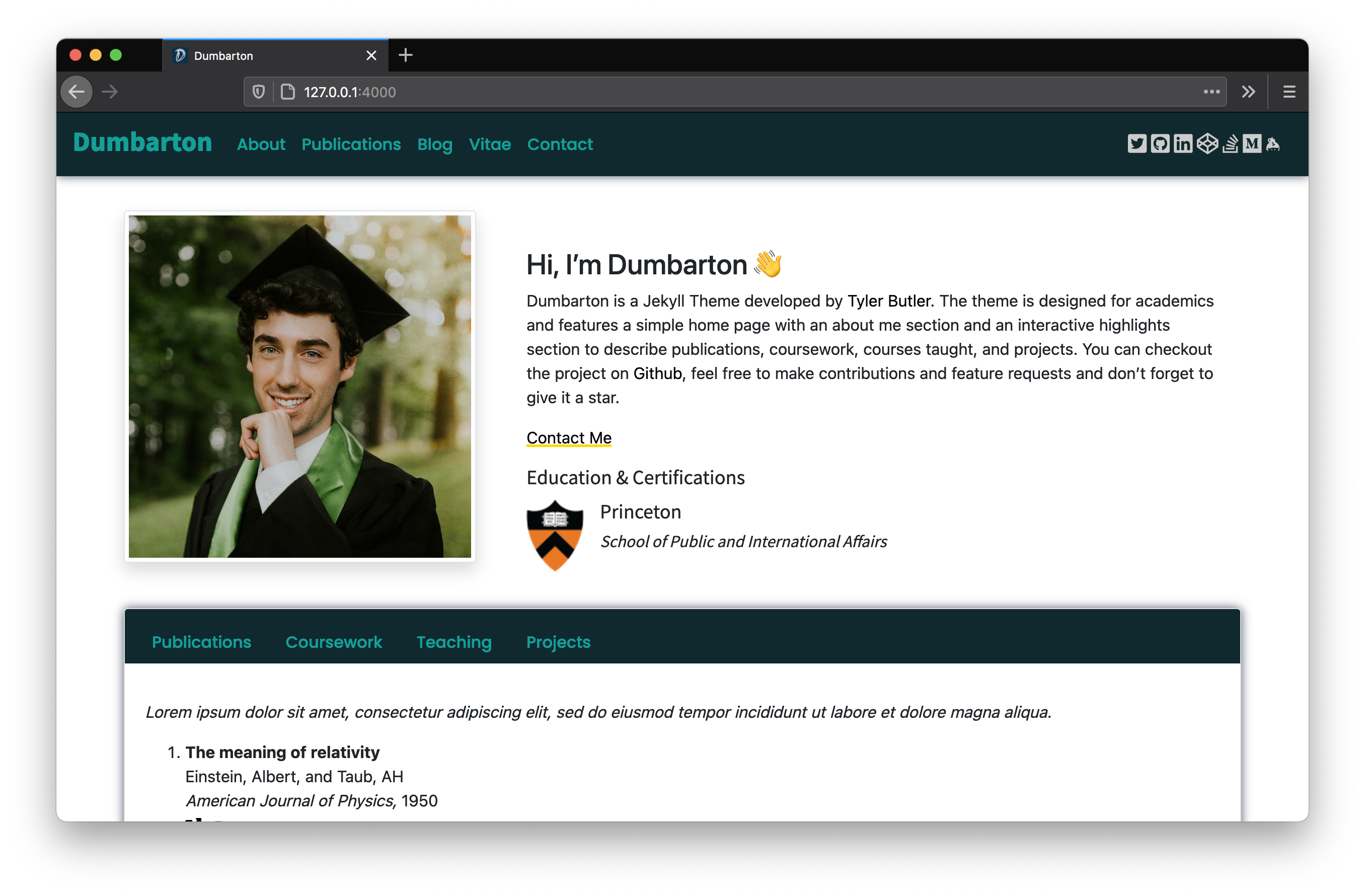](https://dumbarton.netlify.app/)
[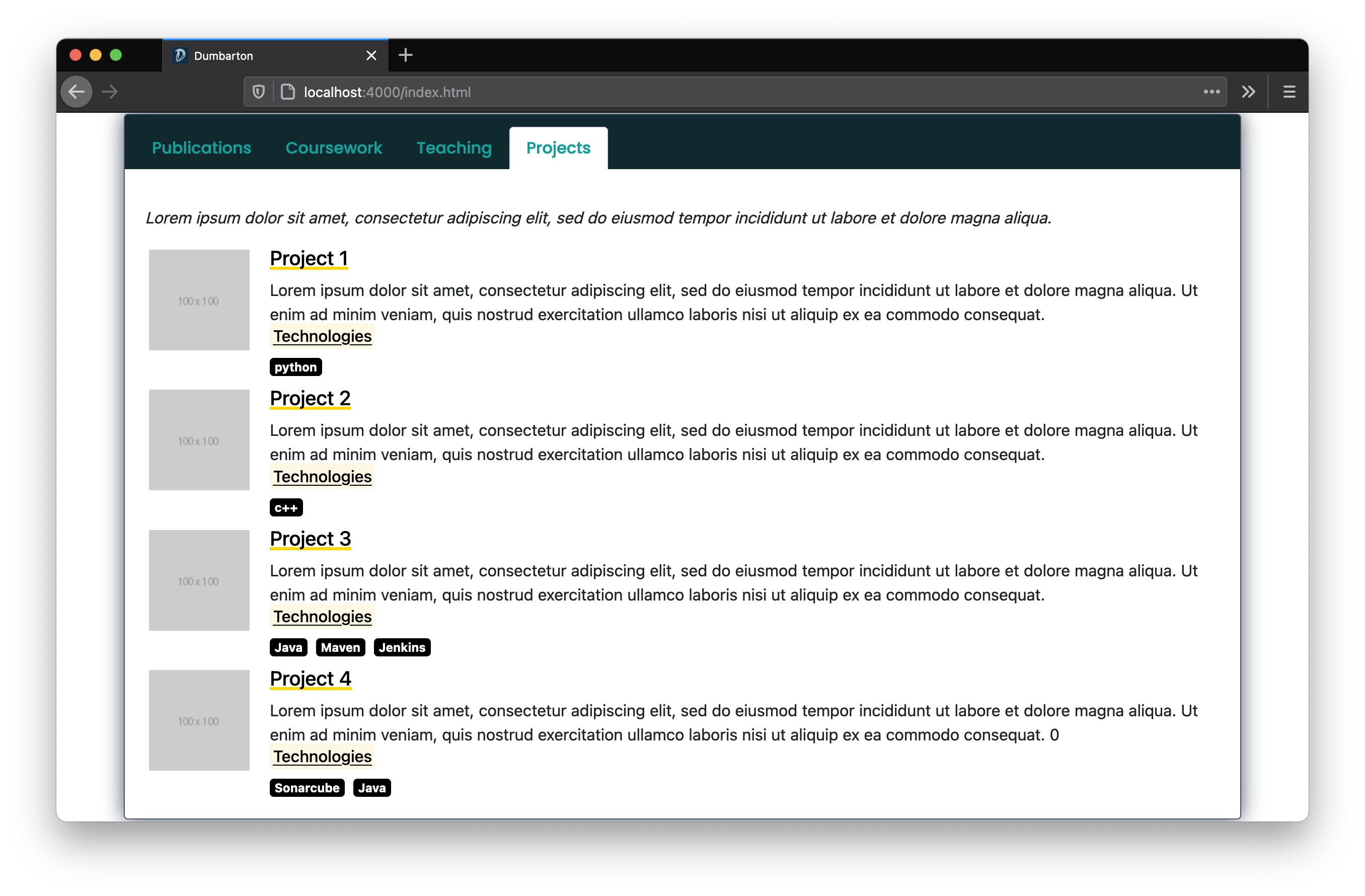](https://dumbarton.netlify.app/)
## Table of Contents
- [Table of Contents](#table-of-contents)
- [About](#about)
- [Installation](#installation)
- [Setting Options](#setting-options)
- [Base Settings](#base--settings)
- [Site Settings](#site-settings)
- [Blog Settings](#blog-settings)
- [Theme Settings](#theme-settings)
- [Help Settings](#help-settings)
- [Jekyll Scholar Settings](#jekyll-scholar-settings)
- [CDN Settings](#cdn-settings)
- [Meta Tag Settings](#meta-tag-settings)
- [Favicon](#favicon)
- [Thanks](#thanks)
- [Code](#code)
- [Images](#images)
## About
Dumbarton is a Jekyll Theme developed by Tyler Butler. The theme is designed for academics and features a simple home page with an about me section, a blog, and an interactive highlights section to describe publications, coursework, courses taught, and projects. UI design with Bootstrap and Animate CSS.
**A Note on Compatability**
_At this time, this theme is not compatible with GitHub pages because GitHub does not support jekyll-scholar._
## Installation
Follow the following instructions to install the Dumbarton theme:
1. Clone the repo.
```bash
git clone https://github.com/tcbutler320/Jekyll-Theme-Dumbarton.git
cd Jekyll-Theme-Dumbarton
```
2. Use Bundler to install dependancies
```bash
bundle install
```
3. Start the Jekyll development server
```bash
bundle exec jekyll serve
```
## Setting Options
There are many settings available to users to change how the theme looks. These settings can be changed in `_config.yml`. It's important to note that unlike previewing changes in other areas of the site, you must stop and restart the development server in order to see changes made in the config file.
### Base Settings
| Field | Description | Options |
|--- |--- |--- |
| `image` | Used in metatag as sites link preview | https://example.com or /assets/path/to/image.png |
### Site Settings
| Field | Description | Options |
|--- |--- |--- |
| `profile_image` | Used on home page as authors profile image | https://example.com or /assets/path/to/image.png |
| social links, ex `twitter` | Used to generate links in the nav and footer | e.g. `twitter: tbutler0x90` |
### Blog Settings
| Field | Description | Options |
|--- |--- |--- |
| `tags` | Used to generate tags widget on blogs page, seperated by spaces | e.g. `tags: post jekyll` |
| `comments` | Enable comments on blog posts using gitalk. **Not Currently Working** | `comments: false` |
### Theme Settings
**UI 2.0 Color Schemes 🌈**
The recent Dumbarton release supports Color Schemes! To pick a pre-configured color theme, change the `ui-theme` option in `_config.yml` . To create a new theme add a new entry in `_data/themes.yml`
```yml
abyss:
name: abyss
nav-color: "#10292e"
nav-text: "#149f98"
title-font: "Noto Sans JP"
link-font: "#272343"
link-color: "#272343"
link-font: "Poppins"
font: "Poppins"
font-color: "Black"
social-color: "#CCCCCC"
footer-social-color: "Black"
button-color: "black"
home-highlight-background: "#10292e"
home-highlight-header-text: "#149f98"
education-title-font: "Noto Sans JP"
education-title-size: "18px"
education-entry-font: "Noto Sans JP"
education-entry-size: "18px"
education-section-size: "15px"
certification-title-font: "Noto Sans JP"
certification-title-size: "18px"
certification-entry-font: "Noto Sans JP"
certification-entry-size: "18px"
certification-section-size: "15px"
highlights-tab-color: "White"
projects-color: "Black"
border-style: ""
post-tag-size: "20px"
post-title-size: "36px"
post-author-size: "15px"
post-font-weight: "700"
default-button-color: ""
```
| Field | Description | Options |
|--- |--- |--- |
| `nav-dIcon` | Used as the nav bar drop down icon on mobile or small screen view | Select any fontawesome icon, e.g. `"fas fa-caret-down"` |
| `animate` | When enabled, home page animations will be turned on and used upon first loading the page | e.g. `true`, `false` |
| `home_option` | Used to change the section below the 'about me' on the home page. **Note that only option `education` is currently working** | e.g. `education` |
### Help Settings
| Field | Description | Options |
|--- |--- |--- |
| `help_tips` | Used for demo purposes only. When enabled, a popup occurs on the homepage detailing information about the theme | e.g. `true`, `false` |
### Jekyll Scholar Settings
_Excerpt from [Jekyll-Scholar](https://github.com/inukshuk/jekyll-scholar)_
> Jekyll-Scholar is for all the academic bloggers out there. It is a set of extensions to Jekyll, the awesome, blog aware, static site generator; it formats your bibliographies and reading lists for the web and gives your blog posts citation super-powers.
The [Jekyll Scholar](https://github.com/inukshuk/jekyll-scholar) plugin is used on the publications page and the home page publications highlight section. Refer to the [official documentation](https://github.com/inukshuk/jekyll-scholar) for setting options.
```yml
scholar:
last_name: Dumbarton
style: apa
locale: en
source: /_bibliography/
bibliography: papers.bib
bibliography_template: bib
replace_strings: true
join_strings: true
details_dir: bibliography
details_layout: bibtex.html
details_link:
query: "@*"
```
### CDN Settings
| Field | Description | Options |
|--- |--- |--- |
| font_awesome_id | Used to generate fontawesome icons in the navbar. Register free to get your id at https://fontawesome.com/ | N/A |
### Meta Tag Settings
Several meta tag settings are optional. Refer to [htmlhead.dev](https://htmlhead.dev/) for a full list of options and explanations for the below configurations.
```yml
google-site-verification: #<meta name="google-site-verification" content="verification_token"><!-- Google Search Console -->
yandex-verification: #<meta name="yandex-verification" content="verification_token"><!-- Yandex Webmasters -->
msvalidate: # meta name="msvalidate.01" content="verification_token"><!-- Bing Webmaster Center -->
alexaVerifyID: # <meta name="alexaVerifyID" content="verification_token"><!-- Alexa Console -->
pinterestdomain_verify: #<meta name="p:domain_verify" content="code_from_pinterest"><!-- Pinterest Console-->
norton-safeweb: # <meta name="norton-safeweb-site-verification" content="norton_code"><!-- Norton Safe Web -->
detectphone: yes # yes or no. Disable automatic detection and formatting of possible phone numbers
x-dns-prefetch-control: on # on or off. Completely opt out of DNS prefetching by setting to "off"
fbappid: # Facebook OpenGraph
```
### Favicon
Site favicons are located at `/assets/img/icons`. You can use a [Favicon Generator](https://realfavicongenerator.net/) to create a new set of icons using any image you'd like. Simply create a package from the aboved linked generator and replace the icons folder.
## Thanks
I borrowed concepts and assets from various other open source projects. A special thanks for everyone who contributed to Jekyll-Theme-Dumbarton.
### Code
- [Corey](https://codepen.io/Corsurath/pen/abbxNpj)
- Used as a concept for the blog layout v 2.0
- [Masresha](https://codepen.io/masresha)
- [Decision Making App](https://codepen.io/masresha/pen/KyLrbK): Used as a concept for the blog layout v 1.0
-
### Images
Special thanks to the following individuals for their images
- [Cole Keister](https://unsplash.com/@coleito)
<!-- MARKDOWN LINKS AND IMAGES --->
[contributors-shield]: https://img.shields.io/github/contributors/tcbutler320/Jekyll-Theme-Dumbarton.svg?style=flat-square
[contributors-url]: https://github.com/tcbutler320/Jekyll-Theme-Dumbarton/graphs/contributors
[forks-shield]: https://img.shields.io/github/forks/tcbutler320/Jekyll-Theme-Dumbarton.svg?style=flat-square
[forks-url]: https://github.com/tcbutler320/Jekyll-Theme-Dumbarton/network/members
[stars-shield]: https://img.shields.io/github/stars/tcbutler320/Jekyll-Theme-Dumbartonsvg?style=flat-square
[stars-url]: https://github.com/tcbutler320/Jekyll-Theme-Dumbarton/stargazers
[issues-shield]: https://img.shields.io/github/issues/tcbutler320/Jekyll-Theme-Dumbarton.svg?style=flat-square
[issues-url]: https://github.com/tcbutler320/Jekyll-Theme-Dumbarton/issues
[license-shield]: https://img.shields.io/github/license/tcbutler320Jekyll-Theme-Dumbarton.svg?style=flat-square
[license-url]: https://github.com/tcbutler320/Jekyll-Theme-Dumbarton/blob/master/LICENSE.txt
[linkedin-shield]: https://img.shields.io/badge/-LinkedIn-black.svg?style=flat-square&logo=linkedin&colorB=555
[linkedin-url]: https://linkedin.com/in/tyler-b-a700a1aaExplore similar templates
Compare previews and descriptions within the same stack and category.

al-folio
A Jekyll academic homepage theme for scholars and researchers, with a clean responsive design and out-of-the-box support for publication lists, project showcases, CVs, and blogs.
Jekyll · Portfolio

minimal-mistakes
Minimal Mistakes is a two-column Jekyll theme for personal sites, blogs, project documentation, or portfolios.
Jekyll · Portfolio

Beautiful Jekyll
Beautiful Jekyll is a mature, easy-to-use Jekyll blog theme maintained by Dean Attali since 2015, with over 50,000 users.
Jekyll · Blog

jekyll-TeXt-theme
A customizable Jekyll theme for personal sites, team sites, blogs, projects, and documentation.
Jekyll · Blog

startbootstrap-clean-blog-jekyll
The official Jekyll version of Start Bootstrap's Clean Blog theme, offering a blog home page, about page, contact page, and sample post pages, with a Formspree-powered contact form.
Jekyll · Blog

So Simple
A minimal reading-oriented Jekyll theme by Michael Rose for personal blogs, portfolios, and long-form reading. It offers multiple layouts, microformat markup, Disqus comments, Google Analytics, Jekyll SEO Tag, three skins, and aggregation by year, category, and tag with a grid view.
Jekyll · Blog