Based on Jekyll, adapted from the LessOrMore blog template
JekyllBlog
MyBlog — Jekyll Blog Template
By marquistj13
A Jekyll-based blog template adapted from LessOrMore, mainly intended for recording and organizing notes using Collections.
Explore the design
Compare the page layouts and mobile experience. Open any screenshot for a closer look.
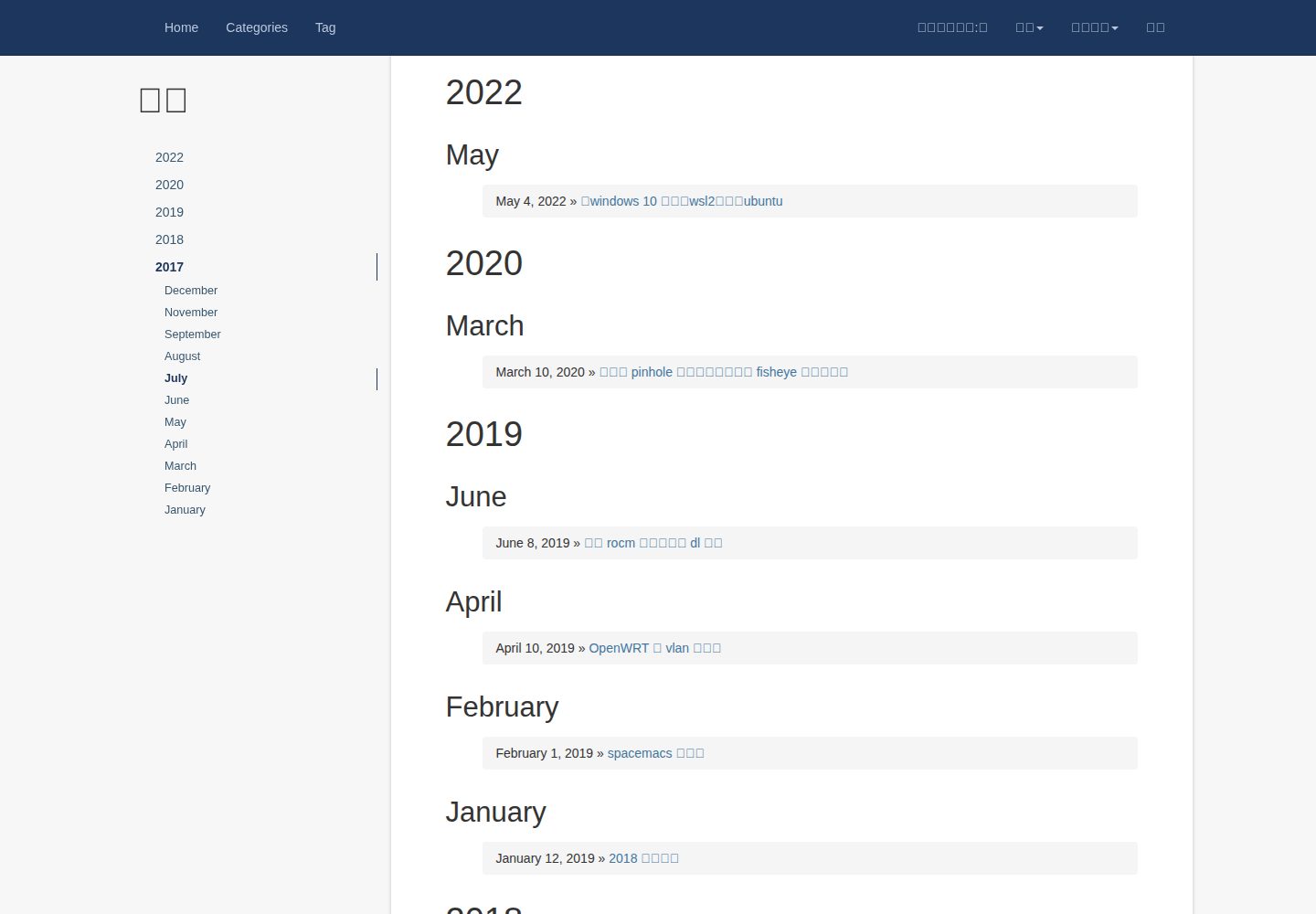
Desktop homepage1 / 3
Desktop captureTop of page
Actual screenshot captured by the server browser.
All pages & views 3
Screenshots show visual appearance; interactive behavior may differ.
Recorded 2026-10-02View source
What stands out
A quick read of the recorded project description.
Organizes notes with Collections; Markdown in a Collection can reference images in the same directory
Configuration is centralized in the _config_with_python folder at the root, with template_config.yml and menu_config.yml managing metadata and menus respectively
After modifying configuration, buildMenu.py must be run to generate the menu; the script depends on Python's PyYAML and jinja2
Supports subfolder indexes under a Collection, but Chinese folder names are affected by Liquid url_decode support
Template Details
MyBlog is a Jekyll blog template that the author positions as a "blog template for taking notes," adapted from LessOrMore. It retains LessOrMore's basic configuration approach and introduces Jekyll's Collection mechanism: Markdown files in a Collection can reference images in the corresponding Collection directory, addressing the difficulty of referencing same-directory images in ordinary _posts articles. The template also leverages Jekyll's handling of frontmatter, so files with frontmatter are rendered through Liquid, while files without frontmatter are copied as-is to _site.
For configuration, the template centralizes the settings users need to modify in the _config_with_python folder at the root: template_config.yml handles blog metadata, and menu_config.yml handles the top menu and Collection grouping. After each modification to these two files, buildMenu.py must be run to regenerate the menu; this script depends on Python's PyYAML and jinja2. The README explicitly states that the template is mainly for the author's own use, has not been polished, and has flaws.
The template supports creating subfolders under a Collection and generates subfolder indexes based on article URLs. Because folder names converted to URLs become ASCII codes, Liquid's url_decode filter is needed to restore them; older Liquid versions do not support this filter, so Chinese subfolder names may display as ASCII codes. The template also mentions that Google site search, Disqus comments, and visit counters have been added.
JekyllBlog
Is it right for your project?
Use Cases
- Building a personal blog focused on notes with Jekyll
- Organizing Markdown content by topic such as reading notes or academic accumulation using Collections
- Referencing images in the same directory as the source file within articles or notes
- Configuring a top menu with dropdown groups via menu_config.yml
Suitable For
- Users familiar with Jekyll and Markdown who are willing to run build scripts manually
- Individual writers who need to keep notes and blog on the same site
- Users who can accept a template with flaws that is mainly for personal use rather than a finished theme
Getting started & customization
Use these recorded setup notes alongside the repository instructions for your chosen version.
- 1
After downloading the repository with git clone, modify template_config.yml and menu_config.yml in the _config_with_python folder at the root
- 2
The baseurl in template_config.yml must be changed to the GitHub project name; if the project is *.github.io, set it to an empty string
- 3
After each modification to template_config.yml or menu_config.yml, buildMenu.py must be run; this script depends on PyYAML and jinja2
- 4
For local preview, run jekyll serve -w -b "", or start with the specified port and incremental mode using the script provided in the README
- 5
The README states that the template is mainly for the author's own use and has not been polished; verify the actual results before use
License & source material
Usage conditions & limitations
Free to use · keep license noticeThis entry covers the free version in the public repository under the MIT license; the free scope is the code of this version and does not mean external services or third-party assets are free.
Must comply with when using
- Free use, modification, commercial use, and distribution of this version's code are permitted.
- When distributing copies or substantial portions of the code, retain the original author's copyright notice and the full MIT license notice.
- The code is provided as-is; warranties and limitations of liability are governed by the original license and applicable law.
Additional costs & items to verify
- The author states that the template is for personal use, unpolished, and has many flaws; it is not a production-grade theme, and actual results should be verified before use.
- After each modification to template_config.yml or menu_config.yml, buildMenu.py must be run to regenerate the menu; otherwise, the configuration will not take effect.
- The menu build script depends on the Python libraries PyYAML and jinja2; these external dependencies must be installed separately.
- Subfolder indexes depend on the url_decode filter in newer Liquid versions; older Liquid versions do not support it, and Chinese subfolder names may display as ASCII codes.
- The template integrates Google site search, Disqus comments, and visit counters; these are third-party external services and may require corresponding accounts or configuration.
- Demo images, fonts, icons, and other third-party assets must be checked against their respective licenses; the code's MIT license alone is not sufficient to determine this.
- External services such as domains, hosting, databases, payments, or AI may incur additional charges.
View Original Text Basis
Permission is hereby granted, free of charge
Original License Text
本模板主要是自己捣鼓着用的,没有时间和精力进行打磨,所以有很多瑕疵,不过够自己用了
Original README
在每次对`template_config.yml`或者`menu_config.yml`进行修改以后必须运行一次`buildMenu.py`
Original README
`buildMenu.py`依赖于两个Python library:`PyYAML`和`jinja2`
Original README
这个filter只有新版本的Liquid的支持,如果遇到老版本的Liquid那就不行
Original README
https://github.com/marquistj13/MyBlog/blob/master/LICENSEhttps://github.com/marquistj13/MyBlog/blob/master/README.mdupdate:加入谷歌站内搜索 disqus 评论 以及访问计数
Original README
Compiled by DeepSeek based on repository license and README ·2026-10-02. Results only cover the materials read; dependencies, images, fonts, and subsequent term changes are subject to their respective original texts.
Project checks & description sources
Template Information
- Source platforms
- GitHub
- Documentation and maintenance reference score
- Partly documented · 72 / 100
- Technologies
- Jekyll
- Website type
- Blog
How this score is calculated
Our heuristic uses license records (up to 30), a demo link (12), a preview (10), stars (15), recorded maintenance (15), description completeness (8), feature records (5) and classification data (5). It is not a code, security or performance test, or a Google score. A link does not establish tested functionality.
What to verify for this project
- Repository update recorded
- 2023-11-05
- Screenshot last checked
- 2026-10-02
A demo link is listed. Check it with your own content and viewport sizes; its presence does not confirm that forms, authentication or payments work.
The catalog identifies Jekyll as the primary stack. Check the actual dependency manifest and lockfile for versions and hosting requirements. These notes use recorded metadata, not a code audit or a deployment test.
Use a selection guide →How this description was prepared
AI-assisted description based on catalog records and repository material. Repository authors are not automatically the reviewers of this description.
Automatically checked against source and license rules; no manual editorial review.
Inspect the recorded source material
SHA-256: 8f1138a12c44df86d573d51405b691d93f3ffb7182cfd31de0092fcb0017955e
2026-10-02T10:56:45.274Z
Source file / repository# 用于记笔记的博客模板 模板来源 ==================================== 改编自:[LessOrMore](https://github.com/luoyan35714/LessOrMore) 此模板特性 ==================================== 简单来说是用来记笔记的。 因为post类型的文章使用markdown的时候,不能插入 `_posts` 目录的图片,这一点我感觉不太好,幸好Jekyll还有一种Collection类型的“文章库”,Collection中的md文件可以插入对应Collection目录的图片,再基于Jekyll的一个特性:设置`frontmatter`的文件就用`Liquid`模板渲染一下,没有设置`frontmatter`的文件就原样copy到`_site`目录,因此我打算将其改造成利用Collection进行note-taking的blog。 使用 ==================================== **本模板主要是自己捣鼓着用的,没有时间和精力进行打磨,所以有很多瑕疵,不过够自己用了**。 以下为对此捣鼓过程的总结。 下载 ------------------------------------ 使用git从 [MyBlog](https://github.com/marquistj13/MyBlog) 主页下载项目 ``` bash git clone https://github.com/marquistj13/MyBlog.git ``` 配置 ------------------------------------ **本模板的所有配置文件均在位于根目录的文件夹 `_config_with_python`中。** 由于本模板改编自 [LessOrMore](https://github.com/luoyan35714/LessOrMore) ,因此基本配置和[LessOrMore](https://github.com/luoyan35714/LessOrMore)相同,即配置根目录的文件`_config.yml`。 **本模板配置不同之处在于:** 用户需要配置的文件不是根目录的`_config.yml`,而是位于根目录的文件夹 `_config_with_python` 中,即`template_config.yml`文件用于设置blog的meta data,详情请参考 [LessOrMore](https://github.com/luoyan35714/LessOrMore)。在此对于本配置文件的修改注意事项进行重申:`template_config.yml`中的baseurl修改为你的github的项目名,如果项目是'***.github.io',则设置为空'' 本模板比[LessOrMore](https://github.com/luoyan35714/LessOrMore)增加的特性:collection的配置,即使用使用 `menu_config.yml` 配置blog header的菜单项,举个例子: ```ruby menus: - menu_name_cn: 阅读笔记 menu_name_en: ReadingNotes menu_list: - Book_NeuralNetworksAndDeepLearning - test - menu_name_cn: 学术积累 menu_name_en: ScholarThings menu_list: [test_scholar] ``` 很容易看懂,我就是新建两个下拉菜单项,阅读笔记以及学术积累,阅读笔记的英文名ReadingNotes用于建立文件夹的时候使用,阅读笔记下面一共有两个collection项(分别对应两个文件夹,即Book_NeuralNetworksAndDeepLearnin和test,这俩文件夹下面可以存放对应的笔记,同理,学术积累菜单项下面只有一个collection即test_scholar **小提示:** 在每一个collection下面可以放入子文件夹,本模板亦可以根据子文件夹创建此collection下对于子文件夹中的文件的索引目录,这个功能是根据文章的url实现的,主要参考的是 [这篇文章](https://thinkshout.com/blog/2014/12/creating-dynamic-menus-in-jekyll/).但由于文件夹名字转换为url之后变成了ASCII码,因此从url中提取的子文件夹名字得用`Liquid`模板语言的一个filter:`url_decode`,这个filter只有新版本的Liquid的支持,如果遇到老版本的Liquid那就不行,所以,如果你对子文件夹含有中文,列出来的索引目录就是对应的ASCII码,我暂时就这么凑合着用吧,哈哈。 **在每次对`template_config.yml`或者`menu_config.yml`进行修改以后必须运行一次`buildMenu.py`**。 `buildMenu.py`依赖于两个Python library:`PyYAML`和`jinja2`。 **如果在本地安装了Jekyll,就不需要每次push到github去看效果:** 可以使用`jekyll serve -w -b ""`方便地进行博客的实时预览,这在书写markdown的时候非常有用。 推荐的本地运行脚本 ------------------------------------ 在 Ubuntu上,保存以下内容为可执行文件,并放到MyBlog的同级文件即可: ``` cd MyBlog cd _config_with_python python3 buildMenu.py cd ../ jekyll serve --port 4000 --incremental ``` 在Windows机器上,将以下文件保存为`*.bat`,运行即可: ``` @echo on cd C:\Users\marquis\GitHub\MyBlog\_config_with_python C:\Users\marquis\Anaconda3\python.exe buildMenu.py cd ..\ bundle exec jekyll serve --port 4000 --incremental ``` 注意:现在更新到 python3 了,两个依赖的package:`PyYAML`和`jinja2`。 **关于Python的安装,如果你用的是anaconda3,不想直接像上面的bat脚本那样用默认的环境,要新建一个虚拟环境的话,可以通过以下方式顺便安装两个依赖的Python library:`PyYAML`和`jinja2`** ``` conda -n myblog python=3.6 PyYAML jinja2 ``` 这样就会在`Anaconda3\envs`目录下生成myblog目录。 由于anaconda不推荐将Python加入环境变量,因此,我们直接用其绝对路径`C:\Users\Marquis\Anaconda3\envs\myblog\python.exe`即可。 至于jekyll的本地安装,请参考:[jekyll安装](https://marquistj13.github.io/MyBlog/2017/02/record-my-system-software-reinstall/#jekyll)。 这里做个备份: 根据[官方](https://jekyllrb.com/docs/windows/#installation)教程,使用[RubyInstaller](https://rubyinstaller.org/) 安装ruby环境。 然后设置为清华的源:[Ruby Gems 镜像使用帮助](https://mirrors.tuna.tsinghua.edu.cn/help/rubygems/)。 执行`gem install jekyll bundler`。 最以后使用以下Gemfile: ``` source 'https://mirrors.tuna.tsinghua.edu.cn/rubygems' #gem 'github-pages', group: :jekyll_plugins # gem 'jekyll-feed' gem 'jekyll-paginate' gem 'jekyll-sitemap' gem 'jemoji' ``` 在该Gemfile的目录运行 `bundle install`即可。 update:加入谷歌站内搜索 disqus 评论 以及访问计数 ------------------------------------ 详见:https://marquistj13.github.io/MyBlog/2017/09/blog-search-disqus-comments-visitor-counts/ update:具体安装细节 ------------------------------------ 详见:https://marquistj13.github.io/MyBlog/2017/01/how-to-use-this-blog-template-to-take-notes/
Explore similar templates
Compare previews and descriptions within the same stack and category.

al-folio
A Jekyll academic homepage theme for scholars and researchers, with a clean responsive design and out-of-the-box support for publication lists, project showcases, CVs, and blogs.
Jekyll · Portfolio

minimal-mistakes
Minimal Mistakes is a two-column Jekyll theme for personal sites, blogs, project documentation, or portfolios.
Jekyll · Portfolio

Beautiful Jekyll
Beautiful Jekyll is a mature, easy-to-use Jekyll blog theme maintained by Dean Attali since 2015, with over 50,000 users.
Jekyll · Blog

jekyll-TeXt-theme
A customizable Jekyll theme for personal sites, team sites, blogs, projects, and documentation.
Jekyll · Blog

startbootstrap-clean-blog-jekyll
The official Jekyll version of Start Bootstrap's Clean Blog theme, offering a blog home page, about page, contact page, and sample post pages, with a Formspree-powered contact form.
Jekyll · Blog

So Simple
A minimal reading-oriented Jekyll theme by Michael Rose for personal blogs, portfolios, and long-form reading. It offers multiple layouts, microformat markup, Disqus comments, Google Analytics, Jekyll SEO Tag, three skins, and aggregation by year, category, and tag with a grid view.
Jekyll · Blog