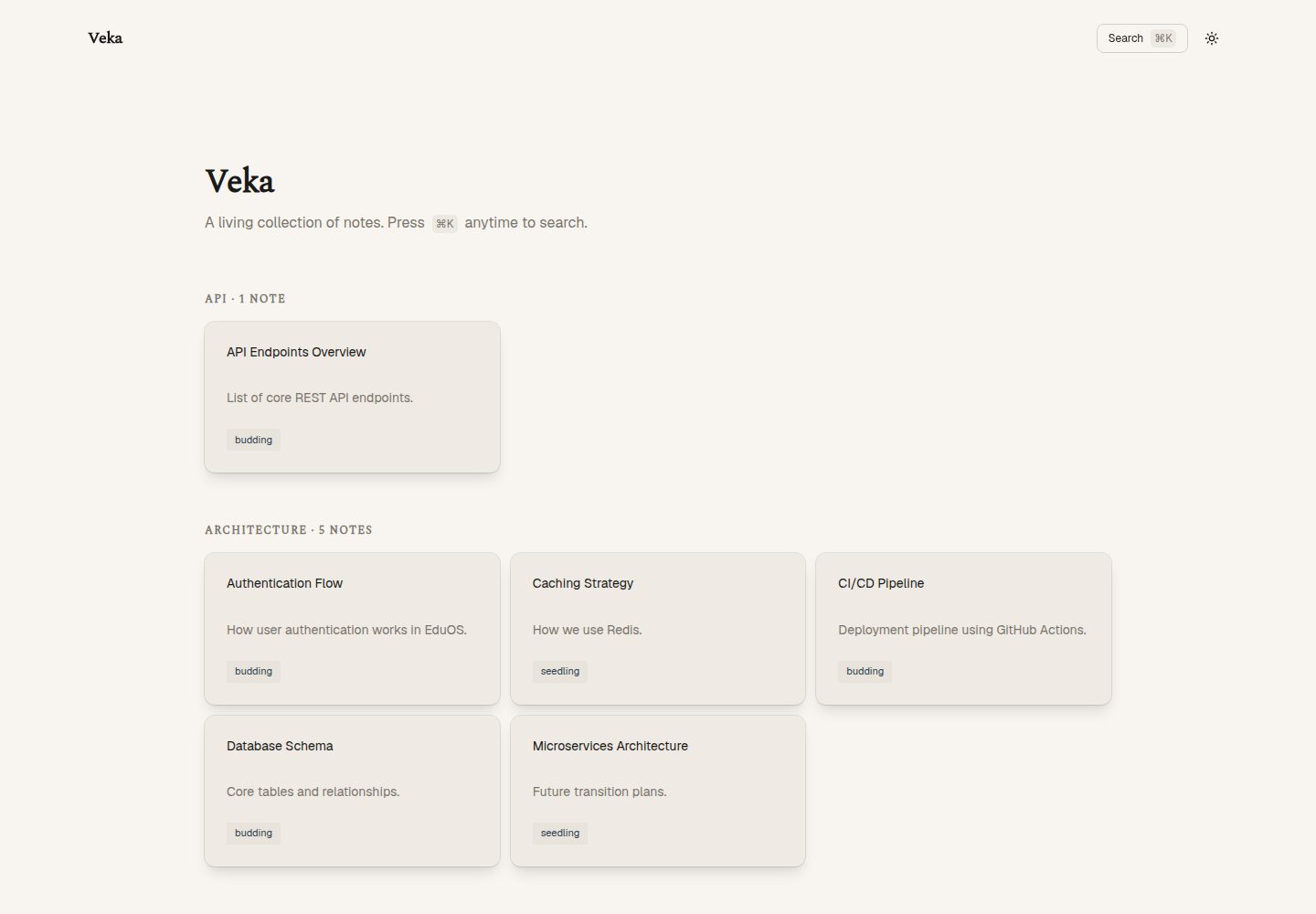
Notes placed in src/content/wiki/ automatically generate URLs and sidebar navigation, with no need to register routes in a configuration file
AstroStarter
veka — Astro Starter Template
By masmuss
Veka is a personal wiki and digital garden starter template built on Astro. Place Markdown notes in the content directory to automatically generate pages with a sidebar and local static search.
Explore the design
Compare the page layouts and mobile experience. Open any screenshot for a closer look.
Desktop homepage1 / 3
Desktop captureTop of page
Actual screenshot captured by the server browser.
All pages & views 3
Screenshots show visual appearance; interactive behavior may differ.
Recorded 2026-10-02View source
What stands out
A quick read of the recorded project description.
Uses Pagefind to generate a local static search index at build time, without relying on a third-party search service
Frontmatter is validated by Zod; missing titles or incorrect date formats are caught at build time
Provides a growthStage field that can mark note maturity with seedling, budding, or evergreen
Built-in SEO handling, including title and description normalization, Open Graph, Twitter Card, canonical URL, and JSON-LD
WikiLayout uses a three-column grid layout with navigation, main content, and table of contents
Template Details
Veka is a personal wiki and digital garden starter template for Astro, positioned as a lightweight note-publishing tool rather than a full documentation framework. Note files go in the src/content/wiki/ directory, and you can freely create multiple levels of subdirectories. Routes and sidebar navigation are generated automatically from the directory structure, so you do not need to register pages in a configuration file. Each note uses Markdown or MDX, and its frontmatter is validated by Zod. It must include the fields title, description, createdAt, updatedAt, tags, isPinned, and growthStage. growthStage takes seedling, budding, or evergreen to mark the maturity of a note.
Search uses Pagefind, which generates a local index at build time and does not rely on a third-party search service. Because the index comes from static build output, search cannot be tested directly in local development mode; you need to build first and then preview. SEO information such as site identity, canonical links, Open Graph, Twitter Card, and JSON-LD is configured centrally in src/lib/site-config.ts, and page-level titles and descriptions are normalized for length according to rules.
The template outputs a static site by default and can be deployed to Vercel, Netlify, or Cloudflare Pages. The build command is pnpm run build, which triggers both the Astro build and Pagefind index generation. The repository uses the MIT license, so the code can be used, modified, and distributed for free; however, third-party assets in the demo such as images, fonts, and icons need to be checked separately for licensing, and external services such as domains and hosting may incur costs.
AstroStarter
Is it right for your project?
Use Cases
- Building a personal digital garden, organizing notes by topic directory and improving them over time
- Creating an internal or personal wiki to record concepts, ideas, and reference material in Markdown
- Adding a lightweight note-publishing and local search solution to an existing Astro project
- Deploying to static hosting platforms such as Vercel, Netlify, or Cloudflare Pages
Suitable For
- Note writers who are used to writing in Markdown and want to reduce route configuration
- Personal sites that need local static search and do not want to integrate a third-party search service
- Astro users who want to organize multi-level note content using a directory structure
- Developers who accept frontmatter field validation and are willing to fill in metadata according to the template conventions
Getting started & customization
Use these recorded setup notes alongside the repository instructions for your chosen version.
- 1
You can get the template with pnpm dlx degit masmuss/veka my-wiki, then run pnpm install and pnpm run dev
- 2
Notes go in the src/content/wiki/ directory and support .md and .mdx; frontmatter must include title, description, createdAt, updatedAt, tags, isPinned, and growthStage
- 3
Pagefind search cannot be tested in local development mode; you need to run pnpm run build first and then pnpm run preview
- 4
Site name, URL, OG image, favicon, and similar settings are changed in src/lib/site-config.ts
- 5
When deploying to a static hosting platform, set the build command to pnpm run build so that pages and the search index are generated together
License & source material
Usage conditions & limitations
Free to use · keep license noticeThis entry covers the free version under the MIT license in the public repository; the free scope is the code of that version and does not mean that external services or third-party assets are free.
Must comply with when using
- The code of this version may be used, modified, used commercially, and distributed for free.
- When distributing copies or substantial portions of the code, retain the original author's copyright notice and the complete MIT license notice.
- The code is provided as is; warranties and limitations of liability are governed by the original license and applicable law.
Additional costs & items to verify
- Pagefind search cannot be tested directly in local development mode; you must build first and then preview, because the search index comes from static build output.
- When deploying to a hosting platform, set the build command to pnpm run build so that both the Astro build and Pagefind index generation are triggered.
- Demo images, fonts, icons, and other third-party assets need to be checked against their respective licenses and cannot be judged solely by the MIT license of the code.
- External services such as domains, hosting, databases, payments, or AI may incur separate charges.
View Original Text Basis
Permission is hereby granted, free of charge
Original License Text
Pagefind search works by reading the static build output. To test search locally, you must run npm run build followed by npm run preview.
Original README
https://github.com/masmuss/veka/blob/main/LICENSEhttps://github.com/masmuss/veka/blob/main/README.mdMake sure your build command on the target platform is set to: `pnpm run build`
Original README
Compiled by DeepSeek based on repository license and README ·2026-10-02. Results only cover the materials read; dependencies, images, fonts, and subsequent term changes are subject to their respective original texts.
Project checks & description sources
Template Information
- Source platforms
- Astro Themes
- Documentation and maintenance reference score
- More documented · 87 / 100
- Technologies
- Astro
- Website type
- Starter
How this score is calculated
Our heuristic uses license records (up to 30), a demo link (12), a preview (10), stars (15), recorded maintenance (15), description completeness (8), feature records (5) and classification data (5). It is not a code, security or performance test, or a Google score. A link does not establish tested functionality.
What to verify for this project
- Repository update recorded
- 2026-07-24
- Screenshot last checked
- 2026-10-02
A demo link is listed. Check it with your own content and viewport sizes; its presence does not confirm that forms, authentication or payments work.
The catalog identifies Astro as the primary stack. Check the actual dependency manifest and lockfile for versions and hosting requirements. These notes use recorded metadata, not a code audit or a deployment test.
Use a selection guide →How this description was prepared
AI-assisted description based on catalog records and repository material. Repository authors are not automatically the reviewers of this description.
Automatically checked against source and license rules; no manual editorial review.
Inspect the recorded source material
SHA-256: b7a0fd9deda49277e21c31877cf85d7fbc6836821fb75667d727196cefae4070
2026-10-02T20:19:06.636Z
Source file / repository# 🌲 Veka
**The Minimalist Digital Garden & Wiki Starter for Astro.**
Veka is not a competitor to massive documentation frameworks. It is the antithesis. Built specifically for those who want a fast, organic place to take notes — a digital garden or personal wiki — free from rigid routing configuration.
Drop your Markdown files into the folder, and let the system weave them together automatically.





Production demo available at [demo-veka.khoirul.me](https://demo-veka.khoirul.me) or [wiki.khoirul.me](https://wiki.khoirul.me)
---
## ⚡ Why Veka?
- **Zero-Config Routing:** No need to register navigation in a config file. Create folders as deep as you like (e.g. `src/content/wiki/koding/arsitektur/`), and URLs with sidebar navigation are generated automatically.
- **Ultra-Fast Static Search:** Powered by [Pagefind](https://pagefind.app/). Search is indexed locally during the build process — no third-party services required.
- **Zod Schema Validation:** Frontmatter is strictly validated. No more build errors from a missing title or incorrectly formatted date.
- **"Digital Garden" Concept:** Comes with a `growthStage` property (`seedling`, `budding`, `evergreen`) to track the maturity level of each note.
- **100% Lighthouse Score:** The UI is built selectively using minimal components and vanilla JS for interactivity, ensuring zero runtime bloat.
---
## 🚀 Quick Start (Under 1 Minute)
Run these commands in your terminal to clone the template and start a local server:
```bash
# 1. Clone this repository (or use degit)
pnpm dlx degit masmuss/veka my-wiki
# 2. Enter the directory
cd my-wiki
# 3. Install dependencies
pnpm install
# 4. Start the local server
pnpm run dev
```
Important Note for Search Features: Pagefind search works by reading the static build output. To test search locally, you must run npm run build followed by npm run preview.
## 📝 How to Write Notes
All your notes live in the `src/content/wiki/` directory. Feel free to create new sub-directories. Every `.md` or `.mdx` file must include the following frontmatter:
```plaintext
---
title: "Your Note Title"
description: "Brief description for SEO and search snippets."
createdAt: 2026-07-05
updatedAt: 2026-07-05
tags: ["concept", "idea"]
isPinned: false
growthStage: "seedling" # Options: seedling | budding | evergreen
---
Write your thoughts here using Markdown...
```
## 🏗️ Project Structure
```plaintext
├── src/
│ ├── components/
│ │ ├── seo/ # Seo.astro, JsonLd.astro
│ │ └── shell/ # BaseHead.astro, Header.astro
│ ├── content/
│ │ ├── config.ts # Zod schema validation
│ │ └── wiki/ # Your markdown files and folders
│ ├── layouts/
│ │ ├── BaseLayout.astro # HTML shell, delegates head to BaseHead
│ │ └── WikiLayout.astro # 3-Column Grid (Nav, Content, TOC)
│ ├── lib/
│ │ ├── seo.ts # Title/description normalization & canonical URL
│ │ └── site-config.ts # Site-wide configuration (name, URL, OG image, etc.)
│ └── pages/
│ ├── index.astro # Dashboard / Home
│ └── wiki/
│ └── [...slug].astro # Dynamic routing engine
└── astro.config.mjs
```
## ⚙️ Configuration
Edit `src/lib/site-config.ts` to customize your site identity. All fields are used for SEO meta tags, Open Graph, and JSON-LD structured data.
```ts
export const SITE = {
name: "Veka", // Site name (used in <title> suffix & og:site_name)
title: "Veka", // Default page title
description: "Minimalist Digital Garden", // Fallback meta description
author: "Veka", // JSON-LD author
url: "https://veka-9tg.pages.dev", // Canonical base URL
image: "/og-image.png", // Default Open Graph image
favicon: "/favicon.svg", // Favicon path
};
```
SEO features (auto-generated per page):
- `<title>` normalization — appends `" | Veka"` if not present, truncates at 60 chars
- Description normalization — enforces 120–160 character range
- Open Graph tags (`og:title`, `og:description`, `og:image`, `og:type`, `og:url`, `og:site_name`)
- Twitter Card tags (`twitter:card`, `twitter:title`, `twitter:description`, `twitter:image`)
- Canonical URL — strips hash and trailing slash
- JSON-LD structured data — `WebSite` for all pages, `Article` for wiki notes (with `datePublished`, `dateModified`, `keywords`)
- Article metadata — `article:published_time`, `article:modified_time`, `article:tag` for wiki pages
## 🌍 Deployment
Veka is configured as a Static Site Generator (SSG) by default. Deployment is seamless on platforms like Vercel, Netlify, or Cloudflare Pages.
Make sure your build command on the target platform is set to: `pnpm run build`
This command will automatically run `astro build` and trigger the pagefind integration to build the search index.
Explore similar templates
Compare previews and descriptions within the same stack and category.

astrowind
AstroWind is a free, open-source Astro starter theme using Astro and Tailwind CSS, released under the MIT license.
Astro · Blog
accessible-astro-starter
An accessibility-focused Astro 6 starter template with WCAG 2.2 AA practices, Tailwind CSS 4, TypeScript, Prettier, ESLint, form validation, blog and portfolio examples, and preference toggles for dark mode, high contrast, and reduced motion.
Astro · Blog

astro-erudite
astro-erudite is an opinionated, unstyled static blog template built with Astro and native CSS, with no UI or CSS framework and minimal dependencies.
Astro · Portfolio

astro-shopify
A lightweight Shopify headless ecommerce starter template built with Astro and Svelte, integrating the Shopify Storefront API for product and inventory data, with built-in cart state management and basic add-to-cart and checkout flow.
Astro · E-commerce

brutal
Brutal is a neobrutalism Astro starter theme from ElianCodes, derived from the author's personal site and generalized. It includes a Markdown blog collection, build-time RSS and sitemap, image optimization, Tailwind CSS styling, and Biome checks, with no JavaScript by default.
Astro · Starter

qwind
Qwind is a free and open-source website template built on Qwik and Tailwind CSS, featuring directory-based routing via QwikCity, a Markdown blog, dark mode, and static deployment configuration.
Astro · Tool Site