Full-screen Leaflet map with custom category markers, marker clustering, and theme-switching tile styles
AstroReactBlogCorporate Website
travelblog-website-template — Astro Blog Template
By MasuRii
A Philippine travel blog template built with Astro and React, featuring magazine-style editorial layout, destination maps, fuzzy search, light and dark themes, and PWA support, with content maintained as structured data files.
Explore the design
Compare the page layouts and mobile experience. Open any screenshot for a closer look.
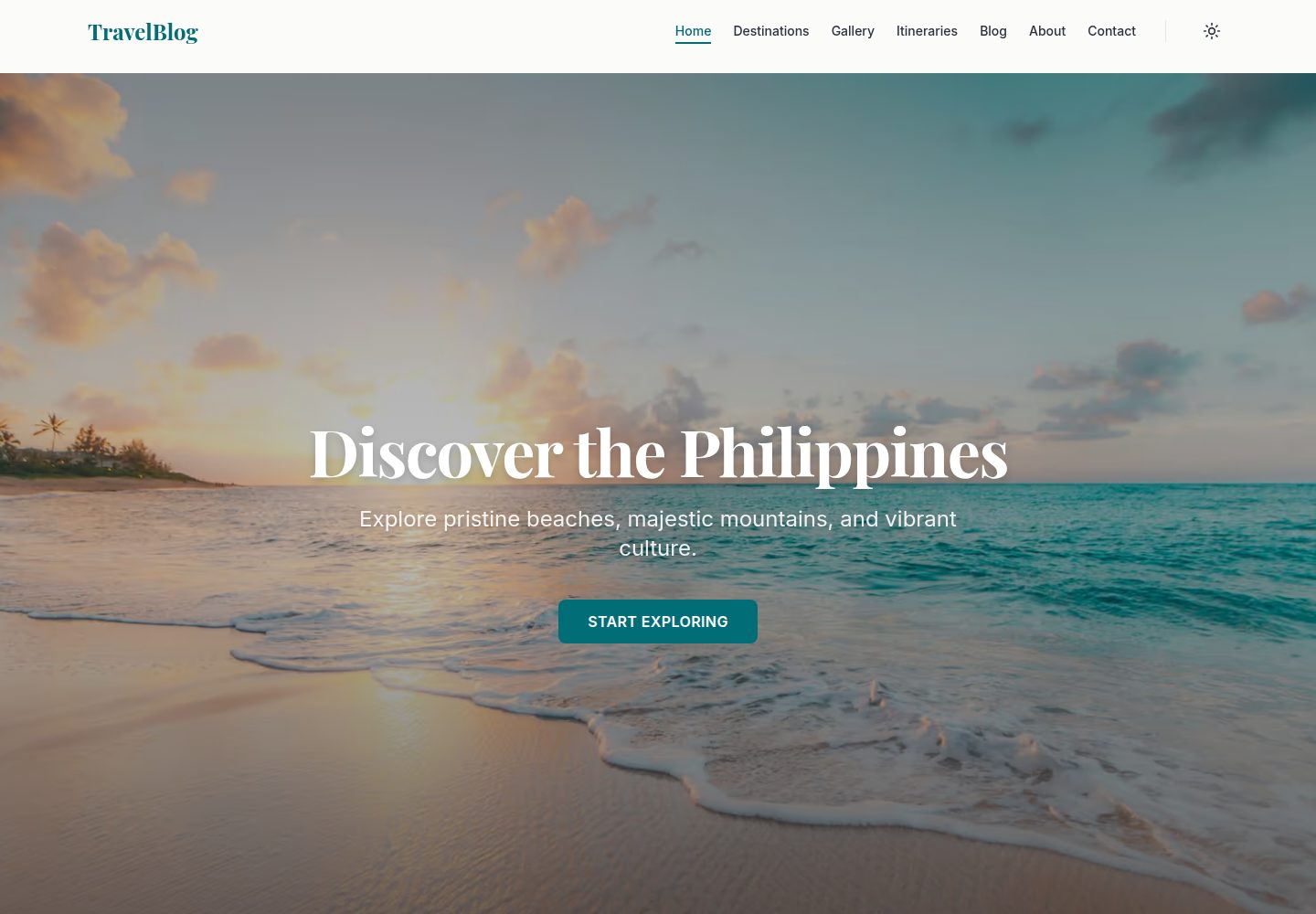
Desktop homepage1 / 3
Desktop captureTop of page
Actual screenshot captured by the server browser.
All pages & views 3
Screenshots show visual appearance; interactive behavior may differ.
Recorded 2026-10-02View source
What stands out
A quick read of the recorded project description.
Client-side fuzzy search based on Fuse.js for quickly locating destinations and articles
Light and dark theme switching that follows system preferences
Automatic image processing with Sharp at build time, plus placeholder image download and diversity validation scripts
SEO-related configurations including JSON-LD structured data, Open Graph, and Twitter cards
PWA manifest and Service Worker for offline access and desktop installation
Template Details
This is a travel blog template for Philippine beaches, islands, and lesser-known spots, using a magazine-style editorial layout suited to image-and-text travel records and destination showcases. Pages are built with Astro, interactive parts use React components, styling is based on Tailwind CSS, and light and dark theme switching is provided.
The template includes a homepage, destination list and detail pages, blog list and article pages, and a full-screen Leaflet map page with category markers and clustering. In-site search uses Fuse.js for client-side fuzzy matching, images are processed at build time by Sharp, and print styles are included for itinerary output. The project also provides a PWA manifest and Service Worker for offline access and desktop installation.
Content is maintained as structured data: destination information is stored in TypeScript files under src/data/destinations/, and adding a destination means adding a data file. The repository includes placeholder image download and validation scripts, unit and end-to-end tests, accessibility tests, and deployment configurations for GitHub Pages and Vercel.
Usage limitations: sample images come from third-party sources such as Unsplash and must be checked against their respective licenses; external services such as domains and hosting may incur costs. The repository uses the MIT license, allowing modification and commercial use of this version of the code, but copyright and license notices must be retained when redistributing.
AstroReactBlogCorporate website
Is it right for your project?
Use Cases
- Building a travel blog focused on Philippine beaches, islands, and lesser-known spots
- Creating a destination showcase site with map browsing and category filtering for travel content
- Image-and-text content sites that need light and dark themes, in-site fuzzy search, and offline access
- Maintaining destination and article content as structured data files and deploying via GitHub Pages or Vercel
Suitable For
- Individual travel bloggers or travel content creators
- Travel websites that need maps and destination category displays
- Developers familiar with Astro, React, and TypeScript who are willing to maintain content through data files
- Projects that want to use an MIT-licensed template for secondary modification or commercial use
Getting started & customization
Use these recorded setup notes alongside the repository instructions for your chosen version.
- 1
Requires Bun (recommended) or Node.js 18+ and Git; after installing dependencies, run the development server at the default address http://localhost:4321
- 2
Destination content is stored in TypeScript files under src/data/destinations/; adding a destination means adding a data file
- 3
Sample images can be downloaded from Unsplash via a script or replaced with your own; third-party assets must be checked against their respective licenses
- 4
Deploying to GitHub Pages requires setting the Pages source to GitHub Actions in the repository settings; pushing to the main branch triggers automatic build and deployment; Vercel deployment is also supported by importing the repository
- 5
The repository uses the MIT license; when distributing copies or substantial portions of the code, retain the original author's copyright notice and the full MIT license notice
License & source material
Usage conditions & limitations
Free to use · keep license noticeThis entry covers the free version in a public repository under the MIT license; the free scope is this version of the code and does not mean external services or third-party assets are free.
Must comply with when using
- Free use, modification, commercial use, and distribution of this version of the code are permitted.
- When distributing copies or substantial portions of the code, retain the original author's copyright notice and the full MIT license notice.
- The code is provided as is; warranties and liability limitations are governed by the original license and applicable law.
Additional costs & items to verify
- Placeholder images come from third-party sources such as Unsplash and must be checked and complied with under their respective licenses; the template's MIT license does not cover these assets.
- Deploying to GitHub Pages requires manually enabling Pages in the repository settings and setting the source to GitHub Actions.
- Deploying with Vercel requires registration and importing the repository; external services such as hosting may incur costs.
- Demo images, fonts, icons, and other third-party assets must be checked against their respective licenses and cannot be judged solely by the code's MIT license.
- External services such as domains, hosting, databases, payments, or AI may incur additional charges.
View Original Text Basis
Permission is hereby granted, free of charge
Original License Text
Download placeholder images from Unsplash
Original README
Enable GitHub Pages in repository settings (Settings → Pages → Source: GitHub Actions)
Original README
https://github.com/MasuRii/travelblog-website-template/blob/main/LICENSEhttps://github.com/MasuRii/travelblog-website-template/blob/main/README.mdImport the repository in [Vercel](https://vercel.com)
Original README
Compiled by DeepSeek based on repository license and README ·2026-10-02. Results only cover the materials read; dependencies, images, fonts, and subsequent term changes are subject to their respective original texts.
Project checks & description sources
Template Information
- Source platforms
- GitHub
- Documentation and maintenance reference score
- More documented · 88 / 100
- Technologies
- Astro · React
- Website type
- Blog · Corporate Website
How this score is calculated
Our heuristic uses license records (up to 30), a demo link (12), a preview (10), stars (15), recorded maintenance (15), description completeness (8), feature records (5) and classification data (5). It is not a code, security or performance test, or a Google score. A link does not establish tested functionality.
What to verify for this project
- Repository update recorded
- 2026-01-17
- Screenshot last checked
- 2026-10-02
A demo link is listed. Check it with your own content and viewport sizes; its presence does not confirm that forms, authentication or payments work.
The catalog identifies Astro as the primary stack. Check the actual dependency manifest and lockfile for versions and hosting requirements. These notes use recorded metadata, not a code audit or a deployment test.
Use a selection guide →How this description was prepared
AI-assisted description based on catalog records and repository material. Repository authors are not automatically the reviewers of this description.
Automatically checked against source and license rules; no manual editorial review.
Inspect the recorded source material
SHA-256: c085f77232bb42cfd2dc2d7e379f1272e80d69ec0429bd4271056c5a67b08ccb
2026-10-02T15:52:38.486Z
Source file / repository# Philippine Travel Blog Template <div align="center">     [](https://github.com/MasuRii/travelblog-website-template/actions/workflows/deploy.yml) [](package.json) [](CONTRIBUTING.md) **A high-performance, SEO-optimized travel blog template built with Astro, React, and Tailwind CSS. Specifically designed for showcasing Philippine beaches, islands, and hidden gems with an editorial magazine aesthetic.**  [Live Demo](https://masurii.github.io/travelblog-website-template/) | [Documentation](#documentation) | [Quick Start](#quick-start) </div> --- ## Features - **Blazing Fast** - Built with Astro's "Islands Architecture" for zero JavaScript by default - **Interactive Destinations Map** - Full-page Leaflet map with custom category markers, clustering, and theme-aware tiles - **Adaptive Theme System** - Seamless light and dark mode with system preference detection - **Intelligent Search** - Fast, client-side fuzzy search powered by Fuse.js - **PWA Ready** - Offline support via Service Workers and manifest for app-like installation - **SEO Optimized** - Complete JSON-LD schema markup and Open Graph/Twitter cards - **Accessibility First** - WCAG AA compliance verified with axe-core - **Image Optimization** - Automated build-time image processing using Sharp - **Print Friendly** - Optimized stylesheets for printing travel itineraries - **Fully Responsive** - Mobile-first design that looks great on all devices ## Tech Stack | Category | Technology | | -------------------- | -------------------------------------------------------------------------------- | | **Framework** | [Astro](https://astro.build) v5.16.9 | | **UI Library** | [React](https://react.dev) v19.2.3 | | **Styling** | [Tailwind CSS](https://tailwindcss.com) v4.1.18 | | **State Management** | [Nanostores](https://github.com/nanostores/nanostores) | | **Maps** | [Leaflet](https://leafletjs.com) & [React Leaflet](https://react-leaflet.js.org) | | **Search** | [Fuse.js](https://www.fusejs.io) v7.1.0 | | **Image Processing** | [Sharp](https://sharp.pixelplumbing.com) v0.34.5 | | **Testing** | [Vitest](https://vitest.dev), [Playwright](https://playwright.dev) | | **Deployment** | [GitHub Pages](https://pages.github.com) / [Vercel](https://vercel.com) | ## Quick Start ### Prerequisites - [Bun](https://bun.sh) (recommended) or [Node.js](https://nodejs.org) 18+ - [Git](https://git-scm.com) ### Installation ```bash # Clone the repository git clone https://github.com/MasuRii/travelblog-website-template.git cd travelblog-website-template # Install dependencies bun install # or npm install # Start development server bun dev # or npm run dev ``` The site will be available at `http://localhost:4321` ## Commands All commands are run from the root of the project: | Command | Description | | --------------------------- | ------------------------------------------ | | `bun install` | Install dependencies | | `bun dev` | Start local dev server at `localhost:4321` | | `bun build` | Build production site to `./dist/` | | `bun preview` | Preview production build locally | | `bun run lint` | Run ESLint for code quality | | `bun run format` | Run Prettier for code formatting | | `bun run type-check` | Run TypeScript type checking | | `bun run test` | Run unit tests with Vitest | | `bun run test:e2e` | Run E2E tests with Playwright | | `bun run test:a11y` | Run accessibility tests with axe-core | | `bun run images:fetch` | Download placeholder images from Unsplash | | `bun run images:validate` | Validate image diversity | | `bun run data:validate:all` | Validate all data files | ## Project Structure ``` travelblog-website-template/ ├── public/ # Static assets (favicon, robots.txt, PWA icons) ├── src/ │ ├── assets/ # Images and fonts │ │ └── images/ # Destination and placeholder images │ ├── components/ │ │ ├── Map/ # Map components (FullPageMap, MapCluster, etc.) │ │ ├── Skeleton/ # Loading skeleton components │ │ ├── UI/ # UI components (Button, Input, Select) │ │ ├── Hero.astro # Landing hero section │ │ ├── Navigation.tsx # Header navigation │ │ ├── Footer.tsx # Site footer │ │ ├── QuickSearch.tsx # Fuzzy search component │ │ ├── PhotoGallery.tsx # Image gallery with lightbox │ │ └── ... # Other components │ ├── config/ # Configuration files │ ├── constants/ # Category definitions │ ├── data/ # Destination data files │ ├── hooks/ # Custom React hooks │ ├── i18n/ # Internationalization files │ ├── layouts/ # Page layouts │ │ └── BaseLayout.astro # Main layout with SEO │ ├── pages/ # Astro pages │ │ ├── index.astro # Home page │ │ ├── map.astro # Full-page map │ │ ├── destinations/ # Destination listing and detail pages │ │ ├── blog/ # Blog listing and post pages │ │ └── ... # Other pages │ ├── store/ # Nanostores state management │ ├── styles/ # Global CSS │ ├── types/ # TypeScript type definitions │ └── utils/ # Utility functions ├── tests/ # E2E and unit tests ├── scripts/ # Build and utility scripts ├── .github/workflows/ # GitHub Actions CI/CD └── package.json ``` ## Customization ### Content Destination data is managed as structured TypeScript files in `src/data/destinations/`. Adding a new destination is as simple as creating a new file and exporting the data object. ### Images The project includes automated scripts for managing images: 1. Fetch placeholder images: `bun run images:fetch` 2. Validate image diversity: `bun run images:validate` 3. Verify processing: `bun run images:verify` ### Styling The project uses Tailwind CSS with a custom design system. Key customization points: - Colors and theme variables in `src/styles/global.css` - Typography using Playfair Display and Inter fonts - Component-specific styles in their respective `.astro` and `.tsx` files ## Deployment This project supports both **GitHub Pages** and **Vercel** deployment: ### GitHub Pages (Automatic) 1. Push your code to GitHub 2. Enable GitHub Pages in repository settings (Settings → Pages → Source: GitHub Actions) 3. The included workflow will automatically build and deploy on every push to `main` 4. Your site will be available at `https://<username>.github.io/<repo-name>/` ### Vercel 1. Push your code to GitHub 2. Import the repository in [Vercel](https://vercel.com) 3. Deploy! ### Other Platforms For other platforms, run `bun build` and deploy the `dist/` folder. ## Documentation For detailed information on customizing your travel blog, refer to the [Customization](#customization) section above. ## Contributing Contributions are welcome! Please read our contributing guidelines before submitting a pull request. We follow: - [Conventional Commits](https://www.conventionalcommits.org/) for commit messages - ESLint and Prettier for code style --- <div align="center"> **Built with love by [MasuRii](https://github.com/MasuRii)** If you found this helpful, please consider giving it a star! [](https://github.com/MasuRii/travelblog-website-template) </div>
Explore similar templates
Compare previews and descriptions within the same stack and category.

astrowind
AstroWind is a free, open-source Astro starter theme using Astro and Tailwind CSS, released under the MIT license.
Astro · Blog

astro-paper
AstroPaper is a minimal, responsive, accessible, and SEO-friendly Astro blog theme. Articles are stored as Markdown/MDX in src/content/posts/, with subdirectories affecting URLs.
Astro · Blog

fuwari
Fuwari is a static blog template built with Astro and Tailwind CSS for personal blogs. It manages posts as Markdown files in src/content/posts/, with frontmatter for title, date, description, cover, tags, categories, draft status, and language.
Astro · Blog

Firefly
Firefly is a clean personal blog theme forked from Astro and Fuwari, offering four background modes, single/double sidebar and list/grid layouts, Pagefind client-side full-text search, and a six-language UI.
Astro · Blog

astro-theme-cactus
Astro Cactus is an Astro-based blog and portfolio theme that uses Markdown/MDX content collections to manage posts, notes, and tags, with frontmatter type-checked by a schema.
Astro · Portfolio

astrofy
Astrofy is a free and open-source personal portfolio website template built with Astro and TailwindCSS, with built-in blog, CV timeline, project showcase, store, and RSS feed modules.
Astro · Portfolio