A Jekyll theme for Persian blogs, forked from the klise theme
JekyllBlog
simorq — Jekyll Blog Template
By mhdzli
simorq is a Jekyll blog theme for Persian writing, forked from the klise theme, with support for Persian calendar (khorshidi/jalali) dates.
Explore the design
Compare the page layouts and mobile experience. Open any screenshot for a closer look.
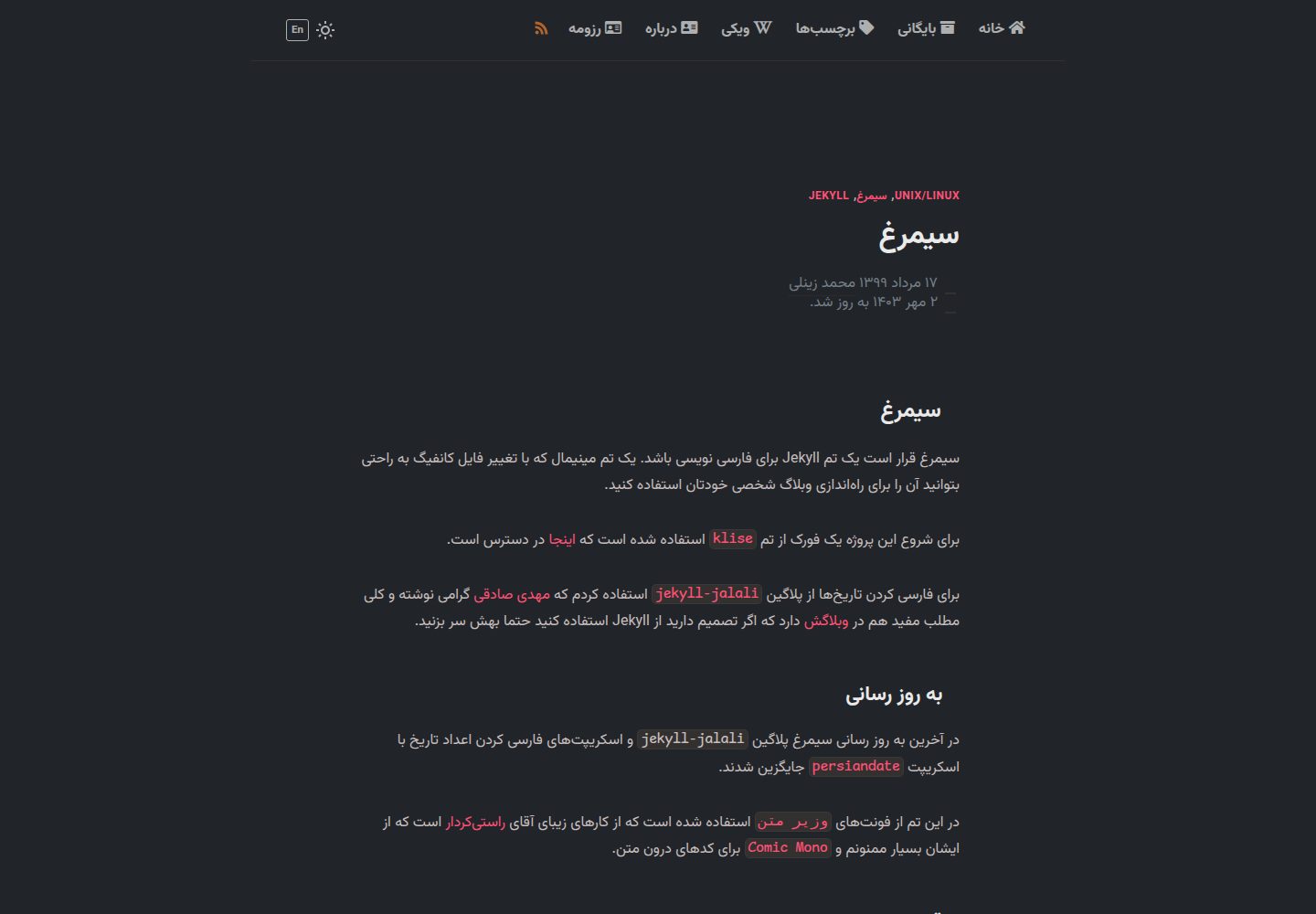
Desktop homepage1 / 3
Desktop captureTop of page
Actual screenshot captured by the server browser.
All pages & views 3
Screenshots show visual appearance; interactive behavior may differ.
Recorded 2026-10-02View source
What stands out
A quick read of the recorded project description.
Supports Persian calendar (khorshidi/jalali) dates; the latest version uses a bundled persiandate script for dates and numerals
Provides light and dark appearances, with styles adjusted via SCSS
Includes jekyll-postfiles image organization, jekyll-sitemap sitemaps, and jekyll-feed RSS output
Uses Vazirmatn as the body font and Comic Mono for code highlighting
Supports post pagination and provides an optional Google Analytics configuration item
Template Details
simorq is a Jekyll theme for Persian (فارسی) blogs, with the goal of providing a minimalist template that lets you set up a personal blog by editing configuration files. It is forked from the klise theme and adjusted for Persian reading conventions.
Date handling is the theme's core differentiator: early versions used the jekyll-jalali plugin to convert dates to the Persian calendar, while the most recent update switched to a bundled persiandate script for Persian calendar dates and numeral conversion. For typography, it uses Vazirmatn (وزیر متن) as the body font and Comic Mono for code highlighting.
The theme offers light and dark appearances, with styles adjusted via SCSS; it includes the jekyll-postfiles image organization approach, jekyll-sitemap for sitemaps, jekyll-feed for RSS output, post pagination, and an optional Google Analytics configuration. The README also mentions a way to add a comment section via Mastodon, but readers need to consult the author's blog post for instructions.
There are several usage limitations to note: jekyll-postfiles and jekyll-jalali are not supported in GitHub Pages' default build, so you cannot rely directly on the traditional GitHub Pages build method; the README update notes that you can instead build with GitHub Actions and deploy to Pages, or deploy to Netlify, Vercel, or surge.sh. The project is released under the MIT license, but third-party assets such as images and fonts in the demo site need to be checked separately for their respective licenses.
JekyllBlog
Is it right for your project?
Use Cases
- Building a personal blog for Persian-speaking readers
- A Jekyll site that needs to display post dates in the Persian calendar
- A blog project where you want to adjust the theme's appearance with SCSS and have built-in RSS and sitemaps
- A static blog deployed via GitHub Actions, Netlify, Vercel, or surge.sh
Suitable For
- Individual bloggers who use Jekyll and write Persian content
- Static blog authors who need Persian calendar date display
- Front-end developers who want to build on an MIT-licensed theme
Getting started & customization
Use these recorded setup notes alongside the repository instructions for your chosen version.
- 1
Local run: clone the repository, run bundle install, then bundle exec jekyll serve, and visit localhost:4000 to view it
- 2
Docker method: clone the repository, first run scripts/docker_build_image.sh to build the image, then run scripts/docker_run.sh to start it
- 3
For GitHub Pages deployment, switch Pages' Build and deployment to GitHub Actions in the repository settings and build with the Jekyll workflow
- 4
jekyll-postfiles and jekyll-jalali are not supported by GitHub Pages' default build, so the traditional Pages build method cannot be used
- 5
Third-party assets such as images and fonts in the demo site need to be checked separately under their respective licenses
License & source material
Usage conditions & limitations
Free to use · keep license noticeThis entry covers the free version in the public repository under the MIT license; the free scope is the code of this version and does not mean that external services or third-party assets are free.
Must comply with when using
- You may use, modify, commercially use, and distribute the code of this version for free.
- When distributing copies or substantial portions of the code, retain the original author's copyright notice and the full MIT license notice.
- The code is provided as is; warranties and limitations of liability are governed by the original license and applicable law.
Additional costs & items to verify
- The jekyll-postfiles and jekyll-jalali plugins are not supported by GitHub Pages' default build, so the traditional GitHub Pages build method cannot be used; you need to switch to building with GitHub Actions or deploy to platforms such as Netlify, Vercel, or surge.sh.
- The comment section feature requires consulting the author's blog post and is implemented via the external Mastodon service; the theme itself does not include a built-in comment system.
- Google Analytics is an optional configuration; once enabled, it requires connecting to Google's external analytics service.
- Demo images, fonts, icons, and other third-party assets need to be checked under their respective licenses and cannot be judged solely by the code's MIT license.
- External services such as domains, hosting, databases, payments, or AI may incur additional charges.
View Original Text Basis
Permission is hereby granted, free of charge
Original License Text
از آنجا که پلاگین [`jekyll-postfiles`](https://github.com/nhoizey/jekyll-postfiles#compatibility) و [`jekyll-jalali`](https://github.com/mehdisadeghi/jekyll-jalali) در `github pages` پشتیبانی نمیشوند امکان استفاده روی گیتهاب وجود ندارد.
Original README
برای افزودن بخش دیدگاهها با استفاده از ماستودون [این پست](https://www.zmim.ir/mastodon-comments/) را بخوانید.
Original README
https://github.com/mhdzli/simorq/blob/master/LICENSEhttps://github.com/mhdzli/simorq/blob/master/README.mdآنالیز گوگل اگر دوست دارید استفاده کنید.
Original README
Compiled by DeepSeek based on repository license and README ·2026-10-02. Results only cover the materials read; dependencies, images, fonts, and subsequent term changes are subject to their respective original texts.
Project checks & description sources
Template Information
- Source platforms
- GitHub
- Documentation and maintenance reference score
- More documented · 81 / 100
- Technologies
- Jekyll
- Website type
- Blog
How this score is calculated
Our heuristic uses license records (up to 30), a demo link (12), a preview (10), stars (15), recorded maintenance (15), description completeness (8), feature records (5) and classification data (5). It is not a code, security or performance test, or a Google score. A link does not establish tested functionality.
What to verify for this project
- Repository update recorded
- 2025-03-06
- Screenshot last checked
- 2026-10-02
A demo link is listed. Check it with your own content and viewport sizes; its presence does not confirm that forms, authentication or payments work.
The catalog identifies Jekyll as the primary stack. Check the actual dependency manifest and lockfile for versions and hosting requirements. These notes use recorded metadata, not a code audit or a deployment test.
Use a selection guide →How this description was prepared
AI-assisted description based on catalog records and repository material. Repository authors are not automatically the reviewers of this description.
Automatically checked against source and license rules; no manual editorial review.
Inspect the recorded source material
SHA-256: 527853282c60881633ad17a226c2cd5fc57f7eb7e82fcd972ee771fffb9b16c3
2026-10-02T10:50:23.699Z
Source file / repository# سیمرغ سیمرغ قرار است یک تم Jekyll برای فارسی نویسی باشد. یک تم مینیمال که با تغییر فایل کانفیگ به راحتی بتوانید آن را برای راهاندازی وبلاگ شخصی خودتان استفاده کنید. میتوانید نمونه استفاده شده آن را در [وبلاگ من](https://zmim.ir) ببینید. من برای خودم بخشهای دیگری به سیمرغ اضافه کردم و تم آن را کمی تغییر دادهام. چنانچه دوست داشتید میتوانید از آنها هم استفاه کنید. برای شروع این پروژه یک فورک از تم [`klise`](https://klise.now.sh) استفاده شده است که [اینجا](https://github.com/piharpi/jekyll-klise) در دسترس است. برای فارسی کردن تاریخها از پلاگین [`jekyll-jalali`](https://github.com/mehdisadeghi/jekyll-jalali) استفاده کردم که [مهدی صادقی](https://github.com/mehdisadeghi/) گرامی نوشته و کلی مطلب مفید هم در [وبلاگش](https://mehdix.ir/) دارد که اگر تصمیم دارید از Jekyll استفاده کنید حتما بهش سر بزنید. در آخرین به روز رسانی سیمرغ پلاگین `jekyll-jalali` و اسکریپتهای فارسی کردن اعداد تاریخ با اسکریپت [`persiandate`](https://github.com/mhdzli/simorq/blob/master/src/assets/js/persiandate.js) جایگزین شدند. در این تم از فونتهای [`وزیر متن`](https://github.com/rastikerdar/vazirmatn) استفاده شده است که از کارهای زیبای آقای [راستیکردار](https://github.com/rastikerdar) است که از ایشان بسیار ممنونم و [`Comic Mono`](https://dtinth.github.io/comic-mono-font/) برای کدهای درون متن. ## قابلیتها - تم تاریک و روشن - پشتیبانی از تاریخ فارسی - تغییر ظاهر با استفاده از scss - هماهنگ با دسکتاپ و گوشی - ساختار مناسب برای عکسها ([`jekyll-postfiles`](https://github.com/nhoizey/jekyll-postfiles)) - نقشه سایت ([`jekyll-sitemap`](https://github.com/jekyll/jekyll-sitemap)) - خوراک rss ([`jekyll-feed`](https://github.com/jekyll/jekyll-feed)) - هایلایت کدها ([`Comic Mono`](https://dtinth.github.io/comic-mono-font/)) - صفحه بندی پستها - آنالیز گوگل اگر دوست دارید استفاده کنید. (نکنید 😠) - استفاده از W3C **👽** - استفاده از فونت Awesome **👽** - سبک و سریع **🚄** - برای افزودن بخش دیدگاهها با استفاده از ماستودون [این پست](https://www.zmim.ir/mastodon-comments/) را بخوانید. ## نصب راه انداختن سرور local روی سیستم شخصی: ```bash $ git clone https://github.com/mhdzli/simorq.git $ cd simorq $ bundle install $ bundle exec jekyll serve ``` با آدرس `localhost:4000` میتوانید نتیجه را در مرورگرتان مشاهده کنید. [](https://app.netlify.com/start/deploy?repository=https://github.com/mhdzli/simorq) [](https://vercel.com/import/project?template=https://github.com/mhdzli/simorq) ## نصب با استفاده از داکر در این روش نیازی به نصب هیچ افزونه و زبان برنامه نویسی ای نیست. صرفا میبایست داکر روی سیستم شما نصب باشد. ```bash git clone https://github.com/mhdzli/simorq.git cd simorq ``` پس از آن میباید فایل image ساخته شود. دقت کنید این کار فقط نیاز است یک بار انجام شود و برای بارهای بعد میتوانید از ایمیج ساخته شده استفاده کنید. ```bash scripts/docker_build_image.sh ``` سپس میتوانید با دستور زیر سایت را روی سیستم لوکال خود مشاهده کنید. ```bash scripts/docker_run.sh ``` ## محدودیتها - ~~از آنجا که پلاگین [`jekyll-postfiles`](https://github.com/nhoizey/jekyll-postfiles#compatibility) و [`jekyll-jalali`](https://github.com/mehdisadeghi/jekyll-jalali) در `github pages` پشتیبانی نمیشوند امکان استفاده روی گیتهاب وجود ندارد.~~ **به روز رسانی:** با توجه به افزوده شدن `jekyll` به `GitHub Actions` میتوانید از سیمرغ روی گیتهاب هم خروجی بگیرید. کافیست در بخش `Pages` در تنظیمات مخزن خودتان گزینه `Build and deployment` را روی `GitHub Actions` تنظیم کنید و در بخش `Actions` با استفاده از `Jekyll` خروجی بگیرید و روی دامنه مورد نظرتان راهاندازی کنید. میتوانید نمونهای از این خروجی را [اینجا](https://theme.zmim.ir/) ببینید. میتوانید از [`netlify.com`](https://netlify.com)، [`vercel.com`](https://vercel.com) یا [`surge.sh`](https://surge.sh) هم استفاده کنید. ## مجوز یک پروژه آزاد با مجوز [MIT](LICENSE). ## هواداری اگر از این پروژه بهره بردید میتوانید از آن حمایت کنید: [](https://www.payping.ir/@mzeinali) [](https://www.hamibash.com/mzeinali)
Explore similar templates
Compare previews and descriptions within the same stack and category.

al-folio
A Jekyll academic homepage theme for scholars and researchers, with a clean responsive design and out-of-the-box support for publication lists, project showcases, CVs, and blogs.
Jekyll · Portfolio

minimal-mistakes
Minimal Mistakes is a two-column Jekyll theme for personal sites, blogs, project documentation, or portfolios.
Jekyll · Portfolio

Beautiful Jekyll
Beautiful Jekyll is a mature, easy-to-use Jekyll blog theme maintained by Dean Attali since 2015, with over 50,000 users.
Jekyll · Blog

jekyll-TeXt-theme
A customizable Jekyll theme for personal sites, team sites, blogs, projects, and documentation.
Jekyll · Blog

startbootstrap-clean-blog-jekyll
The official Jekyll version of Start Bootstrap's Clean Blog theme, offering a blog home page, about page, contact page, and sample post pages, with a Formspree-powered contact form.
Jekyll · Blog

So Simple
A minimal reading-oriented Jekyll theme by Michael Rose for personal blogs, portfolios, and long-form reading. It offers multiple layouts, microformat markup, Disqus comments, Google Analytics, Jekyll SEO Tag, three skins, and aggregation by year, category, and tag with a grid view.
Jekyll · Blog