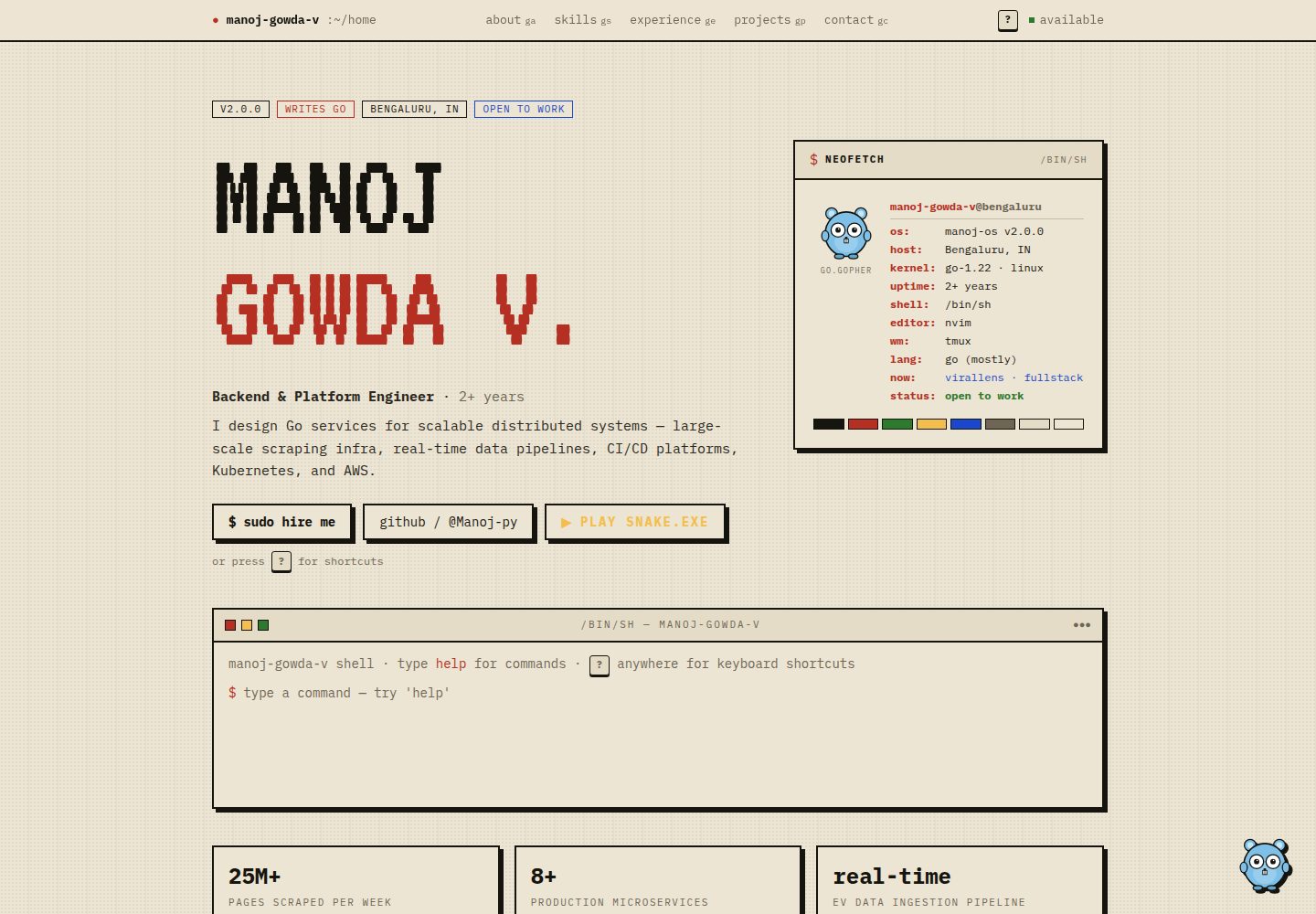
Includes the three pages described in the README: Home, Project, and Blog
Next.jsReactPortfolioBlogCorporate Website
next.js-personal-website-template — Next.js Portfolio Template
By mj-gowda
A Next.js-based personal website template with a homepage introduction, project showcase, Markdown blog, and light/dark theme toggle; the README explains local running and content customization.
Explore the design
Compare the page layouts and mobile experience. Open any screenshot for a closer look.
Desktop homepage1 / 2
Desktop captureTop of page
Actual screenshot captured by the server browser.
All pages & views 2
Screenshots show visual appearance; interactive behavior may differ.
Recorded 2026-10-19View source
What stands out
A quick read of the recorded project description.
Supports light/dark mode toggle
Builds the interface with TypeScript and Tailwind CSS
Renders blog posts from Markdown files using Gray-Matter
Project details, homepage skills, and blog content are maintained through files in the assets directory
The README gives deployment approaches for Vercel and for GitHub Pages with GitHub Actions
Template Details
This template is a personal portfolio and blog site. The pages listed in the README include Home (personal introduction and interests), Project (a collection of past projects), and Blog (blog posts), and it provides a light/dark mode toggle. The README explicitly states the tech stack as Next.js, TypeScript, Tailwind CSS, Headless-UI, and Gray-Matter. Blog content is rendered from Markdown files. For deployment, it mentions that Vercel can be used, and notes that if GitHub Pages is adopted, GitHub Actions can be configured to automatically deploy on pushes to the main branch.
Local running steps are to clone the repository, run yarn install to install dependencies, run yarn dev to start the development server, and then visit http://localhost:3000. For customization, the README requires adding projects and their details in the assets directory following the examples, managing the homepage skills section by modifying skills.ts in assets, and adding blog posts by creating new files in the form of example.md in the posts folder within assets. The README does not provide page component structure, routing details, SEO configuration, testing methods, or production environment considerations, and does not document interactive features other than the light/dark toggle.
Next.jsReactPortfolioBlogCorporate website
Is it right for your project?
Use Cases
- Building a static content site that combines a personal introduction, portfolio, and blog
- Continuously publishing blog posts as Markdown files
- Centrally maintaining project entries and the homepage skills list in assets
- Personal websites that need a light/dark theme toggle
Suitable For
- Developers who want to build a personal portfolio and blog with Next.js and TypeScript
- Users who prefer to manage blog content with Markdown
- Personal site projects that need to run locally and customize content following the README steps
Getting started & customization
Use these recorded setup notes alongside the repository instructions for your chosen version.
- 1
After cloning the repository, run yarn install to install dependencies
- 2
Run yarn dev to start the development server, and visit http://localhost:3000
- 3
Add projects and their details in the assets directory following the examples
- 4
Modify skills.ts in assets to manage the homepage skills section
- 5
Add Markdown files in the posts folder within assets to add blog posts
License & source material
Usage conditions & limitations
Free to use · keep license noticeThis listing covers the free version under the MIT license in the public repository; the free scope is the code of that version and does not mean external services or third-party assets are free.
Must comply with when using
- Free use, modification, commercial use, and distribution of the code of this version are permitted.
- When distributing copies or substantial portions of the code, retain the original author's copyright notice and the complete MIT license notice.
- The code is provided as-is; warranties and limitations of liability are governed by the original license and applicable law.
Additional costs & items to verify
- Demo images, fonts, icons, and other third-party assets must be checked against their respective licenses and cannot be judged solely by the code's MIT license.
- External services such as domains, hosting, databases, payments, or AI may incur separate charges.
View Original Text Basis
Compiled by DeepSeek based on repository license and README ·2026-10-19. Results only cover the materials read; dependencies, images, fonts, and subsequent term changes are subject to their respective original texts.
Project checks & description sources
Template Information
- Source platforms
- GitHub
- Documentation and maintenance reference score
- Partly documented · 70 / 100
- Technologies
- Next.js · React
- Website type
- Portfolio · Blog · Corporate Website
How this score is calculated
Our heuristic uses license records (up to 30), a demo link (12), a preview (10), stars (15), recorded maintenance (15), description completeness (8), feature records (5) and classification data (5). It is not a code, security or performance test, or a Google score. A link does not establish tested functionality.
What to verify for this project
- Repository update recorded
- 2023-09-22
- Screenshot last checked
- 2026-10-19
A demo link is listed. Check it with your own content and viewport sizes; its presence does not confirm that forms, authentication or payments work.
The catalog identifies Next.js as the primary stack. Check the actual dependency manifest and lockfile for versions and hosting requirements. These notes use recorded metadata, not a code audit or a deployment test.
Use a selection guide →How this description was prepared
AI-assisted description based on catalog records and repository material. Repository authors are not automatically the reviewers of this description.
Review declaration: codex-user-requested-batch-review-20261021 · 2026-10-21
Inspect the recorded source material
SHA-256: 085f174458982ad4c5a08ec4da289cdf0144e77334c456e62dbf6e34b98f9998
2026-10-19T12:36:34.924Z
Source file / repository# Personal Website - with blog and projects.  Welcome to my personal website, where you can learn more about me, explore my portfolio, and connect with me. This website showcases my skills, projects, and interests. ## Features - **Dark Mode**: Toggle with light and dark mode. - **Home**: Get to know me better with a brief introduction and my interests. - **Project**: Browse through a collection of my past projects and work. - **Blog**: Read my latest blog posts and insights.  ## Technologies Used - **Next.js**: A React-based framework for building modern web applications. - **Typescript** : A statically typed superset of JavaScript, enhancing code quality and maintainability. - **Tailwind CSS**: A utility-first CSS framework for designing responsive and customizable interfaces. - **Headless-UI**: Customizable tailwind components like dropdowns and models. - **Gray-Matter**: Used for rendering blog posts from Markdown files. - **Vercel**: Hosts the website using GitHub repo. ## Running the Website Locally To run this website locally on your machine, follow these steps: 1. **Clone the Repository**: Use the following command to clone this repository to your local machine: ```sh git clone https://github.com/mj-gowda/manoj-gowda-next.js.git ``` 2. **Install Dependencies**: Navigate to the project's root directory and install the required dependencies using the following command: ```sh yarn install ``` 3. **Start the Development Server**: Run the following command to start the development server: ```sh yarn dev ``` 4. **Open in Your Browser**: Once the server is running, open your web browser and visit http://localhost:3000 to view the website. ## Customization Feel free to customize this website to match your personal branding and style. You can update the content, add more sections, or change the design as needed.  - Go to assets and add projects and its details according to the example - Add and manage the skills section in home page by modifying the skills.ts file in assets - Add blogs by adding example.md files in posts folder which also in the assets folder ## Deployment This website can be deployed to various hosting platforms. If you're using GitHub Pages like this example, you can set up GitHub Actions for automatic deployment upon pushing changes to your main branch. ## Feedback and Contributions If you have any feedback, suggestions, or would like to contribute to this project, please feel free to open an issue or submit a pull request. #### Thank you for visiting my website!
Explore similar templates
Compare previews and descriptions within the same stack and category.

tailwind-nextjs-starter-blog
A Next.js and Tailwind CSS blog starter template using Contentlayer for Markdown/MDX, with built-in SEO, code highlighting, and tags. It targets personal technical blogs and migration from Jekyll/Hugo to React, and supports one-click Vercel deployment.
Next.js · Blog

SaaS-Boilerplate
SaaS-Boilerplate is an open-source SaaS starter template built with Next.js App Router, React 19, TypeScript, Tailwind CSS, and Shadcn UI.
Next.js · SaaS

react-resume-template
A personal resume website template for software developers, built with Next.js, React, and TypeScript and styled with Tailwind CSS. Site content is driven by a single data file at /src/data/data.tsx, with types in dataDef.ts and images in src/images/.
Next.js · Portfolio

Next-JS-Landing-Page-Starter-Template
A free Next.js landing page starter template written in Tailwind CSS and TypeScript, featuring built-in navbar, hero, features, CTA banner, and footer sections.
Next.js · Corporate Website

next-saas-starter
A free Next.js SaaS marketing landing page template from Blazity, using static generation and styled-components with no extra UI library.
Next.js · SaaS

startup-nextjs
Startup is a free, MIT-licensed Next.js template from NextJSTemplates for SaaS startups and corporate landing pages.
Next.js · SaaS