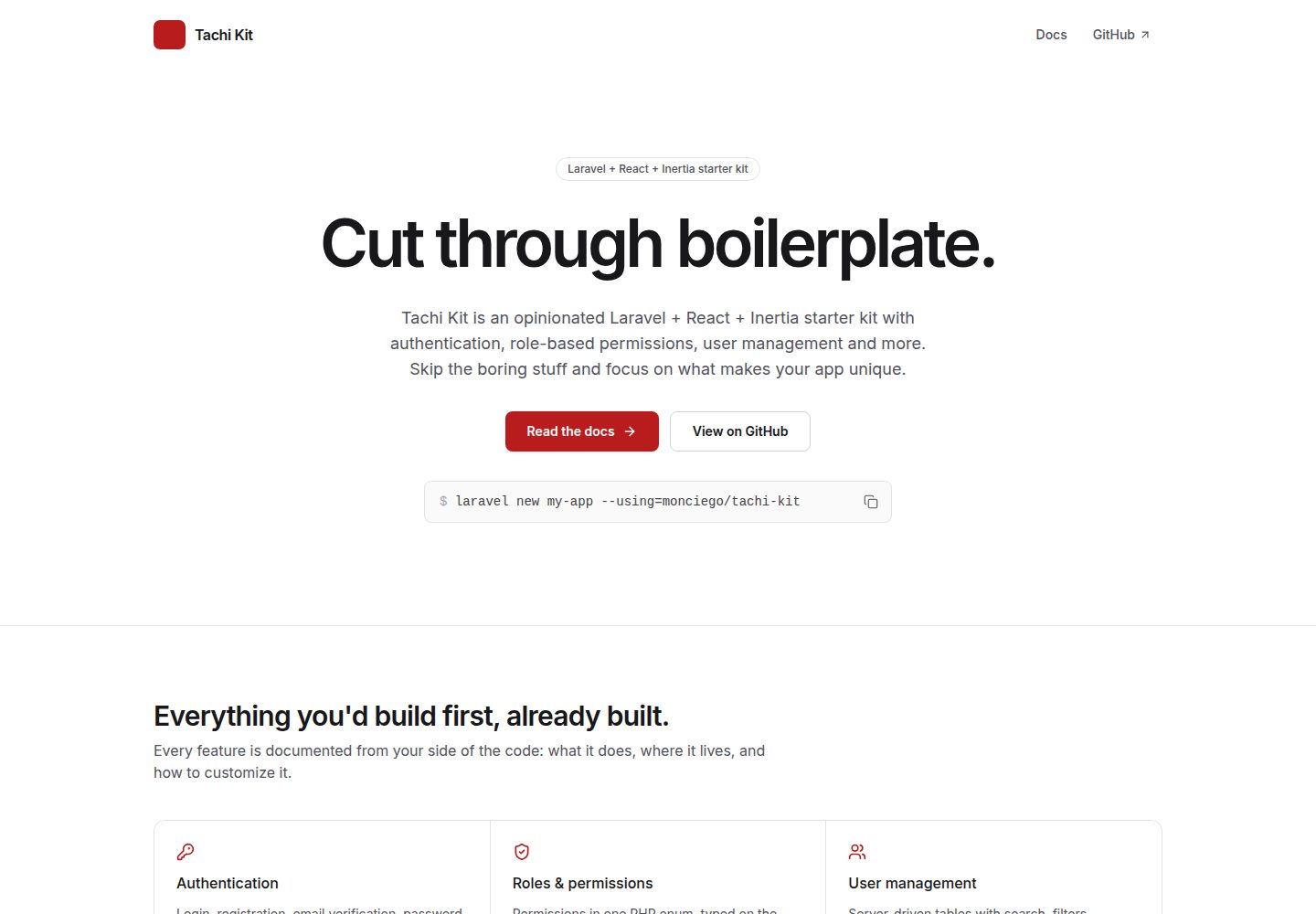
Extends the official Laravel React starter kit while preserving its conventions, so Laravel documentation usage still applies
LaravelReactStarter
tachi-kit — Laravel Starter Template
By monciego
Tachi Kit is a starter kit built on Laravel, React, and Inertia that adds authentication, role-based permissions, user management, and activity logging to the official Laravel React starter kit, making it suitable for quickly building admin-style applications.
Explore the design
Compare the page layouts and mobile experience. Open any screenshot for a closer look.
Desktop homepage1 / 3
Desktop captureTop of page
Actual screenshot captured by the server browser.
All pages & views 3
Screenshots show visual appearance; interactive behavior may differ.
Recorded 2026-10-02View source
What stands out
A quick read of the recorded project description.
Authentication covers login, registration, email verification, password reset, two-factor authentication, and passkeys, and restricts login for inactive accounts
Roles and permissions are based on spatie/laravel-permission, with built-in superadmin, admin, and user roles, support for custom roles, and policy protection
User management provides a server-driven data table with search, faceted filtering, sorting, pagination, bulk deletion, and account status
Activity logging records users, role permissions, password changes, and login/logout events; by default it is visible only to roles with activity.view, and records older than 365 days are cleaned up daily
Types span the front end and back end, using Wayfinder route helpers and TypeScript role and permission constants generated from PHP enums, with PHPStan level 7 and GitHub Actions quality gates configured
Template Details
Tachi Kit is a Laravel + React + Inertia starter kit maintained by monciego, positioned as an "opinionated" starting kit that extends the official Laravel React starter kit with modules commonly used in admin panels. It preserves the official starter kit's conventions, so usage described in the Laravel documentation still applies.
In terms of features, it provides login, registration, email verification, password reset, two-factor authentication, and passkeys (based on Laravel Fortify), and restricts login for inactive accounts. Roles and permissions use spatie/laravel-permission, with built-in superadmin, admin, and user roles, support for custom roles, and policies that protect the superadmin from being edited, deactivated, or deleted. User management provides a server-driven data table with search, faceted filtering, sorting, pagination, bulk deletion, and account status. The dashboard includes stat cards, a monthly registrations chart, and a recent users table, loaded via deferred props. Activity logging is based on spatie/laravel-activitylog and records users, role permissions, password changes, as well as login, logout, and failed login events; by default it is visible only to roles with the activity.view permission, and records older than 365 days are cleaned up daily by a scheduler. Profile settings cover name, email, avatar upload, password, 2FA, passkeys, and appearance (light/dark/system). Types span the front end and back end, using Wayfinder route helpers, TypeScript role and permission constants generated from PHP enums, and PHPStan level 7 checks. Quality gates include Pest, Pint, PHPStan, oxlint, formatting, and tsc, all run in GitHub Actions.
The tech stack is Laravel, React, Inertia, Tailwind CSS, shadcn/ui, and Pest. The runtime requires PHP 8.4+ with Composer, Node.js 22+ with npm, and defaults to SQLite for the database, though MySQL can also be used. Installation can be done via the Laravel installer or Composer to create the project, followed by installing front-end dependencies and running composer dev to start the application and Vite. Production seeding creates only roles and permissions, not demo accounts; the first superadmin must be created via php artisan tachi:superadmin.
Configuration options include ALLOWS_PUBLIC_REGISTRATION (default false; when disabled, /register returns 404 and accounts can only be created by administrators on the users page) and AVATAR_DISK (default public; in production it can be switched to a public cloud disk such as s3). Kit-level settings are located in config/tachi.php. To add a new permission, add an enum in app/Enums/Permission.php, run php artisan tachi:types to regenerate front-end types, seed it, and update policies and front-end calls; if generated files are stale, tests will fail, and CI can catch missed steps.
Regarding licensing, the repository uses the MIT license, allowing free use, modification, commercial use, and distribution, provided the copyright and license notice are retained when distributing. Third-party assets such as demo images, fonts, and icons require separate license verification, and external services such as domains, hosting, and databases may incur additional charges.
LaravelReactStarter
Is it right for your project?
Use Cases
- Quickly building a Laravel + React project with authentication, role-based permissions, and a user management back end
- Extending the official Laravel React starter kit without implementing user management and activity logging from scratch
- Providing dashboard statistics, a monthly registrations chart, and a recent users table for an admin back end
- Recording audit events such as users, role permissions, password changes, and login/logout, with visibility controlled by permissions
- Sharing type-safe role and permission constants between the front end and back end, and integrating CI quality checks
Suitable For
- Developers familiar with Laravel and React who want to skip admin boilerplate
- Mid-to-back-office projects that need built-in role permissions and user management
- Management systems that need activity logs and audit trails
- Laravel projects that accept SQLite by default and can also switch to MySQL
Getting started & customization
Use these recorded setup notes alongside the repository instructions for your chosen version.
- 1
Requires PHP 8.4+ with Composer, Node.js 22+ with npm; the database defaults to SQLite and can also use MySQL
- 2
Create the project via laravel new my-app --using=monciego/tachi-kit or composer create-project monciego/tachi-kit my-app
- 3
After creation, run npm install to install front-end dependencies, then use composer dev to start the application and Vite together
- 4
Production seeding creates only roles and permissions, not demo accounts; run php artisan tachi:superadmin to create the first superadmin
- 5
When using MySQL, modify DB_CONNECTION, DB_HOST, DB_PORT, DB_DATABASE, DB_USERNAME, and DB_PASSWORD in .env before migrating
License & source material
Usage conditions & limitations
Free to use · keep license noticeThis entry covers the free version under the MIT license in the public repository; the free scope is the code of this version and does not mean external services or third-party assets are free.
Must comply with when using
- The code of this version may be used, modified, commercially used, and distributed for free.
- When distributing copies or substantial portions of the code, retain the original author's copyright notice and the full MIT license notice.
- The code is provided as is; warranties and limitations of liability are governed by the original license and applicable law.
Additional costs & items to verify
- The project is built on the official Laravel React starter kit and follows its conventions, so usage and limitations must also comply with the upstream starter kit's conventions.
- The runtime requires PHP 8.4 or higher and Composer; environments below that version cannot use it.
- Front-end builds require Node.js 22 or higher and npm.
- The database supports only the default SQLite or MySQL; other databases are not supported.
- In production, it is recommended to switch avatar storage to a public cloud disk such as s3, which may involve external cloud storage services and their costs.
- Production seeding does not create demo accounts; run php artisan tachi:superadmin separately to create the first superadmin.
- Activity logs are visible only to superadmins by default; other roles must be manually granted the activity.view permission.
- Activity log records older than 365 days are cleaned up daily by a scheduler and cannot be retained long term.
- Public registration is disabled by default; in that case the registration page returns 404 and accounts can only be created by administrators on the users page.
- Demo images, fonts, icons, and other third-party assets must be checked under their respective licenses and cannot be judged solely by the code's MIT license.
- External services such as domains, hosting, databases, payments, or AI may incur additional charges.
View Original Text Basis
Permission is hereby granted, free of charge
Original License Text
It is built on top of the official [Laravel React starter kit](https://github.com/laravel/react-starter-kit) and keeps its conventions
Original README
PHP 8.4+ and Composer
Original README
Node.js 22+ and npm
Original README
SQLite (the default) or MySQL
Original README
Use `s3` (or another public cloud disk) in production.
Original README
In production, `php artisan db:seed --force` only seeds roles and permissions; no demo accounts are created.
Original README
Only superadmins can view the activity log by default.
Original README
entries older than 365 days are pruned daily by the scheduler.
Original README
https://github.com/monciego/tachi-kit/blob/main/LICENSEhttps://github.com/monciego/tachi-kit/blob/main/README.mdWhen off, `/register` returns 404 and sign-up links are hidden; admins create accounts from the Users page.
Original README
Compiled by DeepSeek based on repository license and README ·2026-10-02. Results only cover the materials read; dependencies, images, fonts, and subsequent term changes are subject to their respective original texts.
Project checks & description sources
Template Information
- Source platforms
- GitHub
- Documentation and maintenance reference score
- More documented · 88 / 100
- Technologies
- Laravel · React
- Website type
- Starter
How this score is calculated
Our heuristic uses license records (up to 30), a demo link (12), a preview (10), stars (15), recorded maintenance (15), description completeness (8), feature records (5) and classification data (5). It is not a code, security or performance test, or a Google score. A link does not establish tested functionality.
What to verify for this project
- Repository update recorded
- 2026-10-01
- Screenshot last checked
- 2026-10-02
A demo link is listed. Check it with your own content and viewport sizes; its presence does not confirm that forms, authentication or payments work.
The catalog identifies Laravel as the primary stack. Check the actual dependency manifest and lockfile for versions and hosting requirements. These notes use recorded metadata, not a code audit or a deployment test.
Use a selection guide →How this description was prepared
AI-assisted description based on catalog records and repository material. Repository authors are not automatically the reviewers of this description.
Automatically checked against source and license rules; no manual editorial review.
Inspect the recorded source material
SHA-256: 81e138b068b1bd61b81166c8b5cfd9adbaf684390b087283764e978c2f2ede7d
2026-10-02T14:39:32.679Z
Source file / repository# Tachi Kit **Cut through boilerplate.** Tachi Kit is an opinionated Laravel + React + Inertia starter kit with authentication, role-based permissions, user management and more. Skip the boring stuff and focus on what makes your app unique. It is built on top of the official [Laravel React starter kit](https://github.com/laravel/react-starter-kit) and keeps its conventions, so everything in the Laravel docs still applies. 📖 **Documentation:** [tachi-kit-docs.vercel.app](https://tachi-kit-docs.vercel.app/docs/) ## What's included - **Authentication**: login, registration, email verification, password reset, two-factor authentication and passkeys (Laravel Fortify). Inactive accounts can't sign in. - **Roles & permissions**: [spatie/laravel-permission](https://spatie.be/docs/laravel-permission) with built-in `superadmin`, `admin` and `user` roles, custom roles, and policies that protect superadmins from being edited, deactivated or deleted. - **User management**: server-driven data tables with search, faceted filters, sorting, pagination, bulk delete and account status. - **Dashboard**: stat cards, a monthly sign-ups chart and a recent users table, loaded as deferred props. - **Activity log**: a searchable audit trail of user changes, role and permission changes, password changes, and sign-ins, sign-outs and failed sign-ins ([spatie/laravel-activitylog](https://spatie.be/docs/laravel-activitylog)). Visible to roles with the `activity.view` permission (superadmins by default); entries older than 365 days are pruned daily by the scheduler. - **Profile settings**: name, email, avatar upload, password, 2FA, passkeys and appearance (light/dark/system). - **Typed end to end**: [Wayfinder](https://github.com/laravel/wayfinder) route helpers, TypeScript role and permission constants generated from PHP enums, and PHPStan at level 7. - **Quality gates**: Pest, Pint, PHPStan, oxlint, formatting and `tsc`, all run in GitHub Actions. **Stack:** Laravel 13, React 19, Inertia 3, Tailwind CSS 4, shadcn/ui, Pest. ## Requirements - PHP 8.4+ and Composer - Node.js 22+ and npm - SQLite (the default) or MySQL ## Getting started **1. Create your app** with the Laravel installer: ```bash laravel new my-app --using=monciego/tachi-kit ``` Or with Composer: ```bash composer create-project monciego/tachi-kit my-app ``` Either one creates `.env`, a SQLite database, runs the migrations, seeds the roles and permissions, and links storage for avatars. **2. Install the frontend:** ```bash cd my-app && npm install ``` **3. Start the dev server** (the app and Vite together): ```bash composer dev ``` Open [http://localhost:8000](http://localhost:8000). To explore with demo accounts, seed them first: ```bash php artisan db:seed ``` Working from a clone of this repository instead? One command installs everything, creates `.env`, migrates, links storage and builds the assets: ```bash composer setup ``` See the [installation guide](https://tachi-kit-docs.vercel.app/docs/installation/) for details. ### Using MySQL SQLite works out of the box. To use MySQL, update `.env` before migrating: ```dotenv DB_CONNECTION=mysql DB_HOST=127.0.0.1 DB_PORT=3306 DB_DATABASE=tachikit DB_USERNAME=root DB_PASSWORD= ``` ### Demo accounts Outside production, seeding creates these accounts plus 50 members spread over the past year. The password for all of them is `password`. | Email | Role | | ---------------------------- | ---------- | | `[email protected]` | superadmin | | `[email protected]` | superadmin | | `[email protected]` | admin | | `[email protected]` | admin | ### Production In production, `php artisan db:seed --force` only seeds roles and permissions; no demo accounts are created. Create your first account with: ```bash php artisan tachi:superadmin ``` It asks for a name, email and password (or accepts `--name`, `--email` and `--password`). ## Configuration | Variable | Default | Description | | ---------------------------- | -------- | --------------------------------------------------------------------------------------------------------------------------------------- | | `ALLOWS_PUBLIC_REGISTRATION` | `false` | Allow anyone to sign up. When off, `/register` returns 404 and sign-up links are hidden; admins create accounts from the Users page. | | `AVATAR_DISK` | `public` | Filesystem disk for avatars. Use `s3` (or another public cloud disk) in production. The `public` disk needs `php artisan storage:link`. | Kit-level settings live in `config/tachi.php`. ## Roles & permissions | Role | Access | | ------------ | ----------------------------------------------------------------------------------------------------------------- | | `superadmin` | Everything. Hidden from non-superadmins, can't be deleted or deactivated, and can't be combined with other roles. | | `admin` | Manage users (view, create, edit, delete, change status). | | `user` | Default role for new sign-ups. No management access. | Only superadmins can view the activity log by default. Grant `activity.view` to another role from the Roles page to share it; superadmin activity stays hidden from non-superadmins. System roles can't be renamed or deleted. Custom roles can be created from the Roles page. ### Adding a permission 1. Add a case (and its label) to `app/Enums/Permission.php`, e.g. `case PostsPublish = 'posts.publish';`. 2. Regenerate the frontend types: `php artisan tachi:types`. 3. Seed it: `php artisan db:seed --class=RolePermissionSeeder` (grant it to `admin` there if needed). 4. Check it in a policy with `$user->checkPermissionTo(Permission::PostsPublish->value)`, and in React with `can(PERMISSIONS.POSTS_PUBLISH)` from `usePermissions()`. A test fails if the generated file is out of date, so CI catches a forgotten step 2. ## Commands | Command | Description | | -------------------------------------------- | -------------------------------------------------------------------- | | `composer dev` | Start the app and Vite together (`php artisan dev`). | | `composer test` | Pint, PHPStan and the Pest suite. | | `composer ci:check` | Everything CI runs (adds `npm run check` and `npm run types:check`). | | `php artisan test --filter="name"` | Run a single test. | | `npm run check:fix` | Fix lint and formatting issues in the frontend. | | `php artisan wayfinder:generate --with-form` | Regenerate route helpers (always pass `--with-form`). | | `php artisan tachi:types` | Regenerate role and permission constants for TypeScript. | | `php artisan tachi:superadmin` | Create a superadmin account. | ## License Tachi Kit is open-source software licensed under the MIT license.
Explore similar templates
Compare previews and descriptions within the same stack and category.

sage
Sage is a WordPress starter theme maintained by Roots, using Laravel Blade components and templates, Vite builds, Tailwind CSS, and built-in block editor support.
Laravel · Starter

wave
Wave is an open-source SaaS starter kit built on Laravel and released under the MIT license.
Laravel · SaaS

filament-starter
A Laravel TALL stack starter template maintained by Log1x, with a preconfigured Filament admin panel and plugins including Curator, Gravatar, Exceptions, Jobs Monitor, Breezy, Peek, and Logger.
Laravel · Starter

electrik
Electrik is a Laravel SaaS starter kit installed as a Composer package, with authentication, teams, Stripe subscription billing, and the Slate 3 interface under the Electrik\ namespace rather than copied into App\.
Laravel · SaaS

php-saas
php-saas is a Laravel-based SaaS starter positioned as an everything-included kit. It generates new projects via a global Composer command and includes authentication with two-factor, API tokens, Stripe and Paddle billing, and project, team, and organization management.
Laravel · SaaS

filament-jetstream
A Laravel starter kit that implements Jetstream-like authentication and account features using Filament's native panels and components. It includes login, registration, two-factor authentication, session management, user profiles, and optional teams and API tokens.
Laravel · Starter