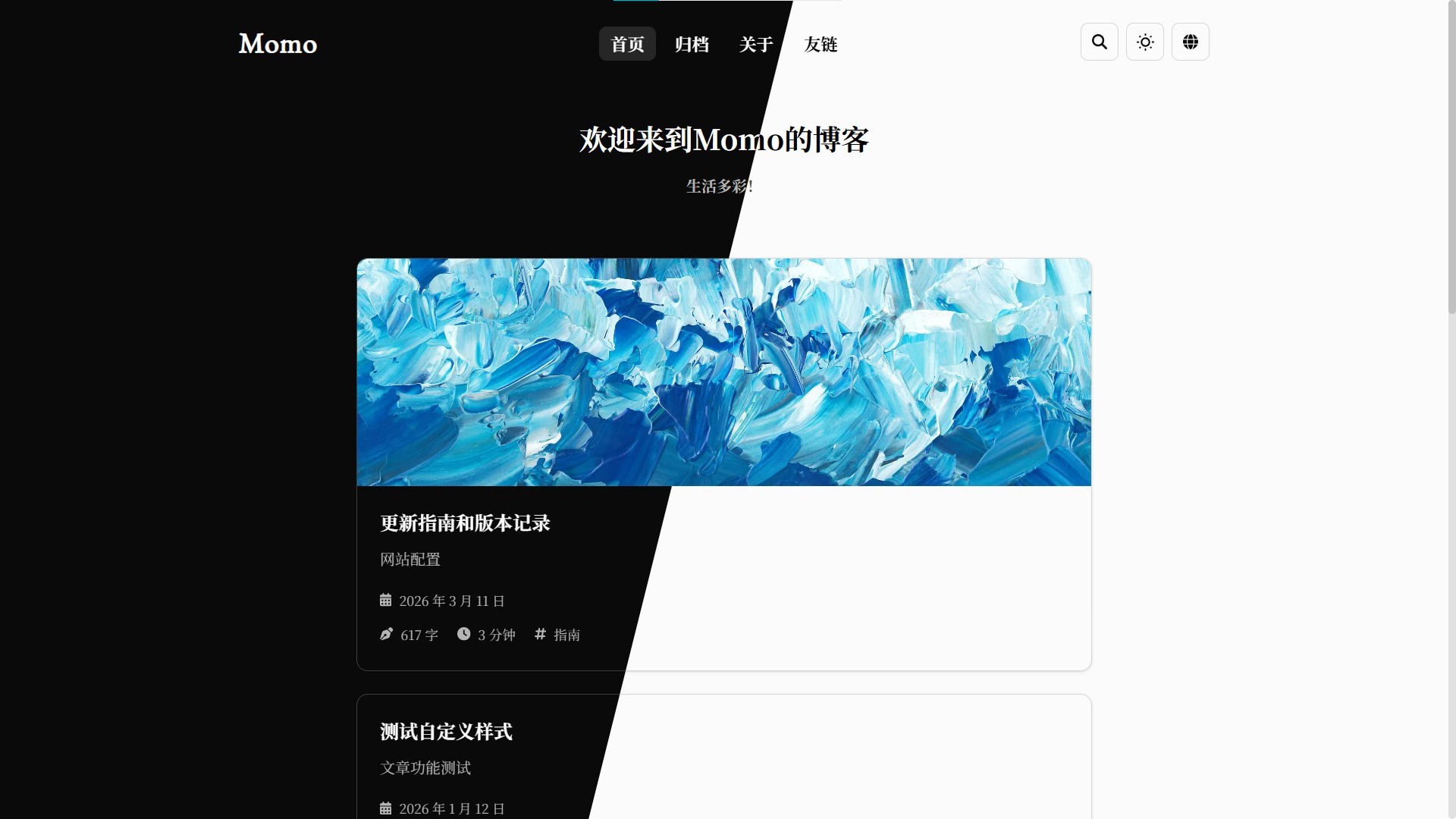
A minimalist blog built with Astro, using black and white as the main colors with blue accents, supporting dark mode and mobile adaptation
AstroBlog
Momo — Astro Blog Template
By Motues
Momo is a minimalist Chinese blog template built on Astro, with a built-in local CMS, pagefind search, and multilingual support, suited to individual writers who want to keep configuration to a minimum.
Explore the design
Compare the page layouts and mobile experience. Open any screenshot for a closer look.
Overview
Author-provided preview
Explore the available preview. Additional pages have not been captured.
One original preview is available. Open the full image to inspect the design.
Screenshots show visual appearance; interactive behavior may differ.
Recorded 2026-09-30View source
What stands out
A quick read of the recorded project description.
Built-in local CMS admin panel (pnpm cms) for visual post editing with live preview, sharing the same Markdown pipeline
Rich Markdown extensions: KaTeX, Typst, Alert, GitHub/NetEase Cloud Music cards, ruby annotations, collapsible sections, Expressive Code, and more
pagefind local search with no external service required; includes canonical, hreflang, Open Graph, sitemap, and other SEO configuration
The pnpm momo command line provides post creation, backup and restore, one-click updates, and environment checks
Supports switching between Simplified Chinese and English, with configuration centralized in src/config.ts
Template Details
Momo is a minimalist blog template built with Astro, using black and white as the main palette with blue accents. Its name comes from the default nickname assigned to new Xiaohongshu users, and the design likewise emphasizes starting from simplicity. It consolidates site information, theme toggles, multilingual settings, and homepage copy into a single configuration file, src/config.ts; the site and i18n settings in astro.config.mjs read from it automatically, reducing the need to edit multiple files back and forth.
In terms of content capabilities, the template covers the parts commonly used for blogging: KaTeX and Typst compiled to SVG at build time, Alert callout blocks, GitHub and NetEase Cloud Music cards, ruby annotations, collapsible sections, rainbow text, and other Markdown extensions, together with Expressive Code; images support a lightbox, automatic grid stitching for consecutive images, and LQIP diffuse gradient placeholders. Search uses pagefind to generate an index locally without relying on external services; comments require the separate Momo-Backend project and can be deployed locally or on Cloudflare. There is also a local CMS admin panel (pnpm cms) and a set of pnpm momo command-line tools for creating posts, backup and restore, updates, and environment checks.
The main barrier to use is the environment: Node.js >= 22 is required, the local CMS admin panel requires >= 22.18, and pnpm is specified as the package manager. Capabilities such as comments and the CMS admin panel depend on additional projects or local processes; whether a real backend has been connected must be verified against the Backend repository. Branches such as memos and v5 are maintained irregularly and are not guaranteed to match main. Before going live, it is advisable to run pnpm momo doctor to check the environment and to confirm the build configuration of the target deployment platform.
AstroBlog
Is it right for your project?
Use Cases
- A personal technical or lifestyle blog that should work out of the box without being bogged down by complex configuration
- Preference for local search and a local CMS, without introducing external services for search or a writing backend
- A writing project that needs a Chinese-English bilingual site, RSS, and basic SEO
- Willingness to use pnpm and a relatively recent Node.js version, and to accept maintaining the template via the command line
Suitable For
- Individual authors who mainly write in Markdown and care about typography and reading experience
- Front-end developers who can handle the Node.js environment and pnpm commands themselves
- Users who need comments and are willing to deploy Momo-Backend separately
Getting started & customization
Use these recorded setup notes alongside the repository instructions for your chosen version.
- 1
Environment requirements: Node.js >= 22 (24 LTS recommended); the local CMS admin panel requires >= 22.18; pnpm is used as the package manager
- 2
The comment feature depends on the separate Momo-Backend project, supports local or Cloudflare deployment, and the backend must be verified as ready before integration
- 3
The memos and v5 branches are maintained irregularly and are not guaranteed to match main; confirm branch status before choosing them
- 4
The template can be updated with pnpm momo update; adding --dry-run first to preview is recommended; posts, images, and src/config.ts are preserved
License & source material
Usage conditions & limitations
Free to use · keep license noticeThis listing covers the free version in the public repository under the MIT license; the free scope is the code of that version and does not mean that external services or third-party assets are free.
Must comply with when using
- The code of this version may be used, modified, used commercially, and distributed free of charge.
- When distributing copies or substantial portions of the code, retain the original author's copyright notice and the complete MIT license notice.
- The code is provided as is; warranties and limitations of liability are governed by the original license and applicable law.
Additional costs & items to verify
- Demo images, fonts, icons, and other third-party assets must be checked against their respective licenses and cannot be judged solely by the code's MIT license.
- External services such as domains, hosting, databases, payments, or AI may incur separate charges.
- The comment feature depends on the separate Momo-Backend project, which is an additional external service requiring separate deployment and verification.
- The environment requires Node.js >= 22, the local CMS admin panel requires >= 22.18, and pnpm is specified as the package manager.
- Branches such as memos and v5 are maintained irregularly, and consistency with the main branch cannot be guaranteed.
- The v5 branch is no longer maintained.
View Original Text Basis
Permission is hereby granted, free of charge
Original License Text
* **评论功能**:支持本地部署和 Cloudflare 部署,具体参考 [Backend](https://github.com/Motues/Momo-Backend)
Original README
> 环境要求:Node.js **>= 22**(推荐 24 LTS;本地 CMS 管理后台需要 **>= 22.18**),包管理使用 [pnpm](https://pnpm.io/zh/)
Original README
下面是一些分支,会不定期进行维护,无法保证与 `main` 分支一致
Original README
https://github.com/Motues/Momo/blob/main/LICENSEhttps://github.com/Motues/Momo/blob/main/README.md* `v5`:v5 版本,已经停止维护
Original README
Compiled by DeepSeek based on repository license and README ·2026-09-30. Results only cover the materials read; dependencies, images, fonts, and subsequent term changes are subject to their respective original texts.
Project checks & description sources
Template Information
- Source platforms
- GitHub
- Documentation and maintenance reference score
- More documented · 87 / 100
- Technologies
- Astro
- Website type
- Blog
How this score is calculated
Our heuristic uses license records (up to 30), a demo link (12), a preview (10), stars (15), recorded maintenance (15), description completeness (8), feature records (5) and classification data (5). It is not a code, security or performance test, or a Google score. A link does not establish tested functionality.
What to verify for this project
- Repository update recorded
- 2026-09-28
- Screenshot last checked
- 2026-09-30
A demo link is listed. Check it with your own content and viewport sizes; its presence does not confirm that forms, authentication or payments work.
The catalog identifies Astro as the primary stack. Check the actual dependency manifest and lockfile for versions and hosting requirements. These notes use recorded metadata, not a code audit or a deployment test.
Use a selection guide →How this description was prepared
AI-assisted description based on catalog records and repository material. Repository authors are not automatically the reviewers of this description.
Automatically checked against source and license rules; no manual editorial review.
Inspect the recorded source material
SHA-256: 51d63c0d9bd61fa9b9c21309cee9fc72926ab3479234b0f324c4ba0636cd1646
2026-09-30T15:49:08.823Z
Source file / repository# Momo
<div align="center">
<img src="./doc/images/dark-light.jpg">
<p>一个极简的Blog模板,使用 <a href="https://astro.build/">Astro</a> 搭建</p>
<small><ins>简体中文</ins></small> <small><a href="./doc/README_en.md">English</a></small>
</div>
## ✨ 特性
Momo 取自小红书📕,每个新用户最初的昵称,象征着初始新生。博客的设计理念也来自于此,从简约出发,在复杂功能与简约设计之间达到一种平衡。
* **极简设计**:页面设计简约,黑白为主色调,蓝色进行点缀
* **深色模式**:支持手动切换或自动跟随系统
* **移动端适配**:组件针对移动端进行优化,拥有和电脑浏览器一样的流畅体验
* **图片体验**:点击图片打开灯箱;连续放置的多张图片自动拼成网格;文章内图片支持 LQIP 弥散渐变占位
* **丰富的 Markdown 语法**:KaTeX、Typst(构建期编译为 SVG)、Alert 提示块、GitHub / 网易云音乐卡片、引用组件、注音(Ruby)、折叠、彩虹文字、下划线、新标签页链接,Expressive Code 等
* **本地搜索**:使用 [pagefind](https://pagefind.app/) 实现本地化搜索,无需外部服务
* **国际化(i18n)**:支持多语言切换,目前支持简体中文、英文
* **评论功能**:支持本地部署和 Cloudflare 部署,具体参考 [Backend](https://github.com/Motues/Momo-Backend)
* **SEO**:canonical、hreflang 多语言对照、Open Graph / Twitter Card、结构化数据、`sitemap.xml` 与 `robots.txt`
* **本地 CMS 管理后台**:`pnpm cms` 启动,可视化编辑文章与实时预览(与博客共用同一条 Markdown 管线),无需手动改 Markdown
* **命令行工具**:`pnpm momo` 提供配置备份/恢复、一键更新、新建文章、环境检查等能力
* **TypeScript**:站点源码与 `src/plugins/` 自定义插件链均使用 TypeScript 编写
* 其他基本功能:文章分类,目录,RSS订阅,字数统计,阅读时间
## 🚀 快速开始
> 环境要求:Node.js **>= 22**(推荐 24 LTS;本地 CMS 管理后台需要 **>= 22.18**),包管理使用 [pnpm](https://pnpm.io/zh/)
1. 克隆本项目
```bash
git clone https://github.com/Motues/Momo.git
cd Momo
```
2. 运行 `pnpm install` 安装依赖(使用 `npm install -g pnpm` 安装 `pnpm`)
3. 运行 `pnpm dev` 启动开发服务器
## 🔧 配置
参考 [配置指南](./doc/config_zh-cn.md),详细信息可以访问 [Momo](https://momo.motues.top/intro/config),阅读对应文章获取详细信息。
站点信息、主题开关、多语言与首页 Cover 文案统一在 `src/config.ts` 中配置;`astro.config.mjs` 的 `site` 与 `i18n` 会自动读取该文件的配置。
## 📚 更新
参考 [更新指南](./doc/release_zh-cn.md),介绍如何更新项目,详细信息可以访问 [Momo](https://momo.motues.top/intro/release)。
执行 `pnpm momo update` 可以自动完成「检查 GitHub Release → 下载新版本源码 → 备份 → 覆盖代码 → 安装依赖」,并提示本次更新中需要手工合并的配置文件。你自己的文章与图片(`src/content`、`src/assets`、`public`)和 `src/config.ts` 会原样保留;先加 `--dry-run` 可以只预览变更、不写入任何文件。
## 🍃 分支
下面是一些分支,会不定期进行维护,无法保证与 `main` 分支一致
* `memos`:实现 Memos 卡片功能
* `v5`:v5 版本,已经停止维护
## ⚡ 指令
以下所有的指令可以在根目录下面执行
| 指令 | 作用 |
| --- | --- |
| `pnpm install` | 安装依赖 |
| `pnpm dev` | 启动本地服务器,运行在 `http://localhost:4321` |
| `pnpm build` | 构建发布版本到 `./dist` 目录下(含 pagefind 搜索索引) |
| `pnpm preview` | 预览构建后的发布版本 |
| `pnpm astro ...` | 运行 `astro` 命令,例如 `astro add` |
| `pnpm cms` | 启动本地 CMS 管理后台,运行在 `http://localhost:5188`(首次使用前先执行 `pnpm install`) |
| `pnpm momo new [path]` | 新建文章,路径省略时按日期自动生成,例如 `pnpm momo new docs/test` |
| `pnpm momo backup` | 备份 `src/config.ts` 到 `.backup/`(加 `--config` 备份全部配置文件,加 `--all` 再连同文章内容与图片) |
| `pnpm momo restore [名称]` | 从备份恢复(默认最近一次) |
| `pnpm momo update` | 从 [GitHub Release](https://github.com/Motues/Momo/releases) 更新模板代码并同步依赖(保留自己的文章与图片;`--dry-run` 预览变更) |
| `pnpm momo clean` | 清理构建产物与缓存(加 `--all` 连同 `node_modules`) |
| `pnpm momo doctor` | 检查环境、依赖与项目状态 |
| `pnpm momo --help` | 查看全部 momo 命令与选项 |
## 📚 参考
* [Astro](https://astro.build/)
* [Fuwari](https://github.com/saicaca/fuwari)
* [Tyndall](https://github.com/moyuin-aka/tyndall-public)Explore similar templates
Compare previews and descriptions within the same stack and category.

astrowind
AstroWind is a free, open-source Astro starter theme using Astro and Tailwind CSS, released under the MIT license.
Astro · Blog

astro-paper
AstroPaper is a minimal, responsive, accessible, and SEO-friendly Astro blog theme. Articles are stored as Markdown/MDX in src/content/posts/, with subdirectories affecting URLs.
Astro · Blog

fuwari
Fuwari is a static blog template built with Astro and Tailwind CSS for personal blogs. It manages posts as Markdown files in src/content/posts/, with frontmatter for title, date, description, cover, tags, categories, draft status, and language.
Astro · Blog

Firefly
Firefly is a clean personal blog theme forked from Astro and Fuwari, offering four background modes, single/double sidebar and list/grid layouts, Pagefind client-side full-text search, and a six-language UI.
Astro · Blog

astro-theme-cactus
Astro Cactus is an Astro-based blog and portfolio theme that uses Markdown/MDX content collections to manage posts, notes, and tags, with frontmatter type-checked by a schema.
Astro · Portfolio

astrofy
Astrofy is a free and open-source personal portfolio website template built with Astro and TailwindCSS, with built-in blog, CV timeline, project showcase, store, and RSS feed modules.
Astro · Portfolio