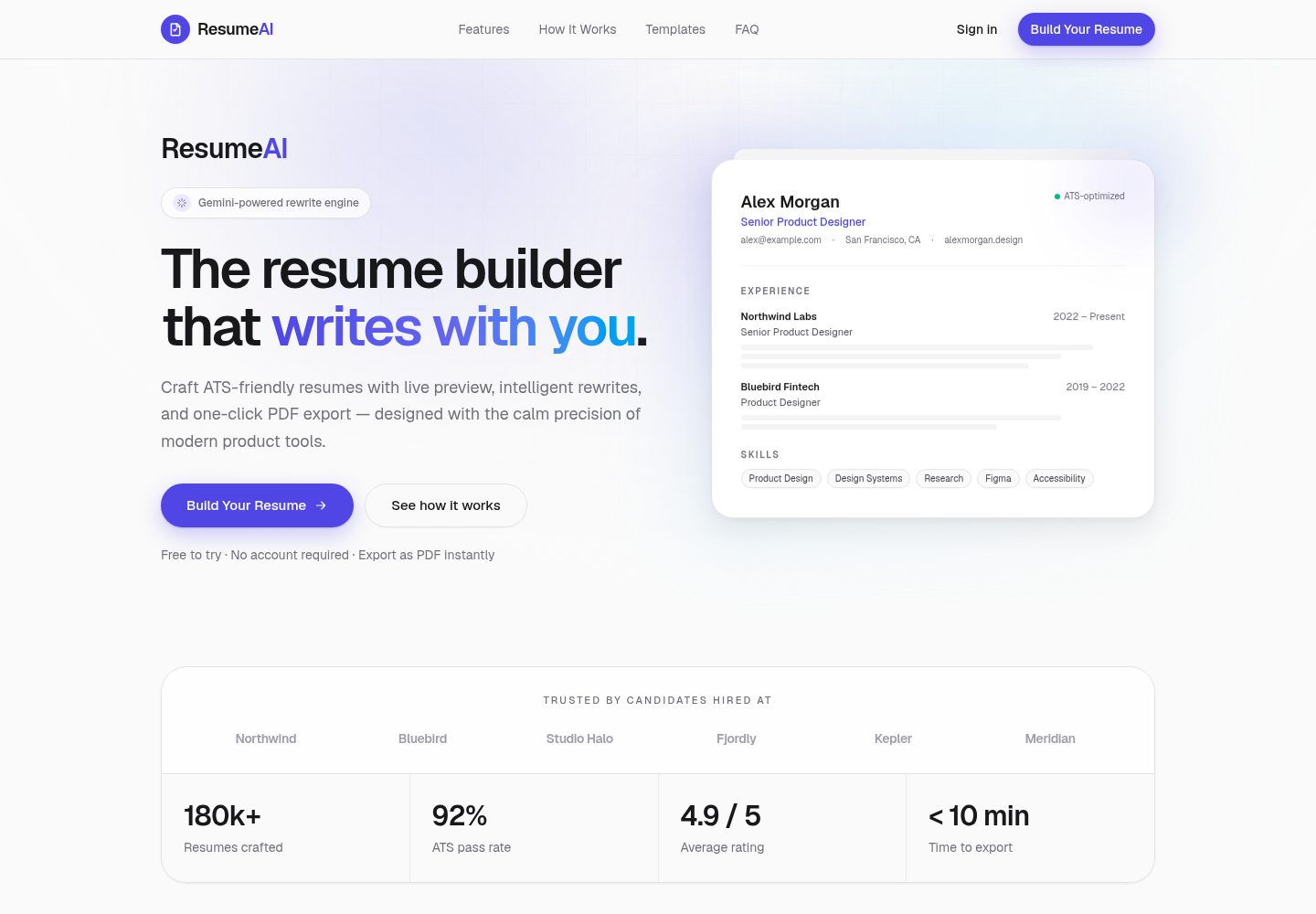
The marketing landing page includes a product introduction, template gallery, FAQ, and a CTA into the editor
Next.jsReactPortfolioSaaS
resumeai-saas — Next.js Portfolio Template
By Muhammad-Mansha
A resume builder application based on Next.js App Router, offering six templates, A4 live preview, local draft saving, and Google Gemini summary rewriting.
Explore the design
Compare the page layouts and mobile experience. Open any screenshot for a closer look.
Desktop homepage1 / 2
Desktop captureTop of page
Actual screenshot captured by the server browser.
All pages & views 2
Screenshots show visual appearance; interactive behavior may differ.
Recorded 2026-10-14View source
What stands out
A quick read of the recorded project description.
The editor covers personal information, summary, experience, education, skills, and project fields, with an A4 live preview
Six templates share the same resume data, with differences in layout hierarchy: Modern, Professional, Minimal, Executive, Creative, Developer
Drafts are automatically saved via localStorage, the template selection is restored after refresh, and deep links such as /builder?template=developer are supported
Google Gemini rewrites the personal summary via the server-side POST /api/improve, with the key stored only on the server
Export uses A4 print styles, hiding interface elements when printing
Template Details
ResumeAI is a resume builder website template. The README describes it as comprising two parts: a marketing landing page and a full resume editor. The landing page hosts the product introduction, template gallery, FAQ, and an entry point into the editor; the editor covers fields such as personal information, personal summary, work experience, education, skills, and projects, with an A4 layout live preview where edits are immediately reflected on the resume sheet.
The template provides six layouts: Modern (single column, underlined sections), Professional (centered header with a date timeline), Minimal (whitespace and light font weight), Executive (bold header, highlighting management experience), Creative (dark sidebar plus main content column), and Developer (skills and projects placed first). The README emphasizes that these templates share the same resume data, with differences in layout hierarchy rather than color scheme. Drafts are automatically saved via localStorage, the selected template is restored after refresh, and deep links such as /builder?template=developer are supported to open a specified template directly. Export relies on the browser's A4 print styles, hiding interface elements when printing.
AI capabilities are concentrated in the server-side POST /api/improve, which uses Google Gemini to rewrite the personal summary, can accept the current work experience text as optional context, and states that facts are preserved. The API key is stored only in server-side environment variables; the client never touches the key. When no key is configured, the remaining features remain usable, and AI rewriting returns a clear configuration error. The README does not describe an account system, cloud sync, ATS keyword analysis, or server-side PDF generation; these are listed under Future improvements.
Next.jsPortfolioSaaS
Is it right for your project?
Use Cases
- Fill in and lay out an A4 resume in the browser, switching among six templates to compare layout effects
- Use Google Gemini to rewrite the wording of the personal summary, passing work experience text as context
- Continue editing after refreshing or closing the page, relying on localStorage to restore the draft and the last selected template
- Export the resume as a PDF via the print function
- Enter the editor for a specified template directly from the landing page or a deep link with a template parameter
Suitable For
- Developers who need a resume-type website template with both a marketing landing page and an editor
- Projects looking to reference how form editing, live preview, and print styles are implemented under Next.js App Router
- Developers who want to learn how to call Gemini on the server and avoid exposing the key to the browser
- Template users who need multiple resume layouts sharing the same data model
Getting started & customization
Use these recorded setup notes alongside the repository instructions for your chosen version.
- 1
Requires Node.js 20+ and npm 10+; run git clone, npm install, cp .env.example .env.local in sequence
- 2
Fill in GEMINI_API_KEY in .env.local to enable AI rewriting; this variable is server-side only and must not be prefixed with NEXT_PUBLIC_
- 3
Run npm run dev to start the development server and visit http://localhost:3000; build, start, and lint scripts are also available
- 4
When deploying to Vercel, select the Next.js framework preset and configure environment variables; the optional NEXT_PUBLIC_SITE_URL is used for metadata and Open Graph
- 5
The README does not provide configuration steps for a database, accounts, or cloud storage
License & source material
Usage conditions & limitations
Free to use · keep license noticeThis entry covers the free version under the MIT license in the public repository; the free scope is the code of this version and does not mean that external services or third-party assets are free.
Must comply with when using
- Free use, modification, commercial use, and distribution of this version's code are permitted.
- When distributing copies or substantial portions of the code, retain the original author's copyright notice and the full MIT license notice.
- The code is provided as is; warranties and limitations of liability are governed by the original license and applicable law.
Additional costs & items to verify
- Demo images, fonts, icons, and other third-party assets must be checked against their respective licenses and cannot be judged solely by the code's MIT license.
- External services such as domains, hosting, databases, payments, or AI may incur separate charges.
- The AI rewriting feature depends on the server-side environment variable GEMINI_API_KEY, and the key must not be exposed to the browser.
- Using AI rewriting requires applying for a Gemini API Key from Google AI Studio yourself.
- Enabling AI features requires configuring GEMINI_API_KEY, and this variable is server-side only.
- GEMINI_API_KEY must not be prefixed with NEXT_PUBLIC_, otherwise it will leak to the client.
- When no API key is configured, AI rewriting is unavailable and only returns a configuration error; other features remain operational.
View Original Text Basis
Permission is hereby granted, free of charge
Original License Text
| **Server-only key** | `GEMINI_API_KEY` never ships to the browser |
Original README
Get an API key from [Google AI Studio](https://aistudio.google.com/apikey).
Original README
| `GEMINI_API_KEY` | Yes for AI | **Server only** | Google Gemini API key for `POST /api/improve` |
Original README
- Never prefix `GEMINI_API_KEY` with `NEXT_PUBLIC_`.
Original README
https://github.com/Muhammad-Mansha/resumeai-saas/blob/main/LICENSEhttps://github.com/Muhammad-Mansha/resumeai-saas/blob/main/README.md- Without a key, the rest of the app still works; Improve with AI returns a clear configuration error.
Original README
Compiled by DeepSeek based on repository license and README ·2026-10-14. Results only cover the materials read; dependencies, images, fonts, and subsequent term changes are subject to their respective original texts.
Project checks & description sources
Template Information
- Source platforms
- GitHub
- Documentation and maintenance reference score
- More documented · 85 / 100
- Technologies
- Next.js · React
- Website type
- Portfolio · SaaS
How this score is calculated
Our heuristic uses license records (up to 30), a demo link (12), a preview (10), stars (15), recorded maintenance (15), description completeness (8), feature records (5) and classification data (5). It is not a code, security or performance test, or a Google score. A link does not establish tested functionality.
What to verify for this project
- Repository update recorded
- 2026-08-06
- Screenshot last checked
- 2026-10-14
A demo link is listed. Check it with your own content and viewport sizes; its presence does not confirm that forms, authentication or payments work.
The catalog identifies Next.js as the primary stack. Check the actual dependency manifest and lockfile for versions and hosting requirements. These notes use recorded metadata, not a code audit or a deployment test.
Use a selection guide →How this description was prepared
AI-assisted description based on catalog records and repository material. Repository authors are not automatically the reviewers of this description.
Review declaration: codex-user-requested-batch-review-20261015 · 2026-10-15
Inspect the recorded source material
SHA-256: 175e9e092839703aa0506f69f092d71d804a0f7b986d9bee1c1b78cbcc28fa16
2026-10-14T22:43:36.122Z
Source file / repository# ResumeAI
### AI-powered resume builder for ATS-friendly careers
Build, refine, and export professional resumes in minutes. ResumeAI combines a polished builder, six distinct templates, Google Gemini rewrites, and browser-based PDF export — with drafts saved locally on your device.
[](https://resumeai-saas-gray.vercel.app)
[](https://github.com/Muhammad-Mansha/resumeai-saas/stargazers)
[](https://nextjs.org/)
[](https://react.dev/)
[](https://www.typescriptlang.org/)
[](https://tailwindcss.com/)
[](https://ai.google.dev/)
[](https://resumeai-saas-gray.vercel.app)
**Live demo:** [https://resumeai-saas-gray.vercel.app](https://resumeai-saas-gray.vercel.app)
**Repository:** [Muhammad-Mansha/resumeai-saas](https://github.com/Muhammad-Mansha/resumeai-saas)
---
## Hero
<p align="center">
<a href="https://resumeai-saas-gray.vercel.app">
<img src="./public/og.svg" alt="ResumeAI — AI-powered resume builder" width="920" />
</a>
</p>
<p align="center">
<a href="https://resumeai-saas-gray.vercel.app"><strong>Open Live Demo →</strong></a>
·
<a href="https://resumeai-saas-gray.vercel.app/builder"><strong>Launch Builder →</strong></a>
</p>
---
## Features
- **Marketing landing page** — product story, templates gallery, FAQ, and clear CTAs into the builder
- **Full resume builder** — personal info, summary, experience, education, skills, and projects
- **Live A4 preview** — edits update the resume sheet instantly
- **Six distinct templates** — Modern, Professional, Minimal, Executive, Creative, and Developer
- **Local draft autosave** — resume content persisted in `localStorage`
- **Template preference memory** — selected layout restored after refresh
- **Landing → builder deep links** — open a template with `/builder?template=developer`
- **Print / PDF export** — A4 print styles that hide UI chrome and keep the resume sheet clean
- **Responsive UI** — usable on desktop and mobile, built with Tailwind CSS
---
## AI Features
ResumeAI uses **Google Gemini** on the server to improve professional summary wording.
| Capability | Details |
| --- | --- |
| **Improve with AI** | Rewrites the Professional Summary into polished, ATS-friendly prose |
| **Experience context** | Sends current experience text as optional context (facts are preserved) |
| **Server-only key** | `GEMINI_API_KEY` never ships to the browser |
| **Safe failure modes** | Clear errors when the key is missing or the model request fails |
| **Works without AI** | Editing, templates, preview, persistence, and PDF still work offline of Gemini |
Model used by `/api/improve`: `gemini-3.6-flash` (configured in `src/app/api/improve/route.ts`).
Get an API key from [Google AI Studio](https://aistudio.google.com/apikey).
---
## Resume templates
Each template uses the **same resume data** with a **different layout hierarchy** — not a simple color swap.
| Template | Layout focus | Best for |
| --- | --- | --- |
| **Modern** | Clean single-column, underlined sections | General professionals |
| **Professional** | Centered letterhead + date rail timeline | Finance, consulting, operations |
| **Minimal** | Editorial whitespace, light typography | Highly readable, clean resumes |
| **Executive** | Bold letterhead, leadership-first hierarchy | Managers and senior leads |
| **Creative** | Dark sidebar + main content column | Designers and creative roles |
| **Developer** | Skills + projects elevated at the top | Software engineers |
Try them live:
- [Modern](https://resumeai-saas-gray.vercel.app/builder?template=modern)
- [Professional](https://resumeai-saas-gray.vercel.app/builder?template=professional)
- [Minimal](https://resumeai-saas-gray.vercel.app/builder?template=minimal)
- [Executive](https://resumeai-saas-gray.vercel.app/builder?template=executive)
- [Creative](https://resumeai-saas-gray.vercel.app/builder?template=creative)
- [Developer](https://resumeai-saas-gray.vercel.app/builder?template=developer)
---
## Screenshots
<p align="center">
<img src="./public/og.svg" alt="ResumeAI Open Graph preview" width="720" />
</p>
| Surface | What to open |
| --- | --- |
| **Landing page** | [resumeai-saas-gray.vercel.app](https://resumeai-saas-gray.vercel.app) |
| **Resume builder** | [ /builder ](https://resumeai-saas-gray.vercel.app/builder) |
| **Brand / OG asset** | [`public/og.svg`](./public/og.svg) |
| **App icon** | [`public/icon.svg`](./public/icon.svg) |
> Tip: capture PNG screenshots of the landing page and builder (Modern + Creative + Developer) into a `docs/screenshots/` folder and replace the placeholders above for an even stronger GitHub presence.
---
## Installation
### Prerequisites
- Node.js 20+ (recommended)
- npm 10+
### Setup
```bash
git clone https://github.com/Muhammad-Mansha/resumeai-saas.git
cd resumeai-saas
npm install
cp .env.example .env.local
```
Edit `.env.local` and add your Gemini key:
```bash
GEMINI_API_KEY=your-gemini-api-key
```
Start the development server:
```bash
npm run dev
```
Open [http://localhost:3000](http://localhost:3000).
### Scripts
| Command | Description |
| --- | --- |
| `npm run dev` | Start the development server |
| `npm run build` | Create an optimized production build |
| `npm run start` | Serve the production build |
| `npm run lint` | Run ESLint |
### Deploy on Vercel
1. Import [Muhammad-Mansha/resumeai-saas](https://github.com/Muhammad-Mansha/resumeai-saas) in [Vercel](https://vercel.com).
2. Framework preset: **Next.js**.
3. Add environment variables (see below).
4. Deploy.
Current production deployment: [https://resumeai-saas-gray.vercel.app](https://resumeai-saas-gray.vercel.app)
---
## Environment variables
| Variable | Required | Scope | Description |
| --- | --- | --- | --- |
| `GEMINI_API_KEY` | Yes for AI | **Server only** | Google Gemini API key for `POST /api/improve` |
| `NEXT_PUBLIC_SITE_URL` | No | Public | Canonical site URL for metadata / Open Graph |
`.env.example` contains:
```bash
GEMINI_API_KEY=
```
**Security**
- Never prefix `GEMINI_API_KEY` with `NEXT_PUBLIC_`.
- The key is read only inside `src/app/api/improve/route.ts`.
- Client code calls `/api/improve`; the secret stays on the server.
- Without a key, the rest of the app still works; Improve with AI returns a clear configuration error.
---
## Project structure
```text
src/
app/ # App Router pages + /api/improve
components/
builder/ # Builder shell, forms, template selector
resume/ # Resume template layouts + renderer
landing/ # Marketing sections
layout/ # Site / builder chrome
ui/ # Shared UI primitives
constants/ # Site config, sample resume, template catalog
hooks/ # Client resume store (localStorage)
lib/ # Storage, formatting, AI client helpers
styles/ # Global tokens + A4 print CSS
types/ # Shared TypeScript types
public/
favicon.svg
icon.svg
og.svg
```
---
## Future improvements
- Section-level AI rewrites for experience and project bullets
- Account sync and multi-device cloud drafts
- Additional templates and denser visual customization
- Server-generated PNG Open Graph images
- Cover letter companion flow
- Optional ATS keyword analysis
- One-click server PDF generation (in addition to browser print)
---
## License
MIT License
Copyright (c) 2026 Muhammad Mansha
Permission is hereby granted, free of charge, to any person obtaining a copy
of this software and associated documentation files (the "Software"), to deal
in the Software without restriction, including without limitation the rights
to use, copy, modify, merge, publish, distribute, sublicense, and/or sell
copies of the Software, and to permit persons to whom the Software is
furnished to do so, subject to the following conditions:
The above copyright notice and this permission notice shall be included in all
copies or substantial portions of the Software.
THE SOFTWARE IS PROVIDED "AS IS", WITHOUT WARRANTY OF ANY KIND, EXPRESS OR
IMPLIED, INCLUDING BUT NOT LIMITED TO THE WARRANTIES OF MERCHANTABILITY,
FITNESS FOR A PARTICULAR PURPOSE AND NONINFRINGEMENT. IN NO EVENT SHALL THE
AUTHORS OR COPYRIGHT HOLDERS BE LIABLE FOR ANY CLAIM, DAMAGES OR OTHER
LIABILITY, WHETHER IN AN ACTION OF CONTRACT, TORT OR OTHERWISE, ARISING FROM,
OUT OF OR IN CONNECTION WITH THE SOFTWARE OR THE USE OR OTHER DEALINGS IN THE
SOFTWARE.
---
<p align="center">
Built with Next.js · React · TypeScript · Tailwind CSS · Google Gemini
<br />
<a href="https://resumeai-saas-gray.vercel.app">Live Demo</a>
·
<a href="https://github.com/Muhammad-Mansha/resumeai-saas">GitHub</a>
</p>
Explore similar templates
Compare previews and descriptions within the same stack and category.

Next.js SaaS Starter
The official Next.js SaaS starter template, integrating email/password authentication, Stripe Checkout subscriptions, a dashboard with user/team CRUD, basic Owner/Member RBAC, and activity logging.
Next.js · SaaS

SaaS-Boilerplate
SaaS-Boilerplate is an open-source SaaS starter template built with Next.js App Router, React 19, TypeScript, Tailwind CSS, and Shadcn UI.
Next.js · SaaS

create-t3-turbo
A full-stack TypeScript monorepo starter from T3 OSS, listed in the Vercel template directory. It splits apps for Next.js, Expo and optional TanStack Start, with shared packages for tRPC v11, better-auth, Drizzle + Supabase and shadcn/ui.
Next.js · Starter

saas-starter-kit
BoxyHQ's open-source Next.js enterprise SaaS starter template provides a reusable foundation with authentication, team management, SAML SSO, directory sync, webhooks, audit logs, and Stripe payments.
Next.js · SaaS
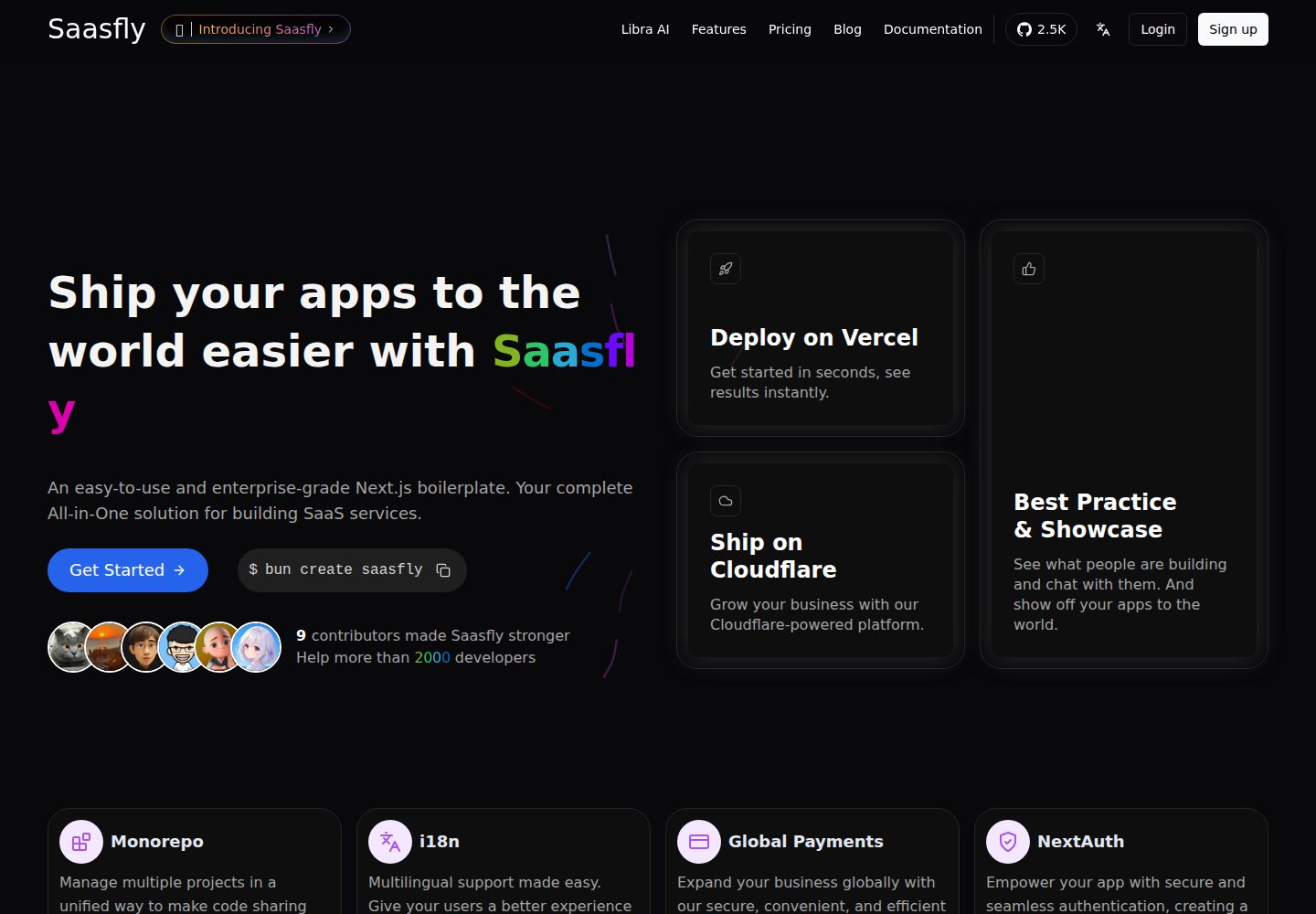
saasfly
Saasfly is an MIT-licensed Next.js SaaS starter template with built-in Clerk authentication, Stripe payment, PostgreSQL, Resend email, internationalization, SEO, tRPC, and Zustand. It is created via `bun create saasfly` and deployable on Vercel.
Next.js · SaaS

react-resume-template
A personal resume website template for software developers, built with Next.js, React, and TypeScript and styled with Tailwind CSS. Site content is driven by a single data file at /src/data/data.tsx, with types in dataDef.ts and images in src/images/.
Next.js · Portfolio