Pure static HTML/CSS/JS, with no build step, no framework, and no npm dependencies; open index.html to run it
HTMLPortfolioStarter
Portfolio-Starter — HTML Portfolio Template
By mullinsben
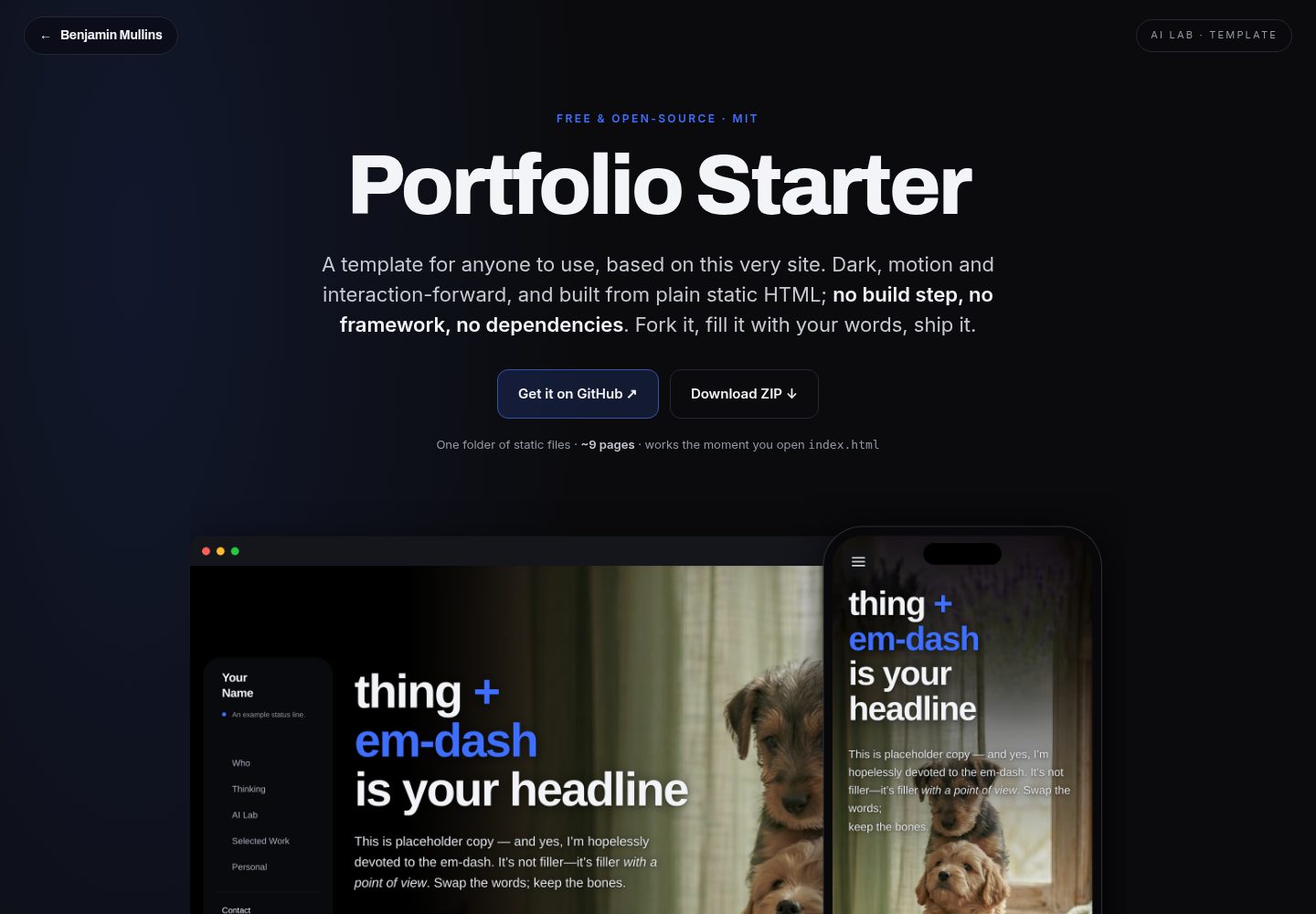
Portfolio-Starter is a free, open-source static HTML personal portfolio template with a dark, motion-forward design, requiring no build step or framework dependencies.
Explore the design
Compare the page layouts and mobile experience. Open any screenshot for a closer look.
Desktop homepage1 / 2
Desktop captureTop of page
Actual screenshot captured by the server browser.
All pages & views 2
Screenshots show visual appearance; interactive behavior may differ.
Recorded 2026-10-04View source
What stands out
A quick read of the recorded project description.
Dark, motion-forward design: liquid-glass navigation, section accent color switching, scrolling text animations, and fade-in reveals when entering the viewport
Includes multiple page formats such as a single-page scrolling homepage, article pages, experiment pages, and password-gated case studies
Built-in scroll progress navigation fill, scroll-spy, and an article table-of-contents sidebar that syncs automatically
Client-side password gate for private case studies, with the demo password demo and a SHA-256 hash you can replace yourself
Responsive mobile adaptation; below 900px, blur effects are disabled and navigation collapses to avoid scroll freezing on some Android devices
Template Details
Portfolio-Starter is a free, open-source static HTML personal portfolio template with a dark, motion-forward design language. It does not rely on a build step, framework, or npm dependencies; you can open index.html directly in a browser to run it. The template includes a single-page scrolling homepage (with sections such as Who, Thinking, AI Lab, Selected Work, and Personal), as well as subpages for articles, experiments, and password-gated case studies. All pages are hand-written static HTML, with styling and interactions based on native CSS/JS.
The template includes several design details: a desktop floating liquid-glass navigation (collapsing into a hamburger menu on mobile), section accent colors that switch on scroll, scrolling text animations for headings and the navigation status bar, fade-in reveals when entering the viewport (respecting prefers-reduced-motion), scroll progress navigation fill and scroll-spy, an article table-of-contents sidebar that syncs automatically, and a client-side password gate for private case studies. The demo copy uses “Em-Dash Ipsum” placeholder text and can be replaced entirely.
Regarding usage limitations: the password gate is only a client-side convenience measure and does not constitute real security protection; truly confidential content should not be placed behind it. The template uses root-absolute paths (such as /assets/favicon.svg), so it is recommended to open it via a local server rather than file://. Fonts come from Google Fonts and can be self-hosted or removed. Placeholder images and the resume PDF need to be replaced with actual content.
HTMLPortfolioStarter
Is it right for your project?
Use Cases
- Personal portfolio website: showcase selected work, articles, and experimental projects
- Writing article or essay pages with a table-of-contents sidebar, quotations, and images
- Publishing case studies or private content that needs simple password protection (not a true security scenario)
- Deploying as a static site to GitHub Pages, Cloudflare Pages, Netlify, Vercel, or your own server
- Using it as a reference template for learning native HTML/CSS/JS motion and responsive layout
Suitable For
- Developers and designers who need to quickly build a personal portfolio without introducing build tools or frameworks
- Users who prefer hand-written static HTML and want full control over page structure and styling
- Personal sites that need multiple page formats such as articles, experiments, and case studies
- Users who want to host the site on any static hosting service
Getting started & customization
Use these recorded setup notes alongside the repository instructions for your chosen version.
- 1
No build step is required; you can open index.html directly, but it is recommended to run it via a local server such as python3 -m http.server 8000 so that root-absolute paths resolve correctly
- 2
Replace Your Name in all .html files, and check the text logo split as Your<br>Name in index.html
- 3
Replace the placeholder images and resume.pdf in assets/ with actual content, and update the src, width, height, and alt of each <img>
- 4
Search for and replace placeholder links such as data-user="you", data-domain="example.com", your-handle, example.com, and yoursite.com, and also update the JSON-LD in <head>
- 5
For the password gate, replace the HASH constant in the page script with the SHA-256 value of your custom password; the demo password is demo, and this gate does not provide real security protection
License & source material
Usage conditions & limitations
Free to use · keep license noticeThis entry covers the free version under the MIT license in the public repository; the free scope is the code of this version and does not mean that external services or third-party assets are free.
Must comply with when using
- You may use, modify, commercialize, and distribute the code of this version for free.
- When distributing copies or substantial portions of the code, retain the original author's copyright notice and the complete MIT license notice.
- The code is provided as is; warranties and limitations of liability are governed by the original license and applicable law.
Additional costs & items to verify
- Demo images, fonts, icons, and other third-party assets must be checked against their respective licenses; they cannot be judged solely by the code's MIT license.
- External services such as domains, hosting, databases, payments, or AI may incur separate charges.
- The password gate is only a client-side convenience measure and does not constitute real security protection; it should not be used to protect truly confidential content.
- Placing truly confidential content behind this password gate is explicitly prohibited because it does not provide real security.
- It is recommended to open via a local server rather than file:// directly, because the pages use root-absolute paths and resources may not resolve correctly under file://.
- Fonts are loaded from Google Fonts by default, which is an external service dependency; you can self-host or remove them.
- The placeholder images are AI-generated sample assets provided under the MIT license, but you should replace them with your own work before publishing and should not use them as formal portfolio content.
- resume.pdf is a placeholder file linked from the homepage and must be replaced with your own resume.
View Original Text Basis
Permission is hereby granted, free of charge
Original License Text
It is *not* real security; it's a "DM me for access" convenience that also keeps the page out of search results
Original README
Don't gate anything genuinely confidential with it.
Original README
Serving it (rather than `file://`) is recommended because the pages use root-absolute paths like `/assets/favicon.svg`.
Original README
No React, no Tailwind, no CDN scripts (except Google Fonts, which you can self-host or remove).
Original README
Placeholder images in `assets/aww/` are AI-generated cute animals, included under the MIT license with everything else. Swap them for your own work before you ship; they're scaffolding, not a portfolio.
Original README
https://github.com/mullinsben/Portfolio-Starter/blob/main/LICENSEhttps://github.com/mullinsben/Portfolio-Starter/blob/main/README.mdresume.pdf # placeholder — swap for your own (homepage links to it)
Original README
Compiled by DeepSeek based on repository license and README ·2026-10-04. Results only cover the materials read; dependencies, images, fonts, and subsequent term changes are subject to their respective original texts.
Project checks & description sources
Template Information
- Source platforms
- GitHub
- Documentation and maintenance reference score
- More documented · 88 / 100
- Technologies
- HTML
- Website type
- Portfolio · Starter
How this score is calculated
Our heuristic uses license records (up to 30), a demo link (12), a preview (10), stars (15), recorded maintenance (15), description completeness (8), feature records (5) and classification data (5). It is not a code, security or performance test, or a Google score. A link does not establish tested functionality.
What to verify for this project
- Repository update recorded
- 2026-06-28
- Screenshot last checked
- 2026-10-04
A demo link is listed. Check it with your own content and viewport sizes; its presence does not confirm that forms, authentication or payments work.
The catalog identifies HTML as the primary stack. Check the actual dependency manifest and lockfile for versions and hosting requirements. These notes use recorded metadata, not a code audit or a deployment test.
Use a selection guide →How this description was prepared
AI-assisted description based on catalog records and repository material. Repository authors are not automatically the reviewers of this description.
Review declaration: [email protected] · 2026-10-04
Inspect the recorded source material
SHA-256: 746f5af27ad314b4fa39326c99186c16ab7a1d03e7f59200be726c6beef24413
2026-10-04T07:34:29.319Z
Source file / repository# Portfolio Starter
A free, open-source **portfolio template**: dark, motion-forward, and shamelessly in love with the em-dash (until you change it).

It's not another minimalist dev-blog starter; it's a full personal-site system: a single-page scroller for the homepage, plus real sub-pages for essays, experiments, and password-gated case studies. Every page is hand-written static HTML; no build step, no framework, no dependencies. Open `index.html` in a browser and it just works.
The demo copy is **Em-Dash Ipsum**: placeholder text written entirely in em-dashes and "it's-not-X—it's-Y" sentences. It's a joke you can read, and a working demo of the type system at the same time. Replace it with your own words and the jokes leave with it.
> Live demo persona: **"Your Name."** That's your cue; search for it and swap in yours.
---
## What's inside
```
portfolio-starter/
├── index.html # Home — single-page scroller (Who, Thinking, AI Lab, Selected Work, Personal)
├── 404.html
├── robots.txt · sitemap.xml · llms.txt # discovery files (edit the domain)
├── LICENSE # MIT
├── thinking/
│ ├── the-em-dash-manifesto.html # essay page format (TOC rail, pull-quotes, figures)
│ └── its-not-this-its-that.html
├── lab/
│ ├── em-dash-ipsum.html # a real, working placeholder-text generator
│ └── the-dashinator.html # "making-of" write-up format
├── work/
│ └── case-study.html # gated case study as a STAR scroll-snap slide deck
└── assets/
├── favicon.svg
├── resume.pdf # placeholder — swap for your own (homepage links to it)
└── aww/ # cute-animal placeholder images (swap for real art)
```
### The design language (the part worth stealing)
- **Floating liquid-glass navigation:** a borderless, blurred sidebar on desktop that collapses to a hamburger on mobile.
- **Per-section accent shifts:** the accent color (`--pop`) and background tint change as you scroll between sections, and cycle on the hero.
- **Animated word-rolls:** the rotating word in the headline and the status line in the nav.
- **Reveal-on-scroll:** content fades up as it enters the viewport (and respects `prefers-reduced-motion`).
- **Scroll-progress nav fills + scroll-spy:** nav items fill as you read; the active section is highlighted.
- **In-essay TOC rail** that auto-syncs to your `<section id>`s.
- **A client-side "velvet rope"** password gate for private case studies.
It's all vanilla HTML/CSS/JS. No React, no Tailwind, no CDN scripts (except Google Fonts, which you can self-host or remove).
---
## A look around
<table>
<tr>
<td width="50%"><img src="screenshots/ai-lab.jpg" alt="AI Lab section with experiment cards"><br><sub><b>AI Lab</b> — cards for tools and experiments; the accent color shifts per section.</sub></td>
<td width="50%"><img src="screenshots/em-dash-ipsum.jpg" alt="The Em-Dash Ipsum generator"><br><sub><b>A real working tool</b> — the Em-Dash Ipsum generator, built right into the lab.</sub></td>
</tr>
<tr>
<td width="50%"><img src="screenshots/essay.jpg" alt="An essay page with table-of-contents rail"><br><sub><b>Essay format</b> — full-bleed hero, an auto-syncing TOC rail, pull-quotes and figures.</sub></td>
<td width="50%"><img src="screenshots/case-study.jpg" alt="A gated case study slide deck"><br><sub><b>Gated case study</b> — a scroll-snap slide deck behind a client-side password (demo: <code>demo</code>).</sub></td>
</tr>
</table>
### Responsive down to the phone
<p>
<img src="screenshots/mobile-home.png" alt="Homepage on mobile" width="240">
<img src="screenshots/mobile-ipsum.png" alt="Generator on mobile" width="240">
<img src="screenshots/mobile-case.png" alt="Case study on mobile" width="240">
</p>
The desktop sidebar collapses to a hamburger, blur effects switch off under 900px (they can freeze scroll on some Android devices), and every layout reflows to a single column.
---
## Make it yours: the 5-minute version
1. **Your name.** Find-and-replace `Your Name` across all `.html` files. (Also check the wordmark in `index.html`: it's split as `Your<br>Name`.)
2. **Your words.** Replace the Em-Dash Ipsum copy. Every page is plain HTML; just type over it. Keep an em-dash or two out of respect.
3. **Your images.** Drop real art into `assets/` and update the `src` / `width` / `height` / `alt` on each `<img>`. Delete the `assets/aww/` placeholders when you don't need them. (Image-size cheatsheet below.)
4. **Your links.** Search for `data-user="you"` / `data-domain="example.com"` (email) and `your-handle` / `example.com` / `yoursite.com` / `your-other-thing.com` (socials + canonical URLs). Update the JSON-LD blocks in `<head>` too.
5. **Your analytics.** Each page has an `<!-- Analytics: drop your snippet here -->` marker in `<head>`. Paste GA4 / Plausible / Fathom / nothing.
### Image-size cheatsheet
| Slot | Used on | Aspect | Suggested px |
|---|---|---|---|
| Home hero | `index.html` | portrait, anchored right, full-bleed | ~1300×2300+ |
| Essay hero | `thinking/`, `lab/the-dashinator` | wide banner | ~2400×620 |
| Case-study cover | `work/case-study.html` | wide (sits faint behind the title slide) | ~2400×620 |
| Floated figure (`figure.tall`) | essays | portrait | ~600×1200 |
| In-body figure (`figure.media`) | essays | wide | ~1000×800 |
| Before/after pair | `work/case-study.html` | square-ish | ~1000×830 |
---
## The gated case study
`work/case-study.html` is locked behind a lightweight password gate. **The demo password is `demo`.**
It is *not* real security; it's a "DM me for access" convenience that also keeps the page out of search results (`<meta name="robots" content="noindex">`). Don't gate anything genuinely confidential with it.
**To set your own password**, compute the SHA-256 of your password and paste it into the `HASH` constant in the page's gate `<script>`:
```bash
printf 'yourpassword' | shasum -a 256
```
…or in a browser console:
```js
crypto.subtle.digest('SHA-256', new TextEncoder().encode('yourpassword'))
.then(b => console.log([...new Uint8Array(b)].map(x => x.toString(16).padStart(2,'0')).join('')))
```
Optional GA "gate funnel" events (`gate_view`, `gate_return`, `gate_unlock`, `gate_fail`) are already wired via the `gaGate()` helper; they no-op until you add an analytics tag.
---
## Run it locally
No build step. Either:
```bash
# just open the file
open index.html
# …or serve it (nicer; root-absolute /assets paths resolve correctly)
python3 -m http.server 8000
# then visit http://localhost:8000
```
Serving it (rather than `file://`) is recommended because the pages use root-absolute paths like `/assets/favicon.svg`.
## Deploy it
It's static files; host them anywhere: GitHub Pages, Cloudflare Pages, Netlify, Vercel, an S3 bucket, your own server. No configuration required. Point the host at the folder and you're live.
---
## Accessibility & performance notes
- Skip links, visible focus rings, `aria-current` on the active nav item, and `prefers-reduced-motion` support are all built in; keep them.
- **Mobile:** the CSS avoids `background-attachment:fixed` and disables `backdrop-filter` blur under 900px on purpose; both can freeze scrolling on some Android devices. Use `overflow-x:clip` (not `hidden`) on `html`/`body` for the same reason.
## Credits
- Built by [Benjamin Mullins](https://benjaminmullins.tv). If this template saved you some time, a thank-you or a link back means a lot (but is never required).
- Placeholder images in `assets/aww/` are AI-generated cute animals, included under the MIT license with everything else. Swap them for your own work before you ship; they're scaffolding, not a portfolio.
- Fonts: [Archivo](https://fonts.google.com/specimen/Archivo) + [Inter](https://fonts.google.com/specimen/Inter) via Google Fonts (Open Font License).
## License
[MIT](LICENSE). Use it, fork it, sell what you build with it. Credit is appreciated but never required.
Made with care (and a thank-you to [Benjamin Mullins](https://benjaminmullins.tv)). Built with Portfolio Starter. Now with 100% more em-dashes.
Explore similar templates
Compare previews and descriptions within the same stack and category.

simplefolio
Simplefolio is a minimal single-page portfolio template for developers, built with HTML, Bootstrap, SCSS, and Parcel under the MIT license. It includes Hero, About, Projects, Contact, and Footer sections, with content edited in /src/index.html and theme colors controlled by two SCSS variables.
HTML · Portfolio

Freelancer
A bright, single-page Bootstrap portfolio template for freelancers, designers, and small studios. It includes a responsive portfolio grid with modal detail windows and an SB Forms contact form that requires an API token.
HTML · Portfolio

Resume
A single-page resume and CV template from Start Bootstrap, built on Bootstrap with a fixed sidebar and content sections.
HTML · Portfolio

Creative
A single-page marketing template by Start Bootstrap for creative agencies and product services, built on Bootstrap with SCSS, featuring a portfolio grid and call-to-action sections. It includes pre-set SB Forms markers for form integration and npm build scripts for source customization.
HTML · Corporate Website

startbootstrap-simple-sidebar
A Bootstrap off-canvas sidebar navigation HTML starter template from Start Bootstrap. It provides directly editable HTML and CSS in the dist directory, while the source uses Pug, SCSS, and JavaScript with npm build scripts for live preview and compilation.
HTML · Starter

adminkit
AdminKit is a free, MIT-licensed HTML admin and dashboard template built on Bootstrap 5. The free version includes 15 demo pages, 1 plugin, and 1 color scheme, with hundreds of UI components, forms, tables, charts, and icons.
HTML · Admin dashboard