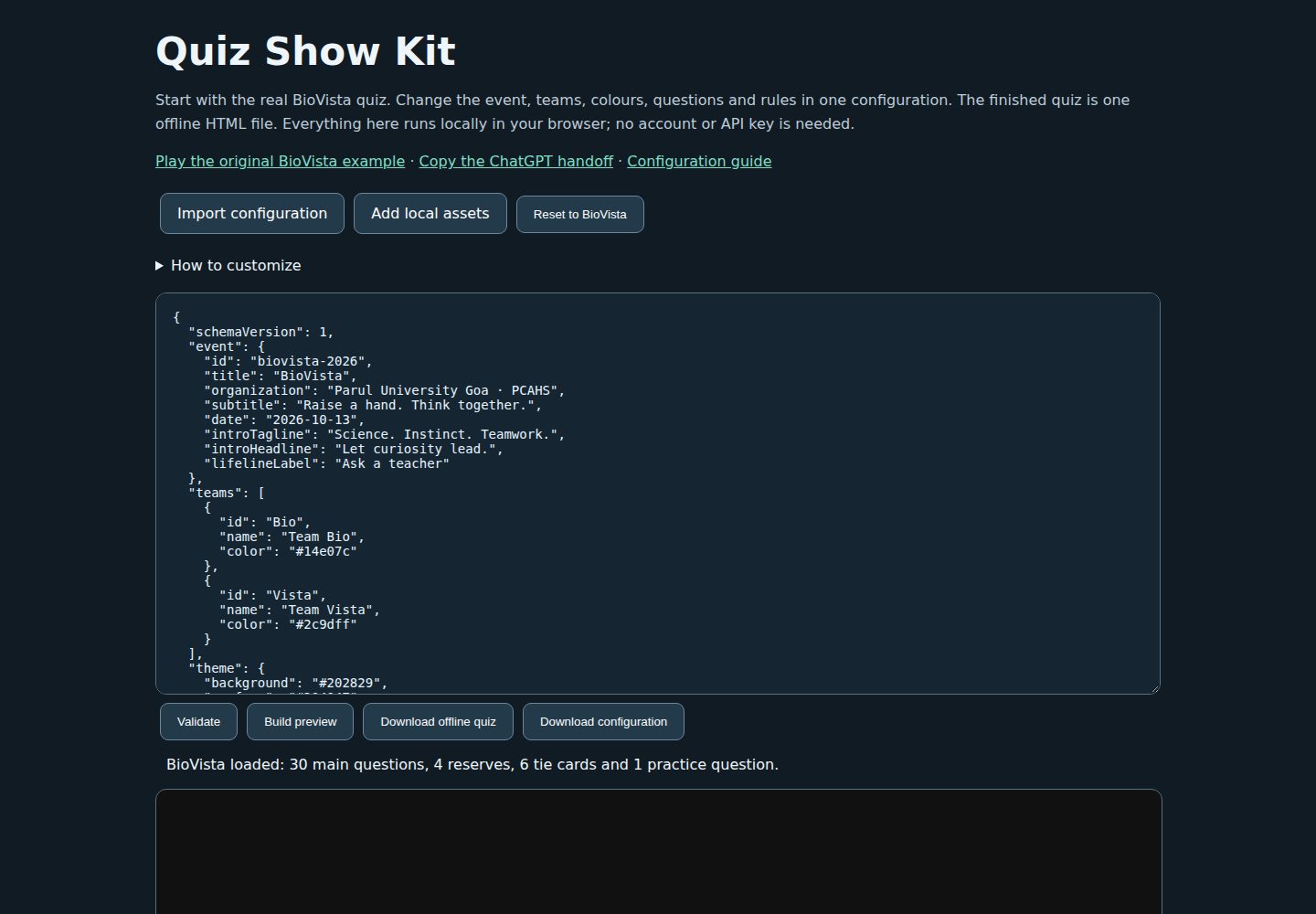
Browser builder requires no installation or API key and works offline
HTMLCorporate Website
quiz-show-kit — HTML Business Template
By Namdev90
Quiz Show Kit is an offline HTML quiz-show builder that includes a browser editor, Node build script, and BioVista example, used to configure two-team matches, questions, scoring, and animated presentation.
Explore the design
Compare the page layouts and mobile experience. Open any screenshot for a closer look.
Desktop homepage1 / 2
Desktop captureTop of page
Actual screenshot captured by the server browser.
All pages & views 2
Screenshots show visual appearance; interactive behavior may differ.
Recorded 2026-10-13View source
What stands out
A quick read of the recorded project description.
Generated HTML embeds scripts and media; no server, backend, runtime CDN, or adjacent resource files are needed
Configuration supports two team names and colors, event copy, corner logo, fonts, color scheme, and optional DNA pattern
Questions support pairing, four-choice options, explanations, sources, charts or images, substitute questions, demo questions, and tie-breaker question pairs
Scoring and timing are configurable, including answer, deliberation, entrance grace, pass, and teacher help
Includes the real BioVista example, retaining 41 cards, visual assets, and a demo
Template Details
Quiz Show Kit packages a quiz show into a single offline HTML file. The README states it includes a browser builder (index.html) and a Node CLI (npm run build) that reads quiz.config.json to generate dist/Quiz_Offline.html. Configuration covers two team names and colors, event copy, corner logo, fonts, color scheme, optional DNA pattern, paired questions, four-choice options, explanations, sources, charts or images, substitute questions, optional demo question, and optional tie-breaker question pairs, as well as answer, deliberation, and entrance grace durations, sequential option entrance, scoring, optional pass, and teacher help. The BioVista example has 30 main questions, 5 rounds, 4 substitutes, 6 tie-breaker cards, and 1 unscored demo, totaling 41 cards, kept in examples/biovista/BioVista_Quiz_Offline.html. The README also states the format is fixed to two-team paired opportunities; it does not support additional teams, arbitrary formats, open-answer scoring, or a translated control interface.
HTMLCorporate Website
Is it right for your project?
Use Cases
- Create an offline-playable two-team quiz show for an in-person event
- Modify event information, questions, and visual assets based on the BioVista configuration to generate a new match file
- Validate, preview, and download a standalone HTML with scoring engine and animations in the browser
- Use the Node CLI to build dist/Quiz_Offline.html from a specified configuration file
Suitable For
- Quiz event organizers who need offline operation without relying on a server or backend
- Users who want to quickly customize a two-team quiz show based on ready-made configuration and examples
- Developers who can use Node.js 22 or newer for command-line builds
Getting started & customization
Use these recorded setup notes alongside the repository instructions for your chosen version.
- 1
Browser builder: open index.html or the online builder, start from the BioVista configuration or import quiz.config.json, validate, preview, and download the generated HTML.
- 2
Node CLI build: requires Node.js 22 or newer; run npm run build to read the root configuration and generate dist/Quiz_Offline.html; you can also use --config and --output to specify paths.
- 3
Local resource paths are resolved within the directory containing the configuration file; the browser builder uses explicitly selected files or media embedded in the configuration.
- 4
Contributors need to run npm install first, then npm run check; check builds the event and browser builder, validates the package, and runs tests.
- 5
Sound requires a real browser gesture to start; embedded previews or browser privacy settings may reject local storage, in which case use Save resume copy to download a complete quiz with checkpoints.
License & source material
Usage conditions & limitations
Free to use · keep license noticeThis entry covers the free version under the MIT license in the public repository; the free scope is the code of this version and does not mean external services or third-party assets are free.
Must comply with when using
- Free use, modification, commercial use, and distribution of this version's code are permitted.
- When distributing copies or substantial portions of the code, retain the original author's copyright notice and the full MIT license notice.
- The code is provided as is; warranties and limitations of liability are governed by the original license and applicable law.
Additional costs & items to verify
- Demo images, fonts, icons, and other third-party assets must be checked against their respective licenses; they cannot be judged solely by the code's MIT license.
- External services such as domains, hosting, databases, payments, or AI may incur separate charges.
- The format is fixed to two-team paired opportunities; it does not support additional teams, arbitrary formats, open-answer scoring, or a translated control interface. Event and question text can use UTF-8, but the control interface is in English.
- Node CLI build requires Node.js 22 or newer.
- Sound requires a real browser gesture to start; embedded previews or browser privacy settings may reject local storage. Optional recording depends on browser support and requires the host to select the screen or window to capture. Unpublished event files should remain with the host because answers are embedded in the HTML.
- The project's own code is MIT, but bundled libraries retain their respective licenses (including GSAP's Standard No Charge license). MIT does not cover logos, trademarks, voice recordings, or other separately attributed media in the examples; new events must use their own approved brand assets.
View Original Text Basis
Permission is hereby granted, free of charge
Original License Text
The format remains two teams with matched primary opportunities. Extra teams, arbitrary tournament formats, open-answer marking, and a translated control interface are not configuration features. Event and question text can use UTF-8; controls are in English. See [Configuration](docs/CONFIGURATION.md) for exact fields, accepted assets, limits, and examples.
Original README
Use Node.js 22 or newer. The CLI build uses the bundled runtime and Node's built-in modules:
Original README
Sound starts after a real browser gesture. Rehearse long text, both teams, passing, penalties, teacher timing, recovery, and tie flow. An embedded preview or browser privacy setting may deny local storage; **Save resume copy** downloads a complete quiz with the checkpoint. Optional recording depends on browser support and requires the host to choose the captured screen or window. Keep unreleased event files with the host: their answers are embedded in the HTML.
Original README
https://github.com/Namdev90/quiz-show-kit/blob/main/LICENSEhttps://github.com/Namdev90/quiz-show-kit/blob/main/README.mdThe project's own code is available under the [MIT license](LICENSE). Bundled libraries retain their own licenses, including GSAP's Standard No Charge license. MIT does not license the example's logos, trademarks, speech recordings, or other separately credited media. Read [Third-party notices](THIRD_PARTY_NOTICES.md) and [BioVista asset notices](examples/biovista/ASSET_NOTICES.md); use your own approved branding for a new event.
Original README
Compiled by DeepSeek based on repository license and README ·2026-10-13. Results only cover the materials read; dependencies, images, fonts, and subsequent term changes are subject to their respective original texts.
Project checks & description sources
Template Information
- Source platforms
- GitHub
- Documentation and maintenance reference score
- More documented · 80 / 100
- Technologies
- HTML
- Website type
- Corporate Website
How this score is calculated
Our heuristic uses license records (up to 30), a demo link (12), a preview (10), stars (15), recorded maintenance (15), description completeness (8), feature records (5) and classification data (5). It is not a code, security or performance test, or a Google score. A link does not establish tested functionality.
What to verify for this project
- Repository update recorded
- 2026-10-13
- Screenshot last checked
- 2026-10-13
A demo link is listed. Check it with your own content and viewport sizes; its presence does not confirm that forms, authentication or payments work.
The catalog identifies HTML as the primary stack. Check the actual dependency manifest and lockfile for versions and hosting requirements. These notes use recorded metadata, not a code audit or a deployment test.
Use a selection guide →How this description was prepared
AI-assisted description based on catalog records and repository material. Repository authors are not automatically the reviewers of this description.
Review declaration: codex-user-requested-batch-review-20261015 · 2026-10-15
Inspect the recorded source material
SHA-256: de59bddf09d7f6509552f420b722bbdd5506f4622d6aacc6c6f99fc43c1a8600
2026-10-13T16:27:00.904Z
Source file / repository# Quiz Show Kit Build a complete quiz show as one offline HTML file. Customize the event, two teams, questions, rules, colors, and approved logos while keeping the scoring engine and animated presentation. The included example is the **real BioVista quiz**: 30 main questions across five rounds, four reserves, six tie cards, and one unscored demonstration. Its 41 cards, visual assets, and presentation are preserved in [BioVista_Quiz_Offline.html](examples/biovista/BioVista_Quiz_Offline.html). Download that file and open it in a browser to try the original event. See its [source questions](examples/biovista/questions.json), [provenance](examples/biovista/origin.json), and [asset notices](examples/biovista/ASSET_NOTICES.md). ## Make your quiz Open the [live browser builder](https://namdev90.github.io/quiz-show-kit/), or use it offline. Download the kit from [Releases](https://github.com/Namdev90/quiz-show-kit/releases), extract it, and open `index.html`. 1. Start from the included BioVista configuration or import your `quiz.config.json`. 2. Customize the event and import the complete reviewed question bank. Select local logos and other assets referenced by your configuration. 3. Validate, preview, and download the generated HTML. 4. Open the downloaded quiz and rehearse it on the display and speakers you will use. The browser builder needs no installation or API key. The downloaded event file includes its scripts and media; it does not need a server, a backend, runtime CDNs, or adjacent asset files to play. Source links in host review are references and need an internet connection only if you choose to open them. For help researching and writing a new event, copy the single prompt in [Make a quiz with ChatGPT](docs/CHATGPT_HANDOFF.md). It asks the assistant to gather essential decisions, research balanced questions with sources, present them for your review, and use this kit to build the file. File access, research, execution, and preview depend on the tools available in that conversation; the prompt includes a manual builder route when those tools are unavailable. ## What you can configure Use [quiz.config.json](quiz.config.json) as the editable BioVista starting point. Keep the preserved example unchanged and give a new competition its own `event.id`. - Two team names and colors, event wording, approved corner logos, system font, palette, and optional DNA motif. - Matched question pairs, four options with one correct answer, explanations, sources, diagrams or approved images, reserves, an optional demonstration, and optional tie pairs. - An even number of main questions per round, within the documented limits. - Answer, consultation, and entry-grace durations; sequential option entrances; scoring; optional passing and teacher lifelines; and short-mode pair counts. The format remains two teams with matched primary opportunities. Extra teams, arbitrary tournament formats, open-answer marking, and a translated control interface are not configuration features. Event and question text can use UTF-8; controls are in English. See [Configuration](docs/CONFIGURATION.md) for exact fields, accepted assets, limits, and examples. The BioVista defaults award **+10** for a primary correct answer, **−2** for primary wrong, **+2** for passed correct, and **−5** for passed wrong. Primary answers get 15 seconds; passed answers and the once-per-team teacher consultation get 7 seconds each. A→B→C→D enters sequentially over 1.8 seconds before the answer clock begins. A tried primary-wrong option is blocked on the passed turn. Ties use complete matched pairs, a separate tally, and no passing. ## Build with Node Use Node.js 22 or newer. The CLI build uses the bundled runtime and Node's built-in modules: ```sh npm run build ``` This reads the root configuration and creates `dist/Quiz_Offline.html`. For a separate event folder: ```sh npm run build -- --config path/to/quiz.config.json --output dist/Quiz_Offline.html ``` Local asset paths resolve inside that configuration's directory. The browser builder instead uses the files you explicitly select or media embedded in the configuration. Contributors should install the development dependencies before running the full checks: ```sh npm install npm run check ``` `check` builds the event and browser builder, validates the package, and runs the tests defined in `package.json`. A passing check does not establish factual accuracy, actual browser rendering, or room audio quality. See [Contributing](CONTRIBUTING.md) and [GitHub setup](docs/GITHUB_SETUP.md). ## Running an event The presentation includes an opening reveal, a coin toss, shared DNA/timer movement, spoken option cues, point-by-point rewards and penalties, confetti, teacher consultation, round statistics, and winner presentation. Host tools provide content review, score corrections, reserves, undo, and resume copies. The engine controls scores and clocks; animations display their results. Sound starts after a real browser gesture. Rehearse long text, both teams, passing, penalties, teacher timing, recovery, and tie flow. An embedded preview or browser privacy setting may deny local storage; **Save resume copy** downloads a complete quiz with the checkpoint. Optional recording depends on browser support and requires the host to choose the captured screen or window. Keep unreleased event files with the host: their answers are embedded in the HTML. ## License and credits The project's own code is available under the [MIT license](LICENSE). Bundled libraries retain their own licenses, including GSAP's Standard No Charge license. MIT does not license the example's logos, trademarks, speech recordings, or other separately credited media. Read [Third-party notices](THIRD_PARTY_NOTICES.md) and [BioVista asset notices](examples/biovista/ASSET_NOTICES.md); use your own approved branding for a new event. For security reports, see [SECURITY.md](SECURITY.md). For agent-assisted contributions, see [AGENTS.md](AGENTS.md).
Explore similar templates
Compare previews and descriptions within the same stack and category.

mazer
Mazer is a free and open-source Bootstrap 5 admin dashboard and landing page template that does not depend on jQuery. It provides prebuilt releases, source builds, and CDN inclusion, and includes dark mode, perfect-scrollbar, and ApexCharts examples.
HTML · Admin dashboard

Freelancer
A bright, single-page Bootstrap portfolio template for freelancers, designers, and small studios. It includes a responsive portfolio grid with modal detail windows and an SB Forms contact form that requires an API token.
HTML · Portfolio

Creative
A single-page marketing template by Start Bootstrap for creative agencies and product services, built on Bootstrap with SCSS, featuring a portfolio grid and call-to-action sections. It includes pre-set SB Forms markers for form integration and npm build scripts for source customization.
HTML · Corporate Website

startbootstrap-agency
Agency is a one-page Bootstrap portfolio theme from Start Bootstrap, MIT licensed. It includes a responsive portfolio grid with modal details and a preconfigured SB Forms contact form that requires an API token.
HTML · Corporate Website

startbootstrap-landing-page
A general-purpose Bootstrap landing page template from Start Bootstrap, MIT licensed, with a Pug/SCSS/npm build pipeline.
HTML · Corporate Website

Landing-Page
A general-purpose landing page HTML template maintained by Tailwind Toolbox, written in pure HTML and loading the complete Tailwind CSS via CDN.
HTML · Corporate Website