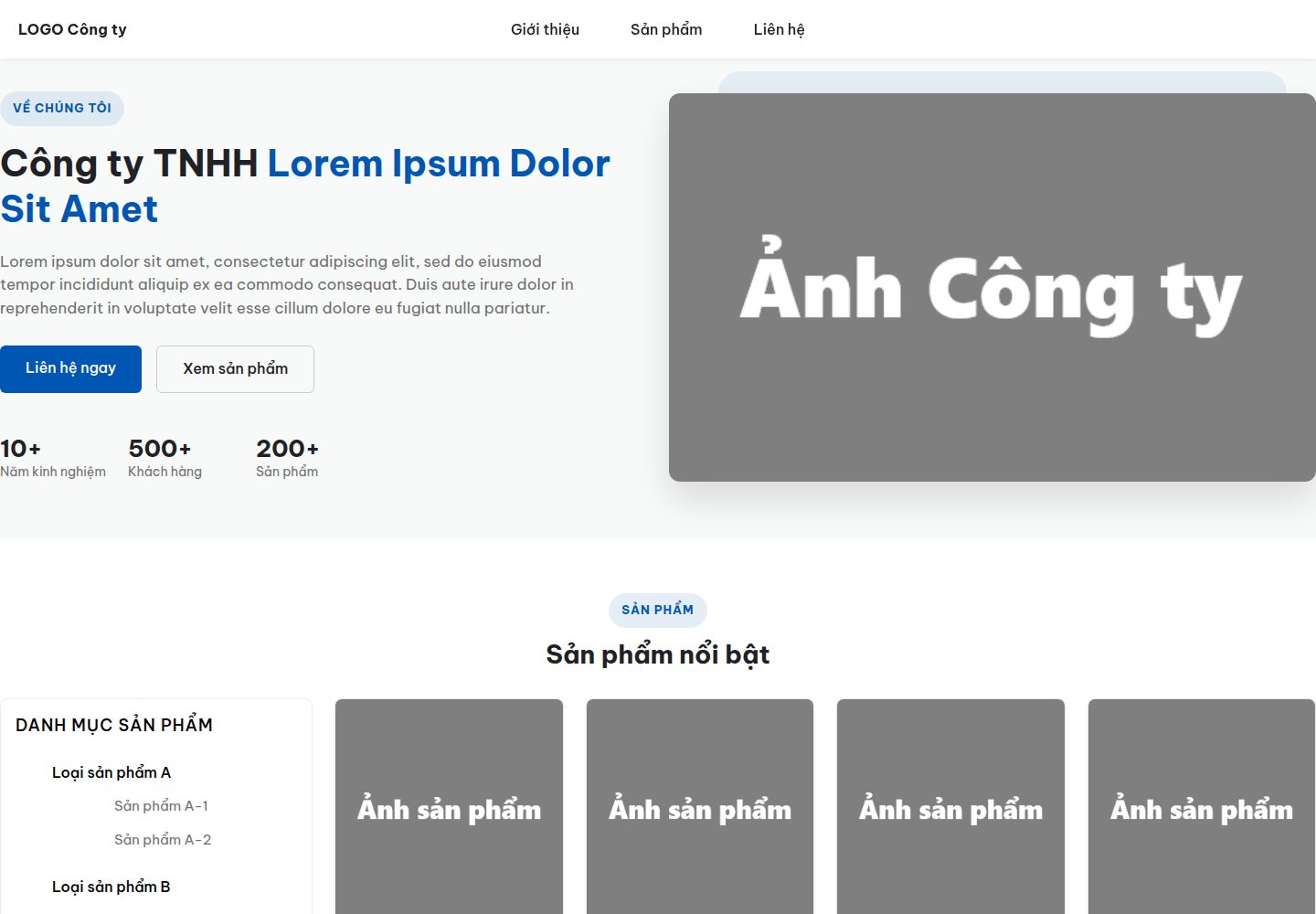
The homepage includes editable introduction, product, contact and footer sections
HTMLStarter
company-site — HTML Starter Template
By namnth2000
company-site is a static corporate website template with a homepage and product detail pages, built with HTML and CSS and requiring no build tools.
Explore the design
Compare the page layouts and mobile experience. Open any screenshot for a closer look.
Desktop homepage1 / 3
Desktop captureTop of page
Actual screenshot captured by the server browser.
All pages & views 3
Screenshots show visual appearance; interactive behavior may differ.
Recorded 2026-10-20View source
What stands out
A quick read of the recorded project description.
Product cards can link to standalone detail pages under products/
Styles are centralized in assets/css/, and the template can be opened in a browser without build tools
It documents extending detail pages by copying the product directory and keeping the index.html structure
The contact form must be connected to a backend or form service; the template itself does not send data
The site's primary color can be adjusted through the :root color variables in base.css
Template Details
company-site is a static website template for corporate presentation. The README states that it consists of a homepage, index.html, and product detail pages in the products directory; styles are kept in assets/css/, no build tools are required, and the HTML can be viewed directly in a browser.
The homepage includes sections for company introduction, products, contact and footer. In the introduction section, the company name, description, statistics and company image can be edited; in the product section, categories and product card information can be adjusted, and products can be linked to standalone detail pages; in the contact section, the address, phone, email and form subject options can be changed; in the footer, social links and copyright information can be changed.
The template documents how to duplicate product detail pages: copy the products/product1/ directory and edit its index.html, keeping the products/ten-san-pham/index.html structure so that URLs without the .html suffix work on GitHub Pages. The README also covers SEO items such as title, meta description, keywords, canonical and og and twitter tags, and adjusting the primary color through the :root variables in assets/css/base.css.
As for limitations, the contact form currently does not send data anywhere; a backend or form receiving service must be connected through the form's action attribute. The README does not document other backends, databases, framework versions or deployment procedures.
HTMLLauncher
Is it right for your project?
Use Cases
- Building a static presentation website for a small business
- Creating a corporate site with product categories and product detail pages
- Publishing a multi-page static website without build tools on GitHub Pages
- Using it as an example for learning HTML/CSS page structure and content replacement
Suitable For
- Front-end developers who need a static corporate website template
- Small businesses that want to maintain their site by editing HTML and CSS manually
- Projects hosting static pages on GitHub Pages
Getting started & customization
Use these recorded setup notes alongside the repository instructions for your chosen version.
- 1
Open index.html directly in a browser to view the template; no build tools are required
- 2
Follow the README steps to edit the introduction, product, contact and footer content in index.html
- 3
Copy the products/product1/ directory to create a new product detail page, keeping the products/ten-san-pham/index.html structure
- 4
Connect the contact form to a service such as Google Form, Formspree or your own API through the form's action attribute
- 5
Update title, meta description, keywords, canonical and og and twitter tags on each page, and adjust the lang attribute as needed
License & source material
Usage conditions & limitations
Free to use · keep license noticeThis entry covers the free version under the MIT license in the public repository; the free scope is the code of this version and does not mean that external services or third-party assets are free.
Must comply with when using
- The code of this version may be used, modified, used commercially and distributed free of charge.
- When distributing copies or substantial portions of the code, the original author's copyright notice and the full MIT license notice must be retained.
- The code is provided as is; warranties and limitations of liability are governed by the original license and applicable law.
Additional costs & items to verify
- The README mentions the Formspree form service; real submissions require configuring a service endpoint, and its usage limits and fees must be checked separately.
- Demo images, fonts, icons and other third-party assets must be checked against their respective licenses and cannot be judged solely by the code's MIT license.
- External services such as domains, hosting, databases, payments or AI may incur separate charges.
- The contact form currently does not send data anywhere; a backend or form receiving service (such as Google Form, Formspree or your own API) must be connected through the form's action attribute.
- Adding a product detail page requires copying the products/product1/ directory and keeping the products/ten-san-pham/index.html structure so that URLs without the .html suffix work on GitHub Pages.
- assets/images/anh-cong-ty.png must be replaced with your own company image; you may keep the file name or change the src path.
- The canonical and og:*, twitter:* tags must be changed to your own real domain.
- If the website is not in Vietnamese, the lang="vi" attribute must be changed.
View Original Text Basis
Permission is hereby granted, free of charge
Original License Text
- Form hiện chưa gửi dữ liệu đi đâu - cần tự nối với backend/dịch vụ nhận form (Google Form, Formspree, API riêng...) ở thuộc tính `action` của thẻ `<form>`
Original README
- Tạo trang chi tiết mới bằng cách copy thư mục `products/product1/`, đổi tên thư mục và cập nhật nội dung file `index.html` bên trong (mô tả, thông số kỹ thuật). Giữ nguyên cấu trúc `products/ten-san-pham/index.html` để URL không cần đuôi `.html` khi deploy (GitHub Pages tự tìm `index.html` trong thư mục)
Original README
- Thay ảnh `assets/images/anh-cong-ty.png` bằng ảnh công ty của bạn (giữ nguyên tên file hoặc đổi lại đường dẫn `src`)
Original README
- Đổi `link rel="canonical"` và các thẻ `og:*`, `twitter:*` cho đúng domain thật của bạn
Original README
https://github.com/namnth2000/company-site/blob/main/LICENSEhttps://github.com/namnth2000/company-site/blob/main/README.md- Đổi `lang="vi"` nếu trang web dùng ngôn ngữ khác
Original README
Compiled by DeepSeek based on repository license and README ·2026-10-20. Results only cover the materials read; dependencies, images, fonts, and subsequent term changes are subject to their respective original texts.
Project checks & description sources
Template Information
- Source platforms
- GitHub
- Documentation and maintenance reference score
- Partly documented · 72 / 100
- Technologies
- HTML
- Website type
- Starter
How this score is calculated
Our heuristic uses license records (up to 30), a demo link (12), a preview (10), stars (15), recorded maintenance (15), description completeness (8), feature records (5) and classification data (5). It is not a code, security or performance test, or a Google score. A link does not establish tested functionality.
What to verify for this project
- Repository update recorded
- 2026-07-28
- Screenshot last checked
- 2026-10-20
A demo link is listed. Check it with your own content and viewport sizes; its presence does not confirm that forms, authentication or payments work.
The catalog identifies HTML as the primary stack. Check the actual dependency manifest and lockfile for versions and hosting requirements. These notes use recorded metadata, not a code audit or a deployment test.
Use a selection guide →How this description was prepared
AI-assisted description based on catalog records and repository material. Repository authors are not automatically the reviewers of this description.
Review declaration: codex-user-requested-batch-review-20261021 · 2026-10-21
Inspect the recorded source material
SHA-256: b66c345b1f3b009d965b1c8e29fed3797fc0d137b9b514a97041ecb3fc053f4d
2026-10-20T22:39:48.158Z
Source file / repository# company-site A company website template ## Hướng dẫn sử dụng template Template gồm 1 trang chủ (`index.html`) và các trang chi tiết sản phẩm (`products/product1.html`, `product2.html`, ...). Style nằm trong `assets/css/` (không cần build tool, chỉ cần mở file HTML bằng trình duyệt). ### Bước 1: Cập nhật phần Giới thiệu (Introduction) Mở `index.html`, tìm khối `<div id="introduction">`: - Đổi tên công ty trong thẻ `<h1 class="intro__heading">` - Đổi đoạn mô tả trong `.intro__paragraph` - Cập nhật số liệu ở `.intro__stats` (năm kinh nghiệm, số khách hàng, số sản phẩm...) - Thay ảnh `assets/images/anh-cong-ty.png` bằng ảnh công ty của bạn (giữ nguyên tên file hoặc đổi lại đường dẫn `src`) ### Bước 2: Cập nhật phần Sản phẩm (Products) Trong khối `<div id="products">`: - Sửa danh mục sản phẩm ở `.products__category-list` (tên danh mục và sản phẩm con) - Với mỗi thẻ `.products__item`: đổi ảnh, tên sản phẩm, giá, nhãn hàng, xuất xứ - Nếu muốn sản phẩm có trang chi tiết riêng: bọc thẻ `.products__item` trong link `<a>` trỏ tới thư mục con trong `products/`, dạng `./products/ten-san-pham/` (xem ví dụ 2 sản phẩm đầu tiên) - Tạo trang chi tiết mới bằng cách copy thư mục `products/product1/`, đổi tên thư mục và cập nhật nội dung file `index.html` bên trong (mô tả, thông số kỹ thuật). Giữ nguyên cấu trúc `products/ten-san-pham/index.html` để URL không cần đuôi `.html` khi deploy (GitHub Pages tự tìm `index.html` trong thư mục) ### Bước 3: Cập nhật phần Liên hệ (Contact) Trong khối `<div id="contact">`: - Sửa thông tin ở `.contact__info` (địa chỉ, số điện thoại, email) - Sửa các lựa chọn trong `<select id="contact__form-topic">` nếu cần - Form hiện chưa gửi dữ liệu đi đâu - cần tự nối với backend/dịch vụ nhận form (Google Form, Formspree, API riêng...) ở thuộc tính `action` của thẻ `<form>` ### Bước 4: Cập nhật Footer Trong khối `<div id="footer">`: - Sửa link mạng xã hội ở các thẻ `<a href="#">` trong `.socialnetwork` - Sửa tên công ty và năm trong `.copyright` ### Bước 5: Cập nhật SEO Trong thẻ `<head>` của từng trang HTML: - Đổi `<title>` và thẻ `meta name="description"`, `meta name="keywords"` - Đổi `link rel="canonical"` và các thẻ `og:*`, `twitter:*` cho đúng domain thật của bạn - Đổi `lang="vi"` nếu trang web dùng ngôn ngữ khác ### Bước 6: Cập nhật màu sắc & font (tuỳ chọn) Mở `assets/css/base.css`, sửa các biến màu trong `:root` (ví dụ `--text-color-blue`) để đổi màu chủ đạo cho toàn bộ trang. ### Bước 7: Kiểm tra lại Mở `index.html` bằng trình duyệt, kiểm tra ở cả màn hình lớn (desktop) và nhỏ (mobile) để đảm bảo bố cục không bị vỡ trước khi đưa lên hosting.
Explore similar templates
Compare previews and descriptions within the same stack and category.

startbootstrap-simple-sidebar
A Bootstrap off-canvas sidebar navigation HTML starter template from Start Bootstrap. It provides directly editable HTML and CSS in the dist directory, while the source uses Pug, SCSS, and JavaScript with npm build scripts for live preview and compilation.
HTML · Starter

adminkit
AdminKit is a free, MIT-licensed HTML admin and dashboard template built on Bootstrap 5. The free version includes 15 demo pages, 1 plugin, and 1 color scheme, with hundreds of UI components, forms, tables, charts, and icons.
HTML · Admin dashboard

Landing-Page
A general-purpose landing page HTML template maintained by Tailwind Toolbox, written in pure HTML and loading the complete Tailwind CSS via CDN.
HTML · Corporate Website

light-bootstrap-dashboard
Light Bootstrap Dashboard is a free, MIT-licensed admin dashboard template from Creative Tim, built on Bootstrap with a responsive static HTML structure.
HTML · Admin dashboard

sing-app
Sing App Lite is a free, open-source admin dashboard template from Flatlogic, built with Bootstrap 4.5 and SCSS. It provides a responsive layout, dashboard examples, typography, tables, notifications, basic charts, icons, maps, and a hover sidebar, along with styled Bootstrap components.
HTML · Admin dashboard

startbootstrap-modern-business
Modern Business is a multipurpose Bootstrap full-site HTML template from Start Bootstrap with 17 standalone pages covering home, about, services, portfolio, pricing, blog, FAQ, and contact.
HTML · Starter