Jekyll-based blog theme released under the MIT license
JekyllBlog
chalk — Jekyll Blog Template
By nielsenramon
Chalk is a free Jekyll-based blog theme released under the MIT license, with built-in tag filtering, dark/light themes, RSS, sitemap, and SEO-related configuration.
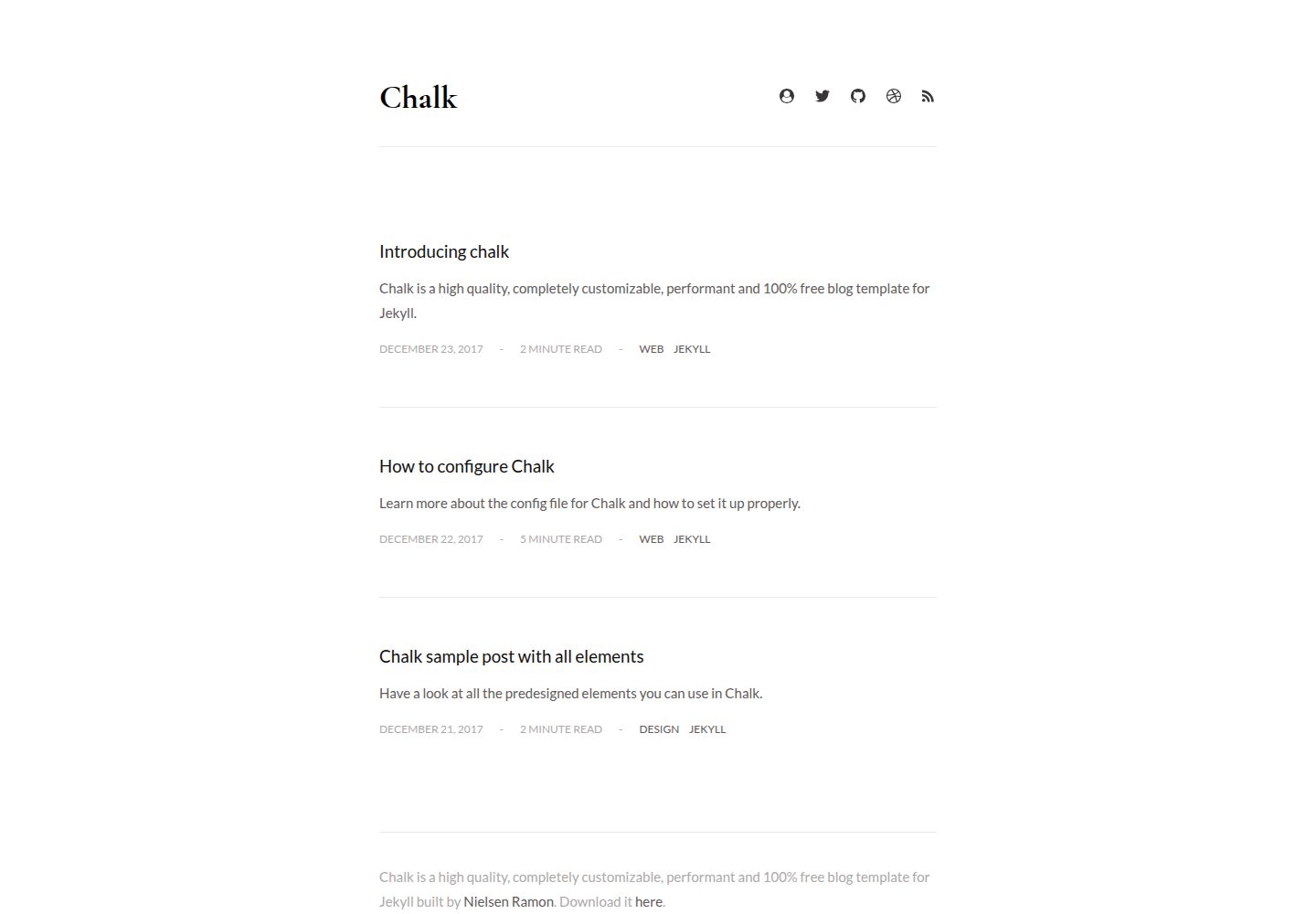
Explore the design
Compare the page layouts and mobile experience. Open any screenshot for a closer look.
Desktop homepage1 / 3
Desktop captureTop of page
Actual screenshot captured by the server browser.
All pages & views 3
Screenshots show visual appearance; interactive behavior may differ.
Recorded 2026-09-30View source
What stands out
A quick read of the recorded project description.
Built-in tag filtering and optional tag navigation
Supports switching between dark and light themes
Automatically generates an RSS feed and sitemap
Integrates Disqus comments and Google Analytics
Provides a custom 404 page and code highlighting styles
Template Details
Chalk is a blog theme for Jekyll. The repository is released under the MIT license, and the code may be used, modified, used commercially, and distributed for free; when distributing, the copyright notice and license notice must be retained. The theme provides a post list, an about page, a custom 404 page, tag filtering with optional tag navigation, and supports pagination configuration, click-to-zoom images, video embedding, emoji, and local fonts.
For content and distribution, Chalk automatically generates an RSS feed and a sitemap, provides reading time indicators, sharing links for posts on Facebook, Twitter, and Google Plus, and integrates Disqus comments and Google Analytics. The interface supports switching between dark and light themes, includes code highlighting styles, and states support for modern browsers.
For building and deployment, the theme depends on Ruby and Node environments and uses npm scripts for initialization, local running, and publishing. Note that Chalk does not support the standard GitHub Pages hosting method for Jekyll because it uses Jekyll plugins that GitHub Pages does not support; publishing requires building with npm run publish and pushing to the gh-pages branch. If used as a project site, baseurl must also be set in _config.yml. The licenses for third-party assets such as demo images, fonts, and icons must be checked separately, and external services such as domains and hosting may incur additional costs.
JekyllBlog
Is it right for your project?
Use Cases
- Building a personal technical blog centered on a post list
- A writing site that needs tag filtering and paginated browsing
- Blog projects that want to use Jekyll and control the build and deployment process themselves
- Content sites that need RSS, a sitemap, and basic SEO configuration
Suitable For
- Developers familiar with Jekyll and npm scripts
- Bloggers who accept a manual publishing process via the gh-pages branch
- Writers who need dark/light themes and tag browsing
Getting started & customization
Use these recorded setup notes alongside the repository instructions for your chosen version.
- 1
Ruby and Node environments must be installed first, then run npm run setup to initialize
- 2
Use npm run local to start Jekyll for local development
- 3
Before publishing, commit changes to a branch other than gh-pages, then run npm run publish to build and push to the gh-pages branch
- 4
When used as a project site, set baseurl to the repository name in _config.yml
- 5
Chalk does not support the standard GitHub Pages Jekyll hosting method because it uses plugins that GitHub Pages does not support
License & source material
Usage conditions & limitations
Free to use · keep license noticeThis entry covers the free version under the MIT license in the public repository; the free scope is the code of that version and does not mean that external services or third-party assets are free.
Must comply with when using
- The code of this version may be used, modified, used commercially, and distributed for free.
- When distributing copies or substantial portions of the code, retain the original author's copyright notice and the complete MIT license notice.
- The code is provided as is; warranties and limitations of liability are governed by the original license and applicable law.
Additional costs & items to verify
- Chalk does not support the standard GitHub Pages hosting method for Jekyll because it uses Jekyll plugins that GitHub Pages does not support; publishing requires building with npm run publish and pushing to the gh-pages branch instead.
- If used as a project site, baseurl must be set to the repository name in _config.yml, otherwise site paths may be incorrect.
- Before publishing, commit changes to a working branch other than gh-pages, then run npm run publish; do not develop directly on the gh-pages branch.
- Demo images, fonts, icons, and other third-party assets must be checked against their respective licenses and cannot be judged solely by the code's MIT license.
- External services such as domains, hosting, databases, payments, or AI may incur additional charges.
View Original Text Basis
Permission is hereby granted, free of charge
Original License Text
Chalk does not support the standard way of Jekyll hosting on GitHub Pages.
Original README
you must set the `baseurl` in `_config.yml` to the name of your repository.
Original README
https://github.com/nielsenramon/chalk/blob/master/LICENSEhttps://github.com/nielsenramon/chalk/blob/master/README.mdcommit your changes to any working branch except the `gh-pages` one
Original README
Compiled by DeepSeek based on repository license and README ·2026-10-01. Results only cover the materials read; dependencies, images, fonts, and subsequent term changes are subject to their respective original texts.
Project checks & description sources
Template Information
- Source platforms
- GitHub
- Documentation and maintenance reference score
- More documented · 80 / 100
- Technologies
- Jekyll
- Website type
- Blog
How this score is calculated
Our heuristic uses license records (up to 30), a demo link (12), a preview (10), stars (15), recorded maintenance (15), description completeness (8), feature records (5) and classification data (5). It is not a code, security or performance test, or a Google score. A link does not establish tested functionality.
What to verify for this project
- Repository update recorded
- 2024-04-09
- Screenshot last checked
- 2026-10-01
A demo link is listed. Check it with your own content and viewport sizes; its presence does not confirm that forms, authentication or payments work.
The catalog identifies Jekyll as the primary stack. Check the actual dependency manifest and lockfile for versions and hosting requirements. These notes use recorded metadata, not a code audit or a deployment test.
Use a selection guide →How this description was prepared
AI-assisted description based on catalog records and repository material. Repository authors are not automatically the reviewers of this description.
Automatically checked against source and license rules; no manual editorial review.
Inspect the recorded source material
SHA-256: 6960dae1d36a9cfb0f8c639acb37fa2b9159edb718725ac453d09a99df39448e
2026-10-01T13:26:01.706Z
Source file / repository Chalk is a high quality, completely customizable, performant and 100% free blog template for Jekyll. ## Overview Features: - About page. - Automatic RSS feed. - Automatic sitemap. - Automatic time to read post indicator. - Cross browser support (supports all modern browsers). - Custom 404 page. - Custom code highlighting. - Customizable pagination. - Dark and Light theme. - Easy setup and deploying. - Enlarge images on click. - Filter on tags. - Optional tag navigation. - Frequently updated with new versions. - Many social media links supported. - Media embed for videos. - PageSpeed optimized. - Proper sharing links for posts on Facebook, Twitter and Google Plus. - SEO optimized. - Support for local fonts. - Support for emoji's. Integrations - [Disqus](https://disqus.com/) - [Google Analytics](https://analytics.google.com/analytics/web/) - [Google Fonts](https://fonts.google.com/) - [SVG Icons](https://icomoon.io/) Used tools - [Autoprefixer](https://github.com/postcss/autoprefixer) - [Circle CI](https://circleci.com/) - [Html-proofer](https://github.com/gjtorikian/html-proofer) - [Jekyll](https://jekyllrb.com/) - [Jekyll Assets](https://github.com/jekyll/jekyll-assets) - [Jekyll Sitemap](https://github.com/jekyll/jekyll-sitemap) - [HTML5 Boilerplate](https://html5boilerplate.com/) (Influenced by) - [Kickster](https://kickster.nielsenramon.com/) - [Retina.js](https://imulus.github.io/retinajs/) - [STACSS](https://stacss.nielsenramon.com/) - [Travis](https://travis-ci.org/) - [Yarn](https://yarnpkg.com) - [Zooming](https://github.com/kingdido999/zooming/) ## Usage ### Installation If you haven't installed the following tools then go ahead and do so (make sure you have [Homebrew](https://brew.sh/) installed): brew install ruby brew install npm On windows, install Ruby and Node with the installers found here: - [Ruby](https://rubyinstaller.org/) - [Node.js](https://nodejs.org/en/download/) Next setup your environment: npm run setup ### Development Run Jekyll: npm run local ## Deploy to GitHub Pages Before you deploy, commit your changes to any working branch except the `gh-pages` one and run the following command: npm run publish **Important note**: Chalk does not support the standard way of Jekyll hosting on GitHub Pages. You need to deploy your working branch (can be any branch, for xxx.github.io users: use another branch than `master`) with the `npm run publish` command. Reason for this is because Chalk uses Jekyll plugins that aren't supported by GitHub pages. The `npm run publish` command will automatically build the entire project, then push it to the `gh-pages` branch of your repo. The script creates that branch for you so no need to create it yourself. Also, if you are developing a **project site**, you must set the `baseurl` in `_config.yml` to the name of your repository. You can find more info on how to use the `gh-pages` branch and a custom domain [here](https://help.github.com/articles/quick-start-setting-up-a-custom-domain/). [View this](https://github.com/nielsenramon/kickster#automated-deployment-with-circle-ci) for more info about automated deployment with Circle CI. ## License MIT License ## Contributing 1. Fork it (https://github.com/[my-github-username]/chalk/fork) 2. Create your feature branch (`git checkout -b my-new-feature`) 3. Commit your changes (`git commit -am 'Add some feature'`) 4. Push to the branch (`git push origin my-new-feature`) 5. Create a new Pull Request
Explore similar templates
Compare previews and descriptions within the same stack and category.

al-folio
A Jekyll academic homepage theme for scholars and researchers, with a clean responsive design and out-of-the-box support for publication lists, project showcases, CVs, and blogs.
Jekyll · Portfolio

minimal-mistakes
Minimal Mistakes is a two-column Jekyll theme for personal sites, blogs, project documentation, or portfolios.
Jekyll · Portfolio

Beautiful Jekyll
Beautiful Jekyll is a mature, easy-to-use Jekyll blog theme maintained by Dean Attali since 2015, with over 50,000 users.
Jekyll · Blog

jekyll-TeXt-theme
A customizable Jekyll theme for personal sites, team sites, blogs, projects, and documentation.
Jekyll · Blog

startbootstrap-clean-blog-jekyll
The official Jekyll version of Start Bootstrap's Clean Blog theme, offering a blog home page, about page, contact page, and sample post pages, with a Formspree-powered contact form.
Jekyll · Blog

So Simple
A minimal reading-oriented Jekyll theme by Michael Rose for personal blogs, portfolios, and long-form reading. It offers multiple layouts, microformat markup, Disqus comments, Google Analytics, Jekyll SEO Tag, three skins, and aggregation by year, category, and tag with a grid view.
Jekyll · Blog