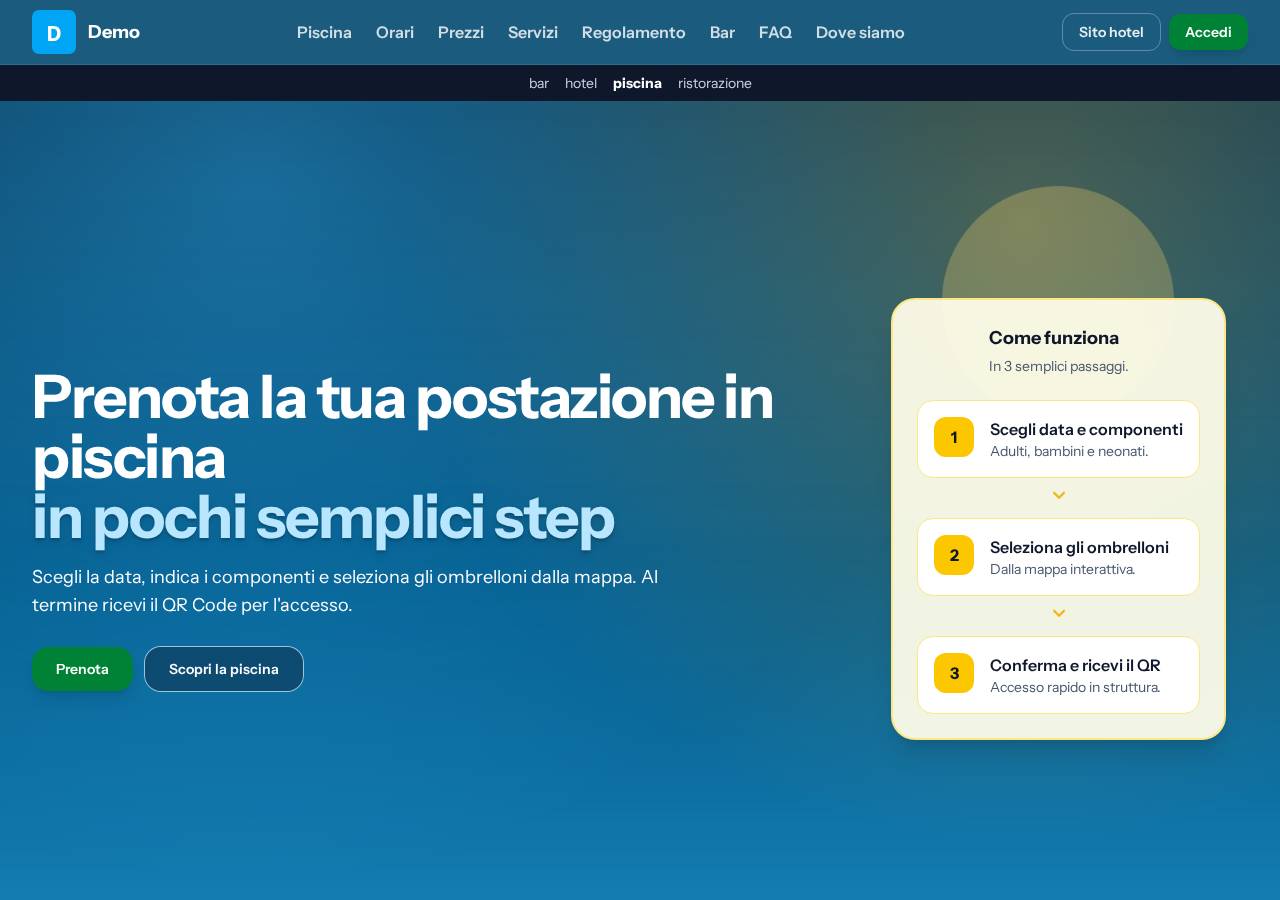
Provides four vertical presets—piscina, ristorazione, bar and hotel—sharing one component catalogue and differing only in content, theme and demo data under presets/
AstroCorporate Website
venue-landing-kit — Astro Business Template
By NikoAuso
An Astro SSR-based multi-vertical landing page kit offering a component catalogue and four presets for pool, restaurant, bar and hotel, with data from an HTTP backend or committed files and a built-in demo mode.
Explore the design
Compare the page layouts and mobile experience. Open any screenshot for a closer look.
Author preview
Author-provided previewTop of page
Preview provided in the project README.
One original preview is available. Open the full image to inspect the design.
Screenshots show visual appearance; interactive behavior may differ.
Recorded 2026-10-13View source
What stands out
A quick read of the recorded project description.
Data source can be switched between backend and static; sections such as hours and pricing support individual overrides, and DEMO_MODE forces static with built-in demo data
The section catalogue includes types such as hero, features, hours, pricing, services, rules, highlight, menu, gallery, faq, testimonials, location, story and rooms, with page structure controlled by array order
Theming uses brand-, cta- and accent- semantic tokens; theme files must be part of Tailwind's @import graph, and the palette cannot be swapped at runtime
Provides /demo/<preset> preview routes; under DEMO_MODE all presets can be viewed, while non-demo mode returns 404
The code is MIT licensed and may be used, modified, commercialised and distributed free of charge, provided the copyright notice and licence notice are retained
Template Details
Venue Landing Kit is an Astro SSR landing page template for local commercial venues. It breaks pages into a composable section catalogue and ships four vertical presets: piscina (pool), ristorazione (restaurant), bar and hotel. All four presets share the same component set and differ only through content, theme and demo data files under presets/.
Data sources are supported in two ways: declare dataSource as backend or static in site.config.ts, and sections such as hours and pricing can each override this individually. In static mode, data comes from STATIC_DATA exported by site.content.ts, which by default uses the preset demo data and must be replaced with real data; in backend mode, live data is fetched from an endpoint assembled from API_BASE_URL and FACILITY_SLUG. DEMO_MODE=true forces all data through the static path.
The template also provides /demo/<preset> preview routes; under DEMO_MODE all four presets can be viewed, while non-demo mode returns 404. Theming is controlled through semantic tokens (brand-, cta-, accent-), and theme files must be part of Tailwind's @import graph, so the palette cannot be swapped at runtime. Choosing a preset requires changing both the content import in site.content.ts and the theme import in src/styles/tokens.css, and both must point to the same vertical.
The component catalogue covers section types including hero, features, hours, pricing, services, rules, highlight, menu, gallery, faq, testimonials, location, story and rooms; each section receives only { id, content } plus the necessary site or backend payload. Page order is determined by the order of the section array, and setting enabled: false disables a section along with its menu entry and anchor.
Before use, you must replace brand assets, preset photos and legal text yourself, and verify the licences of third-party assets such as demo images, fonts and icons. The code is MIT licensed and may be used, modified, commercialised and distributed free of charge, but external services and third-party assets may carry separate fees or licensing requirements.
AstroCorporate Website
Is it right for your project?
Use Cases
- Building a single-page landing page for a local venue such as a pool, restaurant, bar or hotel, choosing the corresponding preset by vertical
- Connecting live data via API_BASE_URL and FACILITY_SLUG when an existing HTTP backend provides opening hours, prices, address and similar data
- Using STATIC_DATA committed files to build a self-contained site when there is no backend or a fully static deployment is preferred
- Previewing the page structure and colour scheme of all four presets under DEMO_MODE via /demo/<preset> before deciding which one to adopt
- White-label customisation based on the same component catalogue, replacing brand assets, copy and legal text for different clients
Suitable For
- Front-end developers who need to quickly build landing pages for local commercial venues
- Astro projects that want to compose page sections in a componentised way and control the data source
- Teams with an existing HTTP backend API that need to connect data such as opening hours and prices to the front end
- Site builders who need multiple vertical presets as a starting point for further white-label customisation
Getting started & customization
Use these recorded setup notes alongside the repository instructions for your chosen version.
- 1
After cloning the repository, run npm install, copy .env.example to .env (with DEMO_MODE=true), then run npm run dev to start local development
- 2
Choosing a preset requires changing both the content import in site.content.ts and the theme import in src/styles/tokens.css, and both must point to the same vertical
- 3
In static mode, replace the default demo data in STATIC_DATA in site.content.ts with real data; in backend mode, configure API_BASE_URL, FACILITY_SLUG and optionally API_AUTH_TOKEN
- 4
Replace the brand assets and preset photos under public/brand/, and rewrite the legal text in src/content/legal/; OG images must be 1200×630 raster images
- 5
Third-party assets such as demo images, fonts and icons must be checked against their respective licences, and external services may charge separately
License & source material
Usage conditions & limitations
Free to use · keep license noticeThis listing covers the free version in the public repository under the MIT licence; the free scope applies to that version's code and does not imply that external services or third-party assets are free.
Must comply with when using
- The code of this version may be used, modified, commercialised and distributed free of charge.
- When distributing copies or substantial portions of the code, retain the original author's copyright notice and the full MIT licence notice.
- The code is provided as is; warranties and limitations of liability are governed by the original licence and applicable law.
Additional costs & items to verify
- Demo images, fonts, icons and other third-party assets must be checked against their respective licences and cannot be judged solely by the code's MIT licence.
- External services such as domains, hosting, databases, payments or AI may charge separately.
- Theme files must be placed in Tailwind's @import graph; because utility classes with opacity inline colours at build time, the palette cannot be swapped at runtime.
- Choosing a preset requires changing two imports at the same time (the content import in site.content.ts and the theme import in tokens.css), and both must point to the same vertical; there is no preset field in the configuration.
- The /demo/<preset> preview routes are noindex and return 404 when not in DEMO_MODE; a production deployment serves only a single preset and does not expose the others.
- In static mode, data comes from STATIC_DATA exported by site.content.ts, which by default is the preset demo data and must be replaced with real data.
- In backend/hybrid mode, API_AUTH_TOKEN must be configured as a Bearer token on every request (except /up) and is for server-side use only.
- PUBLIC_SITE_URL is a required environment variable, used for canonical, sitemap and OG.
- OG images must remain 1200×630 raster format; social crawlers do not render SVG.
- You must rewrite the legal text (Markdown) under src/content/legal/ yourself; with backend data, the data controller comes from site.gdpr and must pass validation.
- You must replace the brand assets under public/brand/ as well as the preset photos.
- DEMO_MODE=true forces all data sources through the static path.
View Original Text Basis
Permission is hereby granted, free of charge
Original License Text
Il tema DEVE stare in quel `@import` (dentro il grafo Tailwind): le utility con opacità inlineano il colore al build, quindi la palette non è sostituibile a runtime.
Original README
La selezione sono **due import che devono puntare allo stesso verticale** (non esiste un campo `preset` in config, di proposito: sarebbe una terza dichiarazione libera di divergere dalle due che fanno fede):
Original README
Le route sono `noindex` e **fuori da DEMO_MODE rispondono 404**: un deploy reale serve un solo preset e non espone gli altri.
Original README
In modalità statica i payload arrivano da `STATIC_DATA` (esportata da `site.content.ts`, default: i dati demo del preset — sostituiscili coi dati reali)
Original README
`API_AUTH_TOKEN` | solo backend/mixed | — | Bearer su ogni chiamata (non `/up`); server-only |
Original README
`PUBLIC_SITE_URL` | sì | `http://localhost:4321` | canonical, sitemap, OG |
Original README
l'OG **deve** restare raster 1200×630 — i crawler social non rendono SVG
Original README
Riscrivi i legali in `src/content/legal/` (Markdown; il titolare arriva da `site.gdpr` quando i dati sono backend) e falli validare.
Original README
Sostituisci gli asset: `public/brand/` (identità) e le foto del preset.
Original README
https://github.com/NikoAuso/venue-landing-kit/blob/main/LICENSEhttps://github.com/NikoAuso/venue-landing-kit/blob/main/README.md`DEMO_MODE=true` forza static ovunque.
Original README
Compiled by DeepSeek based on repository license and README ·2026-10-13. Results only cover the materials read; dependencies, images, fonts, and subsequent term changes are subject to their respective original texts.
Project checks & description sources
Template Information
- Source platforms
- GitHub
- Documentation and maintenance reference score
- Partly documented · 68 / 100
- Technologies
- Astro
- Website type
- Corporate Website
How this score is calculated
Our heuristic uses license records (up to 30), a demo link (12), a preview (10), stars (15), recorded maintenance (15), description completeness (8), feature records (5) and classification data (5). It is not a code, security or performance test, or a Google score. A link does not establish tested functionality.
What to verify for this project
- Repository update recorded
- 2026-10-09
- Screenshot last checked
- 2026-10-13
No demo link is recorded. Use the repository instructions to evaluate the project locally; the screenshot alone cannot establish interactive behavior.
The catalog identifies Astro as the primary stack. Check the actual dependency manifest and lockfile for versions and hosting requirements. These notes use recorded metadata, not a code audit or a deployment test.
Use a selection guide →How this description was prepared
AI-assisted description based on catalog records and repository material. Repository authors are not automatically the reviewers of this description.
Review declaration: [email protected] · 2026-10-13
Inspect the recorded source material
SHA-256: b08d031cd2596091e37e47f7492e9fae2f40a6f74e116023516ad5826f45cdb2
2026-10-13T01:36:26.327Z
Source file / repository# Venue Landing Kit
[](./LICENSE)
Un kit Astro SSR per landing di attività locali: un **catalogo di componenti** e un **preset pronto
per verticale** — piscina, ristorazione, bar, hotel — customizzabile via file di config. I dati vivi
(identità, orari, listino) possono arrivare **da un backend HTTP** o **da file committati**, sezione
per sezione: un deploy senza gestionale è un sito statico puro.
## I quattro preset
<table>
<tr>
<td width="50%"><b>piscina</b> — ingressi, ombrelloni, regolamento · <a href=".github/screenshots/preset-piscina.jpg">pagina intera</a><br><img src=".github/screenshots/hero-piscina.jpg" alt="Preset piscina"></td>
<td width="50%"><b>ristorazione</b> — carta, storia, galleria · <a href=".github/screenshots/preset-ristorazione.jpg">pagina intera</a><br><img src=".github/screenshots/hero-ristorazione.jpg" alt="Preset ristorazione"></td>
</tr>
<tr>
<td><b>bar</b> — drink list, eventi, dehors · <a href=".github/screenshots/preset-bar.jpg">pagina intera</a><br><img src=".github/screenshots/hero-bar.jpg" alt="Preset bar"></td>
<td><b>hotel</b> — camere e tariffe, servizi · <a href=".github/screenshots/preset-hotel.jpg">pagina intera</a><br><img src=".github/screenshots/hero-hotel.jpg" alt="Preset hotel"></td>
</tr>
</table>
Stessa base di componenti, quattro palette e quattro strutture: cambiano solo i file sotto
`presets/`. Le immagini sono generate dalle route `/demo/<preset>` con `npm run screenshots`.
**Il contratto è il codice**: [`src/lib/dto.ts`](src/lib/dto.ts) (endpoint dati live) e
[`src/lib/sections.ts`](src/lib/sections.ts) (catalogo sezioni e shape della struttura). Lo specchio
leggibile del contratto backend è [`BACKEND_CONTRACT.md`](BACKEND_CONTRACT.md).
## Quickstart (demo, zero backend)
```bash
git clone <questo-repo> && cd <cartella>
npm install
cp .env.example .env # contiene DEMO_MODE=true
npm run dev # http://localhost:4321
```
Vedrai il preset attivo (piscina) popolato dai suoi dati demo. `curl localhost:4321/health` →
`{"status":"ok",...,"demo":true,"data_source":"demo",...}`.
### Vetrina dei preset (`/demo/<preset>`)
Per vedere **tutti** i verticali senza toccare i due import, con `DEMO_MODE=true` ogni preset ha la
sua pagina di esempio, servita dallo stesso build:
```bash
npm run dev
open http://localhost:4321/demo/piscina # oppure ristorazione, bar, hotel
```
| Route | Cosa mostra |
| -------------------- | --------------------------------------------------------------- |
| `/demo/piscina` | preset piscina: copy, dati demo e palette di `presets/piscina/` |
| `/demo/ristorazione` | idem per `presets/ristorazione/` |
| `/demo/bar` | idem per `presets/bar/` |
| `/demo/hotel` | idem per `presets/hotel/` |
Ogni pagina ha una barra in alto per passare da un preset all'altro; menu e ancore restano sulla
pagina demo (`/demo/bar#orari`). Le route sono `noindex` e **fuori da DEMO_MODE rispondono 404**: un
deploy reale serve un solo preset e non espone gli altri.
Come funziona: la route legge `presets/<nome>/index.ts` (contenuto + `DEMO_DATA`) e inietta il
`theme.css` del preset come `<style>` inline, così i token `brand-`/`cta-`/`accent-` vengono
rivalorizzati a richiesta sopra la palette compilata. Un preset nuovo sotto `presets/` compare da
solo. Per il build reale resta valida la regola dei due import (sotto): la vetrina è solo uno
strumento di anteprima. Anche sul build di produzione:
```bash
npm run build && DEMO_MODE=true node ./dist/server/entry.mjs
curl -s -o /dev/null -w '%{http_code}\n' localhost:4321/demo/hotel # 200
```
## Come è organizzato
| Superficie | Possiede |
| ----------------- | --------------------------------------------------------------------------------------------------------------------- |
| `presets/<tema>/` | il verticale: `content.ts` (struttura+copy), `theme.css` (palette), `demo-data.ts`, asset in `public/presets/<tema>/` |
| `site.content.ts` | il file del **deploy**: importa il preset scelto e applica override per sezione; esporta `STATIC_DATA` |
| `site.config.ts` | identità per-deploy: `dataSource`, brand asset, `formatting.{locale,currency}`, analytics, fetch |
| `src/` | componenti, degradazione, sicurezza — mai copy di business, mai palette cablata |
### Scegliere il preset
La selezione sono **due import che devono puntare allo stesso verticale** (non esiste un campo
`preset` in config, di proposito: sarebbe una terza dichiarazione libera di divergere dalle due che
fanno fede):
1. il contenuto, in `site.content.ts`:
```ts
import { content as presetContent } from './presets/ristorazione';
```
2. il tema, in `src/styles/tokens.css`:
```css
@import '../../presets/ristorazione/theme.css';
```
Il tema DEVE stare in quel `@import` (dentro il grafo Tailwind): le utility con opacità inlineano
il colore al build, quindi la palette non è sostituibile a runtime.
### La struttura a sezioni
`site.content.ts` (via preset) è un `SiteContent`: `meta` + un array ordinato di sezioni. Riordinare
l'array riordina la pagina; `{ type, enabled: false }` spegne una sezione (menu e ancore compresi)
senza richiedere altro. Il catalogo:
| `type` | Componente | Dati backend |
| -------------- | -------------- | ------------------------------------------- |
| `hero` | Hero | `links.booking` (CTA) |
| `features` | FeatureGrid | — |
| `hours` | OpeningHours | `/site/opening-hours` (o statici) |
| `pricing` | PricingTables | `/site/pricing` (o statici) |
| `services` | ServiceList | — |
| `rules` | RuleGroups | `links.booking`, `contacts.whatsapp` (CTA) |
| `highlight` | HighlightPanel | `links.booking` (CTA) |
| `menu` | MenuCourses | — (prezzi come stringhe libere dell'autore) |
| `gallery` | GalleryGrid | — (testo tutto opzionale) |
| `faq` | Faq | — (`<details>` nativi, niente script) |
| `testimonials` | Testimonials | — (citazioni redazionali) |
| `location` | Location | `site.address` (indirizzo + link Maps) |
| `story` | Story | — |
| `rooms` | RoomsGrid | `links.booking` (CTA prenota per camera) |
### I componenti, uno per uno
Screenshot dai preset demo. Ogni sezione prende solo `{ id, content }` (più `site` o i payload backend
dove indicato sopra): l'aspetto è il tema attivo, il testo è il contenuto del preset.
<table>
<tr>
<td width="50%"><b><code>hero</code></b> — titolo, CTA e card laterale: voci con icona = lista di vantaggi, senza icona = passi numerati<br><img src=".github/screenshots/hero-hotel.jpg" alt="Hero"></td>
<td width="50%"><b><code>features</code></b> — griglia di icone + contatori animati<br><img src=".github/screenshots/section-features.jpg" alt="Features"></td>
</tr>
<tr>
<td><b><code>hours</code></b> — settimana dal backend, badge sul giorno corrente, card stagione<br><img src=".github/screenshots/section-hours.jpg" alt="Orari"></td>
<td><b><code>pricing</code></b> — listino ingressi e abbonamenti dal backend<br><img src=".github/screenshots/section-pricing.jpg" alt="Prezzi"></td>
</tr>
<tr>
<td><b><code>menu</code></b> — categorie ad accordion, tab opzionali, link al menu esterno<br><img src=".github/screenshots/section-menu.jpg" alt="Menu"></td>
<td><b><code>rooms</code></b> — card camera con dotazioni, prezzo "da" e CTA prenota<br><img src=".github/screenshots/section-rooms.jpg" alt="Camere"></td>
</tr>
<tr>
<td><b><code>services</code></b> — due foto affiancate a un elenco di servizi<br><img src=".github/screenshots/section-services.jpg" alt="Servizi"></td>
<td><b><code>rules</code></b> — regolamento in gruppi, con toni ammesso/vietato<br><img src=".github/screenshots/section-rules.jpg" alt="Regolamento"></td>
</tr>
<tr>
<td><b><code>highlight</code></b> — pannello scuro per un'area o un'iniziativa<br><img src=".github/screenshots/section-highlight.jpg" alt="Highlight"></td>
<td><b><code>gallery</code></b> — griglia foto con celle larghe, flusso denso (niente buchi)<br><img src=".github/screenshots/section-gallery.jpg" alt="Galleria"></td>
</tr>
<tr>
<td><b><code>story</code></b> — foto affiancata a qualche paragrafo di racconto<br><img src=".github/screenshots/section-story.jpg" alt="Storia"></td>
<td><b><code>testimonials</code></b> — citazioni con autore e valutazione<br><img src=".github/screenshots/section-testimonials.jpg" alt="Recensioni"></td>
</tr>
<tr>
<td><b><code>faq</code></b> — domande in <code><details></code> nativi, senza JavaScript<br><img src=".github/screenshots/section-faq.jpg" alt="FAQ"></td>
<td><b><code>location</code></b> — indirizzo e link Maps dal backend, più come arrivare<br><img src=".github/screenshots/section-location.jpg" alt="Dove siamo"></td>
</tr>
</table>
### Fonte dati: backend, statica, o mista
`site.config.ts` dichiara `dataSource: 'backend' | 'static'`; le sezioni `hours`/`pricing` possono
fare override con `data.source`. In modalità statica i payload arrivano da `STATIC_DATA`
(esportata da `site.content.ts`, default: i dati demo del preset — sostituiscili coi dati reali) e
**non esiste il percorso 503**: il sito è self-contained. `DEMO_MODE=true` forza static ovunque.
`/health` riporta `data_source: 'backend' | 'static' | 'demo' | 'mixed'` e degrada solo se il
deploy dipende davvero da un backend giù.
## White-labeling di un deploy
1. Fork; scegli il preset (i due import sopra).
2. Override di copy in `site.content.ts` (sostituzione esplicita per sezione — esempio nel file).
3. `site.config.ts`: `dataSource`, `formatting`, asset brand (`logoUrl`/`faviconUrl`/`ogImageUrl`
accettano URL assoluto o path da `public/`; l'OG **deve** restare raster 1200×630 — i crawler
social non rendono SVG).
4. Sostituisci gli asset: `public/brand/` (identità) e le foto del preset.
5. Riscrivi i legali in `src/content/legal/` (Markdown; il titolare arriva da `site.gdpr` quando i
dati sono backend) e falli validare.
6. Env del deploy:
| Var | Richiesta | Default | Uso |
| --------------------------- | ------------------ | ------------------------------------- | --------------------------------------------------------------------- |
| `DEMO_MODE` | no | `false` | `true` = serving statico coi dati demo del preset |
| `API_BASE_URL` | solo backend/mixed | `http://127.0.0.1:8000/api/public/v1` | root del backend; URL = `${API_BASE_URL}/${FACILITY_SLUG}/<endpoint>` |
| `FACILITY_SLUG` | solo backend/mixed | `demo` | struttura servita; verificato contro `SitePayload.slug` (warning) |
| `API_AUTH_TOKEN` | solo backend/mixed | — | Bearer su ogni chiamata (non `/up`); server-only |
| `PUBLIC_SITE_URL` | sì | `http://localhost:4321` | canonical, sitemap, OG |
| `CACHE_TTL_SECONDS` | no | `300` | TTL cache in-process |
| `PUBLIC_GA4_MEASUREMENT_ID` | no | — | GA4 consent-mode v2 (vuoto = niente tag) |
| `PORT` / `HOST` | no | default Astro | bind del server |
7. Build e avvio:
```bash
npm ci && npm run build
node ./dist/server/entry.mjs # env dal process manager, non da .env
```
PM2/systemd per i restart; Nginx/Caddy davanti per TLS e per servire `dist/client/`.
Smoke-test: `curl https://<sito>/health`.
## Comandi
| Comando | Scopo |
| ------------------------------------- | -------------------------------------------------------------- |
| `npm run dev` / `build` / `preview` | dev server · build SSR · esecuzione del build con `.env` |
| `npm run check` | `astro check` + `tsc --noEmit` |
| `npm run lint` / `format` | ESLint · Prettier (`format:check` è gate CI) |
| `npm test` | unit (Vitest) — include le guardie su temi, wiring e contratto |
| `npm run test:e2e[:degraded\|:empty]` | Playwright su mock backend / backend giù / payload vuoti |
| `npm run test:lh` | Lighthouse (manuale, non gate CI) |
| `npm run screenshots` | rigenera `.github/screenshots/` dalle route `/demo/<preset>` |
Le suite E2E derivano le attese dalla struttura committata: il re-theme non le rompe.
## Contribuire
Vedi [CONTRIBUTING.md](./CONTRIBUTING.md). Sicurezza: [SECURITY.md](./SECURITY.md).
Licenza [MIT](./LICENSE).
Explore similar templates
Compare previews and descriptions within the same stack and category.

astrowind
AstroWind is a free, open-source Astro starter theme using Astro and Tailwind CSS, released under the MIT license.
Astro · Blog

astro-landing-page
An Astro + Tailwind CSS landing page example template with theme variables, dark mode, responsive layout, and Open Graph tags, under the MIT license, suitable as a starting point for single-page product, event, or corporate homepage sites.
Astro · Corporate Website

Tailcast
Tailcast is a dark-themed corporate website template built with Astro and Tailwind CSS for a fictional startup.
Astro · Corporate Website

Positivus
Positivus is an Astro and Tailwind CSS landing page theme for digital marketing agencies, maintained by manulthanura with a demo on Vercel.
Astro · Corporate Website

qwind
Qwind is a free and open-source website template built on Qwik and Tailwind CSS, featuring directory-based routing via QwikCity, a Markdown blog, dark mode, and static deployment configuration.
Astro · Tool Site

agency-landing-page-Astrojs
A single-page digital agency landing page template built with Astro and Tailwind CSS, featuring light and dark themes and a modular component directory. Suitable for static showcase pages, with MIT-licensed code and third-party assets requiring separate license verification.
Astro · Corporate Website