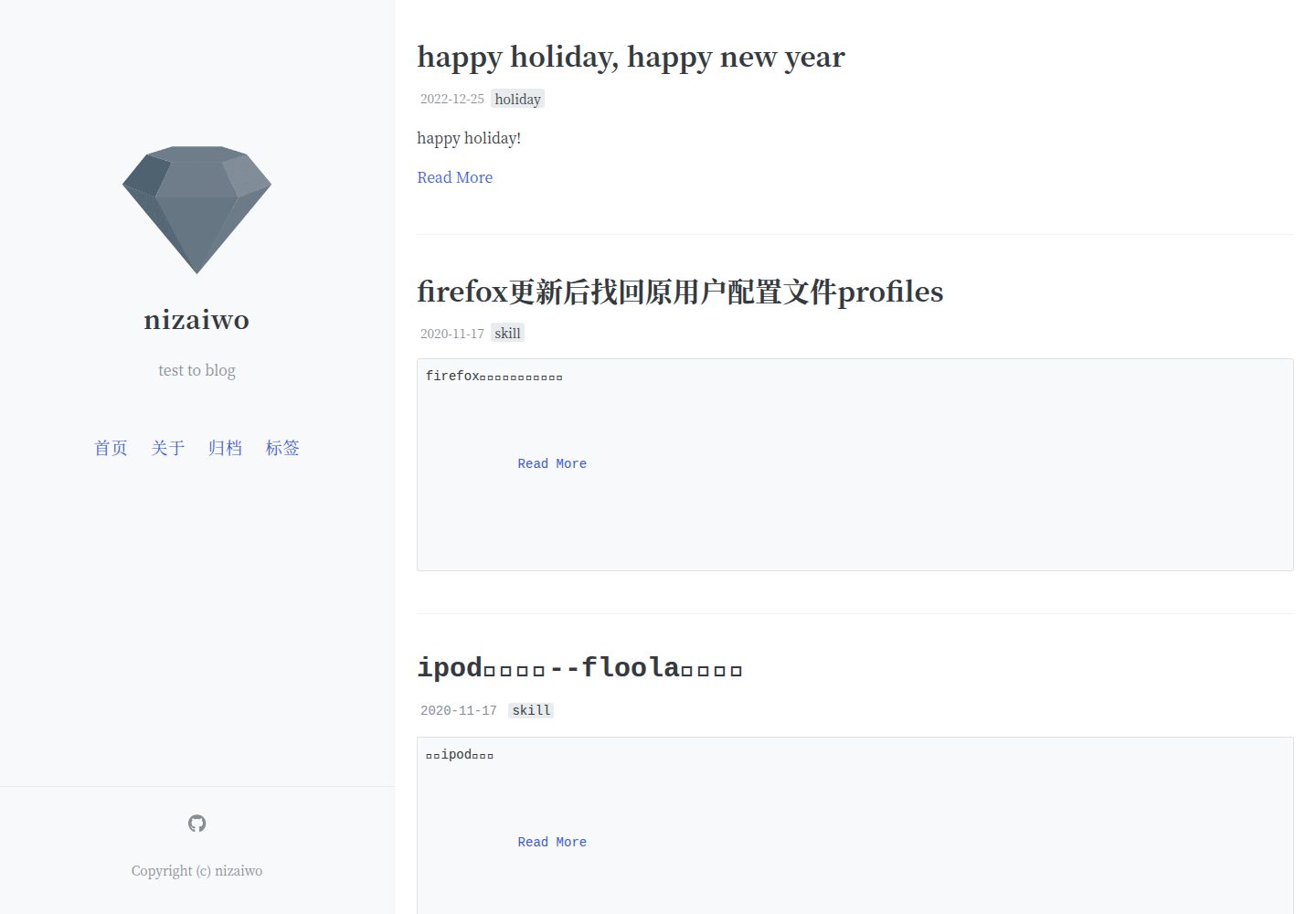
A Jekyll blog theme with a Chinese interface; the README says it is derived from LOFFER and modified and localized based on Kiko-now
JekyllBlog
blogs — Jekyll Blog Template
By nizaiwo
A Jekyll-based Chinese blog theme. The README states it is derived from LOFFER, can be deployed on GitHub Pages, and supports Markdown writing, pinned posts, a table of contents, and tag archives.
Explore the design
Compare the page layouts and mobile experience. Open any screenshot for a closer look.
Desktop homepage1 / 3
Desktop captureTop of page
Actual screenshot captured by the server browser.
All pages & views 3
Screenshots show visual appearance; interactive behavior may differ.
Recorded 2026-10-04View source
What stands out
A quick read of the recorded project description.
Targets users without a coding background; the README states it can be deployed to GitHub without writing code or using the command line
Write posts in Markdown in the _post folder and configure title, date, author, tags, comments, and more via YAML Front Matter
Supports pinned: true to pin posts and toc: true to display a table of contents, which is based on jekyll-toc by allejo
Provides /tags and /archive pages to browse archives by tag and date
Theme colors are based on the Open Color palette; replace the color variable in _sass/_variables.scss to change colors
Template Details
This is a Jekyll blog theme. The repository is named blogs and the author is nizaiwo. The README indicates that its predecessor is LOFFER by FromEndWorld; the theme was modified and localized into Chinese based on Kiko-now, and the interface is in Chinese. It targets users without a coding background, aiming to let them have a blog on GitHub without writing code or using the command line.
Writing is done by publishing posts in Markdown in the _post folder. The post front matter uses YAML Front Matter to declare fields such as layout, title, date, Author, tags, and comments. Optional features include: adding pinned: true in the Front Matter to pin a post; adding toc: true to display a table of contents, which is based on jekyll-toc by allejo; viewing archives by tag and date, corresponding to the /tags and /archive pages. The theme also states that it supports LaTeX rendering and provides example pages.
The theme color is adjusted via _sass/_variables.scss, using the open-source Open Color palette. Available colors are red, pink, grape, violet, indigo, blue, cyan, teal, green, lime, and yellow; the default is teal. Replacing that variable value changes the color. Social icons come from Font Awesome.
Limitations: the repository has 0 stars and was last updated on 2022-12-25. The README does not state compatibility with the current Jekyll version, nor does it provide deployment instructions other than GitHub Pages. The code is under the MIT license, but third-party assets such as demo images, fonts, and icons must be checked separately under their respective licenses.
JekyllBlog
Is it right for your project?
Use Cases
- An individual setting up a Chinese blog on GitHub Pages and publishing Markdown posts
- Organizing existing posts with tag and date archives, and pinning important content as needed
- Enabling LaTeX rendering for posts that contain formulas
- Changing the theme color scheme by modifying the color variable to suit personal preference
Suitable For
- Bloggers who want to write in Markdown and do not want to write code or use the command line
- Individual users planning to host their blog on GitHub Pages
- Sites that need a Chinese interface and basic post features such as pinning and a table of contents
- Users who accept the MIT license and are willing to retain the original author's copyright notice
Getting started & customization
Use these recorded setup notes alongside the repository instructions for your chosen version.
- 1
The README suggests that users without a coding background follow its dedicated tutorial page to complete setup
- 2
Posts go in the _post folder; the Front Matter must include fields such as layout, title, date, Author, and tags
- 3
To pin a post, add pinned: true to the post's Front Matter; to show a table of contents, add toc: true
- 4
To change the theme color, open _sass/_variables.scss and replace the default teal with another color from Open Color
- 5
The code is under the MIT license; retain the copyright and license notice when distributing. Third-party assets such as demo images, fonts, and icons must be checked separately for licensing
License & source material
Usage conditions & limitations
Free to use · keep license noticeThis entry covers the free version under the MIT license in the public repository; the free scope is the code of that version and does not mean that external services or third-party assets are free.
Must comply with when using
- You may use, modify, commercialize, and distribute the code of this version for free.
- When distributing copies or substantial portions of the code, retain the original author's copyright notice and the complete MIT license notice.
- The code is provided as is; warranties and limitations of liability are governed by the original license and applicable law.
Additional costs & items to verify
- This template is positioned as a Jekyll blog deployed on GitHub Pages; the README only describes this hosting method and does not provide instructions for other deployment paths.
- The project is derived from LOFFER by FromEndWorld; the README acknowledges this and asks users to star the original author's project. This is an attribution and source statement, and it is advisable to retain acknowledgment of the upstream project when using it.
- The theme is modified and localized from Kiko-now; the README's acknowledgments list upstream projects, and the corresponding copyright and license notices must be retained when distributing.
- Social icons come from free and open-source Font Awesome content; the README does not provide its specific license text, so you must check Font Awesome's license terms yourself when using these icons.
- The theme color scheme relies on the open-source Open Color palette; the README does not explain its licensing details, so you must confirm the palette's licensing requirements yourself when replacing color variables.
- Demo images, fonts, icons, and other third-party assets must be checked under their respective licenses; they cannot be judged solely by the code's MIT license.
- External services such as domains, hosting, databases, payments, or AI may incur additional charges.
View Original Text Basis
Permission is hereby granted, free of charge
Original License Text
这是一个可以发布在GitHub的Jekyll博客,你不需要编写代码或使用命令行即可获得一个部署在GitHub的博客。
Original README
给原作者项目点一个☆吧!(点击下图即可打开原作者github项目主页链接)
Original README
fork这个主题,然后再其上进行修改汉化,才有了LOFFER
Original README
社交网络图标来自FontAwesome的免费开源内容
Original README
https://github.com/nizaiwo/blogs/blob/master/LICENSEhttps://github.com/nizaiwo/blogs/blob/master/README.mdLOFFER用了一个开源的颜色表[Open Color](https://yeun.github.io/open-color/)
Original README
Compiled by DeepSeek based on repository license and README ·2026-10-04. Results only cover the materials read; dependencies, images, fonts, and subsequent term changes are subject to their respective original texts.
Project checks & description sources
Template Information
- Source platforms
- GitHub
- Documentation and maintenance reference score
- Partly documented · 65 / 100
- Technologies
- Jekyll
- Website type
- Blog
How this score is calculated
Our heuristic uses license records (up to 30), a demo link (12), a preview (10), stars (15), recorded maintenance (15), description completeness (8), feature records (5) and classification data (5). It is not a code, security or performance test, or a Google score. A link does not establish tested functionality.
What to verify for this project
- Repository update recorded
- 2022-12-25
- Screenshot last checked
- 2026-10-04
A demo link is listed. Check it with your own content and viewport sizes; its presence does not confirm that forms, authentication or payments work.
The catalog identifies Jekyll as the primary stack. Check the actual dependency manifest and lockfile for versions and hosting requirements. These notes use recorded metadata, not a code audit or a deployment test.
Use a selection guide →How this description was prepared
AI-assisted description based on catalog records and repository material. Repository authors are not automatically the reviewers of this description.
Review declaration: [email protected] · 2026-10-04
Inspect the recorded source material
SHA-256: 94e32be2e0c249276bf85936c431a88bda502e82e15b614cc12ff7417e0683e6
2026-10-04T01:01:50.375Z
Source file / repositoryLOFFER是个可以帮助你get off from LOFTER的软件。
这是一个可以发布在GitHub的Jekyll博客,你不需要编写代码或使用命令行即可获得一个部署在GitHub的博客。
**查看为无代码基础者写的教程[请点这里](https://fromendworld.github.io/LOFFER/document/)**
## 帮助这个项目
介绍更多人来使用它,摆脱lofter自由飞翔!
欢迎Issues和Pull Requests。
给原作者项目点一个☆吧!(点击下图即可打开原作者github项目主页链接)
[](https://github.com/FromEndWorld/loffer)
## 其他的使用tips和支持的功能
1.对LaTeX渲染的支持,请见[这篇说明和示例](https://fromendworld.github.io/LOFFER/math-test/)。
2.置顶功能,只要在一个post的YAML Front Matter(就是文章头部的这段信息)中加入` pinned: true `,这篇文章就可以置顶了。
3.给LOFFER更换主题颜色的手法。LOFFER用了一个开源的颜色表[Open Color](https://yeun.github.io/open-color/),该色表提供的可选颜色有:red, pink, grape, violet, indigo, blue, cyan, teal, green, lime, yellow。
LOFFER的默认状态是teal,要更换主题颜色,只要打开文件` _sass/_variables.scss `,将文件中所有的teal全部替换成你想要的颜色。例如,查找teal,替换indigo,全部替换,commit,完成!
4.目录功能,在post的信息中心加入` toc: true `,这篇博文就会显示目录了。
目录基于[jekyll-toc by allejo](https://github.com/allejo/jekyll-toc)制作。
5.使用Markdown文档在_post文件夹中发布博文,现有功能包括显示作者、置顶博文、添加目录。
博文YAML举例:
---
layout: post
title: Markdown语法简介
date: 2013-07-16
Author: Shengbin
tags: [sample, markdown]
comments: true
toc: true
---
6.按照标签和日期查看博文归档。请查看/tags 和/archive 页面。
## 致谢
* [Jekyll](https://github.com/jekyll/jekyll) - 这是本站存在的根基
* [Kiko-now](<https://github.com/aweekj/kiko-now>) - fork这个主题,然后再其上进行修改汉化,才有了LOFFER
* [Font Awesome](<https://fontawesome.com/>) - 社交网络图标来自FontAwesome的免费开源内容
* [FromEndWorld](<https://github.com/FromEndWorld/loffer>) - 感谢FromEndWorld制作的LOFFER
Explore similar templates
Compare previews and descriptions within the same stack and category.

al-folio
A Jekyll academic homepage theme for scholars and researchers, with a clean responsive design and out-of-the-box support for publication lists, project showcases, CVs, and blogs.
Jekyll · Portfolio

minimal-mistakes
Minimal Mistakes is a two-column Jekyll theme for personal sites, blogs, project documentation, or portfolios.
Jekyll · Portfolio

Beautiful Jekyll
Beautiful Jekyll is a mature, easy-to-use Jekyll blog theme maintained by Dean Attali since 2015, with over 50,000 users.
Jekyll · Blog

jekyll-TeXt-theme
A customizable Jekyll theme for personal sites, team sites, blogs, projects, and documentation.
Jekyll · Blog

startbootstrap-clean-blog-jekyll
The official Jekyll version of Start Bootstrap's Clean Blog theme, offering a blog home page, about page, contact page, and sample post pages, with a Formspree-powered contact form.
Jekyll · Blog

So Simple
A minimal reading-oriented Jekyll theme by Michael Rose for personal blogs, portfolios, and long-form reading. It offers multiple layouts, microformat markup, Disqus comments, Google Analytics, Jekyll SEO Tag, three skins, and aggregation by year, category, and tag with a grid view.
Jekyll · Blog