Implemented in pure HTML, CSS, and JavaScript, with no front-end framework dependencies
HTMLPortfolio
omar-aghili-portfolio — HTML Portfolio Template
By oaexam8-lgtm
A personal portfolio website built with pure HTML, CSS, and JavaScript, supporting Persian/English bilingual switching and dark/light themes, under the MIT license.
Explore the design
Compare the page layouts and mobile experience. Open any screenshot for a closer look.
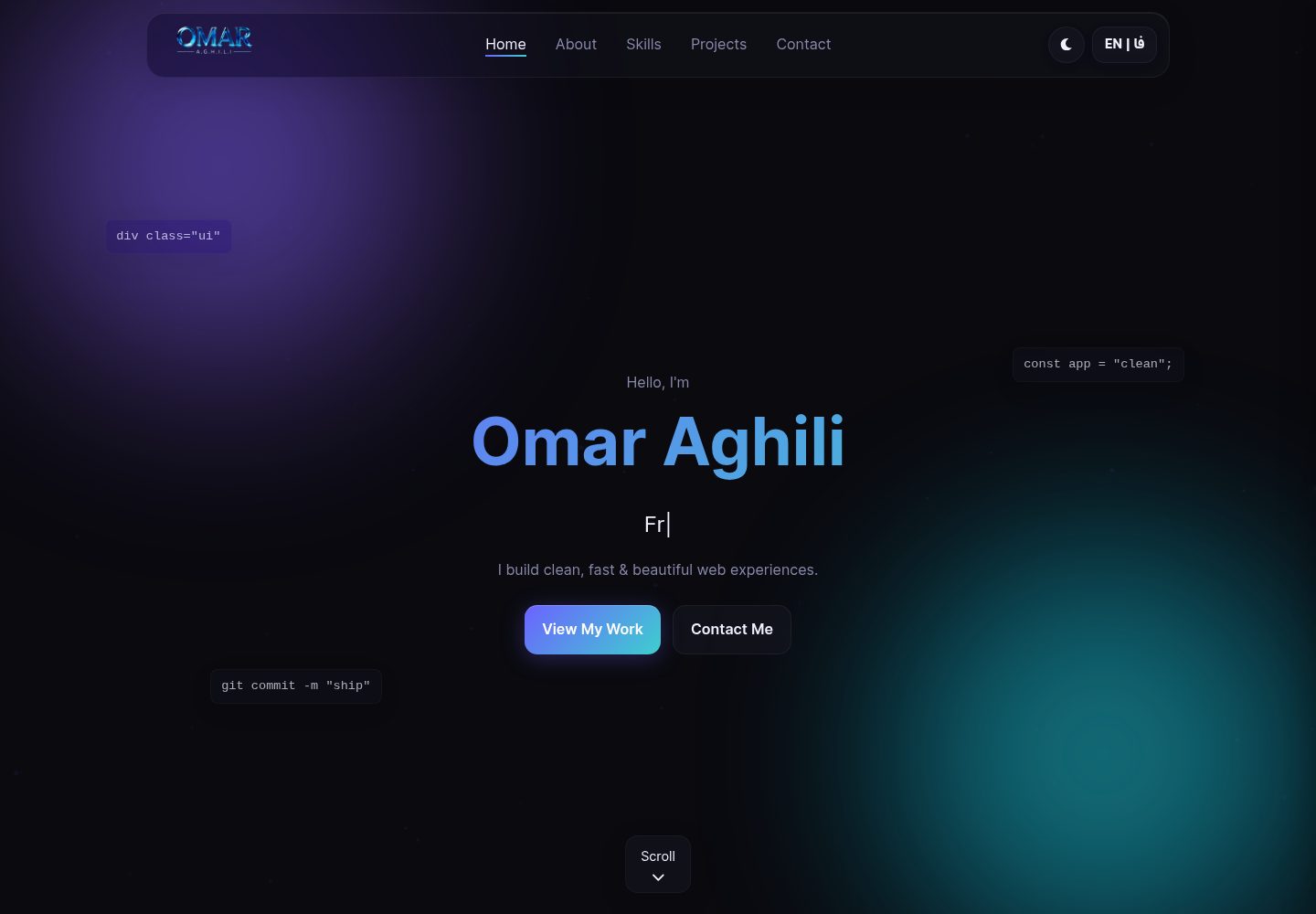
Desktop homepage1 / 2
Desktop captureTop of page
Actual screenshot captured by the server browser.
All pages & views 2
Screenshots show visual appearance; interactive behavior may differ.
Recorded 2026-10-13View source
What stands out
A quick read of the recorded project description.
Dark/light theme switching, with preferences saved via LocalStorage
Persian and English bilingual switching, automatically handling RTL and LTR directions
Includes scroll animations, skill progress bars, contact form validation, back-to-top, and toast notifications
Comes with SEO files such as robots.txt, sitemap.xml, and meta tags
Under the MIT license, allowing free use, modification, commercial use, and distribution
Template Details
This is a portfolio website template for personal presentation, written in native HTML, CSS, and JavaScript without relying on front-end frameworks. The page includes common portfolio sections such as home, skills, projects, and contact, and comes with built-in interactions including dark/light theme switching, Persian and English bilingual switching (with RTL/LTR direction adjustment), scroll animations, skill progress bars, contact form validation, a back-to-top button, and toast notifications. Theme and language preferences are saved via LocalStorage. The project includes SEO-related files such as robots.txt, sitemap.xml, and meta tags.
Usage is to open index.html directly, or run it via a Python local server or VS Code Live Server. The repository uses the MIT license, allowing free use, modification, commercial use, and distribution of this version of the code, but the copyright notice and license statement must be retained when distributing. Third-party assets such as demo images, fonts, and icons need to be checked separately for their licenses, and external services such as domains and hosting may incur additional charges.
HTMLPortfolio
Is it right for your project?
Use Cases
- Individual developers or designers building a portfolio website
- Resume or project introduction pages that need Persian/English bilingual presentation
- As a reference project for learning native HTML, CSS, and JavaScript interaction implementation
- Quick deployment to static hosting services such as GitHub Pages
Suitable For
- Users who want to showcase personal projects and skills with pure static pages
- Portfolio scenarios that need bilingual (Persian/English) and dark/light theme switching
- Developers who want to modify and commercially use a template based on the MIT license
Getting started & customization
Use these recorded setup notes alongside the repository instructions for your chosen version.
- 1
You can double-click index.html to open it in a browser, or use Python's http.server to start a local server
- 2
In VS Code, you can install the Live Server extension, right-click index.html, and select Open with Live Server
- 3
Modify CSS variables in css/style.css to adjust theme styles such as primary color and background color
- 4
Replace image resources such as avatar, background, and project screenshots in the images directory
- 5
Third-party assets such as demo images, fonts, and icons need to be checked separately for their licenses; external services such as domains and hosting may incur additional charges
License & source material
Usage conditions & limitations
Free to use · keep license noticeThis entry covers the free version under the MIT license in the public repository; the free scope is the code of this version and does not mean that external services or third-party assets are free.
Must comply with when using
- Free use, modification, commercial use, and distribution of this version of the code are allowed.
- When distributing copies or substantial portions of the code, retain the original author's copyright notice and the full MIT license statement.
- The code is provided as is; warranties and limitations of liability are governed by the original license and applicable law.
Additional costs & items to verify
- Demo images, fonts, icons, and other third-party assets need to be checked against their respective licenses and cannot be judged solely by the MIT license of the code.
- External services such as domains, hosting, databases, payments, or AI may incur additional charges.
- Icons are loaded via the Font Awesome CDN, which is an external service dependency; icons may not display when offline or when the CDN is unavailable, and their license and availability need to be confirmed independently.
- Fonts are third-party resources and need to be checked separately for their licenses; if used commercially or redistributed, the font licensing scope should be confirmed.
- The example deployment relies on the GitHub Pages hosting service, and using that service requires compliance with its terms; external services such as domains and hosting may incur additional charges.
- Font Awesome is separately licensed third-party material, and its license differs from the MIT code license; it must be verified independently before redistribution.
- Fonts provided by Google Fonts are third-party assets and need to be checked separately for their licenses; they cannot be assumed to be licensed together with the MIT code.
View Original Text Basis
Permission is hereby granted, free of charge
Original License Text
- **Font Awesome 6.6.0** - آیکونها (از CDN)
Original README
- **Inter & Vazirmatn Fonts** - فونتهای اختصاصی
Original README
- **GitHub Pages** - میزبانی رایگان
Original README
- [Font Awesome](https://fontawesome.com) - برای آیکونهای زیبا
Original README
https://github.com/oaexam8-lgtm/omar-aghili-portfolio/blob/main/LICENSEhttps://github.com/oaexam8-lgtm/omar-aghili-portfolio/blob/main/README.md- [Google Fonts](https://fonts.google.com) - برای فونتهای Inter و Vazirmatn
Original README
Compiled by DeepSeek based on repository license and README ·2026-10-13. Results only cover the materials read; dependencies, images, fonts, and subsequent term changes are subject to their respective original texts.
Project checks & description sources
Template Information
- Source platforms
- GitHub
- Documentation and maintenance reference score
- More documented · 80 / 100
- Technologies
- HTML
- Website type
- Portfolio
How this score is calculated
Our heuristic uses license records (up to 30), a demo link (12), a preview (10), stars (15), recorded maintenance (15), description completeness (8), feature records (5) and classification data (5). It is not a code, security or performance test, or a Google score. A link does not establish tested functionality.
What to verify for this project
- Repository update recorded
- 2026-09-21
- Screenshot last checked
- 2026-10-13
A demo link is listed. Check it with your own content and viewport sizes; its presence does not confirm that forms, authentication or payments work.
The catalog identifies HTML as the primary stack. Check the actual dependency manifest and lockfile for versions and hosting requirements. These notes use recorded metadata, not a code audit or a deployment test.
Use a selection guide →How this description was prepared
AI-assisted description based on catalog records and repository material. Repository authors are not automatically the reviewers of this description.
Review declaration: [email protected] · 2026-10-13
Inspect the recorded source material
SHA-256: 2d6eba3cdefc6a3dcf2c2618bd310b3764fbdd5ef24da561df03971f7230e5c1
2026-10-13T08:58:48.641Z
Source file / repository# 🌟 Omar Aghili - Personal Portfolio
<div align="center">





**یک وبسایت پورتفولیو شخصی مدرن و حرفهای با پشتیبانی دو زبانه**
**A modern, professional personal portfolio website with bilingual support**
[نمایش زنده](https://oaexam8-lgtm.github.io) • [گزارش باگ](https://github.com/oaexam8-lgtm/oaexam8-lgtm.github.io/issues) • [درخواست ویژگی](https://github.com/oaexam8-lgtm/oaexam8-lgtm.github.io/issues)
</div>
---
## 📋 فهرست | Table of Contents
- [درباره پروژه](#-درباره-پروژه--about)
- [ویژگیها](#-ویژگیها--features)
- [تکنولوژیها](#️-تکنولوژیها--technologies)
- [نصب و راهاندازی](#-نصب-و-راهاندازی--installation)
- [ساختار پروژه](#-ساختار-پروژه--project-structure)
- [استفاده](#-استفاده--usage)
- [مشارکت](#-مشارکت--contributing)
- [لایسنس](#-لایسنس--license)
- [تماس](#-تماس--contact)
---
## 📖 درباره پروژه | About
این پروژه یک وبسایت پورتفولیو شخصی است که با تکنولوژیهای خالص وب (HTML، CSS، JavaScript) ساخته شده است. هدف از این پروژه ارائه یک نمونه تمیز، مدرن و حرفهای برای معرفی مهارتها و پروژههای شخصی است.
This is a personal portfolio website built with pure web technologies (HTML, CSS, JavaScript). The goal is to provide a clean, modern, and professional showcase for skills and personal projects.
### 🎯 اهداف پروژه | Project Goals
- ✅ طراحی مدرن و جذاب
- ✅ تجربه کاربری روان و سریع
- ✅ کد تمیز و قابل نگهداری
- ✅ پشتیبانی از چند زبان
- ✅ دسترسیپذیری بالا
- ✅ بهینهسازی برای موتورهای جستجو
---
## ✨ ویژگیها | Features
### 🎨 طراحی و ظاهر
- 🌓 **تم تاریک و روشن** - تغییر آسان با یک کلیک + ذخیره ترجیحات
- 🎭 **انیمیشنهای زیبا** - Typing effect، Scroll reveal، Hover effects
- 🎨 **طراحی مدرن** - استفاده از Gradients، Shadows، و CSS Variables
- 📐 **Grid Layout** - استفاده از CSS Grid و Flexbox
### 🌐 چند زبانگی
- 🇮🇷 **پشتیبانی فارسی** - با تغییر جهت RTL
- 🇬🇧 **پشتیبانی انگلیسی** - با جهت LTR
- 🔄 **تغییر آسان زبان** - با یک کلیک + ذخیره خودکار
### 📱 واکنشگرا
- 📱 **موبایل** - بهینه شده برای صفحههای کوچک
- 📱 **تبلت** - Layout مناسب برای صفحههای میانه
- 💻 **دسکتاپ** - تجربه کامل برای صفحههای بزرگ
- 🍔 **منوی موبایل** - با انیمیشن و Overlay
### ⚡ عملکرد و بهینهسازی
- 🚀 **سرعت بالا** - بدون Framework سنگین
- 💾 **ذخیرهسازی محلی** - LocalStorage برای تنظیمات
- 🖼️ **Lazy Loading** - بارگذاری تصاویر در زمان نیاز
- 🔍 **SEO Optimized** - با Meta tags، Sitemap، و Robots.txt
### ♿ دسترسیپذیری
- 🏷️ **ARIA Labels** - برای Screen readers
- ⌨️ **Keyboard Navigation** - قابل استفاده با کیبورد
- 🎯 **Focus States** - نمایش واضح Focus
- 📢 **Live Regions** - اعلان تغییرات به کاربران
### 🛠️ قابلیتهای دیگر
- 📝 **فرم تماس** - با Validation کامل
- 🔝 **Scroll to Top** - دکمه بازگشت به بالا
- 🎯 **Active Link Tracking** - مشخص کردن بخش فعال
- 🍞 **Toast Notifications** - پیامهای زیبا
- 📊 **Skill Progress Bars** - نمایش سطح مهارتها
---
## 🛠️ تکنولوژیها | Technologies
### Frontend
- **HTML5** - ساختار معنایی
- **CSS3** - استایلدهی پیشرفته با Variables
- **JavaScript (ES6+)** - عملکردهای تعاملی
### Libraries & Tools
- **Font Awesome 6.6.0** - آیکونها (از CDN)
- **Inter & Vazirmatn Fonts** - فونتهای اختصاصی
- **Intersection Observer API** - انیمیشنهای Scroll
### Development
- **Git** - کنترل نسخه
- **GitHub Pages** - میزبانی رایگان
---
## 🚀 نصب و راهاندازی | Installation
### پیشنیازها | Prerequisites
- مرورگر مدرن (Chrome، Firefox، Safari، Edge)
- Git (اختیاری)
- ویرایشگر کد (VS Code توصیه میشود)
### نصب | Install
#### روش 1: دانلود مستقیم
```bash
# دانلود ZIP از GitHub
# باز کردن فایل index.html در مرورگر
```
#### روش 2: Clone با Git
```bash
# کلون کردن repository
git clone https://github.com/oaexam8-lgtm/oaexam8-lgtm.github.io.git
# رفتن به پوشه پروژه
cd oaexam8-lgtm.github.io
# باز کردن در VS Code
code .
```
### اجرا | Run
#### روش 1: باز کردن مستقیم
```bash
# دابل کلیک روی index.html
```
#### روش 2: سرور محلی با Python
```bash
# Python 3
python -m http.server 8000
# مرورگر را باز کنید:
# http://localhost:8000
```
#### روش 3: Live Server در VS Code
```bash
# نصب افزونه Live Server
# کلیک راست روی index.html
# انتخاب "Open with Live Server"
```
---
## 📂 ساختار پروژه | Project Structure
```
portfolio/
│
├── 📄 index.html # صفحه اصلی
├── 📄 README.md # مستندات پروژه
├── 📄 LICENSE # لایسنس MIT
├── 📄 CONTRIBUTING.md # راهنمای مشارکت
├── 📄 CHANGELOG.md # تاریخچه تغییرات
├── 📄 .gitignore # فایلهای نادیده گرفته شده
├── 📄 robots.txt # تنظیمات موتورهای جستجو
├── 📄 sitemap.xml # نقشه سایت
│
├── 📁 css/
│ └── 📄 style.css # استایلهای اصلی
│
├── 📁 js/
│ └── 📄 script.js # اسکریپتهای JavaScript
│
└── 📁 images/
├── 📁 image-logo/ # لوگو و فاویکون
│ └── 📄 image-logo.png
├── 📁 image-avatar/ # عکس پروفایل
│ └── 📄 image-avatar.png
├── 📁 images-background/ # تصاویر پسزمینه
│ └── 📄 image-hero-section.jpg
└── 📁 images-projects/ # اسکرینشات پروژهها
├── 📄 image-DevPortfolio.jpg
├── 📄 image-TaskFlow.jpg
└── 📄 image-WeatherNow.jpg
```
---
## 💻 استفاده | Usage
### تغییر تم
```javascript
// کلیک روی آیکون ماه/خورشید در نوار بالا
// تم به صورت خودکار ذخیره میشود
```
### تغییر زبان
```javascript
// کلیک روی دکمه EN | FA
// زبان و جهت صفحه تغییر میکند
```
### سفارشیسازی
```css
/* تغییر رنگهای اصلی در style.css */
:root {
--accent: #6c63ff; /* رنگ اصلی */
--bg-primary: #0a0a0f; /* پسزمینه اصلی */
/* ... */
}
```
---
## 🤝 مشارکت | Contributing
مشارکت شما در بهبود این پروژه استقبال میشود! 🎉
Your contributions are welcome! 🎉
لطفاً [راهنمای مشارکت](CONTRIBUTING.md) را بخوانید.
Please read [Contributing Guidelines](CONTRIBUTING.md).
### مراحل مشارکت:
1. 🍴 Fork کنید
2. 🔀 Branch بسازید (`git checkout -b feature/AmazingFeature`)
3. ✍️ تغییرات را Commit کنید (`git commit -m 'feat: Add AmazingFeature'`)
4. 📤 Push کنید (`git push origin feature/AmazingFeature`)
5. 🔃 Pull Request ایجاد کنید
---
## 📜 لایسنس | License
این پروژه تحت لایسنس MIT منتشر شده است - جزئیات در فایل [LICENSE](LICENSE)
This project is licensed under the MIT License - see [LICENSE](LICENSE) file for details
---
## 📧 تماس | Contact
**Omar Aghili** | **عمر عقیلی**
- 📧 Email: [[email protected]](mailto:[email protected])
- 🐙 GitHub: [@oaexam8-lgtm](https://github.com/oaexam8-lgtm)
- 🌐 Website: [oaexam8-lgtm.github.io](https://oaexam8-lgtm.github.io)
---
## 🙏 تشکر | Acknowledgments
- [Font Awesome](https://fontawesome.com) - برای آیکونهای زیبا
- [Google Fonts](https://fonts.google.com) - برای فونتهای Inter و Vazirmatn
- جامعه Open Source - برای الهام و پشتیبانی
---
<div align="center">
**ساخته شده با ❤️ توسط عمر عقیلی**
**Built with ❤️ by Omar Aghili**
⭐ اگر این پروژه برایتان مفید بود، یک ستاره بدهید!
⭐ If you found this project useful, give it a star!
</div>
Explore similar templates
Compare previews and descriptions within the same stack and category.

simplefolio
Simplefolio is a minimal single-page portfolio template for developers, built with HTML, Bootstrap, SCSS, and Parcel under the MIT license. It includes Hero, About, Projects, Contact, and Footer sections, with content edited in /src/index.html and theme colors controlled by two SCSS variables.
HTML · Portfolio

Freelancer
A bright, single-page Bootstrap portfolio template for freelancers, designers, and small studios. It includes a responsive portfolio grid with modal detail windows and an SB Forms contact form that requires an API token.
HTML · Portfolio

Resume
A single-page resume and CV template from Start Bootstrap, built on Bootstrap with a fixed sidebar and content sections.
HTML · Portfolio

Creative
A single-page marketing template by Start Bootstrap for creative agencies and product services, built on Bootstrap with SCSS, featuring a portfolio grid and call-to-action sections. It includes pre-set SB Forms markers for form integration and npm build scripts for source customization.
HTML · Corporate Website

Grayscale
A dark single-page Bootstrap template from Start Bootstrap for photography, events and brand storytelling, with a large hero and clearly separated sections.
HTML · Corporate Website

startbootstrap-stylish-portfolio
A one-page Bootstrap portfolio theme from Start Bootstrap with multiple content sections and an off-canvas navigation menu. Basic use means editing HTML/CSS under dist and opening index.html; advanced use relies on npm with Pug and SCSS build scripts.
HTML · Portfolio