A web developer portfolio page replicating Figma template 1
HTMLPortfolio
Portfolio-project — HTML Portfolio Template
By oovillagran
A mobile-first portfolio page from the Microverse learning phase, replicating Figma template 1 and built with HTML and CSS.
Explore the design
Compare the page layouts and mobile experience. Open any screenshot for a closer look.
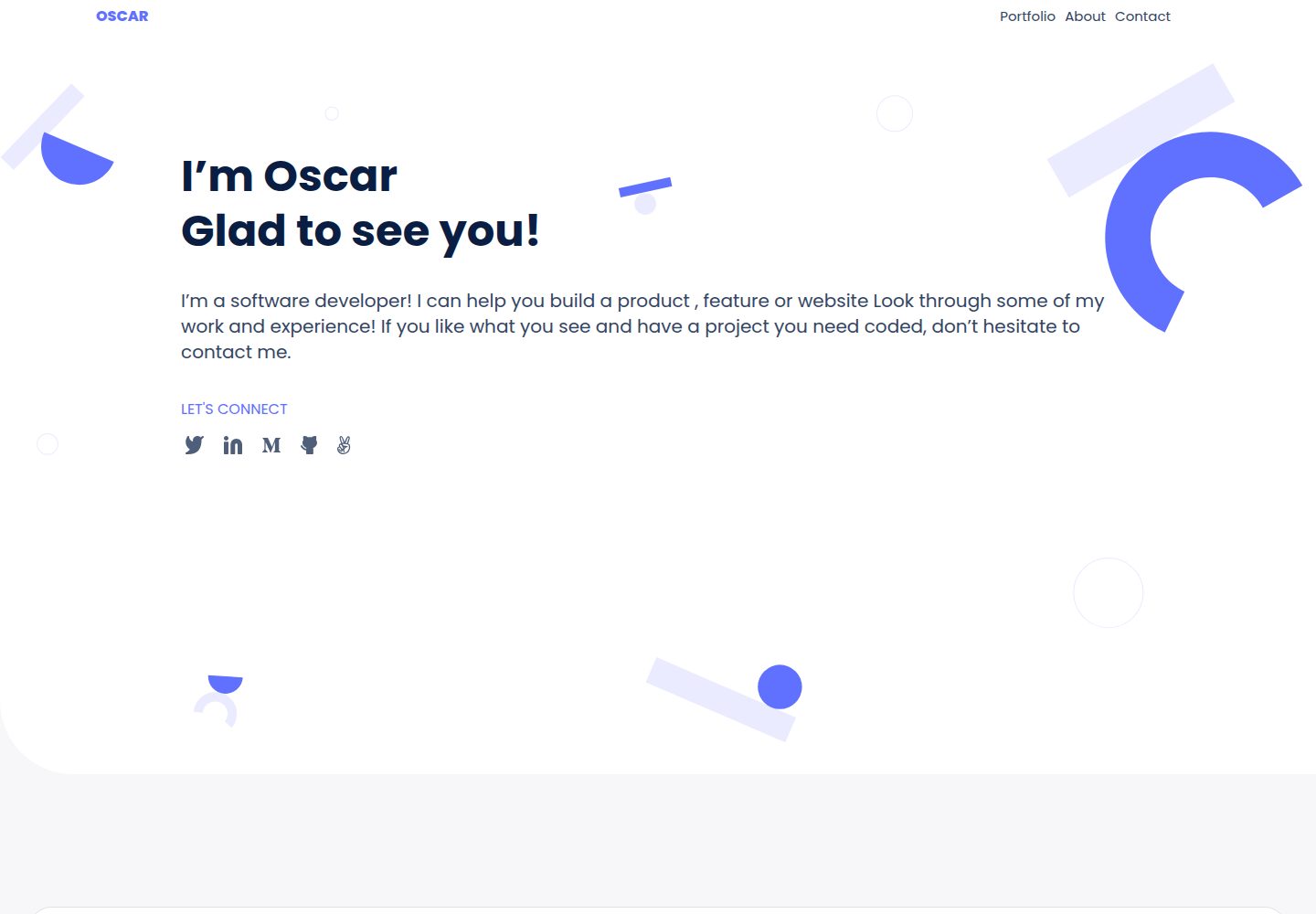
Desktop homepage1 / 2
Desktop captureTop of page
Actual screenshot captured by the server browser.
All pages & views 2
Screenshots show visual appearance; interactive behavior may differ.
Recorded 2026-10-02View source
What stands out
A quick read of the recorded project description.
Mobile-first approach with responsive layout
Built with HTML and CSS, no framework dependencies
Online demo via GitHub Pages, with a Loom walkthrough video
MIT licensed, allowing use, modification, commercial use, and distribution
Template Details
This is a personal portfolio webpage template, the author's first project at Microverse. The goal was to replicate a web developer portfolio page based on Figma template 1, practicing mobile-first and responsive layout techniques.
The repository primarily uses HTML and CSS; the README's Tech Stack lists HTML and CSS, and the template metadata marks the stack as HTML. An online demo is available via GitHub Pages, along with a Loom video walkthrough.
Key practices listed in the README include: creating branches in the repository, using linters for HTML and CSS projects, and writing a descriptive README file. The author also lists future plans: using linters in HTML and CSS projects, using Flexbox tools, using a README template file, and requesting code reviews.
The project is MIT licensed, allowing use, modification, commercial use, and distribution, provided the copyright and license notice are retained; third-party assets such as images, fonts, and icons that may appear on the page require separate license verification.
HTMLPortfolio
Is it right for your project?
Use Cases
- As a practice reference for learning HTML and CSS responsive layout
- As an initial structure for a personal portfolio page, to be replaced with content as needed
- For practicing GitHub branch workflow, linters, and README writing conventions
Suitable For
- Developers learning front-end fundamentals who want a reference for mobile-first techniques
- Individual developers needing a lightweight static portfolio starting point
- Those demonstrating HTML/CSS project structure and GitHub workflow in teaching
Getting started & customization
Use these recorded setup notes alongside the repository instructions for your chosen version.
- 1
Clone the repository: git clone [email protected]:oovillagran/Portfolio-project.git
- 2
After entering the directory, run npm install to install dependencies
- 3
Open the page directly in a browser to view it, or deploy to GitHub Pages as described in the README
- 4
Run npx hint . to execute the check command given in the README
License & source material
Usage conditions & limitations
Free to use · keep license noticeThis entry covers the free version under the MIT license in the public repository; the free scope is the code of this version and does not imply that external services or third-party assets are free.
Must comply with when using
- Free use, modification, commercial use, and distribution of this version's code are permitted.
- When distributing copies or substantial portions of the code, retain the original author's copyright notice and the full MIT license notice.
- The code is provided as is; warranties and limitations of liability are governed by the original license and applicable law.
Additional costs & items to verify
- Demo images, fonts, icons, and other third-party assets must be checked against their respective licenses; the code's MIT license alone cannot be used to judge them.
- External services such as domains, hosting, databases, payments, or AI may incur separate charges.
View Original Text Basis
https://github.com/oovillagran/Portfolio-project/blob/main/LICENSE.mdhttps://github.com/oovillagran/Portfolio-project/blob/main/README.mdPermission is hereby granted, free of charge
Original License Text
Compiled by DeepSeek based on repository license and README ·2026-10-02. Results only cover the materials read; dependencies, images, fonts, and subsequent term changes are subject to their respective original texts.
Project checks & description sources
Template Information
- Source platforms
- GitHub
- Documentation and maintenance reference score
- Partly documented · 68 / 100
- Technologies
- HTML
- Website type
- Portfolio
How this score is calculated
Our heuristic uses license records (up to 30), a demo link (12), a preview (10), stars (15), recorded maintenance (15), description completeness (8), feature records (5) and classification data (5). It is not a code, security or performance test, or a Google score. A link does not establish tested functionality.
What to verify for this project
- Repository update recorded
- 2023-04-14
- Screenshot last checked
- 2026-10-02
A demo link is listed. Check it with your own content and viewport sizes; its presence does not confirm that forms, authentication or payments work.
The catalog identifies HTML as the primary stack. Check the actual dependency manifest and lockfile for versions and hosting requirements. These notes use recorded metadata, not a code audit or a deployment test.
Use a selection guide →How this description was prepared
AI-assisted description based on catalog records and repository material. Repository authors are not automatically the reviewers of this description.
Automatically checked against source and license rules; no manual editorial review.
Inspect the recorded source material
SHA-256: ad51b1df05db2742c926d338540e3a297944db4912dc0a335c7cd47fdcf11505
2026-10-02T21:30:15.074Z
Source file / repository<a name="readme-top"></a>
<div align="center">
<h1><b>Portfolio Project</b></h1>
<img src="images/screenshots/README.png" alt="Readme Image">
</div>
<!-- TABLE OF CONTENTS -->
# 📗 Table of Contents
- [📗 Table of Contents](#-table-of-contents)
- [📖 Portfolio Project: Setup and mobile first](#-portfolio-project-setup-and-mobile-first)
- [🛠 Built With ](#-built-with-)
- [Tech Stack ](#tech-stack-)
- [Key Features ](#key-features-)
- [🚀 Live Demo ](#-live-demo-)
- [🏎️ Loom Walktrough ](#️-loom-walktrough-)
- [💻 Getting Started ](#-getting-started-)
- [Prerequisites](#prerequisites)
- [Setup](#setup)
- [Install](#install)
- [Usage](#usage)
- [Run tests](#run-tests)
- [Deployment](#deployment)
- [👥 Authors ](#-authors-)
- [🔭 Future Features ](#-future-features-)
- [🤝 Contributing ](#-contributing-)
- [⭐️ Show your support ](#️-show-your-support-)
- [🙏 Acknowledgments ](#-acknowledgments-)
- [📝 License ](#-license-)
<!-- PROJECT DESCRIPTION -->
# 📖 Portfolio Project: Setup and mobile first<a name="about-project"></a>
**Portfolio Project: Setup and mobile first** is the start point in order to create my own portfolio web site. This project uses the template number 1 from the **templates in Figma**.
## 🛠 Built With <a name="built-with"></a>
### Tech Stack <a name="tech-stack"></a>
<details>
<summary>HTML</summary>
<ul>
<li>HTML</li>
</ul>
</details>
<details>
<summary>CSS</summary>
<ul>
<li>CSS</li>
</ul>
</details>
<!-- Features -->
### Key Features <a name="key-features"></a>
- **Creating branches on repositories.**
- **Use of linter on HTML&CSS project.**
- **Write a correct descriptive README file.**
<p align="right">(<a href="#readme-top">back to top</a>)</p>
<!-- LIVE DEMO -->
## 🚀 Live Demo <a name="live-demo"></a>
- Here you can see a [Live Demo](https://oovillagran.github.io/Portfolio-project/) of my project.
<p align="right">(<a href="#readme-top">back to top</a>)</p>
<!-- Walktrough-->
## 🏎️ Loom Walktrough <a name="walktrough"></a>
- This is the [Loom Walktrough](https://www.loom.com/share/dc581ee556564b79980452c969e5d524) of my project.
<p align="right">(<a href="#readme-top">back to top</a>)</p>
<!-- GETTING STARTED -->
## 💻 Getting Started <a name="getting-started"></a>
To get a local copy up and running, follow the following steps steps.
### Prerequisites
In order to run this project you need:
- Create a repo on your repositores files.
- Clone or make a copy of this repo on your local machine.
- Follow GitHub flow.
- A carefully reading of this README.md is required.
### Setup
Clone this repository to your desired folder:
```bash
cd my-folder
git clone [email protected]:oovillagran/Portfolio-project.git
```
### Install
Install this project with:
```bash
npm install
```
### Usage
To run the project, you can use your favorite browser.
### Run tests
To run tests, execute the following command:
```bash
npx hint .
```
### Deployment
- You can deploy this project using GitHub pages.
<p align="right">(<a href="#readme-top">back to top</a>)</p>
<!-- AUTHORS -->
## 👥 Authors <a name="authors"></a>
👤 **Oscar Villagran**
- GitHub: [@oovillagran](https://github.com/oovillagran)
- Twitter: [@oovillagran](https://twitter.com/oovillagran)
- LinkedIn: [Oscar Villagran](https://www.linkedin.com/in/oovillagran/)
👤 **Hafed Efheij**
- GitHub: [@Hafed](https://github.com/hafedefheij)
- LinkedIn: [@Hafed](https://www.linkedin.com/in/hafedefheij)
<p align="right">(<a href="#readme-top">back to top</a>)</p>
<!-- FUTURE FEATURES -->
## 🔭 Future Features <a name="future-features"></a>
- [ ] **Use of linter in HTML&CSS projects**
- [ ] **Flexbox tools are requiered**
- [ ] **Use README template file**
- [ ] **Ask for a code review**
<p align="right">(<a href="#readme-top">back to top</a>)</p>
<!-- CONTRIBUTING -->
## 🤝 Contributing <a name="contributing"></a>
Contributions, issues, and feature requests are welcome!
Feel free to check the [issues page](../../issues/).
<p align="right">(<a href="#readme-top">back to top</a>)</p>
<!-- SUPPORT -->
## ⭐️ Show your support <a name="support"></a>
If you like this project feel free to make any comment, all contributions are welcome!.
<p align="right">(<a href="#readme-top">back to top</a>)</p>
<!-- ACKNOWLEDGEMENTS -->
## 🙏 Acknowledgments <a name="acknowledgements"></a>
I would like to thank Microverse comunity, especially reviewers guys, they do an excellent job. I thank my learning, morning session and standup partners for supporting me.
<p align="right">(<a href="#readme-top">back to top</a>)</p>
## 📝 License <a name="license"></a>
This project is [MIT](LICENSE.md) licensed.
<p align="right">(<a href="#readme-top">back to top</a>)</p>
Explore similar templates
Compare previews and descriptions within the same stack and category.

simplefolio
Simplefolio is a minimal single-page portfolio template for developers, built with HTML, Bootstrap, SCSS, and Parcel under the MIT license. It includes Hero, About, Projects, Contact, and Footer sections, with content edited in /src/index.html and theme colors controlled by two SCSS variables.
HTML · Portfolio

Freelancer
A bright, single-page Bootstrap portfolio template for freelancers, designers, and small studios. It includes a responsive portfolio grid with modal detail windows and an SB Forms contact form that requires an API token.
HTML · Portfolio

Resume
A single-page resume and CV template from Start Bootstrap, built on Bootstrap with a fixed sidebar and content sections.
HTML · Portfolio

Creative
A single-page marketing template by Start Bootstrap for creative agencies and product services, built on Bootstrap with SCSS, featuring a portfolio grid and call-to-action sections. It includes pre-set SB Forms markers for form integration and npm build scripts for source customization.
HTML · Corporate Website

Grayscale
A dark single-page Bootstrap template from Start Bootstrap for photography, events and brand storytelling, with a large hero and clearly separated sections.
HTML · Corporate Website

startbootstrap-stylish-portfolio
A one-page Bootstrap portfolio theme from Start Bootstrap with multiple content sections and an off-canvas navigation menu. Basic use means editing HTML/CSS under dist and opening index.html; advanced use relies on npm with Pug and SCSS build scripts.
HTML · Portfolio