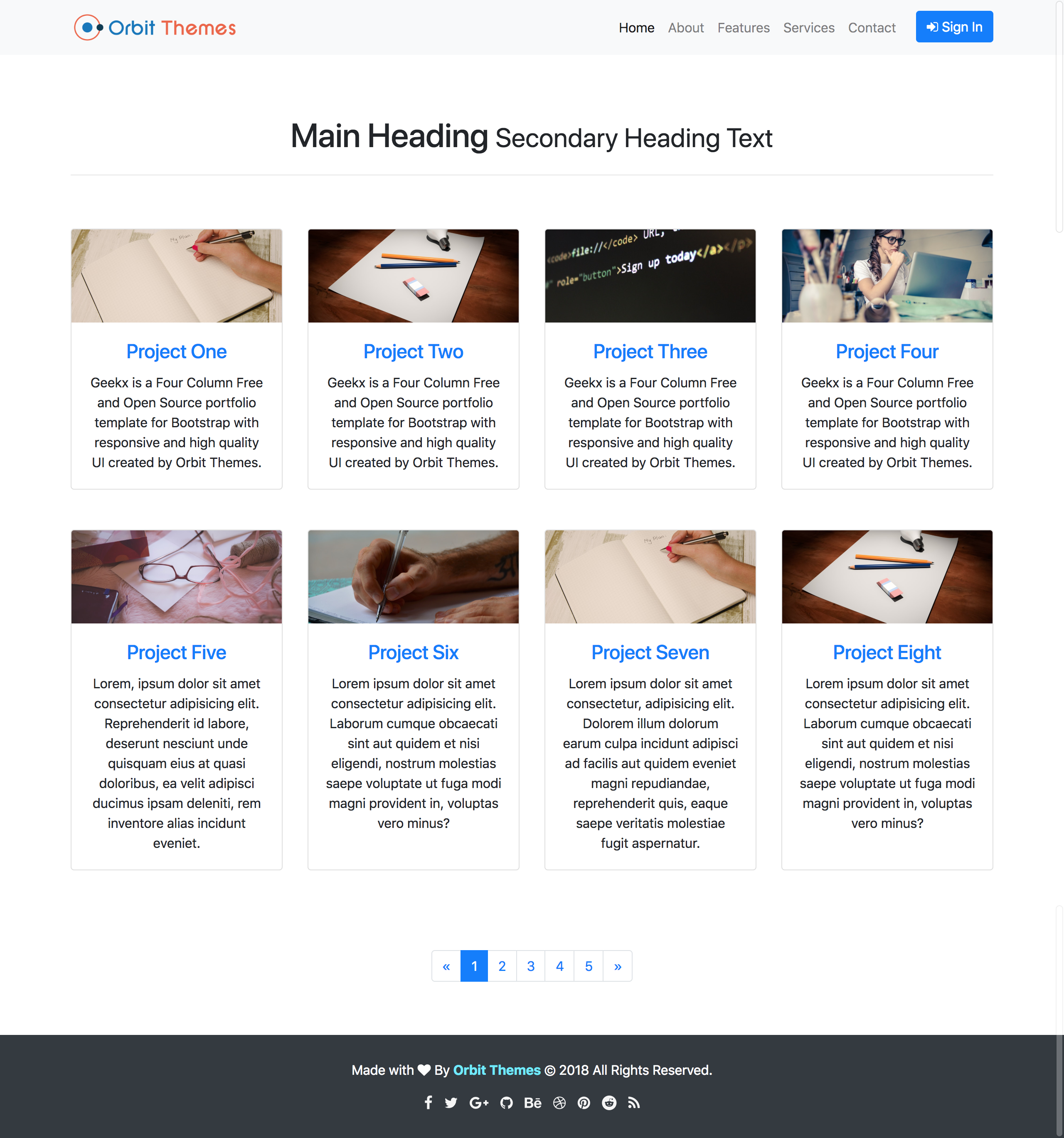
Four-column portfolio showcase layout built on Bootstrap
HTMLPortfolio
geekx — HTML Portfolio Template
By orbitthemes
Geekx is a free, open-source four-column portfolio template released by Orbit Themes, built on Bootstrap and licensed under MIT, suitable for showcasing images or project work.
Explore the design
Compare the page layouts and mobile experience. Open any screenshot for a closer look.
Author preview
Author-provided previewTop of page
Preview provided in the project README.
One original preview is available. Open the full image to inspect the design.
Screenshots show visual appearance; interactive behavior may differ.
Recorded 2026-10-02View source
What stands out
A quick read of the recorded project description.
Responsive design adapting to different screen sizes
HTML5 ready with semantic tags
Styles written in SASS, compilable and minifiable via Gulp
MIT license allowing free use, modification, commercial use, and distribution
Template Details
Geekx is a four-column portfolio showcase template developed by Orbit Themes and released as open source under the MIT license. The template is built on Bootstrap, provides a responsive interface, and the repository includes preview images provided by the author.
Structurally, the template centers on HTML and CSS, with styles written in SASS that can be compiled to CSS and minified via Gulp tasks; the script portion merges multiple JS files into main.js and generates a minified version. The development workflow relies on Node.js and npm; after installing dependencies, you can run gulp dev to preview in the browser and automatically refresh when changes are saved. For simple modifications, you can directly edit the HTML and CSS files and open index.html in a browser.
The template is positioned for portfolio display; the README describes it as a four-column portfolio template and lists features such as responsive design, SEO semantic code, and HTML5 readiness. The repository was last updated in 2018, making it an older template project.
Regarding licensing, the code is under the MIT license, allowing free use, modification, commercial use, and distribution, provided the copyright notice and license notice are retained when distributing. The demo images in the template come from Pexels; third-party assets such as fonts and icons must be checked separately under their respective licenses and cannot be judged solely by the code's MIT license.
HTMLPortfolio
Is it right for your project?
Use Cases
- Individual designers or developers showcasing image portfolios
- Photography projects displaying photos in a four-column grid
- Scenarios requiring quick setup of a static portfolio display page
- Secondary development of portfolio pages based on Bootstrap
Suitable For
- Individuals looking to build a portfolio page using a free open-source template
- Users familiar with HTML and CSS who need to edit files directly
- Front-end developers willing to use Node.js and Gulp for building
Getting started & customization
Use these recorded setup notes alongside the repository instructions for your chosen version.
- 1
Direct use: edit HTML and CSS files, open index.html in a browser to preview
- 2
Full development workflow: clone the repository, run npm install, then run gulp dev to start preview and auto-refresh
- 3
Can be installed via npm i geekx, or download the release package from Orbit Themes
- 4
Gulp tasks include gulp css (compile and minify SCSS), gulp js (merge and minify scripts), gulp export, gulp clean
- 5
Demo images come from Pexels; third-party assets such as fonts and icons must be checked under their respective licenses
License & source material
Usage conditions & limitations
Free to use · keep license noticeThis entry covers the free version under the MIT license in the public repository; the free scope applies to that version's code and does not imply that external services or third-party assets are free.
Must comply with when using
- Free use, modification, commercial use, and distribution of this version's code are permitted.
- When distributing copies or substantial portions of the code, retain the original author's copyright notice and the full MIT license notice.
- The code is provided as-is; warranties and limitations of liability are governed by the original license and applicable law.
Additional costs & items to verify
- Demo images, fonts, icons, and other third-party assets must be checked under their respective licenses and cannot be judged solely by the code's MIT license.
- External services such as domains, hosting, databases, payments, or AI may incur additional charges.
View Original Text Basis
https://github.com/orbitthemes/geekx/blob/master/LICENSEhttps://github.com/orbitthemes/geekx/blob/master/README.mdPermission is hereby granted, free of charge
Original License Text
Compiled by DeepSeek based on repository license and README ·2026-10-02. Results only cover the materials read; dependencies, images, fonts, and subsequent term changes are subject to their respective original texts.
Project checks & description sources
Template Information
- Source platforms
- GitHub
- Documentation and maintenance reference score
- Partly documented · 56 / 100
- Technologies
- HTML
- Website type
- Portfolio
How this score is calculated
Our heuristic uses license records (up to 30), a demo link (12), a preview (10), stars (15), recorded maintenance (15), description completeness (8), feature records (5) and classification data (5). It is not a code, security or performance test, or a Google score. A link does not establish tested functionality.
What to verify for this project
- Repository update recorded
- 2018-06-13
- Screenshot last checked
- 2026-10-02
No demo link is recorded. Use the repository instructions to evaluate the project locally; the screenshot alone cannot establish interactive behavior.
The catalog identifies HTML as the primary stack. Check the actual dependency manifest and lockfile for versions and hosting requirements. These notes use recorded metadata, not a code audit or a deployment test.
Use a selection guide →How this description was prepared
AI-assisted description based on catalog records and repository material. Repository authors are not automatically the reviewers of this description.
Automatically checked against source and license rules; no manual editorial review.
Inspect the recorded source material
SHA-256: c647340644cf64695d8f4e90219ca7e8dd9a6a277a882082d303b0c8294d18c3
2026-10-02T21:32:43.446Z
Source file / repository# [Orbit Themes - Geekx Four Column Portfolio Template](https://orbitthemes.com/preview/geekx/)
[Geekx](https://orbitthemes.com/downloads/geekx/) is a **Free** and **Open Source** Four Column portfolio template for [Bootstrap](https://getbootstrap.com/) with responsive and high quality UI created by [Orbit Themes](https://orbitthemes.com/).
<strong><a href="https://orbitthemes.com/preview/geekx/">View Demo</a> | <a href="https://github.com/orbitthemes/geekx/archive/master.zip">Download ZIP</a></strong>
[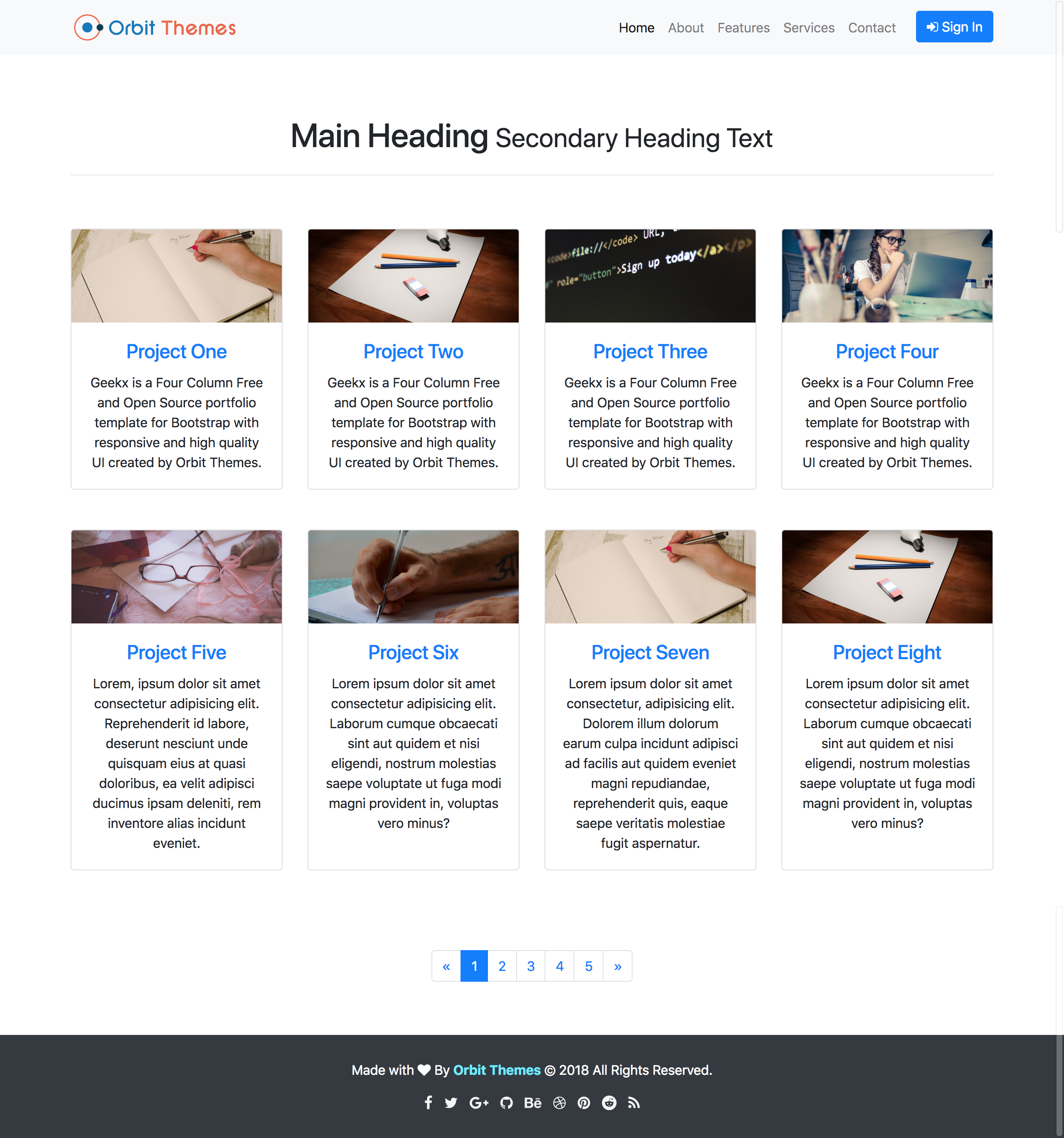](https://orbitthemes.com/preview/geekx/)
**[View Live Preview](https://orbitthemes.com/preview/geekx/)**
## Status
[](https://github.com/orbitthemes/geekx)
[](https://raw.githubusercontent.com/orbitthemes/geekx/master/LICENSE)
[](https://www.npmjs.com/package/geekx)
[](https://travis-ci.org/orbitthemes/geekx)
[](https://david-dm.org/orbitthemes/geekx)
[](https://david-dm.org/orbitthemes/geekx?type=dev)
## Features
- Responsive Design.
- Developed With Bootstrap 4.
- SEO Semantic Code.
- Simple and Easy To Use.
- HTML5 ready. Use the new elements with confidence.
- Designed with progressive enhancement in mind.
## Download and Installation
To begin using this template, choose one of the following options to get started:
* [Download the latest release on Orbit Themes](https://orbitthemes.com/downloads/geekx/)
* Install via npm: `npm i geekx`
* Clone the repository: `git clone https://github.com/orbitthemes/geekx.git`
```sh
# clone the repository
$ git clone https://github.com/orbitthemes/geekx.git
# go into the directory
$ cd geekx
# install all dependencies
$ npm install
#For Development Options
$ gulp dev
```
* [Fork, Clone, or Download on GitHub](https://github.com/orbitthemes/geekx)
## Usage
### Basic Usage
After downloading, simply edit the HTML and CSS files included with the template in your favorite text editor to make changes. These are the only files you need to worry about, you can ignore everything else! To preview the changes you make to the code, you can open the `index.html` file in your web browser.
### Advanced Usage
After installation, run `npm install` and then run `gulp dev` which will open up a preview of the template in your default browser, watch for changes to core template files, and live reload the browser when changes are saved. You can view the `gulpfile.js` to see which tasks are included with the dev environment.
#### Gulp Tasks
- `gulp` the default task that builds everything.
- `gulp dev` browserSync opens the project in your default browser and live reloads when changes are made.
- `gulp css:compile` compiles the SCSS into CSS file.
- `gulp css:minify` minifies the compiled CSS file.
- `gulp css` compiles SCSS files into CSS and minify the css.
- `gulp js` Combines all js scripts to one file named `main.js`, Minify the file, and save it as `main.min.js`.
- `gulp export` copies dependencies from node_modules to the dist directory.
- `gulp clean` Removes all the directories inside dist, minified js files and all compiled css files.
## Bugs and Issues
Have a bug or an issue with this template? [Open a new issue](https://github.com/orbitthemes/geekx/issues) on GitHub or leave a comment on the [template overview page at Orbit Themes](https://orbitthemes.com/downloads/geekx/).
## Custom Builds
You can hire Orbit Themes to create a custom build of any template, or create something from scratch using Bootstrap. For more information, visit the **[Contact Page](https://orbitthemes.com/contact/)**.
## Other Templates
- [Album Plus](https://orbitthemes.com/downloads/album-plus) - Album Plus is a Simple Photography and Magazine template for Bootstrap 4.
- [Blog](https://orbitthemes.com/downloads/blog) - Blog Is The Beautiful Blogger Template For Bootstrap 4.
- [My Shop](https://orbitthemes.com/downloads/my-shop) - My Shop is a Simple E-Commerce template for Bootstrap 4.
- [Carousel Plus](https://orbitthemes.com/downloads/carousel-plus) - Clean and Responsive Bootstrap 4 slideshow Template.
- [Checkout Plus](https://orbitthemes.com/downloads/checkout-plus) - Simple, Clean and Stylish Bootstrap 4 Checkout Page Template.
- [Cover Plus](https://orbitthemes.com/downloads/cover-plus) - Cover Plus Is The Beautiful One Page Template for Bootstrap 4.
- [Dashboard](https://orbitthemes.com/downloads/dashboard) - Free and Responsive admin dashboard template for bootstrap 4.
- [Healthy](https://orbitthemes.com/downloads/healthy) - Clean Responsive Fitness Landing Page For Bootstrap 4.
- [Kreative](https://orbitthemes.com/downloads/kreative) - Kreative Business Landing Page Template.
- [Pricing Plus](https://orbitthemes.com/downloads/pricing-plus) - Clean and Responsive Pricing Page Template With High Quality UI.
<!-- ## Useful Links -->
<!-- OrbitThemes Blog Post Links Related To the Template. -->
## How to contribute
To contribute, please ensure that you have stable Node.js and npm installed.
Test if Gulp CLI is installed by running `gulp --version`. If the command isn't found, run `npm install -g gulp`. For more information about installing Gulp, see the [Gulp's Getting Started!](https://gulpjs.org/getting-started).
To have all gulp dependencies run `npm install`
If gulp is installed, follow the steps below.
* Fork and clone the repository.
* Run `gulp dev`, this will open Template on your default browser.
* Now you can code, code and code!
* Submit a pull request.
## About
Orbit Themes is an open source library of free Bootstrap templates and themes. All of the free templates and themes on Orbit Themes are released under the MIT license, which means you can use them for any purpose, even for commercial projects.
* Web: https://orbitthemes.com
* Twitter: https://twitter.com/orbitthemes
* Facebook: https://www.facebook.com/orbitthemes/
* Google Plus: https://plus.google.com/+orbitthemes
* Github: https://github.com/orbitthemes
* Behance: https://www.behance.net/orbitthemes
* Dribble: https://dribbble.com/orbitthemes
* Pinterest: https://www.pinterest.com/orbitThemes/
* Reddit: https://www.reddit.com/user/orbitthemes
* Instagram: https://www.instagram.com/orbitthemes/
* LinkedIn: https://www.linkedin.com/company/orbit-themes/
Orbit Themes was created by and is maintained by **[Sandeep Prasad Bhatt](http://sandeepbhatt.com.np/)** .
* http://sandeepbhatt.com.np
* https://twitter.com/_MeSandy
* https://github.com/sandy100
Orbit Theme Templates and Themes are based on the [Bootstrap](http://getbootstrap.com/) framework created by [Mark Otto](https://twitter.com/mdo) and [Jacob Thorton](https://twitter.com/fat).
## Credits
* [node.js](http://nodejs.org/)
* [gulp](http://gulpjs.com/)
* [jQuery](http://jquery.com/)
* [Bootstrap](http://getbootstrap.com/)
* [SASS](https://sass-lang.com/)
* [Pexels](https://www.pexels.com/)
## Copyright and License
Copyright 2018 Orbit Themes. Code released under the [MIT](https://raw.githubusercontent.com/orbitthemes/geekx/master/LICENSE).
## Visit Website: https://www.orbitthemes.com
Explore similar templates
Compare previews and descriptions within the same stack and category.

simplefolio
Simplefolio is a minimal single-page portfolio template for developers, built with HTML, Bootstrap, SCSS, and Parcel under the MIT license. It includes Hero, About, Projects, Contact, and Footer sections, with content edited in /src/index.html and theme colors controlled by two SCSS variables.
HTML · Portfolio

Freelancer
A bright, single-page Bootstrap portfolio template for freelancers, designers, and small studios. It includes a responsive portfolio grid with modal detail windows and an SB Forms contact form that requires an API token.
HTML · Portfolio

Resume
A single-page resume and CV template from Start Bootstrap, built on Bootstrap with a fixed sidebar and content sections.
HTML · Portfolio

Creative
A single-page marketing template by Start Bootstrap for creative agencies and product services, built on Bootstrap with SCSS, featuring a portfolio grid and call-to-action sections. It includes pre-set SB Forms markers for form integration and npm build scripts for source customization.
HTML · Corporate Website

Grayscale
A dark single-page Bootstrap template from Start Bootstrap for photography, events and brand storytelling, with a large hero and clearly separated sections.
HTML · Corporate Website

startbootstrap-stylish-portfolio
A one-page Bootstrap portfolio theme from Start Bootstrap with multiple content sections and an off-canvas navigation menu. Basic use means editing HTML/CSS under dist and opening index.html; advanced use relies on npm with Pug and SCSS build scripts.
HTML · Portfolio