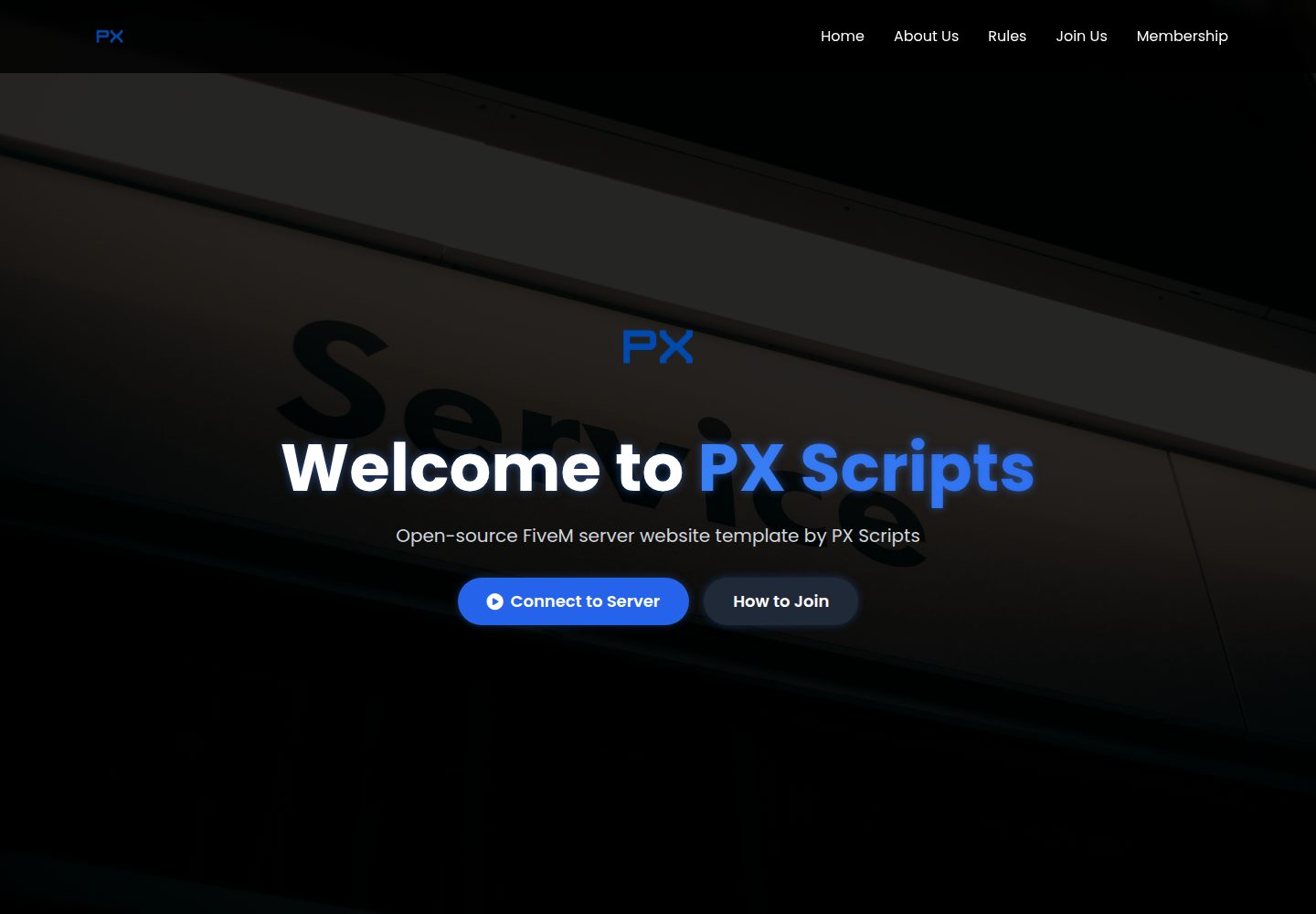
Includes multiple static pages such as home, about, join, rules, rulebook, membership, and 404
HTMLStarter
fivem-web-template — HTML Starter Template
By PhoenixGoDdev
A static website template for FiveM servers, including home, about, rules, join, membership, and 404 pages, with server online status and player list displayed via the FiveM public API.
Explore the design
Compare the page layouts and mobile experience. Open any screenshot for a closer look.
Desktop homepage1 / 3
Desktop captureTop of page
Actual screenshot captured by the server browser.
All pages & views 3
Screenshots show visual appearance; interactive behavior may differ.
Recorded 2026-10-04View source
What stands out
A quick read of the recorded project description.
Displays real-time server player count and player list via the FiveM public API
Server ID is configured as a constant in server-status.js and can be replaced as needed
Uses Tailwind CSS utility classes, Font Awesome icons, and Animate.css animations
Provides .htaccess and _redirects for Apache or Netlify deployment
Mobile-first responsive layout with a collapsible mobile menu
Template Details
This is a FiveM server website template published by PX Scripts. The repository is primarily composed of static HTML pages, accompanied by resource files such as styles.css, script.js, and server-status.js. The pages cover home, about us, join us, rules, detailed rulebook, membership pass, and a custom 404 page, making it suitable as a foundational site for server presentation and information publishing.
The template uses server-status.js to call the FiveM servers-frontend.fivem.net API to retrieve real-time player counts and player lists, with the server ID configured as a constant at the top of the script. The styling layer uses Tailwind CSS utility classes, along with Font Awesome icons and Animate.css animations, with an overall dark gaming style and responsive handling for mobile devices.
The repository also includes server.js (Express development server), .htaccess, and _redirects, targeting local debugging, Apache hosting, and Netlify deployment respectively. The README states it can be deployed to traditional hosting, GitHub Pages, Netlify, or Vercel, but does not provide build process instructions; in practice, it is published as static files. Template content and branding information need to be replaced by the user, and the licensing of third-party assets such as demo images, fonts, and icons must be verified separately.
HTMLLauncher
Is it right for your project?
Use Cases
- Build a public website for a FiveM server to present server information and rules in one place
- Display real-time online player count and player list on the home page so visitors can gauge server activity
- Explain connection methods, joining requirements, and membership pass benefits to players
- Deploy as a static site to GitHub Pages, Netlify, Vercel, or traditional shared hosting
Suitable For
- Teams or individuals operating a FiveM server who need a basic website
- Users who want to deploy as static HTML without introducing a front-end build process
- Server communities that need to display real-time player data and rule documents
Getting started & customization
Use these recorded setup notes alongside the repository instructions for your chosen version.
- 1
Replace SERVER_ID in server-status.js with your FiveM server ID, otherwise the online status will not load
- 2
Replace branding and contact information such as logo images, page titles, server IP, Discord, and social media links
- 3
Modify color variables in styles.css and Tailwind color classes in the HTML as needed to match the server's color scheme
- 4
For local debugging, you can open index.html directly in a browser or run server.js to start the Express development server
- 5
Before deployment, confirm that .htaccess or _redirects matches the target hosting platform, and verify the licensing of third-party assets
License & source material
Usage conditions & limitations
Free to use · keep license noticeThis entry covers the free version under the MIT license in the public repository; the free scope applies to that version's code and does not imply that external services or third-party assets are free.
Must comply with when using
- You are allowed to use, modify, commercially use, and distribute the code of this version for free.
- When distributing copies or substantial portions of the code, retain the original author's copyright notice and the full MIT license notice.
- The code is provided as is; warranties and limitations of liability are governed by the original license and applicable law.
Additional costs & items to verify
- The template relies on the FiveM public API (servers-frontend.fivem.net) to retrieve real-time player data; the target server must be online and the network must be able to access this external interface, otherwise the online status cannot be displayed.
- You must replace SERVER_ID in server-status.js with the actual FiveM server ID, otherwise the player count and player list will not load.
- The support channels provided in the README are PX Scripts' Discord and Tebex store, which are external services; you should verify their availability and relevant terms before use.
- Demo images, fonts, icons, and other third-party assets must be checked against their respective licenses and cannot be judged solely based on the code's MIT license.
- External services such as domains, hosting, databases, payments, or AI may incur additional charges.
View Original Text Basis
Permission is hereby granted, free of charge
Original License Text
Live Server Status**: Real-time player count and player list from FiveM API
Original README
const SERVER_ID = 'your-server-id-here';
Original README
https://github.com/PhoenixGoDdev/fivem-web-template/blob/main/LICENSEhttps://github.com/PhoenixGoDdev/fivem-web-template/blob/main/README.mdDiscord: [PX Scripts](https://discord.gg/EvnYVr4S7Y)
Original README
Compiled by DeepSeek based on repository license and README ·2026-10-04. Results only cover the materials read; dependencies, images, fonts, and subsequent term changes are subject to their respective original texts.
Project checks & description sources
Template Information
- Source platforms
- GitHub
- Documentation and maintenance reference score
- More documented · 77 / 100
- Technologies
- HTML
- Website type
- Starter
How this score is calculated
Our heuristic uses license records (up to 30), a demo link (12), a preview (10), stars (15), recorded maintenance (15), description completeness (8), feature records (5) and classification data (5). It is not a code, security or performance test, or a Google score. A link does not establish tested functionality.
What to verify for this project
- Repository update recorded
- 2025-08-22
- Screenshot last checked
- 2026-10-04
A demo link is listed. Check it with your own content and viewport sizes; its presence does not confirm that forms, authentication or payments work.
The catalog identifies HTML as the primary stack. Check the actual dependency manifest and lockfile for versions and hosting requirements. These notes use recorded metadata, not a code audit or a deployment test.
Use a selection guide →How this description was prepared
AI-assisted description based on catalog records and repository material. Repository authors are not automatically the reviewers of this description.
Review declaration: [email protected] · 2026-10-04
Inspect the recorded source material
SHA-256: 7822db10944a9f9fa6ab2d487c8568468f4f69de57b8609fbe1a3e9cc55cca34
2026-10-04T03:22:50.459Z
Source file / repository# 🎮 PX Scripts - FiveM Server Website Template
A modern, responsive, and feature-rich FiveM server website template designed for professional servers. This template provides everything you need to showcase your FiveM server with live player statistics, comprehensive information pages, and a sleek user interface.
## ✨ Features
### 🎯 **Core Functionality**
- **Live Server Status**: Real-time player count and player list from FiveM API
- **Dynamic Server ID**: Configurable via URL parameters or server configuration
- **Responsive Design**: Mobile-first design that works on all devices
- **Modern UI/UX**: Clean, professional interface with smooth animations
- **Cross-Browser Compatible**: Works on all modern browsers
### 🎨 **Design & Styling**
- **Tailwind CSS**: Utility-first CSS framework for rapid development
- **Custom Animations**: Smooth hover effects and page transitions
- **Dark Theme**: Professional dark color scheme optimized for gaming
- **Font Awesome Icons**: Comprehensive icon library for enhanced UI
- **Animate.css**: CSS animation library for engaging interactions
### 📱 **Pages & Sections**
- **Homepage**: Hero section, server stats, and quick navigation
- **About Us**: Server story, mission, vision, and team information
- **Rules**: Server rules and guidelines with detailed rulebook
- **Join Us**: Connection instructions and requirements
- **Membership**: Premium pass options and benefits
- **404 Error**: Custom error page with navigation
### 🔧 **Technical Features**
- **FiveM API Integration**: Live server data from `servers-frontend.fivem.net`
- **Express.js Server**: Simple Node.js server for local development
- **Static File Serving**: Optimized for deployment on any hosting platform
- **SEO Optimized**: Meta tags and semantic HTML structure
- **Performance Optimized**: Fast loading times and efficient resource usage
## 📁 File Structure
```
fivem-web-template/
├── 📄 index.html # Main homepage
├── 📄 404.html # Custom error page
├── 📄 server.js # Express.js development server
├── 📄 .htaccess # Apache configuration for production
├── 📄 _redirects # Netlify redirects configuration
├── 📄 logo (transparent).png # Main logo
├── 📄 logo with text (transparent).png # Logo with text
├── 📄 styles.css # Custom CSS styles and animations
├── 📄 script.js # General JavaScript functionality
├── 📄 server-status.js # FiveM server status integration
└── 📁 pages/ # Additional website pages
├── 📄 about.html # About Us page
├── 📄 join.html # Join/Connect page
├── 📄 rules.html # Server rules overview
├── 📄 rulebook.html # Detailed rulebook
└── 📄 membership.html # Membership passes page
```
## 🚀 Quick Start
### **1. Basic Setup**
1. **Clone or Download** the template files
2. **Upload** to your web hosting provider
3. **Configure** your server ID (see configuration section)
4. **Customize** content and branding
5. **Deploy** and share your website
### **2. Local Development**
```bash
# Navigate to project directory
cd fivem-web-template
# Start local development server
open the index.html on Browser
# Open browser to http://localhost:3000
```
### **3. Production Deployment**
- **Traditional Hosting**: Upload all files via FTP/SFTP
- **GitHub Pages**: Push to repository and enable Pages
- **Netlify**: Drag and drop folder or connect Git repository
- **Vercel**: Import project and deploy automatically
## ⚙️ Configuration
### **Server ID Setup**
#### **Method : Edit server-status.js**
```javascript
// In server-status.js, line 3
const SERVER_ID = 'your-server-id-here';
```
### **Customization Options**
#### **Branding Changes**
- **Logo**: Replace `logo (transparent).png` with your own
- **Server Name**: Update titles in all HTML files
- **Colors**: Modify CSS variables in `styles.css`
- **Content**: Edit text content in HTML files
#### **Server Information**
- **Server IP**: Update connection links
- **Discord**: Add your Discord server invite
- **Social Media**: Update social media links
- **Rules**: Customize server rules and guidelines
## 🎨 Customization Guide
### **Changing Colors**
The template uses a blue color scheme. To change colors:
1. **Primary Colors**: Edit `styles.css` color variables
2. **Tailwind Classes**: Replace `blue-` classes with your preferred colors
3. **Custom CSS**: Modify gradient and shadow colors
### **Adding New Pages**
1. **Create HTML file** in `pages/` directory
2. **Copy header/footer** from existing pages
3. **Update navigation** in all page headers
4. **Add page link** to mobile menu
### **Modifying Server Status**
- **API Endpoint**: Change in `server-status.js`
- **Update Frequency**: Modify refresh intervals
- **Data Display**: Customize player information shown
## 🌐 Deployment Options
### **GitHub Pages**
1. **Create Repository** on GitHub
2. **Upload Files** to repository
3. **Enable Pages** in repository settings
4. **Set Source** to main branch
5. **Access** via `username.github.io/repository-name`
### **Netlify**
1. **Drag & Drop** project folder to Netlify
2. **Set Build Command** (leave empty for static sites)
3. **Set Publish Directory** (leave as root)
4. **Deploy** and get live URL
### **Traditional Hosting**
1. **Upload Files** via FTP/SFTP
2. **Ensure** `.htaccess` is uploaded
3. **Test** all pages and functionality
4. **Configure** domain and SSL
## 🔧 Troubleshooting
### **Common Issues**
#### **Server Status Not Loading**
- Check if server ID is correct
- Verify FiveM server is online
- Check browser console for errors
- Ensure CORS is not blocking requests
#### **Images Not Displaying**
- Verify image file paths are correct
- Check file permissions on server
- Ensure image files are uploaded
#### **Mobile Menu Not Working**
- Check if `script.js` is loaded
- Verify JavaScript console for errors
- Test on different mobile devices
#### **Connect Link Not Working**
- Ensure server ID is properly configured
- Check if FiveM client is installed
- Verify URL parameter format
### **Browser Compatibility**
- **Chrome**: Full support
- **Firefox**: Full support
- **Safari**: Full support
- **Edge**: Full support
## 📱 Mobile Optimization
### **Responsive Features**
- **Mobile-First Design**: Optimized for small screens
- **Touch-Friendly**: Large touch targets and gestures
- **Fast Loading**: Optimized images and resources
- **Mobile Menu**: Collapsible navigation for mobile devices
### **Performance Tips**
- **Optimize Images**: Use WebP format when possible
- **Minimize CSS/JS**: Remove unused styles and scripts
- **Enable Compression**: Use Gzip compression on server
- **CDN Usage**: Serve static assets from CDN
## 🤝 Support & Contributing
### **Getting Help**
- **Check Issues**: Look for similar problems in repository
- **Documentation**: Review this README thoroughly
- **Community**: Ask questions in FiveM community forums
### **Contributing**
1. **Fork** the repository
2. **Create** feature branch
3. **Make** your changes
4. **Test** thoroughly
5. **Submit** pull request
## 📄 License
This template is provided by **PX Scripts** for free use and modification. You are free to:
- ✅ Use for personal and commercial projects
- ✅ Modify and customize as needed
- ✅ Distribute modified versions
- ✅ Use for client projects
**Attribution**: While not required, credit to PX Scripts is appreciated.
## 🔗 Useful Links
- **FiveM Official**: https://fivem.net
- **FiveM API Documentation**: https://docs.fivem.net
- **Tailwind CSS**: https://tailwindcss.com
- **Font Awesome**: https://fontawesome.com
- **Animate.css**: https://animate.style
## 📞 Contact
- **Developer**: PX Scripts
- **Template**: FiveM Server Website Template
- **Version**: 1.0.0
- **Last Updated**: Aug 2025
- Discord: [PX Scripts](https://discord.gg/EvnYVr4S7Y)
- Tebex Store: [Tebex](https://px-scripts.tebex.io/)
---
**Made with ❤️ by PX Scripts for the FiveM community**
*This template provides a solid foundation for your FiveM server website. Customize it to match your server's unique identity and requirements.*
---
## 🚧 Coming Soon: React.js Version!
A modern FiveM website template built with **React.js** is in the works. Stay connected for updates and feel free to share your suggestions or feature requests!
- **React.js template coming soon**
- **Your feedback is welcome!**
Follow this repository or join our Discord to stay updated.Explore similar templates
Compare previews and descriptions within the same stack and category.

startbootstrap-simple-sidebar
A Bootstrap off-canvas sidebar navigation HTML starter template from Start Bootstrap. It provides directly editable HTML and CSS in the dist directory, while the source uses Pug, SCSS, and JavaScript with npm build scripts for live preview and compilation.
HTML · Starter

adminkit
AdminKit is a free, MIT-licensed HTML admin and dashboard template built on Bootstrap 5. The free version includes 15 demo pages, 1 plugin, and 1 color scheme, with hundreds of UI components, forms, tables, charts, and icons.
HTML · Admin dashboard

Landing-Page
A general-purpose landing page HTML template maintained by Tailwind Toolbox, written in pure HTML and loading the complete Tailwind CSS via CDN.
HTML · Corporate Website

light-bootstrap-dashboard
Light Bootstrap Dashboard is a free, MIT-licensed admin dashboard template from Creative Tim, built on Bootstrap with a responsive static HTML structure.
HTML · Admin dashboard

sing-app
Sing App Lite is a free, open-source admin dashboard template from Flatlogic, built with Bootstrap 4.5 and SCSS. It provides a responsive layout, dashboard examples, typography, tables, notifications, basic charts, icons, maps, and a hover sidebar, along with styled Bootstrap components.
HTML · Admin dashboard

startbootstrap-modern-business
Modern Business is a multipurpose Bootstrap full-site HTML template from Start Bootstrap with 17 standalone pages covering home, about, services, portfolio, pricing, blog, FAQ, and contact.
HTML · Starter