Built on Bootstrap 5, using vanilla JavaScript, no jQuery dependency
HTMLAdmin dashboard
AdminLTE — HTML Admin dashboard Template
By prabhavatispace-cpu
AdminLTE is a free and open-source admin dashboard template based on Bootstrap 5, using vanilla JavaScript, providing multiple demo pages and documentation, under the MIT license.
Explore the design
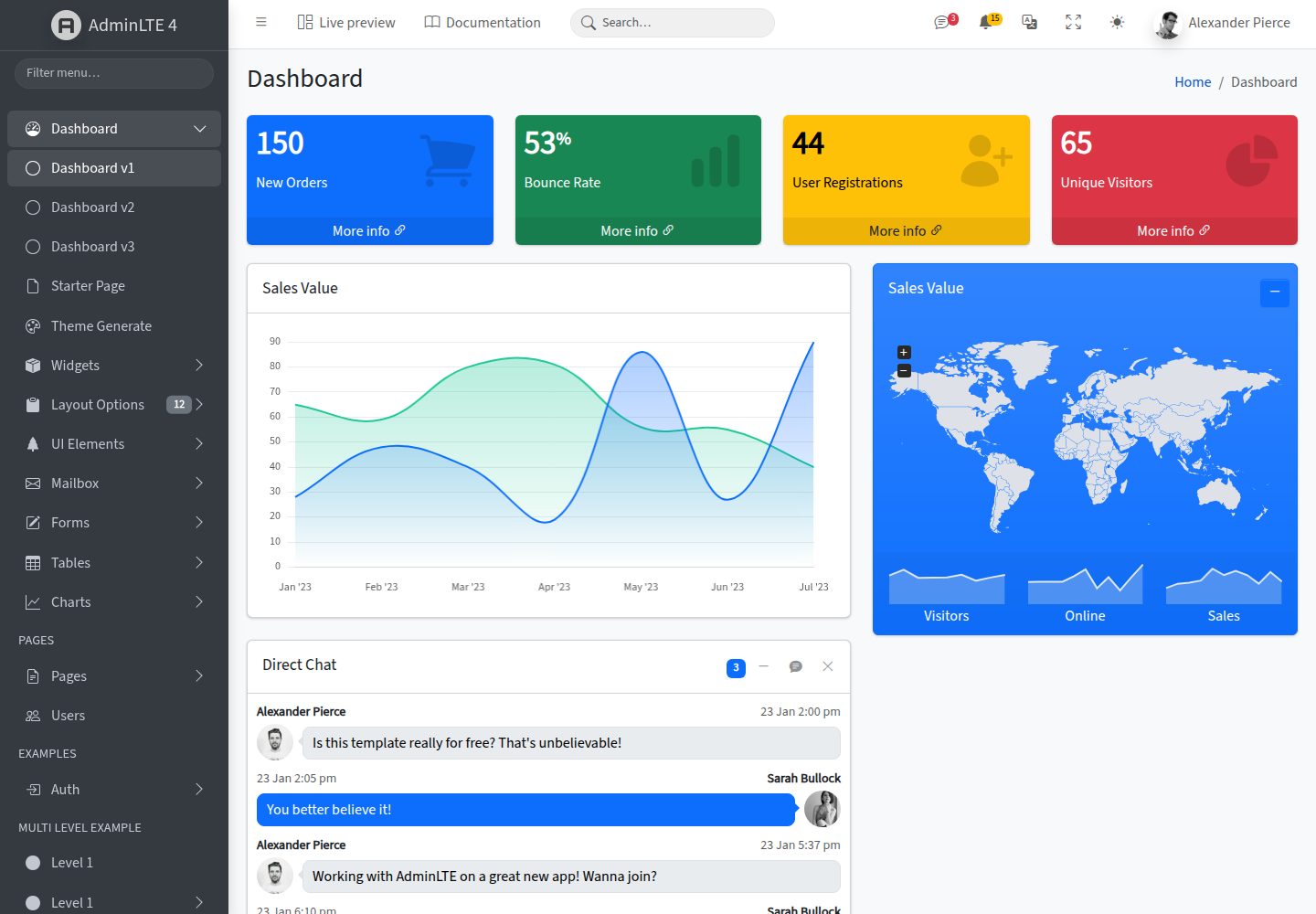
Compare the page layouts and mobile experience. Open any screenshot for a closer look.
Desktop homepage1 / 3
Desktop captureTop of page
Actual screenshot captured by the server browser.
All pages & views 3
Screenshots show visual appearance; interactive behavior may differ.
Recorded 2026-10-02View source
What stands out
A quick read of the recorded project description.
Provides 18 new demo pages covering admin scenarios such as calendar, kanban, chat, file manager, mailbox, wizard, and data tables
Includes dark mode and RTL support, with dark mode using Bootstrap 5.3's native data-bs-theme attribute
Provides a migration guide from v3, explaining changes to class names, data attributes, and plugin replacements
Supports CDN, npm, and Composer installation methods, with a complete documentation site
Under the MIT license, allowing free use, modification, commercial use, and distribution
Template Details
AdminLTE is an admin dashboard template built on Bootstrap 5, using vanilla JavaScript and no longer relying on jQuery. It provides complete demo pages and documentation, covering common admin interfaces from dashboards to various application pages.
The template includes 18 new demo pages, covering Calendar, Kanban, Chat, File Manager, Projects, Mailbox, Wizard, Tabulator data tables, Profile, Settings, Invoice, Pricing, FAQ, and error pages such as 404, 500, and Maintenance. For documentation, it offers pages such as Getting Started, Customization & Theming, RTL Support, Migration from v3, Layout Blueprint, Recipes, Deployment & Performance, Recommended Integrations, and JavaScript Plugins Overview.
Version 4 has renamed class names and data attributes compared to v3, for example, .wrapper changed to .app-wrapper, data-toggle changed to data-bs-toggle; dark mode now uses Bootstrap 5.3's native data-bs-theme="dark" attribute; v3's jQuery plugins have been replaced with vanilla JS solutions, such as Select2 replaced by Tom Select, DataTables replaced by Tabulator, Summernote replaced by Quill. v3's extra colors and sidebar skins have been moved to optional stylesheets adminlte-colors.css or adminlte-colors-v3.css.
This repository is the HTML / Bootstrap core version, which can be included directly via CDN or installed via npm or Composer. The repository uses the MIT license, allowing free use, modification, commercial use, and distribution, but third-party assets such as demo images, fonts, and icons need to be checked against their respective licenses.
HTMLBackend
Is it right for your project?
Use Cases
- Building the interface framework and dashboard for an admin management system
- Admin projects that need application pages such as calendar, kanban, chat, file manager, and mailbox
- Front-end projects using Bootstrap 5 that do not want to introduce jQuery
- Admin interfaces that need dark mode or RTL layout
- Projects migrating from AdminLTE v3 to v4
Suitable For
- Admin management system developers
- Front-end projects using Bootstrap 5
- Teams that need ready-made admin page templates
- Projects that need an MIT-licensed open-source template
Getting started & customization
Use these recorded setup notes alongside the repository instructions for your chosen version.
- 1
Can include adminlte.min.css and adminlte.min.js directly via CDN, with no build step required
- 2
Can also install via npm install admin-lte@4 or composer require almasaeed2010/adminlte
- 3
Developing AdminLTE itself requires running npm install first, then npm start to launch the development server
- 4
Build with npm run build, and for a full production build use npm run production
- 5
Third-party assets such as demo images, fonts, and icons need to be checked against their respective licenses; they cannot be judged solely by the code's MIT license
License & source material
Usage conditions & limitations
Free to use · keep license noticeThis entry covers the free version under the MIT license in the public repository; the free scope is the code of this version and does not mean external services or third-party assets are free.
Must comply with when using
- Allows free use, modification, commercial use, and distribution of this version's code.
- When distributing copies or substantial portions of the code, retain the original author's copyright notice and the full MIT license notice.
- The code is provided as is; warranties and limitations of liability are governed by the original license and applicable law.
Additional costs & items to verify
- The current version uses the MIT license, but AdminLTE.io reserves the right to change the license for future versions, which may no longer use MIT.
- The charts on the demo pages rely on Chart.js loaded from a CDN; using these pages requires internet access to external CDN services.
- The premium templates promoted in the README are paid products and are not part of this repository's free and open-source scope; they require separate purchase.
- Production deployment should only use compiled dist assets and your own files; do not deploy node_modules, demo HTML pages, or the src directory.
- Demo images, fonts, icons, and other third-party assets need to be checked against their respective licenses; they cannot be judged solely by the code's MIT license.
- External services such as domains, hosting, databases, payments, or AI may incur additional charges.
View Original Text Basis
Permission is hereby granted, free of charge
Original License Text
AdminLTE.io reserves the right to change the license of future releases.
Original README
The charts on the demo pages are drawn with [Chart.js](https://www.chartjs.org/) (MIT), loaded from a CDN on the pages that use it
Original README
our team hand-picks premium dashboards at **[adminlte.io/premium](https://adminlte.io/premium)**
Original README
https://github.com/prabhavatispace-cpu/AdminLTE/blob/master/LICENSEhttps://github.com/prabhavatispace-cpu/AdminLTE/blob/master/README.mdDeploy only the compiled production assets (`dist/js/adminlte.min.js`, `dist/css/adminlte.min.css`) and your own application files — never `node_modules/`, the demo HTML pages, or the `src/` directory.
Original README
Compiled by DeepSeek based on repository license and README ·2026-10-02. Results only cover the materials read; dependencies, images, fonts, and subsequent term changes are subject to their respective original texts.
Project checks & description sources
Template Information
- Source platforms
- GitHub
- Documentation and maintenance reference score
- More documented · 80 / 100
- Technologies
- HTML
- Website type
- Admin dashboard
How this score is calculated
Our heuristic uses license records (up to 30), a demo link (12), a preview (10), stars (15), recorded maintenance (15), description completeness (8), feature records (5) and classification data (5). It is not a code, security or performance test, or a Google score. A link does not establish tested functionality.
What to verify for this project
- Repository update recorded
- 2026-10-01
- Screenshot last checked
- 2026-10-02
A demo link is listed. Check it with your own content and viewport sizes; its presence does not confirm that forms, authentication or payments work.
The catalog identifies HTML as the primary stack. Check the actual dependency manifest and lockfile for versions and hosting requirements. These notes use recorded metadata, not a code audit or a deployment test.
Use a selection guide →How this description was prepared
AI-assisted description based on catalog records and repository material. Repository authors are not automatically the reviewers of this description.
Automatically checked against source and license rules; no manual editorial review.
Inspect the recorded source material
SHA-256: f8f93fc61c3df89d5ed7e51b3b0a3e559a47983df15bd2b281f71c85cd1f4f7e
2026-10-02T14:19:40.612Z
Source file / repository# [AdminLTE — Bootstrap 5 Admin Dashboard](https://adminlte.io)
[](https://www.npmjs.com/package/admin-lte)
[](https://packagist.org/packages/almasaeed2010/adminlte)
[](https://www.jsdelivr.com/package/npm/admin-lte)
[](https://opensource.org/licenses/MIT)
[](https://discord.gg/jfdvjwFqfz)
[](https://app.netlify.com/sites/adminlte-v4/deploys)
**AdminLTE** is the most popular open-source admin dashboard template — fully responsive,
built on **[Bootstrap 5.3](https://getbootstrap.com/)** with vanilla JavaScript (no jQuery),
highly customizable, and easy to use. It fits every screen from small mobile devices to
large desktops, and it's MIT-licensed.
**[Live Demo](https://adminlte.io/themes/v4/)** ·
**[Documentation](https://adminlte.io/themes/v4/docs/introduction.html)** ·
**[Framework Editions](#framework-editions)** ·
**[Premium Templates](#premium-templates)**
<p align="center">
<a href="https://adminlte.io/themes/v4/">
<img alt="AdminLTE 4 dashboard — light mode" src=".github/assets/dashboard-light.webp" width="49%">
</a>
<a href="https://adminlte.io/themes/v4/">
<img alt="AdminLTE 4 dashboard — dark mode" src=".github/assets/dashboard-dark.webp" width="49%">
</a>
</p>
## Framework editions
The same AdminLTE 4 dashboard, officially integrated for the framework you know best —
you're looking at the **HTML / Bootstrap** core:
<!-- ADMINLTE-ECOSYSTEM:START -->
<div align="center">
<a href="https://github.com/ColorlibHQ/AdminLTE"><img height="36" alt="HTML" src="https://img.shields.io/badge/HTML-0D6EFD?style=for-the-badge&logo=html5&logoColor=white"></a>
<a href="https://github.com/ColorlibHQ/adminlte-react"><img height="36" alt="React" src="https://img.shields.io/badge/React-20232A?style=for-the-badge&logo=react&logoColor=61DAFB"></a>
<a href="https://github.com/ColorlibHQ/adminlte-react"><img height="36" alt="Next.js" src="https://img.shields.io/badge/Next.js-000000?style=for-the-badge&logo=nextdotjs&logoColor=white"></a>
<a href="https://github.com/ColorlibHQ/adminlte-vue"><img height="36" alt="Vue" src="https://img.shields.io/badge/Vue.js-35495E?style=for-the-badge&logo=vuedotjs&logoColor=4FC08D"></a>
<a href="https://github.com/ColorlibHQ/adminlte-vue"><img height="36" alt="Nuxt" src="https://img.shields.io/badge/Nuxt-00DC82?style=for-the-badge&logo=nuxt&logoColor=white"></a>
<a href="https://github.com/ColorlibHQ/adminlte-angular"><img height="36" alt="Angular" src="https://img.shields.io/badge/Angular-DD0031?style=for-the-badge&logo=angular&logoColor=white"></a>
<a href="https://github.com/ColorlibHQ/adminlte-laravel"><img height="36" alt="Laravel" src="https://img.shields.io/badge/Laravel-FF2D20?style=for-the-badge&logo=laravel&logoColor=white"></a>
<a href="https://github.com/ColorlibHQ/adminlte-symfony"><img height="36" alt="Symfony" src="https://img.shields.io/badge/Symfony-000000?style=for-the-badge&logo=symfony&logoColor=white"></a>
<a href="https://github.com/ColorlibHQ/adminlte-django"><img height="36" alt="Django" src="https://img.shields.io/badge/Django-092E20?style=for-the-badge&logo=django&logoColor=white"></a>
<a href="https://github.com/ColorlibHQ/adminlte-aspnet"><img height="36" alt="ASP.NET" src="https://img.shields.io/badge/ASP.NET-512BD4?style=for-the-badge&logo=dotnet&logoColor=white"></a>
<a href="https://github.com/ColorlibHQ/adminlte-drupal"><img height="36" alt="Drupal" src="https://img.shields.io/badge/Drupal-0678BE?style=for-the-badge&logo=drupal&logoColor=white"></a>
<a href="https://docs.adminlte.io"><img height="36" alt="Docs" src="https://img.shields.io/badge/Docs-adminlte.io-0EA5E9?style=for-the-badge&logo=readthedocs&logoColor=white"></a>
</div>
<!-- ADMINLTE-ECOSYSTEM:END -->
| Edition | Repository | Live demo | Install |
|---|---|---|---|
| **HTML / Bootstrap** (this repo) | [AdminLTE](https://github.com/ColorlibHQ/AdminLTE) | [themes/v4](https://adminlte.io/themes/v4/) | `npm install admin-lte` |
| **React & Next.js** — 30+ typed components, RSC-ready, ⌘K palette | [adminlte-react](https://github.com/ColorlibHQ/adminlte-react) | [themes/next-react](https://adminlte.io/themes/next-react/) | see repo |
| **Vue 3 & Nuxt** — 45+ typed components, composables, SSR-safe theming | [adminlte-vue](https://github.com/ColorlibHQ/adminlte-vue) | [themes/vue-nuxt](https://adminlte.io/themes/vue-nuxt/) | see repo |
| **Laravel** — Blade components, config-driven menu, auth scaffolding | [adminlte-laravel](https://github.com/ColorlibHQ/adminlte-laravel) | [laravel.adminlte.io](https://laravel.adminlte.io/) | `composer require colorlibhq/adminlte-laravel` |
| **Django** — reusable app, menu filter pipeline, themed admin | [adminlte-django](https://github.com/ColorlibHQ/adminlte-django) | [django.adminlte.io](https://django.adminlte.io/) | `pip install django-adminlte4` |
| **Symfony** — Twig Components, AssetMapper, config-driven menu, EasyAdmin theme | [adminlte-symfony](https://github.com/ColorlibHQ/adminlte-symfony) | see repo | `composer require colorlibhq/adminlte-symfony` |
| **Angular 22** — 44 standalone signal components, dark mode, ⌘K palette | [adminlte-angular](https://github.com/ColorlibHQ/adminlte-angular) | see repo | `npm i @adminlte/angular` |
| **ASP.NET Core (.NET 10)** — Blazor components + MVC/Razor Pages Tag Helpers | [adminlte-aspnet](https://github.com/ColorlibHQ/adminlte-aspnet) | see repo | `dotnet add package ColorlibHQ.AdminLTE.AspNetCore` |
| **Drupal** — admin theme for Drupal 10.3+/11, themed admin UI | [adminlte-drupal](https://github.com/ColorlibHQ/adminlte-drupal) | see repo | see repo |
| **Docs** — guides, components, and API reference for every edition | [docs.adminlte.io](https://docs.adminlte.io) | [docs.adminlte.io](https://docs.adminlte.io) | — |
Every edition ships the full AdminLTE 4 design — Bootstrap 5.3, dark mode, RTL — with
idiomatic integrations for its stack (components, routing, auth, theming).
## Quick start
**CDN** — no build step:
```html
<link rel="stylesheet" href="https://cdn.jsdelivr.net/npm/admin-lte@4/dist/css/adminlte.min.css">
<script src="https://cdn.jsdelivr.net/npm/admin-lte@4/dist/js/adminlte.min.js"></script>
```
**npm:**
```bash
npm install admin-lte@4
```
**Composer:**
```bash
composer require almasaeed2010/adminlte
```
Then start from the [Getting Started guide](https://adminlte.io/themes/v4/docs/introduction.html)
or copy one of the demo pages.
### Developing AdminLTE itself
1. **Install dependencies:** `npm install`
2. **Start the dev server:** `npm start` *(opens http://localhost:3000 with live reload)*
3. **Build:** `npm run build` — or `npm run production` for the full lint + optimize + bundlewatch pipeline
<details>
<summary>All npm scripts</summary>
- `npm start` — development server with file watching
- `npm run build` — build all assets for development
- `npm run production` — full production build with linting and bundlewatch
- `npm run lint` — run all linters (JS, CSS, docs, lockfile)
- `npm run css` — build CSS only
- `npm run js` — build JavaScript only
</details>
## What's new in v4
The v4 line is a ground-up rewrite on Bootstrap 5.3 with **no jQuery**: 18 new demo pages
(Calendar, Kanban, Chat, File Manager, Mailbox, Wizard, Tabulator data tables, and more),
a documentation overhaul, and major dependency upgrades. See the
[CHANGELOG](CHANGELOG.md) for full details.
### New in 4.3
- **Sidebar search** — a new `SidebarSearch` plugin filters the menu as you type, expanding
whatever submenu holds a match and restoring the menu exactly as it was when cleared.
Paired with a navbar search in the app header.
- **Ribbons** — corner banners (`.ribbon-wrapper` + `.ribbon`) in three sizes, mirrored
automatically in RTL, with the clip following the card's corner radius.
- **Social & post widgets** — `.user-block`, `.post`, `.widget-user`, `.widget-user-2` and
`.description-block`, laid out with grid and flex.
- **Three new demo pages** — Gallery (filterable media library, no image library required),
Search Results (typed results with a refine panel), and Ribbons.
- **Nav tabs, modals and offcanvas** added to the General UI Elements showcase.
- **Card and Miscellaneous docs pages**, plus a language switcher recipe — every component
that ships CSS now has a reference page.
<details>
<summary>Highlights</summary>
**18 new demo pages**
- Apps: Calendar (FullCalendar), Kanban (SortableJS), Chat, File Manager, Projects, Mailbox (Inbox / Read / Compose)
- Forms: Wizard (4-step with validation)
- Tables: Data Tables (Tabulator — jQuery-free)
- Pages: Profile, Settings, Invoice, Pricing, FAQ
- Errors: 404, 500, Maintenance
**Documentation overhaul**
- New pages: Getting Started, Customization & Theming, RTL Support, Migration from v3, Layout Blueprint, Recipes, Deployment & Performance, Recommended Integrations, JavaScript Plugins Overview
- Rewritten Introduction with four labelled install paths (CDN / npm / source / Composer)
- FAQ rebuilt with hero, live search, section chips, and an accordion of 23 questions
- Split sidebar navigation: dashboard demo and docs each have their own nav
**Major dependency upgrades**
- ESLint 10, TypeScript 6, Stylelint 17, Astro 6.3, Bootstrap 5.3.8, Node 22 LTS in CI
- `npm install` runs clean with **0 vulnerabilities**
</details>
<details>
<summary>Breaking changes from v3</summary>
- Class renames: `.wrapper` → `.app-wrapper`, `.main-header` → `.app-header`, `.main-sidebar` → `.app-sidebar`, `.content-wrapper` → `.app-main`
- Data attributes: `data-toggle` → `data-bs-toggle`, `data-widget="pushmenu"` → `data-lte-toggle="sidebar"`, `data-widget="treeview"` → `data-lte-toggle="treeview"`
- Dark mode: `.dark-mode` body class → `data-bs-theme="dark"` attribute (Bootstrap 5.3 native)
- jQuery no longer required; plugins are vanilla TypeScript
- The bundled `plugins/` folder is gone — every v3 jQuery widget has a documented vanilla-JS successor ([replacement table](https://adminlte.io/themes/v4/docs/migration.html#third-party-plugin-replacements): Select2 → Tom Select, DataTables → Tabulator, Summernote → Quill, …)
- The v3 extra colours (`.bg-navy`, `.bg-teal`, the sidebar skins, …) live in opt-in stylesheets: `dist/css/adminlte-colors.css` — fourteen redesigned colours, every one readable with white text, 17 skin presets, plus a one-line hook for your brand colour — or `dist/css/adminlte-colors-v3.css`, the 18 AdminLTE 3 colours exactly as they were. Either sheet also lets you make one of them Bootstrap's `primary` — `<html data-lte-primary="teal">` recolours buttons, links, pagination and form focus ([Colors docs](https://adminlte.io/themes/v4/docs/colors.html), [live demo](https://adminlte.io/themes/v4/UI/colors.html)). Nothing is added to `adminlte.css`.
See the dedicated [Migration from v3](https://adminlte.io/themes/v4/docs/migration.html) guide.
</details>
## Premium templates
AdminLTE will always be free and open source. When a project needs more —
app-ready pages, framework-native codebases, dedicated support — our team
hand-picks premium dashboards at **[adminlte.io/premium](https://adminlte.io/premium)**,
including editions built for the same stacks AdminLTE integrates with:
<table>
<tr>
<td align="center" width="50%">
<a href="https://dashboardpack.com/theme-details/admindek-html/?utm_source=github&utm_medium=readme&utm_campaign=adminlte">
<img src=".github/assets/premium/admindek.webp" alt="Admindek — feature-rich Bootstrap 5 dashboard with dark mode" width="100%">
</a>
<br>
<a href="https://dashboardpack.com/theme-details/admindek-html/?utm_source=github&utm_medium=readme&utm_campaign=adminlte"><strong>Admindek</strong></a>
<br>
<sub>The natural next step from AdminLTE: Bootstrap 5 + vanilla JS, 100+ components, dark/light modes, RTL, 10 color presets.<br>
Also for <a href="https://dashboardpack.com/theme-details/admindek-dashboard-laravel/?utm_source=github&utm_medium=readme&utm_campaign=adminlte">Laravel</a> ·
<a href="https://dashboardpack.com/theme-details/admindek-nextjs/?utm_source=github&utm_medium=readme&utm_campaign=adminlte">Next.js</a> ·
<a href="https://dashboardpack.com/theme-details/admindek-dashboard-angular/?utm_source=github&utm_medium=readme&utm_campaign=adminlte">Angular</a></sub>
</td>
<td align="center" width="50%">
<a href="https://dashboardpack.com/theme-details/apex-dashboard-nextjs/?utm_source=github&utm_medium=readme&utm_campaign=adminlte">
<img src=".github/assets/premium/apex.webp" alt="Apex Dashboard — admin template available for Next.js, Laravel, Django and Angular" width="100%">
</a>
<br>
<a href="https://dashboardpack.com/theme-details/apex-dashboard-nextjs/?utm_source=github&utm_medium=readme&utm_campaign=adminlte"><strong>Apex Dashboard</strong></a>
<br>
<sub>5 dashboard variants, 20+ app pages, 125+ routes, full CRUD — in your backend's native stack.<br>
For <a href="https://dashboardpack.com/theme-details/apex-dashboard-nextjs/?utm_source=github&utm_medium=readme&utm_campaign=adminlte">Next.js</a> ·
<a href="https://dashboardpack.com/theme-details/apex-dashboard-laravel/?utm_source=github&utm_medium=readme&utm_campaign=adminlte">Laravel</a> ·
<a href="https://dashboardpack.com/theme-details/apex-dashboard-django/?utm_source=github&utm_medium=readme&utm_campaign=adminlte">Django</a> ·
<a href="https://dashboardpack.com/theme-details/apex-dashboard-angular/?utm_source=github&utm_medium=readme&utm_campaign=adminlte">Angular</a></sub>
</td>
</tr>
<tr>
<td align="center" width="50%">
<a href="https://dashboardpack.com/theme-details/zenith-dashboard-django/?utm_source=github&utm_medium=readme&utm_campaign=adminlte">
<img src=".github/assets/premium/zenith.webp" alt="Zenith — ultra-minimal admin dashboard, Django edition" width="100%">
</a>
<br>
<a href="https://dashboardpack.com/theme-details/zenith-dashboard-django/?utm_source=github&utm_medium=readme&utm_campaign=adminlte"><strong>Zenith Dashboard — Django</strong></a>
<br>
<sub>Achromatic, ultra-minimal design as a ready-to-run Django project: 50+ pages, 6 dashboards, live theme customizer.</sub>
</td>
<td align="center" width="50%">
<a href="https://dashboardpack.com/theme-details/haze-dashboard-nuxt/?utm_source=github&utm_medium=readme&utm_campaign=adminlte">
<img src=".github/assets/premium/haze.webp" alt="Haze — Nuxt 4 admin dashboard with 92+ pages and 5 dashboards" width="100%">
</a>
<br>
<a href="https://dashboardpack.com/theme-details/haze-dashboard-nuxt/?utm_source=github&utm_medium=readme&utm_campaign=adminlte"><strong>Haze — Nuxt</strong></a>
<br>
<sub>Nuxt 4 + Nuxt UI v4 + Tailwind CSS v4. 92+ pages, 7 layouts, 5 dashboards, RTL, i18n, mock API layer.</sub>
</td>
</tr>
</table>
<p align="center">
<a href="https://adminlte.io/premium"><strong>View all premium templates →</strong></a>
</p>
## Browser & platform support
AdminLTE supports the latest versions of all modern browsers (Chrome, Firefox, Safari,
Edge) via Bootstrap 5.3.8. The build scripts run cross-platform — Windows (CMD,
PowerShell, Git Bash), macOS and Linux — using cross-platform npm utilities throughout.
## Security & production deployment
AdminLTE is a **UI template**. Deploy only the compiled production assets
(`dist/js/adminlte.min.js`, `dist/css/adminlte.min.css`) and your own application files —
never `node_modules/`, the demo HTML pages, or the `src/` directory.
> **About CVE-2021-36471:** this CVE is **disputed** and does not represent a
> vulnerability in AdminLTE — it refers to demo pages being accessible when example
> files are incorrectly deployed to production. AdminLTE v4 cleanly separates
> development demos from production assets.
For detailed guidelines, authentication requirements, and best practices, see
[SECURITY.md](SECURITY.md).
## Sponsorship
Support AdminLTE development by becoming a sponsor or donor.
<p align="center">
<a href="https://github.com/sponsors/danny007in">
<img src="https://img.shields.io/static/v1?label=Sponsor&message=%E2%9D%A4&logo=GitHub&color=%23fe8e86" alt="Sponsor on GitHub" />
</a>
<a href="https://www.paypal.me/daniel007in">
<img src="https://img.shields.io/static/v1?label=Donate&message=%E2%9D%A4&logo=PayPal&color=%2300457C" alt="Donate via PayPal" />
</a>
</p>
### Our sponsors
<p align="center">
<a href="https://github.com/spizzo14"><img src="https://unavatar.io/github/spizzo14?fallback=https%3A%2F%2Fraw.githubusercontent.com%2FJamesIves%2Fgithub-sponsors-readme-action%2Fdev%2F.github%2Fassets%2Fplaceholder.png" width="50" height="50" alt="User avatar: spizzo14" loading="lazy" /></a>
<a href="https://github.com/tomhappyblock"><img src="https://unavatar.io/github/tomhappyblock?fallback=https%3A%2F%2Fraw.githubusercontent.com%2FJamesIves%2Fgithub-sponsors-readme-action%2Fdev%2F.github%2Fassets%2Fplaceholder.png" width="50" height="50" alt="User avatar: tomhappyblock" loading="lazy" /></a>
<a href="https://github.com/stefanmorderca"><img src="https://unavatar.io/github/stefanmorderca?fallback=https%3A%2F%2Fraw.githubusercontent.com%2FJamesIves%2Fgithub-sponsors-readme-action%2Fdev%2F.github%2Fassets%2Fplaceholder.png" width="50" height="50" alt="User avatar: stefanmorderca" loading="lazy" /></a>
<a href="https://github.com/tito10047"><img src="https://unavatar.io/github/tito10047?fallback=https%3A%2F%2Fraw.githubusercontent.com%2FJamesIves%2Fgithub-sponsors-readme-action%2Fdev%2F.github%2Fassets%2Fplaceholder.png" width="50" height="50" alt="User avatar: tito10047" loading="lazy" /></a>
<a href="https://github.com/sitchi"><img src="https://unavatar.io/github/sitchi?fallback=https%3A%2F%2Fraw.githubusercontent.com%2FJamesIves%2Fgithub-sponsors-readme-action%2Fdev%2F.github%2Fassets%2Fplaceholder.png" width="50" height="50" alt="User avatar: sitchi" loading="lazy" /></a>
<a href="https://github.com/npreee"><img src="https://unavatar.io/github/npreee?fallback=https%3A%2F%2Fraw.githubusercontent.com%2FJamesIves%2Fgithub-sponsors-readme-action%2Fdev%2F.github%2Fassets%2Fplaceholder.png" width="50" height="50" alt="User avatar: npreee" loading="lazy" /></a>
<a href="https://github.com/isaacmorais"><img src="https://unavatar.io/github/isaacmorais?fallback=https%3A%2F%2Fraw.githubusercontent.com%2FJamesIves%2Fgithub-sponsors-readme-action%2Fdev%2F.github%2Fassets%2Fplaceholder.png" width="50" height="50" alt="User avatar: isaacmorais" loading="lazy" /></a>
</p>
<p align="center">
<a href="https://github.com/sponsors/danny007in">Your avatar here? Become a sponsor</a>
</p>
## Contributing
Contributions are highly welcome:
1. Install [Node.js](https://nodejs.org/) (LTS) and clone this repository (`master` branch).
2. `npm install`, then `npm start` to run the dev server.
3. Make your changes (run `npm run lint` before committing) and open a PR against `master`.
## License
AdminLTE is an open source project by [AdminLTE.io](https://adminlte.io) licensed under
[MIT](https://opensource.org/licenses/MIT). AdminLTE.io reserves the right to change
the license of future releases.
The charts on the demo pages are drawn with [Chart.js](https://www.chartjs.org/) (MIT),
loaded from a CDN on the pages that use it — it is not a dependency of the `admin-lte` package.
## Image credits
[Pixeden](http://www.pixeden.com/psd-web-elements/flat-responsive-showcase-psd),
[Graphicsfuel](https://www.graphicsfuel.com/2013/02/13-high-resolution-blur-backgrounds/),
[Pickaface](https://pickaface.net/),
[Unsplash](https://unsplash.com/),
[Uifaces](http://uifaces.com/),
[Unavatar](https://unavatar.io/)
Explore similar templates
Compare previews and descriptions within the same stack and category.

gentelella
Gentelella v4 is a free, open-source admin dashboard template maintained by Colorlib, built with vanilla JavaScript, SCSS, and Vite 8 without Bootstrap or jQuery.
HTML · Admin dashboard

coreui-free-bootstrap-admin-template
A free Bootstrap admin template maintained by CoreUI, built on CoreUI's own UI component library. It provides compiled HTML pages and Pug template source code, covering dashboards, authentication, forms, components, icons, and error pages.
HTML · Admin dashboard

dashboards
A collection of responsive dashboard HTML templates open-sourced by Keen IO, built on CSS Grid, offering multiple prebuilt admin data interface layouts.
HTML · Admin dashboard

SB Admin 2
SB Admin 2 is a classic Bootstrap admin template from Start Bootstrap, offering dashboards, charts, tables, and common management pages.
HTML · Admin dashboard

Adminator-admin-dashboard
Adminator 4 is a vanilla HTML, CSS and JavaScript admin dashboard template with a CSS-variable token design system, built-in light and dark themes, no jQuery or Bootstrap dependency, and 18 pages covering dashboards, mail, calendar, charts, forms, tables and error pages.
HTML · Admin dashboard

SB Admin
SB Admin is a lightweight, open-source Bootstrap admin template from Start Bootstrap. It offers a sidebar-and-top-bar layout with data tables, forms, and stat cards, plus responsive design.
HTML · Admin dashboard